Overview

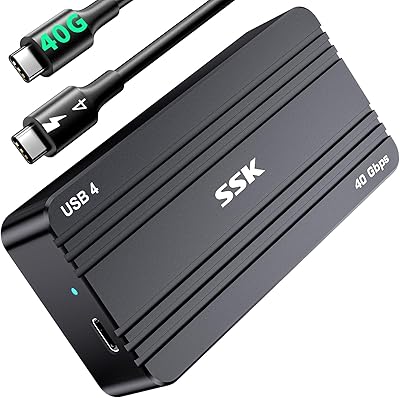
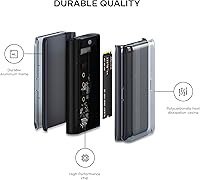
The Satechi ST-EU4NPM USB4 M.2 NVMe SSD Enclosure is a well-considered piece of kit for anyone who needs genuinely fast, portable NVMe storage access and isn't willing to compromise on build quality. It picked up a CES award — worth noting as a signal it cleared real scrutiny before reaching shelves. The housing pairs aluminum with an inner polycarbonate shell, a deliberate design choice addressing both rigidity and heat management rather than just aesthetics. Backward compatibility with USB 3.2 and USB 2.0 means it won't become a liability with older hardware. Just know going in: the SSD is on you, and the included cable is short.
Features & Benefits

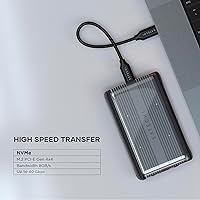
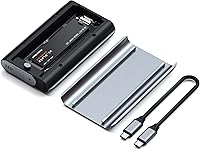
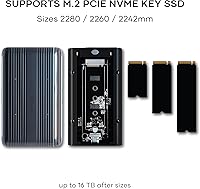
At its core, this USB4 NVMe enclosure is built around a PCIe Gen 4x4 connection — which in practical terms means read and write speeds pushing toward 3,800 MB/s when paired with a capable host and a fast Gen 4 drive. That's enough headroom to edit 4K footage directly from the drive without buffering. Installation is refreshingly simple: slide in your M.2 drive, secure it with the silicone pin, and you're done — no tools required. It accommodates drives in 2230, 2242, 2260, and 2280 form factors up to 16TB, runs on Mac, Windows, and Linux without any driver setup, and includes UASP and TRIM support to keep sustained performance from degrading over time.

Best For

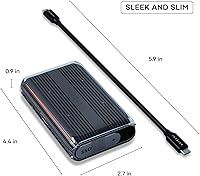
This M.2 enclosure makes the most sense for people who genuinely stress their storage. Video editors and photographers moving large RAW files or multi-gigabyte project folders between workstations will feel the difference over a standard USB 3.2 drive. It's a natural fit for MacBook Pro and Mac Mini users on Thunderbolt 4 ports, where the interface is physically identical and performance nearly matches USB4. IT professionals rotating NVMe drives across machines will appreciate the tool-free swap system. At 4.45 x 2.68 x 0.91 inches, it slips easily into a laptop bag. And if you have a spare NVMe drive sitting unused, this enclosure is a practical way to put it back to work.

User Feedback

Across 427 ratings, the Satechi enclosure holds a 4.2-star average — an honest score reflecting a product that performs well under the right conditions but has a few friction points. Buyers consistently praise the build quality and how effortless drive installation feels. Speed satisfaction is closely tied to host hardware: users on USB4 or Thunderbolt 4 machines report strong real-world throughput, while those on older ports see lower numbers — expected, but it catches some buyers off guard. The most common complaint centers on the 15cm included cable, which is genuinely too short for most desk setups. A handful of users also report the enclosure runs warm during sustained heavy transfers, though not at concerning levels.

Pros

  • On USB4 and Thunderbolt 4 hosts, real-world transfer speeds are fast enough to edit 4K video directly from the drive.
  • The aluminum outer shell feels genuinely premium and holds up well to daily bag-and-desk use over time.
  • Tool-free drive installation via the silicone pin system makes swapping NVMe drives quick and painless.
  • Supports all four common M.2 NVMe form factors, so it works with drives from a wide range of devices.
  • Plug-and-play across macOS, Windows, and Linux — no driver hunting or configuration required.
  • TRIM support helps the connected SSD maintain consistent write speeds rather than slowing down with use.
  • Backward compatibility with USB 3.2 and USB 2.0 means it remains useful even on older host hardware.
  • At under 200 grams, this USB4 NVMe enclosure is easy to carry without adding meaningful weight to a travel bag.
  • The two-year warranty and Satechi's accessible support record provide reasonable long-term confidence.
  • Includes a thermal pad in the box, which is a small but thoughtful addition that competing enclosures often skip.

Cons

  • The included USB4 cable is only 15cm long — far too short for most desk or workstation setups.
  • Peak 40Gbps speeds require a USB4 or Thunderbolt 4 host; USB 3.2 users will see a fraction of that throughput.
  • NVMe-only compatibility means M.2 SATA drives will not work, which catches some buyers off guard.
  • The enclosure runs noticeably warm during sustained heavy transfers, which may concern users in warm environments.
  • No SATA support is not always clearly communicated upfront, leading to avoidable returns for uninformed buyers.
  • The polycarbonate inner shell feels noticeably less refined than the aluminum exterior, which some buyers find disappointing.
  • Long-term durability of the silicone pin under frequent drive-swap cycles remains an open question for high-rotation users.
  • A small number of users have reported occasional connection drops during extended heavy write sessions on certain Windows laptops.
  • Buyers will need to purchase an SSD separately, adding to the total cost before the enclosure is actually usable.
  • At this price tier, a longer cable and a three-year warranty would be reasonable expectations that the package does not fully meet.

Ratings

The Satechi ST-EU4NPM USB4 M.2 NVMe SSD Enclosure earns a nuanced scorecard built from AI analysis of verified global buyer reviews, with spam, bot-generated, and incentivized submissions actively filtered out before scoring. Across more than 400 real-world ratings, this USB4 NVMe enclosure shows genuine strengths in build quality, installation experience, and peak transfer performance — while a handful of recurring friction points around the included cable and host-dependent speeds keep it from a clean sweep. Both sides of that picture are reflected honestly below.
Transfer Speed Performance
86%
On USB4 and Thunderbolt 4 hosts, buyers report real-world read speeds that comfortably handle 4K video editing without dropped frames or stuttering. Paired with a capable Gen 4 NVMe drive, the throughput is genuinely in a different league compared to standard USB 3.2 enclosures most users are upgrading from.
The 40Gbps ceiling only materializes with the right host hardware, and users on USB 3.2 Gen 2 machines see speeds closer to what any mid-range enclosure would deliver. Several buyers expressed frustration that this expectation was not set clearly enough before purchase.
Build Quality & Materials
91%
The aluminum outer shell feels solid and premium in hand — not hollow or plasticky like many competing enclosures at a lower price tier. Buyers consistently describe it as something that inspires confidence when tossing it into a laptop bag for travel or daily commutes.
A small number of users noted that the polycarbonate inner casing, while functional for heat management, feels noticeably less premium than the aluminum exterior. It is a minor aesthetic gripe rather than a structural concern, but worth flagging for buyers who care about internal finish.
Installation & Setup Ease
93%
The silicone pin system is one of the most praised aspects across the review pool. Users who have wrestled with tiny screws in other enclosures particularly appreciate being able to swap drives in seconds without any tools — a real advantage for IT professionals rotating SSDs across machines.
A handful of users with less technical experience found the silicone pin mechanism slightly unintuitive on the first attempt, wishing the printed instructions were more visual. Once understood, the process is fast, but the learning curve is not zero for complete beginners.
Thermal Management
74%
26%
For typical workloads — file transfers, backups, general storage access — the enclosure stays comfortably warm rather than hot. The included thermal pad helps seat the SSD properly against the polycarbonate shell, and most buyers doing occasional large transfers report no throttling.
Under sustained heavy workloads, like prolonged multi-gigabyte transfers or sequential write stress tests, some users report the enclosure getting noticeably warm to the touch. Thermal throttling in extended sessions has been flagged by a minority of buyers, which is worth knowing if sustained performance is critical.
Included Accessories & Cable
54%
46%
The package is thoughtfully assembled overall — thermal pad, silicone pin, clear protective case, and a user manual are all included. Having everything needed for a clean installation in one box is appreciated, especially for users new to NVMe enclosures.
The included USB4 cable measuring just 15cm is the single most consistent complaint across the review pool. It is too short for most desk or workstation setups, effectively forcing buyers to purchase a separate cable immediately. At this price point, a longer cable should be standard.
Cross-Platform Compatibility
88%
Verified buyers on macOS, Windows 10 and 11, and various Linux distributions all report plug-and-play recognition with no driver installation required. For users who work across operating systems regularly, this reliability removes a common headache entirely.
A small cluster of Linux users reported needing to verify kernel compatibility for UASP to function correctly, which is a known edge case rather than a product defect. Windows users on older systems occasionally reported slower initial recognition speeds.
Drive Compatibility Range
89%
Supporting all four common M.2 NVMe form factors — from the compact 2230 size found in Surface devices to the standard 2280 — means this enclosure can repurpose a wide range of drives buyers may already own. The 16TB ceiling is also future-proof by any practical measure.
The enclosure is NVMe-only and does not support M.2 SATA drives, which catches some buyers off guard. Users expecting SATA compatibility should clarify their drive type before purchasing, as this limitation is not always obvious from the product listing at a glance.
Portability & Form Factor
87%
At under 200 grams and slightly larger than a standard business card in footprint, this M.2 enclosure barely registers in a bag. Frequent travelers and remote workers specifically call out how easy it is to carry alongside a laptop without adding noticeable bulk.
The included 15cm cable actively works against portability by requiring users to stay close to their port — somewhat defeating the point for desk-side workflows. Buyers who need flexibility will need a longer USB4 cable, which adds cost and an extra item to carry.
Value for Money
71%
29%
For USB4 users who need every bit of throughput this interface can deliver, the enclosure justifies its price tier through consistent real-world performance and build quality that holds up over time. Buyers who already own a Gen 4 NVMe drive and a compatible host get excellent utility per dollar.
Users without a USB4 or Thunderbolt 4 host are paying a significant premium for bandwidth they cannot access. For those on USB 3.2 systems, the value proposition weakens considerably, and cheaper alternatives would deliver a similar real-world experience for less.
UASP & TRIM Support
82%
18%
UASP reduces CPU overhead during large file transfers, and buyers who run benchmarks before and after enabling it report measurable throughput gains. TRIM support is a meaningful long-term benefit, helping the SSD maintain consistent write speeds rather than degrading gradually with use.
Neither feature is visible or configurable — they operate silently in the background — so buyers who specifically sought out an enclosure for UASP support have no easy way to confirm it is active without running third-party diagnostic tools.
Long-Term Durability
78%
22%
The aluminum outer casing resists the kind of surface scratching and minor drops that would scuff or crack a plastic enclosure over months of regular travel use. Buyers who have owned the unit for over a year report no degradation in fit, finish, or connectivity.
The long-term behavior of the silicone pin under repeated drive swaps is an open question for high-rotation users. A small number of buyers expressed concern about wear over many cycles, though no widespread structural failure has been reported across the current review pool.
Plug-and-Play Reliability
84%
Day-to-day connection reliability is strong — the enclosure mounts consistently and quickly across host machines without requiring remounting or reconnection cycles. Users who leave it connected as a semi-permanent workstation drive report stable operation over extended sessions.
A small subset of buyers reported occasional dropped connections under heavy sustained writes, particularly on certain Windows laptops. These instances appear isolated and may be host-side power management issues, but they appear often enough in reviews to merit a mention.
Warranty & Brand Support
76%
24%
A two-year limited warranty from an established brand like Satechi provides reasonable peace of mind, and the company has a visible support presence. Buyers who contacted support report reasonably prompt responses and a non-adversarial returns process.
Two years is competitive but not class-leading — some rivals in this price tier offer three-year coverage. A few buyers also noted that the warranty terms around physical damage are narrow, which matters for a device designed to travel regularly.

Suitable for:

The Satechi ST-EU4NPM USB4 M.2 NVMe SSD Enclosure is built for people who actually push their storage hard. Video editors moving large project files between a desktop and laptop, photographers offloading multi-gigabyte RAW batches after a shoot, and IT professionals rotating NVMe drives across multiple systems will get the most out of what this enclosure offers — provided their host machine has a USB4 or Thunderbolt 4 port. MacBook Pro and Mac Mini users are particularly well-positioned here, since those machines ship with Thunderbolt 4 ports that are physically and functionally compatible. The tool-free installation also makes it genuinely useful for anyone who swaps drives regularly and doesn't want a screwdriver involved every time. Travelers and remote workers will appreciate how easily it fits into a bag, and anyone sitting on a spare NVMe drive will find this a practical and high-performance way to put it back to work.
Not suitable for:

If your laptop or desktop only has USB 3.2 ports, the Satechi ST-EU4NPM USB4 M.2 NVMe SSD Enclosure is a difficult recommendation at this price. The peak throughput this enclosure is built around simply won't be accessible, and you'd end up paying a premium for bandwidth your system cannot use — a mid-range USB 3.2 enclosure would deliver nearly identical real-world speeds for considerably less. Buyers expecting SATA drive compatibility will also be disappointed, as this enclosure supports NVMe drives only; checking your drive type before purchasing is essential. Anyone sensitive to thermals should know the enclosure runs noticeably warm during prolonged heavy transfers, which may be a concern in warm environments or enclosed bags. Finally, buyers who want everything ready to go out of the box should factor in that the included 15cm cable is too short for most desk setups, and a longer USB4 cable will likely be an immediate additional purchase.
Specifications

  • Interface: Connects via USB4, delivering up to 40Gbps of bandwidth when paired with a compatible USB4 or Thunderbolt 4 host port.
  • Backward Compatibility: Also works with USB 3.2 Gen 2 (10Gbps), USB 3.2 Gen 1 (5Gbps), and USB 2.0 (480Mbps) hosts, though at reduced speeds.
  • SSD Type: Supports M.2 NVMe SSDs only, utilizing a PCIe Gen 4x4 connection for maximum throughput; M.2 SATA drives are not compatible.
  • Form Factors: Accommodates M.2 NVMe drives in 2230, 2242, 2260, and 2280mm lengths, covering the vast majority of consumer and prosumer NVMe drives available today.
  • Max Capacity: Supports NVMe SSDs up to 16TB, making it viable for both current high-capacity drives and future storage upgrades.
  • Read/Write Speed: Rated for read and write speeds of up to 3,840 MB/s when using a compatible Gen 4 NVMe drive and a USB4 or Thunderbolt 4 host.
  • Body Material: The outer shell is machined aluminum for durability and heat transfer, paired with an inner polycarbonate casing designed to manage thermal output during active use.
  • Dimensions: Measures 4.45 x 2.68 x 0.91 inches, making it compact enough to fit in a shirt pocket or a small laptop bag compartment.
  • Weight: Weighs 6.7 ounces (189g) without an SSD installed, adding negligible bulk to a travel or commuter setup.
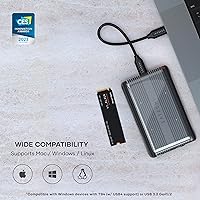
  • OS Compatibility: Fully compatible with macOS, Windows (10 and later), and Linux without requiring any additional drivers or software installation.
  • Installation Method: Uses a tool-free silicone pin system to secure the SSD inside the enclosure, eliminating the need for a screwdriver during drive installation or swaps.
  • Driver Requirement: No drivers are required; the enclosure is recognized natively by all supported operating systems as a plug-and-play storage device.
  • UASP Support: UASP (USB Attached SCSI Protocol) is supported, reducing CPU overhead and improving throughput consistency during large sequential file transfers.
  • TRIM Support: SSD TRIM pass-through is supported, allowing the operating system to communicate with the drive to maintain long-term write performance and storage health.
  • Included Accessories: Each unit ships with one USB4 cable (15cm), a thermal pad, a silicone pin, a clear protective case, and a printed user manual.
  • Connector Type: Uses USB Type-C connectors on both the enclosure and the included cable, consistent with USB4 and Thunderbolt 4 port standards.
  • Thermal Design: A pre-cut thermal pad is included to bridge the SSD and the polycarbonate inner shell, helping conduct and disperse heat generated during active transfers.
  • Warranty: Covered by a two-year limited warranty from Satechi against defects in materials and workmanship under normal use conditions.
  • SSD Included: No SSD is included in the package; buyers must supply their own compatible M.2 NVMe drive separately.
  • Awards: The enclosure received a CES Innovation Award, recognizing its design and engineering among consumer electronics products at the time of its debut.

Related Reviews

Cable Matters USB4 40Gbps M.2 NVMe Enclosure
80%
88%
Data Transfer Performance
83%
Build Quality & Materials
79%
Thermal Management & Cooling
91%
Portability & Form Factor
74%
Compatibility Range
More
Satechi ST-E2230M M.2 NVMe 2230 SSD Enclosure
82%
91%
Build Quality
88%
Transfer Speed
86%
Active Cooling Effectiveness
67%
Fan Noise Level
94%
Portability & Size
More
SSK M.2 NVMe SSD Enclosure 40Gbps USB4, 8TB
88%
94%
Data Transfer Speed
89%
Ease of Setup
91%
Build Quality
75%
Heat Management
88%
Compatibility with Mac/Windows
More
dockteck DH0002 M.2 NVMe/SATA SSD Enclosure
84%
88%
Transfer Speed (NVMe)
76%
SATA Drive Performance
83%
Build Quality
93%
Ease of Setup
79%
Thermal Management
More
ineo C2605-NVMe M.2 NVMe SSD Enclosure
77%
88%
Write Protection Reliability
79%
Transfer Speed Performance
82%
Thermal Management
61%
Fan Noise Level
76%
Build Quality & Materials
More
WAVLINK Dual-Bay NVMe M.2 SSD Cloner
75%
83%
Offline Cloning Reliability
78%
Transfer Speed
71%
Compatibility Range
76%
Build Quality
86%
Ease of Setup
More
Plugable M.2 NVMe SSD Enclosure
87%
94%
Ease of Setup
92%
Data Transfer Speed
88%
Build Quality
90%
Port Compatibility
87%
Cooling & Thermal Management
More
ORICO TCM2 M.2 NVMe SSD Enclosure
78%
83%
Transfer Speed
61%
Thermal Management
74%
Build Quality
91%
Ease of Installation
86%
Cable Bundle Quality
More
ANYOYO TB502Pro NVMe SSD Enclosure
78%
91%
Transfer Speed Performance
88%
Thermal Management
89%
Build Quality
86%
Thunderbolt 5 Compatibility
41%
TB3 Fallback Behavior
More
GRAUGEAR 40Gbps M.2 NVMe SSD Enclosure
85%
93%
Speed & Performance
88%
Cooling Efficiency
91%
Ease of Installation
85%
Build Quality
75%
Compatibility with Older USB Interfaces
More

FAQ

Yes, and it works particularly well with those machines. Apple's MacBook Pro and Mac Mini ship with Thunderbolt 4 ports, which are physically identical to USB4 and support the same bandwidth. You will get close to the full performance this enclosure is capable of delivering without any adapters or additional setup.

No drivers or software are needed. Plug the enclosure into your computer and the operating system — whether macOS, Windows, or Linux — will recognize the drive automatically. It is genuinely plug-and-play in the most literal sense.

The 40Gbps figure is the interface ceiling, not a guaranteed everyday result. To get close to it, you need two things: a USB4 or Thunderbolt 4 port on your computer, and a fast PCIe Gen 4 NVMe drive inside the enclosure. On USB 3.2 machines, speeds will top out around 10Gbps regardless of how fast your drive is. That said, users on USB4 hosts with Gen 4 drives consistently report real-world read speeds well above 3,000 MB/s in benchmarks.

No. The Satechi ST-EU4NPM USB4 M.2 NVMe SSD Enclosure is designed exclusively for NVMe drives and will not work with M.2 SATA drives. If you are unsure which type of drive you have, check the label on your drive — it will typically say NVMe or AHCI, and NVMe drives are usually thinner with a single notch on the connector edge.
No tools required. Open the enclosure, slide your M.2 NVMe drive into the slot at the correct angle, then press the silicone pin through the small hole to hold it in place. The whole process takes under a minute once you have done it once. The first time can feel slightly unintuitive if you are not used to the pin mechanism, but it clicks into place clearly.

It is, and this is the most consistent complaint across buyer reviews — so it is worth being upfront about. The included cable is genuinely too short for most desk setups and will force you to sit the enclosure right next to your laptop port. Most buyers end up purchasing a longer USB4 cable separately within the first week. Budget for that extra cost when you order.

For typical use — occasional large file transfers, backups, general storage access — the enclosure stays warm but not alarmingly so. The thermal pad and polycarbonate inner shell do meaningful work under moderate loads. Under sustained, heavy sequential writes over many minutes, it does get noticeably warm, and a small number of users report some thermal throttling in those extended scenarios. For most people, this will not be an issue in day-to-day use.

It works across all three major operating systems without any extra setup. Windows 10, Windows 11, and most mainstream Linux distributions all recognize the enclosure natively. Linux users running older kernels should verify UASP support on their specific setup, but this is a kernel-level consideration rather than an enclosure defect.

Technically the enclosure will connect to modern iPhones and iPads with USB-C ports, and iOS and iPadOS do support external storage. However, the performance benefits of USB4 will not apply since those mobile devices do not support the full USB4 specification. It will work for basic file access, but it is not the intended use case and will function more like a slow external drive in that context.

Satechi covers this enclosure with a two-year limited warranty against manufacturing defects under normal use. Their customer support is generally responsive based on buyer feedback, and the returns process has been described as straightforward by most users who needed to use it. The warranty does not cover physical damage, so handle it with reasonable care — especially when traveling.