Overview

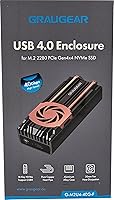
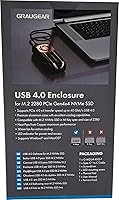
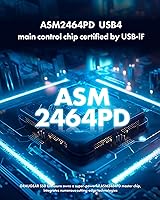
The GRAUGEAR G-M2U4-40G-F USB4 NVMe SSD Enclosure is built for users who routinely push external storage to its limits — not casual file movers who will never notice the difference. What sets it apart is the ASM2464PD chipset, which genuinely unlocks 40Gbps throughput over USB4 rather than the bottlenecked speeds you get from older controllers. The aluminum and copper construction isn't just aesthetic; it signals a design philosophy centered on longevity and thermal stability. Compatibility spans Thunderbolt 4 and 3 as well as USB 3.x, so this USB4 enclosure won't become obsolete when your next laptop arrives. You're paying a premium here, and the build quality largely justifies it.
Features & Benefits

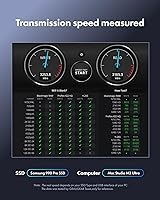
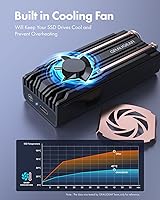
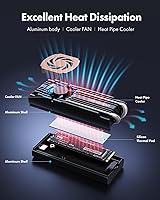
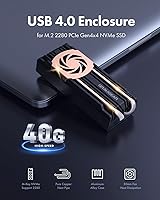
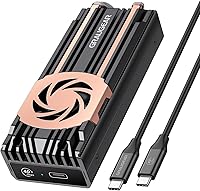
The cooling setup on this NVMe enclosure is genuinely serious. A 30mm active fan pairs with dual copper direct-touch heatpipes that physically contact the SSD surface, pulling heat away faster than a passive heatsink alone could during sustained transfers. The ASM2464PD controller is the right chip for this job — unlike the older JMS583 or ASM2364, it supports PCIe 4.0 x4 internally, meaning the drive's bandwidth isn't wasted before data even hits the USB4 connection. Real-world speeds fall short of the 40Gbps ceiling, but the gap is tighter than on competing enclosures. One honest caveat: installation requires a screwdriver, and hitting full speed demands updated firmware and drivers. Plan for a setup process, not a plug-and-play experience.

Best For

This NVMe enclosure earns its price when paired with the right workflow and the right hardware. Video editors and creators regularly offloading large RAW files or 4K/8K footage will feel the speed advantage immediately — provided they have a Thunderbolt 4 or USB4 host port available. Professionals who run long, continuous transfers and worry about throttling will also appreciate how hard the thermal system works to keep sustained speeds stable. If you're upgrading from a USB 3.2 enclosure and already have a premium NVMe drive like a Samsung 990 Pro or WD Black SN850X, the GRAUGEAR enclosure is one of the few external options genuinely capable of letting that drive perform near its ceiling.

User Feedback

Sitting at 3.9 stars across roughly 159 ratings, this USB4 enclosure lands in mixed-but-reasonable territory. The most consistent praise centers on lower SSD temperatures during demanding transfers — buyers who monitor drive temps report a tangible difference, and build quality draws frequent positive mentions. On the critical side, a recurring theme is setup friction: several users found that achieving full 40Gbps required driver updates, firmware flashing, and OS build upgrades not clearly communicated in the box. Device recognition issues on older USB-C ports surface periodically as well. Fan noise divides opinion — it is present and audible, though not objectively loud. Most negative reviews trace back to mismatched host expectations rather than any hardware defect.

Pros

  • The active fan and dual copper heatpipes work together to keep SSD temperatures noticeably lower during sustained transfers.
  • The ASM2464PD chipset is one of the few controllers that genuinely unlocks PCIe 4.0 x4 bandwidth over USB4.
  • Aluminum and copper construction feels solid and durable — this is not a plastic shell with a fancy spec sheet.
  • Thunderbolt 4 and 3 compatibility makes this USB4 enclosure a strong long-term investment across different host devices.
  • Backward compatibility with USB 3.2 down to USB 2.0 means it will work on older machines, albeit at reduced speeds.
  • Supports NVMe drives up to 4TB, giving plenty of headroom as storage needs grow.
  • Real-world transfer speeds are competitive among 40Gbps enclosures, staying closer to the ceiling than many rivals.
  • Compact dimensions keep it portable without sacrificing the heatsink hardware that makes it thermally effective.

Cons

  • Hitting full 40Gbps requires firmware updates and driver installation — not a simple out-of-the-box experience.
  • Some users report the device is not recognized at all on older USB-C ports, which can cause real frustration.
  • Installation requires a screwdriver; there is no tool-free mechanism for swapping drives.
  • The cooling fan produces audible noise, which may be distracting for users working in quiet environments.
  • Achieving maximum speed also depends on the host OS build being up to date, adding another setup variable.
  • At this price point, the value proposition weakens significantly if the host device lacks USB4 or Thunderbolt 4.
  • Device recognition issues under certain USB 3.x backward-compatibility conditions are documented across multiple user reports.
  • The lack of clear setup documentation in the box has led to repeated confusion about speed requirements among buyers.

Ratings

The scores below reflect AI-driven analysis of verified global buyer reviews for the GRAUGEAR G-M2U4-40G-F USB4 NVMe SSD Enclosure, with spam, bot-generated, and incentivized feedback actively filtered out before scoring. Each category captures both what users genuinely praised and where real frustrations emerged — nothing is glossed over. The result is an honest, data-grounded picture of where this NVMe enclosure excels and where it asks more of its buyers than some are prepared for.

Thermal Performance
88%
Users running sustained file transfers — especially video editors moving multi-gigabyte project files — consistently report that SSD temperatures stay meaningfully lower than in passive enclosures. The combination of direct-touch copper heatpipes and an active fan delivers cooling results that are tangible, not just theoretical.
A small number of users noted the fan ramps up noticeably under heavy load, which some found surprising for a device marketed around quiet operation. In very warm ambient environments, sustained temperatures still climb higher than idle specs suggest.
Transfer Speed
83%
When paired with a compatible USB4 or Thunderbolt 4 host and a high-end NVMe drive, real-world sequential read and write speeds are genuinely competitive — users upgrading from USB 3.2 enclosures describe the difference as immediately obvious during large file operations.
Achieving anywhere near the 40Gbps ceiling requires the right host port, updated drivers, and current firmware — a combination not every buyer has ready on day one. Users on older USB-C ports report speeds no better than a basic enclosure, which leads to sharp disappointment.
Build Quality
91%
The aluminum shell and copper heatpipe construction give this USB4 enclosure a solidity that stands out in the category. Multiple buyers specifically mentioned that it feels like a precision-machined tool rather than consumer-grade electronics, which inspires long-term confidence.
The enclosure is noticeably heavier than plastic competitors at 272g, which some users found inconvenient when carrying it in a laptop bag alongside other gear. A few noted minor machining variance around the seam where the shell halves meet.
Setup & Ease of Use
54%
46%
Once properly configured, the enclosure operates reliably without requiring further intervention. Users who invested time in the firmware update and driver installation process report a stable, consistent experience thereafter with no recurring issues.
The path to that stability is genuinely rocky for many buyers. Firmware updates, driver installs, OS build requirements, and host-port verification are all preconditions for full performance — and the in-box documentation does not walk users through any of it clearly. This is the single most common source of negative reviews.
Compatibility
72%
28%
Thunderbolt 4 and 3 support alongside USB4 gives this NVMe enclosure a broad range of compatible hosts, and backward compatibility down to USB 2.0 means it technically functions across almost any modern computer with a USB-C port.
Device recognition on older USB-C ports is inconsistent — some users report the enclosure simply not appearing as a drive on certain USB 3.0 or 3.1 hosts. This is not a dealbreaker for the target buyer, but it undermines the promise of universal backward compatibility.
Fan Noise Level
67%
33%
In typical desktop environments with background noise from HVAC or other peripherals, the 30mm fan blends in without calling attention to itself. Users working in moderately busy home offices or shared workspaces rarely flagged it as a meaningful distraction.
For users working in very quiet environments — late-night editing sessions, recording-adjacent workspaces, or library-style home offices — the fan hum is audible and, for some, consistently distracting. It is not loud, but it is not silent, and sensitivity varies considerably.
Value for Money
69%
31%
For users who own a Thunderbolt 4 laptop and a premium NVMe drive, the GRAUGEAR enclosure delivers a measurable performance and thermal advantage over cheaper alternatives, making the premium feel earned in those specific conditions.
Buyers without USB4 or Thunderbolt 4 hardware are essentially paying a significant premium for speeds they cannot access and cooling they may not need, which makes the value case collapse quickly when the host hardware is not up to the task.
Installation Process
61%
39%
The physical drive installation is clean and intuitive once the enclosure is open — the SSD slot is clearly positioned and the screw points are well-machined, so users with any hardware experience find the physical assembly takes only a few minutes.
The absence of a tool-free mechanism is a legitimate inconvenience for users who swap drives regularly, as it requires a screwdriver every time. There is no standoff pre-installed for shorter M.2 form factors, which some buyers discovered only after opening the box.
Portability
74%
26%
At roughly the footprint of a large USB drive, the enclosure fits comfortably in a jacket pocket or tech pouch, and the compact dimensions make it a practical companion for professionals moving between workstations or traveling with editing rigs.
The 272g weight — heavier than most external drives in this size class — is noticeable when the enclosure is the only thing in a pocket, and the lack of a carrying case or pouch in the box means users need to source their own protective sleeve.
Cable & Accessories
58%
42%
A USB-C to USB-C cable is included in the box, which is appreciated as a baseline, and users with USB4-rated cables on hand found that swapping to a certified cable was straightforward and improved connection reliability.
The included cable is not clearly rated for USB4 40Gbps, and several users suspect it may be limiting their speeds without realizing it. The absence of a USB-A adapter is also noted by users on older desktop setups, though that is an expected trade-off at this interface tier.
Long-Term Reliability
77%
23%
Buyers who have owned the GRAUGEAR enclosure for several months report consistent performance without degradation, and the metal construction shows no meaningful wear even with regular travel and daily-use friction.
The sample size of long-term reviews is still relatively limited given the product's age, and a handful of users reported intermittent connection drops appearing after extended ownership — not widespread, but enough to note as a watch item.
Driver & Firmware Support
55%
45%
Firmware updates have been available and users who applied them report resolving early recognition issues and speed inconsistencies, suggesting the manufacturer is at least maintaining the software side of the product post-launch.
The update process itself is not guided within the product packaging, and locating the correct firmware version requires navigating GRAUGEAR's website independently — a friction point that contributes disproportionately to negative first impressions among less experienced users.

Suitable for:

The GRAUGEAR G-M2U4-40G-F USB4 NVMe SSD Enclosure is purpose-built for users who genuinely stress external storage on a daily basis. Video editors and content creators regularly moving large RAW photo libraries, 4K timelines, or 8K footage between a workstation and a laptop will get the most out of what this hardware offers. The benefit is especially clear for anyone already running a Thunderbolt 4 MacBook, a USB4-equipped Windows laptop, or a modern desktop with a USB4 controller — without a compatible host port, the enclosure's ceiling simply cannot be reached. Professionals who run long, uninterrupted transfers and have experienced throttling or thermal slowdowns with cheaper enclosures will appreciate the active cooling system working quietly in the background. It also makes sense for power users pairing it with a premium NVMe drive like a WD Black SN850X or Samsung 990 Pro, where the internal PCIe 4.0 x4 bandwidth means the drive itself is no longer the bottleneck.
Not suitable for:

If you just need a convenient enclosure to occasionally move files between a home PC and an external drive, this NVMe enclosure is likely more hardware than the situation calls for. Casual users without a USB4 or Thunderbolt 4 host port will be capped at USB 3.x speeds regardless, making the premium price difficult to justify when far simpler enclosures deliver the same real-world result at their port's limit. The setup process is also a genuine consideration: reaching the advertised 40Gbps requires updated firmware, compatible drivers, and in some cases a specific OS build — buyers who expect plug-and-play simplicity will find that frustrating. Anyone sensitive to ambient noise should know the cooling fan is audible, even if not loud by objective standards. Finally, budget-conscious buyers upgrading from a basic enclosure and running a mid-range NVMe drive will see diminishing returns — the speed ceiling of the drive itself may already be the limiting factor long before this enclosure becomes one.

Specifications

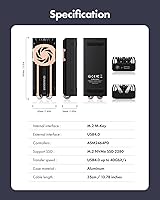
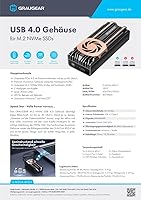
  • Interface: Connects via USB4 40Gbps over a USB-C port, with full support for Thunderbolt 4 and Thunderbolt 3 hosts.
  • Chipset: Uses the ASM2464PD controller, one of the few chips capable of sustaining PCIe 4.0 x4 internal bandwidth over a USB4 connection.
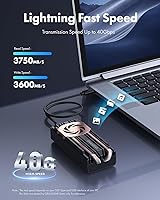
  • Max Transfer Speed: Rated for up to 40Gbps theoretical throughput when connected to a USB4 or Thunderbolt 4 host with updated firmware and drivers.
  • Internal Bandwidth: The PCIe 4.0 x4 internal interface ensures the enclosure itself does not bottleneck high-performance NVMe drives.
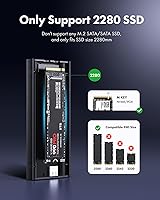
  • SSD Compatibility: Accepts M.2 NVMe SSDs in 2280 form factor with a maximum supported capacity of 4TB.
  • Cooling System: Combines a 30mm active cooling fan with dual copper direct-touch heatpipes that make flat contact with the SSD surface for fast heat transfer.
  • Body Material: Enclosure shell is machined aluminum alloy; heatpipes are copper, contributing to both thermal performance and structural durability.
  • Dimensions: Measures 3.21″ in length, 1.65″ in width, and 1.02″ in height, keeping the unit compact enough for desk or bag use.
  • Weight: Weighs 272g (approximately 9.6 oz), reflecting the solid metal and copper construction rather than a lightweight plastic shell.
  • Included Cable: Ships with one USB-C to USB-C cable; no USB-A adapter is included in the box.
  • Backward Compatibility: Functions with USB 3.2, 3.1, 3.0, and 2.0 ports at their respective speed limits, though device recognition on older ports is not always guaranteed.
  • UASP Support: Supports UASP (USB Attached SCSI Protocol), which reduces CPU overhead and improves throughput efficiency during transfers.
  • Tool-Free Install: Drive installation is not tool-free and requires a screwdriver to secure the SSD inside the enclosure.
  • Drive Slots: Accommodates a single M.2 NVMe drive; there is no provision for a secondary drive or SATA compatibility.
  • User Rating: Holds a 3.9 out of 5 star average based on approximately 159 customer ratings on Amazon.

Related Reviews

Cable Matters USB4 40Gbps M.2 NVMe Enclosure
80%
88%
Data Transfer Performance
83%
Build Quality & Materials
79%
Thermal Management & Cooling
91%
Portability & Form Factor
74%
Compatibility Range
More
SSK HE-C401 M.2 NVMe SSD Enclosure
79%
78%
Transfer Speed Performance
88%
Build Quality
69%
Compatibility
74%
Ease of Setup
71%
Thermal Management
More
Satechi ST-EU4NPM USB4 M.2 NVMe SSD Enclosure
81%
86%
Transfer Speed Performance
91%
Build Quality & Materials
93%
Installation & Setup Ease
74%
Thermal Management
54%
Included Accessories & Cable
More
GRAUGEAR G-M2ST235-CL NVMe SATA Drive Docking Station
77%
88%
Offline Cloning
91%
Drive Compatibility
84%
Transfer Speed
79%
Cooling Performance
93%
Ease of Use
More
ineo C2605-NVMe M.2 NVMe SSD Enclosure
77%
88%
Write Protection Reliability
79%
Transfer Speed Performance
82%
Thermal Management
61%
Fan Noise Level
76%
Build Quality & Materials
More
WAVLINK Dual-Bay NVMe M.2 SSD Cloner
75%
83%
Offline Cloning Reliability
78%
Transfer Speed
71%
Compatibility Range
76%
Build Quality
86%
Ease of Setup
More
Plugable M.2 NVMe SSD Enclosure
87%
94%
Ease of Setup
92%
Data Transfer Speed
88%
Build Quality
90%
Port Compatibility
87%
Cooling & Thermal Management
More
GEWOKLIY Ge-MC13 M.2 2230 NVMe SSD Enclosure
78%
83%
Transfer Speed
88%
Build Quality
79%
Compatibility
67%
Thermal Management
92%
Ease of Setup
More
ORICO TCM2 M.2 NVMe SSD Enclosure
78%
83%
Transfer Speed
61%
Thermal Management
74%
Build Quality
91%
Ease of Installation
86%
Cable Bundle Quality
More
elecacc Dual Bay NVMe SATA SSD Enclosure
75%
93%
Ease of Setup
84%
Offline Cloning
71%
Transfer Speed
88%
Drive Compatibility
63%
Build Quality
More

FAQ

Thunderbolt 4 works just as well — it runs on the same underlying 40Gbps bandwidth. Either a USB4 or Thunderbolt 4 port on your laptop or desktop will let you reach the maximum speed. What will not get you there is a standard USB 3.2 or USB-C port, regardless of what it looks like on the outside.

It can be, depending on your system. To hit full 40Gbps, you need to update the enclosure firmware, install the appropriate drivers, and in some cases ensure your OS is on a recent enough build. If you plug it in and expect it to just work at max speed out of the box, you may be disappointed. Spending 20 to 30 minutes on the setup process upfront prevents most of the frustration people report.

Yes, if your MacBook Pro has Thunderbolt 4 ports — which all current Apple Silicon models do — the GRAUGEAR G-M2U4-40G-F USB4 NVMe SSD Enclosure is fully compatible. macOS handles the connection cleanly once the enclosure is properly set up, and many users report strong real-world speeds on Apple hardware.
The fan is audible — it is not silent. Most users in normal working environments describe it as a quiet hum that blends into background noise, but if you work in a very quiet room or are sensitive to fan noise, you will likely notice it. It is not loud by any reasonable standard, just not completely silent either.

No. This enclosure is designed exclusively for M.2 NVMe drives and does not support SATA-based M.2 SSDs. If you have an M.2 SATA drive, you will need a different enclosure.

It should work, but a few caveats apply. Speed will be capped at USB 3.2 rates, which is a significant step down from 40Gbps. More importantly, some users have reported that the enclosure is not recognized at all on certain older USB-C ports — it is not universal, but worth knowing before assuming full backward compatibility in every situation.

It is straightforward but not tool-free. You will need a small Phillips-head screwdriver to open the enclosure and secure the drive. The process itself takes only a few minutes and does not require any technical expertise beyond basic hardware comfort.

The drive itself runs cooler than it would in a passive enclosure, which is the whole point of the fan and heatpipe combination. The aluminum shell can get warm to the touch during extended sessions, but that is normal heat dissipation working as designed. Reports of thermal throttling are uncommon when the cooling system is functioning properly.

The enclosure supports M.2 NVMe drives up to 4TB in capacity, which covers all current consumer drives without limitation.

The included cable is functional for general use, but if you want to guarantee full USB4 bandwidth, it is worth verifying the cable is rated for 40Gbps — not all USB-C cables are. For critical workflows, using a certified USB4 or Thunderbolt 4 cable gives you one less variable to troubleshoot if speeds seem lower than expected.