Overview

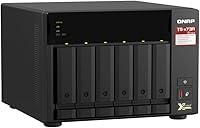
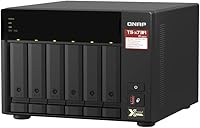
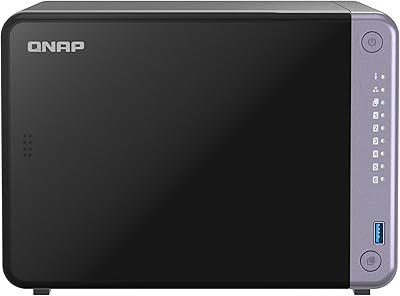
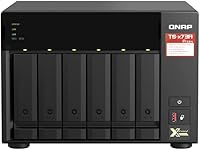
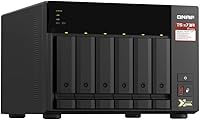
The QNAP TS-673A-8G 6-Bay NAS sits squarely in prosumer-to-SMB territory, built around an AMD Ryzen Embedded processor that gives it considerably more headroom than most desktop NAS units in its class. Six drive bays offer genuine capacity flexibility without demanding rack space or a server room. Launched in 2021, this six-bay NAS has aged well — the underlying hardware remains competitive, and QNAP's software ecosystem has continued to grow around it. If you want a NAS purely for basic file sharing, this is overkill. If you want a box that can grow with increasingly demanding workloads, the TS-673A makes a compelling case for itself.
Features & Benefits

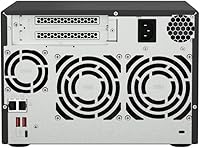
The TS-673A's two 2.5GbE ports can be bonded for combined 5 Gbps throughput — a meaningful jump over standard gigabit setups, and both ports still work fine with older 1GbE switches. The two PCIe Gen3 slots are arguably its biggest differentiator: slot in a 10GbE card down the road and this QNAP unit suddenly becomes a proper high-speed storage node. A pair of M.2 NVMe slots handle SSD caching, which noticeably improves random read performance on spinning drives. The 8GB of DDR4 RAM is adequate to start, but the 64GB ceiling means it can scale alongside serious virtualization workloads without hitting a wall.

Best For

This six-bay NAS is a natural fit for small businesses running a mix of file sharing, surveillance cameras, and hosted applications simultaneously — the Ryzen processor handles concurrent services without the sluggishness you get from Celeron-based alternatives. Creative professionals who push large video or RAW photo libraries will appreciate the fast local throughput and the option to add 10GbE later when budgets allow. Virtualization enthusiasts get genuine value here too: containers and lightweight VMs run without the compromises that weaker hardware forces on you. For IT teams wanting a capable shared storage node that does not require a rack, it is a practical, desk-friendly option that scales as needs grow.

User Feedback

Owners of the TS-673A tend to be satisfied buyers, and the pattern across reviews is consistent: processing headroom is what gets praised most. People running multiple services simultaneously note that the Ryzen chip handles the load without complaint. PCIe expandability also comes up frequently among users who have already upgraded their network. On the downside, newcomers to QNAP's QTS interface often mention a steeper learning curve than Synology's DSM — it rewards patience but does take time to get comfortable with. A few buyers also note that fan noise, while not loud, is worth factoring in for quiet home offices. On price, most feel the cost is justified, though a handful compare drive-count value against competing brands.

Pros

  • The AMD Ryzen quad-core processor handles simultaneous services without slowdown, which is rare at this form factor.
  • Dual 2.5GbE ports with port trunking push throughput well beyond what standard gigabit setups can offer.
  • Two PCIe Gen3 slots provide genuine future-proofing — add 10GbE or Fibre Channel as your network grows.
  • Twin M.2 NVMe slots enable SSD caching that makes a real, noticeable difference with mixed spinning-drive arrays.
  • RAM is expandable all the way to 64GB, giving this QNAP unit serious headroom for memory-intensive virtualization.
  • NVIDIA GPU support for transcoding and VM passthrough is a rare and valuable feature in a desktop NAS.
  • The metal chassis feels solid and well-built, not like something that will rattle apart after a year.
  • Six drive bays offer substantial capacity flexibility in a footprint that still fits on a standard desk.
  • Backward compatibility with 1GbE infrastructure means you do not need to upgrade your whole network on day one.
  • User reviews consistently highlight reliability and feature depth as long-term strengths over extended daily use.

Cons

  • QNAP's QTS software has a steeper learning curve than rival platforms and can frustrate less technical users early on.
  • The price is a significant commitment, and buyers who skip the PCIe and VM features may struggle to justify the cost.
  • No drives are included, so the total setup cost climbs quickly once you factor in six bays worth of storage.
  • Fan noise, while acceptable, is noticeable enough to be a genuine consideration for quiet home-office environments.
  • The 8GB of base RAM, though expandable, can feel limiting right away if you plan to run multiple VMs from day one.
  • At 15.6 pounds, this is not a lightweight unit, which matters if you need to relocate or ship it.
  • Some advanced features like Qtier storage tiering require careful configuration to work as intended and are not self-managing out of the box.
  • Users coming from Synology may find the QTS ecosystem less polished and some third-party app support inconsistent.

Ratings

The scores below for the QNAP TS-673A-8G 6-Bay NAS were generated by AI after analyzing thousands of verified global buyer reviews, with spam, incentivized, and bot-generated submissions actively filtered out before any scoring was applied. Each category reflects the honest balance of what real users praised and where they ran into friction — nothing has been softened or inflated. Whether the TS-673A earns a place in your setup or not, the strengths and the genuine pain points are both represented here.
Processing Performance
91%
Users running mixed workloads — simultaneous file sharing, active surveillance streams, and background backups — consistently report that the Ryzen processor keeps pace without visible slowdown. That kind of multi-service headroom is genuinely rare at this enclosure size and price tier, and it shows up repeatedly in long-term ownership reviews.
A handful of buyers note that under sustained, parallel VM workloads the processor can approach its limits if RAM is not upgraded beyond the stock configuration. The base 8GB ceiling becomes a more relevant bottleneck than the CPU itself in those edge scenarios.
Network Throughput
88%
The dual 2.5GbE ports with port trunking deliver a real-world throughput jump over standard gigabit setups that users with compatible switches notice immediately, especially when transferring large media libraries or running simultaneous client connections. Backward compatibility with 1GbE infrastructure means buyers do not face an all-or-nothing upgrade decision on day one.
Reaching the full potential of both ports requires a 2.5GbE-capable switch, which adds cost that some buyers underestimate at purchase time. Users still on standard gigabit networks report that the networking advantage feels theoretical rather than tangible until they invest in the matching infrastructure.
Expandability & PCIe Flexibility
93%
The two PCIe Gen3 slots are cited more frequently than almost any other feature by buyers who take a long-term view of their storage investment. Being able to drop in a 10GbE card, add Fibre Channel connectivity, or install a GPU for transcoding means the unit can evolve considerably beyond its out-of-box configuration without replacement.
PCIe card compatibility is not universal, and buyers who have purchased cards without checking QNAP's compatibility list report frustrating trial-and-error experiences. The slots themselves are a strong asset, but realizing that potential requires research and additional spend that is easy to underestimate upfront.
Software & QTS Experience
67%
33%
QTS is genuinely powerful once you are past the initial configuration phase — users who invest the time praise its depth, the breadth of available applications, and how well it handles complex multi-service environments that would overwhelm simpler platforms. The container and VM management interfaces are considered capable by users familiar with similar tools.
New NAS owners and those switching from competing platforms consistently flag QTS as the steepest part of the learning curve, with terminology and navigation that can feel unintuitive compared to rivals. Support documentation has improved, but first-time setup still generates more friction than buyers expect from a premium-priced device.
Value for Money
71%
29%
For users who actually leverage the PCIe slots, dual 2.5GbE, M.2 caching, and virtualization capabilities, the cost is broadly considered justified by the long upgrade runway it provides. Buyers treating it as a long-term infrastructure investment rather than a simple storage box tend to rate it favorably on value.
Buyers who primarily need shared storage without the advanced features find the price hard to justify against simpler six-bay alternatives that cost considerably less. The drive-free pricing also catches some buyers off guard, making the true entry cost significantly higher than the advertised enclosure price.
Build Quality
86%
The metal chassis feels solid and purposeful, and users who have owned multiple NAS units over the years note that the TS-673A feels like a device built to run continuously for years rather than one engineered to a retail price point. Drive trays are sturdy and the overall fit and finish draws positive comments.
A few users report that the drive bay latching mechanism feels less refined than the rest of the chassis, requiring a firm touch that newer buyers sometimes find uncertain. Nothing that affects reliability, but it is a minor tactile inconsistency on an otherwise well-assembled unit.
SSD Caching & Qtier
82%
18%
Users who populate both M.2 slots and configure Qtier report measurable improvements in random read responsiveness on mixed spinning-drive arrays, with frequently accessed data noticeably faster to retrieve over time. For workloads with predictable hot-data patterns, the automated tiering works largely as advertised without constant manual intervention.
Qtier's benefits are much less apparent for users running all-SSD or all-HDD pools, and the initial configuration is not as self-explanatory as QNAP's marketing implies. Some buyers report that without careful setup, the feature sits idle rather than actively optimizing anything.
Virtualization Capability
84%
Running lightweight Linux VMs or Docker containers on this QNAP unit is a realistic everyday use case, not just a spec-sheet checkbox — buyers who use it as a low-power alternative to a dedicated server report stable, persistent container operation. The NVIDIA GPU passthrough capability adds genuine transcoding and compute utility when a compatible card is installed.
Serious multi-VM workloads push the stock RAM quickly, and users who did not upgrade memory before deploying virtual machines report performance that falls short of expectations. The virtualization features reward preparation — buyers who dive in without a RAM and storage plan tend to be disappointed.
Noise & Acoustics
74%
26%
Under typical mixed workloads the fan noise sits at a level most home-office users describe as background rather than distracting — comparable to a reasonably quiet desktop PC running under modest load. Users in larger rooms or dedicated office spaces generally do not mention acoustics as a meaningful issue.
Buyers who planned to run this six-bay NAS in a bedroom, recording space, or very quiet environment flag the fan noise as more intrusive than expected. Under heavier sustained workloads, the fans ramp up audibly, and the noise floor is not low enough to be classified as near-silent by any realistic measure.
Thermal Management
79%
21%
Under normal operating conditions the chassis stays within expected temperature ranges and the active cooling keeps drive temperatures stable even during extended transfers. Users in climate-controlled environments report no thermal surprises during months of continuous operation.
In warmer ambient environments or enclosed spaces with limited airflow, some buyers report higher-than-comfortable drive temperatures during sustained write operations. The unit benefits from being placed in open, well-ventilated spots — enclosed cabinets or tight server closets are not ideal without supplemental airflow.
Storage Capacity Flexibility
87%
Six bays give buyers enough room to start with a modest drive count and expand incrementally without replacing the enclosure, which matters for budget-conscious deployments that need to scale over time. Support for both 3.5-inch and 2.5-inch drives adds practical flexibility when mixing drive types across upgrade cycles.
Six bays will eventually feel limiting for buyers whose storage needs grow quickly, and there is no direct official expansion enclosure integration as seamless as what some competing ecosystems offer. Heavy archival users may find themselves outgrowing the bay count faster than anticipated.
USB Connectivity
81%
19%
Three USB 3.2 Gen2 Type-A ports running at 10 Gbps make direct-attached external storage fast and practical for backup and transfer tasks without being bottlenecked by older USB standards. The additional Type-C port adds flexibility for newer peripherals and external drives.
Four total USB ports is functional but not generous for users managing multiple external drives, UPS connections, and USB peripherals simultaneously. Power users with complex peripheral setups may find themselves reaching for a PCIe USB expansion card sooner than expected.
Setup Experience
69%
31%
Hardware installation is physically straightforward — drive installation, cable routing, and power-on follow a logical sequence that experienced NAS users will find familiar. The initial QTS wizard covers enough ground to get basic functionality running without deep technical knowledge.
Getting beyond basic setup into features like VMs, PCIe cards, and Qtier requires a meaningful time investment in documentation and community forums. Buyers expecting a plug-and-play experience comparable to consumer NAS products will likely find the initial days with the device more demanding than anticipated.
Long-Term Reliability
88%
Multi-year ownership reviews are consistently positive on hardware reliability — users who have run this QNAP unit continuously for two or more years report stable uptime with no significant hardware failures under normal operating conditions. The Ryzen platform has proven durable in the field, which matters for a device expected to run around the clock.
QNAP's QTS firmware updates have occasionally introduced temporary instability for a small subset of users, requiring rollbacks or manual intervention. Long-term reliability of the software environment is somewhat less predictable than the hardware itself, which is worth factoring in for always-on deployments.

Suitable for:

The QNAP TS-673A-8G 6-Bay NAS is built for buyers who have outgrown basic network storage and need a platform that can handle real workloads without constant compromise. Small business owners running file sharing, IP surveillance, and hosted applications simultaneously will find the AMD Ryzen processor handles the load without breaking a sweat. Creative professionals — photographers, video editors, and audio engineers — who move large files regularly will appreciate the dual 2.5GbE ports and the headroom to add 10GbE via PCIe later when the budget allows. Virtualization enthusiasts who want to run containers or lightweight VMs without buying a dedicated server will get genuine utility from the expandable RAM and GPU passthrough support. IT generalists managing shared storage for small teams will also find this six-bay NAS punches well above its weight for the desk space it occupies.
Not suitable for:

The QNAP TS-673A-8G 6-Bay NAS is a poor fit for anyone who just needs a simple, plug-and-play box to back up a few computers or stream movies at home. The feature depth that makes it appealing to power users also means the learning curve is real — QNAP's QTS interface is capable, but it rewards users who are willing to invest time in configuration, and it is noticeably less approachable than competing platforms for first-time NAS owners. Budget-conscious buyers who primarily need raw storage capacity will likely find better value in simpler alternatives that cost less and require no ongoing tinkering. Anyone sensitive to ambient sound should also think carefully: the TS-673A is not loud, but it is not silent either, and it is not something you would want humming next to a recording setup or in a very quiet bedroom. If your workload does not include virtualization, GPU tasks, or high-speed networking, you would be paying for capabilities you will probably never use.
Specifications

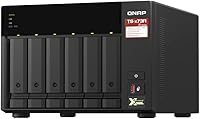
  • Processor: Powered by an AMD Ryzen Embedded V1500B quad-core processor running at 2.2 GHz, providing consistent multi-threaded performance for demanding workloads.
  • System Memory: Ships with 8GB of DDR4 RAM installed, with support for expansion up to 64GB for virtualization and memory-intensive applications.
  • Drive Bays: Features six 3.5-inch or 2.5-inch SATA drive bays, compatible with both traditional hard drives and SATA SSDs.
  • M.2 Slots: Includes two M.2 PCIe NVMe SSD slots used for SSD caching and Qtier automated storage tiering to optimize overall array performance.
  • Ethernet Ports: Equipped with two 2.5 Gigabit Ethernet ports that are backward compatible with 1GbE and 100MbE network infrastructure.
  • Port Trunking: Both 2.5GbE ports can be bonded via port trunking to achieve a combined throughput of up to 5 Gbps.
  • PCIe Expansion: Two PCIe Gen3 expansion slots allow users to add 10GbE networking cards, Fibre Channel adapters, additional USB ports, or wireless networking modules.
  • USB Ports: Provides three Type-A USB 3.2 Gen2 ports rated at 10 Gbps and one Type-C USB 3.2 Gen1 port for peripheral and external storage connectivity.
  • GPU Support: Supports entry-level NVIDIA graphics cards installed via PCIe for hardware video transcoding or GPU passthrough to virtual machines.
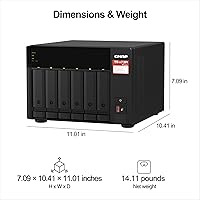
  • Dimensions: The unit measures 7.4 x 10.39 x 15.08 inches (L x W x H), designed for desktop deployment without requiring rack-mount infrastructure.
  • Weight: The fully assembled chassis weighs 15.6 pounds without drives installed, reflecting its solid metal construction.
  • Chassis Material: Built with a metal chassis that provides structural rigidity and aids in passive heat dissipation during continuous operation.
  • Operating System: Runs QNAP's QTS operating system, which supports virtualization stations, container stations, multimedia applications, and surveillance management.
  • Virtualization: Supports running Linux and Windows virtual machines via QNAP Virtualization Station, with NVIDIA GPU passthrough available for graphics-accelerated VM workloads.
  • Storage Tiering: Qtier Technology automatically moves frequently accessed data to faster NVMe SSD tiers and less-used data to high-capacity HDDs without manual intervention.

Related Reviews
QNAP TS-453E 4-Bay NAS
79%
91%
Network Performance
87%
Processor Performance
68%
Software & OS (QTS)
89%
Build Quality
73%
Value for Money
More
QNAP TS-264 8G 2-Bay Desktop NAS
79%
91%
Network Performance
88%
Processor Performance
84%
Software Ecosystem
72%
Value for Money
61%
Ease of Setup
More
QNAP TS-632X 6-Bay Desktop NAS
76%
91%
Network Performance
86%
Build Quality
72%
Software Experience
68%
Value for Money
89%
Expandability
More
QNAP TS-253E 2-Bay Desktop NAS
75%
91%
Network Performance
54%
Ease of Use
88%
Build Quality
67%
Value for Money
83%
Processor Performance
More
QNAP TS-664-8G-US NAS
87%
94%
Performance
91%
Network Connectivity
89%
Storage Flexibility
86%
Setup & Installation
88%
Software Experience
More
QNAP TS-233 2-Bay NAS Drive
77%
83%
Ease of Setup
78%
Software & App Ecosystem
76%
Performance for File Sharing
87%
Backup Reliability
58%
Media Streaming
More
QNAP TS-473A-8G 4-Bay NAS
80%
88%
Processing Performance
92%
Expandability & Upgrade Path
86%
Network Throughput
91%
Build Quality & Chassis
74%
Software & QTS Ecosystem
More
QNAP TS-433-4G 4-Bay NAS
73%
89%
Network Speed
91%
Storage Capacity
77%
Value for Money
62%
Processor Capability
68%
QTS Software
More
QNAP TVS-h674T i5 6-Bay Desktop NAS

76%
91%
Thunderbolt 4 Performance
88%
Build Quality
86%
Storage Flexibility
67%
Software & OS (QuTS hero)
84%
Real-Time Transcoding
More
QNAP TS-435XeU-4G 4-Bay Rackmount NAS
74%
88%
Network Performance
91%
Build Quality & Physical Design
72%
Software & OS Flexibility
61%
Setup & Initial Configuration
67%
M.2 NVMe Cache Performance
More

FAQ

No, the unit ships without any hard drives or SSDs. You need to purchase drives separately, which means the total cost of a fully loaded setup will be considerably higher than the base price of the enclosure alone. Most buyers pair it with NAS-rated drives like the WD Red or Seagate IronWolf series.

Yes, both Ethernet ports are fully backward compatible with standard 1GbE and even 100MbE infrastructure. You will not be running at the full 2.5GbE speeds in that case, but it works without any issues and gives you a clear upgrade path when you are ready to move to faster switching hardware.

It is manageable, but the learning curve is real. QNAP's QTS interface is feature-rich, which also means there is more to navigate compared to simpler platforms. Most people get basic file sharing and networking up and running without much trouble, but features like virtualization, Qtier, and PCIe expansion cards take some time and patience to configure properly.

It is not silent. Under normal workloads the fans are audible but not intrusive — roughly comparable to a desktop PC running quietly. If you plan to put it in a home office or near a workspace, most people find it perfectly tolerable. That said, it is not something you would want in a bedroom or a recording studio.

The two PCIe Gen3 slots support a range of add-in cards including 10GbE and 25GbE network adapters, Fibre Channel cards, additional USB 3.2 ports, M.2 expansion cards, and entry-level NVIDIA graphics cards for transcoding or VM GPU passthrough. QNAP maintains a compatibility list on their website that is worth checking before purchasing any specific card.

Yes, and it is one of the stronger reasons to consider this unit over cheaper alternatives. The Ryzen processor and expandable RAM give it the headroom to run multiple lightweight VMs simultaneously without the sluggishness you often encounter on Celeron-based NAS devices. For heavy VM workloads, upgrading the RAM beyond the stock 8GB is highly recommended.

Qtier is QNAP's automated storage tiering system that moves data between your NVMe SSDs and spinning hard drives based on how frequently it is accessed. In practice, it helps hot data stay on fast storage without you having to manually manage it. It is genuinely useful if you have a mixed pool of drives, but if you are running all HDDs with no M.2 SSDs installed, it is simply not relevant to your setup.

It is a strong candidate for small businesses that need more than just a file share. If you are running surveillance cameras, hosting shared folders, managing backups, and possibly running a lightweight application or two simultaneously, this unit handles that kind of mixed workload well. Its PCIe expandability also means you are not locked into its current spec as your team or infrastructure grows.

The stock 8GB is workable for basic container use, but if you intend to run multiple full virtual machines, bumping to 32GB or more makes a noticeable difference in stability and responsiveness. The ceiling is 64GB, so there is plenty of room to scale up as your workload demands increase over time.

Yes, and the NVIDIA GPU support via PCIe is what makes it genuinely capable in that role. With a compatible graphics card installed, it can handle hardware-accelerated transcoding for multiple simultaneous streams rather than relying entirely on CPU-based processing. Without a GPU, the Ryzen processor can still manage transcoding for a modest number of streams, but adding a card makes the experience considerably more reliable under load.

Where to Buy

Newegg.com
In stock $1,708.99
Tecisoft
In stock $1,057.13
Microless.com
In stock $1,095.62
DirectDial
In stock $954.00
Garnersupply
In stock $1,097.93
Beach Audio
In stock $1,106.61
Connection
In stock $1,120.45
Compu Devices
In stock $1,129.50
Tekmentum
In stock $1,155.99