Overview

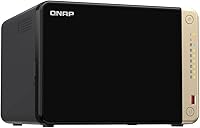
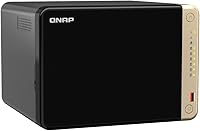
The QNAP TS-664 6-Bay Desktop NAS sits firmly in the mid-to-high tier of the NAS market, built for power home users, small offices, and prosumers who have genuinely outgrown a simpler 2- or 4-bay setup. The six-bay capacity is the real headline — it gives you meaningful room to scale storage over time without replacing the entire unit. An Intel Celeron quad-core processor puts it well ahead of ARM-based alternatives that struggle under heavier workloads. One thing to clarify upfront: this unit ships diskless, so drives are a separate budget item. And at 10 x 13.5 x 15.25 inches, this is a proper desktop tower — plan your desk space accordingly before ordering.
Features & Benefits

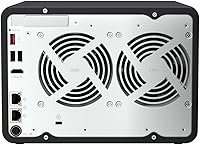
The networking setup alone makes a strong case for the TS-664. Dual 2.5GbE ports let you run link aggregation for higher throughput or configure failover so a cable issue does not knock everyone offline — genuinely practical in a shared office. Two M.2 NVMe slots sit outside the drive bays, meaning you can add SSD caching without sacrificing any storage slots. USB 3.2 Gen 2 ports handle fast external drives or expansion enclosures for quick offloads. On the software side, QNAP QTS supports Plex, Docker, virtual machines, and remote access via MyQNAPCloud. Both Windows and Mac backup are covered natively, no third-party software required.

Best For

This six-bay NAS is a strong match for creative professionals and small teams — photographers and videographers juggling RAW files or 4K projects will appreciate both the storage headroom and fast network throughput. It also suits home users running Plex or Jellyfin, where the quad-core processor delivers real transcoding capability rather than just barely coping. If you want to consolidate backups, surveillance footage, and personal cloud storage in one place, this desktop storage unit handles all of it without friction. The six-bay layout rewards patient planners too — start with two or three drives and fill the remaining bays as your needs grow.

User Feedback

Across nearly 400 ratings, the TS-664 holds a solid 4.4-star average, and the review patterns are consistent. Buyers highlight the sturdy build quality, improved network performance over older QNAP models, and the versatility of the QTS platform. On the critical side, first-time NAS users regularly mention setup takes longer than expected — QTS is capable but less intuitive than Synology's DSM for beginners. Fan noise under load also comes up more than occasionally. The most important hardware caveat is the 8GB RAM ceiling: it is soldered on and cannot be upgraded, which limits how aggressively you can run Docker containers or virtual machines. Know that going in.

Pros

  • Six drive bays provide serious long-term storage headroom without ever needing to replace the unit itself.
  • Dual 2.5GbE ports support link aggregation, meaningfully boosting throughput for multi-user environments.
  • Two dedicated M.2 NVMe slots add SSD caching without stealing a single drive bay.
  • The Intel Celeron quad-core processor handles Plex transcoding and multi-app workloads far better than ARM-based rivals.
  • QTS app ecosystem is deep — Docker, virtual machines, surveillance, and Plex are all supported natively.
  • Hot-swap drive support means replacing a failed drive mid-operation without shutting anything down.
  • Native backup support for both Windows and macOS removes the need for any third-party backup software.
  • MyQNAPCloud remote access works reliably without requiring manual port forwarding or advanced networking knowledge.
  • Build quality feels solid and well-engineered, with a chassis that handles continuous 24/7 operation comfortably.
  • Ranking among the top NAS devices on Amazon reflects a broad base of satisfied, experienced users.

Cons

  • QTS has a steep learning curve — first-time NAS buyers routinely report that initial setup takes far longer than expected.
  • The 8GB RAM is soldered directly to the board and cannot be expanded, which is a hard ceiling for virtualization use.
  • Fan noise under sustained heavy load is a recurring complaint and may be disruptive in quiet home office environments.
  • Diskless pricing can mislead budget-conscious buyers who do not immediately factor in the cost of six NAS-grade drives.
  • The physical footprint is substantial — at over 15 inches deep, it demands dedicated desk or shelf space.
  • QNAP's software update track record includes occasional bugs post-update, requiring more active maintenance than some rivals.
  • Compared to Synology's interface, QTS feels cluttered and less approachable for non-technical household members.
  • No PCIe expansion slot means you cannot add a 10GbE card later if your network infrastructure outgrows 2.5GbE.
  • The TS-664 lacks a built-in display or front-panel status indicators detailed enough for quick at-a-glance diagnostics.

Ratings

The scores below reflect an AI-driven analysis of verified global buyer reviews for the QNAP TS-664 6-Bay Desktop NAS, with spam, incentivized, and bot-generated feedback actively filtered out before scoring. Each category is evaluated on real-world usage patterns reported by actual owners — from small business deployments to home media setups — so both the strengths and the friction points are represented honestly. No category has been inflated to flatter the product, and no legitimate complaint has been buried.

Storage Capacity & Scalability
93%
Six bays give users room to grow gradually without replacing the unit, which is exactly what photographers and videographers managing growing RAW or 4K archives appreciate most. Owners consistently praise the ability to start with two or three drives and expand over time, treating the remaining bays as built-in future-proofing.
A small number of power users note that 108TB raw is the hard ceiling, and without a PCIe expansion slot for adding a host bus adapter, the unit cannot connect to external multi-bay enclosures for users who eventually need even more capacity.
Processor Performance
81%
19%
The Intel Celeron quad-core processor is a clear upgrade over the ARM chips found in similarly priced rivals, and Plex users in particular report noticeably smoother hardware-accelerated transcoding for one or two simultaneous 4K streams without the stuttering that plagued older QNAP models.
Under heavier simultaneous workloads — running Docker containers, a virtual machine, and active file transfers at the same time — users report the processor showing its limits with sluggish QTS responsiveness. It handles typical prosumer tasks well but is not a virtualization workhorse.
Network Throughput
88%
Dual 2.5GbE ports are a genuine advantage for small teams and home offices, with users reporting real-world transfer speeds that put older gigabit NAS units to shame, especially when moving large video project files between workstations. Link aggregation support pushes effective throughput even higher for multi-user environments.
Getting the most out of these ports requires a 2.5GbE-capable switch and compatible network adapters on client machines, which adds to the total cost of entry. Users on older gigabit infrastructure see no throughput benefit until they upgrade their wider network setup.
RAM & Multitasking Ceiling
54%
46%
For standard NAS duties — file serving, Time Machine backups, basic Plex streaming, and running one or two lightweight Docker containers — the 8GB of DDR4 on-board memory is adequate and users in these use cases rarely report memory pressure.
The non-expandable RAM is the single most consistent complaint from technically advanced buyers. Anyone planning to run multiple virtual machines, stack several memory-hungry Docker services, or push QTS harder over time will hit this ceiling and have no recourse — the memory is permanently soldered and cannot be swapped out under any circumstances.
Software & App Ecosystem
77%
23%
QTS covers an impressive range of use cases out of the box — Plex Media Server, Container Station for Docker, virtualization, cloud sync, and surveillance are all available without cobbling together third-party solutions. Advanced home users and IT-minded small business owners consistently describe the software depth as a strong reason to choose QNAP over simpler alternatives.
The flip side is a user interface that feels cluttered and inconsistent compared to more streamlined competitors, and firmware updates have occasionally introduced bugs that required rollbacks or forum-hunting to resolve. For anyone without patience for occasional software troubleshooting, QTS can feel more like a project than a product.
Ease of Setup
61%
39%
Hardware setup is physically straightforward — drives slide in without tools in most configurations, and QTS walks users through initial volume creation with a wizard. Users with any prior NAS experience or a general comfort with network storage concepts typically get up and running without major issues.
First-time NAS owners repeatedly flag that the initial configuration takes several hours longer than expected, and the sheer number of options in QTS can be paralyzing without prior context. Compared to competing platforms designed for beginners, the learning curve here is meaningfully steeper.
Build Quality & Hardware Design
84%
Owners describe the chassis as solid and well-constructed, with drive trays that feel sturdy during hot-swap operations rather than flimsy. The overall impression is of a unit built for continuous 24/7 operation rather than occasional home use, which matches the expectations of the prosumer and small business buyers it targets.
The front panel has a predominantly plastic finish that some buyers feel looks dated relative to the premium pricing, and the unit's large footprint — over 15 inches deep — surprises users who did not measure their available desk or shelf space before ordering.
Noise Level
62%
38%
At idle and during light workloads, the TS-664 operates quietly enough for most home office settings, and users who keep the unit in a dedicated storage room or equipment closet rarely raise noise as a concern at all.
Under sustained heavy loads — large RAID rebuilds, active transcoding, or intensive backup jobs — the cooling fans spin up noticeably and become a genuine distraction in quiet environments. Several reviewers specifically mention this as a drawback for living room or bedroom deployments.
Value for Money
74%
26%
For users who fully utilize the six bays, dual 2.5GbE networking, NVMe caching, and QTS app ecosystem, the hardware justifies its position in the market. Buyers who treat this as a long-term infrastructure investment — scaling drives over several years — consistently feel the unit pays for itself over time.
The diskless format means the sticker price is only the beginning; populating all six bays with quality NAS-grade drives can more than double the total outlay. Buyers who do not need six bays or the processing overhead may find a simpler 4-bay alternative offers better value for their actual workload.
Backup & Recovery Tools
86%
Having native support for both Windows backup via NetBak Replicator and macOS Time Machine without any additional software purchase is consistently appreciated in mixed-OS households and small offices. Snapshot and versioning capabilities within QTS add another layer of protection that users coming from basic external drives find genuinely reassuring.
NetBak Replicator's interface feels dated compared to modern backup solutions, and a few users report that initial Windows backup configuration requires more manual steps than expected. For users wanting enterprise-grade backup scheduling granularity, third-party tools may still be necessary.
Remote Access & Cloud Features
78%
22%
MyQNAPCloud works reliably for most users and removes the intimidating router configuration step that traditionally deterred less technical buyers from setting up remote access. Users who travel frequently and need to retrieve files from a home office setup describe it as a dependable solution for day-to-day remote access.
Connection speeds through MyQNAPCloud are dependent on the user's home upload bandwidth and can feel sluggish for large file retrieval over average residential internet connections. Some privacy-conscious users also prefer a fully local setup and find QNAP's cloud relay dependency difficult to avoid entirely.
M.2 NVMe Cache Performance
82%
18%
Users who add NVMe SSDs to the dedicated M.2 slots report a noticeable improvement in access times for frequently used files, and the fact that caching happens independently of the drive bays means no storage capacity is sacrificed in the process. For mixed-media workflows with a hot dataset of regularly accessed files, the speed improvement is practical and meaningful.
The M.2 slots run at PCIe Gen3 x2 rather than the full x4 bandwidth some NVMe drives are capable of, which means the theoretical maximum cache speed is lower than what the SSDs themselves could deliver in a desktop PC. Most real-world NAS workloads will not notice, but spec-focused buyers may find this worth noting.
Hot-Swap Reliability
89%
Hot-swap functionality works as advertised, with users reporting clean drive detection and automatic RAID rebuild initiation after swapping a failed drive — all while the unit stayed online and accessible to other users on the network. This is a meaningful operational advantage for small business environments where downtime is disruptive.
RAID rebuild times on a full six-drive array can stretch to many hours depending on drive capacity and workload during the rebuild, and the unit's fans run at higher speeds throughout, increasing noise noticeably during what can be an extended recovery window.
Compatibility & Ecosystem Fit
79%
21%
The TS-664 plays well with a wide range of NAS-rated drives from major manufacturers, and QTS compatibility with third-party services like Plex, Dropbox, Google Drive sync, and various Docker images means it integrates into most existing home or office workflows without major friction.
Users migrating from Synology devices sometimes encounter workflow differences that require relearning familiar processes within QTS, and some niche third-party apps available on competing platforms have no equivalent in QNAP's App Center, which can be a dealbreaker for specific use cases.

Suitable for:

The QNAP TS-664 6-Bay Desktop NAS is built for users who have a real storage problem to solve and the technical curiosity to configure a capable system. Creative professionals — photographers archiving RAW shoots, videographers working with 4K or 8K footage, or small production teams sharing large project files across a local network — will find the six-bay capacity and dual 2.5GbE networking genuinely useful rather than just impressive on paper. Home media enthusiasts running Plex or Jellyfin will appreciate a quad-core processor that can handle transcoding without constant buffering complaints from the family. It also suits tech-savvy households that want one device to handle automated backups from every computer, store surveillance footage, and act as a private cloud — without paying monthly subscription fees. If you are the kind of person who plans storage needs a few years ahead and wants to fill drive bays gradually as your library grows, this six-bay NAS is structured exactly for that approach.
Not suitable for:

The QNAP TS-664 6-Bay Desktop NAS is a poor fit for anyone expecting a plug-and-play experience out of the box. If you have never set up a NAS before and are not prepared to spend time learning QNAP's QTS interface — which is powerful but notably less intuitive than competing platforms — frustration is likely. The unit ships without drives, so buyers on a tight total budget need to factor in the additional cost of populating even a few bays with quality NAS-grade hard drives, which adds up quickly. The 8GB of on-board RAM cannot be upgraded under any circumstances, which makes this desktop storage unit a questionable choice for anyone planning to run multiple virtual machines or a heavy Docker workload simultaneously. And physically, this is a large tower — if your setup requires something that tucks invisibly into a cabinet or closet, the footprint alone may rule it out.
Specifications

  • Processor: Intel Celeron N5105 or N5095 quad-core processor with 4 threads, bursting up to 2.9GHz for handling concurrent tasks and transcoding workloads.
  • RAM: 8GB DDR4 memory is soldered directly on-board and cannot be upgraded or replaced under any circumstances.
  • Drive Bays: Six hot-swappable SATA bays accept both 3.5-inch and 2.5-inch hard drives or SSDs, and the unit ships completely diskless.
  • Max Capacity: Raw storage capacity tops out at 108TB depending on the drives installed across all six bays.
  • M.2 Slots: Two M.2 PCIe Gen3 x2 NVMe slots sit independently of the drive bays and are designated for SSD caching or all-flash storage pools.
  • Network Ports: Dual RJ45 ports each support 2.5GbE, 1GbE, and 100M speeds, and can be configured for link aggregation or network failover.
  • USB Ports: Multiple USB 3.2 Gen 2 Type-A ports deliver up to 10Gb/s transfer speeds for fast external drives and expansion enclosures.
  • Hot-Swap: All six drive bays support hot-swapping, allowing a failed drive to be replaced without powering down or interrupting other users.
  • Operating System: QNAP QTS is the pre-installed NAS operating system, offering a web-based interface with support for apps, Docker, virtual machines, and cloud sync.
  • Form Factor: This is a desktop tower design, not rack-mountable, intended to sit on a desk or shelf with adequate ventilation clearance.
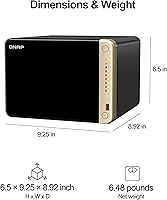
  • Dimensions: The unit measures 10 x 13.5 x 15.25 inches (L x W x H), making it one of the larger desktop NAS units in its class.
  • Weight: The diskless unit weighs 6.48 pounds; total weight will increase substantially once drives are installed.
  • Color: Ships in a matte black finish with a predominantly plastic front panel and metal chassis construction.
  • Backup Software: QNAP NetBak Replicator handles Windows system backups natively, while macOS users can point Time Machine directly at the device.
  • Remote Access: MyQNAPCloud enables secure remote file access and management from outside the local network without requiring manual router port forwarding.
  • RAID Support: QTS supports multiple RAID configurations including RAID 0, 1, 5, 6, 10, and JBOD, as well as QNAP's own RAID-expansion-capable storage pool system.
  • Availability: First listed in December 2022 and currently ranked among the top NAS devices on Amazon with a 4.4-star average across nearly 400 ratings.

Related Reviews
QNAP TS-453E 4-Bay NAS
79%
91%
Network Performance
87%
Processor Performance
68%
Software & OS (QTS)
89%
Build Quality
73%
Value for Money
More
QNAP TS-632X 6-Bay Desktop NAS
76%
91%
Network Performance
86%
Build Quality
72%
Software Experience
68%
Value for Money
89%
Expandability
More
QNAP TS-233 2-Bay NAS Drive
77%
83%
Ease of Setup
78%
Software & App Ecosystem
76%
Performance for File Sharing
87%
Backup Reliability
58%
Media Streaming
More
QNAP TS-433-4G 4-Bay NAS
73%
89%
Network Speed
91%
Storage Capacity
77%
Value for Money
62%
Processor Capability
68%
QTS Software
More
QNAP TVS-h674T i5 6-Bay Desktop NAS

76%
91%
Thunderbolt 4 Performance
88%
Build Quality
86%
Storage Flexibility
67%
Software & OS (QuTS hero)
84%
Real-Time Transcoding
More
QNAP TS-264 8G 2-Bay Desktop NAS
79%
91%
Network Performance
88%
Processor Performance
84%
Software Ecosystem
72%
Value for Money
61%
Ease of Setup
More
QNAP TS-435XeU-4G 4-Bay Rackmount NAS
74%
88%
Network Performance
91%
Build Quality & Physical Design
72%
Software & OS Flexibility
61%
Setup & Initial Configuration
67%
M.2 NVMe Cache Performance
More
QNAP TS-832PX-4G 8-Bay NAS
73%
91%
Networking Performance
88%
Build Quality
74%
Software & Ecosystem
67%
Processor Performance
86%
Storage Capacity & Scalability
More
QNAP TS-133 1-Bay Desktop NAS Drive
73%
83%
Value for Money
81%
Software & Ecosystem
74%
Ease of Setup
78%
Build Quality
62%
Performance
More
Asustor Flashstor 6 FS6706T All-SSD NAS
80%
91%
Noise Level
84%
Storage Performance
86%
Network Throughput
63%
Processor Performance
60%
RAM & Multitasking
More

FAQ

No, the TS-664 ships completely diskless. You will need to purchase drives separately and install them yourself. For a NAS like this, it is strongly recommended to use NAS-rated drives such as those from Seagate IronWolf or Western Digital Red lines, rather than standard desktop drives.

Unfortunately, no. The 8GB DDR4 memory is soldered directly onto the motherboard and cannot be removed or upgraded. If you are planning to run multiple virtual machines or heavy Docker workloads simultaneously, this fixed ceiling is worth factoring into your decision before buying.

It is a solid pick for Plex. The Intel Celeron quad-core processor handles hardware-accelerated transcoding reasonably well, which means it can typically manage one or two simultaneous 4K streams without significant strain. If you are streaming to many clients at once or need aggressive transcoding headroom, results may vary, but for most home setups it performs well above what ARM-based NAS units can offer.

At idle or light load, the fan noise is generally acceptable for a home office environment. However, several users report that under sustained heavy workloads — like large file transfers or active transcoding — the cooling fans become noticeably audible. If you plan to keep this in a living room or bedroom, it is worth considering its placement carefully.

You can absolutely use just one port, and the unit will work fine as a standard gigabit or 2.5GbE connection. The second port is there if you want to set up link aggregation for higher combined throughput or failover redundancy in case one cable or switch port goes down. For most home users, a single 2.5GbE connection is more than sufficient.

QNAP's QTS platform is highly capable and arguably offers more raw flexibility — especially for Docker, virtual machines, and advanced networking. That said, if you are used to Synology's DSM interface, QTS will feel more cluttered and less polished initially. It has more of a learning curve, but most users adapt within a few weeks of regular use.

No. All six bays support hot-swapping, so you can slide out a failed drive and insert a replacement while the unit stays powered on and other users remain connected. As long as your RAID configuration has redundancy built in, the NAS will start rebuilding the array automatically once the new drive is detected.

Yes. The two M.2 NVMe slots can be used either as SSD cache to accelerate your spinning hard drive pool, or as a dedicated all-flash storage pool on their own. The flexibility is genuinely useful — you could run an NVMe-only pool for frequently accessed files while keeping bulk data on slower spinning drives.

It is possible, but this six-bay NAS is not really designed with first-timers in mind. Basic setup — inserting drives, initializing storage, and mapping a network drive — is manageable for most people willing to follow QNAP's documentation. Where it gets more complex is configuring features like remote access, RAID types, or app services. Budget a few hours and expect to consult QNAP's support forums at least once during setup.

It will work perfectly fine with a standard gigabit switch — the network ports on the TS-664 are backward compatible with 1GbE and even 100M connections. You will just be capped at gigabit speeds until you upgrade your switch. If you want to take advantage of the full 2.5GbE throughput, you will need a 2.5GbE-capable switch and a compatible network adapter on your computer as well.