Overview

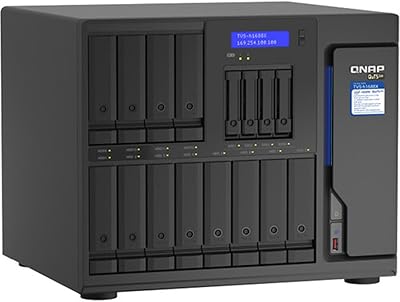
The QNAP TVS-h674T i5 6-Bay Desktop NAS is a workstation-grade storage unit aimed squarely at creative professionals and small teams who need serious local throughput — not a casual home backup box. The headline differentiator here is Thunderbolt 4 connectivity, which sets this Thunderbolt NAS apart from the vast majority of network-attached storage options at any price. One thing buyers need to understand upfront: it ships diskless, meaning you will need to budget for drives separately — a significant additional cost depending on capacity goals. Underneath it all runs QuTS hero, QNAP's ZFS-based operating system, which prioritizes data integrity through features like inline deduplication, compression, and snapshot protection.
Features & Benefits

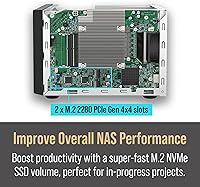
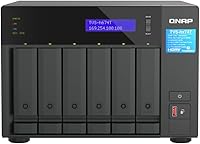
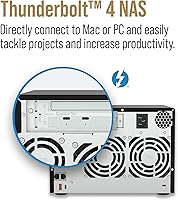
At the heart of the TVS-h674T sits an Intel Core i5-12400 with six cores and twelve threads — enough muscle for real-time 4K transcoding without breaking a sweat, even while other users are pulling files simultaneously. The Thunderbolt 4 port is the real draw for video editors: plug directly into a Mac or Windows workstation and you effectively get DAS-level speed over a single cable. Two M.2 PCIe Gen4 NVMe slots let you set up SSD caching to significantly accelerate HDD-based storage pools. The pair of PCIe Gen 4 expansion slots means you can add faster networking like 10GbE or 25GbE later, and 32GB of DDR4 RAM handles multiple concurrent workloads without strain.

Best For

This QNAP tower is best matched to video production teams who want to edit directly from shared network storage without a dedicated SAN — Thunderbolt 4 makes that practical in a way that standard 1GbE or even 2.5GbE NAS simply cannot. Photographers and media archivists managing multi-terabyte libraries will appreciate the six-bay capacity combined with ZFS-backed redundancy. It also makes a strong case for small studios migrating off older direct-attached storage setups, where the added network flexibility and scalability are worth the investment. That said, if you never plan to use PCIe expansion or Thunderbolt, you are likely paying for headroom you will not use.

User Feedback

Across roughly 109 ratings, the TVS-h674T holds a 4.0-star average — respectable, but the gap from a full five stars is worth understanding. Buyers consistently praise the build quality and the depth of the QNAP software ecosystem, with many noting that Thunderbolt performance delivered exactly what they expected. The friction points, however, are real. QuTS hero has a steep learning curve, and several reviewers noted that initial setup took considerably longer than anticipated for anyone unfamiliar with ZFS-based NAS platforms. Fan noise under sustained load also drew consistent complaints. A recurring theme in lower-rated reviews involves the diskless model: some buyers felt the total cost of ownership was not clearly communicated at the point of purchase.

Pros

  • Thunderbolt 4 delivers near-DAS speeds for direct-attach video editing workflows on Mac or Windows.
  • Six drive bays with ZFS under the hood means strong capacity headroom and robust data integrity protection.
  • The Intel 12th Gen Core i5 handles real-time 4K transcoding without taxing other concurrent operations.
  • Dual M.2 NVMe SSD slots allow cache acceleration that meaningfully speeds up HDD-based storage pools.
  • 32GB of DDR4 RAM handles multiple simultaneous users and virtualization without obvious performance degradation.
  • PCIe Gen 4 expansion slots let you add 10GbE or faster networking as your team or bandwidth needs grow.
  • USB 3.2 Gen 2 ports make ingesting large media files from external drives quick and straightforward.
  • The metal chassis feels durable and built to sit in a studio rack or under a desk for years.
  • QuTS hero snapshot protection gives teams a reliable safety net against accidental deletions or ransomware.

Cons

  • Ships without drives — total cost of ownership is significantly higher than the unit price alone suggests.
  • QuTS hero has a steep learning curve that will frustrate buyers without prior NAS or ZFS experience.
  • Fan noise under sustained workloads is a recurring complaint and may be disruptive in quiet environments.
  • Dual 2.5GbE network ports limit shared network performance unless you invest in faster NICs via PCIe expansion.
  • Setup complexity makes this a poor fit for anyone expecting a quick out-of-box configuration experience.
  • The PCIe expansion capability, while genuinely useful, goes entirely unused by the majority of buyers.
  • QNAP software updates have historically introduced occasional instability, requiring attentive system management.
  • At this price tier, the single Thunderbolt 4 port may feel limiting for studios needing multi-client Thunderbolt access.

Ratings

The scores below reflect AI-driven analysis of verified global user reviews for the QNAP TVS-h674T i5 6-Bay Desktop NAS, with spam, bot-submitted, and incentivized feedback actively filtered out before scoring. Each category is rated on real-world performance patterns drawn from buyers across creative studios, small businesses, and prosumer home setups. Both the genuine strengths and the recurring frustrations are transparently reflected — nothing is padded to look better than it is.

Thunderbolt 4 Performance
91%
For video editors plugging directly into a Mac or Windows workstation, the Thunderbolt 4 connection consistently delivers on its promise — buyers report noticeably faster file transfers and smoother direct-edit workflows compared to standard NAS setups. The low-latency direct-attach experience is the single most praised feature across professional user reviews.
A handful of users noted that real-world throughput depends heavily on the drives and SSD cache configuration, meaning buyers with basic HDD arrays may not fully realize the Thunderbolt speed ceiling. The single Thunderbolt port is also a limitation for teams needing simultaneous direct-attach connections from multiple workstations.
Build Quality
88%
The all-metal chassis feels solid and purposeful — reviewers consistently describe it as a unit that earns its place in a professional studio environment rather than feeling like consumer-grade hardware. Drive bays are sturdy, the fit and finish is tight, and nothing rattles even under heavy workloads.
At over 14 pounds without drives, it is a heavy piece of kit, and the physical footprint at 17 x 16 x 11.5 inches demands meaningful desk real estate. A few buyers noted the exterior design is purely utilitarian, which may matter in client-facing studio spaces.
Storage Flexibility
86%
Six hot-swappable bays combined with two M.2 NVMe slots gives users genuine options — run a pure HDD array, add SSD caching for speed, or build a hybrid pool that evolves with your storage needs. The PCIe expansion slots mean networking and storage architecture can be upgraded without replacing the entire unit.
The diskless configuration means out-of-box utility is zero until drives are purchased and installed, which surprised some buyers expecting a ready-to-run unit. Filling all six bays with quality NAS-rated drives adds a substantial cost on top of the unit price.
Software & OS (QuTS hero)
67%
33%
Users who invested the time to learn QuTS hero consistently praise its depth — ZFS-native snapshots, inline deduplication, and granular permission controls are features that competing NAS operating systems do not match at this level. For IT-literate users, it becomes a reliable and powerful daily driver.
The learning curve is the most frequently cited pain point in negative reviews, with non-technical buyers describing the initial setup as genuinely overwhelming. QNAP's history of firmware updates occasionally introducing instability has also made some users wary about keeping the system current.
Real-Time Transcoding
84%
The six-core Intel i5-12400 handles 4K transcoding workloads well, and buyers using the NAS as a Plex or production media server report smooth playback performance even with multiple streams running simultaneously. The HDMI output adds a bonus local playback option.
Buyers pushing beyond 4K — or running transcoding alongside other CPU-heavy NAS tasks simultaneously — occasionally reported performance dips under peak load. The HDMI port is limited to 4K at 30Hz, which feels modest compared to the rest of the spec sheet.
Noise Level
58%
42%
Under light workloads — like idle network access or background backups — the TVS-h674T runs at an acceptable volume level that most users in a standard office environment would not find distracting during normal work hours.
Under sustained heavy workloads, the cooling fans ramp up significantly, and this was one of the most consistent complaints in user reviews. Buyers using the unit in quiet recording studios or noise-sensitive spaces flagged it as a real operational issue rather than a minor inconvenience.
Value for Money
63%
37%
For professional users who actually use Thunderbolt 4 direct-attach and need ZFS-grade data integrity in a single unit, the total capability represents fair value at this tier — replacing the equivalent setup with separate components would cost more and add complexity.
Casual or semi-professional buyers routinely note that the price feels steep once you add the cost of six drives, and the premium is hard to justify if Thunderbolt 4 is not core to your workflow. Several reviewers explicitly stated they felt the diskless pricing was not communicated clearly enough at point of purchase.
Network Connectivity
69%
31%
Dual 2.5GbE ports cover the needs of most small office environments and support link aggregation for modest bandwidth gains. For teams not yet running 10GbE infrastructure, the built-in ports are a practical starting point.
In a prosumer unit at this price point, the absence of at least one 10GbE port out of the box struck several buyers as a notable omission — particularly for teams sharing large media files over a network without direct Thunderbolt access. Adding 10GbE requires spending extra on a PCIe network card.
Setup Experience
54%
46%
QNAP provides reasonably detailed documentation and a fairly active community forum, which helps users who are willing to research their way through initial configuration. The physical hardware installation of drives is straightforward and tool-friendly.
Multiple reviewers — including those with general tech literacy — described the first-time setup of QuTS hero, storage pool creation, and network share configuration as taking far longer than expected. Buyers with no prior NAS experience should plan for a significant time investment before the unit is production-ready.
Expandability
89%
Two PCIe Gen 4 slots give the TVS-h674T genuine long-term upgrade potential — network adapters, additional M.2 cards, and Fibre Channel connectivity are all on the table without replacing the unit. This is a meaningful advantage for studios that expect their infrastructure needs to evolve.
In practice, the majority of buyers never touch the PCIe slots, and the expandability argument is more compelling on paper than in day-to-day use for smaller teams. Expansion cards are an additional cost, and not all card options are officially validated by QNAP, which can create compatibility uncertainty.
Virtualization Support
77%
23%
With 32GB of DDR4 RAM and a capable six-core processor, this QNAP tower handles running lightweight virtual machines and Docker containers alongside NAS duties reasonably well — useful for studios that want to consolidate a VM or container workload onto a single device.
It is not a purpose-built virtualization server, and buyers who push VM workloads aggressively alongside heavy NAS operations will notice resource contention. The 64GB RAM ceiling also limits how far the virtualization use case can scale on this platform.
Data Integrity & Protection
93%
ZFS under QuTS hero delivers enterprise-grade data protection features including silent corruption detection, snapshot rollback, and inline checksumming — capabilities that traditional RAID-based NAS systems simply do not offer. For archivists and studios managing irreplaceable media assets, this is a genuinely important differentiator.
Accessing the full benefit of ZFS data protection requires correctly configuring storage pools and snapshot schedules during initial setup, which is not automatic. Buyers who rush through setup without understanding ZFS fundamentals may not realize they lack the protection they assumed was active by default.
USB Connectivity
81%
19%
Multiple USB 3.2 Gen 2 ports at 10Gb/s make it practical to connect fast external drives or enclosures directly to the NAS for quick ingestion of large media card dumps or archive transfers — a workflow that photographers and field videographers specifically appreciated.
While the port count is generous, QNAP's device compatibility list for USB-attached storage is not exhaustive, and a few buyers reported inconsistent recognition with certain third-party external drives or hubs. Checking the QNAP compatibility list before purchasing accessories is advisable.
Cooling Efficiency
62%
38%
The cooling system does its job under normal operating conditions, keeping the processor and drives within safe thermal ranges even during prolonged transcoding or backup tasks, which protects hardware longevity over time.
The trade-off for thermal management is acoustic — the fans are aggressive enough under load to be a persistent background presence in quieter spaces. There is limited user control over fan curve profiles through QuTS hero, which frustrated buyers hoping for a quieter operational mode.

Suitable for:

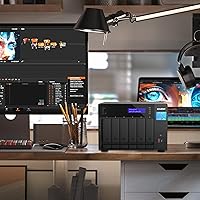
The QNAP TVS-h674T i5 6-Bay Desktop NAS was built for a specific kind of buyer: creative professionals and small teams who treat storage as a core part of their production workflow, not an afterthought. Video editors working with 4K or higher resolution footage will get the most out of the Thunderbolt 4 connection, which allows a direct-attach experience at speeds that standard network ports simply cannot replicate. Photographers and media archivists managing libraries that span multiple terabytes will appreciate the six-bay capacity paired with ZFS-level data integrity, where silent corruption is caught and flagged automatically. Small studios upgrading from an aging direct-attached storage setup will also find this QNAP tower a meaningful step forward — adding genuine network flexibility without sacrificing local speed. Mac-centric workflows in particular benefit here, since Thunderbolt 4 is a native, well-supported connection on Apple hardware, making collaborative editing from shared storage a practical daily reality rather than a theoretical feature.
Not suitable for:

The QNAP TVS-h674T i5 6-Bay Desktop NAS is a hard sell for anyone outside a professional or prosumer context, and buyers should be clear-eyed about that before committing. Home users looking for a simple media server or backup destination will find both the price and the complexity of QuTS hero well beyond what their use case justifies — there are far more approachable NAS options at a fraction of the cost. The diskless configuration is also a genuine sticking point: the unit arrives without drives, meaning you need to separately budget for six HDDs or SSDs, which can substantially increase total outlay. Buyers who lack networking or Linux-adjacent system administration experience should approach with caution, as setting up ZFS storage pools, configuring permissions, and troubleshooting QuTS hero is not a plug-and-play experience. If Thunderbolt 4 connectivity is not a requirement for your workflow, the TVS-h674T's core value proposition weakens considerably, and competing units may offer better value. Finally, those sensitive to fan noise in a quiet home or small office environment should factor that in, as the cooling system under sustained workloads has drawn consistent complaints from real-world users.
Specifications

  • Processor: Powered by an Intel Core i5-12400 with 6 cores and 12 threads, providing enough compute for real-time 4K transcoding alongside concurrent NAS workloads.
  • Memory: Ships with 32GB of DDR4 RAM installed, expandable to a maximum of 64GB for users running virtual machines or heavier multi-user environments.
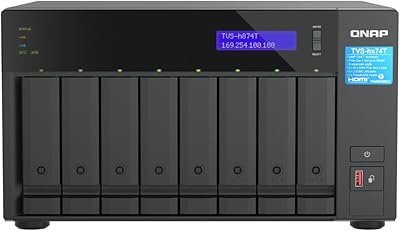
  • Drive Bays: Provides 6 hot-swappable bays compatible with both 3.5-inch and 2.5-inch SATA hard drives and SSDs, sold without any drives included.
  • M.2 Slots: Includes 2 M.2 PCIe Gen4 x4 NVMe slots that can be configured for SSD caching to accelerate HDD pools or as a dedicated all-flash storage tier.
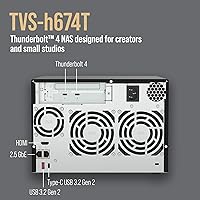
  • Thunderbolt 4: Features one Thunderbolt 4 port running at up to 40Gb/s, enabling direct-attach storage connections to compatible Mac or Windows workstations.
  • Network Ports: Equipped with dual 2.5GbE RJ45 network ports for standard LAN connectivity, with additional speed achievable through PCIe network card upgrades.
  • PCIe Expansion: Houses two PCIe Gen 4 expansion slots for installing optional network adapters, QM2 add-in cards, or Fibre Channel cards to extend performance.
  • USB Ports: Offers multiple USB 3.2 Gen 2 ports in both Type-A and Type-C formats, each supporting transfer speeds of up to 10Gb/s for external drives and enclosures.
  • Video Output: Includes one HDMI 1.4b port supporting 4K output at 30Hz, suitable for connecting a display for local media playback or direct desktop use.
  • Operating System: Runs QNAP's QuTS hero, a ZFS-based NAS operating system that provides inline data deduplication, compression, encryption, and snapshot protection.
  • Form Factor: Designed as a desktop tower unit constructed from a metal chassis, intended for placement on a desk or in a studio equipment area.
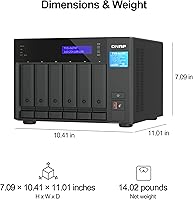
  • Dimensions: Measures 17 x 16 x 11.5 inches (L x W x H), making it a substantial unit that requires dedicated desk or shelf space.
  • Weight: Weighs 14.02 pounds without drives installed, so factor in additional weight when planning placement with a full complement of six HDDs.
  • Drive Configuration: Ships completely diskless — no hard drives or SSDs are included, and buyers must source and install compatible drives separately before use.
  • Max Raw Capacity: Raw storage capacity depends entirely on the drives installed across the six bays, with QNAP supporting large-capacity NAS-grade drives from major manufacturers.
  • Display Output: Supports 4K media playback via the HDMI output, allowing multimedia content stored on the NAS to be played back directly on an attached display.
  • Compatibility: Compatible with both Mac and Windows workstations for network and Thunderbolt access, with SMB protocol support enabling cross-platform file sharing and collaboration.

Related Reviews

QNAP TVS-h874T-i9-64G 8-Bay NAS
83%
92%
Performance
68%
Setup/Installation
89%
Build Quality
85%
Software/Firmware Experience
80%
Usability/Ease of Use
More
QNAP TS-453E 4-Bay NAS
79%
91%
Network Performance
87%
Processor Performance
68%
Software & OS (QTS)
89%
Build Quality
73%
Value for Money
More
QNAP TVS-h874 i7-32G 8-Bay NAS
80%
93%
Processing Performance
91%
Storage Flexibility
89%
ZFS & OS Reliability
84%
Networking Capability
88%
RAM & Virtualization Headroom
More
QNAP TS-632X 6-Bay Desktop NAS
76%
91%
Network Performance
86%
Build Quality
72%
Software Experience
68%
Value for Money
89%
Expandability
More
TerraMaster F6-424 Max NAS Storage 6-Bay, Core i5, 8GB RAM
85%
89%
Performance
93%
Data Transfer Speed
85%
Build Quality
70%
Ease of Setup
90%
Noise Level
More
Asustor Lockerstor 6 Gen3 AS6806T 6-Bay NAS
79%
93%
Raw Throughput Performance
91%
NVMe Cache Flexibility
89%
Network Connectivity
88%
CPU & Processing Headroom
86%
Build Quality & Chassis
More
Asustor Flashstor 6 FS6706T 6-Bay NAS Storage
85%
86%
Performance
88%
Ease of Setup
90%
Network Speed (Dual 2.5GbE)
81%
Build Quality
83%
Expandability (RAM & Storage)
More
Asustor Flashstor 6 Gen2 NAS
75%
93%
Storage Performance
88%
Network Connectivity
47%
USB4 Versatility
84%
Processor Capability
81%
RAM & ECC Support
More
Synology DS620slim 6-Bay NAS Enclosure
82%
91%
Build Quality
93%
Software & DSM Experience
88%
Storage Performance
84%
Drive Bay Flexibility
63%
Value for Money
More
QNAP TVS-h1288X-W1250-16G NAS
84%
93%
Performance
65%
Setup and Installation
89%
Data Integrity (ECC RAM)
91%
Network Speed (10GbE Ports)
88%
Storage Capacity (12-bay Setup)
More

FAQ

No, the TVS-h674T ships completely diskless. You will need to purchase drives separately and install them before the unit is usable. Most buyers opt for NAS-rated drives from brands like Seagate IronWolf or WD Red, and with six bays to fill, drive costs can add up significantly — factor that into your total budget from the start.

Honestly, it takes patience. QuTS hero is a capable operating system, but it is not designed for beginners. Setting up ZFS storage pools, configuring user permissions, and getting network shares running the way you want can take a full day or more if you are coming in cold. There is solid documentation on QNAP's support site and an active community forum, but expect a real learning investment.

Yes, and this is one of the strongest use cases for this QNAP tower. Plug it into a Thunderbolt 4-equipped Mac and you can mount it as a direct-attach volume using the SMB over Thunderbolt protocol, getting speeds far beyond what a standard network connection allows. It works well for editing video or managing large photo libraries directly from the NAS.

Thunderbolt 4 has a theoretical ceiling of 40Gb/s, but your actual throughput will depend heavily on the drives you install and whether you have NVMe SSD caching enabled. With a well-configured SSD cache and fast NAS drives, sequential read and write speeds that outpace a standard 10GbE network connection are realistic. That said, the bottleneck usually shifts to your drive array, not the Thunderbolt port itself.

Yes, and this is exactly the workflow the TVS-h674T is designed to support. With Thunderbolt 4 direct-attach and a properly configured storage pool — ideally with NVMe caching — you should be able to edit 4K footage in real time from the NAS in most common editing applications. Results can vary based on codec, bitrate, and the number of simultaneous streams.

It is a legitimate consideration. Under light loads the unit runs relatively quietly, but once you push it with sustained read/write operations or transcoding tasks, the cooling fans ramp up noticeably. Several buyers have flagged this specifically. If you work in a noise-sensitive environment — a recording space, for example — you may want to think about placement or acoustic isolation.

Yes, that is exactly what the dual PCIe Gen 4 slots are there for. You can install a 10GbE, 25GbE, or even faster network card to give the unit significantly more bandwidth over a standard LAN connection. Keep in mind you would also need a compatible switch to take advantage of the faster networking on your end.

Running QuTS hero, the QNAP TVS-h674T i5 6-Bay Desktop NAS supports ZFS-native RAID configurations including single, mirror, RAID-Z1, RAID-Z2, and RAID-Z3 equivalents, in addition to traditional QNAP RAID modes. ZFS RAID offers stronger data integrity protection than conventional RAID implementations because it detects and corrects silent data corruption automatically.
Yes, with 32GB of RAM and a six-core processor, this unit has enough resources to run lightweight virtual machines through QNAP's Virtualization Station and containers via Container Station. It is not a replacement for a dedicated server, but for running a few containers or a low-demand VM alongside NAS duties, it handles the workload reasonably well.

Yes, all six drive bays support hot-swapping, meaning you can pull a failed drive and replace it without powering down the unit. As long as your storage pool has sufficient redundancy configured — RAID-Z1 at minimum — the array will rebuild onto the new drive automatically. This is one of the practical advantages of a ZFS-based system for production environments where downtime is costly.