Overview

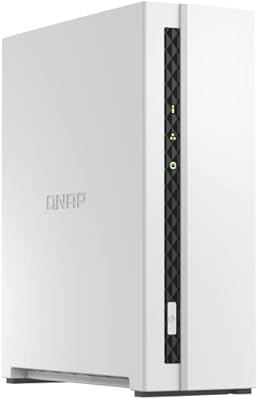
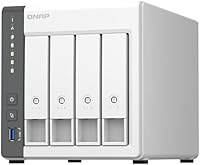
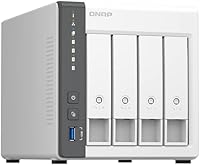
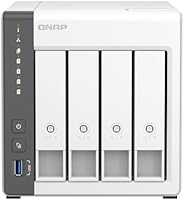
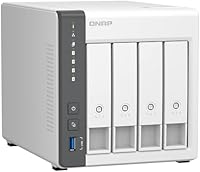
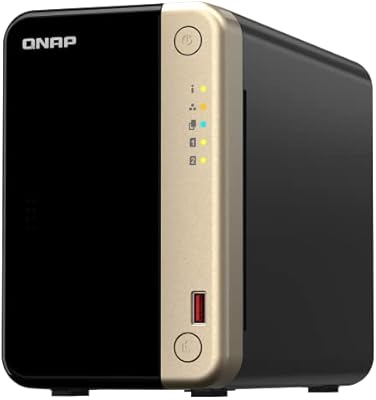
The QNAP TS-433-4G 4-Bay NAS sits comfortably in the entry-to-mid-range home storage space, designed for families and small home offices that want a central place to store, back up, and access files. One thing to know upfront: it ships without drives, so you will need to budget for those separately — but that also means you can choose drives sized exactly to your needs. Under the hood, an ARM Cortex-A55 quad-core chip handles everyday NAS duties well, and a 2.5GbE network port gives it a real edge over older gigabit-only boxes. Just don't expect it to run heavy virtual machines or transcode multiple 4K streams without hitting its limits.

Features & Benefits

The 2.5GbE port is arguably the headline feature here — on a local network with a compatible switch or router, you can push file transfers noticeably faster than a standard gigabit NAS allows. The 4 GB DDR4 RAM is enough for file sharing, running a basic Plex server, or using a handful of QNAP apps, though it is not expandable, so power users should factor that in. QNAP's QTS operating system has a genuinely rich app ecosystem, but first-time NAS users should expect a real learning curve during initial setup. On the backup side, Time Machine and NetBak Replicator cover both Mac and Windows households neatly, and the two USB 2.0 ports let you attach an external drive or connect a UPS for power protection.

Best For

This home NAS makes the most sense for a few specific types of buyers. If your household has a mix of Macs and Windows PCs generating photos, videos, and documents that currently live scattered across multiple devices, this unit ties it all together with automated on-premises backups — no monthly cloud bill required. It also works well for anyone making their first jump into RAID storage after years of trusting a single external drive. Small home offices needing a shared file server with remote access will find it capable and affordable. That said, if you are primarily chasing Plex 4K transcoding or plan to run multiple virtual machines, the ARM processor will hit its ceiling before your ambitions do.

User Feedback

Across roughly 316 ratings, the TS-433-4G holds a 4.1-star average — a fair reflection of its strengths and real trade-offs. Buyers consistently praise the easy drive installation, the noticeably quick local transfer speeds once the 2.5GbE connection is live, and the unit's solid build quality for the price. Where things get mixed is the software side: QTS is powerful, but a meaningful share of three-star reviews point to a steep initial setup process that can frustrate anyone new to NAS devices. Fan noise comes up occasionally too — not loud, but present enough that a bedroom or living room placement may not suit everyone. A few users also flag that the ARM chip shows strain when several resource-hungry apps run simultaneously.

Pros

  • The 2.5GbE port delivers noticeably faster local transfers than standard gigabit NAS units at a similar price point.
  • Four drive bays with support for up to 22 TB per drive gives the home NAS serious long-term storage headroom.
  • Native Time Machine support and NetBak Replicator cover both Mac and Windows backups without any third-party software.
  • The diskless design lets you choose your own drives, giving full control over capacity, speed, and budget.
  • MyQNAPCloud makes remote file access straightforward without requiring advanced networking knowledge.
  • Build quality feels solid and durable for the price — users consistently note it does not feel cheap.
  • The QTS app ecosystem is genuinely extensive, supporting Plex, Surveillance Station, and a wide range of add-ons.
  • Physical drive installation is quick and tool-free, keeping the initial hardware setup simple even for beginners.
  • Ranked among the top five NAS devices on Amazon with over 300 real-world ratings backing up its reliability.

Cons

  • The ARM processor hits a real performance ceiling when multiple resource-intensive QNAP apps run at the same time.
  • 4 GB DDR4 RAM is not user-expandable, which limits how much the TS-433-4G can grow with your needs over time.
  • QTS initial configuration is genuinely complex and can take several hours for users with no prior NAS experience.
  • USB ports are USB 2.0 only, making external drive transfers over USB significantly slower than the internal network speeds.
  • Fan noise, while not loud, is consistently noticeable enough to be disruptive in quiet living spaces or bedrooms.
  • Software transcoding of 4K video is unreliable under load — Plex users will need clients that support direct play.
  • MyQNAPCloud remote access works best when properly port-forwarded; misconfigured setups can introduce security exposure.
  • No drives included means the actual out-of-pocket cost is considerably higher than the unit price alone suggests.
  • Occasional reports of QTS firmware updates causing temporary app instability, requiring manual intervention to resolve.

Ratings

The scores below for the QNAP TS-433-4G 4-Bay NAS were produced by AI after systematically analyzing verified global buyer reviews, with spam, bot-generated submissions, and incentivized feedback filtered out before any scoring was applied. Every category reflects real ownership experiences across a wide range of household and home office use cases, not marketing claims. Genuine strengths and recurring frustrations carry equal weight throughout.

Network Speed
89%
The 2.5GbE port is the single most praised hardware feature among verified buyers. Users with compatible switches consistently report sustained local transfer rates that make moving large video libraries or running nightly full-system backups noticeably faster than anything a standard gigabit NAS can deliver at this price tier.
Reaching those speeds requires a 2.5GbE-capable switch or router on the receiving end, which many home networks do not yet have. Buyers without upgraded infrastructure will see no real-world speed advantage over a conventional NAS until they invest in compatible networking hardware.
Storage Capacity
91%
Four bays with per-drive support up to 22 TB gives this home NAS exceptional long-term headroom for a household device. Families accumulating decades of raw photos, 4K videos, or large media libraries can expand one bay at a time, spreading the cost of drives across months rather than committing to maximum capacity upfront.
Every byte of usable storage requires purchasing drives separately, and the total out-of-pocket cost climbs quickly once NAS-rated drives are factored in. Buyers who did not account for drive costs at purchase time have cited the final tally as significantly higher than the unit price alone suggested.
Value for Money
77%
23%
Buyers who go in with a clear understanding of the diskless model generally feel the hardware punches above its price bracket, particularly given the 2.5GbE port and four-bay capacity. For households replacing cloud subscriptions with on-premises storage, the long-term cost savings over recurring monthly fees shift the value calculation meaningfully in its favor.
The diskless design creates a real sticker-shock problem for buyers who did not read carefully before purchasing. Adding two or four quality NAS drives pushes total spend well beyond the unit price, and the fixed 4 GB RAM — which cannot be upgraded later — starts to feel like a cost-cutting compromise as usage demands grow.
Processor Capability
62%
38%
For the workloads this device was genuinely designed for — shared file access, scheduled backups, photo organization, and a couple of lightweight apps running quietly in the background — the ARM Cortex-A55 chip holds up reliably. Most family households using it as a backup and media storage hub will not encounter performance issues in normal day-to-day operation.
Stack up demanding tasks simultaneously and the ARM processor reveals its limits fast. Users running active Plex transcoding alongside Docker containers and multiple QNAP apps have reported sluggish response times and occasional service interruptions. The one-star and two-star reviews skew heavily toward buyers who expected home-lab versatility and found a clear performance ceiling instead.
QTS Software
68%
32%
Once past the learning curve, QTS delivers a genuinely capable management environment with granular controls over permissions, RAID, scheduled tasks, and a wide app library. Long-term users who invest the time upfront consistently describe it as a reliable daily driver that rarely needs hands-on attention once the initial configuration is locked in.
First-time NAS owners frequently describe the initial QTS experience as disorienting. The interface layers networking concepts, storage terminology, and permission structures in ways that assume prior familiarity, and multiple three-star reviews cite configuration complexity as the reason the unit sat unused for several days after unboxing before the buyer sought outside help.
Build Quality
82%
18%
The chassis feels more substantial than the price tier would suggest, with minimal flex and drive trays that click in with reassuring firmness. For a device meant to run continuously on a shelf or in a cabinet for years, verified buyers across many reviews note that the build instills confidence in its long-term durability.
The exterior is entirely plastic, and buyers comparing it directly to metal-chassis NAS units from other brands tend to find the material aesthetically underwhelming. A small share of users also noted that drive tray retention felt slightly less precise after prolonged repeated insertions, though reports of actual structural failure are rare.
Initial Setup
66%
34%
Getting the hardware assembled — inserting drives and connecting an Ethernet cable — is quick and genuinely approachable even without technical experience. QNAP's online setup documentation is thorough, and buyers who followed it step by step during the software portion report a smoother experience than those who skipped it.
The jump from physically assembled unit to a properly configured, secured NAS involves multiple deliberate steps across QTS menus, and the margin for consequential errors is real. Skipping security hardening during setup — such as leaving default credentials in place — is a documented risk that casual buyers are not always warned about prominently enough.
Backup Performance
81%
19%
Mixed Mac and Windows households report that Time Machine and NetBak Replicator both work reliably once set up, running incremental backups quietly in the background without interrupting active work sessions. Users who replaced cloud backup subscriptions with this setup specifically mention consistency and speed as pleasant surprises.
Users needing more advanced backup behavior — detailed versioning, cloud mirroring, or cross-device sync beyond basic system backup — typically need to install additional QNAP apps to fill those gaps. Each added application loops back into the broader QTS learning curve and nudges closer to the 4 GB RAM ceiling under concurrent use.
Remote Access
74%
26%
For typical home users, MyQNAPCloud delivers on its promise — pulling a document while traveling or checking on a file from a work laptop works reliably through the web portal and mobile app without requiring any router configuration. The setup process for cloud relay access is among the more straightforward steps in the entire QTS experience.
Privacy-conscious users take issue with cloud-relay traffic routing through QNAP's servers rather than connecting directly to the home unit. Configuring a direct VPN or manual port forwarding for a more private connection path is possible but introduces a layer of networking complexity that a meaningful share of buyers did not anticipate needing.
App Ecosystem
76%
24%
QNAP's App Center spans a genuinely wide range of categories — media servers, download managers, surveillance tools, note-taking, cloud sync, and more — giving users who enjoy customizing their setup a lot to work with. Buyers who treat the TS-433-4G as an expandable platform rather than a fixed appliance tend to rate this aspect highly.
App quality varies considerably across the catalog, and some third-party listings require patience to configure correctly. The fixed 4 GB RAM ceiling also means that running several applications simultaneously introduces performance drag, so the apparent breadth of the ecosystem comes with a hardware constraint that limits how aggressively it can be explored in practice.
Noise & Acoustics
64%
36%
In a moderately active space — a home office during work hours or a kitchen shelf — the fan noise is easy to tune out and rarely mentioned as a distraction. Users who placed the unit in a dedicated equipment closet or media cabinet report no acoustic issues at all over extended operation.
In genuinely quiet environments — a bedroom at night or a silent living room — the constant low fan hum becomes noticeable enough that some buyers have relocated the unit after a few weeks. Spinning hard drives add to the acoustic profile, and users running high-RPM drives amplify the combined noise level further.
Power Efficiency
85%
The ARM architecture keeps idle power consumption lower than x86-based NAS alternatives, which matters for a device running continuously around the clock. Users who track household electricity usage report favorably on the unit's efficiency during low-activity periods, and scheduled sleep modes help reduce draw further during overnight hours.
Power consumption rises meaningfully when all four drives are populated and active under backup workloads, narrowing the efficiency advantage during peak use windows. Buyers running a full four-drive configuration with large-capacity NAS drives should expect real-world draw to exceed what the bare unit specification implies.
Media Streaming
61%
39%
Direct-play media streaming works reliably for households where all devices can natively handle the stored file formats. Plex in direct-play mode on a smart TV or media player runs without buffering for standard video content, and DLNA playback for music and basic video performs consistently across the local network.
Software transcoding is where the streaming experience consistently falls apart. Asking the ARM processor to convert video on the fly for incompatible client devices — particularly at 1080p or 4K — results in buffering, dropped frames, or outright playback failure. Households with a mix of devices that cannot all direct-play the same formats will encounter this limitation regularly.
Expandability
54%
46%
The four-bay layout does offer meaningful room to scale raw storage capacity over time. Several buyers specifically chose this unit over a two-bay model for this reason, starting with two drives and using the open bays as a built-in upgrade path without needing to migrate to a new device when storage needs grew.
Beyond adding drives, expansion options hit a firm wall. RAM is fixed at 4 GB with no upgrade path whatsoever, USB ports are USB 2.0 only with no USB 3.x option available, and there is no PCIe slot for adding a 10GbE card or NVMe cache drive. Buyers thinking long-term about hardware growth will find this model constraining within a few years.
Security Features
72%
28%
QTS ships with a solid baseline security toolkit that includes two-factor authentication, IP-based login blocking, HTTPS management access, and network access controls. Users who take the time to work through QNAP's security hardening checklist during setup report feeling confident about the unit's posture even when accessed over the open internet.
QNAP as a platform has been targeted by high-profile ransomware campaigns in recent years, and the default out-of-box configuration is not hardened against known attack vectors. Staying protected requires consistent firmware updates and active monitoring of QNAP security advisories — an ongoing maintenance responsibility that some buyers find more demanding than they expected from a home storage device.

Suitable for:

The QNAP TS-433-4G 4-Bay NAS is a strong fit for households and small home offices that want to stop relying on scattered external drives or expensive cloud subscriptions and finally have one central place for everything. Families with large photo and video libraries will appreciate the ability to store, organize, and access files from any device on the network, while the built-in Time Machine and NetBak Replicator support means both Mac and Windows users get automated backups without any extra software to hunt down. The 2.5GbE networking port is a genuine practical advantage here — if your router or switch supports it, local file transfers are noticeably faster than what a standard gigabit NAS delivers, which matters when you are moving large video files or doing full system backups. It also suits anyone stepping into RAID storage for the first time: four bays give you room to grow, and the QTS ecosystem, while involved, rewards the learning curve with real flexibility. Budget-minded buyers will find the diskless model a smart entry point, since you can start with two drives and add more as your storage needs expand.

Not suitable for:

If your main goal is running a Plex server that transcodes 4K content on the fly, the ARM Cortex-A55 processor in the QNAP TS-433-4G 4-Bay NAS will likely frustrate you — direct play works fine, but software transcoding under load pushes this chip closer to its limit than most power users will accept. The same applies to anyone planning to run multiple virtual machines, stack up Docker containers aggressively, or use this box as a lightweight home lab server; the non-expandable 4 GB RAM ceiling becomes a hard constraint quickly in those scenarios. First-time NAS buyers who want something genuinely plug-and-play should also weigh their options carefully, as QTS has a steeper initial configuration curve compared to more beginner-oriented platforms, and a poorly configured setup can create real headaches. Users sensitive to ambient noise should note that the fan, while not disruptive in a home office, is audible enough to be noticeable in a quiet bedroom or living room. Finally, anyone expecting drives to be included will need to add that cost to their budget — the unit ships completely diskless.

Specifications

  • Processor: Powered by an ARM Cortex-A55 quad-core CPU running at 2.0 GHz, appropriate for file serving, backup tasks, and light application workloads.
  • RAM: Includes 4 GB of DDR4 memory soldered directly to the board, which cannot be upgraded or expanded by the user.
  • Drive Bays: Four internal drive bays are provided; the unit ships completely diskless and requires separately purchased drives before it can be used.
  • Max Capacity: Each bay accepts drives up to 22 TB, giving a theoretical raw maximum of 88 TB across all four bays before RAID overhead.
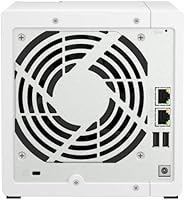
  • Network Ports: Equipped with one 2.5GbE RJ-45 port and one 1GbE RJ-45 port, allowing faster-than-standard local network transfers when paired with a compatible switch.
  • USB Ports: Two USB 2.0 Type-A ports are available for connecting external storage devices or a compatible uninterruptible power supply.
  • Drive Types: Compatible with 3.5-inch and 2.5-inch SATA hard drives and SSDs; NAS-rated drives are strongly recommended for reliable continuous operation.
  • RAID Support: Supports RAID 0, 1, 5, 6, and 10 configurations, as well as JBOD, configurable through the QTS management interface.
  • Operating System: Runs QNAP QTS, a Linux-based NAS platform with a browser-accessible management interface and an extensive library of installable applications.
  • OS Compatibility: Works with Windows and macOS for network drive mounting, file access, and automated system backups.
  • Backup Support: Native macOS Time Machine integration and QNAP NetBak Replicator software for Windows provide automated, on-premises backup for both platforms.
  • Remote Access: MyQNAPCloud provides cloud-relay remote access and DDNS support, enabling off-site file access without manual router port-forwarding.
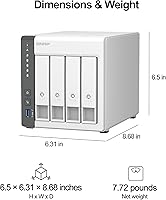
  • Dimensions: The enclosure measures 8.62″ x 6.3″ x 6.65″, making it a compact but not pocket-sized desktop unit.
  • Weight: The unit weighs 4.56 pounds without any drives installed; total weight will increase depending on the number and type of drives added.

Related Reviews

QNAP TS-435XeU-4G 4-Bay Rackmount NAS
74%
88%
Network Performance
91%
Build Quality & Physical Design
72%
Software & OS Flexibility
61%
Setup & Initial Configuration
67%
M.2 NVMe Cache Performance
More
QNAP TS-453E 4-Bay NAS
79%
91%
Network Performance
87%
Processor Performance
68%
Software & OS (QTS)
89%
Build Quality
73%
Value for Money
More
QNAP TS-832PX-4G 8-Bay NAS with 10GbE SFP+ and 2.5GbE
85%
91%
Performance
94%
Network Connectivity
89%
Ease of Setup
85%
Expandability (RAM)
88%
Data Security (Encryption)
More
QNAP TS-632X 6-Bay Desktop NAS
76%
91%
Network Performance
86%
Build Quality
72%
Software Experience
68%
Value for Money
89%
Expandability
More
QNAP TS-932PX-4G 9-Bay NAS
79%
93%
Network Performance
88%
Storage Flexibility
74%
Software Ecosystem (QTS)
71%
Value for Money
86%
Build Quality & Hardware
More
QNAP TS-233 2-Bay NAS Drive
77%
83%
Ease of Setup
78%
Software & App Ecosystem
76%
Performance for File Sharing
87%
Backup Reliability
58%
Media Streaming
More
QNAP TR-004U 4-Bay Rackmount NAS Expansion
78%
88%
Build Quality
91%
RAID Configuration
86%
Ecosystem Integration
67%
DAS Mode Usability
83%
Drive Tray Security
More
QNAP TS-264 8G 2-Bay Desktop NAS
79%
91%
Network Performance
88%
Processor Performance
84%
Software Ecosystem
72%
Value for Money
61%
Ease of Setup
More
QNAP TS-133 1-Bay Desktop NAS Drive
73%
83%
Value for Money
81%
Software & Ecosystem
74%
Ease of Setup
78%
Build Quality
62%
Performance
More
Asustor Lockerstor 4 Gen3 AS6804T NAS
78%
93%
Raw Performance
91%
Network Throughput
89%
Memory & Data Integrity
87%
NVMe Cache Flexibility
88%
Build Quality
More

FAQ

No — the unit ships completely diskless. You will need to buy compatible 3.5-inch or 2.5-inch SATA drives separately and install them yourself before the NAS can store anything. The practical upside is that you control exactly how much storage you start with and can add more drives later as your needs grow.

NAS-rated drives like the Seagate IronWolf or Western Digital Red series are the standard recommendation. Standard desktop drives can technically work, but they are not engineered for the always-on operation a NAS demands and tend to fail sooner in that environment. Each bay supports drives up to 22 TB, so you have plenty of room to scale.

Yes, but with an important caveat. This home NAS handles Plex well when your devices can direct-play the video files without any conversion. The ARM processor struggles with software transcoding — the process of converting video in real time for a device that cannot natively play the original format. If your setup relies heavily on transcoding, especially at 4K, you will likely run into buffering and performance issues.

The hardware side is genuinely straightforward — sliding drives in and connecting an Ethernet cable takes about 15 minutes. The software setup through QTS takes considerably more patience. Configuring shared folders, user permissions, and apps is not complicated once you understand the logic, but first-timers should set aside a few hours and keep QNAP's documentation open. It is not a plug-and-play appliance.

Yes, both platforms are fully supported simultaneously. Mac users can point Time Machine directly at the NAS for automated backups, and Windows users can run QNAP's NetBak Replicator for the same result. Both can also mount shared folders as network drives and access files from the same pool of storage concurrently.

Yes. QNAP's MyQNAPCloud service handles remote access through a web browser or mobile app and does not require you to configure port forwarding on your router manually. If you prefer a direct connection for speed or privacy reasons, manual port forwarding is also supported but requires some router familiarity. Either way, review QNAP's security hardening guide before exposing the unit to external access.

Most users describe a low, steady hum that is noticeable in a quiet room but not intrusive in an active workspace. It is not silent equipment, so placing it in a bedroom or a quiet living room corner where ambient noise is low will likely be noticeable over time. A home office shelf or a dedicated equipment closet is a more practical location for most setups.

No. The 4 GB DDR4 RAM is soldered onto the motherboard and there is no slot for expansion. For everyday file sharing, photo backup, and basic app use, 4 GB is sufficient. If you are planning to run several memory-hungry applications simultaneously, that hard ceiling is a real consideration and worth factoring into your buying decision upfront.

The TS-433-4G supports RAID 0, 1, 5, 6, 10, and JBOD. For most home users starting with two drives, RAID 1 gives you a mirrored copy of your data for single-drive failure protection. With three or four drives, RAID 5 is a popular choice because it balances usable storage capacity with redundancy. One important reminder: RAID protects against a drive dying, but it is not a substitute for a proper backup — accidental deletion or ransomware will affect all mirrored copies equally.

The QNAP TS-433-4G 4-Bay NAS stands out primarily because of its 2.5GbE port, which similarly priced Synology units in the same tier often do not include, giving it a real local transfer speed advantage. On the software side, Synology's DSM operating system is widely regarded as more intuitive for first-time NAS buyers, while QNAP's QTS offers a broader built-in application library out of the box. Neither platform is objectively superior — the right choice largely comes down to whether you value a gentler learning curve or a richer native app ecosystem.

Where to Buy

Best Buy
In stock $515.83
Newegg.com
In stock $549.99
Microless.com
In stock $623.01
DirectDial
In stock $431.00
Compu Devices
In stock $528.01
Grooves-Inc.com
In stock $542.54
serverblink.com
In stock $556.06
NAS Headquarters
In stock $645.00