Overview

The QNAP TS-435XeU-4G 4-Bay Rackmount NAS is built for one specific problem: getting serious network storage into a rack that simply doesn't have the depth for full-size units. At just 11.5 inches deep, it fits where standard 1U appliances won't. Under the hood sits a Marvell OCTEON TX2 quad-core ARM processor at 2.2 GHz, paired with 4GB DDR4 RAM expandable to 32GB as workloads grow. Worth flagging upfront — the unit ships diskless, so you'll need to budget for drives separately, a detail that catches some buyers off guard. It's a premium-tier SMB and edge storage platform built around a compact metal chassis.

Features & Benefits

Where the TS-435XeU earns its price tag is in the networking stack. The dual 2.5GbE ports handle mixed-speed environments well — whether connecting gigabit legacy clients or 2.5G-capable workstations, file transfers stay fast without a switch upgrade. The dual 10GbE ports serve bandwidth-hungry tasks like video editing workflows or large database syncs. Two M.2 slots offer SSD cache acceleration for mechanical drives, though these run on PCIe Gen 3 x1 lanes, so throughput won't match a full NVMe connection — worth knowing before buying. On the software side, QNAP's QTS platform covers ransomware snapshot protection, cloud backup via Boxafe, and IP camera recording through QVR Pro.

Best For

This rackmount NAS fits a fairly specific buyer profile. IT administrators dealing with shallow rack enclosures — wall-mount cabinets or compact network closets — will find the short-depth design immediately practical. It's equally well-suited to small and medium businesses that need fast shared storage across teams without investing in a full-depth server rack. Organizations using Microsoft 365 or Google Workspace that want a locally controlled backup will find Boxafe makes that relatively straightforward. Teams combining IP surveillance with shared file storage benefit from having both consolidated in one box. That said, first-time NAS users should expect a real learning curve with QNAP's QTS software.

User Feedback

Owner sentiment around this QNAP unit is cautiously positive, but not without nuance. Network throughput and build quality — the all-metal chassis in particular — draw consistent praise, and buyers who specifically needed short-depth rack compatibility frequently describe that as a genuine relief. On the other side, the QTS operating system draws mixed reactions. Long-term owners report that firmware updates occasionally introduce bugs that take a few patch cycles to sort out, and first-time QNAP users often describe initial setup as more involved than expected. Fan noise at load is another recurring mention, worth considering for office deployments. A few buyers also compare value unfavorably against similarly priced Synology rackmount alternatives.

Pros

  • The 11.5-inch short-depth chassis solves a real problem for admins working with shallow racks and wall-mount enclosures.
  • Dual 10GbE ports provide serious bandwidth headroom for video editing teams and large file transfers.
  • Dual 2.5GbE ports handle mixed-speed client environments without requiring a full switch upgrade.
  • The all-metal build feels solid and rack-ready, not like a repackaged desktop unit.
  • QVR Pro and Boxafe are both included without additional licensing, adding genuine value for SMB buyers.
  • RAM is expandable up to 32GB, giving the unit room to grow alongside more demanding workloads.
  • Snapshot-based ransomware protection is built in and configurable without third-party software.
  • M.2 SSD caching noticeably accelerates repeated read workloads on mechanical drive arrays.
  • At #34 in the NAS category, buyer volume provides a meaningful community knowledge base for troubleshooting.

Cons

  • QTS has a steep learning curve that regularly frustrates first-time NAS administrators during setup.
  • The unit ships diskless — four drives must be budgeted separately, which meaningfully raises total deployment cost.
  • Firmware updates have a documented history of introducing temporary instability in production environments.
  • Fan noise under heavy load is frequently cited as disruptive in open-plan or office-adjacent installations.
  • M.2 slots run on PCIe Gen 3 x1 lanes, capping NVMe throughput well below what modern SSDs can deliver.
  • Direct technical support quality has been described as inconsistent, with slow response times reported by multiple buyers.
  • The base 4GB RAM configuration feels constrained when running containers, surveillance, and file sharing simultaneously.
  • Buyers without a short-depth rack requirement may find better software polish and stability with competing brands at the same price.
  • Boxafe seat and licensing limits require careful reading before deployment to avoid unexpected costs at scale.

Ratings

The QNAP TS-435XeU-4G 4-Bay Rackmount NAS scores below are generated by AI after systematically analyzing verified buyer reviews from around the world, with spam, incentivized, and bot-flagged submissions filtered out before scoring. The result reflects where this unit genuinely excels and where real owners have run into friction — no cherry-picking. Strengths in networking and physical design are weighed honestly against software complexity and value concerns.

Network Performance
88%
Buyers running mixed 2.5GbE and 10GbE environments consistently report that throughput holds up well under simultaneous multi-user file access. IT admins moving large media libraries or database backups over 10GbE describe transfer speeds that comfortably saturate their links without bottlenecking on the NAS side.
A handful of users noted that achieving peak 10GbE throughput required careful network switch pairing and jumbo frame configuration — not plug-and-play for less experienced admins. A few also flagged that the 2.5GbE ports occasionally needed driver adjustments on certain client machines.
Build Quality & Physical Design
91%
The all-metal chassis draws strong praise across buyer cohorts, with multiple reviewers specifically noting how solid it feels compared to plastic-bodied alternatives at similar price points. The short-depth form factor — just 11.5 inches — was described as a genuine relief by IT admins working with wall-mount or shallow network cabinets.
Despite the solid construction, a few buyers found the drive tray latching mechanism to feel slightly less refined than expected at this price level. Rail kit compatibility for various rack brands also generated a handful of complaints about fitment requiring trial and error.
Software & OS Flexibility
72%
28%
QNAP QTS offers a genuinely broad feature set — snapshot-based ransomware protection, Boxafe cloud backup, and QVR Pro surveillance are all included without extra licensing costs, which SMB buyers appreciated. Power users running virtualization or container workloads via QTS also praised the platform's versatility compared to more locked-down NAS operating systems.
First-time QNAP users consistently flag the learning curve as steeper than expected, with QTS menus described as dense and sometimes counterintuitive. Long-term owners noted that firmware updates have occasionally introduced instability that required rolling back, which erodes confidence in production deployments.
Setup & Initial Configuration
61%
39%
Buyers with prior NAS administration experience — particularly those coming from other QNAP devices — generally found the initial setup process manageable, with the web-based wizard covering the basics competently. Network discovery through QNAP's Qfinder Pro utility worked reliably for most users right out of the box.
For buyers new to NAS administration, the initial setup process was a recurring pain point, with several noting they spent hours troubleshooting drive pool configurations and network settings. The diskless shipping configuration also caught some buyers off guard, adding an extra procurement step that delayed deployment.
M.2 NVMe Cache Performance
67%
33%
Users who installed M.2 SSDs in the cache slots reported meaningful read acceleration on mechanical drive arrays, particularly for frequently accessed files and database indexes. For workloads involving repeated access to the same dataset, the caching layer made a noticeable difference in perceived responsiveness.
Several technically informed buyers pointed out that the M.2 slots run on PCIe Gen 3 x1 lanes, which caps real-world NVMe throughput well below what the drives themselves are capable of — a limitation worth understanding before purchase. Those expecting full NVMe performance were disappointed, as the bottleneck sits at the interface, not the drive.
Fan Noise & Thermal Management
58%
42%
Under light to moderate workloads, noise levels were described as acceptable by buyers housing the unit in a dedicated server room or network closet with some ambient noise. Thermal management kept drive temperatures within safe ranges even during sustained transfers in warmer environments.
Under sustained heavy load, multiple buyers described fan noise as distractingly loud — particularly problematic for open-plan office deployments where the unit sits in or near occupied workspaces. The 1U form factor inherently limits fan size, which pushes fan speed higher to compensate, and this is a known trade-off that the unit doesn't escape.
Value for Money
69%
31%
For buyers specifically needing short-depth 10GbE rackmount storage, the feature-to-price ratio holds up reasonably well given that comparable units with dual 10GbE in this form factor are not common. The inclusion of QVR Pro and Boxafe without additional licensing adds measurable value for teams that would otherwise pay for those functions separately.
Several reviewers benchmarked this QNAP unit against similarly priced Synology rackmount alternatives and felt the QTS software experience and firmware stability gave Synology the edge at the same spend. For buyers who don't specifically need the short-depth chassis, the value argument weakens noticeably.
RAM & Expandability
82%
18%
The ability to expand RAM up to 32GB is a meaningful advantage for workloads involving simultaneous virtualization, heavy caching, and active surveillance streams — buyers running QTS containers alongside QVR Pro specifically appreciated having room to grow without replacing the unit.
The base 4GB configuration ships feeling tight for power users who intend to run multiple QTS applications simultaneously from day one. Buyers who didn't budget for an immediate RAM upgrade sometimes found performance underwhelming in multi-workload scenarios until they expanded memory.
Cloud Backup Integration
79%
21%
Teams using Microsoft 365 or Google Workspace found Boxafe integration straightforward to configure and appreciated having a local, controlled backup destination rather than relying entirely on cloud-to-cloud solutions. The peace of mind of an on-premises backup copy resonated strongly with compliance-conscious SMB buyers.
A few users noted that Boxafe licensing terms and seat limits required more careful reading than expected, and some found that incremental backup scheduling options were less granular than third-party alternatives. Restoring individual email items also generated some complaints about UI friction.
Surveillance Capabilities
76%
24%
QVR Pro's inclusion makes this an attractive single-appliance option for businesses wanting to combine network storage and IP camera recording without a separate NVR. Buyers managing small-to-medium camera deployments reported reliable 24/7 recording performance when drives were properly configured in a surveillance-optimized pool.
The 4-bay drive capacity limits total surveillance retention duration at higher camera counts and resolutions — buyers with more than 8 cameras and long retention requirements found themselves constrained. Camera channel licensing beyond the free tier also added unexpected cost for larger deployments.
Ransomware & Data Protection
83%
QNAP's snapshot-based protection was cited by IT admins as one of the stronger built-in defenses available on a NAS at this tier, offering point-in-time recovery without requiring third-party software. Several buyers specifically chose this unit over alternatives after evaluating its snapshot scheduling flexibility and immutability options.
QNAP as a brand has faced well-publicized ransomware vulnerabilities in prior years, and some buyers noted residual hesitation about connecting the unit directly to the internet despite the protection features. Proper hardening requires deliberate configuration steps that are not enforced by default out of the box.
Processor Performance
77%
23%
The quad-core ARM Cortex-A72 at 2.2 GHz handles typical SMB workloads — concurrent file sharing, backup jobs, and light transcoding — without obvious CPU bottlenecking in everyday use. Buyers running moderate container workloads alongside file serving found the processor responsive enough for most non-intensive tasks.
Users attempting more demanding simultaneous workloads — real-time transcoding of high-bitrate 4K content alongside active VM containers — reported that CPU utilization climbed quickly and introduced latency. The ARM architecture also limits compatibility with certain x86-dependent QTS applications, which some advanced users found restrictive.
Drive Compatibility & RAID Options
81%
19%
The four-bay configuration supports standard RAID 0, 1, 5, and 6, giving SMB buyers meaningful redundancy options without requiring external expansion. QNAP's compatibility list covers a wide range of enterprise and consumer SATA drives, and most buyers reported no compatibility issues with major brands.
The SCSI hard drive interface designation in the specs caused some confusion among buyers unfamiliar with QNAP's internal terminology, leading to pre-purchase uncertainty about which drives were actually supported. The diskless configuration also means there's no way to evaluate drive noise or vibration performance until after purchase and drive sourcing.
Documentation & Support
54%
46%
QNAP's online knowledge base is genuinely extensive, and experienced NAS users found answers to most configuration questions through the wiki and community forums without needing to contact support directly. Video tutorials covering QTS setup and specific features were cited as helpful by several buyers during initial deployment.
Buyers who did need direct support reported inconsistent response quality, with some describing long wait times and responses that didn't address their specific hardware question. The documentation occasionally lags behind firmware changes, leaving users troubleshooting discrepancies between written guides and the current QTS interface.

Suitable for:

The QNAP TS-435XeU-4G 4-Bay Rackmount NAS was clearly designed with a specific deployment scenario in mind, and it delivers best when that scenario actually applies. IT administrators managing short-depth rack enclosures — wall-mount cabinets, compact network closets, or densely packed colocation shelves — will find the 11.5-inch depth a practical solution to a real constraint. Small and medium businesses that need fast shared storage over 2.5GbE or 10GbE, without the footprint of a full-depth server, get a genuinely capable appliance here. Teams already running Microsoft 365 or Google Workspace will find the Boxafe integration a straightforward way to maintain an on-premises backup copy without bolting on separate software. Organizations that want to consolidate IP surveillance recording and network file storage onto a single appliance also have a credible reason to choose this unit, given that QVR Pro is included without extra licensing. For power users willing to invest time in QTS and add M.2 SSD cache drives, there is meaningful performance headroom available beyond the base configuration.
Not suitable for:

Buyers who are new to NAS administration and expecting a consumer-friendly setup experience should think carefully before committing to the QNAP TS-435XeU-4G 4-Bay Rackmount NAS. QTS is a powerful platform, but it is not a forgiving one for first-timers — the initial configuration involves enough complexity that some buyers have spent hours troubleshooting before getting a working storage pool. The diskless configuration is also a critical point: this unit ships with no drives included, so total deployment cost is meaningfully higher than the unit price alone once you factor in four enterprise or NAS-rated drives. Buyers prioritizing dead-quiet operation in open office environments should look elsewhere, as fan noise under sustained workloads is a consistent complaint. If your rack has full-depth clearance and the short-depth form factor is not a specific requirement, comparable or better feature sets can be found from Synology and other competitors at similar price points with more polished software experiences. And if you are expecting full NVMe cache throughput from the M.2 slots, the PCIe Gen 3 x1 interface limits real-world bandwidth significantly — this is not a substitute for a proper all-flash architecture.

Specifications

  • Processor: Powered by a Marvell OCTEON TX2 CN9130/CN9131 ARMv8 Cortex-A72 quad-core CPU running at 2.2 GHz, providing capable multi-threaded performance for simultaneous NAS workloads.
  • RAM: Ships with 4GB DDR4 memory installed, expandable up to 32GB to support more demanding workloads including containers, virtualization, and active surveillance streams.
  • Drive Bays: Features 4 hot-swappable drive bays supporting 3.5″ and 2.5″ SATA HDDs and SSDs; the unit ships diskless with no drives included.
  • Form Factor: 1U short-depth rackmount chassis designed to fit enclosures with limited front-to-rear clearance, including wall-mount cabinets and compact network closets.
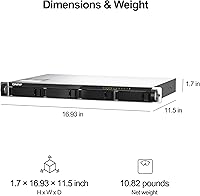
  • Dimensions: Measures 1.69 x 16.93 x 11.5 inches (H x W x D), with the 11.5-inch depth being the defining characteristic for short-depth rack compatibility.
  • Weight: Unit weight is 12.76 pounds without drives installed; total rack weight will increase significantly once drives and rack hardware are added.
  • 2.5GbE Ports: Includes two 2.5GbE network ports supporting 2.5G, 1G, and 100M speeds for flexible connectivity across mixed-speed client environments.
  • 10GbE Ports: Includes two 10GbE network ports for high-bandwidth workloads such as large file transfers, video production pipelines, and link aggregation setups.
  • M.2 Slots: Equipped with two M.2 PCIe Gen 3 x1 NVMe SSD slots for SSD caching or all-flash storage pools; interface bandwidth is limited by the x1 lane width.
  • Operating System: Runs QNAP QTS, a Linux-based NAS operating system with support for containers, virtual machines, storage snapshots, and a broad third-party app ecosystem.
  • Cloud Backup: Boxafe is included to back up Microsoft 365 and Google Workspace accounts — including email, calendars, and files — directly to the local NAS storage pool.
  • Surveillance: QVR Pro is included for IP camera recording and management, enabling 24/7 continuous surveillance without a separate NVR appliance or additional licensing.
  • Snapshot Protection: QNAP's storage snapshot technology allows point-in-time recovery of files and volumes, providing a built-in defense layer against ransomware and accidental deletion.
  • Drive Interface: Uses a SCSI-based internal drive interface architecture as reflected in QNAP's QTS storage stack, compatible with standard SATA NAS and enterprise-grade hard drives.
  • Chassis Material: Constructed from a full metal chassis, contributing to structural rigidity during rack installation and providing better thermal dissipation than plastic-body alternatives.
  • Power Input: Operates at 1.1V nominal voltage at the component level; the unit uses a standard IEC power connector compatible with rack PDUs and standard server room power infrastructure.
  • RAID Support: Supports RAID 0, 1, 5, 6, and 10 configurations through QTS, giving administrators flexible options for balancing storage capacity, redundancy, and write performance.
  • Amazon Ranking: Holds a Best Sellers Rank of #34 in the Network Attached Storage Devices category on Amazon, based on approximately 100 verified ratings averaging 4.1 out of 5 stars.

Related Reviews
QNAP TS-433-4G 4-Bay NAS

83%
87%
Value for Money
82%
Performance
91%
Ease of Setup
85%
Build Quality
88%
Connectivity
More
QNAP TR-004U 4 Bay Rackmount NAS Expansion
82%
88%
Performance & Reliability
91%
Ease of Setup
85%
Value for Money
87%
Build Quality
80%
RAID Configuration & Flexibility
More
QNAP TS-453E 4-Bay NAS
79%
91%
Network Performance
87%
Processor Performance
68%
Software & OS (QTS)
89%
Build Quality
73%
Value for Money
More
QNAP TS-632X-4G 6-Bay NAS with 10GbE and Quad-Core Processor
85%
91%
Performance
94%
Network Connectivity
88%
Expandability
82%
Ease of Setup
85%
Reliability
More
QNAP TS-832PX-4G 8-Bay NAS with 10GbE SFP+ and 2.5GbE
85%
91%
Performance
94%
Network Connectivity
89%
Ease of Setup
85%
Expandability (RAM)
88%
Data Security (Encryption)
More
QNAP TS-932PX-4G 9-Bay NAS
79%
93%
Network Performance
88%
Storage Flexibility
74%
Software Ecosystem (QTS)
71%
Value for Money
86%
Build Quality & Hardware
More
QNAP TS-233 2-Bay NAS Drive
77%
83%
Ease of Setup
78%
Software & App Ecosystem
76%
Performance for File Sharing
87%
Backup Reliability
58%
Media Streaming
More
QNAP TS-264-8G-US 2-Bay NAS
87%
89%
Performance
92%
Setup/Installation
86%
Build Quality/Durability
90%
File Transfer Speed
85%
Software/Firmware/App Experience
More
QNAP TS-133 1 Bay NAS with ARM Cortex-A55 Quad-core Processor and 2GB RAM
84%
82%
Performance
91%
Setup and Installation
88%
Ease of Use
92%
Value for Money
85%
Storage Flexibility
More
Asustor Drivestor 4 Pro AS3304T 4-Bay NAS
78%
88%
Network Performance
83%
Software & ADM Interface
74%
Media Playback & Transcoding
76%
App Ecosystem
57%
RAM & Multitasking
More

FAQ

No, it does not. The unit ships completely diskless, meaning you will need to purchase drives separately before you can create any storage pools. This is one of the most common points of confusion for first-time buyers — make sure you budget for four NAS-rated or enterprise SATA drives on top of the unit cost.

It supports standard 3.5-inch and 2.5-inch SATA hard drives and SSDs. QNAP maintains an official compatibility list on their website, and sticking to drives on that list is strongly recommended, especially for RAID configurations where drive behavior under stress matters.

Honestly, it has a steeper learning curve than most consumer NAS devices. QNAP's QTS operating system is powerful but dense — setting up storage pools, configuring RAID, and managing network permissions takes real time to learn. If you are a first-time NAS user, plan to spend a few hours on initial setup and lean on QNAP's wiki and community forums heavily.

Yes, the M.2 slots can be used either as a caching layer for mechanical drives or configured into their own all-flash storage pool within QTS. Just keep in mind that the slots run on PCIe Gen 3 x1 lanes, which limits bandwidth significantly compared to a true full-speed NVMe connection — so throughput expectations should be calibrated accordingly.

Under light workloads it is manageable, but under sustained heavy transfers or active surveillance recording, the fans can get noticeably loud. The 1U form factor forces smaller, faster-spinning fans to maintain adequate airflow, and that physics trade-off shows up in noise levels. It is best suited for a server room or enclosed network closet rather than an open office environment.

You will need a switch with 10GbE ports to take advantage of those connections — a standard gigabit switch will not negotiate at 10G speeds. If you are adding 10GbE to your network for the first time, factor in switch costs as part of the total deployment budget. The 2.5GbE ports are more likely to work with newer prosumer switches without additional infrastructure investment.

Yes, that is exactly what the included Boxafe application is designed for. It connects to your Microsoft 365 or Google Workspace tenant and pulls email, calendar, contacts, and files down to the local storage pool on a scheduled basis. Do review Boxafe's seat licensing terms before deploying at scale, as costs can vary depending on user count.

The base 4GB is sufficient for straightforward file sharing and light backup tasks. If you plan to run QVR Pro for surveillance alongside active containers or virtualization through QTS, upgrading to at least 8GB or 16GB is a practical move. RAM expansion is relatively straightforward and uses standard DDR4 SO-DIMMs.

QNAP devices should not be placed with open ports directly exposed to the internet without careful hardening — this is true for the category broadly, not just this unit. Best practice is to access the NAS remotely through a VPN, or use QNAP's myQNAPcloud relay service rather than opening ports directly. Make sure to keep firmware updated and disable any services you are not actively using.

That comparison comes up frequently among buyers evaluating this tier. The TS-435XeU has a clear edge in networking hardware — the combination of dual 2.5GbE and dual 10GbE ports is hard to match at this price point. Synology tends to score better on software polish and firmware reliability based on user feedback. The right choice depends on whether networking capability or software simplicity is the higher priority for your specific deployment.

Where to Buy

NAS Headquarters
In stock $1,920.00