Overview

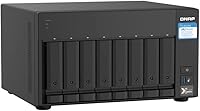
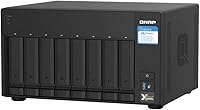
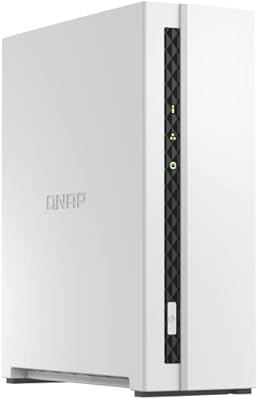
The QNAP TS-832PX-4G 8-Bay NAS sits in an interesting middle ground — substantial enough for small business workloads, yet accessible enough for serious home lab builders who want real networking muscle without going full rackmount. It launched in November 2020, making it a mature product with stable firmware and a well-established support community. Powering it is an AnnapurnaLabs Alpine AL324 quad-core ARM chip running at 1.7GHz — capable for file serving and light containerization, but not the processor you would reach for if heavy 4K transcoding is central to your workflow. Also worth flagging upfront: this is a diskless unit, so the drives are a separate budget item entirely.
Features & Benefits

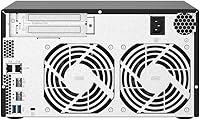
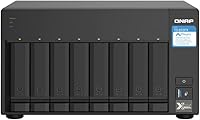
Where this 8-bay NAS genuinely stands out is the networking stack. Two 10GbE SFP+ ports mean you can sustain real throughput to workstations doing large file transfers, pulling footage without the usual wait, or running backup jobs that would crawl over standard gigabit. The two 2.5GbE RJ45 ports add flexibility — link-aggregate them for added bandwidth or keep one for older devices that do not need the speed. The default 4 GB of DDR4 RAM is fine for basic file serving, but anyone planning to run Docker containers or a VM should budget for an upgrade toward the 16 GB maximum. Eight SATA bays mean plenty of room for a staged build-out, and the solid all-metal chassis handles the thermal demands of drives running around the clock.

Best For

This QNAP unit makes the most sense for a fairly specific set of buyers. Creative pros — photographers shooting in RAW or video editors moving large files daily — will appreciate the 10GbE ceiling that prevents the NAS from becoming the bottleneck. Home lab users who want a capable platform for Docker and containerized apps without building a full server will find the QTS ecosystem surprisingly rich. IT administrators managing backups across multiple machines benefit from the eight bays and RAID flexibility. If you are already running a QNAP 4-bay and outgrowing it, scaling up to the TS-832PX is a natural step with familiar software. It is less suited to complete beginners or anyone whose workload tops out at basic media streaming.

User Feedback

Sitting at 4.2 stars across 267 ratings, the reception for the TS-832PX is positive but not without caveats. Owners consistently highlight the networking versatility and hardware build quality as genuine strengths — the metal chassis feels like it was designed to run continuously for years. On the flip side, fan noise under sustained load is a recurring complaint; this is not a unit you would place in a quiet office without some acoustic planning. Several buyers also note that QTS, while feature-rich, has a steeper learning curve compared to Synology DSM, and the default 4 GB of RAM can feel limiting once you start layering on apps and virtual machines. Long-term reliability reports are broadly encouraging, though thermal management deserves attention in poorly ventilated spaces.

Pros

  • Dual 10GbE SFP+ ports deliver serious throughput for video editing, backups, and multi-user file access.
  • Eight drive bays give you room to start small and scale storage capacity over time without replacing the unit.
  • The all-metal chassis feels built for continuous operation and holds up well in always-on environments.
  • Two 2.5GbE RJ45 ports allow link aggregation or simultaneous connection of legacy and modern network clients.
  • RAM is user-upgradeable up to 16 GB, giving the TS-832PX room to grow into heavier containerized workloads.
  • QNAP QTS offers a deep app ecosystem including snapshot support, tiered storage, and virtualization tools.
  • Compatibility with both 6Gb/s and 3Gb/s SATA drives means you can reuse existing hardware during an upgrade.
  • Ranks in the top 20 of its Amazon category with a solid 4.2-star average across a meaningful number of real-world buyers.
  • Mature firmware from a 2020 release means known issues are largely patched and community resources are plentiful.

Cons

  • Sold diskless, so the true cost of ownership is substantially higher once eight drives are added to the bill.
  • Fan noise under sustained load is a recurring complaint and makes this a poor fit for quiet working spaces.
  • The default 4 GB of RAM feels limiting the moment you start running multiple containers or a virtual machine.
  • QTS has a steep initial learning curve that frustrates buyers coming from simpler NAS software like Synology DSM.
  • The ARM processor cannot handle real-time 4K transcoding, which may disappoint media-focused buyers.
  • 10GbE SFP+ connectivity requires compatible switches and transceivers, adding hidden cost for unprepared buyers.
  • The unit is large and heavy at over 14 pounds, requiring dedicated rack or shelf space with adequate airflow.
  • Some long-term owners flag heat management concerns in enclosed or poorly ventilated installations.
  • The QTS app ecosystem, while broad, can feel inconsistent in quality compared to more polished competing platforms.

Ratings

The scores below reflect an AI-driven analysis of verified owner reviews for the QNAP TS-832PX-4G 8-Bay NAS, drawn from buyer feedback worldwide with spam, bot activity, and incentivized posts actively filtered out. Each category is scored independently to surface both the genuine strengths and the honest frustrations real users have encountered. Nothing here is rounded up to protect a brand — the numbers reflect what people actually experience.

Networking Performance
91%
The dual 10GbE SFP+ ports are the headline feature for a reason — users editing 4K footage directly from the NAS over a 10GbE link report the experience feels nearly identical to working from a local drive. For small studios or multi-user environments, this connectivity tier is genuinely transformative compared to standard gigabit setups.
Realizing the full benefit requires investing in compatible 10GbE network infrastructure, including SFP+ switches and transceivers, which adds meaningful cost that some buyers did not anticipate. A handful of users also noted inconsistent link negotiation speeds during initial configuration before firmware updates resolved the issue.
Build Quality
88%
The all-metal enclosure earns consistent praise from long-term owners who have run the unit around the clock for years without structural complaints. Drive trays feel solid, the chassis does not flex under loaded conditions, and the overall construction signals that this unit was designed with continuous operation in mind rather than occasional home use.
A few users noted that the drive trays, while functional, lack the tool-free convenience found on some competing units at a similar price point, requiring screws for each drive installation. The size and weight also mean placement options are limited without dedicated shelving or rack space.
Software & Ecosystem
74%
26%
QNAP QTS offers one of the deepest feature sets in the consumer and prosumer NAS space — Docker containers, virtual machines, snapshot scheduling, tiered storage, and a rich app center are all available out of the box. Users with technical backgrounds regularly describe the platform as punching above its weight class for the price.
The learning curve is steep enough to frustrate buyers coming from simpler platforms, with several owners noting that the initial setup took far longer than expected due to QTS interface complexity. App quality across the ecosystem is inconsistent, and some utilities feel noticeably less polished than equivalent offerings from competing NAS vendors.
Processor Performance
67%
33%
For core file-serving tasks, shared folder access, backup jobs, and running a handful of lightweight Docker containers simultaneously, the AL324 quad-core ARM chip holds its own without breaking a sweat. Users running it as a pure network storage device rarely run into headroom issues in normal day-to-day operation.
The ARM architecture hits a clear wall when workloads shift toward CPU-intensive tasks — real-time 4K transcoding, running multiple virtual machines concurrently, or heavy encryption overhead all expose its limitations noticeably. Buyers who expected x86-level processing performance for media server use cases have been consistently disappointed.
Storage Capacity & Scalability
86%
Eight bays give buyers the freedom to start with a modest drive count and expand incrementally as their storage needs grow, which is a practical advantage over four-bay alternatives that force you to make hard decisions sooner. Support for both 6Gb/s and 3Gb/s drives means existing hardware from older builds can be reused during the transition.
The diskless configuration means the unit's sticker price understates the true cost of ownership substantially once eight NAS-grade drives are added to the bill. Buyers who underestimated this discovered that their actual total spend was considerably higher than the initial purchase suggested.
RAM & Upgradability
62%
38%
The single SODIMM slot being user-accessible is a genuine plus — upgrading to 8 GB or the maximum 16 GB is straightforward for anyone comfortable opening the unit, and aftermarket DDR4 SO-DIMMs are widely available and reasonably priced. Users who upgraded RAM immediately reported a noticeably smoother experience running multiple QTS applications in parallel.
Shipping with only 4 GB of RAM on a device marketed toward containerization and virtualization feels like a deliberate underspec, and buyers who did not plan for an immediate upgrade found the default configuration limiting within days of setup. There is only one RAM slot, so upgrading requires replacing the included module entirely rather than simply adding another.
Noise Level
53%
47%
At idle or under light read/write loads, the TS-832PX is reasonably quiet and manageable in a home office context if physical distance is maintained. QTS does offer fan speed controls that allow some tuning for users who prioritize acoustics over maximum airflow.
Under sustained load — such as a full RAID rebuild, large backup jobs, or simultaneous multi-user transfers — the fans spin up loudly enough to become genuinely disruptive in an open room environment. This is one of the most consistently mentioned complaints across long-term owner reviews, and it is a real barrier for anyone planning to place the unit near a workspace.
Thermal Management
71%
29%
In well-ventilated environments, drive temperatures remain stable and within safe operating ranges even under sustained workloads, and the all-metal chassis does assist with passive heat dissipation across the unit. Long-term owners in open server rooms or dedicated closets with airflow report no chronic thermal problems.
Users who placed the unit in enclosed cabinets or poorly ventilated spaces reported elevated drive temperatures that triggered thermal warnings over time. The active cooling system is effective but dependent on adequate surrounding airflow, which is a planning consideration many buyers did not account for during installation.
Setup Experience
58%
42%
Buyers with prior NAS experience or a background in Linux-based systems found the initial QTS setup process logical and well-structured, with QNAP providing reasonably detailed documentation and an active community forum for reference. Once configured, the system runs reliably without requiring constant maintenance attention.
First-time NAS buyers frequently cited the setup process as their biggest frustration — QNAP QTS presents an overwhelming number of options upfront, and the initial wizard does relatively little to guide inexperienced users toward sensible starting configurations. Several reviewers noted spending hours troubleshooting settings that a more opinionated setup flow would have handled automatically.
Value for Money
69%
31%
For buyers who fully utilize the 10GbE networking, eight-bay capacity, and QTS software depth, the unit delivers a hardware package that would cost considerably more in a traditional server configuration. Technical users consistently regard it as a cost-efficient way to achieve prosumer-grade networked storage with room to grow.
The diskless pricing model obscures the real cost of entry, and once drives, a 10GbE switch, and a RAM upgrade are factored in, the total investment climbs steeply. Buyers with modest storage requirements or simpler use cases will likely find they are paying for capabilities they do not need.
Long-Term Reliability
79%
21%
The majority of long-term owners who have run this QNAP unit continuously for two or more years report no hardware failures attributable to the NAS itself, with most issues traced to individual drives rather than the enclosure or electronics. QNAP has also maintained firmware updates and security patches for this model well past its 2020 launch date.
A small but notable segment of reviewers reported fan failure after extended operation, which in an always-on device is a meaningful reliability concern that warrants monitoring. A few owners also noted that QTS major version updates occasionally introduced temporary instability requiring manual intervention to resolve.
Drive Compatibility
83%
Compatibility with both 6Gb/s and 3Gb/s SATA drives means the unit accepts a broad range of current and legacy hardware, and QNAP maintains a detailed online compatibility list covering drives from all major manufacturers. Users mixing NAS-rated drives from different brands across the eight bays reported no issues with detection or RAID formation.
SSD caching and M.2 expansion are not natively supported on this model without additional QNAP expansion cards, which limits storage tiering flexibility compared to some competing platforms that include M.2 slots on the main board. Buyers expecting native SSD cache support were occasionally caught off guard by this omission.
2.5GbE Connectivity
77%
23%
The two 2.5GbE RJ45 ports are a practical addition that allows the unit to serve standard network clients without requiring any additional infrastructure investment, and they can be link-aggregated for added throughput to a single connection. For mixed environments where only some clients need high speed, this dual-tier networking approach is genuinely flexible.
In a workflow where 10GbE is available, the 2.5GbE ports feel like a secondary afterthought that most power users will route around rather than rely on for primary data transfers. Some users also noted that link aggregation configuration through QTS required more manual setup than expected for a supposedly plug-and-play feature.
Documentation & Support
64%
36%
QNAP provides a reasonably extensive library of online guides, video tutorials, and a community forum where experienced users actively help troubleshoot issues — buyers who invested time in these resources generally resolved their setup questions without contacting support directly. The firmware update process is clearly documented and largely automatic.
Official documentation can feel fragmented and inconsistent in quality across different QTS features, with some advanced functions covered only in community threads rather than formal product guides. Direct customer support response times have drawn mixed reviews, with some buyers waiting several days for responses to technical inquiries.

Suitable for:

The QNAP TS-832PX-4G 8-Bay NAS is built for buyers who have outgrown entry-level storage and need a platform that can genuinely keep up with demanding workloads. Video editors and photographers working with large RAW or 4K source files will benefit most from the dual 10GbE SFP+ ports, which remove the network from the list of things slowing them down. Small business IT administrators will appreciate the eight-bay capacity for building out redundant RAID arrays and using the unit as a centralized backup target for multiple workstations. Home lab enthusiasts who want to experiment with Docker containers, lightweight virtual machines, or self-hosted services without investing in a full server rack will find the QTS ecosystem surprisingly capable. If you are already running a QNAP device and know your way around its interface, stepping up to this unit is a logical and familiar upgrade path.
Not suitable for:

Buyers expecting a plug-and-play experience should think carefully before committing to the QNAP TS-832PX-4G 8-Bay NAS, as QNAP's QTS software has a steeper learning curve than competing platforms like Synology DSM. Anyone whose storage needs top out at casual media streaming or simple home backups is likely buying more hardware than their workload justifies, and the total cost climbs considerably once you factor in purchasing eight drives separately. The ARM-based processor handles file serving and containerized apps well enough, but it is not the right tool for CPU-intensive tasks like real-time 4K transcoding, where an x86-based NAS would be a more realistic choice. Users who need a silent appliance for a home office or living room environment should also be aware that the fans can get audible under sustained load. Finally, buyers unfamiliar with SFP+ networking infrastructure should budget for compatible switches and cables before assuming the 10GbE ports are immediately usable.

Specifications

  • Processor: Powered by an AnnapurnaLabs Alpine AL324 ARM Cortex-A57 quad-core chip running at 1.7GHz, suited for file serving and light containerization.
  • RAM: Comes with 4 GB of SODIMM DDR4 memory installed, with one slot supporting upgrades up to 16 GB for more demanding workloads.
  • Drive Bays: Houses eight 3.5-inch SATA bays compatible with both 6Gb/s and 3Gb/s drives, sold without any hard drives included.
  • Configuration: Ships diskless, meaning you must purchase and install your own drives separately before the unit can store any data.
  • 10GbE Ports: Equipped with two 10 Gigabit Ethernet SFP+ ports for high-throughput connections to compatible switches or direct-attached workstations.
  • 2.5GbE Ports: Includes two RJ45 ports supporting 2.5G, 1G, and 100M speeds, allowing connection of standard network clients alongside high-speed devices.
  • Operating System: Runs QNAP QTS, a Linux-based NAS operating system offering an app center, snapshot management, tiered storage, and virtualization support.
  • Chassis Material: Built from an all-metal enclosure designed to dissipate heat effectively and withstand the rigors of continuous 24/7 operation.
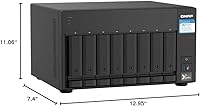
  • Dimensions: Measures 7.4″ deep, 12.95″ wide, and 11.06″ tall, requiring dedicated shelf or rack space with adequate surrounding airflow.
  • Weight: Weighs approximately 14.07 pounds without drives installed, so factor in additional mass when planning your mounting or shelf solution.
  • Compatibility: Designed for use with server and desktop environments, and supports both Windows and macOS clients through standard network protocols.
  • RAID Support: Supports multiple RAID configurations across its eight bays, including RAID 0, 1, 5, 6, 10, and JBOD through QTS.
  • Virtualization: Supports running lightweight virtual machines and Docker containers via the QTS Virtualization Station and Container Station applications.
  • Snapshot Support: QTS includes built-in snapshot technology allowing point-in-time recovery of shared folders and LUNs to protect against data loss.
  • Release Date: First made available in November 2020, giving it several years of firmware maturity and a well-established community knowledge base.
  • Market Rank: Holds a top-20 position in the Amazon Network Attached Storage category and carries a 4.2-star average from over 267 verified ratings.

Related Reviews

QNAP TS-433-4G 4-Bay NAS
73%
89%
Network Speed
91%
Storage Capacity
77%
Value for Money
62%
Processor Capability
68%
QTS Software
More
QNAP TS-435XeU-4G 4-Bay Rackmount NAS
74%
88%
Network Performance
91%
Build Quality & Physical Design
72%
Software & OS Flexibility
61%
Setup & Initial Configuration
67%
M.2 NVMe Cache Performance
More
QNAP TS-632X 6-Bay Desktop NAS
76%
91%
Network Performance
86%
Build Quality
72%
Software Experience
68%
Value for Money
89%
Expandability
More
QNAP TS-932PX-4G 9-Bay NAS
79%
93%
Network Performance
88%
Storage Flexibility
74%
Software Ecosystem (QTS)
71%
Value for Money
86%
Build Quality & Hardware
More
QNAP TS-233 2-Bay NAS Drive
77%
83%
Ease of Setup
78%
Software & App Ecosystem
76%
Performance for File Sharing
87%
Backup Reliability
58%
Media Streaming
More
QNAP TS-264 8G 2-Bay Desktop NAS
79%
91%
Network Performance
88%
Processor Performance
84%
Software Ecosystem
72%
Value for Money
61%
Ease of Setup
More
QNAP TVS-h874T-i9-64G 8-Bay NAS
83%
92%
Performance
68%
Setup/Installation
89%
Build Quality
85%
Software/Firmware Experience
80%
Usability/Ease of Use
More
QNAP TS-453E 4-Bay NAS
79%
91%
Network Performance
87%
Processor Performance
68%
Software & OS (QTS)
89%
Build Quality
73%
Value for Money
More
QNAP TVS-h874 i7-32G 8-Bay NAS
80%
93%
Processing Performance
91%
Storage Flexibility
89%
ZFS & OS Reliability
84%
Networking Capability
88%
RAM & Virtualization Headroom
More
QNAP TS-133 1-Bay Desktop NAS Drive
73%
83%
Value for Money
81%
Software & Ecosystem
74%
Ease of Setup
78%
Build Quality
62%
Performance
More

FAQ

Drives are not included — the QNAP TS-832PX-4G 8-Bay NAS ships completely diskless. You will need to purchase compatible 3.5-inch SATA drives separately and install them yourself before the unit can store anything. Most buyers opt for NAS-rated drives like the WD Red or Seagate IronWolf lineup for reliability in always-on environments.
It depends on how you define handling it. The dual 10GbE SFP+ ports provide plenty of raw network bandwidth for streaming 4K footage to a workstation for editing. However, if you want the NAS itself to transcode 4K video on the fly — like converting formats in the background — the ARM processor will struggle. For network-based editing workflows where the workstation does the heavy lifting, it works well.

For straightforward file sharing across a small team, 4 GB is workable. The moment you start running Docker containers, Plex Media Server, or a virtual machine alongside your storage tasks, you will feel the constraint fairly quickly. Upgrading to 8 GB or the full 16 GB is a smart move if you plan to use the QTS app ecosystem seriously.

At idle or under light load, the fan noise is manageable. Under sustained heavy workloads — like a large RAID rebuild or simultaneous backup jobs — the fans spin up noticeably and can become distracting in a quiet room. This is not a living room or open-office appliance; it belongs in a closet, server room, or somewhere with a door between it and people working nearby.

Synology DSM is generally considered the friendlier starting point for NAS newcomers — its interface is cleaner and the initial setup is more guided. QTS is more powerful and configurable, but that depth comes with a steeper learning curve. If you have never set up a NAS before and do not enjoy tinkering, be prepared to spend some time with QNAP forums and documentation before everything clicks.

You will need a switch with SFP+ ports and compatible SFP+ transceivers or direct-attach copper cables to take advantage of the 10GbE connections. This is an extra cost that catches some buyers off guard. Affordable 10GbE switches have come down in price, but it is still a meaningful addition to your total budget. Alternatively, you can connect the NAS directly to a workstation that has a 10GbE NIC using a DAC cable.

Yes, the eight SATA bays accept both 6Gb/s and 3Gb/s drives, and you can mix drive capacities — though your RAID configuration will affect how that capacity is used. In some RAID modes, all drives are limited to the size of the smallest one in the array. QNAP does support JBOD and some flexible volume configurations that let you mix sizes more efficiently if RAID overhead is a concern.

It can run Plex, but with caveats. If your clients support direct play — meaning they can handle the video format without conversion — it works fine. The ARM processor is not strong enough for real-time transcoding of high-resolution content to multiple streams simultaneously. Users with a mix of client devices that require transcoding will likely hit a wall and may want to consider an x86-based NAS for a Plex-first setup.

You can technically start with just one drive in a single-disk configuration, though you would have no redundancy. Most users start with at least two drives to enable RAID 1 mirroring for basic data protection. To use RAID 5, you need a minimum of three drives. The eight bays let you start conservatively and add drives over time as your storage needs grow.

Yes, QTS includes built-in tools for backing up data to cloud services like Amazon S3, Google Drive, Microsoft Azure, and others through the QNAP Hybrid Backup Sync application. You can also set up remote replication to another QNAP device at a different location for a fully private off-site backup solution. This flexibility is one of the stronger arguments for choosing this platform if data protection is a priority.