Overview

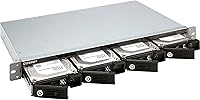
The QNAP TR-004U 4-Bay Rackmount NAS Expansion is a purpose-built 1U storage expander aimed squarely at QNAP NAS users who have hit a capacity ceiling and need a clean, rack-compatible solution. What sets this rackmount expansion unit apart from basic USB enclosures is its onboard hardware RAID controller — flip a dip switch, set your RAID mode, and the unit manages it independently of whatever host system it connects to. It also doubles as a direct-attached storage device over USB 3.0 Type-C, adding flexibility beyond a pure expansion shelf. Available since mid-2019, it has held its ground as a credible mid-to-premium option in a relatively thin market segment.

Features & Benefits

The TR-004U fits up to four SATA drives — 3.5-inch spinning disks or 2.5-inch SSDs — giving you a solid range of capacity and performance configurations within a single enclosure. RAID is managed entirely at the hardware level, with a dip switch letting you choose RAID 0, 1, 5, or JBOD before the host OS ever gets involved. That independence is genuinely useful in environments where software-based RAID feels like an unnecessary risk. The lockable drive trays are a practical touch, especially in shared rack spaces where accidental removal is a real hazard. When this QNAP expansion device is connected to a compatible NAS, Storage and Snapshot Manager gives you full RAID oversight and disk health monitoring directly within QTS.

Best For

This rackmount expansion unit fits best in a QNAP-centric environment — if you are already running a QNAP NAS and need a rack-mounted way to extend capacity, this is one of the more practical options available. Small business IT setups and home labs running 1U racks will appreciate the hardware RAID redundancy, particularly where uptime matters and software RAID introduces unwanted complexity. It also works well in shared rack spaces where physical drive security is a legitimate concern. That said, buyers outside the QNAP ecosystem should weigh the trade-offs carefully — the richer management features simply do not surface unless you are running QTS on a paired QNAP NAS.

User Feedback

Among verified buyers, the dip-switch RAID setup draws consistent praise — most appreciate skipping the software configuration hassle entirely and just getting redundancy working out of the box. Build quality earns solid marks, and the lockable trays get specific callouts from users in multi-person rack environments. The most common criticism centers on ecosystem dependency: buyers who expected robust management on non-QNAP hardware were let down when the deeper monitoring tools simply did not appear. DAS mode generally functions across operating systems, though isolated reports of inconsistent behavior exist. Thermal performance and noise under sustained load come up occasionally, but not at a frequency that suggests a widespread defect. Value opinion splits clearly between QNAP loyalists, who largely feel the price is fair, and everyone else.

Pros

  • Hardware RAID is configured entirely via dip switch, no software setup required and no OS dependency to worry about.
  • Supports both 3.5-inch and 2.5-inch SATA drives, so you can mix HDDs and SSDs based on your workload needs.
  • Lockable drive trays are a genuine safety feature in shared rack environments, not just a cosmetic addition.
  • The 1U rackmount form factor fits existing rack infrastructure without requiring any special mounting workarounds.
  • When paired with a QNAP NAS, Storage and Snapshot Manager gives you centralized disk health and RAID monitoring in one place.
  • RAID 0, 1, 5, and JBOD are all supported, covering most standard redundancy and performance configurations.
  • USB 3.0 Type-C connectivity means the unit can serve double duty as a direct-attached storage device on a workstation.
  • Build quality is consistently praised by buyers, with the enclosure feeling appropriately solid for a rack-mounted environment.
  • Cross-platform DAS support across Windows, macOS, and Linux adds flexibility for mixed-OS shops.

Cons

  • Deep management features are only accessible through QNAP QTS, making the unit significantly less useful outside that ecosystem.
  • No independent network interface means this rackmount expansion unit cannot serve as standalone networked storage without a host NAS.
  • DAS mode reliability across non-QNAP systems has drawn occasional complaints, with some users reporting inconsistent behavior.
  • Thermal performance under heavy sustained load has come up in user reports, though it does not appear to be a universal issue.
  • The price point is harder to justify if you are only planning to use the basic DAS functionality without a paired QNAP NAS.
  • Buyers expecting plug-and-play simplicity on non-QNAP hardware may find the setup experience more involved than anticipated.
  • Four bays is the fixed ceiling — there is no expansion path within the unit itself if your storage needs grow further.
  • At 4.4 pounds without drives, the unit is not particularly heavy, but the 21-inch depth requires adequate rack clearance front to back.

Ratings

Our AI-generated scores for the QNAP TR-004U 4-Bay Rackmount NAS Expansion were produced by analyzing verified global buyer reviews, with spam, incentivized submissions, and bot activity actively filtered out before any scoring was applied. The ratings reflect a balanced picture — where this rackmount expansion unit genuinely excels and where real users have run into frustration. Both the strengths and the pain points are represented transparently so you can make an informed call.

Build Quality
88%
Buyers consistently describe the chassis as solid and rack-appropriate, with a heft that signals durability rather than cost-cutting. The metal construction feels like it belongs in a professional environment, and the drive tray mechanisms draw specific praise for feeling sturdy rather than flimsy during installation.
A handful of users noted that the tray locking mechanism, while useful in concept, requires a precise touch to engage cleanly — some reported minor alignment fussiness when reinserting trays after drive swaps. Nothing catastrophic, but worth noting for hands-on users who swap drives frequently.
RAID Configuration
91%
The hardware dip-switch approach to RAID selection is one of the most consistently praised aspects across buyer reviews. IT admins appreciate that RAID is established at the hardware level before any OS gets involved, making it a reliable and repeatable process that does not depend on software state or driver behavior.
The dip switch covers RAID 0, 1, 5, and JBOD, which satisfies most users, but those looking for RAID 10 or more advanced configurations will find themselves out of options. There is also no visual feedback mechanism on the unit itself to confirm which mode is currently active without consulting documentation.
Ecosystem Integration
86%
When paired with a QNAP NAS running QTS, this expansion device feels like a natural extension of the system rather than a bolt-on accessory. Storage and Snapshot Manager surfaces disk health, RAID status, and volume management in a unified interface, which QNAP NAS owners already know how to navigate.
The depth of integration is also the core limitation — buyers outside the QNAP ecosystem get a stripped-down experience that does not justify the price tier. Non-QNAP NAS users essentially pay for a premium hardware RAID enclosure while leaving the most valuable software features entirely unused.
DAS Mode Usability
67%
33%
The USB-C direct-attached storage mode works reliably for straightforward workloads on Windows and macOS — users running it as a backup target or media archive connected to a workstation generally report it functions without driver headaches or unusual setup steps.
Reliability in DAS mode is not universal, and Linux users in particular have reported inconsistencies. Some buyers expected the DAS experience to be more polished given the price point, and a subset found that switching between NAS expansion mode and DAS mode required more care than anticipated to avoid drive array issues.
Drive Tray Security
83%
The lockable trays are a practical and well-executed feature for shared rack environments — small business IT teams managing server rooms where multiple technicians have physical access genuinely benefit from the added layer of protection against accidental or unauthorized drive removal.
The lock mechanism requires a key, and QNAP only includes a limited number with the unit. Losing a key in a busy server room is a realistic scenario, and sourcing replacements requires going back to QNAP directly, which some users found unnecessarily complicated.
Thermal Management
71%
29%
Under light to moderate workloads, the internal fan keeps drive temperatures within acceptable ranges, and most users running the unit as a NAS expansion with typical small business I/O patterns reported no thermal concerns during regular operation.
Under sustained heavy load — particularly when all four bays are populated with spinning HDDs running continuous read/write operations — drive temperatures climb more than some users expected. A few buyers in warmer server room environments noted that supplemental rack airflow became necessary to stay comfortable with temperatures.
Noise Level
69%
31%
In a dedicated server room or enclosed rack cabinet, the fan noise generated by the TR-004U is essentially a non-issue — it blends into the ambient noise floor that anyone running rack hardware accepts as standard. The fan curve is not aggressive under light loads.
Buyers who deployed this unit in quieter environments, like a home office or a small retail back room, found the fan audible enough to be noticeable. It is not unusually loud for a rackmount device, but the context mismatch between the product's design intent and some buyers' deployment scenarios created disappointment.
Value for Money
72%
28%
For QNAP NAS users who fully leverage the hardware RAID controller and the QTS ecosystem integration, the price reflects a capable and well-built unit that handles a specific job reliably. The combination of hardware RAID, lockable trays, and solid build quality in a 1U form factor is not trivially replicated at a lower price point.
Buyers who end up using only the DAS functionality or who are not in the QNAP ecosystem are paying a mid-to-premium price for a fraction of the available capability. Competing 4-bay enclosures without hardware RAID offer similar DAS functionality at meaningfully lower prices, making the value case entirely conditional on ecosystem fit.
Setup Experience
79%
21%
QNAP NAS users reported a setup process that felt intuitive — drives in, dip switch set, USB-C connected, and QTS handles detection automatically. The physical installation into a rack is standard and requires no unusual steps for anyone familiar with 1U hardware.
Buyers without prior QNAP NAS experience found the initial configuration less self-explanatory, particularly around understanding which dip switch positions correspond to which RAID modes without keeping the manual nearby. The onboarding experience assumes a degree of familiarity with RAID concepts that not all buyers have.
Port & Connectivity
74%
26%
The USB 3.0 Type-C connection is a practical choice for 2025 — most modern workstations and servers have a compatible port, and the interface handles the throughput demands of SATA-based RAID arrays without becoming the bottleneck in typical use cases.
The single USB-C port means the unit cannot be connected to a NAS and a workstation simultaneously, which limits flexibility for users who wanted to toggle between use modes without physically repluggging. Some buyers also noted that the included cable length was shorter than ideal for certain rack layouts.
Drive Compatibility
82%
18%
Compatibility with standard 3.5-inch and 2.5-inch SATA drives is broad, and most commonly used enterprise and consumer drives from major manufacturers install and function without issue. QNAP's hardware compatibility list is reasonably comprehensive and updated periodically.
NVMe drives are not supported, which is an increasingly relevant limitation as SSD pricing continues to drop and more buyers consider all-flash configurations. Buyers who assumed NVMe support based on the USB-C interface were caught off guard by the SATA-only backplane design.
Documentation & Support
63%
37%
QNAP's online knowledge base and community forums are extensive, and for common setup scenarios the answers are generally findable without needing to contact support directly. The hardware manual covers dip switch configurations clearly enough for technically confident buyers.
Official QNAP customer support response times drew criticism from buyers who encountered less common issues, particularly around DAS mode edge cases or cross-platform compatibility. The documentation assumes QNAP NAS pairing for most detailed guidance, leaving DAS-only users with fewer official resources to rely on.
Rackmount Integration
87%
The 1U form factor integrates cleanly into standard 19-inch rack enclosures, and the physical footprint is exactly what buyers in rack environments expect. IT admins adding this to an existing rack build described the physical installation as one of the easier parts of the deployment process.
The depth of 21.26″ is worth measuring against your specific rack cabinet before purchasing — shallow rack enclosures common in some network closets may not accommodate the full depth without the rear of the unit being exposed or unanchored. A few buyers flagged this after purchase.

Suitable for:

The QNAP TR-004U 4-Bay Rackmount NAS Expansion is a strong fit for anyone already invested in the QNAP ecosystem who needs to push their storage capacity further without rebuilding their rack setup from scratch. IT administrators managing small business infrastructure will find the hardware RAID controller particularly appealing — it removes a layer of software dependency that can create headaches during OS migrations or system failures. Home lab enthusiasts running a 1U rack will appreciate how cleanly this rackmount expansion unit slots into an existing setup without demanding a major reconfiguration. If you work in an environment where multiple people have physical access to rack hardware, the lockable drive trays alone are worth factoring into your decision. It also makes sense for users who occasionally need a standalone DAS unit connected directly to a workstation, since the USB 3.0 Type-C connection covers that scenario reasonably well across major operating systems.

Not suitable for:

Buyers who are not running a QNAP NAS should think carefully before committing to the TR-004U, because the most valuable management and monitoring capabilities are locked behind QTS — QNAP's own operating system. If you are running a Synology, TrueNAS, or any other NAS platform, this QNAP expansion device functions at a basic level in DAS mode, but you lose the integrated RAID health monitoring and snapshot management that justify much of its price. It is not a fit for users who need network-attached storage access without a host NAS present, since the unit itself has no independent network interface. Those on a tight budget should also weigh alternatives carefully, as the mid-to-premium pricing only makes sense when the hardware RAID and ecosystem integration features are actually in use. If your rack runs exclusively on tower or desktop hardware with no 1U rail infrastructure, the form factor will also work against you practically.

Specifications

  • Brand: Manufactured by QNAP, a Taiwanese company specializing in network-attached storage and storage infrastructure hardware.
  • Model: The TR-004U is the specific model identifier for this 4-bay rackmount expansion unit within QNAP's storage expansion lineup.
  • Form Factor: Built in a 1U rackmount profile designed to fit standard 19-inch server rack enclosures without requiring adapter rails beyond what is included.
  • Drive Bays: Houses up to four independent SATA drive bays, each compatible with either 3.5-inch hard disk drives or 2.5-inch solid-state drives.
  • Interface: Connects to a host system via a single USB 3.0 Type-C port, supporting both NAS expansion mode and direct-attached storage mode.
  • RAID Modes: Supports RAID 0, RAID 1, RAID 5, and JBOD configurations, selectable via a physical dip switch on the unit.
  • RAID Control: RAID management is handled by an onboard hardware controller, operating independently of the host operating system or any installed software.
  • Drive Security: Each drive tray includes a physical locking mechanism to prevent accidental or unauthorized drive removal during operation.
  • Dimensions: The enclosure measures 21.26″ deep, 16.54″ wide, and 7.87″ tall, occupying a single rack unit of vertical space.
  • Weight: The unit weighs 4.4 pounds without drives installed, which is typical for a metal-chassis 1U rackmount enclosure of this size.
  • Color: Available in black, with a metal chassis finish consistent with standard rack hardware aesthetics.
  • NAS Compatibility: Full integration, including RAID configuration and disk health monitoring, is available through QNAP's Storage and Snapshot Manager on QTS-based NAS devices.
  • OS Support (DAS): When used in direct-attached storage mode, the unit is recognized across Windows, macOS, and Linux operating systems without requiring proprietary drivers.
  • Drive Types: Supports standard SATA I, II, and III hard drives and solid-state drives; NVMe drives are not supported due to the SATA-only backplane design.
  • Availability: The TR-004U was first made available in June 2019 and has remained in active commercial distribution since its launch.
  • Power: The unit draws power through an included external power adapter rather than sourcing power from the connected host via the USB interface.
  • Cooling: An internal cooling fan is included to manage thermal output from populated drive bays during sustained read and write operations.
  • Market Tier: Positioned as a mid-to-premium storage expansion accessory, reflecting the hardware RAID capability and rackmount-grade build quality.

Related Reviews

QNAP TS-435XeU-4G 4-Bay Rackmount NAS
74%
88%
Network Performance
91%
Build Quality & Physical Design
72%
Software & OS Flexibility
61%
Setup & Initial Configuration
67%
M.2 NVMe Cache Performance
More
QNAP TS-433-4G 4-Bay NAS
73%
89%
Network Speed
91%
Storage Capacity
77%
Value for Money
62%
Processor Capability
68%
QTS Software
More
QNAP TS-453E 4-Bay NAS
79%
91%
Network Performance
87%
Processor Performance
68%
Software & OS (QTS)
89%
Build Quality
73%
Value for Money
More
QNAP TR-004-44WD-US 4 Bay DAS with 12TB Storage
85%
87%
Performance
92%
Ease of Setup
84%
Build Quality
65%
Noise Level
90%
Data Redundancy (RAID 5)
More
Asustor Drivestor 4 Pro AS3304T 4-Bay NAS
78%
88%
Network Performance
83%
Software & ADM Interface
74%
Media Playback & Transcoding
76%
App Ecosystem
57%
RAM & Multitasking
More
Asustor Lockerstor 4 Gen3 AS6804T NAS

78%
93%
Raw Performance
91%
Network Throughput
89%
Memory & Data Integrity
87%
NVMe Cache Flexibility
88%
Build Quality
More
KCMconmey NAS-411 4+1 Bay DIY NAS Case
84%
85%
Ease of Setup
80%
Build Quality
70%
Cooling Performance
90%
Customization Options
88%
Drive Compatibility
More
Asustor AS5404T 4-Bay NAS Enclosure
80%
88%
Build Quality
82%
Processing Performance
93%
NVMe Storage Flexibility
87%
Network Throughput
76%
Software Ecosystem (ADM OS)
More
QNAP TS-233 2-Bay NAS Drive
77%
83%
Ease of Setup
78%
Software & App Ecosystem
76%
Performance for File Sharing
87%
Backup Reliability
58%
Media Streaming
More
TerraMaster F4-212 4-Bay NAS Enclosure
70%
76%
Value for Money
83%
Setup & Initial Configuration
61%
Software & OS Experience
67%
Performance & Responsiveness
42%
RAM & Expandability
More

FAQ

Not strictly, but your experience will vary significantly depending on how you use it. In direct-attached storage mode over USB-C, the TR-004U works with any computer running Windows, macOS, or Linux. However, the full management suite — RAID health monitoring, snapshot integration, and centralized configuration — is only available when connected to a QNAP NAS running QTS. If you are not a QNAP NAS user, you are essentially paying for features you cannot access.

Yes, and that is actually one of the more practical aspects of this unit. The dip switch on the device lets you set your RAID mode before you ever plug it into anything. Once the drives are installed and the mode is selected, the hardware controller handles the rest. No software, no boot process, no OS involvement required at that stage.

RAID 1 is the simplest choice for redundancy with two drives — your data is mirrored across both. RAID 5 gives you redundancy spread across three or more drives with better usable capacity efficiency, but it does require at least three populated bays. If raw speed and capacity matter more than redundancy, RAID 0 stripes data across drives but offers zero fault tolerance. JBOD treats each drive as an independent volume with no RAID involvement at all.

Most standard 3.5-inch and 2.5-inch SATA drives — whether spinning HDDs or SATA SSDs — should be compatible. QNAP maintains a hardware compatibility list on their website that is worth checking before installing older or less common drive models. NVMe drives will not work here since the backplane is SATA-only.

For QNAP NAS users, the setup process is fairly straightforward — install drives, set the dip switch, connect via USB-C, and QTS handles detection and configuration from there. As a standalone DAS unit connected to a computer, it is similarly simple since most operating systems recognize it without additional drivers. Where buyers occasionally run into friction is when expectations around software management do not match the ecosystem requirements.

User reports on noise are mixed but generally not alarming. The internal cooling fan is audible under sustained load, though most buyers in rack environments describe it as acceptable background noise rather than a nuisance. If you are placing this unit in a quiet home office without rack enclosure soundproofing, you may notice it more than someone with a dedicated server room.

Hot-swapping is not officially guaranteed on the TR-004U, and attempting to swap drives under RAID configurations without proper preparation carries a risk of data loss or array degradation. Best practice is to power down before removing or inserting drives, particularly when using RAID 1 or RAID 5 configurations. Always verify current RAID status through the management interface before making any changes.

In RAID 5, a single drive failure puts the array into a degraded state — data remains accessible but there is no longer any redundancy. You need to replace the failed drive and allow the array to rebuild before you are protected again. The rebuild process can take several hours depending on drive capacity and usage during that period. When paired with a QNAP NAS, Storage and Snapshot Manager will alert you to the failure and walk you through recovery.

The unit ships with four drive trays included, and each tray has a physical lock mechanism. You do not need to purchase trays separately to start installing drives.

You can, and some users do exactly that. In DAS mode over USB-C, this QNAP expansion device presents as an external storage unit to your PC, and Windows handles it like any other external drive depending on your RAID or JBOD configuration. That said, USB 3.0 bandwidth is a ceiling to be aware of — for sequential workloads like large video file transfers it performs well, but it is not a substitute for a direct PCIe-attached storage solution if you need maximum throughput.