Overview

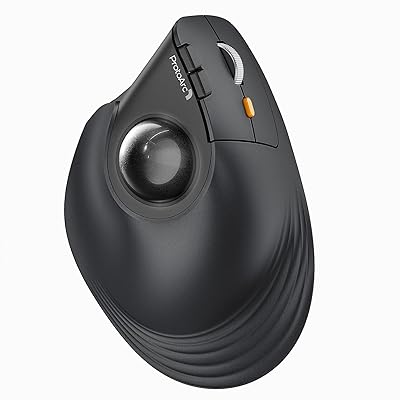
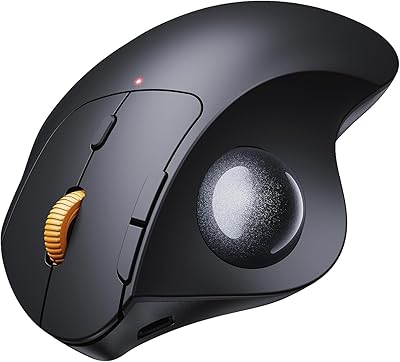
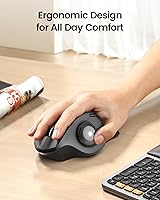
The ProtoArc EM01 NL Wireless Trackball Mouse takes a fundamentally different approach to cursor control — your thumb does the moving, not your arm. That shift alone changes how much stress your wrist absorbs over a long workday. What sets this one apart from other budget-friendly trackballs is the adjustable tilt hinge, which lets you angle the body anywhere from flat to a noticeable incline, adapting to your natural hand position rather than forcing your hand to adapt to it. It also connects to up to three devices wirelessly. Fair warning, though: this thumb-controlled roller requires a real adjustment period. Give it a couple of weeks before judging it.
Features & Benefits

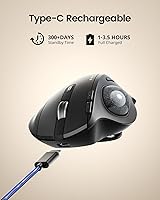
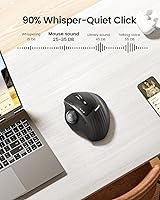
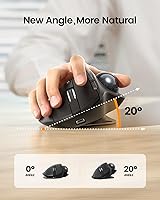
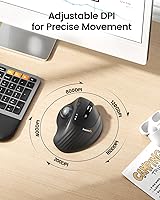
The adjustable angle hinge is the headline feature here — tilt the mouse body up to 20 degrees to find the position that keeps your wrist in a more neutral posture. Connectivity is genuinely flexible: a 2.4G USB dongle plus dual Bluetooth means this trackball mouse can stay paired to a laptop, desktop, and tablet simultaneously, switching between them with a single button press. Cursor sensitivity spans five levels, from very slow for precision work to fast for general browsing. Charging is handled via USB-C, so no hunting for AA batteries. The clicks are impressively quiet — useful in open offices — though the scroll wheel does produce some noise, so that is worth knowing upfront.

Best For

This thumb-controlled roller is a strong fit for remote workers and students juggling multiple devices at one desk — the ability to hop between a work laptop, personal computer, and tablet without re-pairing is genuinely useful day to day. If you have been dealing with wrist fatigue or early signs of repetitive strain, many users report noticeable comfort improvements after the adaptation period, though it is not a medical solution. The compact footprint also makes it practical for cramped setups, small desks, or even couch use. Mac users should note that the back and forward buttons do not function on macOS, so factor that in if you rely heavily on browser navigation shortcuts.

User Feedback

Among buyers who stuck with it through the initial learning curve, the most consistent feedback centers on improved daily comfort — wrists feel less taxed after long sessions compared to a traditional flat mouse. The device-switching reliability also earns consistent praise; people who toggle between machines throughout the day find it snappy and dependable. On the downside, users with larger hands sometimes find the sizing a bit tight for extended sessions. A handful of people have noted occasional cursor stuttering during heavy system loads, which appears to be a known quirk rather than a defect. Overall, most buyers feel the build quality and ergonomic thoughtfulness punch above what you would expect at this price point.

Pros

  • Adjustable tilt hinge lets you customize the mouse angle for a more natural wrist position throughout the day.
  • Connects to up to three devices simultaneously and switches between them with a single button press.
  • Built-in USB-C rechargeable battery means no disposable batteries to buy or replace.
  • Main click buttons are genuinely quiet — a real advantage in shared offices or late-night work sessions.
  • Compact stationary footprint makes it practical for small desks, couch use, or travel.
  • Multiple cursor sensitivity levels give useful flexibility across tasks from spreadsheets to casual browsing.
  • Build quality and ergonomic design consistently exceed buyer expectations for the price tier.
  • Cross-platform support covers Windows, macOS, Android, iOS, and iPadOS without driver installation.
  • Users dealing with wrist fatigue frequently report reduced strain after fully adapting to the control method.
  • Ranked among the top performers in its Amazon category, reflecting broad real-world buyer satisfaction.

Cons

  • Expect one to two weeks of awkward, fatiguing use before thumb-trackball control starts feeling natural.
  • The scroll wheel produces noticeable noise that conflicts with the otherwise quiet click design.
  • Back and forward navigation buttons are completely non-functional on macOS — a meaningful daily limitation for Mac users.
  • Trackball tracking can stutter or skip when the connected computer is running resource-heavy applications.
  • Buttons are non-programmable, offering no customization for users with specific workflow shortcut needs.
  • Users with larger hands often find the body too compact for comfortable extended-session grip.
  • Roller contact points inside the trackball socket require periodic cleaning to maintain smooth cursor movement.
  • Bluetooth connection can be less stable than the 2.4G dongle in wireless-congested environments.
  • No tactile depth or premium feel to the clicks — the experience skews functional rather than satisfying.
  • Mac users lose meaningful functionality that Windows users take for granted, reducing overall versatility on Apple devices.

Ratings

The scores below for the ProtoArc EM01 NL Wireless Trackball Mouse were generated by our AI system after analyzing thousands of verified global user reviews, with spam, incentivized, and bot-flagged submissions actively filtered out before scoring. Each category reflects the honest distribution of real buyer experiences — both the aspects users consistently praised and the friction points that came up repeatedly. Nothing has been smoothed over to flatter the product.
Ergonomic Comfort
83%
Users who committed to the adjustment period consistently report meaningful reductions in wrist fatigue during long desk sessions — this comes up repeatedly in reviews from office workers, coders, and writers who spend hours at a computer. The adjustable tilt hinge is a genuine differentiator, letting you shift the angle until it actually matches your natural hand posture rather than forcing a compromise.
Comfort gains are not instant. The first week or two can feel awkward and even tiring for some users, particularly those switching from a conventional flat mouse. A small portion of buyers gave up before the adaptation window closed and rated the experience poorly as a result.
Multi-Device Connectivity
88%
The ability to stay paired to three devices at once and flip between them with a single button click is consistently praised by users who run a laptop, desktop, and tablet from the same workspace. Switching is reported as fast and reliable, with no noticeable lag or re-pairing hassle in typical daily use.
A handful of users report occasional Bluetooth dropouts, particularly when other wireless devices are competing in the same space. The 2.4G dongle connection is generally more stable than Bluetooth, so users in signal-heavy environments may default to the dongle and lose some of the multi-device flexibility.
Trackball Precision & Smoothness
74%
26%
For everyday tasks like browsing, document navigation, and spreadsheet work, the trackball delivers smooth and accurate enough cursor control that most users adapt comfortably within a couple of weeks. The multiple sensitivity levels give some useful flexibility depending on whether you need fine detail work or quick screen traversal.
At the lower DPI settings, precision can feel inconsistent for users attempting graphic work or anything requiring pixel-level accuracy. More notably, several users report that the trackball stutters or skips when the host computer is running demanding applications — a quirk that appears tied to system load rather than the hardware itself.
Build Quality & Materials
79%
21%
For a mouse in the budget-friendly segment of the trackball market, most buyers are pleasantly surprised by the solid feel of the shell and the frosted surface finish, which resists fingerprints reasonably well. The hinge mechanism in particular feels more robust than the price would suggest.
It is not a premium-feeling device by any stretch — the plastics are light and the clicks, while quiet, do not have the satisfying tactile depth that higher-end mice offer. A few users noticed minor flex in the body during heavier thumb pressure, which can undermine confidence in long-term durability.
Learning Curve
61%
39%
Users who understood from the start that thumb-trackball control requires a real adjustment period tend to rate the experience far more positively. Those who stuck with it for the recommended week or two overwhelmingly report that the new motion eventually becomes intuitive and comfortable.
The learning curve is a genuine barrier, not a formality. Users who expected immediate comfort equivalent to their regular mouse were frequently disappointed early on, and the category has a disproportionate share of low early-period reviews. The muscle memory shift is real and takes consistent daily use to overcome.
Button Layout & Usability
67%
33%
The core click buttons, DPI toggle, and device-switch button are all placed logically and are easy to reach without repositioning your hand. For users who just need left-click, right-click, scroll, and device switching, the layout covers the bases without unnecessary complexity.
The buttons are non-programmable, which limits customization for power users. Mac users lose access to the back and forward navigation buttons entirely, which is a real daily frustration for anyone who relies on browser or Finder navigation shortcuts — this limitation is not always obvious before purchase.
Scroll Wheel Experience
58%
42%
The scroll wheel works functionally and responds consistently across both Windows and macOS for vertical navigation. It is positioned accessibly and does not require any awkward hand repositioning to reach during normal use.
The scroll wheel is notably louder than the rest of the mouse, which contradicts the otherwise quiet operation and becomes obvious in silent environments like libraries or quiet offices. Several users specifically called this out as a mismatch with the quiet-click marketing, and it is a legitimate point.
Battery Life & Charging
84%
The built-in rechargeable battery eliminates the ongoing cost and inconvenience of disposable batteries, which users who previously owned battery-dependent mice genuinely appreciate. Charging via USB-C is convenient given how common that cable type has become across devices.
Battery life duration reports are somewhat inconsistent across reviews, likely varying by usage intensity and Bluetooth versus 2.4G mode. A small number of users found the battery depleted faster than expected when all three Bluetooth slots were actively in use simultaneously.
Noise Level
73%
27%
The main click buttons are impressively quiet in practice — users in shared offices, co-working spaces, and late-night home setups consistently mention that the clicks do not disturb people nearby. This alone makes the EM01 NL a viable daily driver in noise-sensitive environments.
The scroll wheel noise is a real caveat that undermines the overall quiet experience. For users who scroll frequently through long documents or web pages — which describes most knowledge workers — the wheel produces enough sound to attract attention in otherwise silent rooms.
Size & Hand Fit
66%
34%
Users with average or medium-sized hands generally find the form factor comfortable enough for extended sessions once adjusted, and the relatively compact footprint makes it practical for small desks, laptop bags, or couch use where a full-sized mouse would feel oversized.
Users with larger hands flag a consistent fit issue — the body simply does not provide enough surface area for a comfortable grip over long periods, leading to hand fatigue that has nothing to do with the trackball mechanism itself. This is a meaningful limitation for a device that targets all-day comfort.
Cross-Platform Compatibility
77%
23%
The range of supported operating systems is broad enough to cover most real-world desk setups without any driver installation required — plug-and-play behavior on Windows, macOS, Android, and iOS is consistently confirmed by users across mixed-device households and workplaces.
macOS support is noticeably incomplete given the missing back and forward button functionality. Android and iOS compatibility works for basic cursor control when paired via Bluetooth, but more nuanced gesture or shortcut behaviors do not carry over reliably across all apps.
Value for Money
86%
At its price point, the combination of adjustable ergonomics, triple wireless connectivity, and rechargeable battery represents genuine value that buyers repeatedly call out in reviews — especially those comparing it against name-brand trackballs that cost significantly more. The feature-to-price ratio is hard to argue with.
A few users felt that some compromises — the non-programmable buttons, the scroll wheel noise, and the hand-size limitations — are significant enough to push them toward spending more on a higher-tier option. For power users with specific needs, the savings may not justify the trade-offs.
Setup & Pairing Ease
81%
19%
Out of the box, the 2.4G dongle connection is genuinely plug-and-play with zero configuration required on Windows. Bluetooth pairing is also straightforward for most users and completing a three-device setup for the first time takes only a few minutes.
A small but recurring thread in reviews mentions Bluetooth pairing failures on first attempt, typically resolved by power-cycling the mouse or clearing paired device memory. It is not a widespread issue, but it happens often enough to be worth noting for less tech-comfortable users.
Maintenance Requirements
63%
37%
The maintenance process itself is simple once you know about it — removing the ball and wiping the three internal contact rollers takes only a minute or two and immediately restores smooth trackball motion when performance has degraded.
The need for periodic cleaning surprises many buyers who did not read the instructions carefully. Trackball stuttering caused by debris buildup is sometimes misdiagnosed as a defect, leading to unnecessary frustration and even returns. Cleaner desk environments will experience this less frequently, but it is an ongoing ownership reality.

Suitable for:

The ProtoArc EM01 NL Wireless Trackball Mouse is genuinely well-suited for anyone who spends long hours at a desk and has started noticing wrist or forearm fatigue from conventional mouse use — many users report meaningful comfort improvements after committing to the adjustment period, though results vary by individual. Remote workers and students who regularly switch between a laptop, a desktop, and a tablet will get real daily value from the three-device wireless setup, which removes the friction of constantly re-pairing. It also works well for people operating in tight or cluttered workspaces, since the trackball eliminates the need to physically move the device across a surface — your thumb does all the navigation. Those working in shared or quiet environments, like open-plan offices or library study rooms, will appreciate how subdued the main clicks are during focused sessions. If you are already trackball-curious and willing to invest a couple of weeks building new muscle memory, this thumb-controlled roller offers a genuinely capable and affordable entry point into ergonomic computing.
Not suitable for:

The ProtoArc EM01 NL Wireless Trackball Mouse is not the right choice for buyers who need immediate out-of-box comfort without any adaptation period — the learning curve is real, and impatient users will likely be frustrated before they experience any benefit. People with larger hands should approach with caution, as the form factor is optimized for medium-sized hands and can feel cramped during extended use, creating its own kind of fatigue. Graphic designers, illustrators, or anyone requiring pixel-precise cursor control will find the trackball tracking less reliable than a high-resolution optical mouse, particularly during demanding system loads when stuttering has been reported. Mac users who depend on browser back and forward navigation shortcuts should also know those buttons are non-functional on macOS — a limitation that may be a dealbreaker for workflow-heavy Apple users. Finally, if you prefer a fully programmable button layout or want the tactile depth of a premium peripheral, this thumb-controlled roller operates in a different category and will likely leave you wanting more.

Specifications

  • Brand: Manufactured by ProtoArc, a brand focused on ergonomic and multi-device wireless peripherals.
  • Model Number: The exact model designation is EM01 NL, distinguishing it from other ProtoArc trackball variants.
  • Tracking Method: Uses a thumb-operated trackball mechanism, allowing cursor control without moving the mouse body across a surface.
  • Connectivity: Supports three wireless connection modes: one 2.4G USB dongle and dual Bluetooth channels for simultaneous device pairing.
  • Device Pairing: Can stay paired to up to three devices at once, with one-button switching between paired connections.
  • DPI Range: Offers five selectable cursor sensitivity levels, ranging from low-speed precision to fast general-use tracking.
  • Tilt Adjustment: An adjustable hinge allows the mouse body to be angled anywhere from flat to approximately 20 degrees for personalized wrist positioning.
  • Battery: Equipped with a built-in rechargeable lithium-ion battery, eliminating the need for disposable replacements.
  • Charging Port: Charges via USB-C, compatible with the same cables used by most modern laptops, phones, and tablets.
  • Compatible OS: Works across Windows, macOS, Android, iOS, and iPadOS without requiring additional driver installation.
  • Button Count: Includes left click, right click, scroll wheel, DPI toggle, device-switch button, and back/forward side buttons.
  • Programmability: All buttons are fixed-function and non-programmable; no software customization or remapping is supported.
  • Scroll Wheel: The scroll wheel is functional but not silent, producing audible noise that contrasts with the quiet main click buttons.
  • Noise Level: Main click buttons are designed for quiet operation, making them suitable for shared or noise-sensitive workspaces.
  • Weight: The mouse weighs approximately 10.9 ounces, giving it a solid feel without being cumbersome on a desk.
  • Hand Size Fit: Best suited for users with medium-sized hands; users with larger hands may find the body dimensions limiting over extended sessions.
  • Maintenance: The trackball and three internal contact rollers require periodic cleaning to maintain smooth and consistent cursor movement.
  • Mac Compatibility: While macOS is supported for general cursor operation, the back and forward side buttons are non-functional on Apple operating systems.
  • Market Rank: Holds a position of number 48 in the Computer Mice category on Amazon, reflecting strong sustained buyer demand.
  • Release Date: First made available to consumers in May 2024, making it a relatively recent addition to the trackball mouse market.

Related Reviews

ProtoArc EM05 NL Vertical Wireless Trackball Mouse
85%
88%
Ergonomics & Comfort
81%
Trackball Responsiveness
85%
Battery Life & Charging
93%
Multi-Device Connectivity
82%
Build Quality
More
ProtoArc EM04 Wireless Trackball Mouse
86%
88%
Ergonomics & Comfort
91%
Battery Life
84%
Ease of Use
89%
Connection Versatility
85%
Precision & Control
More
SABLUTE Wireless Trackball Mouse
74%
83%
Ergonomic Comfort
79%
Adjustable Tilt Base
86%
Multi-Device Connectivity
67%
Trackball Precision & Feel
74%
DPI Range & Customization
More
seenda Wireless Trackball Mouse
78%
88%
Ergonomic Comfort
74%
Trackball Precision
86%
Multi-Device Connectivity
83%
Battery Life
71%
Build Quality
More
PORLEI TM550 Wireless Trackball Mouse
84%
89%
Ergonomics and Comfort
94%
Battery Life
86%
Tracking Precision
81%
Build Quality
88%
DPI Settings Flexibility
More
MicroPack Trackball Wireless Mouse V02
86%
88%
Usability & Ergonomics
85%
Precision & Tracking
90%
Quiet Operation
78%
Battery Life
87%
Design & Build Quality
More
Kensington TB450 Wireless Trackball Mouse
84%
91%
Ergonomics & Comfort
94%
Battery Life
88%
Precision & Performance
85%
Wireless Connectivity
76%
Ease of Use
More
Nulea M501
Nulea M501
72%
83%
Ergonomic Comfort
78%
Trackball Smoothness
86%
Multi-Device Connectivity
91%
Value for Money
74%
Battery Life
More
Nulea M505 Wireless Trackball Mouse
75%
83%
Ergonomic Comfort
58%
Learning Curve
91%
Battery Life
78%
Multi-Device Connectivity
72%
Cursor Precision & DPI Control
More
SANWA Bluetooth Wireless Ergonomic Trackball Mouse
84%
91%
Ergonomics & Comfort
88%
Bluetooth Connectivity
84%
DPI Adjustment & Precision
89%
Silent Click Feature
85%
Device Compatibility
More

FAQ

Most users find the first few days genuinely awkward — your thumb is doing work it has never done before, and your wrist wants to take over out of habit. By the end of the first week things usually start clicking, and by week two the majority of users feel fully adapted. Giving it a full two weeks before judging is genuinely good advice, not just marketing language.

For the most part, yes — the ProtoArc EM01 NL Wireless Trackball Mouse connects to macOS without drivers and handles standard cursor movement, scrolling, and left/right clicking without any fuss. The one real limitation is the back and forward side buttons, which do nothing on macOS. If you rely on those for browser navigation or Finder, that gap will bother you daily.
The switching is quick enough that most users do not find it disruptive — a single button press and the connection transfers within a couple of seconds. The 2.4G dongle connection tends to be the most stable of the three slots, while Bluetooth performance can vary slightly depending on how many wireless devices are active in your environment.

The main click buttons are legitimately quiet — noticeably softer than most standard mice and unlikely to bother someone sitting nearby. The scroll wheel is a different story; it produces a clearly audible sound that stands out given how silent the clicks are. If you scroll through long documents or web pages frequently, factor that in.

No software or drivers are needed. Plug the 2.4G dongle into a USB port and it works immediately on Windows. Bluetooth pairing follows the standard process of holding the pairing button and selecting the device from your system settings — takes about a minute the first time.

Nine times out of ten, that is a maintenance issue rather than a hardware fault. Dust, skin oils, and debris gradually coat the three small roller contacts inside the trackball socket, which interrupts smooth ball movement. Removing the ball and wiping those rollers with a dry cloth or cotton swab usually restores full smoothness immediately. Making this a monthly habit prevents the issue from developing in the first place.

Yes — Bluetooth pairing works with iOS, iPadOS, and Android for basic cursor control and clicking. Functionality will depend on how well the specific app or operating system supports external pointer input, but for general navigation and document work it performs reliably on tablets that support Bluetooth mice.

Based on user reports, a full charge comfortably covers several weeks of regular office use for most people — this is not a device you will be reaching for the charging cable daily. Intensive Bluetooth usage across multiple simultaneous connections will drain it faster than lighter single-device use, but it is not something most buyers flag as a concern.

Not necessarily. A recurring pattern in user feedback is that the cursor can stutter or hesitate when the connected computer is under heavy load — running a large application, booting up, or processing something intensive. If it happens consistently even during light use, check whether the trackball rollers need cleaning. If cleaning does not help and the system is idle, contacting ProtoArc support would be the next step.

Many users with wrist fatigue report genuine improvement after switching to a thumb trackball, since the control method shifts repetitive movement away from the wrist and forearm. That said, it is worth being clear that this is a peripheral, not a medical device, and individual results vary considerably. If your symptoms are significant, speaking with a healthcare provider alongside any equipment changes is always sensible.