Overview

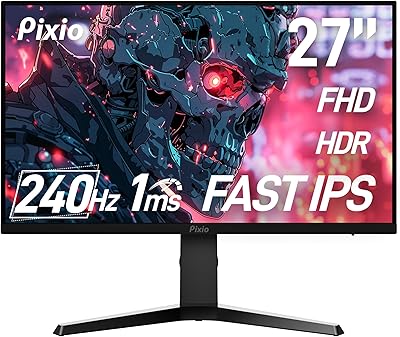
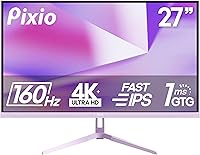
The Pixio PX27U 27-inch 4K Gaming Monitor carves out an interesting spot in the mid-range display market — a segment where buyers are increasingly demanding more without paying flagship prices. Pixio has built a quiet following among budget-conscious PC builders who appreciate solid specs without the brand premium, and this 27-inch display reflects that philosophy. What makes it stand out immediately is the purple accent colorway, a genuine rarity on a monitor shelf dominated by matte black. The honest trade-off here is that you're getting competitive specs packaged with cost-saving choices — the stand feels basic, and the feature set prioritizes performance per dollar over luxury refinements.
Features & Benefits

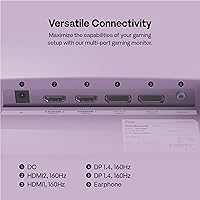
The Fast IPS panel is arguably the strongest selling point here. Colors pop with wide gamut coverage, and the 178-degree viewing angles mean no noticeable color shift when seated off-axis — something TN panels still can't claim. The 1ms GTG response keeps motion clean during fast-paced play, and Adaptive Sync smooths out frame rate dips without obvious artifacts. The 160Hz ceiling is genuinely exciting at 4K, but reaching it consistently requires serious GPU horsepower — a mid-range card simply won't get there. HDR is present, but 400 nits is entry-level territory; don't expect the contrast punch you'd get from a premium FALD display. Connectivity is strong: dual DisplayPort 1.4 and dual HDMI 2.1 ports, plus built-in speakers for setups that don't need a dedicated audio solution.

Best For

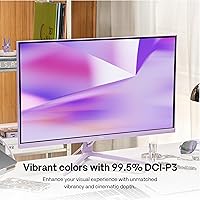
This 27-inch gaming display hits a sweet spot for a few specific buyer types. PC gamers who want to move into true 4K territory without paying flagship prices will find the value compelling, particularly if they're already running a capable GPU. Console players are well-served too — with two HDMI 2.1 ports, a PS5 or Xbox Series X can push 4K at high frame rates without compromise. Budget-conscious content creators will appreciate the near-complete DCI-P3 coverage, which makes color-sensitive work more credible than most monitors at this price allow. And if you're building a purple-themed setup, this is one of the few monitors that ships with that aesthetic built in rather than bolted on as an afterthought.

User Feedback

Buyers rating this Pixio 4K monitor at 4.2 stars out of five tend to single out color vibrancy and the sheer visual impact of 4K as highlights — especially for those upgrading from 1080p, the difference feels dramatic. Out-of-box calibration is generally respectable, though a handful of users have adjusted contrast and color temperature to personal taste. The recurring criticisms center on the stand, which lacks height adjustment and wobbles more than expected at this price point. OSD navigation has drawn some frustration for being slow to respond. A small number of early buyers flagged occasional compatibility quirks when connecting certain AMD GPUs at full refresh rate, though these appear isolated. Long-term reliability data is still thin given the relatively recent launch, but initial impressions suggest build quality is adequate for the price.

Pros

  • 4K resolution on a Fast IPS panel delivers genuinely sharp, vibrant visuals that immediately impress.
  • 160Hz at 4K is a rare spec combination at this price tier, giving capable GPU owners real headroom.
  • Dual HDMI 2.1 ports let console and PC users connect multiple devices without a switcher.
  • Near-complete DCI-P3 coverage makes this 27-inch gaming display viable for casual color work.
  • Adaptive Sync keeps gameplay smooth across a wide frame rate range without obvious tearing.
  • The purple colorway is a genuine design differentiator in a market full of identical black panels.
  • 178-degree viewing angles mean colors stay accurate even when seated slightly off-center.
  • Built-in speakers add convenient audio without requiring a separate purchase for basic setups.
  • VESA compatibility with an included 100x100mm adapter makes arm mounting straightforward.
  • Out-of-box color accuracy earns praise from most buyers without needing immediate calibration.

Cons

  • The included stand lacks height adjustment, which creates ergonomic problems for many desk setups.
  • Stand wobble has been flagged by multiple buyers, particularly noticeable during typing or desk movement.
  • 400 nits peak brightness makes HDR content look underwhelming compared to higher-tier displays.
  • Hitting 160Hz at 4K requires top-tier GPU hardware that most buyers at this price point may not own.
  • OSD menu navigation is sluggish and unintuitive, making display adjustments more tedious than expected.
  • Some AMD GPU users have reported occasional refresh rate compatibility quirks at maximum settings.
  • Long-term reliability data is still limited given the PX27U Wave Purple launched relatively recently.
  • The 1000:1 contrast ratio produces blacks that look gray in darker rooms compared to VA or OLED panels.

Ratings

The scores below for the Pixio PX27U 27-inch 4K Gaming Monitor were generated by our AI system after analyzing verified purchase reviews from buyers worldwide, with spam, bot activity, and incentivized feedback actively filtered out. The ratings reflect a genuine cross-section of real-world experiences — covering both the aspects users rave about and the pain points that caused frustration. Nothing has been softened to protect the brand.
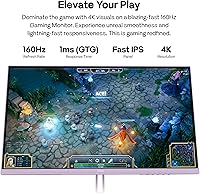
Image Quality
88%
The Fast IPS panel produces colors that genuinely impress buyers at this price point — skin tones in games look natural, and HDR-enabled titles show noticeably richer saturation than most similarly priced monitors. Users upgrading from 1080p panels consistently describe the visual clarity as a dramatic improvement they notice every single session.
Black levels show the characteristic IPS glow in dark-room gaming, which bothers users watching cinematic cutscenes or horror titles. The 1000:1 contrast ratio means dark scenes can look washed out compared to VA or OLED alternatives, even with brightness turned down.
Color Accuracy
84%
Near-complete DCI-P3 coverage means colors land close to professional standards right out of the box, which budget-minded content creators find genuinely useful for photo editing and video grading work. Most buyers report that the default color profile requires little or no adjustment for everyday creative tasks.
Without factory calibration or a bundled Delta-E report, individual units can vary slightly in white balance and gamma — some buyers found the default color temperature ran slightly warm and needed a manual correction. Professional colorists needing verified accuracy will want a purpose-built display instead.
Refresh Rate Performance
79%
21%
At 160Hz, motion feels perceptibly cleaner than 144Hz panels in fast-paced titles — the difference is subtle but real during competitive play, particularly when tracking fast-moving targets. Buyers with high-end GPUs who can sustain high frame rates in lighter esports titles describe the experience as genuinely fluid and responsive.
The vast majority of buyers will never actually hit 160Hz at 4K in demanding modern titles without a top-tier GPU, which creates a gap between the marketed specification and everyday reality. This makes the refresh rate advantage feel theoretical for users pairing the monitor with mid-range hardware.
HDR Experience
54%
46%
For buyers without prior HDR experience, the HDR mode does add visible pop to compatible content — brighter highlights and slightly expanded color range give supported games and streaming content a more dynamic feel compared to standard SDR mode.
At 400 nits peak brightness with no local dimming, the HDR implementation falls well short of what enthusiasts expect — highlights bloom rather than punch, and blacks remain lifted in dark areas. Buyers who have used OLED or full-array local dimming monitors frequently describe the HDR on this display as barely noticeable.
Response Time & Motion
82%
18%
The 1ms GTG rating translates into genuinely clean motion in practice — fast-paced first-person shooters and racing games show minimal trailing or smearing, and the panel holds up well during rapid camera panning that would expose ghosting on slower displays.
Some buyers report faint inverse ghosting artifacts when overdrive is set aggressively, a common trade-off with fast IPS panels pushed to their pixel transition limits. Dropping overdrive to a moderate setting resolves the issue for most users but requires navigating the slow OSD to get there.
Connectivity
91%
Dual HDMI 2.1 and dual DisplayPort 1.4 ports at full 4K/160Hz bandwidth is an unusually generous layout at this price tier — buyers with a PC and two consoles can leave everything plugged in simultaneously without needing a switch. The port selection covers virtually every current gaming device without adapters.
There is no USB hub built into the display, which buyers with multiple peripherals notice as an inconvenience compared to more expensive monitors that offer pass-through USB ports. The lack of a headphone output jack has also frustrated a handful of users who expected one given the monitor's price.
Adaptive Sync
77%
23%
Adaptive Sync works consistently across most tested configurations, keeping gameplay smooth through frame rate fluctuations without visible tearing — buyers pairing this display with both AMD and Nvidia cards generally report a positive experience during regular gameplay sessions.
Nvidia users occasionally encounter inconsistent behavior at the high end of the refresh rate range, with a small subset reporting micro-stutters that disappear when capping frame rates slightly below the panel maximum. Official G-Sync Compatible certification is absent, which creates uncertainty for Nvidia users before purchase.
Stand & Ergonomics
43%
57%
The stand gets the monitor to a usable height for average desk setups, and tilt adjustment covers the basic needs of users who position their display at or slightly below eye level without much deviation.
The stand is widely considered the weakest part of the package — it offers tilt only, with no height, swivel, or pivot adjustment, and multiple buyers describe noticeable wobble when typing or accidentally bumping the desk. Most long-term users end up replacing it with a third-party arm, which adds to the total cost.
Build Quality
67%
33%
The panel housing feels reasonably solid for a value-focused display, and the purple accent design is executed cleanly without looking cheap or like an afterthought — buyers consistently note that the monitor photographs well and holds up to desk wear over time.
Flex in the panel bezel when pressing the OSD buttons is a common complaint, and the back panel uses thinner plastics than premium competitors. A few buyers also noted minor backlight bleed in corners that became apparent in dark room use, though severity varied between units.
OSD & Controls
49%
51%
The OSD provides access to all the key settings buyers need — color profiles, refresh rate confirmation, overdrive levels, and input switching — so the functionality is at least complete even if the execution is frustrating.
Navigation is consistently described as slow, unresponsive, and poorly laid out, with physical buttons that require firm presses and menus that lag noticeably between selections. Several buyers mention spending far longer than expected just trying to enable the correct refresh rate or switch color modes.
Value for Money
86%
When buyers weigh what they are getting — 4K, 160Hz, Fast IPS, dual HDMI 2.1, and near-complete DCI-P3 coverage — against the price, the overall verdict among satisfied users is that the PX27U Wave Purple punches noticeably above its weight class. It consistently outpaces similarly priced competitors on paper and largely delivers in real-world use.
The value equation depends heavily on what buyers prioritize — users who care about stand quality, OSD usability, or premium HDR feel the value proposition less strongly, since those are areas where the cost-cutting is most visible. It is a strong deal for spec hunters but a less obvious win for buyers focused on total build refinement.
Out-of-Box Setup
73%
27%
Assembly is quick and cable management is straightforward — most buyers report having the display up and running within 15 minutes of opening the box, and the default picture settings are usable enough that casual users may not feel the need to adjust anything immediately.
Getting 4K at 160Hz confirmed and active requires navigating display settings on both the monitor and the connected device, which trips up buyers who are unfamiliar with the process. Some users initially assumed the monitor was defective when it defaulted to 60Hz before they manually changed the output settings.
Gaming Performance
83%
For the target audience — mid-to-high-end PC gamers and current-gen console players — this 27-inch gaming display delivers a genuinely strong in-game experience, with sharp visuals, clean motion, and smooth frame delivery across a wide range of game genres including shooters, RPGs, and racing titles.
Buyers using mid-range GPUs frequently find that they cannot leverage the full refresh rate in the games they actually play, which reduces the effective advantage over a cheaper 4K/60Hz or 4K/120Hz display. The performance ceiling is real but only accessible to a subset of the likely buyer pool.
Built-in Speakers
38%
62%
The built-in speakers serve adequately for video calls, system sounds, and casual background audio without needing any external device — buyers who occasionally work from this display appreciate having a fallback audio option when headphones are not practical.
Sound quality is thin and bass-free, and maximum volume is lower than most buyers expect from a monitor in this price range. Virtually no user recommends relying on them for gaming or media consumption, and they are best treated as a last-resort convenience rather than a genuine feature.
Long-term Reliability
71%
29%
Early adopters who have owned the display for several months report that the panel remains stable, with no significant pixel degradation or backlight issues emerging over time — a reassuring signal for buyers concerned about Pixio's quality consistency.
The product launched relatively recently, so there is not yet a large body of long-term ownership data to draw from with confidence. A small number of users reported firmware-related quirks shortly after purchase, and it remains unclear how Pixio's customer support responds to hardware failures outside the return window.

Suitable for:

The Pixio PX27U 27-inch 4K Gaming Monitor is a strong fit for PC gamers who have been priced out of the 4K segment and are ready to make the jump without spending flagship money. If you're running a high-end GPU — think RTX 4080 tier or equivalent — you'll actually be able to push this display close to its 160Hz ceiling in lighter titles, and the visual payoff at 4K on a 27-inch Fast IPS panel is genuinely impressive. Console players with a PS5 or Xbox Series X will also find it particularly well-suited, since two HDMI 2.1 ports mean you can hook up both consoles simultaneously without swapping cables. Budget-conscious content creators who need reliable color accuracy will appreciate the near-complete DCI-P3 coverage, which is rare at this price point. Finally, anyone building a themed desk setup will find the purple colorway a refreshing alternative to the endless sea of all-black monitors on the market.

Not suitable for:

Buyers who expect a premium HDR experience should look elsewhere — the Pixio PX27U 27-inch 4K Gaming Monitor tops out at 400 nits, which technically qualifies as HDR-compatible but produces noticeably flat highlights compared to monitors with full-array local dimming or higher brightness ceilings. Competitive esports players who prioritize ultra-fast pixel response above all else may also find the trade-offs less appealing, since squeezing 4K at maximum refresh rate demands GPU hardware that sits well above mid-range. Anyone frustrated by barebones monitor stands will want to budget for a third-party arm from the start, as the included stand lacks height adjustment and has been noted for wobble. If you're a professional photographer or colorist who needs factory-calibrated accuracy verified by a Delta-E report, this monitor does not ship with that level of quality assurance. And if you're sitting farther than three feet from the screen, the 27-inch panel at 4K may also feel smaller than expected for a desktop viewing environment.

Specifications

  • Screen Size: The display measures 27 inches diagonally, offering a comfortable viewing area without requiring an unusually deep desk.
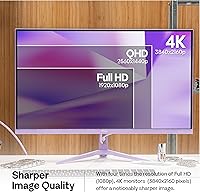
  • Resolution: Native resolution is 3840 x 2160 pixels (4K UHD), delivering approximately 163 pixels per inch for sharp, detailed imagery.
  • Panel Type: A Fast IPS panel is used, balancing strong color accuracy and wide viewing angles with faster pixel transitions than standard IPS.
  • Refresh Rate: The panel supports up to 160Hz, achievable at full 4K resolution over both DisplayPort 1.4 and HDMI 2.1 connections.
  • Response Time: Rated at 1ms GTG (gray-to-gray), which minimizes motion blur and ghosting during fast-paced content.
  • Brightness: Peak brightness reaches 400 nits, which is sufficient for well-lit rooms but represents the entry threshold for HDR performance.
  • Color Gamut: Covers 99.50% of DCI-P3 and 121.76% of sRGB, providing rich, accurate color reproduction across gaming and creative workflows.
  • Contrast Ratio: Static contrast ratio is rated at 1000:1, which is standard for IPS technology but visibly less deep than VA or OLED panels.
  • Viewing Angles: Horizontal and vertical viewing angles both reach 178 degrees, ensuring consistent color at wide off-axis positions.
  • Connectivity: Includes two DisplayPort 1.4 ports and two HDMI 2.1 ports, all capable of carrying 4K at 160Hz without bandwidth compromise.
  • Adaptive Sync: Adaptive Sync is supported to reduce screen tearing, though a compatible graphics card is required for the feature to activate.
  • HDR Support: HDR-compatible display requiring an HDR-capable source; at 400 nits peak, the HDR effect is present but not as dramatic as higher-tier implementations.
  • VESA Mount: Native VESA pattern is 75x75mm; a 100x100mm adapter is included in the box for broader monitor arm compatibility.
  • Speakers: Built-in speakers are included, providing a basic integrated audio option without the need for an external sound device.
  • Aspect Ratio: Standard 16:9 widescreen aspect ratio, compatible with virtually all gaming, streaming, and productivity content formats.
  • Dimensions: With the stand attached, the monitor measures 24.20″ wide, 18.18″ tall, and 8.30″ deep.
  • Weight: The full unit including stand weighs 14.47 pounds, which is within the normal range for a 27-inch display of this class.
  • Surface Finish: The screen features a matte anti-glare coating that reduces reflections in bright environments without significantly softening image clarity.
  • Input Voltage: The monitor operates at 12 volts, consistent with an external power brick setup typical for displays in this category.
  • Model Number: The official model designation is PX27UWAVEPP, used for warranty registration, driver lookup, and support inquiries.

Related Reviews

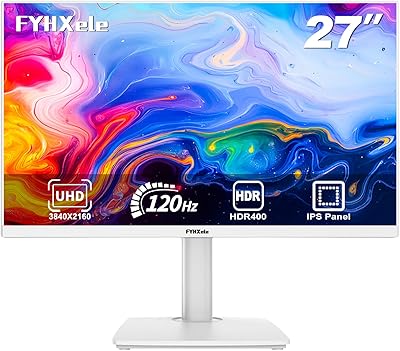
FYHXele 27-inch 4K 120Hz Gaming Monitor
72%
83%
Value for Money
88%
Image Sharpness
79%
Panel Response & Motion
76%
Color Accuracy
47%
HDR Performance
More
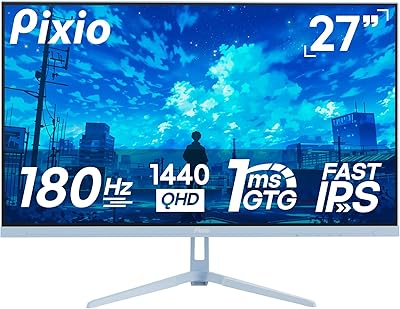
Pixio PX278 Wave 27-inch Gaming Monitor
77%
88%
Image Quality
91%
Refresh Rate
87%
Response Time
83%
Color Accuracy
89%
Value for Money
More
INNOCN 27M2V 27″ 4K Gaming Monitor
76%
91%
Color Accuracy
74%
HDR Performance
87%
Gaming Performance
82%
Value for Money
89%
Connectivity
More
Pixio PX277 OLED Max V2 27″ Monitor
79%
93%
Image Quality
91%
Motion Performance
96%
Contrast & Blacks
58%
SDR Brightness
88%
Color Accuracy
More
Pixio PX279 Wave 27-inch Gaming Monitor
76%
91%
Gaming Performance
84%
Panel & Image Quality
88%
Response Time & Motion Clarity
82%
Color Accuracy
79%
Build Quality & Design
More
Acer Predator XB273K V5 27″ Gaming Monitor
80%
91%
Image Clarity
88%
Refresh Rate Flexibility
93%
Console Compatibility
86%
Motion Performance
52%
HDR Quality
More
Sony INZONE M9 27-Inch 4K Gaming Monitor
79%
91%
Image Clarity
78%
HDR Performance
88%
Refresh Rate & Responsiveness
89%
PS5 Compatibility
72%
Local Dimming Quality
More
Pixio PX279 Prime Neo 27″ Gaming Monitor
75%
91%
Motion Performance
86%
Color Accuracy
61%
Pixel Density & Sharpness
88%
Connectivity
84%
Stand & Ergonomics
More
YEYIAN ODRAZ 27″ 4K UHD Gaming Monitor
72%
86%
Image Quality
88%
Color Accuracy
57%
Gaming Performance
83%
Value for Money
66%
Build Quality
More
Pixio PX275 Wave 27-inch 100Hz QHD IPS Gaming Monitor
87%
91%
Value for Money
88%
Display Quality
93%
Color Accuracy
85%
Gaming Performance
89%
Ease of Setup
More

FAQ

The PS5 and Xbox Series X both support up to 4K at 120Hz over HDMI 2.1, so you won't hit 160Hz from a console — that ceiling applies to PC connections. Still, 120Hz at 4K from a current-gen console is excellent, and the PX27U Wave Purple handles that without any issue thanks to its dual HDMI 2.1 ports.

Realistically, you're looking at an RTX 4080 or RX 7900 XT level of GPU to sustain 160 frames per second at 4K in demanding titles. In lighter or older games the bar is lower, but for modern AAA titles at maximum settings, even high-end cards will dip below that ceiling. Many buyers run this display at variable rates between 60Hz and 160Hz with Adaptive Sync handling the transitions.

Honestly, it depends on your expectations. At 400 nits peak brightness, the Pixio PX27U 27-inch 4K Gaming Monitor meets the minimum technical threshold for HDR, but it lacks the local dimming zones needed to make highlights and shadows truly pop. If you're coming from an OLED or a premium HDR monitor, you'll notice the difference immediately. For users without that reference point, HDR mode still adds some vibrancy to supported content.
Pixio typically includes basic cables in the box, but it is worth confirming what version of cable is included, as a 48Gbps HDMI 2.1 cable is required to run 4K at full refresh rate. If the included cable is an older HDMI specification, you may need to purchase a certified HDMI 2.1 cable separately to unlock the display's full capability.

Yes, and many buyers prefer to ditch the stock stand and mount the display on an arm. The native VESA pattern is 75x75mm, but the box includes an adapter that brings it up to the more common 100x100mm standard, so most monitor arms on the market will be compatible right away.

The stand is functional but basic — this is one of the areas where the value-focused pricing shows. It offers tilt adjustment only, with no height or pivot options, and a few buyers have noted that it wobbles when bumped or when typing heavily. If ergonomics matter to you, budgeting for a monitor arm from the start is a smarter move than expecting the stock stand to feel premium.

It holds up reasonably well for casual creative work. The near-complete DCI-P3 coverage means colors are vibrant and relatively accurate out of the box. That said, this 27-inch gaming display is not factory-calibrated and doesn't ship with a Delta-E accuracy report, so professional photographers or colorists who need verified accuracy will want a display designed specifically for that purpose.

The built-in speakers are adequate for casual use — system alerts, video calls, or background music — but they lack bass and volume for an immersive gaming or movie experience. Most buyers will want external speakers or headphones for anything serious. Think of the built-in speakers as a convenience feature rather than a genuine audio solution.

The PX27U Wave Purple supports Adaptive Sync broadly, which means it is compatible with AMD FreeSync-capable cards natively. Nvidia's G-Sync Compatible certification is not officially listed, but many Nvidia GPU users report that Adaptive Sync functions correctly through both DisplayPort and HDMI connections. Your experience may vary slightly depending on GPU model and driver version, so it's worth verifying compatibility with your specific card before assuming full support.

Warranty terms are set by Pixio directly and typically cover manufacturing defects; the specific duration and dead-pixel policy should be confirmed on Pixio's official website at time of purchase, as terms can change. If purchasing through Amazon, the platform's standard return window also applies for early issues. It's a good idea to test the display thoroughly within the return window to catch any panel uniformity issues or backlight bleed before that option expires.

Where to Buy