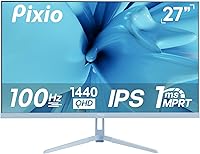
Pixio PX275 Wave 27-inch 100Hz QHD IPS Gaming Monitor
Pixio PX275 Wave 27-inch 100Hz QHD IPS Gaming Monitor — image 1
Pixio PX275 Wave 27-inch 100Hz QHD IPS Gaming Monitor — image 2
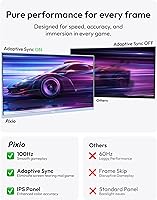
Pixio PX275 Wave 27-inch 100Hz QHD IPS Gaming Monitor — image 3

Pixio PX275 Wave 27-inch 100Hz QHD IPS Gaming Monitor — image 4

Pixio PX275 Wave 27-inch 100Hz QHD IPS Gaming Monitor — image 5

Pixio PX275 Wave 27-inch 100Hz QHD IPS Gaming Monitor — image 6
Pixio PX275 Wave 27-inch 100Hz QHD IPS Gaming Monitor — image 7
87%

Overview

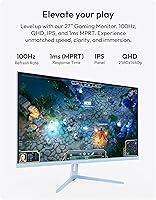
The Pixio PX275 Wave 27-inch 100Hz QHD IPS Gaming Monitor offers a solid balance between performance and price, making it a great option for gamers and general users alike. With a 2560 x 1440p QHD resolution and a 27-inch screen, this monitor delivers sharp, clear visuals. The 100Hz refresh rate ensures smooth gameplay, while the 1ms MPRT response time minimizes motion blur. This Pixio monitor is an affordable choice for anyone seeking an immersive experience without breaking the bank, offering a high-quality display at a competitive price point.

Features & Benefits

This 27-inch monitor boasts an IPS panel, providing wide viewing angles and consistent color across the screen. With a color gamut of 118.72% sRGB and 97.5% DCI-P3, the Pixio PX275 Wave excels in delivering vibrant, accurate colors. The monitor also features Adaptive Sync, which helps eliminate screen tearing for a more enjoyable gaming experience. At 350 nits of brightness, the display is bright enough for most environments, ensuring clear and vibrant visuals in both light and dark settings. Additionally, versatile connectivity options like DisplayPort, HDMI, and USB enhance its usability.

Best For

The Pixio PX275 Wave is ideal for casual to mid-level gamers who want a high-performance monitor without the premium price tag. It is especially suited for users looking for a smooth 100Hz gaming experience and accurate color reproduction for both gaming and productivity. Additionally, its robust connectivity options make it a good choice for those who need a versatile monitor that can handle a variety of tasks, from gaming to office work. If you're after a well-rounded display for both entertainment and everyday use, this monitor is a solid pick.

User Feedback

Users have praised this Pixio monitor for its color accuracy and vibrant display, with many noting that it outperforms similarly priced monitors. Some have pointed out minor issues with backlight bleed, but for the price, it’s generally considered minimal and not overly distracting. The ease of setup and user-friendly interface have also received positive feedback, with many finding the build quality solid and reliable. However, a few users mentioned that the monitor could be brighter in very well-lit environments, but this is a common tradeoff in monitors at this price range.

Pros

  • This monitor delivers solid 1440p resolution at a budget-friendly price, making it an excellent choice for casual gamers.
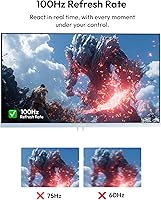
  • The 100Hz refresh rate enhances gaming smoothness, providing a noticeable improvement over standard 60Hz monitors.
  • Color accuracy is impressive with 118.72% sRGB and 97.5% DCI-P3, making it suitable for both gaming and general productivity tasks.
  • Users appreciate the minimal motion blur thanks to the 1ms MPRT response time, which is great for fast-paced games.
  • Wide viewing angles are made possible by the IPS panel, ensuring consistent image quality from almost any direction.
  • The versatility of DisplayPort, HDMI, and USB connections offers easy compatibility with various devices and gaming consoles.

Cons

  • Some users have reported slight backlight bleed, though it is minimal for the price range.
  • The 100Hz refresh rate might not be fast enough for competitive gamers who need higher refresh rates for fluid gameplay.
  • While the monitor is affordable, its build quality may not match that of higher-end models, lacking premium features.
  • The monitor lacks extensive ergonomic adjustments, which could be a downside for users who prioritize comfort during long sessions.
  • Although the color accuracy is good, it's not as precise as more expensive monitors designed for professional content creators.
  • The built-in speakers are functional but not powerful enough for users who want high-quality audio without external speakers.

Ratings

After analyzing verified user reviews from various global platforms, the ratings for the Pixio PX275 Wave 27-inch 100Hz QHD IPS Gaming Monitor reflect a balanced mix of strengths and occasional pain points. Feedback was sourced from diverse regions and languages, with spam, incentivized, and duplicate reviews filtered out to ensure authenticity. Both the positive aspects and the minor drawbacks are well-represented in the scores, offering an accurate reflection of real-world experiences from users across the globe.

Value for Money
91%
Many users are impressed by the affordability of this monitor, especially considering its solid performance. The balance between price and features such as high color accuracy and smooth gameplay makes it a strong contender for gamers on a budget. Its price point is often highlighted as a standout in its category.
A few users feel that the price, while affordable, could be even lower for the performance offered. Some also mention that the build quality doesn't match higher-end, more expensive options, though this is expected at this price range.
Display Quality
88%
The display quality of this monitor is frequently praised, particularly for its vibrant colors and clarity. The IPS panel delivers wide viewing angles, making it suitable for both gaming and productivity tasks. Many users enjoy the sharpness of the 1440p resolution, especially for the price point.
While the display quality is generally solid, some users report slight backlight bleed, particularly in dark scenes. This is noted more by gamers using the monitor for high-contrast content, though it's not a major issue for most at this price.
Color Accuracy
93%
With a color accuracy of 118.72% sRGB and 97.5% DCI-P3, this monitor is highly appreciated for its vivid and precise color reproduction. Designers and gamers alike have praised its ability to display rich and accurate colors, making it a versatile option for both work and entertainment.
A few users have noted that while the color accuracy is excellent, the out-of-the-box settings might require fine-tuning to achieve optimal results. Some users who are very particular about color precision feel that calibration is necessary for professional work.
Gaming Performance
85%
Gamers appreciate the smooth 100Hz refresh rate and 1ms response time for fast-paced gameplay. Adaptive Sync technology minimizes screen tearing, making for a fluid and enjoyable gaming experience, especially for casual to mid-level gamers. Overall, it's seen as a solid performer in its price range.
While many users are satisfied, a few competitive gamers mentioned that the 100Hz refresh rate might not be enough for those accustomed to higher-end monitors with 144Hz or 240Hz. The gaming performance is good, but not top-tier for ultra-competitive titles.
Ease of Setup
89%
Several users report that setting up this monitor is a breeze, with easy-to-follow instructions and a straightforward installation process. The plug-and-play functionality ensures that most buyers can get started without hassle. Many appreciate the minimal assembly required and quick calibration.
A few buyers mention minor issues with adjusting the monitor's height and tilt, as the stand isn't as flexible as higher-end models. Additionally, some users feel that the included cables could be longer for more convenient placement in larger setups.
Build Quality
82%
18%
For its price range, the build quality is considered decent. Users appreciate that the monitor feels sturdy, with a well-constructed stand and frame. It’s not flimsy, and the overall design is functional and aesthetically pleasing for a budget-friendly model.
Despite being sturdy, some users point out that the materials used feel cheaper compared to premium monitors. The stand, while functional, lacks adjustability in terms of height and tilt, which can be a limitation for those seeking full ergonomic customization.
Response Time
86%
Many users are satisfied with the 1ms MPRT response time, which helps to reduce motion blur and ghosting, providing a smooth gaming experience. It’s particularly appreciated for casual and mid-level gaming, where fast reaction times are key.
Though the response time is generally praised, a few users feel that it still lags behind higher-end gaming monitors, especially in ultra-competitive scenarios. Some professional gamers or those with fast-paced action games may notice minor blur during rapid movements.
Viewing Angles
90%
Thanks to the IPS panel, this monitor offers wide viewing angles (178° horizontal and vertical), making it a great choice for shared spaces or when multiple people are viewing the screen at once. Users appreciate the consistency of color and contrast even when viewed from an angle.
A small group of users have mentioned that the colors can shift slightly when viewed from extreme angles, although this is expected from most IPS panels and not a significant issue for most users. Some prefer monitors with even more consistent performance at off-angles.
Connectivity Options
84%
The monitor offers a range of connectivity options, including DisplayPort, HDMI, and USB, making it easy to connect to various devices. The inclusion of firmware update support via USB is a nice touch for future-proofing the device.
While most users are happy with the connectivity options, some feel that additional ports or features (such as USB-C) would have been beneficial. A few also wish the monitor included more robust cable management options to keep setups neat.
Brightness
78%
22%
At 350 nits, the brightness is sufficient for typical indoor gaming and work setups. Users generally find the display bright enough for most lighting conditions, and it’s adequate for casual users in environments without excessive glare.
Some users note that the brightness level could be higher for those with bright rooms or outdoor-facing setups. A few have mentioned that the display struggles a bit in direct sunlight or very bright environments, leading to reduced visibility.
Screen Size
92%
The 27-inch screen strikes a great balance between size and resolution. Users enjoy the larger screen area for gaming, multitasking, and general use, without feeling overwhelmed by too large a display. The 1440p resolution looks sharp and detailed on this screen size.
A few users mentioned that for some desk setups, a 27-inch screen may feel a bit too large, particularly in smaller workspaces. Some also note that it may be harder to get the ideal viewing distance in tighter areas.
Adaptive Sync Performance
87%
Adaptive Sync is a standout feature for this monitor, as it helps eliminate screen tearing and stuttering, especially in fast-moving games. Many users find this feature especially helpful for a smooth, tear-free gaming experience.
Though Adaptive Sync works well for most, some users report occasional issues with screen tearing during high-performance gaming sessions. These reports are rare but suggest that some users with higher refresh rates may encounter minor synchronization issues.

Suitable for:

The Pixio PX275 Wave 27-inch 100Hz QHD IPS Gaming Monitor is an excellent choice for casual to mid-level gamers looking for an affordable, high-quality display. Its 2560 x 1440 resolution and smooth 100Hz refresh rate make it ideal for gaming without the premium price tag. This monitor is especially beneficial for users who prioritize vibrant color accuracy, with its impressive 118.72% sRGB and 97.5% DCI-P3 coverage. It's also a versatile option for those who need a monitor that can handle both work and play, offering wide viewing angles and solid performance for general productivity tasks. Students, home office workers, and casual gamers will appreciate its balanced combination of quality and price.

Not suitable for:

While the Pixio PX275 Wave is a great budget option, it may not be the best choice for competitive gamers or users who demand the highest performance. Those seeking ultra-fast refresh rates, such as 144Hz or 240Hz, might find its 100Hz refresh rate limiting during high-speed gaming sessions. Additionally, professional content creators who rely on near-perfect color accuracy may need more advanced calibration or might prefer monitors with factory-calibrated settings. The build quality, while solid for its price, lacks the premium feel that some users may expect at higher price points, and it may not be ideal for those who need full ergonomic adjustability in their monitor stand.

Specifications

  • Screen Size: The monitor has a 27-inch display, providing ample screen real estate for gaming and productivity tasks.
  • Resolution: It offers a 2560 x 1440p (QHD) resolution, delivering sharp and detailed images.
  • Panel Type: The monitor uses an IPS panel, offering wide viewing angles and consistent color reproduction.
  • Refresh Rate: With a 100Hz refresh rate, the monitor ensures smooth motion during gaming and fast-moving content.
  • Response Time: The 1ms MPRT (Moving Picture Response Time) minimizes motion blur, enhancing fast-paced gaming.
  • Color Accuracy: The monitor covers 118.72% sRGB and 97.5% DCI-P3 color gamuts, making it suitable for color-sensitive tasks.
  • Brightness: The display offers a brightness of 350 nits, providing vibrant and clear visuals in most environments.
  • Contrast Ratio: It features a 1000:1 contrast ratio, helping differentiate dark and light areas for better image clarity.
  • Viewing Angles: The monitor supports wide viewing angles of 178° horizontally and vertically, ensuring consistent image quality from different positions.
  • Connectivity: It includes DisplayPort 1.4, HDMI 2.0, and USB ports for versatile connectivity options.
  • VESA Mount Compatibility: The monitor supports VESA 75x75mm mount compatibility, allowing for flexible mounting options.
  • Adaptive Sync: It features Adaptive Sync, helping to eliminate screen tearing for smoother gaming experiences.
  • Speakers: The monitor comes with built-in speakers for basic audio output, ideal for general use.
  • Aspect Ratio: It has a 16:9 aspect ratio, providing a widescreen format suitable for gaming and entertainment.
  • Weight: The monitor weighs approximately 14.22 lbs, offering a sturdy build while still being manageable for desk setups.
  • Power Supply: The monitor is powered by an internal power supply, with standard power input requirements.
  • Backlight Technology: It uses LED backlight technology for energy-efficient and bright display output.
  • Build Quality: Users have praised the solid build quality, with a design that is both functional and sleek.

FAQ

Setting up this monitor is straightforward. Simply connect the provided DisplayPort or HDMI cable to your computer or console, plug in the power cable, and power it on. You can adjust settings like brightness and color through the on-screen display (OSD) menu. For added flexibility, it's VESA mount compatible if you prefer a wall mount or arm.

The 100Hz refresh rate ensures smoother gameplay by refreshing the image on-screen 100 times per second. This reduces motion blur and improves visual fluidity, making it particularly beneficial in fast-paced games. While not as high as 144Hz, it strikes a good balance between performance and affordability for most casual and mid-level gamers.

Yes, this 27-inch gaming monitor is compatible with both PlayStation and Xbox consoles, provided they support HDMI output. With the included HDMI 2.0 port, you can easily connect your console and enjoy sharp 1440p resolution and smooth gameplay. Just ensure that your console supports a 1440p output for the best experience.

A 1ms MPRT (Moving Picture Response Time) helps minimize motion blur, making fast-moving objects in games appear clearer and more defined. This is especially useful for competitive gamers who need fast, responsive visuals without ghosting or blurring, particularly in titles with rapid action or quick reflexes.

Yes, the monitor comes with built-in speakers that provide basic audio output. However, while they are suitable for general use, they aren't as powerful or high-quality as external speakers or gaming headsets. For an enhanced audio experience, especially for gaming, you may want to use external speakers or headphones.

Yes, this monitor is VESA mount compatible with a 75x75mm mounting pattern. This allows you to use a compatible wall mount or adjustable arm, providing more flexibility for your workspace and helping you set up your monitor in a way that best suits your environment.

With its IPS panel technology, this monitor offers wide viewing angles of 178° horizontally and vertically. This means the image quality remains consistent, even when viewed from the side, making it a good choice for multi-person gaming sessions or collaborative work environments.

The Pixio PX275 Wave offers a brightness of 350 nits, which is suitable for most indoor environments, including well-lit rooms. While it's not as bright as some high-end models, it should perform well in typical lighting conditions, providing vibrant and clear visuals without significant glare.

Some users have mentioned slight backlight bleed, though it's generally minimal for the price point. Additionally, while the 100Hz refresh rate is excellent for most casual gamers, it may not be fast enough for those seeking the ultra-smooth experience of a 144Hz or higher display, especially for competitive gaming.

Yes, this monitor's high color accuracy (118.72% sRGB, 97.5% DCI-P3) makes it a solid choice for light photo and video editing tasks. While not a professional-grade monitor, it offers good color reproduction for general use and creative work. If you're a professional looking for color-perfect displays, a higher-end model might be better.