Overview

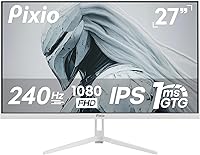
The Pixio PX279 Wave 27-inch Gaming Monitor arrived in late 2024 as a fresh entry in the competitive mid-range display space — a market Pixio has quietly built a reputation in by delivering solid specs without the flagship price tag. What immediately stands out is the white colorway, a genuine rarity when virtually every gaming monitor ships in matte black. It's a deliberate aesthetic choice that resonates with anyone building a clean, light-themed setup. Performance expectations here should be calibrated accordingly: this is a strong value-tier display built for esports-minded users, not a do-everything professional screen.
Features & Benefits

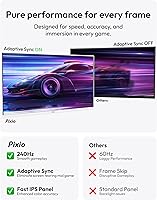
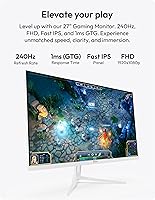
The Fast IPS panel is the real story here. Unlike older TN panels that sacrifice color for speed, this Pixio monitor manages wide viewing angles and genuinely vibrant output — covering over 110% of sRGB and around 93% of DCI-P3. That's respectable for casual streaming or light photo work, though 1080p resolution does limit serious creative use. The 240Hz refresh rate makes a tangible difference in fast-paced shooters: enemy movement reads more cleanly, and the display reacts more crisply to your inputs. Adaptive Sync works across AMD and Nvidia setups alike, and the dual HDMI 2.0 ports plus DisplayPort 1.4 handle multi-device switching without hassle. The built-in speakers function, but treat them as a last resort, not a feature.

Best For

This 240Hz IPS display is a natural fit for competitive FPS and battle royale players who genuinely prioritize frame rate over resolution. If you're regularly pushing triple-digit frames in titles like Valorant or CS2, the headroom here is real and noticeable. It also suits a console and PC hybrid setup well, thanks to multiple high-bandwidth inputs. Aesthetically, it's one of the stronger choices for anyone building a white battlestation — the finish looks intentional rather than cheap. One honest caveat: at 27 inches, 1080p starts showing its limits up close, and users sensitive to pixel density may prefer a 24-inch alternative at this resolution.

User Feedback

Buyer sentiment around the PX279 Wave leans positive overall, with the most consistent praise directed at out-of-box color accuracy and the white finish, which users frequently describe as feeling more premium than the price suggests. The stand ergonomics, however, surface repeatedly as a frustration — tilt and height adjust, but there's no swivel, which limits flexibility for some desk configurations. On value, most verified buyers feel the monitor holds its own against similarly priced 240Hz IPS competitors. Speaker quality draws the expected criticism: passable at low volumes, but lacking body. A handful of buyers mention QC inconsistencies, though these appear to be isolated cases rather than a widespread pattern.

Pros

  • Fast IPS panel delivers noticeably better colors and viewing angles than old-school TN speed displays
  • The white colorway is rare and well-executed — it actually looks clean rather than plasticky
  • Adaptive Sync works across both AMD and Nvidia GPUs, so you're not locked into one ecosystem
  • Dual HDMI 2.0 ports plus DisplayPort 1.4 make multi-device setups genuinely convenient
  • Out-of-box color accuracy draws consistent praise from verified buyers — minimal calibration needed
  • The 240Hz refresh rate provides a real, tangible edge in fast-paced competitive gaming scenarios
  • VESA mount support with a 100x100mm adapter included adds flexibility for arm upgrades
  • Color gamut coverage is broad enough for light casual creative work beyond just gaming
  • Buyers consistently rate the value as strong relative to competing 240Hz IPS options in the same tier

Cons

  • 1080p resolution on a 27-inch panel results in lower pixel density — noticeable up close for productivity tasks
  • The included stand lacks swivel adjustment, limiting ergonomic flexibility for many desk setups
  • Built-in speakers are functional at best and thin-sounding at moderate volumes
  • No USB hub functionality — the single USB port is reserved for firmware updates only
  • 350 nits of peak brightness may fall short in very bright room environments
  • Relatively new to market, so long-term reliability data is still limited compared to established competitors
  • 1080p resolution caps the usefulness of this 240Hz IPS display for any serious content creation work
  • Some buyers report minor quality control variation, though this appears to be infrequent rather than systemic

Ratings

The scores below for the Pixio PX279 Wave 27-inch Gaming Monitor were generated by AI after analyzing verified buyer reviews from multiple global markets, with spam, bot-driven, and incentivized feedback actively filtered out. Each category reflects the genuine consensus of real owners — including the pain points they encountered, not just the highlights. Where buyers were divided, the scores reflect that honestly rather than splitting the difference toward an artificially positive result.
Gaming Performance
91%
This is where the PX279 Wave earns its keep. Competitive gamers consistently report that the high refresh rate makes fast-paced titles feel noticeably more responsive, and the improvement over 144Hz setups is real rather than marginal. Tracking moving targets in shooters and reacting to on-screen events feels sharper and more immediate.
The performance advantage is most meaningful in esports-style titles where you can actually hit high frame counts. In graphically demanding games where your GPU caps out well below the panel's ceiling, the monitor's biggest strength becomes less relevant to your daily experience.
Panel & Image Quality
84%
The Fast IPS panel punches above its weight for this price tier. Colors look vibrant and accurate out of the box with minimal calibration needed, and the wide viewing angles mean the image holds up even when you're not sitting perfectly centered — useful for couch or off-angle setups.
At 27 inches with a 1080p signal, pixel density is noticeably lower than on a smaller panel at the same resolution. Text and fine UI details can appear slightly soft, which becomes more obvious during productivity work than gaming. It is not a dealbreaker for most, but sensitive users will notice.
Response Time & Motion Clarity
88%
Motion clarity is genuinely strong. During fast panning shots and high-speed gameplay, the display avoids the ghosting trails that plague standard IPS panels at this refresh rate. The Fast IPS technology here makes a practical difference compared to what older IPS monitors could deliver.
While GTG response figures are measured under ideal conditions, real-world overdrive performance can vary depending on the in-game settings you use. A small number of buyers noted faint inverse ghosting artifacts when overdrive is pushed too aggressively, though this is adjustable through the OSD.
Color Accuracy
82%
18%
Broad color gamut coverage means images and games with rich palettes look genuinely punchy and engaging. For casual streaming or light photo browsing, the monitor holds its own comfortably, and most buyers found the factory calibration impressively close to accurate without any tweaking.
At a 1000:1 contrast ratio, deep blacks are not the strong suit of this display — dark scenes in games or movies can look slightly washed out compared to VA panel alternatives. This is a known IPS trade-off rather than a flaw specific to Pixio, but it is worth knowing upfront.
Build Quality & Design
79%
21%
The white finish is one of the most talked-about positives in user feedback, and for good reason — it looks polished and intentional rather than like a budget afterthought. The overall chassis feels solid for the price tier, and the matte screen surface handles reflections well in mixed-light environments.
The plastic construction does not feel premium when handled up close, and a few buyers noted that the rear panel shows fingerprints and dust more easily on the white surface than expected. It is not a structural issue, but lighter-colored peripherals do demand more regular cleaning.
Stand & Ergonomics
57%
43%
The stand handles basic positioning needs adequately for users who sit directly in front of their desk without unusual setup requirements. Tilt adjustment is smooth and provides enough range for most standard seating heights when paired with a chair of average height.
The absence of swivel rotation is a recurring and legitimate frustration in user reviews — it limits how flexibly you can position the monitor, particularly in shared or multi-person setups. Height adjustment exists but has a modest range, and users with non-standard desk heights or monitor arm preferences frequently recommend skipping the stand entirely.
Connectivity
86%
Having two HDMI 2.0 ports alongside a DisplayPort 1.4 input is a practical advantage for anyone running a PC and a console simultaneously. Both HDMI connections support the full 240Hz at 1080p, which removes any anxiety about needing to swap cables when switching between devices.
The single USB port is reserved exclusively for firmware updates and cannot be used as a hub for peripherals. Users hoping to run a keyboard, headset, or charging cable through the monitor will need a separate hub, which adds desk clutter that better-equipped monitors in higher tiers avoid.
Brightness & HDR
63%
37%
For typical indoor gaming in a moderately lit room, 350 nits of peak brightness is adequate and the matte panel coating helps reduce glare that would otherwise compound the brightness limitation. Casual evening gaming sessions are comfortable without needing to push the backlight hard.
In bright rooms with natural daylight coming in from the side or behind, 350 nits starts to feel genuinely limiting — screen washout becomes a real issue. There is no meaningful HDR support at this brightness ceiling, so any HDR certification claims should be treated as cosmetic rather than functional.
Built-in Speakers
38%
62%
The speakers handle simple notification sounds and low-volume background audio without distortion, which is more than some competing monitors at this tier offer. For users in dorm rooms or spaces where plugging in external speakers is inconvenient, they work as a stopgap solution.
Virtually every buyer who comments on the speakers describes them as thin, quiet, and lacking any bass. Volume headroom is limited, and at higher volumes the sound quality deteriorates noticeably. Anyone who watches content or plays games with audio as a meaningful part of the experience should plan on an external solution from day one.
Value for Money
87%
The combination of Fast IPS, 240Hz, Adaptive Sync compatibility, and a clean white aesthetic at this price point is difficult to match from competing brands. Most buyers feel they received more monitor than the price suggested, particularly when comparing spec-for-spec against rival options.
The stand limitations and speaker quality do chip away at the overall package — buyers who factor in the likely cost of a monitor arm to compensate will find the effective value slightly less striking than the raw specs suggest. It remains competitive, but not without those real-world caveats.
Setup & Out-of-Box Experience
81%
19%
Physical assembly is quick and straightforward, with a clear snap-together stand design that requires no tools. Out-of-box color settings earn consistent praise from buyers for requiring little to no adjustment before the display looks genuinely good in a real room.
The OSD menu navigation drew mild frustration from some users — the button placement and menu logic take a little learning before they feel natural. It is not a significant barrier, but in an era when competitors offer joystick-based OSD navigation, the button approach feels dated.
Resolution Suitability
61%
39%
For pure gaming, 1080p at 240Hz is a well-established sweet spot that keeps GPU demands manageable and frame rates high — competitive players frequently prefer this trade-off deliberately, and the PX279 Wave executes it competently.
On a 27-inch screen, the pixel density lands around 81 pixels per inch, which is on the lower end for a desk monitor used at typical viewing distances. Users transitioning from higher-resolution displays or those who mix gaming with text-heavy work will notice the difference regularly.
Adaptive Sync Performance
85%
Variable refresh rate support works reliably across both GPU brands without requiring premium certification fees to be passed on to the buyer. Tear-free gameplay at moderate frame rates — when you are not quite hitting the 240Hz ceiling — is smooth and consistent in practice.
The implementation works best within the monitor's stated sync range, and at very low frame rates the behavior is less controlled. This is a minor technical limitation shared across most displays at this tier rather than a specific weakness of this Pixio monitor, but worth noting for users whose systems dip frequently.

Suitable for:

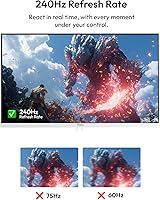
The Pixio PX279 Wave 27-inch Gaming Monitor is a strong match for competitive gamers who live in fast-paced titles like Valorant, CS2, or Apex Legends, where raw responsiveness genuinely changes outcomes. If you're currently on a 144Hz display and wondering whether the jump to 240Hz is worth it, this monitor makes a compelling case — the difference in how motion resolves during fast camera movements and firefights is real and noticeable. The Fast IPS panel also means you're not trading away color quality the way older high-refresh TN displays forced you to, which matters if you also use your PC for streaming content or casual browsing. Gamers building a white or light-themed desk setup will find very few alternatives at this price point that match the aesthetic. It also handles console-plus-PC households well, with enough inputs to keep both hooked up simultaneously at high refresh rates without a switch box.
Not suitable for:

Buyers expecting a sharp, detailed image for productivity work or content creation will likely find this Pixio monitor frustrating over time. At 27 inches, a 1080p resolution starts to feel stretched — pixel density drops noticeably compared to a 24-inch panel at the same resolution, and text rendering in particular can look softer than users coming from higher-resolution displays are used to. Anyone doing photo editing, video work, or color-grading professionally should look toward a higher-resolution display, since 1080p simply limits what you can evaluate on screen at once. Users who rely on ergonomic monitor stands with full swivel and height range will also hit limitations here, as the included stand is functional but basic. And if you're hoping the built-in speakers will replace a real audio setup, they won't — this is not a monitor where audio is a meaningful selling point.

Specifications

  • Panel Type: Uses a Fast IPS panel, which combines the color accuracy and wide viewing angles of standard IPS with a faster pixel response closer to TN performance.
  • Screen Size: The active display area measures 27 inches diagonally.
  • Resolution: Native resolution is 1920 x 1080 pixels, commonly referred to as Full HD or 1080p.
  • Refresh Rate: Supports a maximum refresh rate of 240Hz, allowing up to 240 frames to be displayed per second.
  • Response Time: Rated at 1ms GTG (gray-to-gray), which describes how quickly individual pixels can transition between shades.
  • Brightness: Peak brightness is rated at 350 nits, suitable for moderately lit rooms but may feel limited in very bright environments.
  • Color Gamut: Covers 110.26% of sRGB, 93.5% of DCI-P3, and 85.95% of NTSC, indicating broad and vibrant color reproduction for this display tier.
  • Contrast Ratio: Native contrast ratio is 1000:1, which is standard for IPS-type panels.
  • Viewing Angles: Horizontal and vertical viewing angles both reach 178 degrees at a contrast ratio greater than 10, meaning color and brightness hold well from most positions.
  • Aspect Ratio: Standard 16:9 widescreen aspect ratio, compatible with virtually all gaming and media content.
  • Adaptive Sync: Supports Adaptive Sync technology, compatible with both AMD FreeSync and Nvidia setups to reduce screen tearing and stutter.
  • Connectivity: Includes one DisplayPort 1.4, two HDMI 2.0 inputs (both capable of 240Hz), and one USB port reserved for firmware updates only.
  • Built-in Speakers: Integrated speakers are included, though no wattage specification is officially published by the manufacturer.
  • VESA Mount: Native VESA pattern is 75x75mm; a 100x100mm adapter is included in the box for broader monitor arm compatibility.
  • Dimensions (with stand): With the stand attached, the monitor measures approximately 24.20″ wide, 18.18″ tall, and 8.30″ deep.
  • Dimensions (without stand): Panel only (without stand) measures approximately 24.20″ wide, 14.31″ tall, and 2.56″ deep.
  • Weight: Total weight including the stand is 14.12 pounds.
  • Color: Available in White; this variant is designated the Wave White edition.
  • Power Input: Operates at 12 volts DC input.
  • Release Date: First made available for purchase in December 2024, making it a recent release with limited long-term ownership data available.

Related Reviews
Pixio PX278 Wave 27-inch Gaming Monitor
77%
88%
Image Quality
91%
Refresh Rate
87%
Response Time
83%
Color Accuracy
89%
Value for Money
More
Pixio PX279 Prime Neo 27″ Gaming Monitor
75%
91%
Motion Performance
86%
Color Accuracy
61%
Pixel Density & Sharpness
88%
Connectivity
84%
Stand & Ergonomics
More
Pixio PX27U 27-inch 4K Gaming Monitor
71%
88%
Image Quality
84%
Color Accuracy
79%
Refresh Rate Performance
54%
HDR Experience
82%
Response Time & Motion
More
Pixio PX275 Wave 27-inch 100Hz QHD IPS Gaming Monitor
87%
91%
Value for Money
88%
Display Quality
93%
Color Accuracy
85%
Gaming Performance
89%
Ease of Setup
More
Pixio PX277 OLED Max V2 27″ Monitor
79%
93%
Image Quality
91%
Motion Performance
96%
Contrast & Blacks
58%
SDR Brightness
88%
Color Accuracy
More
Pixio PX246 Wave 24-inch Gaming Monitor
72%
83%
Image Quality
78%
Refresh Rate Performance
91%
Value for Money
82%
Adaptive Sync
74%
Color Accuracy
More
Pixio PX248 Wave Pink 24-inch 200Hz Gaming Monitor

83%
91%
Gaming Performance
88%
Display Quality
84%
Build Quality
86%
Ease of Setup
83%
Connectivity
More
Skytech Gaming Moonshadow 27-inch Curved Gaming Monitor

83%
88%
Image Quality
91%
Refresh Rate Performance
86%
Adaptive-Sync
83%
VA Panel Contrast
84%
Stand & Ergonomics
More
Raywego Z270B13 27-inch Gaming Monitor
70%
88%
Value for Money
83%
Picture Quality
84%
Refresh Rate Performance
62%
Build Quality
81%
Eye Comfort
More
KOORUI G2721E 27-inch Gaming Monitor
78%
93%
Refresh Rate Performance
88%
Image Clarity & Resolution
84%
Color Accuracy
81%
Motion Handling
52%
HDR Quality
More

FAQ

Both HDMI ports on this monitor are version 2.0, which has enough bandwidth to support 1080p at 240Hz. So yes, you can hit the full refresh rate over HDMI — you don't have to use DisplayPort if your GPU or console doesn't have one. That said, DisplayPort 1.4 is still there if you prefer it.

Yes. The monitor supports Adaptive Sync, which is compatible with both AMD FreeSync and Nvidia cards. You may need to enable it in your Nvidia control panel under the G-Sync Compatible option, but it should work without issue on supported Nvidia GPUs.

This is the honest trade-off with the PX279 Wave. At 27 inches, the pixel density is lower than you'd get on a 24-inch 1080p panel, so text and fine details can look slightly softer if you sit close. For gaming it's largely fine — your attention is on motion and responsiveness rather than static sharpness. For productivity or reading long documents, some people find it a bit soft. If pixel density matters a lot to you, a 24-inch 1080p or a 27-inch 1440p display might suit you better.

Yes, the monitor supports VESA mounting. The native pattern is 75x75mm, but Pixio includes a 100x100mm adapter in the box, which covers most standard monitor arms available today. Just make sure your arm is rated for at least 15 pounds to safely support the panel.

The stand does offer tilt and some height adjustment, but it lacks swivel rotation, which is a common complaint from buyers who want to angle the screen sideways or share their display. If full ergonomic adjustment matters to you, pairing this monitor with a proper arm is a reasonable upgrade.

Based on available buyer feedback, the white finish holds up well under normal use and doesn't feel cheap or flimsy. There are no widespread reports of yellowing, though as with any lighter-colored peripheral, you'll want to keep it away from direct sunlight over the long term to be safe.

Functional, but don't expect much. They'll handle system sounds and background music at low volumes without issue, but they lack bass and sound thin when pushed. Most buyers treat them as a backup option. If audio matters to you at all, an external speaker or headset is a much better experience.

You'll need a GPU capable of pushing consistently high frame rates in your games to get real benefit from 240Hz. In less demanding esports titles like Valorant or CS2, even mid-range modern GPUs can hit the frame rates needed. In more graphically intensive games, you may spend more time in the 100–144Hz range, which this monitor still handles smoothly thanks to Adaptive Sync.

Yes, though with a caveat. Current-generation consoles output at a maximum of 120Hz at 1080p, so you won't hit 240Hz from a console. That said, 120Hz is still a solid experience, and having two HDMI ports makes it easy to keep a console and a PC connected simultaneously without unplugging anything.

Pixio typically includes a DisplayPort cable and a power cable with this monitor, though it is always worth confirming at purchase as bundled accessories can vary by retail shipment. HDMI cables are generally not included, so have one on hand if you plan to connect via HDMI from the start.