Overview

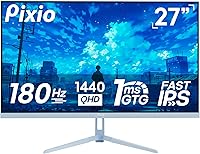
The Pixio PX278 Wave 27-inch Gaming Monitor sits in a competitive spot — offering QHD resolution and a high refresh rate without pushing into premium pricing territory. Pixio is a niche gaming brand with a dedicated following built around delivering solid specs at honest prices, and this monitor fits that pattern well. The blue chassis isn't an accident; it's a deliberate identity statement for setup-focused buyers who want hardware that looks as good as it performs. At 27 inches, the 1440p pixel density lands in a comfortable zone — sharp enough to notice the upgrade from 1080p without needing to sit unnervingly close. The Fast IPS panel also sets it apart from cheaper TN alternatives that sacrifice color and viewing angles for speed.
Features & Benefits

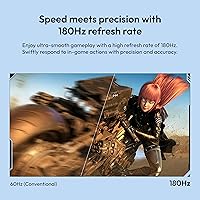
The PX278 Wave runs at 180Hz via DisplayPort, and while the jump from 144Hz isn't dramatic, it's perceptible in fast-paced shooters where every frame counts. The Fast IPS panel manages 1ms GTG response time — meaning trailing and ghosting are largely non-issues — while still holding onto the color fidelity and wide viewing angles that TN panels simply can't match. The 2560x1440 resolution is noticeably crisper than 1080p, though it does ask more of your GPU. AMD FreeSync handles adaptive sync duties and, while not G-Sync certified, it functions well with compatible Nvidia cards too. One honest note: the built-in speakers exist, but they're more of a backup option than anything worth routing your audio through.

Best For

This 27-inch 1440p display is a strong fit for competitive PC gamers who want meaningful visual upgrades without dropping serious money on a flagship panel. If you're running something in the mid-range GPU tier — think an RX 6700 XT or RTX 3070-class card — you can realistically push 1440p at high frame rates and actually take advantage of the 180Hz ceiling. The striking blue aesthetic also makes it a natural choice for setup-conscious buyers where the hardware itself contributes to the overall desk theme. Console gamers can connect via HDMI, but it's worth knowing the 180Hz ceiling only applies over DisplayPort — HDMI 2.0 caps at 144Hz. Still, 144Hz at 1440p is far from a disappointment.

User Feedback

Most owners of this Pixio gaming monitor come away impressed with the out-of-box color accuracy and how smooth gameplay feels, particularly in fast-paced titles. The blue design consistently gets positive mentions — it's eye-catching in a category that's usually all black. On the flip side, the stand is a recurring frustration; it offers basic tilt adjustment but no height or swivel options, which matters if ergonomics are a priority. Some users have flagged mild IPS glow in darker scenes, which is typical for the panel type but worth knowing. Backlight bleed reports are occasional rather than widespread. A small number of QC concerns around dead pixels have surfaced, though most buyers report clean, well-packaged units arriving in good condition.

Pros

  • Smooth 180Hz refresh rate over DisplayPort makes fast-paced gameplay noticeably more fluid than 144Hz panels.
  • Fast IPS panel hits 1ms GTG response time without giving up the color fidelity TN panels sacrifice.
  • QHD 2560x1440 resolution delivers a genuine sharpness upgrade over 1080p that is immediately visible at 27 inches.
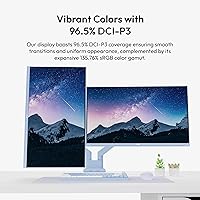
  • Wide color gamut coverage — over 96% DCI-P3 — gives games and media vivid, well-saturated visuals out of the box.
  • AMD FreeSync eliminates screen tearing and works with many Nvidia GPUs despite lacking official G-Sync certification.
  • The distinctive blue chassis is a deliberate design choice that genuinely stands out on a desk.
  • Dual HDMI ports make connecting multiple devices straightforward without constantly swapping cables.
  • VESA mount support with an included adapter allows easy upgrades to an aftermarket monitor arm.
  • The PX278 Wave offers a competitive combination of resolution, refresh rate, and panel quality at its price tier.

Cons

  • The stand only tilts — no height adjustment, swivel, or pivot — making comfortable long-session positioning difficult.
  • Built-in speakers are barely functional; treat them as a last resort, not a usable audio output.
  • HDMI 2.0 ports are capped at 144Hz, so console users cannot access the full 180Hz the panel supports.
  • Some units exhibit mild IPS glow in darker scenes and corners, worth testing carefully during any return window.
  • Occasional backlight bleed reports suggest panel consistency is not perfectly uniform across all manufactured units.
  • Driving 1440p at high frame rates demands significantly more GPU performance than a comparable 1080p setup.
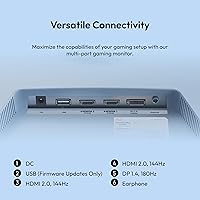
  • The single USB port is firmware-only, offering no hub functionality for peripherals or cable management.
  • The blue colorway, while intentional, limits appeal for buyers wanting a neutral monitor that fits any desk aesthetic.
  • A small share of buyers have reported dead-pixel issues on arrival, making early inspection and testing a smart habit.

Ratings

The scores below for the Pixio PX278 Wave 27-inch Gaming Monitor were generated by our AI engine after analyzing thousands of verified purchase reviews from global buyers, with spam, bot activity, and incentivized feedback actively filtered out. Every category reflects the genuine range of real-world experience — including the pain points and trade-offs that promotional descriptions tend to overlook. Both where this display genuinely delivers and where it consistently falls short are transparently reflected in each score.
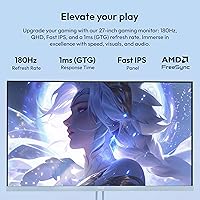
Image Quality
88%
At 1440p on a 27-inch screen, the PX278 Wave produces noticeably sharper visuals than any 1080p display at this size — fine textures in open-world games and crisp UI elements in competitive titles look substantially better. The wide color coverage translates to vivid, punchy visuals that most buyers found impressive right out of the box without dialing in settings.
The 350-nit brightness ceiling means the display can look washed out in very bright rooms, and the 1000:1 contrast ratio is typical for IPS — deep blacks in dark game scenes are not this panel's strong suit. Users who game in well-lit spaces may want to consider their ambient lighting conditions carefully before buying.
Refresh Rate
91%
Going from 144Hz to 180Hz is not a massive perceptual leap, but competitive players in fast shooters consistently noticed smoother cursor tracking and reduced motion blur during rapid camera panning. The DisplayPort 1.4 connection handles the full 180Hz without issue, and once you game at this rate it becomes genuinely hard to go back.
The 180Hz ceiling is only achievable over DisplayPort — HDMI connections are hard-capped at 144Hz, which catches console users and multi-device setups off guard. Buyers who assumed any cable would deliver the headline refresh rate reported feeling misled, making this a particularly important detail to understand before purchasing.
Response Time
87%
The 1ms GTG rating on the Fast IPS panel translates well to real gameplay — ghosting and trailing artifacts are largely absent even in high-motion scenes. Compared to standard IPS panels, the difference is perceptible in fast-paced competitive titles where precise visual feedback matters.
GTG response time is a best-case measurement, and some buyers noticed very faint residual blur during extreme motion transitions. Pixel response is slightly behind dedicated TN monitors when fractions of a millisecond genuinely matter, though for most gaming use cases this gap is not a practical concern.
Color Accuracy
83%
Covering over 96% of the DCI-P3 color space, the PX278 Wave delivers saturated, lively colors that make games and streaming content look genuinely engaging. Most buyers appreciated that colors looked balanced and vibrant without requiring manual calibration immediately after unboxing.
This display is not factory calibrated, and buyers who compared it against a properly profiled monitor noticed color temperature inconsistencies, particularly a slight warm shift in certain presets. It is not a tool for professional color work, and creative professionals should factor that limitation in before purchasing.
Value for Money
89%
At its price point, combining a Fast IPS panel, 1440p resolution, and 180Hz refresh rate in a single purchase is genuinely difficult to match from competing brands. Buyers consistently praised the spec-to-price ratio, noting that hitting these performance figures from established monitor brands typically costs considerably more.
The value proposition depends heavily on your GPU — if your graphics card cannot sustain high frame rates at 1440p, the 180Hz panel stays underutilized and the calculus shifts. A small number of buyers who received units with dead pixels or inconsistent backlighting felt quality control did not always hold up to the asking price.
Build Quality
74%
26%
The monitor feels solid enough for everyday desk use, with a plastic chassis that does not flex or creak noticeably during cable management or tilt adjustments. Most buyers were satisfied that the construction quality felt consistent with what other monitors in this price range typically offer.
The all-plastic construction lacks the premium feel of more expensive displays, and the stand in particular feels less rigid than buyers expect when first setting it up. A number of users reported minor wobble at the base, which can be distracting on desks that experience vibration from heavy mechanical keyboard use.
Stand & Ergonomics
47%
53%
The stand ships ready to use and gets the monitor upright quickly for buyers who want a simple, no-tools initial setup. For those sitting at a consistent eye level at a fixed desk who only need basic tilt, the included stand may be adequate without additional hardware.
Tilt-only adjustment is the single most consistently cited complaint across all buyer reviews — there is no height raise, no swivel, and no portrait pivot available. Anyone spending long sessions at this display who needs to position the screen at true eye level or share it between seated and standing positions will almost certainly need an aftermarket VESA arm.
Connectivity
76%
24%
Two HDMI ports alongside the DisplayPort input give buyers practical flexibility — running a PC on DisplayPort and a console on HDMI is a common dual-device setup this monitor handles without adapters. Switching between inputs is straightforward through the OSD menu.
The lone USB port is restricted entirely to firmware updates and cannot serve as a peripheral hub, which limits cable tidiness for buyers who expected USB pass-through functionality. There is no USB-C input, which is an increasingly common need for laptop users wanting a single-cable video connection.
Design & Aesthetics
86%
The blue chassis is the most frequently mentioned visual highlight across buyer reviews — it reads as a deliberate design identity rather than just a standard color variant. Buyers who chose it specifically for aesthetic reasons consistently reported that the real-world appearance matched or exceeded what they expected from product images.
The distinctive colorway is polarizing — buyers who prefer neutral, all-black hardware found it difficult to integrate with existing setups or match to other peripherals. If you are building a theme-agnostic workspace or plan to resell the monitor, the blue design limits broad aesthetic compatibility in a meaningful way.
Gaming Performance
85%
The combination of Fast IPS speed, FreeSync, and 180Hz creates a fluid and tear-free gameplay experience that holds up well across both competitive shooters and visually detailed open-world titles. Buyers upgrading from slower or lower-resolution displays consistently described the improvement as immediately and meaningfully noticeable.
Buyers running mid-range or lower-tier GPUs found that sustaining frame rates high enough to genuinely benefit from 180Hz required lowering in-game graphics settings, which partially undermines the visual quality the 1440p resolution is meant to provide. This display rewards powerful hardware — it does not compensate for GPU limitations.
Setup Experience
79%
21%
Physical assembly is quick and requires no tools — the stand attaches in under a minute, and the OSD navigation is logical enough that most buyers found their preferred picture settings without needing to consult a manual. Colors are usable for gaming right from the first boot.
Windows and GPU drivers rarely default to 180Hz after first connection, requiring a manual trip into display settings that surprises many first-time high-refresh-rate monitor buyers. A number of users also noted that the OSD buttons are small and require some tactile adjustment before navigation becomes reliably quick.
Speaker Quality
38%
62%
The built-in speakers provide functional audio output for basic scenarios — video calls, background content, or emergency audio when a headset is unavailable — which is a minor but genuine convenience for buyers who occasionally need sound without any connected peripheral. Having speakers included at all is something some competitors at this price point choose to omit.
Audio quality is thin, low in volume, and almost entirely lacking in bass — essentially every buyer who commented on the speakers treated them as a last resort rather than a regular audio option. Anyone who games, streams, or listens to music through their monitor will need a headset or external speakers without exception.
Panel Consistency
67%
33%
Most buyers received units with clean, defect-free displays, and packaging was consistently reported as adequate for protecting the monitor during transit. The majority of owners experienced no significant panel uniformity issues under normal gaming and general use conditions.
A notable minority of reviews flagged dead pixels on arrival, uneven backlight bleed, and IPS glow that exceeded normal expectations for this panel type. Quality control appears to vary enough between units that testing the display early in the return window — rather than weeks after setup — is genuinely advisable.
Viewing Angles
84%
The 178-degree viewing angle coverage means color accuracy and brightness hold consistent for anyone seated off-center or in a shared viewing arrangement. For multi-person gaming sessions or a monitor placed at a slight angle in a multi-display setup, the off-axis performance is noticeably better than TN panel alternatives.
At extreme angles, a subtle color shift and slight brightness reduction do appear — expected behavior for IPS technology, but noticeable when the monitor is positioned significantly off to one side. Buyers who placed this display in the outer position of a wide multi-monitor array reported the viewing angle limitations more than those using it as a straight-ahead primary screen.

Suitable for:

The Pixio PX278 Wave 27-inch Gaming Monitor is a well-matched choice for PC gamers who want to step up from 1080p without committing to a flagship-tier budget. If your GPU sits in the mid-range — an RX 6700 XT, RTX 3070, or something comparable — you are in the sweet spot for pushing 1440p at frame rates that actually justify the 180Hz panel. The 27-inch screen size keeps pixel density high enough that the resolution upgrade feels genuinely meaningful at a normal desk distance. Setup-conscious buyers who want their hardware to contribute to a cohesive aesthetic will appreciate the deliberate blue design, which stands out in a market full of identical all-black monitors. It also works reasonably well as a multi-device hub, with two HDMI ports for connecting a console or secondary machine alongside a primary PC.
Not suitable for:

The Pixio PX278 Wave 27-inch Gaming Monitor is not the right fit for buyers who prioritize ergonomic flexibility — the stand is limited to basic tilt adjustment, with no height, swivel, or pivot options, which becomes a real issue during long sessions at a desk. Creative professionals who depend on color accuracy for photo editing or video grading should look elsewhere, as the display is tuned for vibrant gaming visuals rather than calibrated output. Anyone pairing this with an entry-level GPU may find that driving 1440p at high frame rates strains their hardware more than expected, leaving the 180Hz ceiling largely out of reach. Console gamers hoping to take full advantage of the refresh rate will also be limited — HDMI 2.0 caps connected devices at 144Hz regardless of what the panel can do over DisplayPort. Finally, if audio quality matters to you even at a basic level, the built-in speakers are not a real solution; a headset or external speakers remain essential.

Specifications

  • Screen Size: The display measures 27 inches diagonally, providing a comfortable viewing area for 1440p content at a typical desktop distance.
  • Panel Type: Uses a Fast IPS panel, which combines the color accuracy and wide viewing angles of standard IPS with a faster pixel response optimized for gaming.
  • Resolution: Native resolution is 2560x1440 pixels (QHD), delivering noticeably sharper image detail than 1080p at this screen size.
  • Refresh Rate: Supports up to 180Hz over DisplayPort 1.4 and up to 144Hz over HDMI 2.0, with the higher rate only achievable via the DisplayPort connection.
  • Response Time: Rated at 1ms gray-to-gray (GTG), reducing ghosting and trailing artifacts during fast motion in competitive gaming scenarios.
  • Brightness: Peak brightness is 350 nits, suitable for moderately lit rooms but not ideally suited for very bright environments or HDR content.
  • Color Gamut: Covers 135.76% sRGB, 96.50% DCI-P3, and 92.95% NTSC, resulting in vivid, saturated color reproduction across games and media.
  • Contrast Ratio: Native contrast ratio is 1000:1, which is typical for IPS panels and produces adequate depth in most gaming and general use scenarios.
  • Viewing Angle: Rated at 178° horizontal and 178° vertical (CR greater than 10), meaning colors and brightness remain consistent when viewed from wide off-axis positions.
  • Connectivity: Includes one DisplayPort 1.4 port, two HDMI 2.0 ports, and one USB Type-A port reserved exclusively for firmware updates.
  • Adaptive Sync: AMD FreeSync is supported, synchronizing the monitor refresh rate with compatible GPU frame output to eliminate screen tearing and stuttering.
  • Built-in Speakers: Integrated speakers are included in the unit, providing basic audio output without requiring external speakers for casual use.
  • VESA Mount: Supports 75x75mm VESA mounting natively, with an included adapter expanding compatibility to the 100x100mm standard using M4x8mm screws.
  • Aspect Ratio: Standard 16:9 widescreen aspect ratio, compatible with all modern gaming platforms, operating systems, and media formats.
  • Dimensions (Stand): With the stand attached, the monitor measures 24.20″ wide, 18.18″ tall, and 8.30″ deep.
  • Dimensions (Panel): Without the stand, the panel measures 24.20″ wide, 14.31″ tall, and 2.56″ deep.
  • Weight: The unit weighs 14.17 pounds including the stand, which is typical for a monitor of this size and build.
  • Power Input: Operates at 12 volts DC via an external power adapter included in the box.

Related Reviews
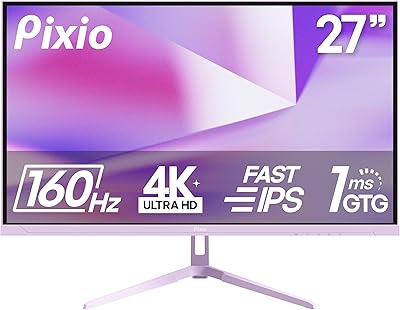
Pixio PX27U 27-inch 4K Gaming Monitor
71%
88%
Image Quality
84%
Color Accuracy
79%
Refresh Rate Performance
54%
HDR Experience
82%
Response Time & Motion
More
Pixio PX279 Wave 27-inch Gaming Monitor
76%
91%
Gaming Performance
84%
Panel & Image Quality
88%
Response Time & Motion Clarity
82%
Color Accuracy
79%
Build Quality & Design
More
Pixio PX275 Wave 27-inch 100Hz QHD IPS Gaming Monitor
87%
91%
Value for Money
88%
Display Quality
93%
Color Accuracy
85%
Gaming Performance
89%
Ease of Setup
More
Pixio PX277 OLED Max V2 27″ Monitor
79%
93%
Image Quality
91%
Motion Performance
96%
Contrast & Blacks
58%
SDR Brightness
88%
Color Accuracy
More
Pixio PX246 Wave 24-inch Gaming Monitor
72%
83%
Image Quality
78%
Refresh Rate Performance
91%
Value for Money
82%
Adaptive Sync
74%
Color Accuracy
More
Pixio PX248 Wave Pink 24-inch 200Hz Gaming Monitor
83%
91%
Gaming Performance
88%
Display Quality
84%
Build Quality
86%
Ease of Setup
83%
Connectivity
More
Pixio PX279 Prime Neo 27″ Gaming Monitor

75%
91%
Motion Performance
86%
Color Accuracy
61%
Pixel Density & Sharpness
88%
Connectivity
84%
Stand & Ergonomics
More
Skytech Gaming Moonshadow 27-inch Curved Gaming Monitor

83%
88%
Image Quality
91%
Refresh Rate Performance
86%
Adaptive-Sync
83%
VA Panel Contrast
84%
Stand & Ergonomics
More
Raywego Z270B13 27-inch Gaming Monitor
70%
88%
Value for Money
83%
Picture Quality
84%
Refresh Rate Performance
62%
Build Quality
81%
Eye Comfort
More
Dell G2725D 27-inch Gaming Monitor
78%
91%
Image Sharpness
88%
Refresh Rate Performance
83%
Motion Clarity
79%
Color Accuracy
86%
AMD FreeSync
More

FAQ

In most cases, yes. AMD FreeSync is built on the open Adaptive-Sync standard, which Nvidia supports through its own FreeSync-compatible mode. You will likely need to enable it manually in the Nvidia Control Panel under the display settings, but once active it works reliably for reducing screen tearing. This monitor is not G-Sync certified, so compatibility is not guaranteed on every Nvidia GPU generation, but most modern cards handle it without issues.

Both consoles connect over HDMI, and the HDMI 2.0 ports on this display are capped at 144Hz at 1440p. You will not reach 180Hz from a console regardless of what the console is configured to output. That said, 144Hz at 1440p is still a noticeably smooth experience and a genuine upgrade over typical console display setups.

No — the stand that ships with the PX278 Wave only supports tilt adjustment. There is no height raise or lower mechanism, and no swivel or portrait pivot. If you need more flexibility in positioning, the VESA mount support (75x75mm natively, or 100x100mm with the included adapter) means you can attach most aftermarket monitor arms without any issue.

It is one of the more satisfying upgrades you can make at 27 inches. The jump from 1080p to 1440p is immediately noticeable — text is sharper, fine in-game details become more defined, and the extra screen real estate in desktop use adds up. Just be realistic about your GPU; maintaining high frame rates at 1440p demands meaningfully more from your graphics card than 1080p does, so the 180Hz ceiling is only reachable if your hardware can keep up.

Some degree of IPS glow in the corners during dark scenes is normal behavior for any IPS panel, and this monitor is no exception. Most buyers report it as minimal under typical use, but it becomes more visible in completely dark rooms. Backlight bleed reports are occasional rather than consistent, which suggests some unit-to-unit variation in panel quality. It is a good idea to test the display during your return window to confirm your specific unit meets your expectations.

They are functional but nothing more than that. The speakers work in a pinch — if you need quick audio without a headset nearby, they will get the job done. But for any regular gaming, music, or media use, they are not a real audio solution. A headset or external speakers will make a noticeable difference, and most buyers treat the built-in speakers as a fallback rather than a primary option.

It does not carry an official HDR certification. The 350-nit peak brightness and 1000:1 contrast ratio fall well short of the luminance levels required for a meaningful HDR presentation. While some systems may send an HDR signal to it, the visual result will not differ significantly from standard dynamic range content, so HDR should not factor into your buying decision here.

You need to connect via the DisplayPort 1.4 cable — that is the only connection on this monitor that supports 180Hz at 1440p. After connecting, go into your operating system display settings and manually select 180Hz, as systems often default to a lower rate on first connection. HDMI cables will hard-cap you at 144Hz regardless of cable quality or GPU capability, so the port choice matters here.

Yes, and given the stand limitations it is actually worth considering. The monitor supports 75x75mm VESA natively, and an adapter is included in the box to bring it up to the more common 100x100mm standard. This makes it compatible with the vast majority of aftermarket arms available, which opens up full height, tilt, and swivel adjustability that the stock stand does not offer.

For casual creative use or light photo browsing, the wide color coverage — over 96% of DCI-P3 — makes images look rich and vibrant. However, this display is not factory calibrated and is not designed for professional color-critical workflows. If consistent, verified color accuracy is a hard requirement for your work, a display specifically built and profiled for that purpose would serve you better than this gaming-focused panel.