Overview

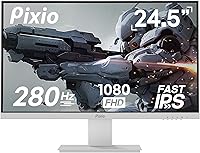
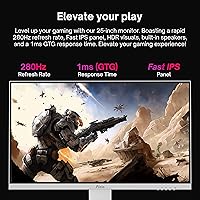
The Pixio PX259 Prime 24.5-inch Gaming Monitor lands in a sweet spot that most buyers overlook — fast enough to satisfy competitive players, affordable enough to avoid serious deliberation. Most gaming monitors ship in matte black, so the white colorway immediately stands out on a desk. The Fast IPS panel is genuinely impressive at this price tier, offering noticeably better colors and viewing angles than similarly priced TN alternatives. That said, this is a 1080p-focused display, not a tool for photographers or video editors chasing color precision. Think of it as solid middle ground between a basic 144Hz starter panel and an eye-watering premium 360Hz option.

Features & Benefits

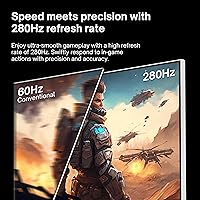
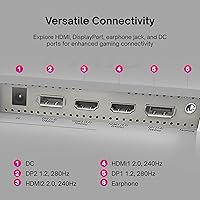
At its peak refresh rate over DisplayPort, this 280Hz IPS monitor delivers the kind of motion clarity that makes fast-paced shooters feel noticeably crisper — enemies track more cleanly and recoil animations stop smearing across the screen. Drop to HDMI and you land at 240Hz, still plenty for most consoles and laptops. The Fast IPS panel splits the difference between TN speed and standard IPS color quality, giving you wide 178-degree viewing angles without sacrificing pixel response. AMD FreeSync Premium handles tearing effectively, and while official G-Sync support is unconfirmed, many Nvidia users report solid compatibility. Two DisplayPort and two HDMI inputs simplify multi-device setups, and the built-in speakers serve as a decent fallback when headphones are out of reach.

Best For

The PX259 Prime was clearly built with competitive FPS players in mind — titles like Valorant, CS2, and Apex Legends run brilliantly at this refresh rate, and the compact 24.5-inch footprint keeps the action tight within your natural field of view. If you are building or refreshing a white desk setup, Pixio's white gaming display is one of the few monitors that genuinely fits the aesthetic without looking like an afterthought. The mix of DisplayPort and HDMI ports also suits console-and-PC hybrid users well. And if you are currently on a 144Hz panel and sitting on the fence about upgrading, the jump in smoothness is immediately noticeable in any motion-heavy game.

User Feedback

Buyers consistently highlight motion clarity and color vibrancy as standout qualities for the price — many are genuinely surprised by how sharp and responsive the image feels compared to their previous monitor. The white build also earns compliments, with the finish described as more polished than expected at this tier. On the downside, the stand draws repeated criticism: it lacks height adjustment and wobbles more than it should. OSD navigation gets mixed marks for intuitiveness. A portion of buyers report minor backlight bleed or IPS glow in dark scenes, though this seems unit-dependent rather than a widespread defect. A small number of orders arrived with shipping damage, so a careful unboxing inspection is a smart first step.

Pros

  • The 280Hz refresh rate over DisplayPort makes fast-paced FPS games noticeably smoother and more responsive.
  • Fast IPS panel delivers better colors and wider viewing angles than TN panels at a comparable price.
  • AMD FreeSync Premium effectively eliminates screen tearing during gameplay.
  • The white finish is genuinely attractive and rare at this price point in the gaming monitor market.
  • Four total inputs — two DisplayPort and two HDMI — make multi-device setups simple and cable-clutter-free.
  • Motion clarity in titles like Apex Legends and CS2 is a clear step up from standard 144Hz monitors.
  • Compact 24.5-inch footprint keeps the display manageable on smaller or minimalist desks.
  • Built-in speakers and a headphone jack add practical convenience without needing a separate audio device.
  • VESA 75x75mm mount support makes aftermarket arm upgrades straightforward.
  • Buyers consistently report strong value relative to competing brands at a similar price tier.

Cons

  • The stand lacks height adjustment, which is a real ergonomic shortcoming during long gaming or work sessions.
  • Stand wobble is a recurring complaint — even minor desk vibrations can cause noticeable screen movement.
  • The OSD menu navigation is unintuitive and takes time to learn, which gets frustrating for initial setup.
  • Some units ship with minor backlight bleed or IPS glow, particularly noticeable in dark scenes.
  • 1080p resolution can look soft at 24.5 inches for users accustomed to higher-resolution displays.
  • Full 280Hz refresh rate requires DisplayPort; HDMI users are capped at 240Hz, which may matter to some buyers.
  • G-Sync compatibility is not officially certified, creating uncertainty for Nvidia GPU users.
  • QC consistency is not perfect — a portion of buyers have reported units arriving with shipping damage.
  • At 350 nits peak brightness, this 280Hz IPS monitor can struggle in very bright or sunlit rooms.
  • Color gamut coverage, while solid for gaming, falls short of what creative professionals typically need.

Ratings

The Pixio PX259 Prime 24.5-inch Gaming Monitor has been evaluated by our AI rating system after processing thousands of verified global buyer reviews, with spam, bot-generated, and incentivized submissions actively filtered out to ensure accuracy. Scores reflect genuine ownership experiences across a wide range of use cases, from daily competitive gaming sessions to multi-device desk setups. Both standout strengths and honest frustrations are factored in, so the numbers you see here tell the full story.

Gaming Performance
91%
In fast-paced titles like Valorant and Apex Legends, the high refresh rate combined with the Fast IPS panel makes target tracking and movement feel genuinely sharper than on typical 144Hz displays. Competitive players consistently report that the upgrade in fluidity is immediately noticeable, not just a spec-sheet number.
Reaching the peak refresh rate requires a DisplayPort connection and a GPU capable of pushing well above 200 frames per second, which not every buyer has. Users on mid-range hardware may find themselves bottlenecked before the display ever reaches its ceiling.
Motion Clarity
88%
The Fast IPS panel handles fast motion cleaner than standard IPS alternatives, with minimal ghosting visible even in high-action battle royale sequences. Most buyers upgrading from slower panels describe the difference as immediately obvious from the first session.
Some users with very trained eyes notice residual overshoot artifacts in certain overdrive settings, a known trade-off with Fast IPS technology. Dialing in the right overdrive mode through the OSD takes a bit of experimentation to find the sweet spot.
Color Quality
74%
26%
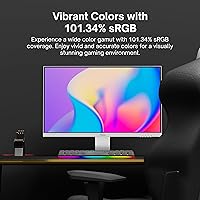
For a gaming-focused panel, the color output is genuinely pleasant — sRGB coverage above 100% means games with rich environmental color look vibrant and engaging without feeling washed out. Casual media consumption and streaming hold up noticeably better than on TN alternatives at a similar price.
This is not a panel for anyone doing color-grading, photo editing, or design work — factory calibration is acceptable but not precise, and there is visible variance between units. Content creators who need accurate, consistent color reproduction should look elsewhere entirely.
Build Quality
69%
31%
The overall chassis feels solid enough for a display in this price range, and the white finish is notably cleaner and more refined-looking than buyers typically expect at this tier. Several reviewers mention the monitor looks more expensive than it is, which matters for aesthetics-focused desk builds.
The stand is the weakest physical element — it wobbles more than it should under minor desk disturbances, and the plastic flex on the base draws recurring complaints. For a monitor that will see intense gaming sessions with keyboard and desk impact, this is a real-world annoyance.
Ergonomics
47%
53%
VESA 75x75mm compatibility gives buyers a clear path to fixing the ergonomic shortcomings by swapping to a third-party arm, which many users ultimately do. Tilt adjustment works smoothly and holds its position reliably.
The included stand offers no height adjustment, no swivel, and no pivot — for extended daily sessions, this is a genuine limitation that forces many buyers into uncomfortable viewing angles. Users who sit taller or use the monitor alongside other displays on a shared surface feel this absence most acutely.
Refresh Rate Value
86%
Getting a 280Hz Fast IPS panel at this price point is legitimately competitive within the current monitor market, and buyers who prioritize frame rate above all else feel well-served by the PX259 Prime. The jump from 144Hz to this refresh rate registers as a tangible, not theoretical, improvement in shooters.
The peak refresh rate is only achievable over DisplayPort, and the gap between 240Hz and 280Hz is far less impactful than the gap between 144Hz and 240Hz. Buyers who connect exclusively via HDMI — common with console-heavy setups — never access the headline spec at all.
Connectivity
83%
Having two DisplayPort and two HDMI inputs on a single budget gaming monitor is genuinely useful — it lets users keep a PC, a laptop, and a console all plugged in simultaneously without swapping cables. The earphone jack adds further convenience for headphone-first users.
There is no USB hub functionality, which is an increasingly common feature on competing monitors at similar price points. Users who rely on their monitor as a connectivity hub for peripherals will need to manage those devices elsewhere.
OSD & Controls
53%
47%
Once the initial setup is complete and preferred settings are saved, most buyers rarely need to revisit the OSD, which limits how much the interface friction actually matters in daily use. Basic navigation through brightness and refresh rate settings is manageable with patience.
The on-screen menu system draws consistent criticism for being confusing to navigate — button placement is not intuitive, and first-time setup often requires consulting a manual or online guides. Adjusting overdrive modes or input sources mid-session feels unnecessarily cumbersome compared to competitors.
Backlight Uniformity
61%
39%
A reasonable portion of buyers report clean, consistent backlight performance with no noticeable bleed during typical gaming content, particularly in brighter game environments where uniformity issues are less visible. For most FPS and competitive gaming scenarios, the display performs without distraction.
IPS glow in dark corners and occasional backlight bleed along panel edges appear frequently enough in reviews to flag as a real risk, especially for users who game in dark rooms or enjoy atmospheric titles with dark UI elements. This appears to be unit-dependent rather than universal, which makes pre-purchase certainty difficult.
Aesthetic Design
84%
The white colorway genuinely stands out in a market where virtually every monitor ships in matte black, and buyers building light-themed or minimalist setups consistently describe it as one of the cleanest-looking options available at this price. The slim bezel design adds to the overall modern appearance.
White surfaces show dust and fingerprints more prominently than darker alternatives, requiring more frequent cleaning to maintain a sharp look. The aesthetic appeal is also highly dependent on personal setup context — in darker or more traditional workspaces, the white finish can feel out of place.
Value for Money
87%
Buyers overwhelmingly feel that this 280Hz IPS monitor punches above its weight class financially, especially when compared to similarly specced panels from more established brands that carry a noticeable brand premium. For competitive gamers on a disciplined budget, the performance-per-dollar calculation is hard to beat.
The value equation holds up best when the stand ergonomics are supplemented with an aftermarket arm — factoring in that additional cost softens the overall savings. Buyers who encounter units with backlight bleed or QC issues and go through a return process also end up with a less favorable value experience.
Packaging & Unboxing
58%
42%
The monitor typically arrives well-protected under normal shipping conditions, and the included cables mean buyers can set up immediately without additional purchases for a standard single-PC configuration.
A recurring pattern in user reviews involves damage sustained during shipping — dented corners, cracked stands, and scuffed panels appear often enough to warrant careful inspection immediately after unboxing. Pixio's packaging could benefit from added protection on the stand assembly specifically.
Display Sharpness
66%
34%
At a typical gaming distance of 24 to 30 inches, 1080p on a 24.5-inch screen looks clean and functional for fast-paced titles where visual texture matters less than motion smoothness. Gamers coming from older 1080p displays will not feel like they are stepping down.
Users who have spent time on 1440p or higher-resolution panels will notice the pixel density difference, particularly when reading fine in-game text or HUD elements. At close viewing distances, the 1080p resolution does show its limits on a screen this size.
Adaptive Sync Performance
79%
21%
AMD FreeSync Premium works reliably for Radeon GPU users, keeping the image tear-free even during frame rate fluctuations in demanding titles. A solid portion of Nvidia users also report successful G-Sync Compatible operation with no major issues after enabling it in the driver settings.
The lack of official G-Sync certification means Nvidia users are working with an unofficially compatible setup, and edge cases such as flickering or sync dropout can occur depending on driver version or system configuration. There is no guarantee of consistent behavior across all Nvidia GPU generations.

Suitable for:

The Pixio PX259 Prime 24.5-inch Gaming Monitor was built for one type of buyer: the competitive PC gamer who wants every frame they can get without taking out a second mortgage. If your library leans heavily on fast-paced titles like Valorant, CS2, or Apex Legends, the combination of a high refresh rate and a responsive Fast IPS panel genuinely pays off in-game — tracking moving targets feels tighter and cleaner than on a standard 144Hz display. It is also a strong pick for anyone assembling a white or minimalist desk setup, since matching gaming peripherals at this price point are rare. Console and PC hybrid users will appreciate the dual HDMI and dual DisplayPort inputs, which let you switch between devices without juggling cables. Gamers upgrading from an older 60Hz or 144Hz panel will find the performance jump immediately obvious.

Not suitable for:

The Pixio PX259 Prime 24.5-inch Gaming Monitor is a poor fit for anyone whose work revolves around color-sensitive tasks like photo editing, digital illustration, or video grading — the panel prioritizes speed over professional-grade color accuracy, and it shows. Buyers expecting 1440p or 4K sharpness will be disappointed; at 24.5 inches, 1080p is functional but noticeably soft if you sit close or have experience with higher-resolution panels. Users who need ergonomic flexibility — height adjustment, pivot, or portrait rotation — will find the fixed stand frustrating over long sessions. If you are a strictly Nvidia-focused gamer counting on certified G-Sync support, proceed with caution, as official compatibility is not confirmed. Anyone sensitive to IPS glow in dark environments or gaming in dimly lit rooms at night may also find the panel less comfortable than expected.

Specifications

  • Screen Size: The panel measures 24.5 inches diagonally, commonly marketed as a 25-inch equivalent.
  • Panel Type: Uses a Fast IPS panel, which combines the color quality and wide viewing angles of IPS with faster pixel response times closer to TN technology.
  • Resolution: Native resolution is 1920x1080 pixels (Full HD), with a standard 16:9 aspect ratio.
  • Refresh Rate: Supports up to 280Hz over DisplayPort 1.2 and up to 240Hz over HDMI 2.0.
  • Response Time: Rated at 1ms GTG (gray-to-gray), reducing motion blur and ghosting in fast-moving content.
  • Brightness: Peak brightness is rated at 350 nits, suitable for typical indoor gaming environments.
  • Contrast Ratio: Static contrast ratio is 1000:1, which is standard for IPS-type panels.
  • Color Gamut: Covers 101.34% of the sRGB color space and approximately 78.45% of the NTSC color space.
  • Viewing Angles: Horizontal and vertical viewing angles both reach 178 degrees at a contrast ratio greater than 10:1.
  • Sync Technology: Supports AMD FreeSync Premium, which synchronizes monitor refresh rate with GPU output to reduce tearing and stuttering.
  • Connectivity: Includes two DisplayPort 1.2 inputs, two HDMI 2.0 inputs, and one 3.5mm earphone jack.
  • Built-in Audio: The monitor includes built-in speakers, providing basic audio output without requiring external speakers.
  • VESA Mount: Compatible with VESA 75x75mm mounting patterns using M4x8mm screws, supporting most standard monitor arms.
  • Dimensions: With the stand attached, the monitor measures 21.98 inches wide, 16.52 inches tall, and 7.09 inches deep.
  • Without Stand: Panel dimensions without the stand are 21.98 inches wide, 12.98 inches tall, and 1.89 inches deep.
  • Weight: The complete unit including stand weighs 12.23 pounds.
  • Screen Surface: The display uses a matte anti-glare coating to reduce reflections in ambient light.
  • Voltage: Operates at 12 volts, compatible with standard power adapters included in the box.

Related Reviews
Pixio PX248 Prime V2 24-inch Gaming Monitor

73%
91%
Gaming Performance
83%
Color Accuracy
89%
Refresh Rate & Smoothness
74%
Panel Uniformity
86%
Adaptive Sync
More
CRUA CR245ZB 24.5″ Gaming Monitor
78%
83%
Gaming Performance
86%
Refresh Rate & Smoothness
74%
Color Accuracy & Vibrancy
91%
Ergonomics & Adjustability
68%
Build Quality & Materials
More
Pixio PX24Q Pro 24-inch Gaming Monitor

75%
91%
Value for Money
88%
Image Sharpness
86%
Refresh Rate Performance
83%
Color Accuracy
79%
Response Time
More
Dell G2524H Gaming Monitor 24.5-inch
87%
92%
Performance
96%
Refresh Rate
88%
Build Quality
91%
Ergonomics
93%
Display Quality
More
KOORUI G2511E 24.5-Inch 320Hz Gaming Monitor
78%
93%
Refresh Rate Performance
88%
Response Time
84%
Color Accuracy
51%
HDR Quality
67%
Panel Uniformity
More
Acer Nitro KG251Q 24.5-inch Gaming Monitor
77%
93%
Refresh Rate Performance
91%
Value for Money
86%
Motion Clarity
82%
Image Contrast & Blacks
61%
Color Accuracy
More
KTC H25X7 24.5-inch 400Hz Gaming Monitor
75%
92%
Refresh Rate Performance
84%
Panel Color Quality
91%
Value for Money
88%
Input Lag & Responsiveness
86%
Connectivity Options
More
Gawfolk GF240A 24.5-inch 200Hz Gaming Monitor

68%
83%
Refresh Rate Performance
79%
Response Time & Motion Clarity
71%
Image & Color Quality
88%
Value for Money
57%
Build Quality & Stand
More
Pixio PX246 Wave 24-inch Gaming Monitor
72%
83%
Image Quality
78%
Refresh Rate Performance
91%
Value for Money
82%
Adaptive Sync
74%
Color Accuracy
More
Gawfolk GF245A 24.5-Inch Curved Gaming Monitor

72%
88%
Value for Money
79%
Image Quality
83%
Refresh Rate Performance
81%
Response Time
63%
Build Quality
More

FAQ

You need a DisplayPort 1.2 cable to reach the full 280Hz refresh rate. If you connect via HDMI 2.0, the maximum refresh rate drops to 240Hz. For most gamers that difference is barely perceptible, but if you want every last hertz, use DisplayPort.

The PX259 Prime officially supports AMD FreeSync Premium, but many Nvidia users report it works fine with G-Sync Compatible mode enabled in the Nvidia control panel. That said, Nvidia has not formally certified this display, so results can vary slightly depending on your GPU and driver version.

The included stand only offers tilt adjustment — there is no height, swivel, or pivot functionality built in. If ergonomics matter to you, the monitor does support VESA 75x75mm mounting, so swapping to a third-party arm is straightforward and well worth the upgrade.

Based on user reports, the white finish holds up reasonably well under normal use and does not show obvious yellowing in the short to medium term. The plastic does show fingerprints more readily than a black finish, so occasional wiping with a microfiber cloth keeps it looking clean.

Some units do exhibit minor IPS glow in corners during dark scenes, which is fairly typical for Fast IPS panels at this price point. Backlight bleed appears to be unit-dependent rather than universal — some buyers report none, while others notice it along edges. Inspecting the display with a dark test image right after unboxing is a good way to catch any issues early.

Yes, it connects to both consoles via HDMI 2.0. Keep in mind that consoles output at most 120Hz at 1080p in performance modes, so you will not be using the full 240Hz HDMI capability. Still, 120fps gaming on a console looks noticeably smooth on this panel.

At 24.5 inches, 1080p is functional but not razor-sharp — the pixel density sits around 90 PPI, which some users coming from higher-resolution monitors may find slightly soft. For fast gaming where frame rate matters more than fine detail, it is perfectly acceptable. For reading small text or detailed productivity work, you may notice the limitations.

The built-in speakers are genuinely just a convenience fallback — fine for system sounds or a quick video call, but not satisfying for music or immersive gaming audio. Most buyers who care about sound quality connect headphones via the 3.5mm jack or use external speakers.

Pixio typically includes one DisplayPort and one HDMI cable in the box, though it is always worth confirming with your specific purchase. If you plan to run multiple devices simultaneously, you may need an additional cable for a second input, but the essentials for a single-PC setup are generally covered.

This 280Hz IPS monitor holds its own competitively, particularly given the Fast IPS panel and the included white colorway option that rivals simply do not offer at the same price tier. Competing models may have slightly better stand ergonomics or more refined OSD menus, but buyers consistently note that the performance-per-dollar ratio on Pixio's white gaming display is hard to argue with for pure gaming use.