


Overview

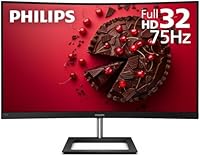
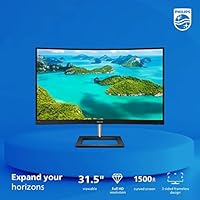
The Philips 322E1C 32″ Curved Monitor is a solid pick for anyone who wants a large, immersive screen without spending a lot. The 1500R curve on a 31.5-inch VA panel feels genuinely enveloping at a typical desk — noticeably more engaging than a flat screen at the same size. VA panels bring deeper black levels and stronger contrast compared to IPS alternatives, though fast-moving content can reveal mild ghosting if you look closely. What genuinely sets this monitor apart in its segment is the 4-year advance replacement warranty — that kind of coverage is rare at this price tier. Keep expectations calibrated: this is a capable everyday display, not a professional-grade or high-refresh gaming panel.

Features & Benefits

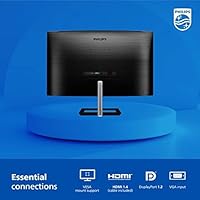
The 1500R curvature is subtle enough not to feel gimmicky but pronounced enough to make extended work sessions more comfortable for your peripheral vision. Add 75Hz with Adaptive-Sync support, and everyday scrolling and light gaming feel noticeably smoother than on a typical 60Hz flat panel. Connectivity is practical — HDMI, DisplayPort, and VGA mean you can hook up both modern and older machines without hunting for adapters. Resolution sits at Full HD 1920x1080, which handles documents and streaming perfectly well; just know that at 31.5 inches, pixel density is modest, so text won't look razor-sharp up close. The frameless front and VESA compatibility are welcome additions that keep desk setups looking clean.

Best For

This 32-inch curved monitor fits neatly into a home office or student desk setup. Spend most of your day in a browser, writing documents, or on video calls, and the large screen with a gentle curve genuinely reduces eye fatigue over long sessions. Budget-conscious gamers will find it handles casual titles comfortably — though anyone chasing competitive framerates should look at higher-refresh options. It particularly suits first-time monitor buyers upgrading from a smaller or older flat screen, where the jump in size feels immediately impactful. The strong warranty protection also makes it a sensible long-term choice for users who want peace of mind without paying a premium price for it.

User Feedback

With over 2,000 ratings averaging 4.3 stars, the Philips 322E1C earns its score honestly. Buyers consistently highlight the screen size to price value and appreciate how straightforward the setup is straight out of the box. The warranty reassures many purchasers, with several noting it as their deciding factor. On the downside, the included stand draws frequent criticism — it only tilts and offers no height adjustment, which frustrates users who need a more dialed-in viewing angle. A number of buyers also flag that while colors look pleasant for casual use, they fall short for design or photo editing work. Quality control appears generally consistent, though occasional reports of backlight irregularities do surface among verified reviews.

Pros

  • Generous 31.5-inch screen size delivers strong value for everyday home and office use.
  • The 1500R curve adds genuine immersion without feeling overdone on a single-monitor desk.
  • VA panel produces rich contrast and deep blacks that outperform IPS at this price tier.
  • 75Hz refresh with Adaptive-Sync makes scrolling and casual gaming noticeably smoother than 60Hz alternatives.
  • HDMI, DisplayPort, and VGA connectivity covers a wide range of devices, including older hardware.
  • The four-year advance replacement warranty offers rare peace of mind in the budget monitor segment.
  • Frameless design keeps desk setups looking clean and works well in side-by-side configurations.
  • VESA mount compatibility makes it easy to attach a third-party arm for better ergonomic positioning.
  • Setup is straightforward out of the box, with no complicated driver installation required.
  • At its price point, this curved VA display competes favorably against most flat-panel alternatives of similar size.

Cons

  • The included stand only tilts — no height, swivel, or pivot adjustment, which limits ergonomic flexibility.
  • 1080p resolution across 31.5 inches results in lower pixel density, making text appear softer than on smaller FHD screens.
  • VA panel ghosting is noticeable during fast-paced gaming, making it a poor fit for competitive play.
  • Color accuracy is not reliable enough for design, photo editing, or any color-critical professional work.
  • No USB hub or built-in speakers means additional desk clutter for users expecting those conveniences.
  • The 4ms response time, while adequate for casual use, lags behind gaming-focused panels at comparable prices.
  • Occasional reports from buyers suggest backlight consistency can vary between units.
  • The physical footprint is substantial — nearly 28 inches wide — which can overwhelm smaller or cluttered desks.

Ratings

The Philips 322E1C 32″ Curved Monitor has been scored by our AI system after analyzing thousands of verified global buyer reviews, with spam, bot submissions, and incentivized feedback actively filtered out. The ratings below reflect a balanced picture — real strengths alongside genuine pain points — so you can make an informed decision based on what actual owners experienced. This curved VA display earns strong marks in several key areas while showing clear limitations that matter depending on how you plan to use it.

Value for Money
88%
Buyers consistently cite this as one of the best-value large curved monitors available at its price tier. Getting a 31.5-inch VA panel with Adaptive-Sync, a frameless design, and a four-year advance replacement warranty in a single package feels genuinely generous compared to competing options.
A handful of buyers feel the value proposition softens slightly once they account for the cost of a third-party monitor arm to compensate for the limited stand. Those who expected sharper text at this screen size also felt less satisfied with the overall deal.
Picture Quality
74%
26%
The VA panel delivers noticeably richer contrast and deeper blacks than IPS alternatives at comparable prices, which makes streaming movies and working in darker room environments genuinely more pleasant. Colors look vibrant and warm for everyday content without any obvious oversaturation.
The 1080p resolution spread across 31.5 inches produces a pixel density that many users find noticeably soft, particularly when reading long documents or small text. This is a clear step down in sharpness compared to the same resolution on a 24-inch or 27-inch screen.
Ergonomics & Stand
51%
49%
The stand is stable and does not wobble during use, and the tilt adjustment covers a reasonable range for users who sit at a standard desk height. For buyers who plan to immediately swap in a VESA arm, the limited stand becomes a non-issue.
This is the most frequently criticized aspect across user reviews. The stand offers tilt only — no height adjustment, no swivel, no pivot — which forces many users to stack books or purchase a separate arm just to reach a comfortable eye level, adding cost and inconvenience.
Gaming Performance
63%
37%
For casual gaming — think RPGs, strategy games, or slower-paced titles — the 75Hz refresh rate with Adaptive-Sync delivers a smooth, tear-free experience that feels like a real upgrade over a standard 60Hz flat monitor. The screen size also makes open-world games feel notably more immersive.
Fast-paced and competitive gaming is where this display runs into its limits. VA panel ghosting is noticeable during rapid on-screen movement, and 75Hz simply cannot compete with 144Hz or 165Hz gaming monitors. Buyers who regularly play shooters or racing games will feel these constraints.
Build Quality
78%
22%
The physical construction feels solid for a monitor in this segment, with no obvious flex in the panel or creaking at the joints. The frameless front bezel looks clean and modern, and the Black and Silver finish holds up well over time without showing scratches easily.
A small but recurring subset of reviews mentions quality control inconsistencies — occasional dead pixels or minor backlight uniformity issues arriving out of the box. While not widespread, it is worth inspecting the panel carefully upon first setup.
Color Accuracy
66%
34%
For everyday tasks like web browsing, document work, and casual photo viewing, colors look pleasing and reasonably balanced straight out of the box. The 102–104% sRGB coverage means standard digital content renders with decent saturation and warmth.
Anyone doing professional photo editing, video grading, or graphic design will quickly notice that the panel is not factory calibrated for accuracy. Colors can drift noticeably at wider viewing angles, and without proper calibration tools the display is not reliable for color-critical work.
Immersive Viewing
83%
The 1500R curvature consistently earns praise from buyers who previously used flat monitors. At 31.5 inches, the curve wraps the image just enough to reduce the need to scan your eyes toward the corners, which reduces fatigue during long browsing or movie-watching sessions.
Users who sit further back than typical desk distance report that the curve feels more subtle and less impactful than expected. A few buyers also note that reflections from room lighting can be distracting depending on the desk setup and monitor placement.
Ease of Setup
91%
Assembly is universally described as quick and painless, typically taking under ten minutes. The monitor attaches to the stand without tools in most steps, the input menu is intuitive to navigate, and drivers are not required for basic use on modern operating systems.
A small number of buyers reported that the on-screen display menu buttons on the rear of the monitor are awkwardly positioned and slightly difficult to distinguish by feel alone. This is a minor inconvenience but worth noting for users who frequently adjust settings.
Connectivity
82%
18%
The inclusion of HDMI, DisplayPort, and VGA ports covers a wide range of devices, including older desktop PCs that still rely on VGA. Buyers appreciate not needing to hunt for adapters, and the audio output jack adds a direct speaker or headphone connection without routing through a PC.
There is no USB hub built into the monitor, which is an increasingly common feature even at this price point. Users who hoped to use the monitor as a desk connectivity hub for peripherals will need to rely on their computer or a separate USB hub instead.
Warranty & Support
93%
The four-year advance replacement warranty is genuinely exceptional for a monitor at this price level. Multiple verified buyers specifically cite the warranty as the deciding factor in their purchase, and those who have exercised it report that Philips honors the process without significant friction.
The warranty is only available in its full form within the United States, which limits its appeal for international buyers who may be covered under different, less generous regional terms. Some users also report that initial contact with support can require persistence before reaching resolution.
Viewing Angles
69%
31%
For a single user sitting directly in front of the screen, viewing angles are more than adequate. The VA panel handles moderate off-axis viewing better than older TN panels, making it workable in shared office setups where a colleague occasionally glances at your screen.
VA panels have a known weakness in that colors and contrast shift noticeably when viewed from sharper angles, and this display is no exception. Users who share their screen during presentations or frequently work at wide seated angles tend to notice the color shift more than those using it solo.
Brightness & Glare
71%
29%
In typical indoor office lighting conditions, brightness levels are comfortable for extended use without causing eye strain. The frameless design also helps minimize the visual distractions that can come with bezel-reflected glare in brighter environments.
In rooms with strong natural light or windows positioned behind the user, the screen surface can reflect enough ambient light to impact readability. The monitor lacks an anti-glare coating strong enough to fully counter bright daylight environments, which can be a real issue for home offices near windows.
Desk Footprint
72%
28%
The frameless front bezel keeps the visual footprint minimal, and the overall aesthetic integrates cleanly into modern desk setups. Buyers building a minimal workspace consistently mention that the monitor looks more premium than its price suggests.
The physical base of the stand is quite wide and takes up meaningful desk real estate, which can be a problem on smaller desks. At nearly 28 inches wide and over 20 inches deep with the stand, users with compact workstations may feel constrained by the overall size.

Suitable for:

The Philips 322E1C 32″ Curved Monitor is a strong match for home office workers, students, and everyday users who want a large, comfortable screen without a hefty price tag. If you spend long hours reading documents, browsing, or sitting through video calls, the 31.5-inch 1500R curve genuinely reduces the eye strain that comes with flat panels at this size. First-time monitor buyers upgrading from something smaller will notice an immediate improvement in workspace comfort. Casual gamers who care more about screen real estate than raw performance will also find it a satisfying upgrade — the 75Hz refresh and Adaptive-Sync handle everyday titles without issue. The four-year advance replacement warranty is a rare and meaningful perk at this price point, making it a particularly sensible pick for anyone who wants long-term reliability baked in from day one.

Not suitable for:

The Philips 322E1C 32″ Curved Monitor is not the right tool for buyers with demanding or specialized display needs. Competitive gamers who rely on high refresh rates will quickly feel the ceiling — 75Hz and 1080p are entry-level specs, and faster-paced titles will expose the VA panel’s motion clarity limitations. Graphic designers, photographers, and video editors should also look elsewhere, since the color accuracy and panel calibration are not up to professional-grade work. The included stand is a genuine frustration point: it only tilts and provides no height adjustment, which is a real ergonomic drawback for users who want a precise setup without buying a separate arm. Anyone prioritizing sharp, detailed visuals should also note that 1080p resolution spread across 31.5 inches results in noticeably lower pixel density than smaller FHD monitors, making text and fine detail look softer than expected.

Specifications

  • Screen Size: The viewable display area measures 31.5 inches diagonally across the curved VA panel.
  • Panel Type: Uses a VA (Vertical Alignment) panel, which delivers stronger contrast ratios and deeper blacks than typical IPS displays.
  • Resolution: Native resolution is 1920x1080 (Full HD), suitable for everyday computing, streaming, and general office tasks.
  • Curvature: The screen features a 1500R curvature radius, providing a gently immersive viewing arc without being as aggressive as tighter 1000R curves.
  • Refresh Rate: Supports a maximum refresh rate of 75Hz, a step up from standard 60Hz panels for smoother motion during scrolling and casual gaming.
  • Response Time: Rated at 4ms response time, adequate for general use and light gaming but not competitive with dedicated gaming monitors.
  • Sync Technology: Supports Adaptive-Sync, which is compatible with AMD FreeSync, reducing screen tearing during gaming without requiring a specific GPU brand.
  • Color Gamut: Covers 102–104% of the sRGB color space, making it well-suited for everyday content consumption and casual photo viewing.
  • Connectivity: Includes one HDMI port, one DisplayPort, one VGA port, and a 3.5mm audio output for connecting headphones or external speakers.
  • VESA Mount: VESA-compatible mounting pattern allows the monitor to be attached to most standard third-party monitor arms and wall mounts.
  • Design: Features a frameless, borderless front bezel in a Black and Silver color finish, keeping the look minimal and desk-friendly.
  • Warranty: Comes with a 4-year Advance Replacement warranty in the United States, meaning Philips ships a replacement unit before requiring the defective one returned.
  • Dimensions: Assembled unit measures approximately 27.9 x 11.1 inches (width x height) with a depth of 20.6 inches including the stand base.
  • Weight: The complete unit with stand weighs 18.66 pounds, which is typical for a curved monitor of this screen size.
  • Input Voltage: Rated for 240 volts, and is compatible with standard power setups across most regions when used with the appropriate plug adapter.

Related Reviews
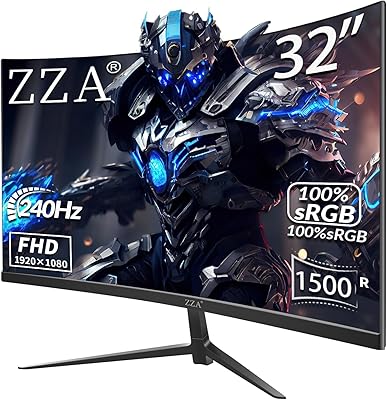
ZZA Z32D 32″ Curved Gaming Monitor
68%
88%
Gaming Performance
84%
Value for Money
81%
Picture Contrast & Blacks
79%
Motion Clarity
72%
Build Quality
More
Samsung 32-inch S39GD Curved Monitor
73%
83%
Value for Money
58%
Image Sharpness & Resolution
88%
Curve & Immersion
79%
Refresh Rate & Motion Smoothness
84%
Eye Comfort & Fatigue
More
KOORUI G3221SC 32″ Curved QHD Gaming Monitor
69%
83%
Picture Quality
81%
Gaming Performance
86%
Value for Money
41%
HDR Performance
67%
Color Accuracy
More
CRUA CR320C 32″ Curved 4K Monitor

73%
91%
Image Sharpness
78%
Color Accuracy
88%
Contrast & Black Levels
84%
Curvature & Immersion
67%
Refresh Rate & Smoothness
More
Gawfolk GF320C 32-Inch Curved Gaming Monitor
75%
88%
Refresh Rate Performance
83%
Image Quality
76%
Motion Clarity
86%
Curvature & Immersion
91%
Value for Money
More
Sceptre C325W-1920R 32-inch Curved Monitor
75%
91%
Value for Money
83%
Build Quality
67%
Display Clarity
86%
Curvature & Immersion
61%
Gaming Performance
More
LG 32MR50C-B 32-Inch Curved Monitor
75%
91%
Value for Money
78%
Picture Quality
83%
Refresh Rate & Motion Handling
52%
Ergonomics & Stand
84%
Curvature & Immersion
More
Gawfolk GF320E 32-inch Curved Monitor
73%
88%
Image Sharpness & Resolution
83%
Contrast & Color Depth
86%
Curvature & Immersion
84%
Value for Money
52%
Stand Stability
More
Samsung 32-Inch S39C Curved Gaming Monitor
83%
88%
Display Quality
91%
Value for Money
86%
Eye Comfort
89%
Ease of Setup
85%
Build Quality
More
Samsung Odyssey G55C 32″ Curved Gaming Monitor
78%
88%
Image Sharpness & Resolution
84%
Refresh Rate & Motion Clarity
91%
Curvature & Immersion
93%
Value for Money
57%
HDR Performance
More

FAQ

The Adaptive-Sync technology on this curved VA display is officially AMD FreeSync compatible, so you get tear-free performance with an AMD GPU. Nvidia cards can also drive the monitor without issue, but variable refresh rate features may not activate depending on your GPU generation and driver settings.

It depends on how close you sit and what you use the monitor for. At a normal desk distance of two to three feet, most users find it perfectly fine for browsing, video calls, and streaming. That said, text and fine detail are noticeably softer than on a 27-inch FHD display, so if pixel-perfect sharpness matters to you, this trade-off is worth considering before buying.

Unfortunately, no. The stand that ships with the Philips 322E1C 32″ Curved Monitor only allows tilt adjustment, with no height, swivel, or pivot options. If ergonomics are important to your setup, investing in a VESA-compatible monitor arm is a practical solution since the display supports standard VESA mounting.

Philips offers an Advance Replacement program in the United States, which means if your unit develops a covered defect, they send out a replacement before you have to ship the original back. This minimizes downtime significantly compared to typical repair-and-return warranty processes, and it is one of the more generous policies in this price range.

Not really. While the 102–104% sRGB coverage is decent for casual use, the panel is not factory calibrated for color-accurate professional work. Photographers and designers who need reliable color accuracy would be better served by a monitor with wider color gamut coverage and factory calibration, such as those targeting DCI-P3 or AdobeRGB.

Yes, the monitor includes a native VGA input alongside HDMI and DisplayPort, so you can connect older desktops or laptops directly without needing an adapter. Keep in mind that VGA is an analog signal and may not deliver the same image clarity as a digital HDMI or DisplayPort connection.

The 1500R curvature is on the gentler end of the curved monitor spectrum, so it does not feel extreme or distracting during office tasks. Most users find it actually reduces the need to move their eyes toward the screen edges, which can make long reading or document sessions more comfortable compared to a flat panel of the same size.

No, this 32-inch curved monitor does not include built-in speakers. It does have a 3.5mm audio output jack, so you can connect external speakers or headphones directly from the display if your source device routes audio through the video connection.

It is a modest but real improvement. Scrolling and general motion feel smoother, and light or casual gaming benefits from the extra headroom. However, 75Hz is still an entry-level spec for gaming, and players accustomed to 144Hz or higher panels will likely feel the difference. For competitive or fast-paced genres, a higher-refresh gaming monitor would serve better.

Assembly is straightforward and takes most users under ten minutes. The stand attaches to the panel with a few screws or a simple click-in mechanism, and the on-screen menu for input selection and brightness adjustment is easy to navigate. Most buyers report being up and running very quickly with no technical knowledge required.

Where to Buy