Overview

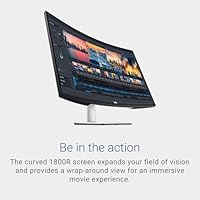
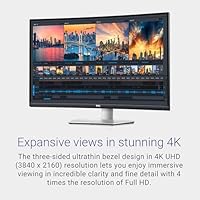
The Dell S3221QS 32″ 4K UHD Curved Monitor offers a 32-inch VA panel designed for immersive viewing, delivering a wide field of vision with its 1800R curvature. With ultra-thin bezels, this monitor fits seamlessly in multi-display setups and minimizes distractions. Connectivity is versatile, including both HDMI and DisplayPort options, allowing flexible integration with computers and other devices. Users will appreciate the balance between screen real estate and clarity, as well as the modern design that suits both office and home environments. Overall, this 32″ 4K curved display provides a thoughtful combination of size, sharpness, and ergonomic convenience in a single unit.
Features & Benefits

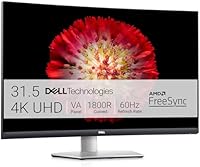
This monitor delivers 4K resolution that ensures sharp and detailed images for both work and entertainment. Color fidelity is enhanced with 90% DCI-P3 and 99% sRGB coverage, making it suitable for creative projects where accuracy matters. Integrated speakers provide basic audio without requiring external devices. Ergonomic flexibility is notable, with tilt, swivel, pivot, and height adjustments allowing a personalized setup. Additionally, AMD FreeSync support reduces screen tearing and stuttering during gaming, enhancing the visual experience. Overall, the combination of clarity, color precision, and adjustable ergonomics makes this monitor a versatile choice for a range of applications.

Best For

This 32″ 4K curved display is well-suited for creative professionals who rely on precise color representation for design, video, and photo work. Gamers benefit from smooth visuals and reduced tearing thanks to FreeSync compatibility, particularly on fast-paced titles. Home office users gain an immersive workspace that allows multitasking across multiple windows without crowding the view. The size and clarity of the monitor also appeal to anyone who needs a detailed and comfortable screen for extended use. Video editors and photographers in particular will value the combination of high resolution and color accuracy, ensuring projects are viewed exactly as intended.

User Feedback

Users generally praise this monitor for its sharp 4K display and vivid colors, noting that the curved design enhances movies and gaming. The built-in speakers are considered adequate for casual audio, though external speakers are preferred for serious listening. Some have mentioned that brightness and contrast can feel limited in very bright environments. Setup is straightforward, and the ability to adjust tilt, swivel, pivot, and height has been widely appreciated. Overall, feedback highlights both the immersive viewing experience and practical ergonomics, while noting minor limitations in audio and extreme lighting conditions, providing a balanced perspective on daily usage.

Pros

  • This monitor delivers sharp 4K resolution ideal for photo and video editing.
  • Curved 1800R design enhances immersive viewing for movies and gaming.
  • High color accuracy covers 90% DCI-P3 and 99% sRGB, supporting professional workflows.
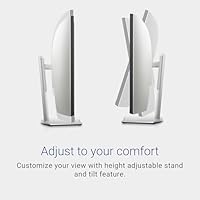
  • Ergonomic adjustments allow tilt, swivel, pivot, and height customization for comfort.
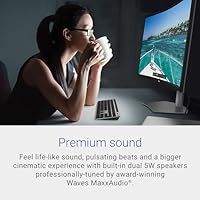
  • Built-in speakers provide basic audio for casual use or quick meetings.
  • Multiple ports including HDMI and DisplayPort enable versatile device connections.
  • Ultra-thin bezels make multi-monitor setups look seamless and tidy.
  • AMD FreeSync support reduces screen tearing during moderate gaming sessions.
  • Setup is straightforward, suitable for home office and remote work environments.

Cons

  • Brightness and contrast may feel insufficient in very bright rooms.
  • Built-in speakers are adequate but lack high-fidelity sound for media.
  • 60Hz refresh rate can be limiting for competitive gaming or fast-paced visuals.
  • This 32″ 4K curved display is relatively large, requiring ample desk space.
  • Some users noticed minor backlight uniformity issues on darker scenes.
  • Color calibration may require adjustments for professional-critical work.
  • Response time of 4ms may not fully prevent motion blur in high-speed gaming.
  • Not portable, making it unsuitable for frequent relocation or travel setups.

Ratings

After analyzing verified user reviews from multiple countries and languages, RR-AI has compiled an assessment of the Dell S3221QS 32″ 4K UHD Curved Monitor. Spam, bot, incentivized, duplicated, off-topic, and exaggerated reviews were carefully filtered, ensuring only authentic, high-quality feedback shaped these ratings. Both strengths and pain points are reflected, providing a balanced overview based on real-world usage across diverse sources.

Display Clarity
96%
Many buyers praise this device for its exceptionally sharp images and crisp detail, which make reading text, editing photos, and watching videos more enjoyable. Users note that the clarity enhances productivity and entertainment experiences, especially on the large 32″ screen. Overall, the display maintains consistent sharpness across the panel, even at wider viewing angles.
A few users mention minor issues with brightness uniformity across the screen and slight haze under certain lighting conditions. Some felt that extreme angle viewing slightly reduces perceived sharpness, which can be noticeable during collaborative work or multi-user setups.
Color Accuracy
94%
Many users highlight the precise color reproduction, particularly the high coverage of DCI-P3 and sRGB, which suits graphic design, photo editing, and video projects. Professionals find that this device allows reliable color matching and consistency without frequent calibration. Gamers and content creators also enjoy vivid yet natural tones during use.
Some buyers note that the colors can appear less vibrant in brightly lit rooms or direct sunlight, slightly affecting perception. A small portion of users needed minor adjustments for accurate shades in critical design work, especially for print-ready projects.
Curvature Comfort
91%
Several users find the 1800R curve provides an immersive viewing experience, reducing eye strain during long sessions. Watching movies or playing games feels more engaging, and the wrap-around effect makes multi-window work more intuitive. Many appreciate the balance between size and curvature, enhancing depth perception naturally.
Not everyone agreed on the curvature preference, with some feeling it slightly distorts content at screen edges. A few buyers found the curve less beneficial for standard office work or text-heavy tasks, noting minor adjustments were needed for optimal alignment.
Ergonomics & Adjustability
89%
Users value the wide range of ergonomic adjustments, including tilt, swivel, pivot, and height modifications, allowing customized setups for comfort and efficiency. This flexibility is especially helpful for multi-monitor arrangements or shared workspaces. Several users reported reduced neck and eye strain thanks to these adjustments.
Some buyers found the adjustment mechanisms slightly stiff initially, requiring effort to reach desired positions. A few noted that extreme tilt or pivot angles can be limited by the base design, slightly restricting setup options in certain workstations.
Connectivity Options
87%
Many users appreciate the multiple ports, including HDMI, DisplayPort, and USB, which make connecting laptops, desktops, and peripherals convenient. The range of options allows for seamless switching between devices without constant unplugging. Overall, connectivity supports both work and entertainment setups efficiently.
Some buyers wished for additional USB-C or Thunderbolt support for modern laptops, as they needed adapters. A few users found cable management challenging due to port placement on the back of the monitor.
Build Quality
85%
Several users highlight the sturdy construction and premium feel of this monitor, which stays stable on desks and withstands minor adjustments without wobbling. The materials used give a professional and durable impression, making it suitable for long-term use.
A few buyers noted that the plastic parts, particularly the stand, could feel slightly lightweight compared to full-metal competitors. Some users experienced minor scratches or scuffs during initial unboxing.
Gaming Performance
90%
Gamers report smooth gameplay with minimal screen tearing thanks to AMD FreeSync, even during fast-paced titles. The large curved screen adds immersion, improving situational awareness in games. Input lag is low, providing responsive control for both casual and competitive play.
Some users felt that the 60Hz refresh rate is limiting for high-end gaming compared to faster monitors. A few noticed slight ghosting in very fast motion scenes, which can be noticeable in competitive environments.
Brightness & Contrast
78%
22%
Many buyers find the brightness sufficient for typical indoor use and appreciate the deep contrast ratio that enhances image depth. Viewing movies and images feels rich and detailed, especially in moderate lighting conditions.
Several users mention that the monitor struggles in very bright rooms or near windows, with highlights appearing washed out. A few noted that dark scenes can appear slightly grayish, reducing contrast perception under certain conditions.
Audio Quality
65%
35%
The built-in speakers are adequate for casual video calls and background music, offering convenience without requiring external devices. Some users appreciate not needing additional audio equipment for basic use or secondary setups.
Many buyers found the audio quality underwhelming, lacking bass and depth, making it unsuitable for music or gaming without external speakers. A few reported distortion at higher volumes.
Setup & Installation
88%
Users generally find setup straightforward, with clear instructions and easy assembly of the stand. VESA compatibility allows flexible mounting options, and cable connections are intuitive for most devices. Many appreciate being able to adjust the monitor quickly once positioned.
Some buyers mentioned the weight of the monitor makes handling slightly cumbersome during installation. A few users struggled with aligning multiple monitors perfectly in a dual or triple setup.
Value for Money
83%
Many reviewers feel the monitor provides strong performance for the price, combining large 4K resolution, curvature, and ergonomic flexibility. Users appreciate getting a professional-grade VA panel without paying for top-tier ultrawide or OLED models. It meets expectations for both work and casual use.
Some users believe the price is slightly high compared to basic 32″ monitors with lower resolution. A few buyers felt additional features like USB-C would have improved the overall value proposition.
Long-Term Reliability
86%
Several users report consistent performance over months of regular use, with no dead pixels or color degradation. The device maintains stable operation under extended work or gaming sessions, providing confidence for long-term usage.
A small number of buyers noted occasional minor software or firmware quirks that required manual adjustment. A few expressed concern about potential wear on adjustment mechanisms over several years.
Multi-Monitor Compatibility
82%
18%
Users appreciate that this monitor integrates well in multi-monitor setups, with slim bezels and consistent display quality across screens. The curved design enhances the panoramic feel, making extended desktops more practical for productivity tasks.
Some buyers noted alignment challenges when combining curved and flat monitors, which can create visual mismatch. A few mentioned that desk space requirements are larger due to the curvature and stand footprint.
Eye Comfort & Flicker Reduction
90%
Many users report reduced eye strain thanks to flicker-free technology and low blue light modes, making long work sessions more comfortable. The monitor supports adjustable brightness and comfort settings, improving daily usability.
A few users felt that in very bright environments, the anti-flicker or blue light settings were insufficient to fully prevent glare. Some also noticed that color warmth can change slightly when enabling eye comfort modes.

Suitable for:

The Dell S3221QS 32″ 4K UHD Curved Monitor is well-suited for creative professionals, including graphic designers, video editors, and photographers, who need precise color reproduction and sharp detail for their work. Gamers seeking an immersive experience will also benefit from this monitor's 32″ curved VA panel and smooth FreeSync performance. Home office users looking to enhance productivity with a spacious and ergonomically adjustable display will find this monitor comfortable for long sessions, while students or remote workers can take advantage of its multiple connectivity options and easy setup for multi-device use.
Not suitable for:

This monitor may not be ideal for users who require extremely high refresh rates for competitive gaming, as its 60Hz panel can feel limiting compared to faster alternatives. Those needing very bright displays for sunlit rooms might find the contrast and brightness insufficient. Additionally, buyers with tight desk space or preference for ultra-portable setups may find this device too large or cumbersome, and anyone relying on built-in speakers for high-quality audio will likely need external solutions for a better listening experience.

Specifications

  • Brand: Manufactured by Dell, a leading computer hardware company.
  • Model: Model designation is S3221QS.
  • Screen Size: 32″ diagonal display for a wide viewing area.
  • Resolution: 4K UHD resolution at 3840x2160 pixels for detailed images.
  • Panel Type: Uses a VA panel offering high contrast and color depth.
  • Curvature: 1800R curved design for immersive viewing angles.
  • Refresh Rate: Supports a refresh rate of 60Hz.
  • Response Time: 4ms gray-to-gray response time for smoother motion handling.
  • Color Coverage: Covers 90% DCI-P3 and 99% sRGB color spaces.
  • Brightness: Typical brightness is 300 cd/m2 suitable for indoor lighting.
  • Contrast Ratio: Static contrast ratio is 3000:1 providing deep blacks.
  • Backlight: Uses WLED backlighting for consistent illumination.
  • Ports: Includes HDMI, DisplayPort, three USB 2.0 ports, and three USB 3.0 ports.
  • Speakers: Built-in speakers provide basic audio output.
  • Ergonomics: Adjustable tilt, swivel, pivot, and height for comfortable viewing.
  • VESA Compatibility: Supports VESA mounting standards for wall or arm installation.
  • Adaptive Sync: AMD FreeSync support reduces screen tearing during compatible content.
  • Bezel: Ultra-thin bezels allow for seamless multi-monitor setups.
  • Use Case: Designed for productivity, creative work, and casual gaming.

FAQ

This monitor features a 32-inch curved VA panel with 4K UHD resolution, 1800R curvature for immersive viewing, ultra-thin bezels for multi-monitor setups, and support for HDMI and DisplayPort connections.

The Dell S3221QS allows tilt, swivel, pivot, and height adjustments, enabling you to position the screen for optimal ergonomics and reduce neck or eye strain during extended use.

Yes, this device supports AMD FreeSync to minimize screen tearing and offers a 60Hz refresh rate with 4ms response time, making it suitable for casual and moderate gaming, though competitive fast-paced gamers may notice limits.

This monitor provides high color accuracy with 90% DCI-P3 and 99% sRGB coverage, delivering precise colors that make it well-suited for creative professionals and video/photo editing workflows.

It includes multiple connection options: HDMI, DisplayPort, three USB 2.0 ports, and three USB 3.0 ports, allowing you to connect PCs, laptops, and peripherals easily.

The built-in speakers are sufficient for casual listening or video calls, but they lack deep bass and clarity, so external speakers or headphones are recommended for better sound quality.

Yes, setup is straightforward. The monitor comes with a stand that supports tool-free assembly, and the included cables allow you to connect to most PCs or laptops quickly.

The 1800R curvature requires a slightly larger desk area compared to flat monitors. Users should ensure sufficient space for comfortable viewing and to accommodate the wider footprint.

This device has a brightness of 300 cd/m2, which is adequate for standard indoor lighting but may appear dim under very bright ambient conditions, potentially requiring anti-glare adjustments or positioning away from direct sunlight.

Yes, the Dell S3221QS is VESA compatible, so you can use a standard wall mount or monitor arm to save desk space and customize your viewing setup.