Overview

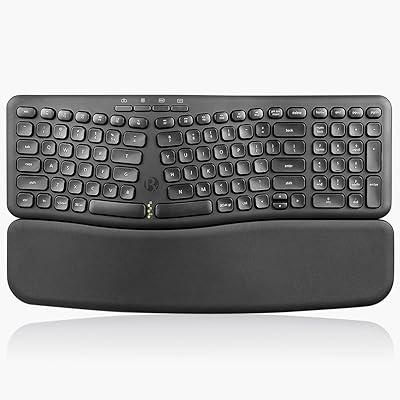
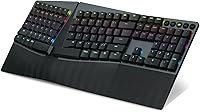
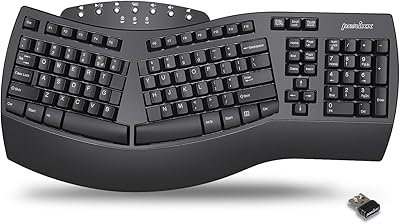
The Perixx PERIBOARD-835 Wireless Ergonomic Mechanical Keyboard is a full-size board aimed squarely at coders and heavy typists who have grown tired of choosing between ergonomic comfort and wireless freedom. Its curved, split-key frame nudges your wrists into a more natural angle — not dramatically, but enough to matter over a long workday. Connectivity is genuinely flexible: wired USB, a 2.4GHz dongle, and two simultaneous Bluetooth pairings cover most desk setups without a fuss. Launched in mid-2023, it has settled into the mid-to-premium tier of the ergonomic keyboard market, currently ranking around #454 in Amazon's Computer Keyboards category.
Features & Benefits

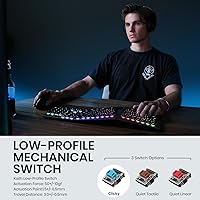
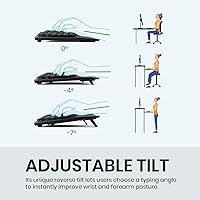
The PERIBOARD-835's low-profile blue switches deliver a satisfying, audible click with every keystroke — the kind of tactile confirmation that makes long coding sessions feel more deliberate and less fatiguing. The integrated wrist rest adjusts to three negative tilt angles (0, -4, and -7 degrees), letting you dial in a position that actually reduces strain rather than just looking ergonomic. RGB lighting comes loaded with preset modes and can be further tuned through Perixx's companion software, which also handles the 10 programmable macros and remappable keys. A dedicated OS-toggle key and a detachable 5.9 ft USB cable round out a well-considered feature set.

Best For

This ergonomic mechanical keyboard is a natural fit for remote workers and developers who spend the bulk of their day typing and want to address wrist fatigue without committing to the steep adjustment period of a fully separated split board. The multi-device Bluetooth setup also makes it a practical choice for anyone juggling a Mac and a PC — switching between them takes a single key press. Home office users who want a keyboard that looks as good as it functions will appreciate the RGB element. That said, if you work in an open-plan or shared space, the blue clicky switches will absolutely draw attention.

User Feedback

With a 3.8-star average across 179 ratings, Perixx's wireless split keyboard lands in genuinely mixed territory. Buyers who love it consistently praise the wrist rest comfort and the satisfying feel of the switches during heavy typing sessions, and the multi-device connectivity earns steady approval. On the other side, the companion software has frustrated a fair share of users — it works, but the setup process is not intuitive, and some report needing multiple attempts to configure macros correctly. A handful of reviewers also flagged inconsistent wireless range. If you are a home-based typist who values ergonomics over out-of-box simplicity, you will likely be satisfied; if you need plug-and-play reliability, adjust your expectations accordingly.

Pros

  • The adjustable wrist rest with three tilt angles provides genuine, customizable relief during long typing sessions.
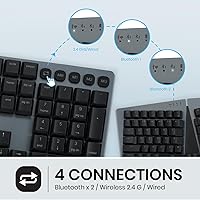
  • Connecting to two Bluetooth devices plus a 2.4GHz dongle covers most multi-device desk setups without any dongles to juggle.
  • Low-profile blue switches offer satisfying tactile feedback that heavy typists and coders tend to appreciate.
  • The dedicated Mac and Windows toggle key makes OS switching fast and effortless.
  • RGB lighting is well-implemented, with usable presets even before you touch the software.
  • The built-in lithium polymer battery means no AA batteries to replace or forget.
  • A detachable 5.9 ft USB cable allows wired use or charging without being tethered permanently.
  • The split-key curved layout eases wrist pronation without forcing a drastic typing posture change.
  • Up to 10 programmable macros offer real workflow efficiency once the software is properly configured.
  • Full-size layout means no compromises on the number pad or function row.

Cons

  • The companion software has a noticeable learning curve and has frustrated multiple users during initial setup.
  • Blue clicky switches are too loud for shared offices or anyone on frequent video calls.
  • Wireless range has been reported as inconsistent by some users in larger or signal-crowded rooms.
  • At nearly 3.74 pounds, the keyboard is not practical for portable or on-the-go use.
  • The split angle is modest — users with advanced ergonomic needs may find it insufficient.
  • Macro configuration occasionally requires multiple attempts to save and register correctly.
  • No alternative switch options are available, locking buyers into the blue clicky feel.
  • The software ecosystem feels less mature compared to competing brands at a similar price point.
  • Some reviewers noted that build quality does not fully match expectations set by the premium pricing.
  • There is a real adjustment period for the curved layout — do not expect immediate comfort if switching from a flat keyboard.

Ratings

Our AI-generated scores for the Perixx PERIBOARD-835 Wireless Ergonomic Mechanical Keyboard were produced by analyzing verified global buyer reviews, with spam, incentivized, and bot-flagged feedback actively filtered out before scoring. The ratings below reflect a transparent picture of where this keyboard genuinely delivers and where real users have run into friction. Both the standout strengths and the honest pain points are weighted into every number you see here.

Ergonomic Comfort
74%
26%
Users who commit to the split-key curved layout consistently report reduced wrist strain after two to three weeks of daily use, particularly those coming from flat membrane keyboards. The three-angle wrist rest adjustment is a practical detail that lets you fine-tune the position to your actual desk height rather than accepting one fixed angle.
The ergonomic learning curve is real — several buyers reported discomfort or slower typing speeds during the first week, and a minority never fully adapted and returned the keyboard. For users with more advanced ergonomic needs, the modest split angle may not provide enough correction to make a meaningful difference.
Typing Experience
81%
19%
Heavy typists and coders who favor tactile feedback consistently praise the low-profile blue switches for the satisfying click that confirms each keypress without requiring a deep travel distance. The overall feel holds up well during extended sessions, and the low-profile design appeals to users who find standard mechanical keyboards too tall.
Blue switches are a polarizing choice that Perixx locks you into — there is no alternative switch option available for this model. Some users found the actuation sound more fatiguing than expected over an eight-hour workday, particularly when the initial novelty of the click wore off.
Noise Level
46%
54%
For solo home office users who actively enjoy audible feedback, the click sound serves as a satisfying rhythm during long writing or coding sessions. In the right environment, the sound level is not a problem at all and is part of the appeal for this specific switch type.
In any shared environment — open offices, co-working spaces, or during video calls — the noise level is a genuine problem and one of the most frequently cited complaints in user reviews. This is not a flaw so much as an inherent characteristic of blue switches, but it significantly limits where this keyboard can realistically be used.
Multi-Device Connectivity
83%
The combination of dual Bluetooth pairings plus the 2.4GHz dongle option covers nearly every multi-device desk scenario without requiring any hardware changes or re-pairing. Users who switch between a Mac and a Windows PC throughout the day specifically called out the hardware OS-toggle key as one of the most useful features on the board.
Bluetooth stability drew some criticism, with a handful of reviewers noting occasional dropout or latency in wireless-congested home environments. The 2.4GHz connection is notably more reliable, so users in dense wireless environments may find themselves defaulting to the dongle more than expected.
Companion Software
52%
48%
Once configured correctly, the software does unlock genuinely useful functionality — 10 programmable macros and full key remapping give power users real flexibility to adapt the keyboard to their workflow. Users who invested time in learning the software generally reported being satisfied with the output.
Getting to that point is the problem: multiple reviewers described the software as unintuitive, with macro saves that do not always register on the first attempt and a UI that feels unfinished compared to competitors at this price tier. Mac users in particular found the software experience inconsistent and occasionally non-functional.
Wireless Range & Stability
67%
33%
For standard desk setups where the keyboard sits within two to three feet of the receiver or connected device, the wireless performance is reliable enough that most users do not think about it. The 2.4GHz mode specifically earned consistent approval for its latency-free feel during everyday typing.
Range becomes an issue in larger rooms or environments with significant wireless interference, with some users reporting dropouts at distances that should be well within spec. The inconsistency across different setups made this a recurring theme in the lower-star reviews.
Build Quality
69%
31%
The aluminum frame gives the keyboard a solid, premium feel in hand, and the overall construction is noticeably more substantial than budget ergonomic options. Most users found the build quality acceptable and consistent with what you would expect at this price point.
A subset of reviewers raised concerns about long-term durability and finish consistency, with some units showing keycap wear or flex in the frame earlier than expected. At a mid-to-premium price, the build does not feel as bulletproof as some competing aluminum-bodied keyboards in the same segment.
Wrist Rest Quality
77%
23%
The integrated wrist rest is one of the more praised elements of this keyboard, with users particularly appreciating that the negative tilt angles actively work to counteract wrist pronation rather than just providing passive padding. The fact that it is built in — rather than a separate accessory to position and manage — was consistently noted as a convenience.
Being non-detachable means you cannot remove the wrist rest if you prefer to type without one, which limits flexibility for users who like to switch between styles. A few buyers also noted that the surface material showed wear marks after a few months of daily contact.
RGB Backlighting
73%
27%
The per-key RGB lighting looks sharp in a dim home office environment, and the factory preset modes are genuinely usable without ever opening the software — a detail that more expensive keyboards often neglect. Buyers who care about desk aesthetics appreciated that the low-profile keys let the lighting show through cleanly.
Customization beyond the presets requires the companion software, which introduces the same friction documented elsewhere in this review. The lighting uniformity across keys was also flagged by a small number of users as slightly inconsistent, with certain keys appearing dimmer than their neighbors.
Mac Compatibility
63%
37%
The dedicated Mac toggle key and native Mac OS X support mean basic typing and navigation work well out of the box on Apple hardware. Multi-device users switching between Mac and Windows throughout the day found the key remapping for Mac-specific shortcuts helpful once configured.
The companion software experience on Mac is notably weaker than on Windows, limiting the ability to fully program macros or customize the board without a Windows machine nearby. A few Mac-only users felt the keyboard was not truly optimized for their platform despite the advertised compatibility.
Battery Life
71%
29%
The built-in lithium polymer battery performs adequately for daily wireless use, and the ability to keep working via the wired USB cable while charging removes the stress of unexpected power outages mid-session. Users appreciated that the battery is included rather than requiring separate purchase.
Perixx does not publish a specific battery life rating, which made it difficult for buyers to plan usage patterns — an omission that drew frustration in several reviews. Heavy RGB use noticeably shortens runtime, and users who leave backlighting on at full brightness reported charging the keyboard more frequently than expected.
Value for Money
66%
34%
The feature set — mechanical switches, multi-device wireless, adjustable wrist rest, RGB, and macro programming — is genuinely broad for a single keyboard, and buyers who use all of those features regularly tend to feel the price is justified. For home office users who would otherwise buy these features across multiple accessories, the bundled value makes sense.
At its price point, the software shortcomings and mixed build quality reports make it hard to call this a straightforward recommendation against more polished competitors. Buyers who end up not using macros or multi-device switching may feel they overpaid for features they never touch.
Setup & Ease of Use
72%
28%
Connecting the keyboard in wired or 2.4GHz mode is fast and genuinely plug-and-play — most users were typing within minutes of unboxing. The included manual covers the essentials clearly enough for straightforward everyday use without needing to consult the software.
The setup experience takes a sharp turn in complexity the moment macro configuration or Bluetooth pairing is involved. Several users reported needing to consult online forums or contact support to resolve pairing issues that the manual did not adequately address.

Suitable for:

The Perixx PERIBOARD-835 Wireless Ergonomic Mechanical Keyboard is a strong match for developers, writers, and data professionals who spend four or more hours a day at a keyboard and are starting to feel the strain of a flat, conventional layout. The curved split-key frame offers a gentler ergonomic transition than a full ortholinear or fully separated board, making it a realistic step up for someone who has never used an ergonomic keyboard before. If your desk setup involves a Mac and a PC — or any two devices you toggle between regularly — the dual Bluetooth plus 2.4GHz dongle combination is genuinely practical rather than just a spec-sheet bullet. Home office workers who have full control over their environment will also get the most out of the clicky blue switches and RGB lighting without worrying about bothering colleagues. This board rewards users who are willing to invest a little time in the companion software to unlock macros and custom key mappings.
Not suitable for:

The Perixx PERIBOARD-835 Wireless Ergonomic Mechanical Keyboard is a harder sell for anyone working in a shared, open-plan, or library-style environment — the blue clicky switches are loud by design, and there is no quieter switch option available on this model. Users who expect plug-and-play simplicity may find the companion software frustrating; configuring macros and custom layouts requires patience, and the experience is not as polished as what you get from more established keyboard software ecosystems. If you already use a true split ergonomic keyboard with significant separation between the two halves, the relatively modest split angle here is unlikely to feel like a meaningful upgrade. At its price point, buyers with strict portability needs should also reconsider — at nearly 3.74 pounds with an integrated wrist rest, this is a desk-bound keyboard, not one you will want to slip into a bag for a coffee shop session. Finally, if wireless range is critical in a larger or signal-crowded workspace, some users have flagged inconsistency worth factoring in.
Specifications

  • Layout: Full-size keyboard with a split-key curved frame designed to promote a more natural wrist and arm position during extended typing.
  • Switch Type: Low-profile blue clicky mechanical switches that provide tactile bump feedback and an audible click with each keypress.
  • Connectivity: Supports four connection modes: wired USB, 2.4GHz wireless via included receiver, and dual Bluetooth 5.0 device pairings simultaneously.
  • Backlighting: Per-key RGB backlighting with multiple factory preset lighting modes and full customization available through Perixx's companion software.
  • Wrist Rest: Integrated non-detachable palm rest with three adjustable negative tilt angles — 0, -4, and -7 degrees — to reduce wrist pronation during use.
  • Battery: Built-in rechargeable lithium polymer battery is included in the box and charged via the detachable USB cable.
  • Cable: Detachable USB cable measuring 5.9 ft (approximately 1.8 m) supports both wired operation and battery charging.
  • OS Support: Compatible with Windows 7, 8, 10, and 11, Linux, and Mac OS X, with a dedicated hardware key to toggle between Windows and Mac modes.
  • Programmability: Companion software enables full key remapping and supports up to 10 custom macros to automate repetitive tasks or shortcuts.
  • Dimensions: The keyboard measures 18.66″ in length, 7.93″ in width, and 1.74″ in height, making it a full-footprint desk board.
  • Weight: The unit weighs 3.74 pounds with the integrated wrist rest included, which is typical for a full-size ergonomic mechanical keyboard.
  • Material: The keyboard frame incorporates aluminum construction, as listed in Perixx's official product comparison specifications.
  • Color: Available in black as the standard colorway, with RGB backlighting providing visual variety across the key surface.
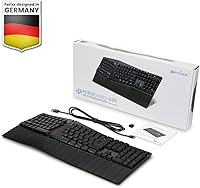
  • In the Box: Package includes the PERIBOARD-835 keyboard, a 2.4GHz USB receiver, a detachable USB cable, and a user manual.
  • Wireless Receiver: A compact USB 2.4GHz receiver is included for plug-and-play wireless operation with compatible Windows and Linux systems.
  • ASIN: The Amazon Standard Identification Number for this keyboard is B0C5F25F8H, released to market in May 2023.

Related Reviews
Perixx PERIBOARD-624B Wireless Ergonomic Split Keyboard
70%
81%
Ergonomic Design
88%
Wireless Freedom
54%
Key Feel & Typing Experience
86%
Setup & Ease of Use
61%
Build Quality & Materials
More
Perixx Periboard-612B Wireless Ergonomic Split Keyboard
72%
88%
Ergonomic Design
81%
Wireless Connectivity
79%
Typing Comfort
62%
Learning Curve
74%
Build Quality
More
Perixx PERIBOARD-535 Ergonomic Split Mechanical Keyboard
76%
88%
Ergonomic Design
84%
Switch Feel
83%
Wrist Rest Comfort
79%
Build Quality
58%
Programmability
More
Perixx PERIBOARD-636B Ergonomic Wireless Keyboard
76%
78%
Ergonomic Comfort
61%
Typing Feel
88%
Noise Level
83%
Wireless Reliability
81%
Wrist Rest Quality
More
NocFree Wireless Ergonomic Split Mechanical Keyboard
81%
88%
Wireless Reliability
83%
Ergonomic Design
91%
Typing Experience
92%
Switch Customization
54%
Learning Curve
More
Perixx PERIBOARD-512B Ergonomic Split Keyboard
75%
83%
Ergonomic Design
78%
Typing Comfort
74%
Key Feel & Feedback
79%
Build Quality
67%
Wrist Rest Quality
More
Perixx PERIBOARD-536 Ergonomic Compact Wired Keyboard
67%
67%
Ergonomic Comfort
58%
Typing Experience
78%
Noise Level
63%
Wrist Rest Quality
54%
Build Quality
More
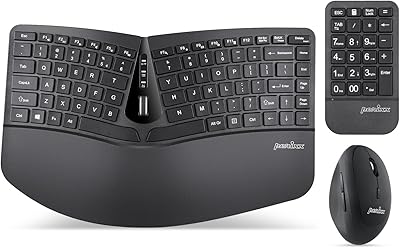
Perixx PERIDUO-606A Wireless Ergonomic Keyboard Mouse Set

71%
78%
Ergonomic Design
54%
Keyboard Feel
76%
Vertical Mouse Comfort
82%
Wireless Reliability
91%
Setup & Ease of Use
More
Perixx Periduo-605 Wireless Ergonomic Keyboard Mouse Combo
72%
83%
Ergonomic Comfort
61%
Keyboard Feel & Typing
79%
Mouse Comfort & Design
69%
Wireless Reliability
76%
Value for Money
More
QUASIO Wave Keys Ergonomic Wireless Keyboard with Wrist Rest
75%
83%
Ergonomic Comfort
71%
Wrist Rest Quality
67%
Typing Feel & Key Travel
86%
Wireless Reliability
81%
Mac & Windows Compatibility
More

FAQ

Basic use is straightforward — plug in the USB receiver or pair via Bluetooth and you are typing within a few minutes. The complexity only surfaces if you want to customize macros or remap keys, which requires downloading and installing Perixx's companion software. That software works, but it has a bit of a learning curve, so budget some time for it on your first session.

Honestly, blue clicky switches are among the louder switch types available, and this keyboard is no exception. In a quiet shared office or during video calls, you will almost certainly draw attention and possibly complaints. It is best suited to a private home office or a space where keyboard noise is not a concern for those around you.

Yes, you can pair it to two Bluetooth devices simultaneously and also use the 2.4GHz dongle as a third connection — so three devices in total can be configured at once. Switching between paired devices is handled through a dedicated key on the board. The hardware toggle between Mac and Windows modes makes OS switching fast and clean.

The wrist rest is functional and adjustable across three angles, which gives you real control over how your wrists sit during typing. Most users who give the keyboard an honest adjustment period do report reduced wrist strain. That said, if you are coming from a completely flat keyboard, expect at least a week or two before the new position starts feeling natural rather than awkward.

Perixx does not publish an official battery life figure for this model, which is worth noting. Based on typical lithium polymer batteries in similar ergonomic keyboards at this size, you can generally expect multiple days to a couple of weeks depending on how heavily you use the RGB lighting. Turning backlighting off or reducing brightness significantly extends runtime between charges.

It is actually one of the more approachable ergonomic options for first-timers because the split angle is relatively gentle — it is not a dramatic separation like a fully split keyboard. Most touch typists adapt within a week or two. That said, hunt-and-peck typists may take longer, since the key positioning is noticeably different from a standard flat keyboard.

Yes, the detachable USB cable doubles as both a charging cable and a full wired connection, so a dead battery does not leave you stuck. You just plug in and keep working while it charges in the background.

Most users report solid performance from the 2.4GHz connection, which is the more dependable of the wireless options. Bluetooth performance is generally good but, as a handful of reviewers have noted, range and stability can vary in environments with a lot of wireless interference. If your desk is more than a few feet from your computer or you have a crowded wireless environment, the 2.4GHz dongle is the safer choice.

Perixx's companion software for key remapping and macro programming has historically been more reliably supported on Windows. Mac users may find the software experience limited or encounter compatibility issues depending on their OS version. The keyboard itself works on Mac without the software, including the dedicated Mac mode toggle, but advanced customization is easier on a Windows machine.

If you work from home, type heavily, and are starting to notice wrist discomfort with a standard keyboard, this ergonomic keyboard offers a meaningful combination of features at its price point — mechanical switches, multi-device wireless, an adjustable wrist rest, and programmable keys all in one package. The 3.8-star rating reflects real trade-offs, particularly around software polish and switch noise, so it is not for everyone. But for the right home-office user, the value is there.

Where to Buy