Overview

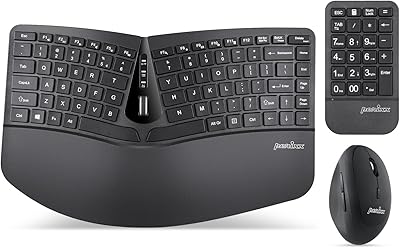
The Perixx PERIBOARD-624B Wireless Ergonomic Split Keyboard enters a niche but growing corner of the peripheral market — one occupied by people who type for hours daily and are starting to feel it in their wrists, shoulders, or forearms. What sets this split wireless keyboard apart from most ergonomic boards is its genuinely cable-free design: both halves communicate independently over 2.4GHz RF, so you can spread them as far as 2 feet apart without any tethering wire. Perixx is a smaller brand with a focused ergonomic lineup, and this board sits at a mid-range price point — more accessible than premium alternatives, but clearly comfort-focused rather than built for speed typists or keyboard enthusiasts who demand mechanical switches.
Features & Benefits

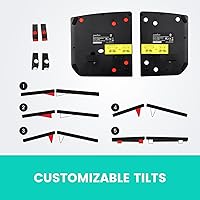
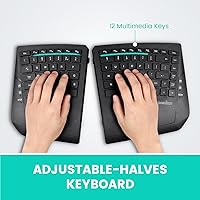
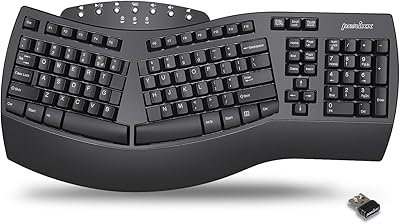
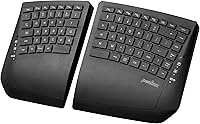
The most practical advantage of this split wireless keyboard is how the two halves operate independently — each communicating via a single USB nano-dongle, with a wireless range of up to 30 feet from your PC. You can angle and tilt each half separately thanks to adjustable multi-position feet, which makes a real difference if you spend hours at a desk and need a setup tailored to your posture. The keys are low-profile membrane switches with just 2.2mm of travel — shallow and quiet, not clicky. A built-in palm rest adds wrist support right out of the box, and multimedia shortcut keys handle volume and media controls without extra clicks. Battery power means no charging cables, though AAA batteries will need replacing over time.

Best For

This ergonomic keyboard is a solid pick for Windows users — it supports Windows 7 through 11, and there is no Mac or Linux compatibility listed, so that is worth knowing upfront. It suits people who are new to split keyboards and want to ease into the ergonomic typing style without spending significantly more on high-end alternatives. If your workday involves long typing sessions and you have been noticing tension in your wrists or shoulders, this board offers a more natural hand position that could help reduce that strain over time. Those who prefer a quieter desktop setup will appreciate the low-noise membrane keys. Heavy gamers or users expecting a precise tactile keystroke would likely find the typing experience underwhelming.

User Feedback

Sitting at a 3.7-out-of-5 aggregate rating, the Perixx ergonomic board has earned a divided reception. Buyers who value the wireless split concept tend to praise the freedom it offers — no cord between halves is a genuine convenience that most competing boards simply do not provide. Setup is typically described as quick and painless. On the other side, tactile typists frequently flag the membrane keys as mushy, and some users report a noticeable adjustment period before typing accuracy rebounds. Battery dependency is a recurring gripe for heavy users. A few reviewers with RSI symptoms note some relief, though results vary person to person. Compared to pricier options like Kinesis or Logitech ERGO, the gap in build quality comes up often in critical reviews.

Pros

  • The two halves operate fully wirelessly with no tethering cable between them, a rarity at this price level.
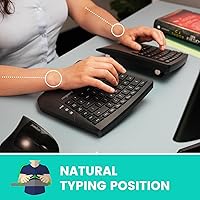
  • Spreading the halves apart encourages a more natural shoulder and wrist position during long typing sessions.
  • Setup is straightforward — plug in the nano-dongle and you are ready to go, no software required.
  • A built-in palm rest provides immediate wrist support without needing to buy a separate accessory.
  • The 2.4GHz connection is stable up to 30 feet, giving genuine desk flexibility.
  • Low-profile keys are quiet enough for shared workspaces or open-plan offices.
  • Adjustable tilt feet on both halves let you customize the angle to your posture and desk height.
  • At its mid-range price, it undercuts most ergonomic split keyboards by a significant margin.
  • Multimedia shortcut keys handle common tasks without requiring extra software or remapping.

Cons

  • Only compatible with Windows; Mac and Linux users are completely locked out.
  • Membrane key feel is frequently described as mushy by users who have tried mechanical keyboards.
  • Runs on AAA batteries rather than a built-in rechargeable cell, adding ongoing cost and inconvenience.
  • A 3.7-out-of-5 rating signals that a meaningful portion of buyers have had disappointing experiences.
  • There is a real adjustment period for new split-keyboard users, and typing accuracy often drops at first.
  • The compact layout omits a dedicated numpad, which matters for data-entry users.
  • Battery compartment placement and overall build quality feel utilitarian rather than premium.
  • Wireless reliability between the two independent halves has been questioned by some reviewers.
  • No software or driver support means limited customization options for key remapping or macros.

Ratings

The scores below reflect an AI-driven analysis of verified global user reviews for the Perixx PERIBOARD-624B Wireless Ergonomic Split Keyboard, with spam, bot-generated, and incentivized feedback actively filtered out before scoring. Each category captures both what buyers genuinely appreciated and where real frustrations surfaced — nothing is glossed over. The result is an honest, balanced picture of how this split wireless keyboard performs in everyday use across a wide range of buyers.

Ergonomic Design
81%
19%
For users coming from a standard flat keyboard, the ability to spread the two halves apart and angle each one independently makes a tangible difference in shoulder width and wrist alignment during long workdays. Buyers dealing with mild forearm or wrist tension frequently noted that the split layout helped them adopt a more relaxed arm position without requiring extreme adjustment.
The ergonomic gains do come with a learning curve that some users found genuinely frustrating in the first one to two weeks. A handful of reviewers also noted that the fixed curved key layout does not suit every hand size equally, and users with smaller hands occasionally reported reaching awkwardly for outer keys.
Wireless Freedom
88%
The absence of any cable between the two halves is the standout feature for most buyers, and it consistently earns praise in reviews. Being able to reposition each half freely on the desk — even pull one back when not in use — gives a level of flexibility that tethered split boards simply cannot match.
A minority of users reported occasional micro-dropouts or brief connectivity hiccups, particularly in offices with dense 2.4GHz RF environments shared with multiple wireless devices. While not widespread, it is a concern worth flagging given that inter-half wireless stability is the defining feature of this board.
Key Feel & Typing Experience
54%
46%
For users who primarily want a quiet, low-impact typing surface — especially in shared office settings — the shallow membrane keys do the job without generating the noise of clicky mechanical switches. Light typists who do not need strong tactile confirmation generally find the 2.2mm travel acceptable for day-to-day correspondence and document work.
This is the most common source of dissatisfaction in user reviews. Typists accustomed to mechanical keyboards consistently describe the keys as mushy and imprecise, and even some membrane keyboard veterans find the feedback underwhelming. The shallow travel leaves little room for error, and mistyping rates tend to rise during the adjustment period.
Setup & Ease of Use
86%
Plug-and-play setup via the USB nano-dongle is consistently praised for being fast and hassle-free. Most buyers report being up and typing within a minute of opening the box, with no driver downloads or configuration required on supported Windows systems.
There is no pairing button or visual indicator to confirm the connection is active, which can cause brief confusion if the keyboard goes to sleep or batteries run low. A small number of users reported needing to re-insert the dongle after Windows updates disrupted recognition.
Build Quality & Materials
61%
39%
The keyboard feels solid enough for desk use and does not flex noticeably during normal typing. The matte black finish on both halves is inoffensive and blends well into most workspaces without showing fingerprints as aggressively as glossy surfaces would.
Several reviewers pointed out that the plastic casing feels lightweight in a way that reads as thin rather than portable. The tilt feet, while functional, have been described as flimsy by a notable portion of buyers, and a few reported that the locking mechanism lost tension after several weeks of daily adjustment.
Palm Rest Comfort
74%
26%
Having a built-in palm rest on each half removes the need for a separate accessory purchase, which buyers on a budget appreciate. For users with average-sized hands, the integrated rests provide reasonable wrist support during lighter typing tasks without forcing an unnatural wrist angle.
The palm rests are not cushioned — they are simply a flat plastic extension of each half — which becomes noticeable during extended sessions. Users who already own gel or foam wrist rests sometimes find the built-in option falls short of what they are used to, particularly over hours of continuous use.
Battery Life & Power
58%
42%
Running on AAA batteries means no charging cable is ever needed, and swapping in fresh batteries takes only seconds. For users who travel or move the keyboard between locations regularly, this can actually be a practical advantage over boards that need to be tethered to a USB port for charging.
The ongoing cost and environmental footprint of disposable batteries is a genuine friction point, and it comes up frequently in critical reviews. There is no low-battery warning system, so users often discover dead batteries mid-session rather than ahead of time, and heavy typists may find themselves replacing batteries more often than expected.
Adjustability & Customization
73%
27%
The multi-position tilt feet give each half a meaningful range of angle options, and being able to tune the two halves independently is a practical advantage for users with asymmetric posture needs or uneven desk surfaces. Most buyers find a comfortable angle within a few minutes of experimenting.
The tilt adjustment is purely mechanical — there is no software, no remapping capability, and no per-key customization of any kind. Users who want to reprogram keys, create macros, or adjust repeat rate beyond what Windows allows natively will hit a hard wall with this board.
Compatibility & Platform Support
47%
53%
On supported Windows systems, the keyboard works reliably right out of the box with no additional software. Windows 7 through 11 are all covered, which is a wide enough net to accommodate older business machines still running legacy OS versions.
The Windows-only limitation is a significant restriction that eliminates the board outright for Mac and Linux users — and Perixx has not provided any workaround or unofficial guidance for those platforms. In an era where many users split time between operating systems, this narrow compatibility feels dated.
Value for Money
69%
31%
Compared to premium ergonomic split keyboards, this board comes in at a noticeably lower price, making the split wireless concept accessible to buyers who are not ready to commit to a high-end investment. For someone testing ergonomic typing for the first time, the entry cost feels proportionate to the risk.
The 3.7-out-of-5 aggregate rating suggests that a meaningful share of buyers feel the value equation does not fully deliver on its promise — particularly those who expected better key quality at the price. When stacked against competing membrane ergonomic options, the build and key feel do not always justify the premium over cheaper alternatives.
Noise Level
82%
18%
The low-profile membrane construction keeps keystroke noise well below what you would expect from a mechanical board, and buyers in open-plan offices frequently cite this as a deciding factor in their purchase. Day-to-day typing during calls or in quiet environments is generally unobtrusive.
While quieter than most mechanical switches, the bottom-out sound on the membrane keys still produces a faint but audible tap, which in very quiet environments can still carry. It is not a silent keyboard by design, and users seeking near-zero sound output would need to look at specifically engineered silent switch options.
Typing Accuracy
63%
37%
Once past the initial adjustment period — typically one to two weeks for most users — accuracy tends to recover and some buyers report fewer errors than on a standard keyboard due to the more natural hand positioning the split layout encourages.
The transition period is real and can be disruptive for anyone who types professionally under time pressure. The split layout combined with the shallow key travel creates a double adjustment challenge, and several reviewers noted that their productivity dropped noticeably during the first week of switching.
Desk Footprint & Portability
77%
23%
The ability to spread, angle, or pull apart the two halves gives this ergonomic keyboard surprising desk flexibility compared to fixed ergonomic boards. Users with small or cluttered desks appreciate being able to move one half aside entirely when not in active use.
At just over 2 pounds combined and without a carrying case or bag included, it is not a keyboard most users would comfortably commute with daily. The two separate halves also require care during transport to avoid losing the nano-dongle, which has no dedicated storage slot on the keyboard itself.

Suitable for:

The Perixx PERIBOARD-624B Wireless Ergonomic Split Keyboard is best suited for Windows-based office workers and remote employees who spend long hours typing and have started noticing discomfort in their wrists, forearms, or shoulders. If you are making your first move into ergonomic peripherals, this split wireless keyboard offers a gentle entry point — the adjustable tilt and independent half positioning let you dial in a more natural arm angle without requiring a steep relearning curve. People who work in tidy or shared desk environments will appreciate that there are no cables cluttering the surface, including no wire bridging the two halves. Quiet office settings are also well served here, since the low-profile membrane keys produce minimal noise during use. For anyone priced out of premium ergonomic keyboards from brands like Kinesis or Logitech, this board hits a practical middle ground worth considering.

Not suitable for:

The Perixx PERIBOARD-624B Wireless Ergonomic Split Keyboard is a poor fit for Mac and Linux users — compatibility is strictly limited to Windows 7 through 11, and there is no workaround listed for other operating systems. If you are a typist who values strong tactile feedback or an audible click with each keypress, the shallow 2.2mm membrane keys will likely feel unsatisfying and imprecise by comparison to mechanical alternatives. This ergonomic keyboard also runs on four AAA batteries rather than a rechargeable cell, which means ongoing battery purchases — a real inconvenience for heavy daily users. Gamers or anyone who needs fast, accurate keystrokes in high-pressure situations should look elsewhere, as membrane switches at this profile are not built for that kind of responsiveness. Finally, buyers who have already used a high-end split keyboard and are looking to upgrade will probably find the build quality and key feel a step down rather than a step forward.
Specifications

  • Connectivity: The keyboard uses 2.4GHz RF wireless technology, connecting both halves to a PC through a single USB nano-dongle receiver.
  • Wireless Range: The USB receiver maintains a stable connection with the keyboard at distances of up to 30 feet from the host computer.
  • Half Separation: The two keyboard halves can be positioned up to 2 feet apart from each other without any physical cable connecting them.
  • Key Type: Low-profile membrane switches are used across the full layout, prioritizing quiet operation and a shallow actuation feel.
  • Key Travel: Each key has a travel distance of 2.2mm, which is shallower than standard membrane keyboards and contributes to the quieter keystroke sound.
  • Layout: The keyboard uses a compact US English QWERTY layout with built-in multimedia shortcut keys for common media and system controls.
  • Palm Rest: Both halves include an integrated palm rest that provides wrist support during extended typing sessions without requiring a separate accessory.
  • Tilt Adjustment: Multi-position adjustable tilt feet are located on the underside of each half, allowing users to customize the typing angle independently.
  • Power Source: The keyboard is powered by four AAA batteries, which are not rechargeable via USB and will need periodic replacement depending on usage.
  • Dimensions: The combined keyboard measures 14.21 inches in length, 8.46 inches in width, and 1.1 inches in height when the halves are placed together.
  • Weight: The total weight of the keyboard unit is 2.03 pounds, making it moderately lightweight for a full split ergonomic board.
  • OS Compatibility: The keyboard is officially compatible with Windows 7, 8, 10, and 11 only; Mac OS and Linux are not listed as supported platforms.
  • Color: The keyboard is available in Black, with a matte finish consistent across both halves and the palm rest sections.
  • Receiver Type: A compact USB nano-dongle receiver is included in the box and handles wireless communication for the entire keyboard system.
  • Brand: Manufactured by Perixx, a peripheral brand that focuses specifically on ergonomic input devices including keyboards, mice, and trackballs.
  • Model Number: The official model number is PERIBOARD-624B, with the B suffix denoting the Black color variant of the PERIBOARD-624 line.
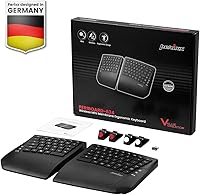
  • In The Box: The package includes the PERIBOARD-624 split keyboard unit, a USB nano-dongle receiver, and a printed user manual.
  • Market Rank: The keyboard holds a Best Sellers Rank of #448 in the Computer Keyboards category on Amazon as of its most recent listing data.

Related Reviews

Perixx Periboard-612B Wireless Ergonomic Split Keyboard
72%
88%
Ergonomic Design
81%
Wireless Connectivity
79%
Typing Comfort
62%
Learning Curve
74%
Build Quality
More
Perixx PERIBOARD-835 Wireless Ergonomic Mechanical Keyboard
69%
74%
Ergonomic Comfort
81%
Typing Experience
46%
Noise Level
83%
Multi-Device Connectivity
52%
Companion Software
More
Perixx PERIBOARD-636B Ergonomic Wireless Keyboard
76%
78%
Ergonomic Comfort
61%
Typing Feel
88%
Noise Level
83%
Wireless Reliability
81%
Wrist Rest Quality
More
Perixx PERIBOARD-535 Ergonomic Split Mechanical Keyboard
76%
88%
Ergonomic Design
84%
Switch Feel
83%
Wrist Rest Comfort
79%
Build Quality
58%
Programmability
More
Perixx Periduo-605 Wireless Ergonomic Keyboard Mouse Combo
72%
83%
Ergonomic Comfort
61%
Keyboard Feel & Typing
79%
Mouse Comfort & Design
69%
Wireless Reliability
76%
Value for Money
More
NocFree Wireless Ergonomic Split Mechanical Keyboard
81%
88%
Wireless Reliability
83%
Ergonomic Design
91%
Typing Experience
92%
Switch Customization
54%
Learning Curve
More
DeLUX GM901D Ergonomic Wireless Keyboard
76%
83%
Ergonomic Design
76%
Palm Rest Comfort
81%
Wireless Connectivity
67%
Typing Feel
72%
Build Quality
More
Perixx PERIBOARD-512B Ergonomic Split Keyboard
75%
83%
Ergonomic Design
78%
Typing Comfort
74%
Key Feel & Feedback
79%
Build Quality
67%
Wrist Rest Quality
More
Perixx PERIBOARD-536 Ergonomic Compact Wired Keyboard
67%
67%
Ergonomic Comfort
58%
Typing Experience
78%
Noise Level
63%
Wrist Rest Quality
54%
Build Quality
More
Perixx PERIDUO-606A Wireless Ergonomic Keyboard Mouse Set
71%
78%
Ergonomic Design
54%
Keyboard Feel
76%
Vertical Mouse Comfort
82%
Wireless Reliability
91%
Setup & Ease of Use
More

FAQ

Unfortunately, no. The Perixx PERIBOARD-624B Wireless Ergonomic Split Keyboard is officially compatible with Windows 7, 8, 10, and 11 only. There is no listed support for macOS or any Linux distribution, so if you are not on a Windows machine, this is not the right pick for you.

You can separate the two halves by up to 2 feet, which is enough to place them shoulder-width apart or adjust for a wider, more natural arm position. Since there is no physical cable connecting the halves, you have real flexibility in how you arrange your desk setup.

No software installation is required. You plug the USB nano-dongle into your Windows PC and the keyboard should be recognized and ready to use almost immediately. It is a plug-and-play device, which keeps the setup process simple.

Battery life will depend heavily on how much you type each day, but membrane keyboards generally draw low power, so you should get a reasonable stretch out of a fresh set of AAA batteries. That said, there is no battery indicator, so it is worth keeping a spare set on hand to avoid being caught off guard.

Yes, especially if you are coming from a standard flat keyboard. Most new split keyboard users see a dip in typing accuracy for the first week or two while their hands adjust to the wider, angled layout. It does get more natural with time, but going in with realistic expectations helps.

Since this split wireless keyboard uses a dedicated 2.4GHz RF nano-dongle rather than Bluetooth, it operates independently of other wireless devices. In most typical home or office setups, interference with a separate wireless mouse is unlikely, though extremely crowded RF environments could occasionally cause minor disruption.

The low-profile membrane keys are noticeably quieter than mechanical switches, making this ergonomic keyboard a decent choice for shared or open-plan workspaces. You will not get the complete silence of a dedicated silent keyboard, but it is far less disruptive than most clicky or tactile alternatives.

Yes, each half has its own set of adjustable tilt feet on the underside, so you can position them at different angles if your posture or desk setup requires it. The range of adjustment is not extreme, but it does give you enough room to find a more comfortable wrist angle than a flat keyboard offers.

This split wireless keyboard can potentially help reduce strain by allowing a more natural arm and wrist position, but it is not a medical device and results will vary from person to person. Some users with RSI-related discomfort do report feeling better after switching, while others find it takes time to see any difference. If your symptoms are significant, it is worth consulting a healthcare professional alongside making any ergonomic changes.

The main trade-offs are in build quality and key feel. Higher-end boards often use better materials, offer more customization, and in some cases use mechanical switches. The Perixx ergonomic board sits in a more accessible price tier, which means some compromises — particularly the membrane key feel — are part of the equation. If you are just testing the waters with split keyboards, it is a reasonable starting point without a large financial commitment.

Where to Buy