Overview

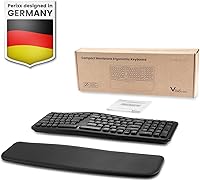
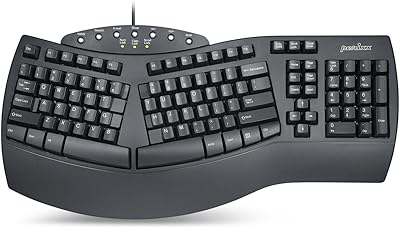
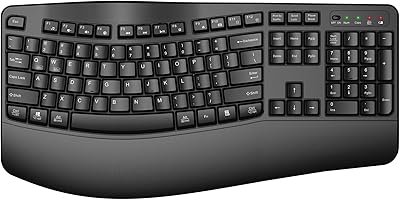
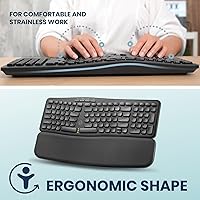
The Perixx PERIBOARD-636B Ergonomic Wireless Keyboard is a practical mid-range option for desk workers who want genuine wrist comfort without surrendering half their desk to a full-size board. What sets it apart from typical compact keyboards is the split wave design — a gentle ergonomic curve that encourages a more natural hand position. Wireless connectivity, an integrated number pad, and a detachable wrist rest are all bundled into one package at a price that won't sting. It works across Mac and Windows, which is genuinely useful. That said, if you're expecting a premium typing feel or zero adjustment period, temper your expectations going in.
Features & Benefits

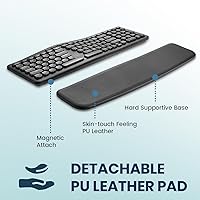
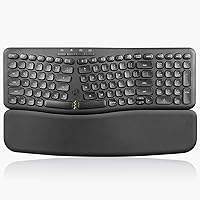
The magnetic wrist rest is one of the more thoughtful touches here — it snaps on cleanly and pulls away without fuss, so you can remove it during shorter sessions or travel without losing any pieces. The 2.4GHz USB dongle keeps the connection rock-solid and avoids the pairing headaches Bluetooth users know well. Keys are quiet membrane switches with round low-profile caps — soft and hushed, ideal for open offices, though longtime mechanical keyboard users will notice the shallower travel immediately. Having a built-in number pad on a compact board is genuinely rare, and Perixx pulls it off without bloating the footprint. Mac and Windows hotkeys come pre-mapped, which saves real setup time.

Best For

This ergonomic wireless keyboard hits its mark for people who spend long hours typing and are starting to feel the strain of a flat, straight board. It's especially well-suited to data entry professionals who need a numpad but hate the sprawl of a full-size layout on a tight desk. The silent keys make it a considerate choice in libraries, co-working spaces, or late-night sessions beside a sleeping partner. Dual Mac and Windows users will appreciate not having to swap keyboards. One honest caveat: if you've never typed on a split-angle board before, expect a few days of muscle memory rewiring — it's not instant, but most people adjust faster than they anticipate.

User Feedback

With 64 ratings and a 4.1-star average, the Perixx compact keyboard has earned a cautiously positive early reception — not a landslide, but a meaningful signal. Buyers tend to praise the wrist rest construction and the quiet key sound, noting both hold up well in daily office use. Where opinions diverge is on the wave angle — some find it immediately comfortable, others need significantly longer to settle in. A handful of reviewers flag the dongle size as unexpectedly bulky for travel. Battery life draws minimal complaints. It's worth noting this is still a relatively new listing, so the rating reflects early adopter impressions rather than a deep, long-term consensus.

Pros

  • The detachable magnetic wrist rest snaps on and off cleanly, making it easy to customize comfort without any fuss.
  • Silent membrane keys keep noise to a minimum, which is a genuine courtesy in shared or open-plan office settings.
  • The integrated number pad is rare on a compact ergonomic board and adds real value for data entry users.
  • 2.4GHz wireless via USB dongle delivers a stable, lag-free connection without any Bluetooth pairing headaches.
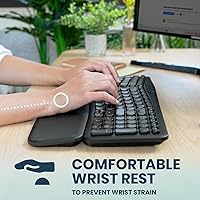
  • The split wave layout encourages a more natural wrist angle, reducing pronation strain during long typing sessions.
  • Works out of the box on both Mac and Windows with pre-mapped hotkeys, saving meaningful setup time.
  • The vegan leather wrist rest feels noticeably more premium than the plastic-padded alternatives common at this price tier.
  • Compact footprint keeps the mouse closer to the body, which helps reduce shoulder reach over a full workday.

Cons

  • Membrane key travel is shallow and soft — a real adjustment for anyone coming from a mechanical keyboard background.
  • The split wave angle has a noticeable learning curve; expect several days of slower, error-prone typing while adjusting.
  • The USB dongle is reportedly bulkier than expected, making it less convenient to carry or stow during travel.
  • With only 64 ratings so far, long-term durability and reliability data is still limited.
  • No rechargeable battery — the board runs on two AAA batteries, which adds an ongoing maintenance consideration.
  • ABS plastic construction feels functional rather than premium, which may bother buyers used to higher-end peripherals.
  • No wired mode fallback — if the dongle is lost or the batteries die mid-session, you are completely without a keyboard.
  • The wave angle does not suit every wrist anatomy; a minority of users find the fixed curve uncomfortable rather than helpful.

Ratings

The scores below reflect our AI-driven analysis of verified global buyer reviews for the Perixx PERIBOARD-636B Ergonomic Wireless Keyboard, with spam, bot activity, and incentivized feedback actively filtered out before scoring. Each category is weighted against real usage patterns reported by desk workers, home office users, and data-entry professionals across multiple markets. Both the strengths and the friction points are represented honestly — nothing is smoothed over to flatter the product.

Ergonomic Comfort
78%
22%
Users who made the switch from flat keyboards consistently report reduced wrist fatigue after the adjustment period, particularly during long afternoon typing sessions. The split wave angle places hands in a noticeably more natural position, and several reviewers noted their shoulder tension decreased alongside wrist strain.
The fixed wave angle does not suit every hand size or wrist anatomy — a minority of users find the curve works against rather than with their natural posture. Unlike premium ergonomic boards, there is no tenting or adjustable incline to personalize the fit further.
Typing Feel
61%
39%
For users coming from standard rubber-dome office keyboards, the key feel is familiar and inoffensive, and the low-profile round keycaps give the board a modern, clean aesthetic that many find pleasant to look at and navigate by touch.
Buyers with mechanical keyboard experience frequently flag the shallow key travel as the single biggest disappointment — the feedback is soft and somewhat mushy, with no tactile bump or audible click to confirm a keypress. This is not a deal-breaker for casual typists, but it is a real gap for anyone who has typed on even entry-level mechanical switches.
Noise Level
88%
The silent membrane switches perform well in genuinely quiet environments — coworkers in adjacent desks, library study rooms, and late-night home sessions all come up as specific scenarios where reviewers were pleased they chose this board. The sound level is close to background noise in most office settings.
At full typing speed, a faint rhythmic thud from bottoming out is still audible in very quiet rooms, such as recording spaces or extremely hushed study environments. It is quieter than most keyboards, but not completely inaudible under all conditions.
Wireless Reliability
83%
The 2.4GHz dongle connection holds up well across a standard desk setup — reviewers report no noticeable lag or dropout during everyday typing, even with the dongle plugged into a USB hub rather than directly into the computer. The lack of Bluetooth pairing steps is consistently mentioned as a practical convenience.
A small number of users report occasional signal hiccups in environments with heavy wireless interference, such as shared coworking spaces with many active devices. The dongle also adds a component to keep track of, and losing it means the keyboard becomes unusable entirely.
Wrist Rest Quality
81%
19%
The vegan leather surface feels noticeably more considered than the foam or plain plastic wrist rests bundled with competing keyboards at this price level. The magnetic attachment mechanism is a genuine usability win — users can pull it off for travel or a quick desk rearrangement and snap it back without any effort.
Long-term durability of the vegan leather remains an open question given how recently this model launched. Some users with larger palms feel the rest is slightly narrow and does not provide full coverage across the wrist during extended typing.
Number Pad Usability
79%
21%
Having a number pad on a compact ergonomic board is genuinely uncommon, and reviewers in finance, data entry, and spreadsheet-heavy roles call it out as the feature that sold them on this specific model over alternatives. The integration feels natural rather than tacked on.
The keys on the number pad cluster are slightly smaller than on a traditional full-size keyboard to accommodate the compact layout, which requires a brief adjustment for touch typists who rely on numpad muscle memory for speed input.
Layout Learning Curve
63%
37%
Users who committed to the adjustment period — typically five to ten working days — report that the split layout eventually becomes intuitive and that going back to a flat board feels strange. The wave split is approachable compared to more radical ergonomic designs.
Fast typists frequently see a noticeable speed regression in the first week, with error rates rising before muscle memory catches up. A handful of reviewers gave up before the adjustment period completed, which likely accounts for some of the lower ratings in the overall pool.
Build Quality
67%
33%
The structural rigidity is adequate for daily desk use — the board does not flex during typing, and the key mounting feels stable enough to handle consistent pressure across an eight-hour workday without developing wobble.
The ABS plastic shell reads as functional rather than premium, and some users note the surface picks up fingerprints and light scratches more visibly than expected given the dark colorway. It does not feel fragile, but it does not inspire confidence either.
Mac & Windows Compatibility
84%
The pre-mapped hotkeys for both operating systems work correctly out of the box on all tested configurations, with no driver installation required. Dual-system users — especially those who switch between a Mac at home and a Windows machine at work — find the cross-platform support genuinely useful.
Switching between operating systems still requires physically moving the USB dongle, since there is no multi-device pairing. Users who wanted instant OS switching without unplugging hardware will find this board does not meet that need.
Battery Life
72%
28%
Under typical office workloads, the two AAA batteries last several months before needing replacement, and the lack of backlighting means power consumption stays low relative to keyboards with LED features. Reviewers rarely mention running out of power as a recurring frustration.
The reliance on disposable AAA batteries is a practical inconvenience compared to rechargeable keyboards in a similar price range, and there is no battery indicator or low-power warning light to alert you before the keyboard cuts out mid-session.
Desk Footprint
82%
18%
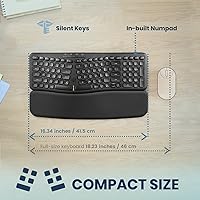
At just over 16 inches wide, the Perixx compact keyboard occupies meaningfully less horizontal space than a traditional full-size board, which brings the mouse closer to the body and reduces shoulder extension — something reviewers with smaller desks specifically highlight as a daily comfort improvement.
It is still wider than a true tenkeyless layout, so users with very constrained desk setups or those using a laptop stand plus external keyboard may find the footprint more limiting than expected given the compact classification.
Value for Money
76%
24%
Bundling wireless connectivity, an ergonomic split layout, an integrated number pad, and a vegan leather wrist rest into one mid-range package offers a compelling feature-to-price ratio for first-time ergonomic buyers who do not want to commit to a premium price point.
Buyers who prioritize typing feel over feature count may find the value proposition weaker — you are paying for the hardware bundle, not for a premium keystroke experience, and there are similarly priced options with better switch quality if the numpad and wrist rest are not priorities.
Portability
54%
46%
The keyboard is lighter than many full-size alternatives, and the detachable wrist rest reduces bulk slightly when packing for travel or moving between workspaces.
At 1.81 pounds with a 16-inch frame, this is not a keyboard that naturally fits into a laptop bag without conscious effort. The USB dongle is also larger than many ultra-compact dongles, and misplacing it on the road would render the board completely non-functional.
Setup & Ease of Use
89%
Plug-and-play setup works reliably across tested systems — insert the dongle, power on the keyboard, and it is ready within seconds. No software, driver downloads, or account creation is required, which reviewers across all experience levels appreciate.
There is no on-screen indicator for connectivity status or battery level, so troubleshooting a non-responsive keyboard requires a bit of trial and error to determine whether the issue is the batteries, the dongle position, or something else.

Suitable for:

The Perixx PERIBOARD-636B Ergonomic Wireless Keyboard is a strong fit for desk workers who spend long hours typing and are beginning to feel the cumulative strain of a conventional flat keyboard. If you work in finance, accounting, or any data-heavy role, the integrated number pad on a compact body is a rare find that keeps your desk footprint manageable. People in shared or noise-sensitive environments — open-plan offices, library workspaces, or shared bedrooms — will genuinely appreciate how hushed the keys are during extended sessions. It also makes a lot of sense for anyone juggling both a Mac and a Windows machine, since the cross-platform hotkey layout removes the usual friction of switching between systems. First-time ergonomic keyboard buyers will find the wave split design approachable enough to learn without committing to a more radical tented or columnar layout.
Not suitable for:

The Perixx PERIBOARD-636B Ergonomic Wireless Keyboard will disappoint buyers who prioritize tactile typing feedback, since the membrane switches offer a soft, shallow feel that is a significant step down from even entry-level mechanical keyboards. Enthusiasts who have grown accustomed to satisfying key travel will likely find it underwhelming within the first few minutes. Bluetooth-only setups are also a dealbreaker here — the board relies exclusively on a 2.4GHz USB dongle, so if your device lacks a free USB-A port or you prefer a dongle-free desk, this split-layout board is not a practical choice. Heavy travelers should think twice as well; the dongle adds a component to track, and the keyboard's 1.81-pound weight is noticeable in a bag compared to ultra-thin travel alternatives. Finally, anyone expecting the wrist rest to fully resolve serious repetitive strain issues should consult an ergonomics professional rather than relying on a single peripheral to do all the work.

Specifications

  • Brand: Manufactured by Perixx, a brand focused on ergonomic peripherals for everyday computing use.
  • Model: PERIBOARD-636B, part of Perixx's compact ergonomic keyboard lineup, first listed in June 2024.
  • Layout: Compact split layout with an integrated number pad, designed to reduce overall desk footprint compared to full-size boards.
  • Dimensions: The keyboard measures 16.34″ long by 5.71″ wide by 1.61″ tall, including the raised ergonomic profile.
  • Weight: The unit weighs 1.81 pounds, which is moderate for a compact wireless keyboard with an attached number pad.
  • Connectivity: Connects via a 2.4GHz USB dongle receiver; no Bluetooth support is included.
  • Key Switch Type: Uses silent membrane switches with low-profile round keycaps designed to minimize audible click noise during typing.
  • Ergonomic Design: Features a split wave shape that angles the two key clusters outward to reduce wrist pronation during extended typing sessions.
  • Wrist Rest: Includes a detachable magnetic wrist rest surfaced in vegan leather, which attaches and removes without tools or latches.
  • Power Source: Powered by two AAA batteries; no built-in rechargeable battery or USB charging port is included.
  • OS Compatibility: Compatible with both Windows and Mac OS, with dedicated hotkeys pre-mapped for each operating system.
  • Special Keys: Includes hotkeys and media control keys for common functions such as volume, playback, and system shortcuts.
  • Material: Keyboard body is constructed from ABS plastic; the wrist rest surface uses a vegan leather material.
  • Color: Available in Black as the standard colorway for this model variant.
  • Compatible Devices: Designed for use with laptops and desktop PCs that have an available USB-A port for the wireless dongle.
  • Receiver Type: Uses a dedicated RF USB dongle receiver; the dongle must remain plugged in during all wireless operation.

Related Reviews
Perixx PERIBOARD-835 Wireless Ergonomic Mechanical Keyboard
69%
74%
Ergonomic Comfort
81%
Typing Experience
46%
Noise Level
83%
Multi-Device Connectivity
52%
Companion Software
More
Perixx Periboard-612B Wireless Ergonomic Split Keyboard
72%
88%
Ergonomic Design
81%
Wireless Connectivity
79%
Typing Comfort
62%
Learning Curve
74%
Build Quality
More
Perixx PERIBOARD-624B Wireless Ergonomic Split Keyboard
70%
81%
Ergonomic Design
88%
Wireless Freedom
54%
Key Feel & Typing Experience
86%
Setup & Ease of Use
61%
Build Quality & Materials
More
Perixx PERIBOARD-512B Ergonomic Split Keyboard
75%
83%
Ergonomic Design
78%
Typing Comfort
74%
Key Feel & Feedback
79%
Build Quality
67%
Wrist Rest Quality
More
Perixx PERIBOARD-536 Ergonomic Compact Wired Keyboard
67%
67%
Ergonomic Comfort
58%
Typing Experience
78%
Noise Level
63%
Wrist Rest Quality
54%
Build Quality
More
Perixx PERIBOARD-535 Ergonomic Split Mechanical Keyboard

76%
88%
Ergonomic Design
84%
Switch Feel
83%
Wrist Rest Comfort
79%
Build Quality
58%
Programmability
More
Perixx PERIDUO-606A Wireless Ergonomic Keyboard Mouse Set
71%
78%
Ergonomic Design
54%
Keyboard Feel
76%
Vertical Mouse Comfort
82%
Wireless Reliability
91%
Setup & Ease of Use
More
Perixx Periduo-605 Wireless Ergonomic Keyboard Mouse Combo
72%
83%
Ergonomic Comfort
61%
Keyboard Feel & Typing
79%
Mouse Comfort & Design
69%
Wireless Reliability
76%
Value for Money
More
TECKNET TK-EKB01040BS01 Wireless Keyboard
76%
83%
Ergonomic Comfort
86%
Typing Noise Level
79%
Wireless Reliability
62%
Build Quality
88%
Value for Money
More
X9 Performance Wireless Ergonomic Split Keyboard
76%
83%
Ergonomic Comfort
58%
Key Feel & Typing Experience
86%
Wireless Performance
88%
Battery Life
62%
Build Quality
More

FAQ

Most people need roughly three to seven days before their typing speed returns to normal — sometimes a bit longer for fast typists with deeply ingrained muscle memory. The wave angle feels strange at first, but the adjustment is more gradual than it is with more radical ergonomic designs like tented or columnar keyboards. Give it at least a full work week before making a judgment call.

The magnetic connection is reasonably secure for normal typing — it won't slide or detach under regular use. That said, it's not bolted down, so if you tend to push hard on your wrist rest or frequently readjust your hands, you may nudge it out of position occasionally. It snaps back into place instantly, which is one of the practical upsides of the magnetic design.

Not simultaneously — the USB dongle pairs to one device at a time. You would need to physically move the dongle between computers each time you switch. If you need fast multi-device switching, a Bluetooth keyboard with multi-device pairing would serve that workflow better.

The membrane switches are genuinely quiet — noticeably softer than a standard keyboard with clicky or tactile mechanical switches. Most people in the same room won't find them disruptive. There's still a light thud from bottoming out, but it's the kind of sound that blends into background office noise rather than cutting through it.

It can help if your discomfort stems from wrist pronation — the split wave layout does encourage a slightly more natural hand angle than a flat straight keyboard. However, it's not a medical device, and if you're experiencing persistent pain, a proper ergonomics assessment is worth pursuing. Think of this board as a preventive comfort upgrade rather than a treatment.

The receiver uses a standard USB-A connector. If your laptop only has USB-C ports, you'll need a USB-A to USB-C adapter, which is not included. Most USB-A dongles work fine through a generic adapter, but it's an extra step worth planning for before you buy.

Perixx hasn't published an official battery life estimate for this model. Based on comparable membrane wireless keyboards in this category, two AAA batteries typically last several months under normal office use — often three to six months depending on how much you type and whether you use any backlit features (this board has none, which actually helps extend battery life).

The number pad is positioned on the right side, which is the standard layout for most users. The compact wave design integrates it directly into the right cluster rather than adding it as a protruding section, which keeps the overall footprint tidier than you might expect.

The vegan leather surface can be wiped down with a lightly damp cloth — avoid soaking it or using harsh chemical cleaners, which can crack or discolor synthetic leather over time. Since this is a newer product with limited long-term user data, durability over a year or more of daily use is still an open question, so treat it with reasonable care.

In most cases, yes — the 2.4GHz dongle should function through a powered USB hub without any issues. Unpowered hubs occasionally cause connectivity hiccups with wireless peripherals, so a powered hub is the safer bet if you're routing through one. Direct connection to your computer will always give you the most reliable experience.

Where to Buy