Overview

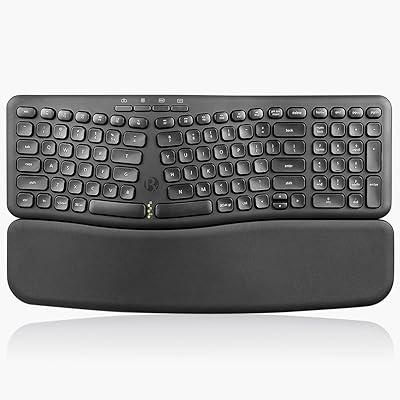
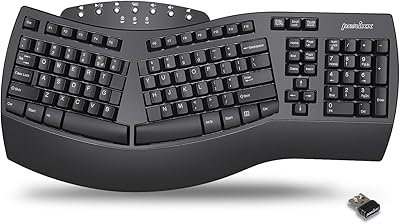
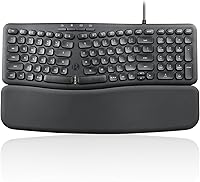
The Perixx PERIBOARD-536 Ergonomic Compact Wired Keyboard is a practical, budget-friendly pick for office workers and home users who want real comfort gains without a big outlay. It arrived in mid-2024 and has collected nearly 100 ratings — enough to form a fair picture of its reliability. The compact wave-split layout pulls off something most ergonomic boards sacrifice: it keeps the number pad intact while shrinking the desk footprint compared to a standard full-size keyboard. Connection is a wired USB-A affair — plug it in and you are typing, no pairing, no batteries. That said, realistic expectations matter here: membrane switches, ABS plastic, and gentle ergonomic shaping mean this is a comfort aid, not a clinical solution.
Features & Benefits

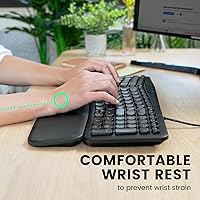
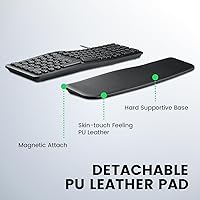
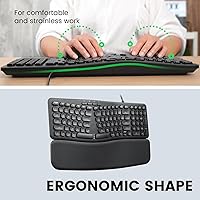
The detachable wrist rest is probably the first thing you notice. It snaps on magnetically and sits flush enough to feel deliberate rather than tacked on; after an hour of typing it does its job holding your wrists in a neutral position, though lighter users have reported it shifting during more dynamic sessions. The silent membrane switches are genuinely quieter than a typical office keyboard — not the pin-drop silence of a dedicated silent mechanical, but a meaningful step down in clatter. The low-profile round keycaps have a soft, short travel that feels accessible out of the box. Hotkeys cover both Mac and Windows functions, though key labeling skews toward Windows, so Mac users may need a short adjustment period.

Best For

This ergonomic compact keyboard hits a useful niche. It makes the most sense for open-plan office workers who need quieter typing but are not ready to invest in a mechanical setup. If you are starting to feel wrist or forearm fatigue and want to try an ergonomic layout before committing to a pricier true-split board, this is a low-risk entry point. It also suits anyone cramped for desk space who still relies on a number pad for data entry — a combination surprisingly few compact keyboards manage. Dual Mac and Windows support makes it practical for people who switch between machines. Just do not expect it to replace a proper ergonomic workstation setup if your symptoms are more serious.

User Feedback

Sitting at 3.7 out of 5 from roughly 97 ratings, the reception for the Perixx PERIBOARD-536 is honestly mixed — and that is worth taking seriously. On the positive side, buyers consistently praise the wrist rest comfort and the noticeable drop in typing noise compared to their previous keyboards. Plug-and-play setup also earns frequent mentions as a reliable strong point. The criticism centres on key feel: typists coming from mechanical switches often find the membrane action too soft or imprecise, and a handful of users mention the wrist rest losing its grip over time. A few reviews raise concerns about long-term durability — specifically keycap legends showing wear. No widespread cable failures have been reported, which at least suggests solid basic build quality.

Pros

  • Retains a full number pad within a compact footprint — a rare combination in ergonomic keyboard design.
  • The magnetic wrist rest attaches cleanly and provides genuine comfort during extended typing sessions.
  • Silent membrane switches are noticeably quieter than standard office keyboards without any special configuration.
  • Plug-and-play USB-A connection means zero setup friction — it simply works the moment you plug it in.
  • Wave-split layout reduces ulnar deviation without the steep learning curve of a true split keyboard.
  • Compatible with both Mac and Windows out of the box, with hotkey support for both operating systems.
  • At its price point, the inclusion of a detachable faux-leather wrist rest adds real perceived value.
  • Low-profile keycaps make the transition from a standard keyboard feel approachable rather than disorienting.
  • Compact dimensions free up meaningful desk space compared to a traditional full-size keyboard layout.

Cons

  • Key feel is soft and mushy — typists used to mechanical switches will likely find it unsatisfying.
  • The wrist rest can shift or lose grip during more vigorous typing, especially on smooth desk surfaces.
  • Ergonomic benefit is mild; it will not adequately address serious or chronic wrist conditions.
  • Key labeling leans toward Windows conventions, which creates a small but real adjustment period for Mac-only users.
  • Keycap legends on this wrist-rest keyboard have shown wear in some longer-term user reports, raising durability questions.
  • No wireless option at all — users who prefer a cable-free workspace will need to look elsewhere.
  • The ABS plastic construction feels functional rather than premium, which is noticeable when handling the board.
  • The 3.7-star aggregate rating signals a meaningful portion of buyers left disappointed, particularly around build longevity.
  • No USB-C connection means compatibility issues with modern laptops that lack a legacy USB-A port without an adapter.

Ratings

The scores below reflect AI-driven analysis of verified buyer reviews for the Perixx PERIBOARD-536 Ergonomic Compact Wired Keyboard, gathered from global sources with spam, bot-generated, and incentivized feedback actively filtered out. Each category is scored independently to give you an honest picture of where this wrist-rest keyboard genuinely delivers — and where it falls short. Both the praise and the frustrations are represented here, so you can make a well-informed call before buying.

Ergonomic Comfort
67%
33%
For users coming from a standard flat keyboard, the wave-split layout makes a real difference during long workdays — wrists sit at a more natural angle and forearm tension tends to ease after the first few days of adjustment. The gentle curve is approachable enough that most people adapt quickly without retraining their muscle memory.
Anyone dealing with more serious wrist issues or expecting clinical-grade relief is likely to be disappointed. The ergonomic angle is mild by design, and several users noted that the improvement plateaus quickly if their underlying posture or desk setup remains unchanged.
Typing Experience
58%
42%
The low-profile keys and rounded keycap shape make finger placement feel natural straight away, especially for users who have only ever used standard membrane boards. Casual typists and moderate-speed users generally report a comfortable, fatigue-reducing session when typing documents or emails throughout the day.
Fast or heavy typists consistently flag the membrane action as too soft and imprecise — the common description is mushy, with a bottom-out feel that lacks satisfying feedback. Anyone accustomed to mechanical switches, even budget ones, will likely find the key response underwhelming.
Noise Level
78%
22%
The reduction in typing noise compared to a typical office membrane keyboard is genuine and noticeable — colleagues in open-plan spaces have largely stopped noticing when users switch to this board. For conference calls and shared workspaces, it is a meaningful, practical upgrade without going mechanical.
It is not truly silent; at higher typing speeds, some clatter still carries through, and users on video calls in quiet rooms have occasionally been picked up on microphone. Expectations should be set at quieter-than-normal rather than near-silent.
Wrist Rest Quality
63%
37%
The faux-leather surface feels noticeably softer and more premium than plain foam or hard plastic alternatives in this price bracket. After an hour of continuous use, it provides decent cushioning without leaving pressure marks on the wrists, which is more than many budget boards manage.
The magnetic grip works well on textured or matte desk surfaces but has a tendency to slide on glass, glossy, or laminate desktops. A handful of users also raised concerns about the faux leather showing wear or peeling after several months of daily contact.
Build Quality
54%
46%
The overall chassis feels stable enough for everyday desk use, and the keyboard does not flex noticeably under normal typing pressure. The USB cable appears to hold up reasonably well based on early user feedback, with no widespread reports of fraying or connectivity drops.
The ABS plastic construction feels exactly what it is — budget-tier — and users who handle premium keyboards regularly will notice immediately. Keycap legend fading has been reported by a portion of longer-term users, suggesting the pad-printing does not hold up particularly well under sustained daily use.
Layout & Key Mapping
72%
28%
Having an integrated number pad in a compact ergonomic form factor is a genuine rarity, and users who rely on numeric data entry appreciate not having to choose between ergonomics and functionality. The overall key arrangement is logical and rarely requires any deliberate relearning for most users.
The key labeling skews Windows-first, which creates a minor but real friction point for Mac users who need to mentally remap certain shortcuts. A few symbols and function layer indicators are either absent from the keycaps or positioned in counterintuitive spots.
Mac Compatibility
69%
31%
The keyboard does work with Mac OS without any driver installation, and the hotkey layer includes media and system controls that function correctly. Users who primarily work on Windows but occasionally switch to a Mac find the transition manageable.
Mac-only users consistently note the labeling disconnect — key legends do not reflect Mac conventions, and locating the correct function shortcuts without memorizing them takes time. It is functional but clearly designed with Windows as the primary target.
Setup & Connectivity
86%
Plug-and-play reliability is one of the most consistently praised aspects of the Perixx PERIBOARD-536 across buyer feedback — connect the USB-A cable and it works immediately on any compatible machine without prompts, software, or configuration. This simplicity is genuinely appreciated by users who have been burned by Bluetooth pairing issues before.
The USB-A only connection is a limitation for users with modern laptops that have moved entirely to USB-C, requiring an additional adapter that is not included in the box. The fixed cable also means any cable damage requires replacing the whole unit.
Desk Footprint
81%
19%
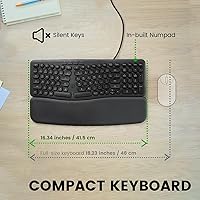
At just over 16 inches wide, the board genuinely frees up horizontal desk space compared to a standard full-size layout, which most users with cluttered setups immediately feel as a quality-of-life improvement. Mouse users especially appreciate the shorter reach distance after switching.
With the wrist rest attached, the total depth increases enough that very small desks may not gain as much space as expected. Users working on a tray table or extremely shallow surface may find the combined footprint still somewhat generous.
Value for Money
71%
29%
Relative to what ergonomic keyboards typically cost, this wrist-rest keyboard offers a reasonable feature set — wave-split layout, magnetic wrist rest, silent switches, and numpad — at a price point that removes most of the financial risk for first-time ergonomic buyers. For casual daily use it justifies the spend.
The build quality and key feel both reflect the budget positioning, and users who end up dissatisfied with the membrane action have essentially paid for a feature set they cannot fully use. If the typing experience is the priority, spending more for a better switch type would be the smarter move.
Hotkeys & Media Controls
74%
26%
The media keys work reliably across Windows and Mac for the basics — volume, playback, and brightness — without requiring any additional software. Regular users who keep them in reach report that they become a natural habit fairly quickly.
The hotkey selection is functional rather than customizable; there is no software suite to remap or expand the function layer. Power users who want granular control over their shortcut setup will find the fixed layout limiting.
Long-Term Durability
51%
49%
Short to medium-term reliability appears reasonable based on current feedback — the unit holds together without reported structural failures, and the USB connection has not been flagged as a common failure point within the first year of use.
Keycap legend wear and wrist rest surface degradation are recurring concerns among users who type heavily every day. The product has only been on the market since mid-2024, so multi-year durability data is still limited, which makes it difficult to rate this category with full confidence.
Adjustability & Customization
44%
56%
The detachable wrist rest gives users at least one meaningful configuration option, and the ability to remove it entirely makes the board usable in a wider range of setups or by users who prefer a different rest solution.
Beyond removing the wrist rest, there is essentially no adjustability on offer — no tilt legs, no tenting, no key remapping software, and no alternative switch options. Users looking to fine-tune the board to their exact ergonomic needs will hit a wall quickly.

Suitable for:

The Perixx PERIBOARD-536 Ergonomic Compact Wired Keyboard is a genuinely good fit for office workers and remote employees who spend long hours at a desk and are starting to notice wrist or forearm fatigue, but are not yet ready to drop serious money on a high-end ergonomic board. If you work in a shared or open-plan environment where keyboard noise is a real consideration, the quieter membrane switches make a noticeable difference without requiring any switch to mechanical hardware. This wrist-rest keyboard also suits people who do a lot of data entry and cannot give up a number pad — a combination that most compact ergonomic boards simply do not offer. It works well for anyone who alternates between Mac and Windows machines, since the dual-compatibility hotkey setup handles both without needing a separate keyboard. Budget-conscious buyers who want to try an ergonomic layout before committing to a premium split keyboard will find this a low-stakes, practical starting point.
Not suitable for:

The Perixx PERIBOARD-536 Ergonomic Compact Wired Keyboard is not the right tool for anyone dealing with diagnosed repetitive strain injury or chronic wrist pain who needs a clinically meaningful ergonomic intervention — the wave-split layout offers gentle relief, but it is far from the aggressive separation and tenting that serious RSI management demands. Typists who have grown accustomed to mechanical switches, whether linear, tactile, or clicky, will likely find the membrane action disappointingly soft and imprecise; the key feel here is squarely in budget-membrane territory. This ergonomic compact keyboard is also wired-only, so it will not suit anyone who prioritises a clean, cable-free desk setup or needs to connect to a tablet or device without a USB-A port. If you are a heavy touch typist who pushes through thousands of words a day professionally, the long-term durability of the keycap legends and the wrist rest grip may become frustrations before the keyboard earns its keep.
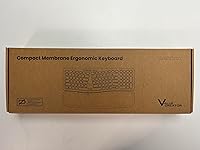
Specifications

  • Brand: Manufactured by Perixx, a brand focused on ergonomic peripheral accessories.
  • Model: PERIBOARD-536 US, first made available in June 2024.
  • Dimensions: The keyboard measures 16.34″ long by 5.71″ wide by 1.61″ tall, making it notably more compact than a standard full-size keyboard.
  • Weight: The unit weighs 1.9 lb, which is light enough to reposition easily on a desk without feeling flimsy.
  • Switch Type: Silent membrane switches are used across the full key layout, reducing actuation noise compared to standard membrane keyboards.
  • Key Profile: Low-profile round keycaps provide a shorter travel distance and a softer landing feel suited to all-day office use.
  • Layout: Compact ergonomic layout with an integrated number pad and a wave-split design that gently angles the key sections to reduce wrist strain.
  • Wrist Rest: A detachable faux-leather wrist rest attaches magnetically and can be removed when not needed.
  • Connection: Wired USB-A connection with no software or driver installation required for standard use on Windows or Mac.
  • OS Support: Compatible with both Windows and Mac OS, with dedicated hotkeys and media keys for each platform.
  • Special Features: Includes programmable hotkeys and media control keys for playback, volume, and system shortcuts.
  • Material: The keyboard body and keycaps are constructed from ABS plastic in a matte black finish.
  • Color: Available in black only as of the current product listing.
  • Power Source: Draws power directly from the host device via USB; no batteries or external power adapter are required.
  • Cable: A USB-A cable is included in the box and is integrated into the keyboard rather than detachable.

Related Reviews

Perixx PERIBOARD-512B Ergonomic Split Keyboard
75%
83%
Ergonomic Design
78%
Typing Comfort
74%
Key Feel & Feedback
79%
Build Quality
67%
Wrist Rest Quality
More
Perixx PERIBOARD-538 Wired Trackball Keyboard
74%
93%
Space Efficiency
78%
Typing Experience
62%
Trackball Usability
81%
Build Quality
83%
Keycap Durability
More
Perixx PERIBOARD-535 Ergonomic Split Mechanical Keyboard
76%
88%
Ergonomic Design
84%
Switch Feel
83%
Wrist Rest Comfort
79%
Build Quality
58%
Programmability
More
Perixx PERIBOARD-636B Ergonomic Wireless Keyboard
76%
78%
Ergonomic Comfort
61%
Typing Feel
88%
Noise Level
83%
Wireless Reliability
81%
Wrist Rest Quality
More
Perixx PERIBOARD-505H Wired Mini Keyboard with Trackball
86%
92%
Value for Money
87%
Trackball Performance
85%
Ease of Use
80%
Build Quality
91%
Compact Design
More
Perixx PERIBOARD-317R Wired Backlit Keyboard
78%
93%
Key Readability
74%
Backlighting Quality
61%
Typing Feel
68%
Build Quality
82%
Setup & Compatibility
More
Perixx PERIBOARD-517 Washable USB Keyboard
74%
88%
Washability & Water Resistance
74%
Build Quality
52%
Typing Feel
77%
Cable & Connectivity
83%
Keycap Durability
More
Perixx PERIBOARD-333RGB Wired Backlit USB Keyboard
85%
88%
Typing Comfort & Responsiveness
84%
RGB Backlighting Customization
79%
Build Quality & Durability
91%
Value for Money
83%
Multimedia Key Functionality
More
Perixx PERIBOARD-624B Wireless Ergonomic Split Keyboard
70%
81%
Ergonomic Design
88%
Wireless Freedom
54%
Key Feel & Typing Experience
86%
Setup & Ease of Use
61%
Build Quality & Materials
More
Perixx PERIBOARD-332
81%
83%
Typing Comfort
74%
Build Quality
69%
Backlighting Quality
91%
Compact Design & Portability
67%
Cross-Platform Compatibility
More

FAQ

No drivers needed. The Perixx PERIBOARD-536 Ergonomic Compact Wired Keyboard is plug-and-play on both Windows and Mac — just connect the USB-A cable and you are ready to type. The only exception is if you want to remap keys, which would require third-party software.
It is meaningfully quieter than a typical membrane keyboard — the kind you would find in a standard office desktop setup. That said, it is not silent in the way a dedicated silent mechanical switch is. Think of it as a considerate office keyboard rather than a whisper-quiet one; nearby coworkers should have no complaints during normal use.

The faux-leather surface feels softer and more pleasant than plain plastic wrist rests at this price range. After an extended typing session it does its job keeping your wrists in a more neutral position. Some users have reported it can shift slightly on slick desk surfaces, so pairing it with a desk mat may help it stay put.

Yes, the wrist rest detaches easily via the magnetic connection and the keyboard functions perfectly without it. If you already have a separate wrist rest you prefer, or simply want a smaller footprint, removing it is a matter of seconds.

It can provide mild relief for everyday fatigue caused by a standard flat keyboard layout, since the wave-split design reduces the inward angle your wrists typically hold during typing. However, it is not a medical device and should not be treated as a substitute for professional advice if you are managing a diagnosed condition like carpal tunnel syndrome. For serious RSI, a more aggressive ergonomic solution with tenting and wider key separation would be more appropriate.

The keyboard supports both operating systems and includes hotkeys for each, but the key labeling visually leans toward Windows conventions. Mac users will find that the function layer still works as expected once they get familiar with the layout; it just takes a short adjustment period since the legends do not always reflect Mac-specific symbols.

The keyboard connects via USB-A only, so you would need a USB-A to USB-C adapter. That adapter is not included in the box, but any standard adapter works fine since the keyboard requires no special drivers or high-speed data transfer.

At 16.34″ wide it is noticeably shorter from left to right than a standard full-size keyboard, which typically stretches past 17 or 18 inches. The depth is slimmer too. If you have been struggling with the distance your mouse sits from your keyboard, this compact layout should bring it noticeably closer.

Probably not ideal. The membrane switches have a soft, low-resistance feel that works well for casual to moderate typing, but fast or heavy typists often find membrane action too imprecise for sustained accuracy. If you are used to mechanical switches, the difference will be immediately noticeable and may feel like a downgrade.

A handful of longer-term users have flagged keycap legend fading after extended use, which is a known limitation of standard pad-printed ABS keycaps at this price tier. The keyboard is not marketed for heavy professional use, so this is worth keeping in mind if you type at high volume daily. No widespread reports of cable failure have surfaced, which at least points to reasonable basic build quality for the price.

Where to Buy