Overview

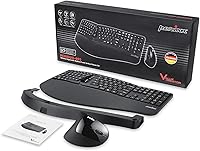
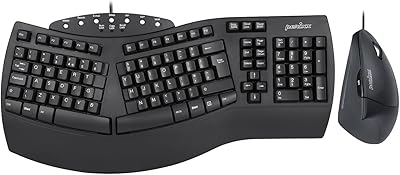
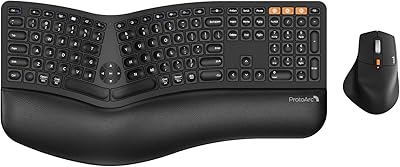
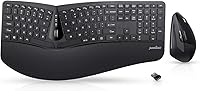
The Perixx Periduo-605 Wireless Ergonomic Keyboard Mouse Combo is a mid-range bundle designed for office workers who spend long hours at a desk and are beginning to feel the strain in their wrists or forearms. The package treats a one-piece split keyboard and vertical mouse as a unified ergonomic system, and both devices share a single USB nano receiver that stores neatly inside the keyboard itself. The box also includes a palm rest and magnetic height adjuster, which add genuine value without inflating the cost. This is a setup built for comfortable daily productivity, not gaming or heavy keyboarding. One practical note before you buy: it runs on four AAA batteries that are not included.
Features & Benefits

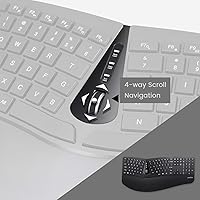
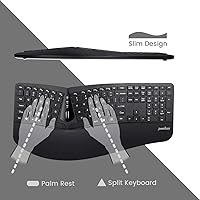
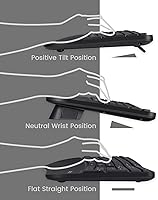
The split-key layout is the heart of this combo — by dividing the keys into two groups angled for each hand, it reduces the outward wrist rotation that causes discomfort during extended typing sessions. Most users adapt within a few days, which is a shorter adjustment period than you might expect. The vertical mouse shifts your grip into a handshake position, noticeably easing forearm tension compared to a standard flat mouse. You can toggle between three DPI settings — 1000, 1500, and 2000 — to match cursor sensitivity to your screen or task. The low-profile membrane keys stay quiet, a real plus in shared office spaces, and the adjustable palm rest lets you dial in the exact wrist angle that suits you.

Best For

This split keyboard and vertical mouse set is a strong fit for office workers or remote employees who are starting to notice wrist or forearm fatigue but have not yet explored fully split or mechanical keyboards. It functions as a complete ergonomic starter kit — keyboard, mouse, palm rest, and receiver all in one box. The single-receiver setup also appeals to anyone who values a clean, uncluttered desk. That said, power users chasing tactile feedback or programmable macro keys will want to look elsewhere. Compatibility is a real limitation too: this is Windows only — covering versions 7, 8, and 10 — so Mac and Linux users should factor that in before purchasing.

User Feedback

Across more than 3,000 ratings averaging 3.9 stars, the Periduo-605 earns genuine praise for wrist comfort, particularly from people who switched away from flat mice and noticed relief fairly quickly. The split layout also gets credit for being easier to adapt to than expected. On the flip side, the membrane key feel draws consistent complaints from typists accustomed to mechanical switches — the shallow, soft actuation simply does not satisfy that crowd. Mouse size is another recurring concern: it skews small, which bothers users with larger hands. A smaller number of buyers have reported occasional connectivity drops, though this does not appear to be widespread. The trade-offs are specific and predictable, which makes it easier to judge fit before committing.

Pros

  • The split keyboard layout reduces outward wrist bending without requiring two completely separate boards.
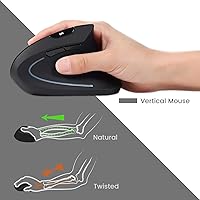
  • The vertical mouse shifts your hand into a natural handshake grip, easing forearm tension during long work sessions.
  • A single nano receiver handles both devices, cutting dongle clutter and freeing up USB ports.
  • The palm rest and magnetic height adjuster are included, letting you fine-tune wrist angle right out of the box.
  • Membrane keys stay quiet enough for open-plan offices or shared home workspaces.
  • Three adjustable DPI settings give you meaningful cursor control across different monitor sizes and tasks.
  • Plug-and-play setup requires no driver installation, so you are up and running in under a minute.
  • The 30-foot wireless range gives you genuine flexibility in how and where you position your setup.
  • With over 3,000 ratings and a ranking in the top 250 keyboard and mouse combos, real-world adoption backs up the value claim.
  • The 12-month limited warranty provides a reasonable safety net for a mid-range purchase.

Cons

  • Batteries are not included, which means you cannot use the combo the moment it arrives without a separate purchase.
  • The mouse runs small and may cause hand fatigue for users with larger palms during extended sessions.
  • Membrane key feel disappoints anyone transitioning from a mechanical keyboard — the actuation feels mushy rather than satisfying.
  • Compatibility is locked to Windows 7, 8, and 10, leaving Mac and Linux users without any supported option.
  • A subset of users has reported intermittent wireless connectivity drops, which can interrupt workflow at inconvenient moments.
  • Battery life is inconsistent according to real-world reports, meaning you may need to track power levels more carefully than expected.
  • There are no programmable keys or macro support, limiting usefulness for power users with complex workflows.
  • The keyboard footprint is wide at over 18 inches, which may crowd smaller desks despite the wireless setup.

Ratings

The scores below reflect an AI-driven analysis of verified global user reviews for the Perixx Periduo-605 Wireless Ergonomic Keyboard Mouse Combo, with spam, bot activity, and incentivized feedback actively filtered out to ensure the results represent genuine buyer experiences. Ratings are drawn from thousands of real-world users across a wide range of work environments and typing habits. Both the standout strengths and the recurring frustrations are represented transparently, so you can make a confident, informed decision.

Ergonomic Comfort
83%
Most users who switched to this combo reported a meaningful reduction in wrist and forearm discomfort within the first week of daily use. The combination of the angled split keyboard and the vertical mouse grip addresses two common sources of strain simultaneously, which sets it apart from single-device ergonomic upgrades.
A few users with more severe pre-existing discomfort found the comfort gains modest rather than transformative, particularly if they were already using a wrist rest elsewhere. The ergonomic benefit also depends heavily on spending time adjusting the palm rest height, which not everyone bothers to do.
Keyboard Feel & Typing
61%
39%
For light productivity typing in an open office, the low-profile membrane keys do the job without generating noise or fatigue during moderate-length sessions. Users coming from a standard flat keyboard tend to be satisfied, especially appreciating the quiet actuation in shared workspaces.
Anyone arriving from a mechanical keyboard will almost certainly find the key feel disappointing — the actuation is soft, slightly mushy, and lacks the tactile definition that experienced typists rely on for accuracy and rhythm. This is probably the most consistently cited frustration across the entire review base.
Mouse Comfort & Design
79%
21%
The vertical mouse drew consistent praise from users who had previously struggled with forearm fatigue using flat mice — many described the handshake grip as something they wished they had tried years earlier. The 5-button layout covers everyday navigation needs without overcomplicating the design.
The mouse runs on the smaller side, and users with larger hands specifically mentioned that the grip feels cramped during long sessions, which ironically undermines the ergonomic case for them. This is not a dealbreaker for average-sized hands, but it is a real limitation worth verifying before purchase.
Wireless Reliability
69%
31%
The vast majority of users reported stable, consistent wireless performance throughout a standard workday, with the 30-foot range proving more than adequate for typical desk setups and even some living room or conference room configurations. The single nano receiver pairing both devices cleanly is a genuine convenience.
A recurring minority of users reported intermittent disconnections, particularly in environments with dense wireless interference from other devices. While this was not widespread enough to define the experience, it happened often enough across reviews to be a credible concern rather than isolated bad luck.
Value for Money
76%
24%
For a bundle that delivers a split keyboard, vertical mouse, palm rest, and height adjuster in one package, most buyers felt the price point was fair relative to what individual ergonomic accessories would cost separately. The included accessories in particular pushed the perceived value higher than the hardware alone would justify.
Users who were expecting premium build quality or mechanical-grade typing performance relative to the price came away underwhelmed. The plastic construction and membrane keys signal a budget-tier product despite the ergonomic positioning, and some felt the combo aged faster than expected with heavy daily use.
Setup & Ease of Use
91%
Plug-and-play installation is genuinely effortless — users across all technical skill levels reported having both devices working within seconds of inserting the receiver. No driver downloads, no software configuration, and no pairing steps make this one of the least friction-heavy peripheral setups available.
The only setup hiccup users mentioned was the absence of batteries, which caught a surprising number of buyers off guard and delayed first use. The manual is functional but minimal, which could leave beginners uncertain about how to adjust the palm rest height properly.
Split Keyboard Adjustment Curve
74%
26%
Most users found the transition to the split layout faster than they anticipated — typically three to five days of regular typing before muscle memory caught up. The one-piece design means there is no gap to navigate physically, which smooths the learning process compared to fully separated boards.
The first day or two of use can noticeably slow typing speed and accuracy, which creates a practical problem for anyone who cannot afford a productivity dip at work. Touch typists who rely on crossing the midline with either hand may take longer to fully adjust than the average user.
DPI & Mouse Performance
72%
28%
Having three DPI settings accessible via a dedicated button gives everyday users a practical way to calibrate cursor sensitivity for different tasks — lower for precise document work, higher for multi-monitor navigation. No software is needed to cycle through them, which keeps things simple.
The DPI range tops out at 2000, which is entirely adequate for productivity but underwhelming for anyone who occasionally dabbles in faster-paced tasks. Cursor tracking accuracy was described as acceptable rather than precise, with a handful of users noting occasional sluggishness on non-standard desk surfaces.
Build Quality & Durability
63%
37%
The keyboard and mouse feel solid enough for standard office use, and most users who treated the set as a daily work tool reported no structural issues within the warranty period. The matte black finish resists fingerprints reasonably well for a plastic surface.
The all-plastic construction makes it feel less premium than the ergonomic positioning implies, and some longer-term users reported key legends fading and the palm rest losing structural firmness after six to twelve months of heavy use. It feels like a product designed for a two-to-three year lifespan, not indefinite daily use.
Battery Life
58%
42%
Under light to moderate daily use, most users reported battery life that lasted several weeks before needing replacement, which is acceptable for a wireless combo in this class. Having a separate battery compartment for the mouse also means you can swap one device independently without disrupting the other.
Battery life was notably inconsistent across the user base — some reported month-long endurance while others replaced batteries within two weeks under similar use conditions. There is no battery level indicator on either device, so users have no warning before a sudden power loss mid-workday.
Desk Footprint & Portability
66%
34%
The wireless setup eliminates cable clutter entirely, and the receiver storing inside the keyboard makes the combo reasonably portable for users who move between desks or pack up at the end of the workday. The relatively low weight keeps transport practical.
At over 18 inches wide, the keyboard occupies a substantial amount of horizontal desk space, which can crowd smaller workstations or dual-monitor setups. Users who hoped the compact wireless design would translate to a physically smaller footprint were sometimes surprised by the actual dimensions.
OS & Platform Compatibility
44%
56%
Within its supported Windows environment, the plug-and-play compatibility across Windows 7, 8, and 10 is reliable and well-tested, with no driver conflicts reported under normal conditions. For the core Windows office user this combo was designed for, compatibility is a non-issue.
The hard Windows-only limitation is a meaningful restriction in 2024, when many home and hybrid workers use Macs or Linux machines. Mac users who attempted to use the combo reported partial functionality at best, and Perixx provides no official support pathway for non-Windows platforms.
Noise Level
84%
The membrane key actuation keeps the keyboard genuinely quiet during normal typing, which users in open-plan offices and home environments with other people present specifically appreciated. The mouse clicks are also unobtrusive, contributing to an overall low-noise profile.
While the keys are quiet compared to most mechanical switches, a small number of users felt the bottom-out sound was still noticeable enough in very quiet environments like libraries or late-night home offices. Noise level is relative, and very noise-sensitive users may still find the actuation audible.
Included Accessories
81%
19%
Including the palm rest and magnetic height adjuster in the box is a genuine differentiator — comparable ergonomic accessories often cost extra and require separate research. Users appreciated being able to set up a fully adjusted ergonomic workstation immediately without additional purchases.
The palm rest material, while functional, was described by some users as hard and slightly uncomfortable without an additional fabric covering after extended use. The magnetic height adjustment mechanism is clever but feels delicate, and a few users reported the magnet piece detaching unexpectedly during normal use.

Suitable for:

The Perixx Periduo-605 Wireless Ergonomic Keyboard Mouse Combo is a practical choice for office workers and remote employees who spend the majority of their workday typing and are starting to notice discomfort in their wrists, forearms, or shoulders. If you have never used an ergonomic peripheral before, this set offers a low-friction entry point — everything you need arrives in one box, including the palm rest and magnetic height adjuster, so there is no need to source accessories separately. The split keyboard layout has a short learning curve that most users clear within a few days, making it realistic for people who cannot afford a steep productivity dip during the transition. It also suits anyone who values a tidy workspace, since a single nano receiver handles both devices without occupying extra USB ports. Windows users on shared or open-plan desks will particularly appreciate the quiet membrane keys and the 30-foot wireless range.
Not suitable for:

The Perixx Periduo-605 Wireless Ergonomic Keyboard Mouse Combo is not a strong fit for people who are accustomed to mechanical keyboards — the membrane keys feel noticeably soft and shallow by comparison, and that tactile difference tends to frustrate experienced typists rather than fade into the background over time. Mac and Linux users should skip this entirely, as the combo officially supports only Windows 7, 8, and 10, with no driver support for other operating systems. Anyone with larger hands may find the vertical mouse uncomfortably small during extended sessions, which somewhat undermines the ergonomic premise. Gamers or power users who rely on programmable macro keys, rapid key rollover, or low-latency input will find this set underpowered for their needs. Finally, buyers who expect batteries in the box will be caught off guard — four AAA cells are required but not included.
Specifications

  • Keyboard Type: One-piece split membrane keyboard with low-profile keys arranged in two angled groups for left and right hand use.
  • Mouse Type: Wireless vertical ergonomic mouse with 5 buttons designed to hold the hand in a natural upright handshake position.
  • DPI Settings: The mouse offers three selectable sensitivity levels: 1000, 1500, and 2000 DPI.
  • Wireless Receiver: A single 2-in-1 USB nano receiver connects both the keyboard and mouse simultaneously and stores inside the keyboard when not in use.
  • Operating Range: Both devices maintain a stable wireless connection up to 30 feet from the receiver under typical indoor conditions.
  • Power Source: The combo requires 4 x AAA batteries in total to operate; batteries are not included in the package.
  • Compatibility: Officially supported on Windows 7, 8, and 10 only; Mac and Linux operating systems are not supported.
  • Connectivity: USB plug-and-play connection requires no driver installation — simply insert the nano receiver and the devices are ready to use.
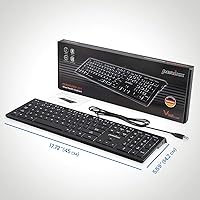
  • Dimensions: The full keyboard unit measures 18.23 x 8.94 x 2.6 inches, making it a wide but relatively flat desktop footprint.
  • Weight: The combined package weighs approximately 1.94 pounds, keeping the setup lightweight and easy to reposition.
  • Layout: The keyboard uses a standard US English key layout with full alphanumeric and function key coverage.
  • Palm Rest: An adjustable palm rest is included along with a movable magnetic piece that allows users to alter the wrist support height.
  • Package Contents: The box includes the split keyboard, vertical mouse, palm rest, magnetic height adjuster, and a printed manual.
  • Warranty: Perixx covers this combo with a 12-month limited warranty against manufacturing defects.
  • Color: Available in black only, with a matte finish across both the keyboard and mouse surfaces.
  • Key Actuation: Keys use membrane actuation with a low-profile design, producing minimal noise during normal typing.

Related Reviews

Perixx PERIDUO-713 Wireless Keyboard and Mouse Combo
87%
88%
Typing Comfort
81%
Build Quality
93%
Wireless Connectivity
72%
Battery Life
95%
Portability
More
Perixx PERIDUO-512B US Ergonomic Keyboard and Vertical Mouse Combo
83%
88%
Ergonomic Comfort
83%
Build Quality
90%
Ease of Setup
65%
Mouse Learning Curve
84%
Keypad Comfort
More
Perixx PERIDUO-606A Wireless Ergonomic Keyboard Mouse Set
71%
78%
Ergonomic Design
54%
Keyboard Feel
76%
Vertical Mouse Comfort
82%
Wireless Reliability
91%
Setup & Ease of Use
More
PEIOUS Wireless Ergonomic Keyboard and Mouse Combo
74%
78%
Ergonomic Comfort
74%
Typing Feel & Key Response
69%
Mouse Ergonomics
83%
Wireless Reliability
61%
Build Quality & Durability
More
GAMCATZ Ergonomic Wireless Keyboard and Mouse Combo
77%
83%
Value for Money
72%
Typing Feel
74%
Mouse Performance
87%
Wireless Reliability
68%
Wrist Comfort
More
JOYACCESS Ergonomic Wireless Keyboard and Mouse Combo
77%
88%
Value for Money
91%
Design & Aesthetics
76%
Typing Comfort
58%
Typing Feel & Key Response
74%
Mouse Performance
More
Lomiluskr Wireless Ergonomic Keyboard and Mouse Combo
70%
79%
Ergonomic Design
76%
Wrist Rest Quality
63%
Wireless Reliability
58%
Mouse Comfort & Fit
81%
Value for Money
More
Nulea KM75
Nulea KM75
76%
83%
Ergonomic Comfort
79%
Memory Foam Palm Rest
76%
Keyboard Typing Feel
72%
Mouse Ergonomics
74%
Multi-Device Switching
More
E-YOOSO Ergonomic Wireless Keyboard and Mouse Combo
84%
88%
Ergonomic Comfort
91%
Wireless Connectivity
94%
Ease of Setup
82%
Design and Build Quality
85%
Mouse Performance
More
ProtoArc EKM01 Plus Ergonomic Keyboard Mouse Combo
74%
88%
Ergonomic Comfort
74%
Typing Experience
91%
Multi-Device Connectivity
83%
Mouse Comfort & Design
77%
Build Quality
More

FAQ

No, the Perixx Periduo-605 Wireless Ergonomic Keyboard Mouse Combo is fully plug-and-play. Just insert the nano receiver into a USB port on your Windows PC and both devices will be recognized automatically — no driver downloads needed.
Yes, a single 2-in-1 nano receiver handles both devices at the same time. It stores inside the keyboard when you are not using it, which is handy if you travel with the set or just want to keep things tidy.

They are not. The combo requires 4 AAA batteries in total, and you will need to supply those yourself before first use. It is worth grabbing a pack alongside your order so you are not stuck waiting.

Unfortunately not. This ergonomic combo officially supports Windows 7, 8, and 10 only. Mac and Linux users would need to look at a different product, as there is no driver or compatibility support provided for those operating systems.

Most users adapt within three to five days of regular use. The first day or two can feel a little slow as your fingers relearn key positions, but the layout is not dramatically different from a standard keyboard — it simply angles each half outward. Sticking with it through the initial adjustment period is worth it for the added comfort.

This is worth thinking about carefully. Several users with larger hands have found the mouse a bit small, which can cause the grip to feel cramped over long sessions. If your hand is on the larger side, it may be worth checking the mouse dimensions against your hand span before committing.

Yes, the low-profile membrane keys are noticeably quieter than most standard keyboards and should be comfortable to use in a shared or open-plan space. They do not have the sharp click of mechanical switches, so the sound profile is soft and unobtrusive.

Yes, the mouse has a dedicated DPI button that cycles through three sensitivity levels: 1000, 1500, and 2000. You just press the button to switch between them — no software required. This is useful if you are working across multiple monitors or switching between detail work and general browsing.

Probably not, if tactile feedback is important to you. The membrane keys on this split keyboard feel noticeably softer and less defined compared to mechanical switches. Many reviewers who made the switch from mechanicals specifically cite this as a disappointment. If you are willing to trade some typing feel for ergonomic positioning, you can adapt — but go in with realistic expectations.

A small number of users have mentioned occasional wireless dropouts, though this is not a dominant complaint across the broader review base. Interference from other wireless devices nearby can sometimes be a factor. If you do experience drops, trying a different USB port or moving the receiver to a less congested spot on your desk usually helps.

Where to Buy