Perixx Periboard-612B Wireless Ergonomic Split Keyboard
Perixx Periboard-612B Wireless Ergonomic Split Keyboard — image 1
Perixx Periboard-612B Wireless Ergonomic Split Keyboard — image 2
Perixx Periboard-612B Wireless Ergonomic Split Keyboard — image 3

Perixx Periboard-612B Wireless Ergonomic Split Keyboard — image 4
Perixx Periboard-612B Wireless Ergonomic Split Keyboard — image 5
Perixx Periboard-612B Wireless Ergonomic Split Keyboard — image 6
Perixx Periboard-612B Wireless Ergonomic Split Keyboard — image 7
Perixx Periboard-612B Wireless Ergonomic Split Keyboard — image 8
Perixx Periboard-612B Wireless Ergonomic Split Keyboard — image 9
72%
28%

Overview

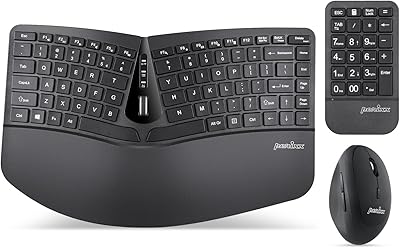
The Perixx Periboard-612B Wireless Ergonomic Split Keyboard has been quietly holding its ground in the ergonomic typing space since mid-2019 — a solid run in a category where products come and go quickly. It targets people who spend long hours at a keyboard and are starting to feel the strain: tight forearms, aching wrists, the early warning signs that something needs to change. The split-key layout and dual wireless connectivity are its two headline features, and together they make a compelling case at this price point. This isn't a premium boutique board, but it doesn't pretend to be one either.

Features & Benefits

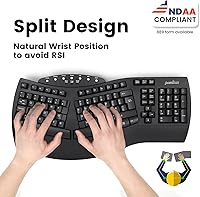
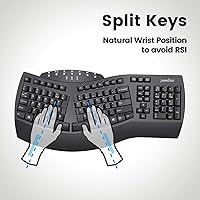
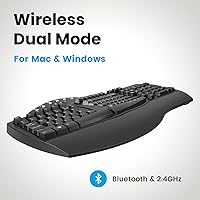
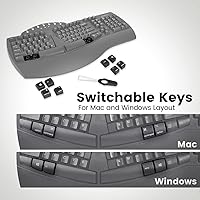
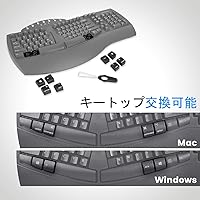
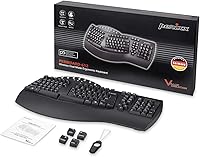
The split ergonomic layout is the core of what this wireless ergonomic board offers. By separating the key clusters and angling them outward, it lets your hands settle into a more natural position — reducing the inward rotation that stresses wrists and forearms over time. The integrated palm rest handles wrist support without needing a separate pad. For connectivity, you get both a 2.4GHz nano receiver — which tucks into an underside compartment — and Bluetooth, handy for switching between devices or keeping the desk clean. The membrane keys have a 3.8mm travel that's quiet and soft; not the crisp snap of mechanical switches, but comfortable for long sessions. Mac and Windows users both get dedicated key support, with swappable keycaps and a key puller included. The single-color backlight is minimal — don't expect anything dramatic.

Best For

This split ergonomic keyboard makes the most sense for people who type heavily throughout the workday and are starting to notice discomfort — not those in acute pain seeking medical-grade relief, but early-stage sufferers who want to make a sensible change before things worsen. It works equally well on Mac and Windows, which makes it genuinely useful for people who move between operating systems. If you've been eyeing pricier options like the Logitech MX Keys or Microsoft Sculpt but aren't ready to commit at that price, the Periboard-612B offers a reasonable middle ground. That said, mechanical keyboard fans and anyone who needs RGB lighting or programmable macros will want to look elsewhere. The same goes for gamers — this board was built for sustained office typing, not quick-action use.

User Feedback

With over 12,000 ratings and a 4.3-star average, the Periboard-612B has clearly resonated with a wide audience. The most consistent praise centers on genuine comfort improvement — people who switched after months of wrist pain report real relief, which is a meaningful signal when you filter through that volume of reviews. Setup gets high marks too; both wireless modes connect quickly without driver headaches. On the flip side, the split layout adjustment is a recurring friction point. Expect a week or two of slower, more deliberate typing while your hands relearn their positions. Some users also found the membrane feel underwhelming after coming from mechanical boards, and a handful noted battery drain moving faster than expected. Long-term owners, though, tend to stick around — durability complaints are relatively rare in the broader review pool.

Pros

  • The split key layout meaningfully reduces wrist and forearm tension during long typing sessions.
  • Dual wireless modes — 2.4GHz and Bluetooth — give real flexibility for multi-device or clutter-free setups.
  • The integrated palm rest removes the need to buy a separate wrist support accessory.
  • Cross-platform compatibility with both macOS and Windows is well-executed, with keycaps and a puller included.
  • The nano receiver tucks into an onboard compartment, so it won't get lost between uses.
  • Membrane keys are quiet enough for shared office spaces or open-plan environments.
  • Over 12,000 ratings with a 4.3-star average points to broad, sustained satisfaction across a large buyer pool.
  • Setup is consistently described as quick and hassle-free, with no driver installation headaches.
  • Positioned well below premium ergonomic competitors while still delivering legitimate ergonomic design.

Cons

  • The split layout requires a real adjustment period — expect slower, error-prone typing for the first week or two.
  • Membrane keys lack the tactile feedback that mechanical keyboard users will likely miss.
  • Runs on AA batteries, which means periodic replacement rather than a simple USB recharge.
  • Battery drain has been flagged by some long-term users as faster than expected.
  • The backlight is single-color and dim — purely functional, with no brightness control or customization.
  • At nearly 2.2 pounds and over 19 inches wide, it is not a compact or portable option.
  • No programmable keys, macros, or software customization of any kind.
  • Bluetooth connectivity, while convenient, has occasional pairing reliability complaints in multi-device use cases.
  • The key travel distance of 3.8mm feels shallow to users accustomed to high-travel or clicky switches.

Ratings

The scores below for the Perixx Periboard-612B Wireless Ergonomic Split Keyboard were generated by our AI system after analyzing thousands of verified global purchases, actively filtering out incentivized, duplicate, and bot-flagged submissions to surface genuine buyer sentiment. We weighed both enthusiastic praise and recurring frustrations equally — nothing has been smoothed over or inflated. What you see reflects the real-world experience of long-term owners, first-time ergonomic keyboard converts, and critical power users alike.

Ergonomic Design
88%
The split-key layout consistently earns praise from users who switched after months of wrist or forearm discomfort, with many reporting noticeable relief within the first few weeks of daily use. The integrated palm rest removes the need for a separate wrist pad, which office workers especially appreciate for keeping their desk setup clean and simple.
The fixed, flat palm rest angle works well for most, but users with larger hands or those who prefer a tented keyboard position find the ergonomic benefit somewhat limited. There is no wrist height adjustment, which can be a real drawback for people with specific physiotherapy-guided posture requirements.
Wireless Connectivity
81%
19%
Having both 2.4GHz and Bluetooth in one board is a practical advantage that multi-device users genuinely value — the ability to pair to a laptop via Bluetooth while keeping the nano receiver in a desktop is a workflow improvement that shows up repeatedly in long-term user feedback. The receiver compartment built into the underside is a small but thoughtful touch that prevents the common frustration of a lost dongle.
Bluetooth connectivity, while convenient, draws occasional complaints about pairing stability — some users report needing to re-pair after sleep or switching between devices, which disrupts workflow. A handful of long-term owners also noted that the 2.4GHz signal can experience minor interference in environments with many competing wireless devices.
Typing Comfort
79%
21%
For users coming from a standard flat keyboard, the Periboard-612B delivers a genuinely more comfortable extended typing experience — the natural hand angle reduces the forearm tension that accumulates over a long workday. The membrane keys are quiet enough that office neighbors rarely complain, which matters a lot in open-plan or shared home office setups.
Users who migrated from mechanical keyboards often find the membrane action underwhelming and slightly mushy, especially during fast or heavy typing bursts. The 3.8mm travel, while adequate, does not satisfy those who rely on tactile confirmation to reduce errors at speed.
Learning Curve
62%
38%
Most users who stuck through the adjustment period report that the layout becomes intuitive within two to three weeks of consistent use. Those who committed to the transition tend to look back positively, often saying they could not imagine returning to a standard keyboard after adapting.
The split layout is a genuine relearning experience — especially for keys like B, T, and Y that sit near the center split — and most buyers underestimate this upfront. Typing speeds drop noticeably for the first one to two weeks, which is a real productivity cost for professionals who cannot afford to slow down during a busy period.
Build Quality
74%
26%
The keyboard feels solid and planted on a desk — at 2.2 pounds it does not shift during use, and the keycaps show minimal wear even after extended daily sessions according to longer-term owners. For a board in this price bracket, the physical construction holds up better than many buyers expected.
The plastic housing is functional rather than premium — it does not feel cheap, but it also does not inspire the confidence of higher-end boards. A small number of users reported keycap wobble developing after several months, and the matte finish shows fingerprints more than the product photography suggests.
Key Feel & Feedback
67%
33%
For users who have always typed on membrane keyboards, the feel here is familiar and comfortable — soft actuation, consistent resistance, and no fatigue-inducing stiffness during marathon typing sessions. The quietness of the keys is a genuine practical advantage for recording environments or late-night use near others.
Mechanical keyboard users frequently cite this as the board's weakest point — the absence of tactile bump or audible click makes fast typing feel imprecise, and error rates tend to rise during the transition period. It is an honest limitation: membrane is a design choice here, not a shortcoming that an update could fix.
Battery Life
61%
39%
Running on two standard AA batteries means you can swap in fresh cells anywhere without hunting for a charging cable or waiting for a recharge cycle — a convenience that road warriors and minimalist setups appreciate. Quality alkaline batteries typically power the board through several weeks of daily office use.
Battery drain is faster than many buyers anticipate, particularly with the backlight active — some users report needing replacement within three to four weeks under heavy use. The lack of a rechargeable internal battery feels like a dated design decision compared to most wireless peripherals at this price tier.
Cross-Platform Support
84%
The dual OS support is one of the more polished aspects of this split ergonomic keyboard — the dedicated function keys work correctly on both Windows and macOS out of the box, and the included swappable keycaps are a practical inclusion that competitors at this price often skip. Users who work between a Mac and a Windows machine in the same day find this genuinely useful.
Compatibility with newer macOS releases is not officially documented beyond macOS X, and while most users report it working fine, those running bleeding-edge OS versions occasionally encounter minor function key mapping quirks that require manual workarounds. Official firmware or software support from Perixx is minimal.
Setup & Ease of Use
86%
Out of the box, the keyboard connects in minutes via both wireless modes with no driver installation required — a consistent point of praise among users who expected the ergonomic feature set to come with setup complexity. The onboard OS toggle switch is intuitive, and the receiver compartment means everything ships and stores as a self-contained unit.
The bottom-mounted connectivity toggle is practical but not elegant — users have to flip the board to switch modes, which feels slightly clunky compared to dedicated mode buttons on competing wireless keyboards. First-time Bluetooth pairing is also less immediately obvious than the nano receiver setup.
Value for Money
83%
Positioned well below flagship ergonomic keyboards from brands like Logitech and Microsoft, this wireless ergonomic board delivers a legitimate split ergonomic layout with dual wireless connectivity at a price that makes the entry point genuinely accessible. Buyers who tried pricier options first frequently cite this as delivering comparable ergonomic benefit at a fraction of the cost.
The value proposition holds up well against premium competitors, but a few buyers felt the membrane key quality and battery design did not quite justify the price compared to some wired ergonomic options that undercut it significantly. Value perception also drops slightly for users who expected a more refined out-of-box typing experience.
Backlighting
53%
47%
The single-color backlight does what it is meant to do — it makes the keys visible in dim environments without distracting glow or harsh brightness. For low-light home office use, it is a functional inclusion that costs nothing extra.
There is no brightness control, no color selection, and no dynamic lighting modes — users expecting anything beyond basic illumination will be disappointed. In a market where even budget keyboards offer adjustable RGB, the backlight here feels like an afterthought rather than a feature, and several buyers mentioned it as a notable gap.
Desk Footprint
69%
31%
The wide split layout is intentional and the keyboard's footprint is justified by its ergonomic purpose — users who made peace with it report that it fits naturally into a standard desk arrangement. The flat profile keeps it unobtrusive visually even at its full width.
At over 19 inches wide, this is not a small keyboard — users with compact desks or multi-monitor setups that crowd the workspace frequently find its size limiting. There is no option to detach or narrow the split halves, so the full footprint is non-negotiable regardless of how you prefer to type.
Durability
76%
24%
Long-term owners — those who have used the board daily for a year or more — mostly report stable performance with no major key failures or connectivity degradation over time. For a mid-range peripheral, that kind of feedback from a large and aged review pool is a meaningful indicator of decent construction.
Occasional reports of keycap legends fading after heavy use suggest the printing may not be the most wear-resistant, and a minority of users experienced connectivity issues after extended ownership that pointed to receiver or Bluetooth module degradation. Perixx's warranty and after-sale support responsiveness receives mixed reviews.
Portability
44%
56%
The wireless design at least removes cable dependency, which makes occasional relocation between rooms or desk setups relatively straightforward. AA batteries also mean there are no charging constraints when moving the board to a different location.
At 2.2 pounds and nearly 20 inches wide, this is firmly a stationary desk peripheral — carrying it in a bag to a coffee shop or co-working space is impractical for most people. There is no travel case included, and the size makes it unwieldy compared to compact or tenkeyless alternatives.

Suitable for:

The Perixx Periboard-612B Wireless Ergonomic Split Keyboard is a strong fit for office workers and remote professionals who spend five or more hours a day at a keyboard and are beginning to feel the physical cost of that — stiff forearms, tender wrists, or the early creep of repetitive strain. The split layout encourages a more natural hand position that takes pressure off the wrists and reduces the inward forearm rotation that standard keyboards force on you all day. People who work across both Mac and Windows will also find this board genuinely useful, since it handles both operating systems natively with swappable keycaps included. If you've been considering a proper ergonomic keyboard but blanch at what the top-tier brands charge, this board sits in a practical middle ground that delivers real ergonomic benefit without the premium price tag. Minimalists and clean-desk advocates will appreciate that the nano receiver stores inside the keyboard itself, and Bluetooth keeps cables and dongles out of the picture entirely.

Not suitable for:

The Perixx Periboard-612B Wireless Ergonomic Split Keyboard is likely to disappoint anyone who is particular about key feel — if you've been using a mechanical keyboard, the membrane switches here will feel noticeably softer and less crisp, and that adjustment can be frustrating rather than freeing. The split layout also demands patience; most users report a genuine relearning period of one to two weeks, so if you need to type at full speed from day one, this board will slow you down before it speeds you back up. Gamers should look elsewhere entirely — the membrane action, layout, and lack of programmable macros make it poorly suited to fast-response or hotkey-heavy use. Anyone expecting RGB lighting or aesthetic customization will be let down by the single-color, low-key backlight. And if you prefer a rechargeable device over one that needs AA batteries swapped out periodically, that's another practical friction point worth considering before buying.

Specifications

  • Dimensions: The keyboard measures 19.09″ long by 9.29″ wide by 1.73″ tall, making it a full-size ergonomic board that requires a reasonably deep desk surface.
  • Weight: At 2.2 pounds, this is a sturdy, desk-bound keyboard not intended for portability or travel use.
  • Key Type: Membrane keys are used throughout, offering quiet actuation suited to shared office environments.
  • Key Travel: Each key registers at 3.8mm of travel distance, providing a soft, cushioned press without mechanical click feedback.
  • Wireless Modes: The keyboard supports both 2.4GHz RF via a nano USB receiver and Bluetooth, with a manual toggle switch on the underside to alternate between the two.
  • Receiver Storage: The nano USB receiver slots into a dedicated compartment on the bottom of the keyboard, keeping it secure and preventing loss when not in use.
  • OS Compatibility: Natively supports Windows 10 and macOS, with dedicated function keys and four swappable keycaps to match each operating system layout.
  • Palm Rest: An integrated, non-detachable palm rest runs the full width of the keyboard base to support wrist positioning during extended typing.
  • Backlighting: Single-color backlighting is included; it is fixed in color with no brightness adjustment or RGB customization options.
  • Power Source: Two AA batteries power the keyboard, with no rechargeable battery or USB charging option available.
  • Voltage: The keyboard operates at 4.25 volts DC supplied by the two standard AA batteries.
  • Color: Available in black only, with a matte finish across the keyboard body and integrated palm rest.
  • Layout: US English QWERTY layout with a split-key ergonomic arrangement that angles both halves outward to promote a neutral wrist and forearm position.
  • Included Extras: The box includes the keyboard, nano USB receiver, four OS-specific swappable keycaps, a key puller tool, and documentation.
  • Compatible Devices: Designed for use with laptops and desktop PCs running supported operating systems; not designed for tablets, smartphones, or gaming consoles.
  • Release Date: The keyboard was first made available in June 2019 and has maintained continuous availability since then.
  • Brand Series: Manufactured by Perixx under the PERIBOARD product line, model designation PERIBOARD-612BUS.
  • BSR Ranking: Holds a Best Sellers Rank of #23 in Computer Keyboards on Amazon at time of publication, reflecting sustained commercial demand.

Related Reviews
Perixx PERIBOARD-624B Wireless Ergonomic Split Keyboard
70%
81%
Ergonomic Design
88%
Wireless Freedom
54%
Key Feel & Typing Experience
86%
Setup & Ease of Use
61%
Build Quality & Materials
More
Perixx PERIBOARD-835 Wireless Ergonomic Mechanical Keyboard
69%
74%
Ergonomic Comfort
81%
Typing Experience
46%
Noise Level
83%
Multi-Device Connectivity
52%
Companion Software
More
Perixx PERIBOARD-636B Ergonomic Wireless Keyboard
76%
78%
Ergonomic Comfort
61%
Typing Feel
88%
Noise Level
83%
Wireless Reliability
81%
Wrist Rest Quality
More
Perixx PERIBOARD-535 Ergonomic Split Mechanical Keyboard
76%
88%
Ergonomic Design
84%
Switch Feel
83%
Wrist Rest Comfort
79%
Build Quality
58%
Programmability
More
Perixx Periduo-605 Wireless Ergonomic Keyboard Mouse Combo
72%
83%
Ergonomic Comfort
61%
Keyboard Feel & Typing
79%
Mouse Comfort & Design
69%
Wireless Reliability
76%
Value for Money
More
Perixx PERIBOARD-512B Ergonomic Split Keyboard
75%
83%
Ergonomic Design
78%
Typing Comfort
74%
Key Feel & Feedback
79%
Build Quality
67%
Wrist Rest Quality
More
DeLUX GM901D Ergonomic Wireless Keyboard
76%
83%
Ergonomic Design
76%
Palm Rest Comfort
81%
Wireless Connectivity
67%
Typing Feel
72%
Build Quality
More
NocFree Wireless Ergonomic Split Mechanical Keyboard
81%
88%
Wireless Reliability
83%
Ergonomic Design
91%
Typing Experience
92%
Switch Customization
54%
Learning Curve
More
Perixx PERIBOARD-536 Ergonomic Compact Wired Keyboard
67%
67%
Ergonomic Comfort
58%
Typing Experience
78%
Noise Level
63%
Wrist Rest Quality
54%
Build Quality
More
Perixx PERIDUO-606A Wireless Ergonomic Keyboard Mouse Set
71%
78%
Ergonomic Design
54%
Keyboard Feel
76%
Vertical Mouse Comfort
82%
Wireless Reliability
91%
Setup & Ease of Use
More

FAQ

Honestly, expect a real adjustment period — most users report one to two weeks before their typing speed returns to normal. The split angle feels unfamiliar at first, especially for keys in the middle of the board like B, Y, and T. Stick with it; the comfort payoff tends to kick in around the same time the muscle memory does.

You can pair it to two devices — one via Bluetooth and one via the 2.4GHz receiver — and switch between them using the toggle on the underside. It is not instant hot-swapping, but the switch is straightforward. The four included swappable keycaps let you label the board to match whichever OS layout you prefer.

The Perixx Periboard-612B Wireless Ergonomic Split Keyboard was officially listed for macOS X compatibility, but the vast majority of users report it working without issue on more recent macOS versions as well, since it functions as a standard HID-compliant input device requiring no proprietary drivers.

Battery life varies based on how often the backlight is active and how heavily the keyboard is used, but typical reported use suggests several weeks to a couple of months per set of AA batteries. Turning off the backlight when not needed will extend life noticeably. A handful of users found the drain faster than expected, so keeping a spare set of batteries on hand is a reasonable habit.

Yes — it is plug-and-play via the nano receiver and pairs directly via Bluetooth without requiring any software installation. Both Windows and macOS recognize it as a standard keyboard immediately. There is no companion app for customization, which keeps setup simple but also means there are no programmable key options.

The ergonomic layout can genuinely help reduce ongoing strain, and many users report noticeable relief after switching. That said, this board is best suited to prevention or mild early-stage discomfort. If you have a diagnosed condition, it is worth discussing any equipment changes with a medical professional or occupational therapist, since keyboard design is just one part of a larger ergonomic picture.

Very different. The membrane switches here are soft and quiet — there is no tactile bump or audible click on actuation. If you are coming from a mechanical board, the feel will take some getting used to and some users simply never warm to it. That said, for people who find mechanical keys fatiguing over long sessions, the softer membrane action can actually be a relief.

Most users report no issues using the receiver through a powered USB hub. Unpowered hubs occasionally cause connectivity instability with wireless peripherals in general, so a powered hub or a direct port connection is the safer choice if you experience any dropouts.

No — the palm rest is fully integrated into the keyboard body and cannot be detached or adjusted. It sits flat, so there is no tenting or height adjustment for the wrist support. If you prefer a more aggressive tenting angle or a separate, height-adjustable rest, this design will not accommodate that.

No. The backlight is single-color with no adjustable brightness and no color customization. It is functional for low-light environments but is not designed with any visual flair in mind. If backlight control or RGB aesthetics matter to you, this wireless ergonomic board will not meet those expectations.

Where to Buy