Overview

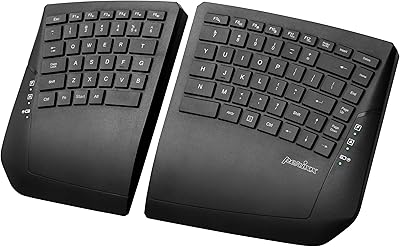
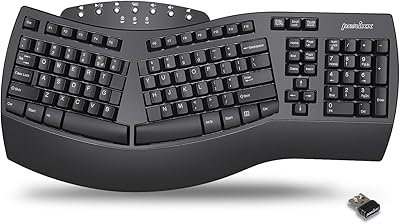
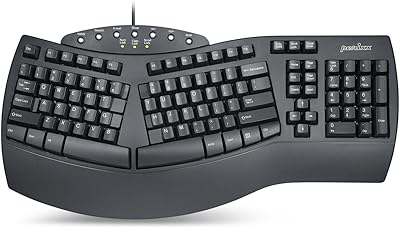
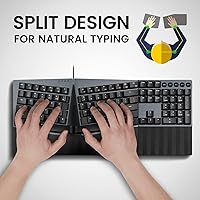
The Perixx PERIBOARD-535 Ergonomic Split Mechanical Keyboard sits in a practical middle ground — not a boutique specialty item with a four-digit price tag, but a thoughtfully designed board that takes ergonomics seriously. The defining feature is the split-key full-size layout, which angles both halves of the keyboard to let your arms rest more naturally at your sides rather than pinching inward. For anyone spending long hours at a desk, that shift in arm position alone can make a real difference over weeks of use. It connects via USB and works across Windows, Linux, and Mac, making it a low-fuss option for mixed-OS households or hot-desk office setups.
Features & Benefits

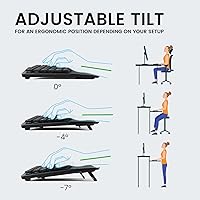
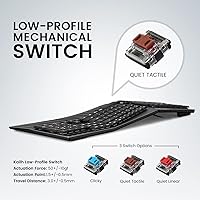
The split curved frame is what makes this ergonomic mechanical board stand out from a standard keyboard. By angling both halves outward, it reduces ulnar deviation — that sideways bend in your wrists that builds up quietly until your forearms start aching. The low-profile brown switches offer a noticeable actuation bump without the loud click you get from blues, which matters a lot in shared office environments. The integrated wrist rest adjusts to three negative tilt angles (0, -4, and -7 degrees), helping counteract wrist pronation rather than letting your palms flatten against the desk. A dedicated OS toggle key handles Mac-to-Windows switching without any remapping, and the nearly 6-foot USB cable gives you enough reach without cluttering your workspace.

Best For

This split keyboard makes the most sense for people already feeling the early signs of wrist or forearm fatigue — not a replacement for medical advice, but a practical step toward a more comfortable daily setup. Developers and writers in open-plan offices will appreciate tactile feedback without the noise. The full-size layout also helps first-time ergonomic users adjust more easily, since you keep the number row and function keys you already know. Dual-OS households get a clean hardware toggle instead of software workarounds. Worth noting: this board is wide and wired, so it is not the right fit if you need a compact or wireless setup.

User Feedback

Across nearly 290 ratings, the PERIBOARD-535 lands at 4.2 stars — broadly positive but not without qualifications. Users consistently praise the wrist rest comfort and the switch feel, with several noting that forearm tension eased noticeably after a few weeks of regular use. Build quality earns solid marks overall. The clearest recurring complaint centers on the programmable key software, which some users describe as clunky and underpowered relative to what comparable boards offer. The split layout learning curve is genuinely polarizing — some people adapt within days, while others take considerably longer to rebuild muscle memory. There are no widespread reports of cable or keycap issues, though a small number of buyers mentioned keycap legends showing early wear.

Pros

  • The split-key layout encourages a more natural arm angle that may noticeably reduce wrist and forearm tension after consistent use.
  • Low-profile brown tactile switches give satisfying feedback without the sharp click noise that irritates coworkers in open offices.
  • The integrated wrist rest adjusts to three negative tilt angles, which is a practical feature rarely found at this price level.
  • A dedicated hardware key for switching between Mac and Windows saves real time for dual-OS users without any software setup.
  • Full-size layout means you keep every key you already know, making the ergonomic transition less disorienting than compact alternatives.
  • The nearly 6-foot USB cable is long enough for most desktop arrangements without creating cable clutter.
  • Build quality earns consistently solid marks from buyers, with an aluminum-referenced construction that feels sturdy in daily use.
  • At its price point, combining mechanical switches with an ergonomic split design and wrist rest is genuinely hard to match.
  • Cross-platform compatibility covers Windows, Linux, and Mac out of the box with no driver headaches reported by most users.

Cons

  • The programmable key software feels limited and clunky compared to what power users expect from a keyboard with macro support.
  • The wide footprint and wired connection make this a desk-only board — portability is not a realistic option.
  • The split layout learning curve is significant; some users report taking several weeks to fully recover their normal typing speed.
  • A small but consistent number of buyers noted keycap legends showing wear earlier than expected for a board in this price range.
  • Only four macro slots are available, which may feel restrictive for developers or power users with complex workflow automation needs.
  • There is no wireless or Bluetooth option, which is a hard dealbreaker for anyone wanting a cleaner, cable-free desk setup.
  • The large overall footprint, including the wrist rest depth, can be a real constraint on smaller or shared workspaces.
  • With only one color option currently available, buyers with specific desk aesthetics or setup themes have no alternative to choose from.

Ratings

Our AI scoring system analyzed verified global user reviews for the Perixx PERIBOARD-535 Ergonomic Split Mechanical Keyboard, actively filtering out incentivized, bot-generated, and duplicate submissions to surface what real long-term users actually experienced. The scores below reflect an honest synthesis of both consistent praise and recurring frustrations — nothing is glossed over. Where this split keyboard earns high marks, the reasons are concrete; where it falls short, those gaps are clearly explained.

Ergonomic Design
88%
The split-key curved frame is the board's strongest asset, and users who stuck with it through the adjustment period consistently reported reduced forearm and wrist tension after a few weeks of daily use. For office workers who spend six or more hours at a desk, that postural improvement is tangible and frequently mentioned as the main reason they would buy it again.
The ergonomic benefit is not instantaneous — it takes commitment to retrain muscle memory, and a meaningful share of buyers found the transition frustrating enough to return the board. Users who already have significant wrist pain may need to pair this with other interventions rather than expecting the keyboard alone to resolve their discomfort.
Switch Feel
84%
The low-profile brown tactile switches hit a practical sweet spot for shared work environments: enough actuation feedback to give confident typing rhythm, without the sharp click that disrupts nearby colleagues. Developers and writers who tested the switches over extended sessions generally praised the consistency of the bump and the relatively light finger effort required.
Users accustomed to full-height mechanical switches sometimes find the low-profile travel distance underwhelming, describing the feel as slightly shallow compared to what they expected. Those coming from linear switches may also need time to appreciate the tactile bump rather than finding it an immediate improvement.
Wrist Rest Comfort
83%
The integrated wrist rest drew consistent praise for its width and surface feel during long typing sessions, with many users noting it eliminated the pressure point discomfort they experienced with standard keyboards. The three adjustable tilt angles — particularly the negative settings — give meaningful control over how the wrist pronates, which is a detail most budget ergonomic boards skip entirely.
Because the wrist rest is fixed to the frame rather than detachable, users who prefer to type without one have no option to remove it. A small number of users also noted that the surface material showed minor cosmetic wear after extended daily contact.
Build Quality
79%
21%
The overall construction feels solid in hand, with an aluminum-referenced build that avoids the hollow, plasticky feel common in this price bracket. Most users reported no flex or creaking during typing, and the keyboard sits stably on a desk without sliding even during fast typing bursts.
A consistent minority of reviewers flagged early wear on keycap legends after several months of intensive use, which undermines confidence in long-term durability. Cable quality was described as acceptable rather than premium, and a few buyers noted the connectors felt less robust than the keyboard body itself.
Programmability
58%
42%
Having four macro slots and key remapping capability built into a board at this price point is a genuine feature, not just a checkbox — users with repetitive workflows appreciated being able to assign frequently used shortcuts or text strings. For basic automation needs, the functionality works as advertised.
The companion software is the most consistently criticized aspect of this board. Users describe it as dated, occasionally buggy, and noticeably less capable than what competing keyboards at similar price points offer. Mac users get no access to the software at all, making the programmable feature effectively Windows-exclusive and significantly limiting its value for mixed-OS setups.
Noise Level
82%
18%
In real open-office settings, the PERIBOARD-535 generated noticeably less disruption than blue-switch or clicky keyboards, making it a viable daily driver even in close-quarters coworking spaces. Several buyers specifically noted that colleagues did not comment on typing noise, which had been an issue with their previous mechanical boards.
It is not a silent keyboard by any measure, and users expecting near-quiet operation — comparable to a membrane or low-profile laptop keyboard — will be disappointed. In very quiet environments like a library or a soundproofed recording space, the actuation sound is still perceptible enough to be a consideration.
OS Compatibility
86%
The hardware Mac/Windows toggle key works reliably and removes the need for any software configuration when switching between operating systems — dual-OS users praised this as a practical, low-friction feature. Linux compatibility out of the box also earned positive mentions from users who are accustomed to peripheral incompatibility on that platform.
The programmable software only runs on Windows, which creates an asymmetry that Mac users feel acutely — they get the toggle key but lose all customization access. Linux users are similarly locked out of macro functionality, which narrows the board's advanced feature set to a single operating system.
Learning Curve
62%
38%
Users who committed to the split layout and worked through the initial awkward phase generally described the experience positively in hindsight, with many saying they could not imagine returning to a standard flat keyboard. The full-size format helps considerably during adaptation since no keys are missing or relocated.
The adaptation period is significant and genuinely variable — some buyers adjusted in under a week, while others reported three weeks or more of measurably slower typing speed. A notable portion of one-star reviews trace directly to buyers who underestimated this curve and returned the board before giving it a fair trial.
Value for Money
77%
23%
Combining a mechanical switch type, a genuine split ergonomic frame, and an adjustable wrist rest in a single wired board at this price level is a difficult combination to find from established brands. For buyers who would otherwise need to buy an ergonomic board and a separate wrist rest accessory separately, the bundled design offers real consolidated value.
The weak programmability software and the lack of wireless connectivity are the two features that most erode the value argument, especially as wireless ergonomic options creep closer to this price point. Buyers who prioritize those features may find it hard to justify the trade-offs against alternatives.
Cable & Connectivity
74%
26%
The 5.9 ft cable is a well-chosen length for most desktop configurations — long enough to reach a tower placed on the floor or at the back of a wide desk, without creating significant cable management headaches. Plug-and-play USB connectivity means there is genuinely nothing to configure for basic use on any supported OS.
Wired-only connectivity is an increasingly hard sell as wireless ergonomic keyboards become more accessible, and buyers working toward a cable-free desk will find this board incompatible with that goal. There is no USB hub, pass-through port, or additional connectivity convenience built into the board.
Footprint & Desk Space
66%
34%
For users with a dedicated workstation and a full-size desk, the wide split frame works naturally and the keyboard does not feel excessively large once positioned. The size also signals permanence — this is a board designed for people who have committed to ergonomic typing rather than those who move their setup regularly.
At over 18.6 inches wide, this is a substantial piece of desk real estate, and users with small desks or tight multi-monitor setups frequently cited space as a genuine constraint. The integrated wrist rest adds meaningful front-to-back depth that can push the keyboard further into a workspace than expected.
Setup & Out-of-Box Experience
81%
19%
Unboxing and getting typing-ready takes under a minute — plug in the USB cable, flip the OS toggle if needed, and you are ready. No drivers are required for standard use, which was appreciated by users who are tired of mandatory software installs just to use a keyboard.
The included manual is minimal, and users who want to explore the programmable features need to find and download the software separately, which felt like an incomplete out-of-box experience to some buyers. Instructions for the tilt adjustment mechanism were also described as unclear by a handful of reviewers.
Keycap Quality
68%
32%
The keycaps are properly sized and spaced for the low-profile switch design, and out of the box the legends are clear and easy to read under typical office lighting. Most users reported no issues with keycap stability or wobble during regular typing sessions.
Longer-term durability of the keycap printing is a recurring concern — a consistent thread of reviews from users past the six-month mark describes visible legend wear on the most frequently used keys. This is not universal, but it appears often enough to be a legitimate quality consideration rather than an isolated complaint.
Aesthetic & Design Language
71%
29%
The all-black colorway and low-profile frame give the board a clean, understated look that blends into most professional desk environments without demanding attention. The split frame shape reads as purposeful rather than gimmicky, which matters for buyers who want ergonomic benefits without a keyboard that looks like a medical device.
There is only one color option available, which limits personalization for users building a cohesive desk aesthetic. The design is also purely functional in orientation — there is no RGB lighting or visual customization of any kind, which will disappoint users who want their keyboard to be a visible part of a styled setup.

Suitable for:

The Perixx PERIBOARD-535 Ergonomic Split Mechanical Keyboard is built for people who spend the bulk of their workday at a desk and are starting to notice the toll that a standard flat keyboard takes on their wrists and forearms. Office professionals, remote workers, and developers who clock six or more hours of daily typing will find the split-key layout and adjustable wrist rest work together to encourage a more natural arm position — which may reduce cumulative strain over time. Writers who want tactile switch feedback to help maintain typing rhythm without making noise in a shared space will also feel at home here. The full-size layout is a deliberate advantage for anyone nervous about switching to an ergonomic board for the first time, since you keep every key in a familiar position rather than adapting to a compact or columnar layout simultaneously. Dual-OS users — particularly those who move between a Mac and a Windows machine in the same day — will appreciate the hardware toggle that removes the need for software remapping or separate keyboards.
Not suitable for:

The Perixx PERIBOARD-535 Ergonomic Split Mechanical Keyboard is a poor match for anyone who needs a portable or wireless setup, since it is a wired-only board with a footprint nearly 19 inches wide — it is not going into a laptop bag comfortably. Users who need ultra-precise, fully customizable per-key programming will likely find the bundled macro software underwhelming compared to what more advanced boards offer at higher price points. Touch typists who frequently drift toward the center of a standard keyboard may struggle with the split gap more than expected, and the adjustment period is real — plan for at least one to two weeks of slower, more deliberate typing before speed returns. People working on very small desks may also run into footprint issues, since the integrated wrist rest adds meaningful depth to the overall profile. Finally, buyers chasing the lightest possible keypress or a completely silent typing experience should look elsewhere, as the brown tactile switches, while not loud, still produce a noticeable bump and sound.

Specifications

  • Brand: Manufactured by Perixx Computer GmbH, a German peripheral brand focused on ergonomic input devices.
  • Model: PERIBOARD-535, a full-size wired ergonomic mechanical keyboard released in November 2022.
  • Layout: Full-size split-key ergonomic layout with a curved frame designed to promote a more neutral wrist and arm position.
  • Switch Type: Low-profile brown tactile mechanical switches that provide a noticeable actuation bump without a loud audible click.
  • Wrist Rest: Integrated palm and wrist rest with adjustable negative tilt at 0, -4, and -7 degrees to help reduce wrist pronation.
  • Connection: Wired USB connection with a durable cable measuring 5.9 ft in length.
  • OS Support: Compatible with Windows 7, 8, 10, and 11, Linux, and Mac OS X out of the box.
  • Programmability: Supports key remapping and up to 4 user-defined macros via Perixx dedicated software.
  • OS Toggle: Dedicated hardware key for switching between Mac and Windows input modes without software configuration.
  • Dimensions: The keyboard measures 18.66″ in length, 7.95″ in width, and 1.73″ in height.
  • Weight: The unit weighs 2.97 pounds, which reflects a solid, desk-bound build not intended for travel.
  • Material: Construction references aluminum in the product comparison data, contributing to the overall sturdy feel reported by users.
  • Color: Available in black only; no alternative color variants are currently listed.
  • Language: US English key layout; international or alternative language layouts are not offered in this model.
  • Macro Keys: Four dedicated macro slots can be assigned through the companion software to automate repetitive tasks or shortcuts.
  • Compatible Devices: Designed for use with PCs, laptops, and tablets that support a standard USB connection.
  • In the Box: Package includes the PERIBOARD-535 keyboard, a USB cable, and a printed manual.
  • BSR Ranking: Ranked #411 in Computer Keyboards on Amazon, based on 289 customer ratings averaging 4.2 out of 5 stars.

Related Reviews

Perixx Periboard-612B Wireless Ergonomic Split Keyboard
72%
88%
Ergonomic Design
81%
Wireless Connectivity
79%
Typing Comfort
62%
Learning Curve
74%
Build Quality
More
Perixx PERIBOARD-624B Wireless Ergonomic Split Keyboard
70%
81%
Ergonomic Design
88%
Wireless Freedom
54%
Key Feel & Typing Experience
86%
Setup & Ease of Use
61%
Build Quality & Materials
More
Perixx PERIBOARD-835 Wireless Ergonomic Mechanical Keyboard
69%
74%
Ergonomic Comfort
81%
Typing Experience
46%
Noise Level
83%
Multi-Device Connectivity
52%
Companion Software
More
Perixx PERIBOARD-512B Ergonomic Split Keyboard
75%
83%
Ergonomic Design
78%
Typing Comfort
74%
Key Feel & Feedback
79%
Build Quality
67%
Wrist Rest Quality
More
NocFree Wireless Ergonomic Split Mechanical Keyboard

81%
88%
Wireless Reliability
83%
Ergonomic Design
91%
Typing Experience
92%
Switch Customization
54%
Learning Curve
More
Perixx PERIBOARD-536 Ergonomic Compact Wired Keyboard
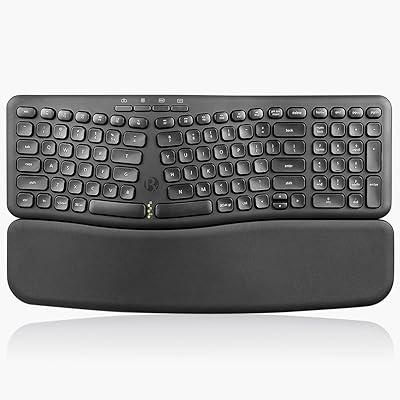
67%
67%
Ergonomic Comfort
58%
Typing Experience
78%
Noise Level
63%
Wrist Rest Quality
54%
Build Quality
More
Perixx PERIBOARD-636B Ergonomic Wireless Keyboard

76%
78%
Ergonomic Comfort
61%
Typing Feel
88%
Noise Level
83%
Wireless Reliability
81%
Wrist Rest Quality
More
Perixx Periduo-605 Wireless Ergonomic Keyboard Mouse Combo
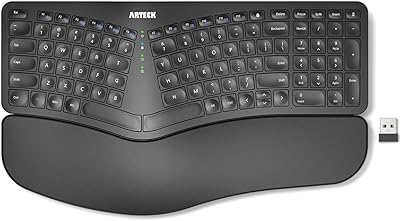
72%
83%
Ergonomic Comfort
61%
Keyboard Feel & Typing
79%
Mouse Comfort & Design
69%
Wireless Reliability
76%
Value for Money
More
Arteck HW315
Arteck HW315
74%
83%
Ergonomic Comfort
74%
Wrist Rest Quality
61%
Typing Feel & Key Travel
92%
Battery Life
81%
Wireless Connectivity
More
Macally BTBLERGO2A Ergonomic Split Keyboard
71%
83%
Ergonomic Comfort
61%
Bluetooth Reliability
81%
Layout Familiarity
63%
Key Feel & Typing Experience
78%
Battery & Charging
More

FAQ

It genuinely varies. Some people find the angled halves feel natural within three to five days, while others need two to three weeks before their typing speed returns to normal. If you are a touch typist with deeply ingrained muscle memory, expect the longer end of that range. The full-size layout does help compared to more exotic ergonomic designs, since all your keys are still where you expect them.

Yes, it works with Mac OS X and includes a dedicated hardware toggle key to switch between Mac and Windows input modes. You do not need to install any drivers just to type — the toggle handles the basic key mapping. The programmable software, however, is Windows-only, so Mac users will not be able to configure macros or remap keys through the companion app.

They are noticeably quieter than blue switches. You will hear a subtle thud and feel the tactile bump, but there is no sharp clicky sound. In a reasonably active office, most coworkers will not find them disruptive. In a very quiet library-style environment, any mechanical switch is going to produce some sound, but browns are a reasonable compromise.

The wrist rest on this board is integrated into the frame rather than a separate detachable accessory, so you cannot remove it. What you can adjust is the tilt angle — choosing between 0, -4, and -7 degrees — which gives you some control over how your palms sit during typing.

Yes, the board is plug-and-play on Linux. The basic keyboard functions will work immediately without any driver installation. Keep in mind that the macro and key remapping software is not available for Linux, so programmable features will not be configurable on that platform.

It is functional but not particularly polished. Most users can figure it out, but do not expect the kind of refined experience you get from high-end gaming keyboard software. If your needs are straightforward — remapping a few keys or recording a short macro — it gets the job done. If you want complex layered profiles or extensive customization, this software may frustrate you.

It measures just over 18.6 inches across, which is meaningfully wider than a standard full-size keyboard once you account for the split frame. It will fit on most standard desks, but if your workspace is already tight or you use a keyboard tray, measure carefully before buying. The wrist rest also adds some depth to the front of the unit.

Most users report no issues, but a small number of buyers have mentioned that keycap printing showed wear after several months of heavy daily use. It does not appear to be a widespread problem, but it is worth noting if you are a high-intensity typist who is hard on keys.

Technically it can connect to any device with a USB port, but practical tablet use depends on whether your tablet supports USB keyboard input and what adapter you might need. It is primarily designed and optimized for desktop and laptop use, and the large footprint makes it an awkward pairing with a tablet in most real-world scenarios.

Perixx generally offers a limited manufacturer warranty on their keyboards, but the specific terms are not detailed in the product listing. It is worth checking directly with Perixx or the retailer at the time of purchase to confirm coverage terms, especially if you plan to use this board heavily in a professional environment.

Where to Buy