
Overview

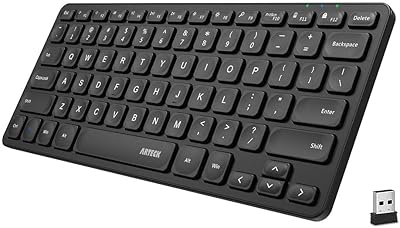
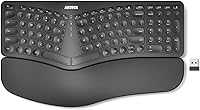
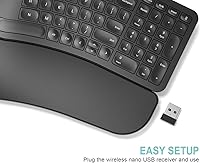
The Arteck HW315 is one of the more approachable options if you've been curious about split ergonomic keyboards but aren't ready to commit to a steep learning curve or a high price. Split designs have grown popular among people who spend hours typing daily — the idea being that separating the two halves lets your arms sit at a more natural angle, reducing strain over time. What stands out here is that a cushioned wrist rest comes built in, not sold separately. Setup is simple: plug in the nano USB receiver and you're typing immediately. This is not a mechanical keyboard and won't satisfy enthusiasts chasing tactile feedback or custom layouts — but that's not the point.

Features & Benefits

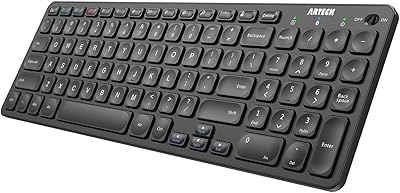
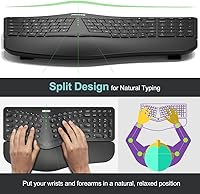
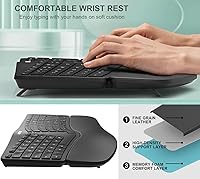
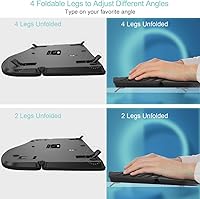
The split keyset layout is the central appeal — it angles your hands outward so your forearms aren't forced into an unnatural inward rotation during long typing sessions. The silicone wrist rest runs the full width of the keyboard and stays fixed in place, which is great for desk use but means you won't want to throw this wrist-rest keyboard into a bag daily. Battery life is genuinely impressive: a single USB-C charge is rated for roughly six months of moderate use, so you're not hunting for cables every few weeks. The nano USB receiver tucks into the back of the unit, a small but practical touch. The full key layout, including a numpad and arrow keys, keeps it useful for data entry and spreadsheet work.

Best For

This split ergonomic keyboard fits best into a Windows-based desk setup where comfort over long workdays is the priority. Remote workers, writers, accountants, and anyone logging significant hours at a keyboard will find the most value here. The plug-and-play wireless connection means no driver installation, no pairing rituals — just insert and type. Because the wrist rest is permanently attached, it works better as a stationary desk fixture than a travel accessory. Mac users should be cautious, as key labeling and function mappings are Windows-oriented. Gamers and mechanical keyboard fans will likely find the key travel underwhelming. For first-time ergonomic buyers who want an all-in-one solution without a heavy upfront investment, it makes a solid, low-pressure starting point.

User Feedback

With over 1,200 ratings averaging 4.4 out of 5, the Arteck wireless keyboard has earned genuine traction among everyday users, not just early adopters. The most consistent praise centers on immediate comfort improvement after switching from a standard flat keyboard, and how quickly the split layout starts to feel intuitive. Setup speed is also a frequent highlight. On the critical side, buyers accustomed to mechanical boards often note that the key travel feels shallow and somewhat soft. A handful of users find the wrist rest too low-profile for their preference. Connectivity complaints appear occasionally but aren't a dominant theme. Most long-term owners report reliable daily performance without issues, which ultimately carries more weight than first-impression reactions alone.

Pros

  • The built-in silicone wrist rest removes the need for a separate accessory purchase.
  • Split layout gently corrects forearm angle, reducing tension during long typing sessions.
  • Battery life consistently lasts months between charges under normal daily use.
  • USB-C charging means any modern cable on your desk already works.
  • The nano receiver stores inside the keyboard body, so it is never left behind.
  • Full numpad and arrow keys make it genuinely practical for spreadsheet and data-entry work.
  • Plug-and-play wireless setup requires no drivers, software, or pairing steps.
  • Membrane switches keep noise low — a real advantage in shared or open-plan offices.
  • Reliable day-to-day performance over months is a recurring theme in long-term user feedback.

Cons

  • Key travel is shallow and mushy — a notable step down for anyone used to mechanical switches.
  • The wrist rest cannot be removed or swapped, limiting customization for different hand heights.
  • No Bluetooth support locks out users with USB-A-scarce laptops or multi-device setups.
  • The large footprint demands significant desk space that smaller workstations may not have.
  • Plastic keycaps develop visible shine after extended heavy use.
  • No battery percentage indicator makes it hard to know when a charge is actually needed.
  • Mac users get mismatched key labels and no way to remap shortcuts natively.
  • Wrist rest padding is too low-profile for users who need more substantial palm elevation.

Ratings

The scores below are generated by AI after analyzing verified buyer reviews for the Arteck HW315 across global markets, with spam, bot-submitted, and incentivized feedback actively filtered out. The result is an honest snapshot of what real daily users experienced — not just in the first week, but over months of desk use. Both the strengths that keep buyers satisfied and the friction points that prompted criticism are reflected without softening.

Ergonomic Comfort
83%
Most users switching from a standard flat keyboard noticed a meaningful reduction in wrist tension within the first week. The outward angle of the split layout lets forearms rest more naturally, which adds up during long writing or data-entry sessions.
The ergonomic benefit is real but not dramatic — people with severe wrist issues or those accustomed to tent-style or contoured boards may find the relief modest. The fixed flat profile offers no height adjustment.
Wrist Rest Quality
74%
26%
Having a built-in cushioned rest means there is no separate purchase or awkward alignment to worry about — it sits exactly where your palms land. For users typing at a fixed desk setup, the silicone padding feels soft enough for extended sessions.
Some users found the wrist rest too thin or too low-profile to provide meaningful support during very long shifts. Because it is not detachable, you cannot swap it out for a firmer or taller aftermarket option.
Typing Feel & Key Travel
61%
39%
The membrane keys are quiet and reasonably responsive for general office typing, making this wrist-rest keyboard suitable for open-plan offices or shared workspaces where noise is a concern.
Buyers coming from mechanical keyboards consistently flag the shallow key travel as a disappointment. The feedback feels mushy rather than crisp, which affects accuracy for fast typists and makes the board feel less premium than the price implies.
Battery Life
92%
A six-month battery life on a single USB-C charge is genuinely rare at this price tier. Users repeatedly praise not having to think about charging — it simply stays ready, which removes a real daily friction point for desk workers.
Battery longevity claims are based on roughly two hours of use per day, so heavier users will see shorter intervals between charges. A few reviews mention the charge indicator could be more informative about remaining capacity.
Wireless Connectivity
81%
19%
The 2.4GHz nano USB receiver delivers a stable, lag-free connection for typical office distances. Plug-in-and-type convenience is a consistent highlight — no pairing menus, no software, no delays.
The connection is USB-A only, which limits use with modern laptops that have dropped full-size USB ports. There is no Bluetooth option, so users with dongles already occupying USB slots may find this a real constraint.
Build Quality
69%
31%
The keyboard feels sturdy enough for everyday desk use, with minimal flex across the split halves during normal typing. At its price point, the plastic construction is what you would expect — functional and not flimsy.
The all-plastic housing does not feel premium, and a few users noted the keycaps show light shine after several months of heavy use. It does not feel like a long-term investment piece.
Setup & Ease of Use
94%
The nano receiver stores neatly in the keyboard body, so it is always with the unit and nearly impossible to lose. Plug it in and the keyboard works immediately — no drivers, no app, no account required.
Windows users get a genuinely smooth experience, but Mac users encounter labeling mismatches and non-standard function key behavior with no supported way to remap them. Setup simplicity is primarily a Windows story.
Layout & Key Coverage
88%
The inclusion of a full numpad and dedicated arrow keys makes this split ergonomic keyboard significantly more practical than compact ergonomic alternatives. Accountants, analysts, and anyone doing spreadsheet-heavy work will appreciate the completeness.
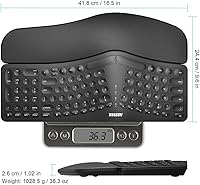
The full layout contributes to a large footprint — at 16.5 inches wide, it demands substantial desk real estate. Users with smaller workstations or multi-monitor setups with limited surface space may find placement tricky.
Portability
38%
62%
The integrated USB receiver storage is a thoughtful touch that does help when moving between desks in the same office, keeping all parts together without a separate bag.
At 2.62 pounds with a fixed wrist rest that cannot be detached, this is not a keyboard anyone should plan to carry regularly. Laptop users who want an ergonomic option for travel or coffee shops will find it impractical.
Value for Money
78%
22%
Compared to dedicated ergonomic keyboards that often cost two to three times as much, the Arteck wireless keyboard packages split design, wrist rest, and impressive battery life into an accessible price. For first-time ergonomic buyers, the math is easy to justify.
Against standard wireless keyboards at lower prices, the value is less clear-cut if ergonomics are not your primary need. Some buyers feel the typing experience alone does not fully justify the cost without the ergonomic context.
Noise Level
86%
Membrane switches make this a quiet board for shared environments. Colleagues in open offices or family members nearby are unlikely to be bothered, which is a recurring positive note in user feedback.
The quietness comes at the cost of feedback clarity. Users who rely on auditory or tactile confirmation while typing fast may make more errors on this board than they would on a clicky alternative.
Mac & Multi-Device Compatibility
29%
71%
The keyboard will technically function when plugged into a Mac via a USB-A adapter, and basic alphanumeric typing works without issues.
Key labeling, shortcut positions, and function row behavior are all Windows-native. There is no Bluetooth, no multi-device pairing, and no software for remapping. Mac users should look elsewhere.
Charging Convenience
84%
USB-C charging is a meaningful quality-of-life upgrade over older micro-USB designs. Most users already have USB-C cables on their desks, so there is no need to track down a proprietary charger.
There is no pass-through charging during use, meaning if the battery does run low mid-day you need to stop or work tethered. No visual battery percentage readout was noted as a gap by several reviewers.

Suitable for:

The Arteck HW315 is a strong fit for Windows-based desk workers who spend the bulk of their day typing and have started noticing discomfort in their wrists or forearms. Remote employees setting up a dedicated home office will appreciate that the wrist rest is already included — no extra purchase, no compatibility guesswork. First-time ergonomic keyboard buyers in particular get a lot of practical value here, since the split layout is approachable rather than extreme, making the adjustment period short. If you do a lot of spreadsheet work, data entry, or writing and need a full key layout with a numpad, this wrist-rest keyboard checks that box without forcing you into a compact form factor. The plug-and-play USB wireless setup also makes it a reliable choice for anyone who wants zero configuration friction — plug in the receiver and you are done.

Not suitable for:

The Arteck HW315 is a poor match for anyone who primarily uses a Mac, since the key labeling, function row behavior, and shortcut positions are all built around Windows conventions, with no software available to remap them. There is no Bluetooth connectivity, which rules it out for users who prefer wireless pairing or work from a laptop with limited USB-A ports. Mechanical keyboard enthusiasts will almost certainly find the membrane key travel shallow and unsatisfying — this is not a board built for tactile feedback or typing precision under pressure. Portability-seekers should also look elsewhere: at nearly 2.7 pounds with a fixed, non-detachable wrist rest, it is fundamentally a desk fixture. Gamers will find it similarly unsuitable, as the layout and key response are oriented entirely toward productivity rather than fast, precise input.

Specifications

  • Model: This keyboard is manufactured by Arteck under the model designation HW315.
  • Dimensions: The unit measures 16.5″ long by 9.6″ wide by 1.02″ tall, making it a full-footprint desk keyboard.
  • Weight: The keyboard weighs 2.62 pounds, which includes the integrated wrist rest.
  • Layout: Full layout with main alphanumeric keys, dedicated arrow keys, and a complete numpad on the right side.
  • Key Type: Membrane key switches provide quiet actuation with low audible noise during typing.
  • Wireless Tech: Connects via 2.4GHz USB-A wireless using a nano receiver stored in the keyboard body.
  • Bluetooth: No Bluetooth connectivity is available; the keyboard uses only the included USB nano receiver.
  • Battery: Built-in rechargeable lithium battery rated for approximately 6 months per charge based on 2 hours of daily use.
  • Charging Port: Charges via a USB-C port, compatible with standard modern USB-C cables.
  • Wrist Rest: Integrated silicone-cushioned wrist and palm rest spans the full width of the keyboard and is not detachable.
  • Body Material: The keyboard housing is constructed from plastic with a silicone material used for the wrist rest padding.
  • Color: Available in Black with a modern, understated finish.
  • Compatibility: Designed for Windows-based desktops and laptops; Mac use is possible but key mappings and labels are Windows-oriented.
  • OS Support: Officially supports Windows operating systems; no dedicated Mac, Linux, or ChromeOS driver or software is provided.
  • Package Contents: Box includes the keyboard, nano USB receiver, USB-C charging cable, and a welcome guide.
  • Warranty: Arteck provides a 24-month manufacturer warranty alongside customer support for this product.
  • Split Design: The keyset is divided into two angled halves to support a more natural forearm and wrist position during extended typing.
  • Amazon Rank: Ranked number 41 in the Computer Keyboards category on Amazon at the time of review.
  • User Rating: Holds a 4.4 out of 5 star average rating based on over 1,274 verified ratings on Amazon.

Related Reviews
Arteck HW305 Wireless Keyboard
79%
91%
Value for Money
94%
Ease of Setup
74%
Typing Experience
63%
Build Quality
69%
Battery Life
More
Arteck Bluetooth Keyboard HB086
86%
93%
Portability & Size
94%
Battery Life
83%
Ergonomics & Comfort
90%
Ease of Use & Setup
88%
Multi-Device Compatibility
More
Arteck HB193 Bluetooth Keyboard
81%
88%
Multi-Device Switching
84%
Build Quality
71%
Typing Experience
86%
Battery Life
91%
Layout & Key Coverage
More
Arteck HW126 Wireless Solar Keyboard
77%
83%
Solar Charging Reliability
88%
Typing Comfort
81%
Build Quality
74%
Wireless Connectivity
86%
Value for Money
More
Arteck Universal Wave Bluetooth Keyboard
75%
78%
Typing Comfort
83%
Multi-Device Switching
63%
Bluetooth Connection Stability
67%
Palm Rest Quality
81%
Key Feel & Travel
More
Arteck Bluetooth Keyboard and Mouse Combo
84%
89%
Battery Life
92%
Ergonomics and Comfort
67%
Bluetooth Connectivity
83%
Build Quality
90%
Portability and Design
More
Arteck HB305-2 Bluetooth Keyboard
81%
88%
Multi-Device Switching
83%
Typing Experience
79%
Battery Life
61%
Build Quality
72%
Bluetooth Connectivity Stability
More
Arteck Ergonomic Split USB Keyboard with Wrist Rest
75%
83%
Ergonomic Comfort
71%
Wrist Rest Quality
74%
Key Feel & Typing Experience
67%
Build Quality & Durability
78%
Backlighting
More
Arteck MD172 Multi-Device Wireless Bluetooth Mouse
87%
88%
Performance
91%
Ergonomics
93%
Battery Life
89%
Connectivity
85%
Clicking Noise
More
Arteck HW192 Wireless Keyboard and Mouse Combo
78%
78%
Build Quality
72%
Typing Experience
63%
Mouse Comfort & Ergonomics
81%
Battery Life
69%
Wireless Connectivity
More

FAQ

No software or drivers are needed. The Arteck HW315 uses a plug-and-play USB nano receiver — pull it from its storage slot on the back of the keyboard, insert it into any USB-A port on your Windows computer, and you are typing immediately. It really is that straightforward.

Arteck rates it at around 6 months per charge based on roughly 2 hours of typing per day. Heavy users who are at the keyboard for 6 to 8 hours daily will likely see shorter intervals — probably 6 to 10 weeks — but the battery is still very competitive at this price level. You charge via USB-C, so any cable on your desk likely already works.

Technically yes, but it is not a good experience. The key labels are Windows-specific, so modifier keys and shortcut positions will not line up with what Mac users expect. There is no software to remap keys either. If you are primarily a Mac user, this wrist-rest keyboard is not the right pick.

No, the wrist rest is permanently integrated into the keyboard body. You cannot detach it or swap it for a different thickness. If you prefer the flexibility of using a separate wrist rest, or none at all, that is a real limitation worth factoring into your decision.

Not without an adapter, since the nano receiver uses a full-size USB-A connector. If your laptop has only USB-C ports — common on newer MacBooks and some thin Windows laptops — you would need a USB-A to USB-C adapter. That is a minor inconvenience but worth knowing before you buy.

Most users adjust within a few days to a week for general typing. The split on this keyboard is moderate rather than extreme, so it is not as jarring as a fully separated or tented ergonomic board. Typists who rely on correct finger placement tend to adapt fastest; those with less disciplined technique may take a little longer.

Very similar, honestly. The key travel is on the shallower side and the actuation feels soft. If you are used to a typical office membrane keyboard you will feel at home. If you are coming from a mechanical board with tactile or clicky switches, the feel will likely be a noticeable step down.

Not really. The split ergonomic keyboard does not have a battery percentage indicator or a detailed status display. Some users have noted this as a minor frustration — you may not realize the battery is low until the keyboard starts dropping inputs. Charging it once every few months as a habit is the simplest workaround.

Yes, there are dedicated hotkeys and media keys built into the layout. These let you control volume, playback, and other common functions without reaching for your mouse, which is a handy addition for a productivity-focused board at this tier.

A lightly dampened microfiber cloth works well for wiping down both the plastic key surface and the silicone wrist rest. Avoid soaking the unit or using harsh chemical cleaners, particularly around the keys and USB-C charging port. For debris between keys, a can of compressed air is the safest approach.