Overview

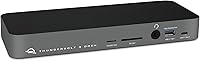
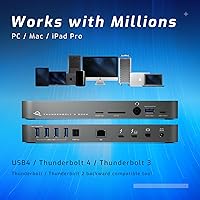
The OWC 14-Port Thunderbolt Dock sits at the upper end of the docking station market, and for good reason — 14 ports on a single hub is genuinely rare. This Thunderbolt dock connects to your laptop via one cable, handling power delivery, data, displays, and audio simultaneously. The slim, horizontal chassis in Space Gray looks right at home next to a MacBook, but it works equally well with Thunderbolt-equipped Windows machines. If you are weighing the premium price, the calculation comes down to whether you need the combination of Thunderbolt 4 bandwidth and this level of port density. For power users, the math usually works out.
Features & Benefits

The headline feature is 85W charging passthrough — plug in one cable and your laptop charges while everything else runs through the hub. Display flexibility is genuinely impressive: run dual 4K monitors at 60Hz, or push a single 5K display through the Thunderbolt 3 downstream port. The Mini DisplayPort adds a third output option. Photographers will appreciate the SD 4.0 UHS-II card reader, which hits real-world transfer speeds that make offloading a large shoot fast and painless. Five USB-A ports mean you can skip a secondary hub entirely, and Gigabit Ethernet handles stable wired networking whenever Wi-Fi is not reliable enough.

Best For

This 14-port dock is built for people who demand a lot from one device. Creative professionals — particularly photographers and video editors — who need fast card offloads and dual external monitors will find it fits their workflow without compromise. Mac users running a MacBook Pro or MacBook Air will likely get the most from it, though Windows users with Thunderbolt 3 or 4 ports are equally supported. It also makes a strong case for home office setups where wired Ethernet, multiple USB peripherals, and clean cable management matter. If a cluttered desk frustrates you, the single-cable workflow here is hard to argue with.

User Feedback

Across a large pool of ratings, the OWC hub holds a solid 4.2-star average — a score that reflects consistent real-world satisfaction rather than marketing. Buyers routinely praise the build quality and connection stability, with long-term owners noting that OWC's firmware support keeps the dock performing reliably over time. On the critical side, some users report the unit runs warm under heavy load, and a subset of Windows users have hit driver friction during initial setup. Price is the most common hesitation — it is not a casual purchase. That said, buyers who compared it against CalDigit or Belkin equivalents frequently concluded the port count and durability justified the cost.

Pros

  • Fourteen ports in one slim unit eliminates the need for secondary hubs entirely.
  • SD 4.0 UHS-II card reader delivers genuinely fast media imports that photographers will notice immediately.
  • Dual 4K 60Hz display support works reliably without configuration headaches on Mac.
  • 85W charging passthrough keeps most MacBooks topped up through a single cable connection.
  • Gigabit Ethernet provides rock-solid wired networking that Wi-Fi simply cannot match for consistency.
  • S/PDIF digital audio output makes this Thunderbolt dock a practical choice for studio monitor setups.
  • Build quality holds up well over years of daily use according to long-term owners.
  • OWC actively issues firmware updates, keeping the dock compatible as operating systems evolve.
  • Thunderbolt cable is included, so you are ready to connect straight out of the box.
  • A 2-year warranty backs the investment with responsive support from OWC.

Cons

  • The price is a significant commitment that is hard to justify if you only need half the ports.
  • Windows users may face driver friction and Thunderbolt firmware issues during initial setup.
  • The unit runs noticeably warm under sustained heavy loads, which some users find concerning.
  • Gigabit Ethernet feels dated on a premium dock when competitors are shipping 2.5GbE as standard.
  • 85W charging can fall short for 16-inch MacBook Pro users under full CPU and GPU load.
  • Only one downstream Thunderbolt port limits daisy-chaining options for storage-heavy workflows.
  • The analog headphone output has a faint background hiss with sensitive in-ear monitors.
  • Port access on the rear becomes awkward once the dock is tucked behind a monitor with cables attached.
  • No companion app means firmware update notifications are easy to miss without manual checks.
  • Users who do not need the SD 4.0 reader or full port density will find the value case much weaker.

Ratings

The OWC 14-Port Thunderbolt Dock has been put through its paces by a wide range of buyers, from professional video editors to home office workers — and our AI has analyzed thousands of verified global reviews, actively filtering out incentivized and bot-generated feedback, to produce the scores below. Both the standout strengths and the honest frustrations are reflected here, so you can make an informed decision rather than rely on cherry-picked praise.
Port Selection & Density
93%
Fourteen ports on a single horizontal unit is genuinely rare at this price tier, and users consistently report that the mix — five USB-A, dual USB-C, Ethernet, audio, card readers, and display outputs — covers virtually every peripheral they own without reaching for a secondary hub.
A small number of Windows-first users noted they would prefer more USB 3.2 Gen 2 Type-A ports rather than the Gen 1 majority, and the lack of a second full-bandwidth Thunderbolt downstream port can be a limiting factor for daisy-chaining storage arrays.
Thunderbolt Bandwidth & Data Speed
88%
The 40Gb/s host connection handles simultaneous display output, fast NVMe storage, and high-speed card reads without any noticeable bottleneck in daily use. Power users moving large video files alongside driving dual monitors rarely report slowdowns under typical workloads.
The single downstream Thunderbolt 3 port operates at the same 40Gb/s pool shared across the dock, so bandwidth-intensive users pushing multiple high-speed peripherals at once may occasionally notice throughput contention rather than the theoretical ceiling.
Display Output Performance
91%
Running dual 4K monitors at 60Hz is reliable and consistent according to the majority of creative professionals who reviewed the unit. The Mini DisplayPort adds useful flexibility for studios with older monitors or projectors still on DisplayPort 1.2 connections.
A 5K output is only available through the Thunderbolt downstream port, not the Mini DisplayPort, which catches some buyers off guard. Users with three simultaneous 4K displays may find the configuration options more limited than expected at this price point.
Charging Passthrough
86%
Eighty-five watts of power delivery is enough to keep a MacBook Pro 14-inch topped up under moderate workloads, and users appreciate the desk-clearing effect of a single cable handling both power and connectivity simultaneously.
For the 16-inch MacBook Pro under heavy CPU and GPU load, 85W can fall slightly short of the 140W the machine ideally demands, meaning battery may slowly deplete during sustained rendering tasks — a nuance worth knowing before committing.
Card Reader Speed
89%
The SD 4.0 UHS-II slot is one of the fastest built into any dock at this tier, and photographers importing from high-speed CFexpress-adjacent cards describe noticeably quicker offload times compared to older USB-based readers they replaced.
The microSD slot tops out at lower speeds than the full SD slot, which matters less for most users but is worth noting if your workflow relies on fast microSD media. Some users also wished for a CFexpress Type B slot given the pro-level positioning.
Build Quality & Materials
87%
The aluminum chassis feels solid and appropriately premium for the price, and long-term owners — some using the dock daily for two or more years — consistently note that ports remain tight and the unit shows no signs of structural wear.
The unit runs noticeably warm during sustained heavy use, which a portion of users flagged as mildly concerning even though no thermal throttling was reported. A few buyers also noted the included Thunderbolt cable feels slightly thin relative to the dock itself.
Mac Compatibility
94%
On macOS, setup is essentially plug-and-play with no drivers required. MacBook Pro and MacBook Air users describe a consistently smooth experience across multiple macOS versions, with display detection and USB recognition working reliably from the first connection.
A small number of macOS users on older Thunderbolt 2 machines noted reduced functionality when using the included adapter path, and some reported that waking the dock from sleep occasionally requires a cable re-seat — an infrequent but recurring complaint.
Windows Compatibility
71%
29%
The dock is Thunderbolt certified for Windows, and the majority of users with modern Thunderbolt 4 laptops from Dell, Lenovo, and HP report solid performance for everyday tasks including display output and USB peripherals.
Driver setup on Windows can require manual intervention, particularly on systems with older Thunderbolt firmware. A meaningful subset of Windows users reported intermittent device disconnections or display flickering until they updated their system chipset and Thunderbolt drivers — not a dealbreaker, but worth planning for.
Gigabit Ethernet Reliability
88%
Wired networking through the dock is one of its quieter strengths — users in open-plan offices and home studios consistently describe it as rock-solid, with no packet loss or speed degradation compared to a direct Ethernet connection.
The port is limited to Gigabit rather than 2.5GbE, which is increasingly common on competing docks at this price. For users on multi-gigabit home networks, that ceiling can feel like an oversight on an otherwise forward-looking product.
Audio Output Quality
79%
21%
Having both a 3.5mm combo jack and an S/PDIF digital output on the same dock is genuinely useful for studio setups, and users connecting to external DACs or optical audio receivers appreciate the inclusion of digital out at this price tier.
The analog 3.5mm output has drawn some criticism for a faint background hiss when used with sensitive in-ear monitors or high-impedance headphones, suggesting the onboard DAC is functional but not audiophile-grade — a fair assessment for a dock in this category.
Form Factor & Desk Footprint
83%
The low-profile horizontal design keeps desk real estate to a minimum, and the Space Gray finish integrates naturally into Mac-centric setups without drawing attention. At just over a pound, it stays put without needing to be physically mounted.
The horizontal layout means port access on the rear can be awkward once cables are connected and the dock is tucked behind a monitor. Users who prefer front-facing ports for frequent USB swapping may find the placement slightly inconvenient day-to-day.
Setup & Ease of Use
84%
Out of the box, the dock ships with a Thunderbolt cable and requires no software installation on Mac. Most users describe the initial setup as taking under two minutes, which is exactly what you want from a hub at this price.
Windows users without up-to-date Thunderbolt firmware face a steeper setup curve, and the lack of any printed quick-start guide means less technical users occasionally rely on OWC support forums to troubleshoot initial configuration issues.
Value for Money
68%
32%
For creative professionals who were previously running two or three separate hubs to cover their peripherals, consolidating into one unit with this port count and Thunderbolt bandwidth represents a genuinely defensible spend over time.
The price is a consistent sticking point in user reviews, with buyers on tighter budgets noting that competitors offer eight to ten ports at meaningfully lower prices. The premium is real, and users who do not need the full port count or SD 4.0 reader may struggle to justify it.
Long-Term Durability
86%
OWC has a strong reputation for standing behind its hardware, and multi-year owners of this dock frequently highlight that it performs identically to day one with no port degradation or firmware-related regressions.
A small number of users reported unit failures after extended use, primarily related to the power circuitry. While OWC's warranty support is generally praised as responsive, having a critical dock fail mid-project is disruptive regardless of how smoothly the replacement process goes.
Firmware & Software Support
81%
19%
OWC has issued firmware updates that addressed early-generation compatibility issues, and users following the product over multiple years note that the company actively maintains the dock rather than abandoning it post-launch — an underappreciated differentiator.
Firmware update notifications are not always proactive, meaning some users run outdated versions without realizing it until they encounter a compatibility problem. A dedicated companion app with automated update checking would meaningfully improve the experience.

Suitable for:

The OWC 14-Port Thunderbolt Dock is purpose-built for power users who refuse to compromise on connectivity. Photographers and video editors will get the most from it — the SD 4.0 UHS-II card reader, dual 4K display support, and five USB-A ports cover an entire studio workflow from a single unit. MacBook Pro and MacBook Air users, in particular, will appreciate how naturally this dock extends their laptop into a full desktop environment without a tangle of adapters and secondary hubs. Home office professionals who rely on wired Ethernet for stable video calls and VPN connections will also find it a reliable daily driver. If your desk setup involves multiple monitors, external storage, a wired network, and regular card offloads happening simultaneously, this is exactly the dock those demands call for.
Not suitable for:

The OWC 14-Port Thunderbolt Dock is a hard sell for anyone who only needs the basics. If your day-to-day requires nothing more than a couple of USB-A ports and an HDMI output, there are far less expensive docks that will serve you just as well without the premium price tag. Windows laptop users should also proceed with caution — while the dock is Thunderbolt certified for Windows, driver setup can require patience, and users with older Thunderbolt firmware on their machines have reported connectivity headaches that Mac users simply do not encounter. Buyers with a 16-inch MacBook Pro who run sustained CPU-heavy workloads should note that 85W passthrough may not fully offset battery drain under peak load. And if 2.5GbE networking is a firm requirement for your multi-gigabit home setup, the Gigabit Ethernet ceiling here will feel like a step behind competing docks that have already made the upgrade.

Specifications

  • Total Ports: The dock provides 14 ports in total, covering Thunderbolt, USB-A, USB-C, display, audio, networking, and card reader connections.
  • Host Connection: One Thunderbolt 3/4 host port (USB-C) delivers up to 40Gb/s bandwidth and is backward compatible with Thunderbolt 2 and Thunderbolt 1 via adapter.
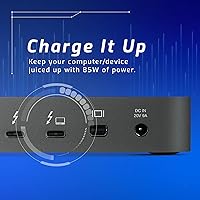
  • Charging Output: The host port delivers up to 85W of power delivery to charge connected laptops while all peripherals remain active.
  • Thunderbolt Downstream: One downstream Thunderbolt 3 USB-C port supports up to 40Gb/s and can drive a single 5K display at 60Hz or a 4K display at 60Hz.
  • USB-A Ports: Five USB 3.2 Gen 1 Type-A ports each support up to 5Gb/s data transfer, with two of the five delivering up to 7.5W for device charging.
  • USB-C Data Port: One USB 3.2 Gen 2 Type-C port provides up to 10Gb/s data transfer for compatible high-speed peripherals.
  • Display Output: Supports up to dual 4K displays at 60Hz simultaneously, or a single 5K display at 60Hz via the Thunderbolt downstream port.
  • Mini DisplayPort: One Mini DisplayPort 1.2 output supports an additional display at up to 4K resolution at 60Hz.
  • Card Reader: An SD 4.0 UHS-II slot and a microSD slot enable media imports at up to 312MB/s from compatible high-speed cards.
  • Network: One Gigabit Ethernet RJ-45 port provides stable wired networking at up to 1Gb/s.
  • Audio Outputs: A 3.5mm stereo combo input/output jack and an S/PDIF digital audio output port handle both analog and digital audio connections.
  • Dimensions: The dock measures 9.06″ long by 3.5″ wide by 0.98″ tall, keeping the desktop footprint compact and unobtrusive.
  • Weight: The unit weighs 1.1 pounds, making it light enough to reposition easily while remaining stable during daily use.
  • Color & Finish: Available in Space Gray, the aluminum-finish chassis is designed to complement modern Mac and premium Windows laptop aesthetics.
  • Compatibility: Thunderbolt certified for both macOS and Windows; requires a Thunderbolt 3 or Thunderbolt 4 (USB-C) port on the host computer.
  • Included Cable: A Thunderbolt cable is included in the box, allowing immediate connection to a compatible host laptop without a separate purchase.
  • Power Supply: The dock draws 85W to support full host charging and peripheral power delivery simultaneously through its integrated power supply.
  • Warranty: Covered by a 2-year OWC Limited Warranty with manufacturer support available through OWC's customer service channels.

Related Reviews
Belkin Thunderbolt 3 Dock Core
88%
88%
Performance
92%
Ease of Setup
91%
Compatibility
89%
Design and Build Quality
87%
Port Variety
More
Anker 778 Thunderbolt Docking Station
85%
89%
Display Performance
92%
Data Transfer Speed
90%
Charging Power
87%
Build Quality
81%
Compatibility
More
CalDigit TS4 Thunderbolt 4 Dock
82%
94%
Port Selection & Density
91%
Build Quality & Design
92%
Thunderbolt 4 Bandwidth Performance
89%
Power Delivery
86%
Display Output Quality
More
Belkin Thunderbolt 3 Dock Mini
86%
92%
Performance
75%
Compatibility
94%
Setup & Installation
89%
Portability & Size
88%
Build Quality
More
Belkin Thunderbolt 3 Dock Pro Docking Station
83%
93%
Single-Cable Convenience
88%
Dual 4K Display Performance
81%
Upstream Charging Power
91%
Data Transfer Speed
86%
Port Selection & Variety
More
Satechi Thunderbolt 4 Dock 100W Charging
85%
89%
Performance
85%
Compatibility
92%
Charging Power
90%
Data Transfer Speed
80%
Multi-Monitor Support
More
Kensington SD5800T Thunderbolt 4 Docking Station
86%
92%
Performance
90%
Display Support
88%
Charging Power
85%
Build Quality
91%
Connectivity
More
OWC ThunderBay 4 with Thunderbolt 3, 16TB
86%
92%
Performance
89%
Build Quality
95%
Speed/Transfer Rate
88%
Reliability
74%
Ease of Setup
More
Dell WD22TB4 Thunderbolt 4 Docking Station
85%
88%
Performance
90%
Build Quality
92%
Power Delivery
85%
Display Support
89%
Connectivity Options
More
CalDigit TS5 Plus Thunderbolt 5 Dock
80%
93%
Port Density & Layout
91%
Thunderbolt 5 Performance
88%
Dual USB Controller Design
89%
Host Charging Power
86%
10 Gigabit Ethernet
More

FAQ

It works with both. Any MacBook Air or MacBook Pro equipped with a Thunderbolt 3 or Thunderbolt 4 port will connect and charge through the dock without any additional software. The 85W output is more than sufficient for the MacBook Air, and it handles the 14-inch MacBook Pro well under typical workloads too.

You can run two displays simultaneously — either dual 4K at 60Hz or a single 5K at 60Hz. The Mini DisplayPort and Thunderbolt downstream port each handle one display, but the total simultaneous display count is two, not three. If three monitors is a firm requirement, you may need to look at docks with additional display output hardware built in.

In most cases, yes, but Windows users should plan for a bit more setup work than Mac users. You will want to make sure your laptop's Thunderbolt firmware and chipset drivers are fully up to date before connecting. Most modern Thunderbolt 4 Windows laptops from major brands work reliably once that groundwork is done, but it is worth budgeting a few extra minutes compared to the near-instant plug-and-play experience on macOS.

It depends on what you are running. For everyday tasks — browsing, email, light editing — 85W will maintain the battery just fine. However, if you are pushing the CPU and GPU hard simultaneously, such as during long video exports or 3D renders, the laptop may draw more than 85W and the battery will slowly deplete. It will not die quickly, but you may end the session at a lower charge than you started with.

The OWC 14-Port Thunderbolt Dock uses an SD 4.0 UHS-II slot, which is among the fastest you will find in any dock. With a compatible UHS-II card, real-world transfer speeds of 250MB/s to 300MB/s are achievable — a noticeable improvement over USB-based readers or older UHS-I slots. If your camera shoots to standard UHS-I cards, the slot is still fully compatible, just capped at that card's lower speed ceiling.

It runs warm under sustained heavy use — warm enough to notice if you touch the underside — but thermal throttling has not been widely reported by users. OWC designed the passive cooling around typical docking workloads. If you are running four or five high-bandwidth peripherals simultaneously for hours at a stretch, expect the chassis to get warm, though not alarmingly so.

A Thunderbolt cable is included in the box, so you can connect to your laptop immediately without hunting down a compatible cable. This is a nice touch given how expensive quality Thunderbolt cables can be when purchased separately.

Yes, the downstream Thunderbolt 3 port supports daisy-chaining compatible Thunderbolt storage devices. Keep in mind that the bandwidth is shared — if you are simultaneously driving a 4K display and a high-speed SSD through the same downstream port, you are splitting that 40Gb/s pool between both devices. For most users this is not a problem, but it is worth knowing if your workflow is extremely bandwidth-intensive.

Both. The 3.5mm jack is a combo input and output port, so you can connect a headset with a microphone or plug in a pair of headphones for playback. The S/PDIF port is output only, designed for connecting to digital audio receivers, optical-input DACs, or studio monitors with a digital input.

All three are strong options at a similar price tier, and the right choice depends on your specific needs. This 14-port dock tends to edge out competitors on raw port count and the SD 4.0 UHS-II reader speed, which is a meaningful advantage for photographers. The CalDigit TS4 offers 2.5GbE networking, which this dock does not, and may suit users on faster home networks better. Belkin's offerings are generally well-regarded for stability but offer fewer ports. If port density and fast card reads are your priorities, the OWC hub is a compelling case.

Where to Buy