

Overview

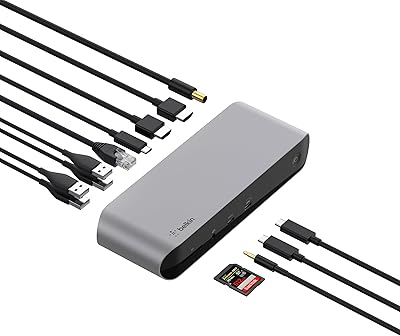
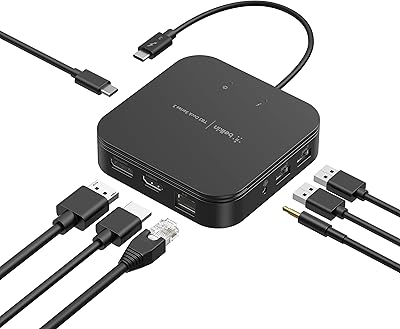
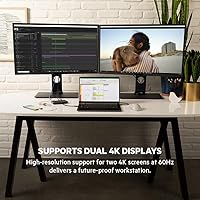
The Belkin Thunderbolt 3 Dock Mini is a compact, versatile docking station designed for both Mac and Windows users. This Thunderbolt 3 dock provides a simple and efficient way to connect multiple devices through a single cable. It supports dual 4K displays at 60Hz, allowing you to expand your workspace effortlessly. The device is small and lightweight, making it an excellent option for users who need a portable solution without sacrificing performance. With its tethered Thunderbolt 3 cable, setup is quick and hassle-free, giving users an easy way to turn their laptop into a full workstation.

Features & Benefits

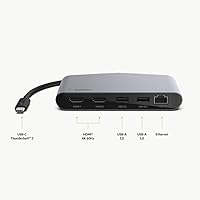
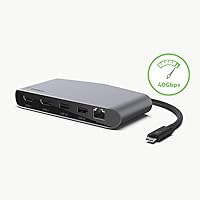
The Belkin Thunderbolt 3 Dock Mini offers impressive performance with 40Gbps data transfer speeds, ensuring smooth and fast data handling. Its array of ports—including 2 USB-A, 1 USB-C, 2 HDMI, and 1 Ethernet—provides extensive connectivity options for external devices. The dock also features up to 60W power delivery, enabling you to charge connected devices while working. Whether you need to connect to monitors, peripherals, or networks, this dock handles it all efficiently, making it an ideal companion for users who demand both speed and versatility in their setups.

Best For

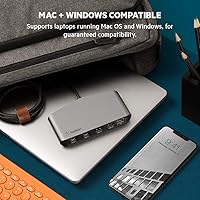
This Thunderbolt 3 docking station is perfect for Mac and Windows users who require a portable and powerful solution for their laptops. It is especially well-suited for professionals who need to manage dual monitor setups for multitasking. Users who frequently transfer large files or work with high-resolution content will appreciate the fast data transfer capabilities and seamless connectivity. The dock is also a great option for those who need a reliable, all-in-one charging and connectivity hub while maintaining a compact and space-saving workstation.

User Feedback

The Belkin Thunderbolt 3 Dock Mini is generally praised for its compact design and reliable performance. Users appreciate how easily it integrates into their work setups, particularly the convenience of setting up dual 4K monitors without any hassle. However, some report occasional compatibility issues with older devices, which can lead to connectivity hiccups. Still, many consider this dock a highly effective solution for streamlining their desk space and improving productivity. Its ability to charge devices while providing fast data transfer has garnered positive feedback, making it a favored choice for professionals on the go.

Pros

  • Compact design makes it easy to carry and ideal for travel.
  • Dual 4K display support boosts productivity for professionals.
  • Fast data transfer speeds (40Gbps) make it reliable for heavy data tasks.
  • Provides 60W power delivery, allowing devices to charge while in use.
  • Quick setup with the included tethered Thunderbolt 3 cable.
  • Multiple ports (USB-A, USB-C, HDMI, Ethernet) allow versatile device connections.
  • Ideal for remote workers or business travelers who need a portable docking solution.

Cons

  • Some users report occasional compatibility issues with older devices.
  • Limited to 60W power delivery, which may not be sufficient for high-power laptops.
  • Compact size means fewer USB ports, limiting connectivity options for users with multiple devices.
  • Not suitable for users who need a higher number of HDMI ports or additional I/O options.
  • Does not support power delivery for charging larger devices like gaming laptops.
  • May not work as smoothly with non-Thunderbolt USB-C ports, leading to slower performance or limited features.

Ratings

After analyzing verified user reviews from various sources and languages, we have gathered insights on the Belkin Thunderbolt 3 Dock Mini. Only authentic, high-quality feedback was considered, filtering out spam, duplicate, and exaggerated reviews. While most users praise its compact design and performance, some have noted compatibility issues with older devices. Both strengths and pain points are reflected in the aggregated scores, providing a balanced view based on real user experiences across multiple platforms.

Performance
92%
Many users are impressed by the fast data transfer speeds, which make it easy to handle large files without noticeable lag. The device performs seamlessly for both personal and professional use, handling heavy tasks like video editing or multitasking with ease. Its reliability is often highlighted by users working across different operating systems.
A few users noted that the device sometimes struggles with specific older hardware configurations. Some have experienced brief connectivity issues when using demanding setups, leading to slight delays in performance under heavy load, especially when paired with outdated laptops or desktops.
Compatibility
75%
25%
This Thunderbolt 3 docking station is well-regarded for its broad compatibility with both macOS and Windows devices. Users consistently mention how easy it is to connect to newer laptops and desktops, without needing additional drivers or complicated setups. For those using up-to-date systems, this dock works flawlessly with minimal effort.
However, some buyers report occasional compatibility issues with older devices, especially those running outdated OS versions or using non-Thunderbolt USB-C ports. Some also mentioned that the docking station doesn’t always support full functionality with every brand or model of laptop, causing frustrations when trying to connect non-standard systems.
Setup & Installation
94%
Setup is widely praised for being quick and intuitive, especially with the included tethered Thunderbolt 3 cable. Most users were able to plug and play without needing to deal with complicated drivers or extra steps. This simplicity makes it especially appealing for professionals looking for a hassle-free solution for connecting multiple devices.
A small number of users pointed out that the initial setup could be confusing when using certain specific configurations or legacy hardware. While most setups were smooth, those with older operating systems or non-Thunderbolt systems experienced minor connectivity hiccups requiring manual configuration or troubleshooting.
Portability & Size
89%
The compact design is a standout feature, with many users appreciating how easy it is to carry around. At just 6.24 ounces and measuring 3.1 x 5.1 x 0.8 inches, it's small enough to be tucked into a laptop bag or backpack, making it perfect for business trips or work-from-home setups. Its lightweight nature makes it a favorite for users on the go.
While the size is a major plus for portability, some users feel the compact design sacrifices a bit in terms of the number of ports and overall expandability. For those needing more than the provided ports, this device may feel a bit restrictive, especially when compared to larger docking stations that offer more I/O options.
Build Quality
88%
The build quality is generally praised for being solid and durable. The sleek, black exterior feels sturdy, and users often highlight how well it holds up during daily use, even in portable settings. Despite its small size, the device feels premium and is built to withstand daily handling.
However, a few users expressed concerns about the lack of an additional protective cover or sturdier materials. While the design is compact, some worry that the relatively thin frame could be prone to wear and tear if used in harsher environments or with frequent mobility.
Charging Speed & Power Delivery
80%
20%
The 60W power delivery is appreciated by users who rely on their docking station to charge devices quickly. It allows laptops and smartphones to stay powered even while connected to multiple peripherals, ensuring that users don't have to juggle power cables. This is especially useful for those with limited outlets in their workspace.
However, some users feel the 60W power delivery falls short when trying to charge larger devices like high-power laptops. Several have mentioned that their devices charge slower than expected or do not charge at all under heavy use, particularly when running multiple high-performance applications or peripherals at the same time.
Dual Monitor Support
90%
Support for dual 4K displays is a major highlight, and many users rave about the increased productivity they experience from setting up a multi-monitor workstation. This feature is especially praised by professionals in design, editing, and other visual-heavy fields, where high-resolution displays make a significant difference.
On the flip side, some users noted that dual monitor support can be tricky to configure for certain older monitors or systems that don’t natively support dual 4K. While most setups work seamlessly, a few had trouble getting both monitors to display at full 60Hz refresh rates, especially when running high-demand applications.
Data Transfer Speed
91%
The 40Gbps data transfer speed is another strong point for this device, with users mentioning how it allows for fast file transfers, smooth video streaming, and minimal latency during usage. Whether for personal or professional tasks, this speed significantly enhances performance when transferring large files between external storage devices and computers.
However, some users pointed out that the transfer speed can be inconsistent when using multiple peripherals at once, especially on non-Thunderbolt laptops. A few reviewers experienced slower-than-expected speeds when connecting hard drives or USB devices, which may be linked to system compatibility or the number of devices connected at once.
User Experience & Usability
85%
Users often commend the intuitive, user-friendly design of the docking station. Its plug-and-play functionality ensures that even less tech-savvy individuals can set it up without issues. The simplicity of the interface, along with its seamless integration with macOS and Windows, enhances the overall usability, making it a convenient option for a wide range of users.
While usability is generally positive, some users have encountered occasional glitches when switching between different devices or setups. These minor bugs can be frustrating for those who rely on a smooth, consistent experience across multiple workstations or devices, particularly when switching between laptops or adjusting peripherals.
Customer Support
70%
30%
Some customers have shared positive experiences with the manufacturer’s support team, citing quick responses to inquiries and a generally helpful approach. The warranty and support options provided also add an extra layer of reassurance for buyers looking for long-term service.
However, several users reported slower-than-expected response times from customer service when facing issues with setup or hardware malfunctions. There are some complaints about delayed support tickets and lack of helpful solutions for troubleshooting specific device compatibility problems.
Reliability & Durability
85%
Most users find the device to be reliable for everyday use, with many commenting on its ability to handle daily tasks without issues. The solid build quality contributes to its durability, making it a dependable option for professionals or home office users who require stable performance over time.
That said, a few users mentioned concerns about long-term reliability, especially with frequent plugging and unplugging. While the device performs well initially, there are reports of occasional connection issues developing after extended use, particularly with more complex setups or multiple device connections.
Value for Money
87%
The product is considered a good value for its price, given its performance and portability. Users feel that the combination of features—like dual 4K display support, high-speed data transfer, and multiple ports—justifies the cost. The sleek design and solid build quality also contribute to the product's overall value.
Some users feel that while the device offers great performance, the price is a bit steep compared to alternatives with similar features. Buyers who do not need the full set of features may find it a bit overkill for their needs, making other, more affordable options more attractive.

Suitable for:

The Belkin Thunderbolt 3 Dock Mini is well-suited for professionals and power users who need a compact and portable docking station. Its dual 4K display support makes it a great choice for multitaskers, such as designers, video editors, or anyone who requires multiple screens for productivity. The device is also ideal for Mac and Windows users looking for a high-speed, reliable solution to connect their laptops to various peripherals. With features like 40Gbps data transfer speeds and 60W power delivery, it's a solid option for those who frequently transfer large files or need a dependable charging station for their devices. Additionally, its lightweight and compact design make it highly portable, making it perfect for business travelers or remote workers who need to set up efficiently wherever they go.

Not suitable for:

However, this Thunderbolt 3 docking station may not be the best fit for users with older devices or those using non-Thunderbolt USB-C ports. Compatibility issues have been reported, especially with legacy hardware, where some users struggled to get full functionality from the dock. Additionally, those needing more than the provided ports, or more robust power delivery (for high-power laptops), may find the Belkin Dock Mini lacking. Users with demanding setups or those who need additional features like more USB ports or faster charging for larger devices might be better off with a larger, more feature-rich docking station. Finally, the dock's compact size, while great for portability, means fewer I/O options, which might not meet the needs of users with more complex connectivity requirements.

Specifications

  • Ports: Includes 2 x USB-A, 1 x USB-C, 2 x HDMI, and 1 x Ethernet for versatile connectivity.
  • Data Transfer Speed: Supports 40Gbps data transfer rate through Thunderbolt 3 for fast performance.
  • Video Support: Supports dual 4K displays at 60Hz for enhanced productivity and multitasking.
  • Power Delivery: Provides up to 60W power delivery to charge connected devices.
  • Thunderbolt Cable: Comes with a 6.8-inch tethered Thunderbolt 3 cable for easy connection.
  • Dimensions: Measures 3.1 x 5.1 x 0.8 inches, offering a compact design for portability.
  • Weight: Weighs 6.24 ounces, making it lightweight and easy to carry.
  • Compatibility: Compatible with macOS Sierra+ and Windows 8+ for broad device support.
  • Form Factor: Compact, slim design fits easily in a laptop bag for travel or remote work.
  • Color: Finished in a sleek black color, suitable for professional environments.
  • Ethernet: Features a Gigabit Ethernet port for reliable wired network connectivity.
  • USB-C Support: Includes a USB-C port for fast data transfer and device connection.
  • Operating System Support: Works seamlessly with both macOS and Windows, ensuring cross-platform usability.
  • Monitor Setup: Ideal for setting up dual 4K monitor configurations, supporting high-resolution tasks.
  • Release Date: Released on May 6, 2019, offering up-to-date connectivity options.
  • Power Adapter: No separate power adapter required, as power is delivered through Thunderbolt 3.

FAQ

Setting up this Thunderbolt 3 docking station is simple. Just connect the included Thunderbolt 3 cable to your laptop or device, then plug it into the dock. The dock is plug-and-play, meaning it doesn’t require extra drivers for most Mac and Windows devices. Once connected, you can start using your monitors and peripherals right away.

Yes, this device is compatible with both Mac and Windows systems. It works with macOS Sierra+ and Windows 8+, offering flexible support for a wide range of laptops. You can connect it to your computer to expand your ports, support dual 4K monitors, and even charge your devices simultaneously.

The dock provides a variety of ports for versatility. It includes 2 USB-A ports, 1 USB-C port, 2 HDMI ports, and 1 Ethernet port, giving you ample options for connecting peripherals, displays, and networking cables.

Yes, this dock provides up to 60W of power delivery, which is sufficient for charging most laptops while you work. However, it may not be enough to charge high-power laptops like gaming machines or workstations, which may require higher wattage.

Yes, it does. The Belkin Thunderbolt 3 Dock Mini supports dual 4K monitors at 60Hz, allowing for smooth and high-resolution multitasking. This is especially useful for professionals and creatives who need extended screen real estate.

This device offers an impressive 40Gbps data transfer speed, thanks to its Thunderbolt 3 connection. This ensures fast and reliable performance, whether you're transferring large files, streaming video, or using data-intensive applications.

Yes, the dock is compact and lightweight, making it ideal for travel or remote work. It weighs just 6.24 ounces and has dimensions of 3.1 x 5.1 x 0.8 inches, so it can easily fit into your laptop bag or backpack without adding much bulk.

Some users have reported occasional compatibility issues with older devices, particularly those that don’t fully support Thunderbolt 3 or USB-C connections. If you have an older laptop, make sure it supports Thunderbolt 3 or USB-C for optimal performance.

Yes, the dock works well with a single monitor, supporting up to 4K resolution at 60Hz. If you only need one display, you can easily connect it through either of the HDMI ports.

The Belkin Thunderbolt 3 Dock Mini provides up to 60W of power delivery. This is enough to charge most laptops during use, but may not be sufficient for laptops that require more power, such as high-end gaming laptops or powerful workstations.