
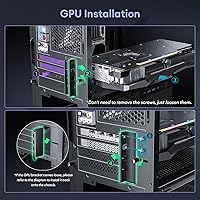
Overview

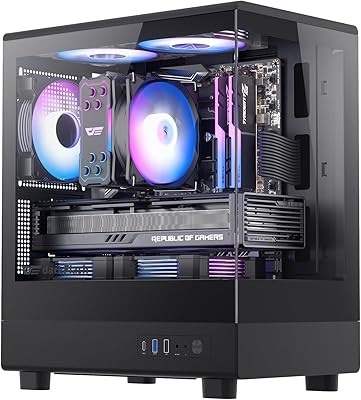
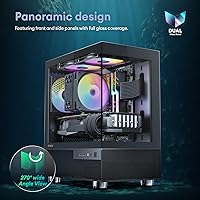
The Okinos Aqua 3 Micro-ATX PC Case is one of those rare compact enclosures that genuinely looks more expensive than it is. Its 270-degree panoramic glass wraps both the front and side panels, giving your build a showcase quality that most cases at this price tier simply don't offer. Okinos ships it with three pre-installed ARGB fans, so you're not staring at an empty, dark interior the moment you power it on. For builders who want a visually striking Micro-ATX or ITX system without immediately padding the parts list with extras, this compact PC enclosure makes a compelling starting point.

Features & Benefits

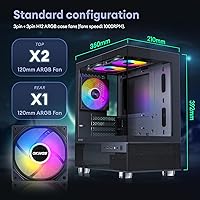
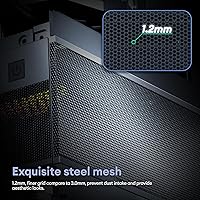
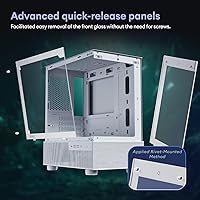
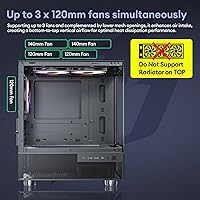
The vertical airflow setup here is worth understanding before you build. Two 120mm ARGB fans sit at the top exhausting hot air out, while a third handles rear exhaust — heat rises and exits rather than pooling inside the chassis. That said, there is no side intake, so very power-hungry GPUs may need careful monitoring. The front I/O punches above its class with a Type-C 3.2 Gen 2 port hitting 10Gbps, which most competing cases skip entirely. The 1.2mm steel mesh filters dust more effectively than coarser alternatives, and the tool-free front glass release means maintenance doesn't require hunting for a screwdriver.

Best For

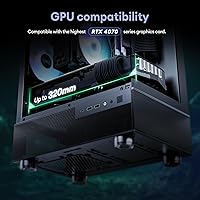
This compact PC enclosure is a natural fit for first-time builders who want their system to look polished without spending extra on fans, lighting, or a showpiece case. It handles mid-range GPUs up to 320mm comfortably — think RTX 4060 or 4070 territory — so performance isn't sacrificed for the smaller footprint. Anyone downsizing from a bulky mid-tower will appreciate how much less desk space it demands. It also suits Micro-ATX gaming rigs where the build itself doubles as a display piece. If you're pairing it with a high-end GPU or a CPU that runs especially hot, weigh the airflow constraints carefully first.

User Feedback

With a 4.6-star rating across roughly 400 reviews, the Aqua 3 earns its praise mostly from buyers who were genuinely surprised by the build quality at this price. The glass panels and exterior finish get consistent compliments — people expected something flimsier. Where the feedback gets more honest is around cable management: the interior is tight, and less experienced builders have mentioned that routing cables neatly takes real patience. A smaller group notes that the stock fans do their job under moderate workloads but may fall short if you're running a high-TDP setup. Balanced overall, but the cable routing issue is worth knowing upfront.

Pros

  • Panoramic tempered glass on both the front and side panels looks genuinely premium for the price tier.
  • Three ARGB fans come pre-installed, saving money and setup time right out of the box.
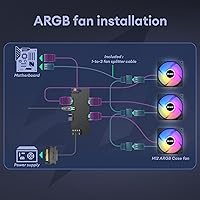
  • The onboard four-port ARGB controller handles lighting without requiring a motherboard header or external hub.
  • A Type-C 3.2 Gen 2 front port delivering 10Gbps is a rare and useful inclusion at this price point.
  • The Aqua 3 fits GPUs up to 320mm, covering most popular mid-range cards with no modifications needed.
  • Tool-free front glass removal makes cleaning the interior far less stressful than on screw-mounted designs.
  • Fine 1.2mm steel mesh filters dust more effectively than the coarser mesh found on many competing cases.
  • Compact dimensions keep the desk footprint small without forcing a compromise down to Mini-ITX.
  • Rated #104 in Computer Cases with a 4.6-star average across hundreds of buyers — consistently well-received for its segment.
  • Bottom-mounted PSU placement keeps power supply heat away from other components and improves overall weight distribution.

Cons

  • Interior cable management space is tight enough to genuinely frustrate less experienced builders.
  • No side intake panel limits sustained cooling headroom for high-TDP GPU configurations.
  • Stock fans may need replacing if you plan to push a power-hungry CPU or GPU under long workloads.
  • Only four expansion slots restricts multi-card or multi-PCIe-device configurations.
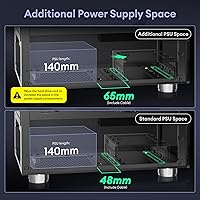
  • Maximum PSU length of 185mm rules out some longer power supplies that builders may already own.
  • The case is limited to Micro-ATX and Mini-ITX boards — full ATX builders need to look elsewhere.
  • Radiator support is absent, which cuts off the option to add an all-in-one liquid cooler for CPU cooling.
  • At 9.17 pounds before components, it is on the heavier side for a case of this volume.

Ratings

The scores below reflect an AI-driven analysis of verified global buyer reviews for the Okinos Aqua 3 Micro-ATX PC Case, with spam, bot-generated, and incentivized feedback actively filtered out before scoring. Each category is graded on real-world performance patterns drawn from hundreds of confirmed purchases, capturing both the aspects buyers consistently celebrate and the friction points they openly flag. Nothing is glossed over — the ratings reflect the full picture.

Visual Design
93%
The 270-degree panoramic tempered glass wrapping both the front and side panels is the single most praised aspect across reviews — buyers repeatedly describe the finished build as looking far more expensive than it is. The diamond-cut panel angles catch light in a way that makes even modest hardware look intentional and polished.
A small number of buyers noted that fingerprints and smudges show prominently on the large glass surfaces, requiring frequent wiping to keep the showcase look intact. There is also no white colorway option, which limits the aesthetic for builders working with a light-themed build.
Build Quality
81%
19%
The steel chassis feels solid for a case at this price tier, and the tempered glass panels arrive without flex or wobble when properly seated. The rivet-mounted quick-release mechanism on the front glass is a particularly well-executed detail that adds durability to what is usually a fragile interaction point.
Some reviewers noted that the interior steel is on the thinner side, and a few observed minor sharp edges along the bottom PSU shroud area during installation. It is not a premium-steel build, and close inspection reveals that the fit and finish is good but not exceptional.
Airflow & Cooling
68%
32%
The vertical exhaust layout — two fans pushing hot air out the top and one at the rear — works efficiently for moderate workloads, and the 1.2mm fine mesh keeps intake air cleaner than most competing cases at this price. Builders running mainstream CPUs and mid-range GPUs report stable temperatures without needing to add fans immediately.
The absence of any side intake panel is a real limitation for high-TDP builds; heat from a power-hungry GPU has fewer pathways out, and sustained gaming or rendering sessions can push thermals higher than expected. Builders pairing the case with a 200W-plus GPU should plan for additional fan upgrades or accept the thermal tradeoff.
Value for Money
89%
Three ARGB fans, a four-port lighting controller, panoramic tempered glass on two panels, and a 10Gbps Type-C front port would typically push a case into a noticeably higher price bracket — getting all of that together here is what drives the overwhelmingly positive sentiment in buyer reviews. For first-time builders especially, the out-of-box completeness reduces day-one spending significantly.
The value equation softens slightly if you end up needing to replace the stock fans for better thermals or add a front intake fan to compensate for the missing side panel — those additions start to erode the cost advantage. The compact interior also means cable management accessories become a near-necessity rather than optional extras.
Front I/O & Connectivity
86%
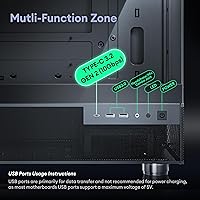
The Type-C 3.2 Gen 2 port running at 10Gbps is a standout inclusion that buyers consistently highlight as a reason they chose this over competing options. Having two USB 3.0 ports alongside it, plus dedicated audio jacks and the ARGB control button, makes the front panel genuinely functional rather than a stripped-down afterthought.
There is no USB-C charging passthrough or Thunderbolt support, which is expected at this price but worth noting for builders who rely heavily on USB-C peripherals. A few users also mentioned the power button feel is slightly mushy compared to premium cases, though it functions without issue.
Cable Management
53%
47%
The PSU shroud at the bottom does a reasonable job hiding the power supply and its immediate cabling from the main glass view, and there are enough routing holes to thread cables through without too much creativity. Experienced builders who use fully modular PSUs and sleeved cables can achieve a clean result.
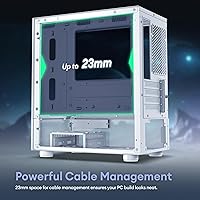
This is the most consistently mentioned frustration across reviews — the space behind the motherboard tray is shallow, making it genuinely difficult to route cables neatly without forcing panels back into place. First-time builders with non-modular or semi-modular PSUs report visible cable clutter behind the glass, which defeats the purpose of the panoramic design.
Fan Performance
71%
29%
The pre-installed H12 ARGB fans provide decent static pressure and a satisfying light show at mid-speed, and they run quietly enough during everyday desktop use that noise is not a meaningful complaint in most reviews. For a budget build or a secondary workstation, they hold up well.
Under sustained load — extended gaming sessions or CPU-intensive tasks — the fans lack the airflow output of higher-quality aftermarket options, and a minority of builders with demanding setups have replaced them within the first few months. They are adequate as a starting point but not a permanent solution for performance-focused systems.
GPU Compatibility
84%
Supporting GPUs up to 320mm covers the vast majority of current mid-range and upper-mid cards, including the RTX 4060 Ti and RTX 4070, without any bracket removal or modification. Builders planning an RTX 4070 build specifically will find the clearance comfortable rather than tight.
The 320mm limit does rule out some longer high-end cards, including certain RTX 4080 and 4090 variants, which can exceed 330–340mm. Builders future-proofing for a top-tier GPU upgrade will eventually outgrow the clearance, making this more of a mid-range-forever chassis.
Ease of Assembly
72%
28%
The tool-free front glass release and clearly positioned standoffs make the initial setup process straightforward, and the pre-installed fans mean there is one fewer task on the build checklist. Most buyers describe the assembly experience as smooth up to the cabling stage.
The tight interior becomes a real obstacle during the final stages of the build, particularly when seating the 24-pin ATX cable and managing GPU power leads. Less experienced builders should expect to spend more time on assembly than a larger mid-tower would require.
Dust Filtration
78%
22%
The 1.2mm steel mesh is genuinely superior to the coarser mesh found on many cases at this tier, catching fine particulates before they reach fans and heatsinks and keeping the interior noticeably cleaner over time. Buyers in dusty environments have commented that the mesh holds up well over months of use.
The finer mesh also clogs faster than coarser alternatives, meaning the filters need more frequent cleaning to avoid a gradual reduction in airflow. There is no removable magnetic filter at the bottom intake zone, which makes PSU area maintenance slightly less convenient.
ARGB Lighting
82%
18%
Having a four-port ARGB controller built into the front I/O panel is a practical feature that many competing cases skip entirely — buyers can cycle through lighting modes without any software, motherboard compatibility checks, or external controllers. The fans produce a vibrant, even glow that photographs well and looks polished in a darkened room.
The lighting controller offers a limited number of preset modes compared to software-driven ARGB ecosystems like ASUS Aura or MSI Mystic Light, so buyers who want fine-grained color programming will find it restrictive. Syncing the fans with other ARGB components on the motherboard requires a separate header connection and can create minor compatibility headaches.
Motherboard Compatibility
74%
26%
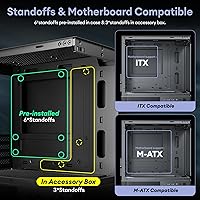
Supporting both Micro-ATX and Mini-ITX formats gives builders a reasonable amount of flexibility, and the interior layout accommodates standard ATX-spaced standoffs without modification. For the Micro-ATX sweet spot of budget and mid-range builds, the fit is reliable.
Full ATX boards are a hard no, which rules out the case for anyone who already owns or plans to buy a standard ATX platform. The four expansion slots also limit multi-GPU or multi-PCIe-card configurations, making it unsuitable for workstation builders who need extra slot real estate.
Noise Levels
76%
24%
At idle and light loads, the three stock fans run quietly enough that most buyers do not mention noise as an issue, and the closed front glass panel helps dampen mechanical drive noise for those using HDDs alongside SSDs. The overall acoustic profile is acceptable for a bedroom or home office setup.
Under full load the fans become noticeably audible, and there is no fan header on the case itself for speed control beyond the fixed ARGB controller presets — you rely entirely on motherboard fan curve settings for noise management. Buyers sensitive to fan noise at full load may want higher-quality replacement fans early on.
Upgrade Headroom
58%
42%
The top fan slots accept 140mm fans as an upgrade over the stock 120mm units, which gives builders a meaningful airflow improvement path without major rework. The bottom fan mounts also remain empty from the factory, leaving room to add intake fans if thermals become a concern later.
The absence of radiator support, only four expansion slots, the 185mm PSU length cap, and no side intake position collectively limit how far this case can grow with a builder's ambitions. It is best thought of as a fixed-tier enclosure rather than a platform to evolve over multiple upgrade cycles.

Suitable for:

The Okinos Aqua 3 Micro-ATX PC Case is built for builders who want their system to look like it cost significantly more than it did. First-time PC builders will find it particularly rewarding — the three pre-installed ARGB fans and onboard lighting controller mean you can power on a fully lit, visually striking rig without sourcing extra components. It's also a strong pick for anyone downsizing from a full or mid-tower who wants a smaller desk footprint without giving up mid-range GPU performance; cards up to 320mm slot in without any clearance workarounds. Compact gaming setups pairing a Micro-ATX board with something like an RTX 4060 or 4070 are squarely in its wheelhouse. If aesthetics matter as much as function and the budget is firm, this compact PC enclosure consistently overdelivers on visual impact.

Not suitable for:

The Okinos Aqua 3 Micro-ATX PC Case has real limitations that certain builders should think hard about before buying. The interior cable routing space is genuinely tight — if you're new to building and not yet comfortable managing cables in a constrained environment, the process will test your patience and the end result may look cluttered behind the glass. Thermal headroom is another concern: the vertical airflow design works well for moderate workloads, but there is no side intake panel, which means high-TDP CPUs or power-hungry GPUs running sustained loads may not stay as cool as they would in a more airflow-focused chassis. Builders planning an enthusiast-tier system with a 250W-plus GPU or a top-end CPU cooler taller than 164mm should look elsewhere. The four expansion slots also limit upgrade headroom for anyone who anticipates adding multiple PCIe cards down the line.

Specifications

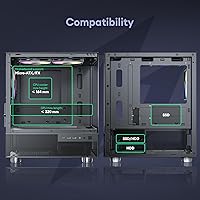
  • Form Factor: Mini-Tower chassis compatible with Micro-ATX and Mini-ITX motherboards.
  • Dimensions: The case measures 350mm deep, 210mm wide, and 392mm tall.
  • Weight: Bare chassis weight is 9.17 pounds before any components are installed.
  • Panel Material: Both the front and side panels are constructed from tempered glass.
  • Mesh Grade: Steel mesh panels use a 1.2mm fine grid for improved dust filtration over standard 3.0mm alternatives.
  • Included Fans: Three 120mm 3-Pin ARGB fans (H12 series) come pre-installed at the top and rear of the chassis.
  • Fan Controller: A built-in 4-port ARGB controller is integrated into the front I/O zone for direct lighting adjustment.
  • Front I/O: The front panel includes two USB 3.0 ports, one Type-C 3.2 Gen 2 (10Gbps) port, HD audio jacks, a power button, and an ARGB control button.
  • Top Fan Support: The top of the case supports up to two 120mm or two 140mm fans.
  • Rear Fan Support: The rear position accommodates one 120mm fan, which is occupied by one of the pre-installed units.
  • Bottom Fan Support: The bottom of the chassis can mount up to two 120mm fans, though none are pre-installed there.
  • Max GPU Length: Graphics cards up to 320mm in length can be installed without modification.
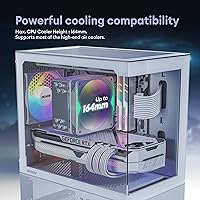
  • Max CPU Cooler: Tower-style CPU coolers up to 164mm in height are supported within the chassis.
  • Max PSU Length: The bottom-mounted PSU bay accommodates power supplies up to 185mm in length.
  • Expansion Slots: Four expansion slots are available for PCIe cards and accessories.
  • PSU Mount: The power supply mounts at the bottom of the chassis to keep heat away from other components.
  • Radiator Support: This case does not support liquid cooling radiators in any fan position.
  • Color: Available in black with a dark-tinted tempered glass finish on the front and side panels.

Related Reviews
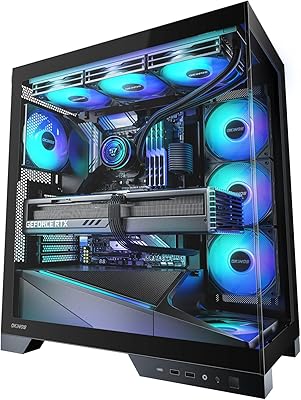
Okinos Aqua 9 ATX PC Case
84%
92%
Cooling Performance
88%
Aesthetics & Design
75%
Ease of Cable Management
89%
Build Quality
84%
Fan Noise
More
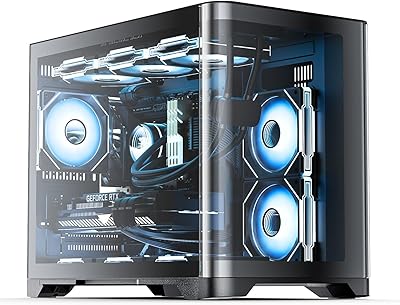
Okinos Cypress 3 Wood Micro ATX Case
88%
90%
Build Quality
87%
Airflow & Cooling Performance
91%
Ease of Installation
95%
Design & Aesthetics
89%
Cable Management
More
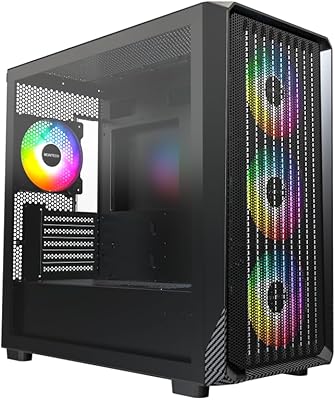
darkFlash DB330M Micro-ATX PC Case
86%
88%
Cooling Performance
91%
Design and Aesthetics
90%
Ease of Setup
85%
Build Quality
89%
Value for Money
More
ASUS A21 Micro ATX PC Case
84%
92%
Cable Management
89%
Airflow Efficiency
85%
Build Quality
90%
Interior Space & Compatibility
87%
Design Aesthetics
More
AsiaHorse Pegasus Micro ATX PC Case
85%
91%
Build Quality
88%
Cooling Performance
89%
Interior Space & Cable Management
85%
Aesthetics & Design
83%
USB Type-C Port
More
Montech X5M Micro ATX Gaming PC Case
85%
90%
Cooling Performance
88%
Ease of Assembly
84%
Build Quality
89%
Design & Aesthetics
91%
GPU Compatibility
More
Jonsbo Z20 Micro-ATX Mini Tower Case
80%
93%
Build Quality & Materials
91%
Portability & Carrying Handle
78%
Internal Layout & Compatibility
89%
GPU Clearance & Large Component Support
87%
Cooling Support & Thermal Flexibility
More
Apevia PHENOM-WH Phenom Micro ATX Gaming PC Case
84%
87%
Cooling Performance
92%
Build Quality
94%
Design & Aesthetics
88%
Ease of Cable Management
65%
Fan Support Options
More
Okinos Cypress 5 AIR Oak Wood ATX PC Case
86%
88%
Cooling Performance
91%
Build Quality
94%
Aesthetic Design
86%
Ease of Installation
90%
Motherboard Compatibility
More
MUSETEX NN8 Mid-Tower ATX PC Case
78%
88%
Value for Money
79%
Airflow Performance
93%
Side Panel Design
84%
ARGB Lighting Quality
71%
Build Quality & Finish
More

FAQ

Yes, the Aqua 3 supports graphics cards up to 320mm long, and the RTX 4070 falls well within that limit. You won't need to remove any brackets or make any adjustments — it slots in like any standard installation.

It ships with three 120mm ARGB fans already in place — two at the top exhausting air upward and one at the rear. For most mid-range builds, that's enough to get started without buying anything extra right away.

Yes, and this is one of the more practical features of this compact PC enclosure. There's a dedicated ARGB control button on the front I/O panel that cycles through lighting modes independently, so you don't need a motherboard with an ARGB header to use it.

This is worth being upfront about: the interior space is tight. There isn't a lot of room behind the motherboard tray to hide cables, so routing everything neatly takes patience. If it's your first build, budget extra time for this step and consider using modular PSU cables to reduce bulk.

The side glass panel uses a standard screw-mount setup, but the front glass has a tool-free quick-release mechanism that makes it noticeably easier to pop off for cleaning or access. The rivet-mounted design also reduces the risk of accidentally dropping the panel.

Tower coolers up to 164mm tall are supported. That covers most popular air coolers, including taller ones like the Noctua NH-D15 alternatives, but you should double-check the specific cooler's height spec before buying if it's a large unit.

No, the Okinos Aqua 3 Micro-ATX PC Case does not have radiator mounting positions, so all-in-one liquid coolers are not an option here. If liquid cooling is part of your plan, you'll need to look at a different chassis.

The 1.2mm steel mesh is noticeably finer than the 3.0mm mesh on many competing cases, which means it traps more dust before it can reach your components. The tradeoff is that filters need to be cleaned more regularly to avoid restricting airflow — checking it every month or two is a good habit.

Standard ATX PSUs are generally fine as long as they don't exceed 185mm in length, which covers most units on the market. If you own a longer high-wattage PSU from an older build, measure it first before assuming it will fit.

It's genuinely useful. The front Type-C port runs at 3.2 Gen 2 speeds (10Gbps), which means it handles fast external SSDs, modern peripherals, and data transfers at full speed. That spec is typically found on cases sold at a noticeably higher price, so it's a real practical benefit here.

Where to Buy