Overview

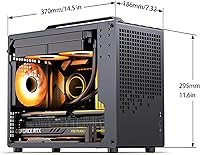
The Jonsbo Z20 Micro-ATX Mini Tower Case arrives in a category where most compact builds force a trade-off — usually Mini-ITX restrictions or a bulky footprint. This compact mATX case sits at around 20 liters, which is genuinely impressive for the Micro-ATX form factor. Pick it up and the 2mm steel construction is immediately noticeable; it feels nothing like a budget chassis. The detachable carrying handle isn't a gimmick — it's the kind of thoughtful detail that makes you want to bring this rig to a friend's place without hunting for a padded bag. Cracking the top 25 in Computer Cases on Amazon within its first year says quite a bit about how well it landed.
Features & Benefits

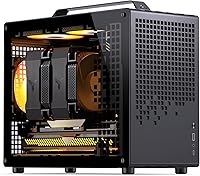
The Z20 packs a surprising amount of flexibility into its compact frame. Magnetic dust filters cover key intake areas, which matters if you plan to run this machine daily without constant disassembly for cleaning. A removable PCIe bracket makes GPU installation far less of a wrestling match, especially inside a tight enclosure. Support for a 240mm AIO cooler at the top is uncommon at this size — paired with up to 164mm of CPU cooler clearance, there's real thermal headroom. The perforated panel pattern looks sharp while doing actual airflow work. PSU flexibility spanning ATX, SFX, and SFX-L gives builders more component freedom than most rivals in this volume class.

Best For

This small-form-factor chassis makes the most sense for builders who want a portable, capable machine without the frustrations of Mini-ITX. If you've ever tried fitting a serious GPU into a true ITX build, you know the headaches — the Z20 sidesteps most of them with up to 363mm GPU clearance in a box barely larger than many ITX options. It also suits desk-space-conscious home or office users who refuse to settle for weaker integrated graphics. The carrying handle is especially useful for anyone who moves their rig regularly — LAN events, a second location, a friend's setup. Builders who care about materials and finish without overspending will find this hits a strong middle ground.

User Feedback

With a 4.7-star average across over 300 ratings, this compact mATX case has clearly connected with its audience. Most buyers call out the build quality specifically — the steel panels feel dense and well-finished, which isn't guaranteed at this price tier. The carrying handle earns consistent praise for being practical rather than decorative. That said, cable management takes real planning; the interior is tight, and several reviewers wish routing options were more generous. ATX PSU compatibility also requires careful component verification before you buy — clearances depend heavily on your specific hardware combination. A handful of first-time builders noted the assembly instructions could be more thorough, so newcomers should budget extra research time.

Pros

  • The Jonsbo Z20 Micro-ATX Mini Tower Case uses 2mm steel panels that feel noticeably more solid than similarly priced rivals.
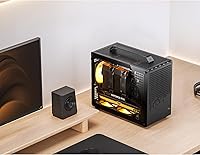
  • The detachable carrying handle makes transporting a fully built system practical, not just possible.
  • Top-mounted 240mm AIO support is rare in a 20-liter chassis and gives real thermal flexibility.
  • GPU clearance up to 363mm means most high-end discrete cards fit without compromises.
  • Magnetic dust filters on key intake panels make routine maintenance quick and tool-free.
  • The compact mATX case supports ATX, SFX, and SFX-L power supplies, reducing PSU upgrade costs.
  • CPU cooler clearance up to 164mm means popular air tower coolers fit without hunting for low-profile alternatives.
  • The perforated panel design looks clean on a desk while genuinely aiding airflow — not just decorative.
  • A 4.7-star rating across hundreds of verified buyers reflects consistently high satisfaction for the category.
  • The removable PCIe bracket meaningfully reduces GPU installation frustration inside a tight enclosure.

Cons

  • Cable management requires real planning — the interior is tight and unforgiving for rushed builds.
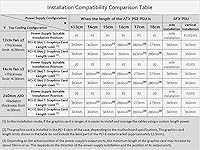
  • ATX PSU compatibility varies by hardware combination and must be verified before purchase, not assumed.
  • The single front USB 3.0 port feels inadequate for a 2024 build, with no USB-C option included.
  • Assembly instructions are thin and leave first-time builders relying on community guides and video walkthroughs.
  • The chassis ships without any vibration dampening on the HDD tray, so spinning drives transmit noise directly.
  • At over 14 pounds empty, total system weight can challenge lighter desk setups after components are added.
  • Only three storage bays total limits expandability for users who need significant local storage capacity.
  • No integrated lighting or RGB support means the interior aesthetic depends entirely on component choices.
  • Quality control reports suggest occasional panel alignment inconsistencies across production batches.
  • The 240mm AIO slot caps radiator thickness at 60mm, which excludes some thicker aftermarket cooling options.

Ratings

The Jonsbo Z20 Micro-ATX Mini Tower Case has been scored by our AI rating system after processing verified purchase reviews from buyers worldwide, with spam, bot-submitted, and incentivized feedback actively filtered out. The result is an honest, balanced snapshot of what real builders experienced — from the aspects that genuinely impressed them to the friction points that caused frustration. Both strengths and shortcomings are reflected in the scores below.
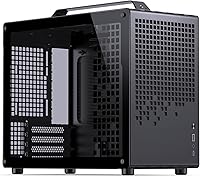
Build Quality & Materials
93%
The 2mm steel panels are the first thing buyers notice when they lift this chassis out of the box — it doesn't flex, rattle, or feel hollow like many competitors at this price tier. Multiple reviewers described it as feeling closer to a premium boutique case than a mid-range product. That density translates to real confidence when transporting the build.
A small number of buyers noted minor panel alignment inconsistencies on their units, suggesting quality control isn't perfectly uniform across the production run. At this thickness and weight, any misalignment is also harder to self-correct without risking scratches to the finish.
Portability & Carrying Handle
91%
The detachable carrying handle solves a real problem that most compact case makers ignore entirely. Builders who regularly take their rigs to LAN events or between locations praised it for making transport feel safe and intentional rather than awkward. It attaches and detaches cleanly without tools.
The handle works well for short carries, but a few users pointed out that at over 14 pounds before components are added, longer carries can still feel tiring. Those using heavy air coolers or multiple drives felt the ergonomics were acceptable rather than comfortable for extended distances.
Internal Layout & Compatibility
78%
22%
Fitting a Micro-ATX motherboard, a full-length GPU, and a standard ATX power supply into roughly 20 liters is a legitimate engineering achievement. Buyers appreciated that the Z20 doesn't force them into the Mini-ITX ecosystem just to get a small footprint, making component selection far less restrictive.
The layout leaves cable routing as a genuine challenge. Several builders reported spending considerably more time than expected managing cables, particularly around the PSU area. The space exists, but it isn't generously designed for cable tidiness, which can frustrate builders who care about airflow and aesthetics inside the case.
GPU Clearance & Large Component Support
89%
Supporting GPUs up to 363mm inside a 20-liter chassis is one of the Z20's strongest practical advantages. Builders running high-end triple-slot cards reported a fit with room to spare, which is rare in this form factor category and removes one of the biggest anxieties when planning a compact high-performance build.
GPU clearance does vary depending on PSU choice and cable routing decisions. A handful of users found that pairing a longer GPU with a full-size ATX PSU and a modular cable set reduced clearance meaningfully, so the 363mm figure should be treated as a maximum rather than a guaranteed working dimension.
Cooling Support & Thermal Flexibility
87%
Top-mount 240mm AIO support in a case this small is genuinely uncommon and was highlighted by multiple builders as a deciding factor in their purchase. Combined with up to 164mm of CPU air cooler clearance, there is real flexibility for thermal builds without being forced into low-profile compromises.
The 240mm AIO slot supports up to 60mm of radiator thickness, which rules out some thicker aftermarket options. Fan mounting positions are versatile on paper, but getting optimal airflow routing in practice requires planning — buyers who installed fans without thinking about pressure direction reported suboptimal thermals.
ATX PSU Compatibility
71%
29%
The ability to use a standard ATX power supply in a 20-liter case is a meaningful cost and availability advantage. Builders who already owned a full-size PSU appreciated not being forced into an SFX unit, which can add significant cost to a compact build.
ATX PSU compatibility is real but conditional. Several users flagged interference with specific hardware combinations, particularly around cable clearance near the motherboard and GPU. Jonsbo's own documentation recommends checking compatibility charts carefully, and buyers who skipped that step ran into avoidable installation headaches.
Dust Filtration
84%
Magnetic dust filters covering key intake areas are a practical inclusion that daily-use desktop builders genuinely appreciate. Pulling them out for a quick clean takes seconds, and the magnetic attachment means they sit flush without gaps that would let dust bypass them entirely.
Coverage is comprehensive but not complete — a few users noted areas around the rear fan and some panel edges where dust accumulation was higher than expected over time. The filters themselves are easy to maintain, but they aren't a complete solution for dusty environments without additional cleaning habits.
Aesthetic Design
86%
The square perforation pattern across the panels gives the Z20 a clean, intentional look that avoids the aggressive styling common in gaming cases. It reads professional enough for an office desk while still appealing to enthusiast builders. The all-black finish holds up well under desk lighting.
The aesthetic is restrained rather than striking, which suits some buyers perfectly and disappoints others who want RGB accents or more visual personality. There are no integrated lighting features, so builders wanting a lighted look need to source that entirely from components and additional accessories.
Value for Money
88%
At its price point, the combination of 2mm steel construction, 240mm AIO support, full-length GPU clearance, and a carrying handle would be difficult to replicate with competing options. Buyers consistently described it as punching above its weight class relative to similarly priced mATX cases.
It isn't the cheapest compact mATX option on the market, and buyers on a strict budget may find the price harder to justify if they don't specifically need the portability or premium materials. Those prioritizing raw interior volume over build quality may find better spaciousness elsewhere for less.
Front I/O & Connectivity
62%
38%
The front panel provides what most builders need for basic daily use — a USB 3.0 port, audio headers, and power controls are all present and functional. Port placement is accessible without being awkward.
A single USB 3.0 port on the front is notably limited by current standards, and the absence of a USB-C front port is a real omission for 2024. Users who connect multiple peripherals or storage devices at the front felt underserved, particularly given the overall quality level of the rest of the chassis.
Assembly Experience
69%
31%
Most experienced builders found the assembly process logical once they understood the layout. The removable PCIe fixing bracket was specifically called out as a thoughtful touch that reduced frustration during GPU installation in what is otherwise a tight enclosure.
First-time builders reported that the included documentation is thin — the instruction manual doesn't walk through tricky steps like PSU positioning variants or AIO mounting in enough detail. Several new builders turned to community forums and video guides to fill the gaps, which adds friction to the out-of-box experience.
Storage Options
74%
26%
Supporting two 2.5-inch SSDs alongside a 3.5-inch hard drive covers the storage needs of most typical desktop builds. The configuration is flexible enough for either a pure SSD setup or a hybrid arrangement with a larger spinning drive for mass storage.
Three storage bays total is adequate but not generous for a productivity or media workstation use case. Builders planning NAS-adjacent setups or multi-drive configurations will hit the ceiling quickly, and there is no obvious expansion path within the existing chassis design.
Weight & Footprint
81%
19%
The 13 x 13 x 7.5-inch footprint is genuinely desk-friendly and fits neatly into spaces that would reject a standard mid-tower. For apartment setups or cramped office desks, the physical size is one of the strongest practical arguments for choosing this chassis.
At just over 14 pounds empty, it is on the heavier end for a case this size — a natural consequence of the thick steel construction. Once components are installed, the total system weight will challenge smaller desks or furniture not rated for that load, and the carrying handle becomes more important to avoid strain.
Noise & Vibration Damping
67%
33%
The rigid steel panels contribute to reduced panel resonance compared to thin-walled alternatives. Buyers running moderately loaded systems reported acceptable noise levels under typical workloads, with no significant buzzing or rattling from the chassis itself.
There is no dedicated vibration dampening material on the HDD tray or fan mounts, which means a spinning hard drive or an unbalanced fan will transmit noise more directly than cases with rubber mounts. Builders running pure SSD setups won't encounter this, but those with a 3.5-inch drive should factor it in.

Suitable for:

The Jonsbo Z20 Micro-ATX Mini Tower Case is a strong fit for builders who want a genuinely compact desktop without giving up the component flexibility that Micro-ATX provides. If you've looked at Mini-ITX builds and walked away frustrated by limited GPU options, tight cooler restrictions, or expensive SFX-only PSU requirements, this small-form-factor chassis resolves most of those pain points in a much smaller envelope than a standard mid-tower. It's particularly well-suited for LAN party regulars — the detachable carrying handle isn't a novelty; it's a practical feature that makes moving a fully loaded rig feel deliberate and safe rather than awkward. Home and office users who want a capable, quiet machine that doesn't dominate a desk will also find the footprint genuinely desk-friendly. Builders planning a high-end GPU installation in a compact system will appreciate that cards up to 363mm can realistically fit, which opens the door to most current-generation discrete graphics options without case-swapping down the line.
Not suitable for:

The Z20 is not the right choice for every builder, and being honest about that matters. Anyone planning to run a 3.5-inch hard drive alongside heavy modular cables and a full-size ATX PSU should map out their specific hardware combination carefully before buying — ATX PSU support is real, but clearances are tight and highly dependent on what else is inside. Builders expecting a beginner-friendly assembly experience may also find this chassis more demanding than anticipated; the documentation is sparse, and the internal layout rewards patience and planning rather than a quick first build. If front-panel connectivity is a priority — particularly USB-C — the single USB 3.0 port will feel like a step backward for a 2024 chassis. Content creators or workstation users who need more than three storage bays will hit the ceiling fast. And if your primary goal is maximum interior volume for the price rather than premium materials and portability, competing cases offer more breathing room at a lower cost.

Specifications

  • Form Factor: Supports Micro-ATX motherboards, making it compatible with a wider range of components than Mini-ITX alternatives.
  • Volume: The internal chassis volume is approximately 20 liters, compact for a Micro-ATX design.
  • Dimensions: External dimensions measure 13″ x 13″ x 7.5″ (length x width x height).
  • Weight: The empty chassis weighs 14.27 pounds, reflecting the use of thick steel panel construction throughout.
  • Panel Material: All primary panels are constructed from 2mm thick integrated bent steel, providing rigidity well above typical budget chassis standards.
  • GPU Clearance: Maximum discrete graphics card length is up to 363mm, though actual clearance depends on PSU size and cable routing choices.
  • CPU Cooler Clearance: CPU air cooler height limit is 164mm for Intel platforms and 163mm for AMD platforms.
  • AIO Support: The top panel accommodates a 240mm all-in-one liquid cooler with a maximum radiator thickness of 60mm.
  • PSU Compatibility: Accepts ATX, SFX, and SFX-L power supplies, with adjustable mounting positions to reduce hardware interference.
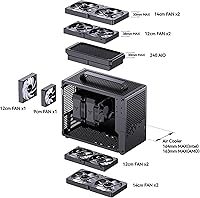
  • Fan Support: Top and bottom panels each support two 120mm or 140mm fans; the rear supports one 120mm and one 92mm fan.
  • Storage Bays: Supports up to two 2.5-inch SSDs combined with one 3.5-inch HDD, or up to three 2.5-inch SSDs in an all-SSD configuration.
  • Expansion Slots: Provides four PCIe expansion slots, sufficient for most dual-slot and triple-slot discrete GPU configurations.
  • Front I/O: Front panel includes one USB 3.0 port along with standard audio in and out headers; no USB-C port is present.
  • Dust Filtration: Magnetic dust filters are fitted across multiple panel intake areas, removable without tools for routine cleaning.
  • Carrying Handle: A detachable carrying handle is included and mounts to the top of the chassis for secure transport of completed builds.
  • PCIe Bracket: A removable PCIe fixing piece is included to simplify GPU installation and reduce clearance friction during assembly.
  • Color: Available in Black with a square-perforated panel finish that serves both an aesthetic and a ventilation function.
  • Availability: The product first became available in February 2024 and reached a top-25 ranking in the Amazon Computer Cases category within its first year.

Related Reviews
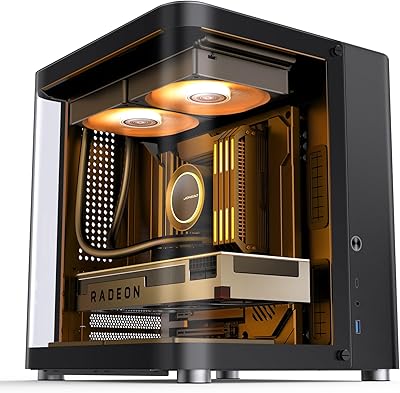
Jonsbo TK-1 Micro ATX Mini Tower Case
84%
88%
Build Quality
91%
Cooling Performance
85%
Ease of Assembly
89%
Design and Aesthetics
80%
Compatibility with Components
More
Antec VSK3000E Micro ATX Mini Tower Case
82%
89%
Build Quality
91%
Value for Money
68%
Cooling Performance
85%
Ease of Installation
80%
Port Availability
More
Antec NX200 M Micro-ATX Mini-Tower Computer Case
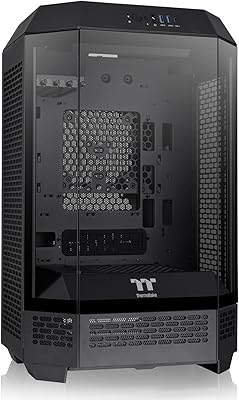
84%
87%
Cooling Performance
83%
Build Quality
88%
Ease of Setup
80%
Size and Space Efficiency
84%
Storage Options
More
Jonsbo D31 Mesh SC Micro ATX Case
86%
91%
Ease of Build
88%
Airflow and Cooling
89%
Compatibility with Components
84%
Build Quality
92%
Design and Aesthetics
More
Thermaltake Tower 300 Black Micro-ATX Case
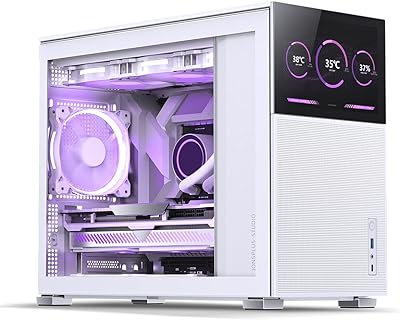
84%
88%
Cooling Performance
90%
Build Quality
85%
Design and Aesthetics
82%
Size and Compatibility
80%
Ease of Setup
More
Segotep Memphis M-ATX Mini Tower PC Case
83%
87%
Build Quality
91%
Airflow & Cooling
89%
Ease of Installation
85%
Design & Aesthetics
78%
Size & Space Efficiency
More
SilverStone FARA H1M Mid-Tower Micro-ATX Case
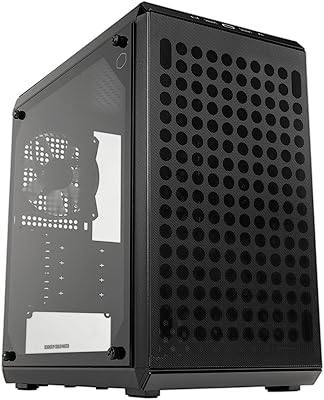
82%
91%
Airflow Performance
88%
Build Quality
85%
Cooling Options
65%
Cable Management
82%
Aesthetics
More
Cooler Master Q300L V2 Micro-ATX Tower Case
77%
91%
Value for Money
83%
Airflow Performance
77%
Build Quality
81%
Tempered Glass Panel
72%
Cable Management
More
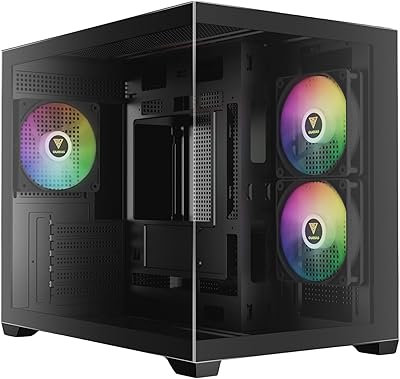
GAMDIAS AURA GC10M ARGB mATX PC Case
78%
91%
Value for Money
72%
Build Quality
78%
Airflow Performance
87%
ARGB Lighting
61%
Cable Management
More
Thermaltake Tower 600 Mid-Tower ATX Case
79%
91%
Build Quality
93%
Aesthetic Design
88%
Cable Management
94%
Cooling Capacity
71%
Installation Experience
More

FAQ

A full-size ATX PSU can fit, but it requires more planning than an SFX unit. The clearance between the PSU, your GPU, and your cables is tight, and it varies significantly depending on which specific components you choose. If you already own an ATX PSU and want to reuse it, double-check the dimensions of your GPU and plan your cable routing before you start the build. If you're buying a PSU fresh, an SFX or SFX-L unit will give you more breathing room inside.

Length-wise, cards up to 363mm are supported, which covers most current flagship GPUs. The real variable is thickness — some triple-slot cards with large coolers can push against the side panel depending on your PSU choice and cable management. It's worth checking the exact dimensions of your specific card model rather than relying on the GPU tier alone.

Yes, and this is one of the features real buyers consistently praise. The handle attaches securely to the chassis and is designed to handle the weight of a complete build. That said, once you factor in a heavy GPU, motherboard, and cooling solution, the total weight climbs quickly — so the handle is practical for carries of reasonable distances rather than long treks.

Cable management is the most common challenge buyers mention, and it's worth going in with realistic expectations. The case isn't impossible to manage, but the interior is compact and the space behind the motherboard tray is limited. Using a modular PSU, right-angle SATA connectors, and sleeved cables makes a real difference. Builders who plan their routing before installing components generally end up with much cleaner results.

No — the top radiator mount is designed for 240mm AIOs only, with a maximum radiator thickness of 60mm. A 280mm unit will not fit. If liquid cooling is a priority, plan around a 240mm setup or consider a high-performance 120mm or 140mm air cooler instead, as the 164mm clearance accommodates most popular tower coolers.

It can work for a first-time builder, but it's not the most forgiving chassis for someone completely new to the process. The assembly instructions are basic and leave out some of the trickier steps. If you're building your first PC, budget extra time, watch a few build videos specific to small-form-factor mATX cases, and have a plan for your cable routing before you start installing components.

Very easy. The magnetic filters lift off without tools and can be rinsed under water or tapped out depending on how much dust has accumulated. The magnetic attachment means they seat flush when replaced, so there's no fiddly re-alignment involved. For a daily-use desktop, pulling them out every few weeks takes under a minute.

The top panel supports either two 120mm fans or two 140mm fans — you have the choice. The same flexibility applies to the bottom. The rear supports a 120mm fan and a 92mm fan. Most builders opt for 120mm fans throughout for simplicity, but 140mm options are there if you prefer higher airflow at lower RPM.

No, there is no built-in RGB or integrated lighting of any kind. The aesthetic relies entirely on the perforated steel panels and the components you install. If you want a lighted build, you'll need to source RGB fans, RAM, or a GPU with onboard lighting yourself.

The main advantage over Mini-ITX is flexibility — Micro-ATX motherboards offer more PCIe slots, more RAM slots, and a broader range of compatible hardware at lower prices. This small-form-factor chassis achieves a volume close to some larger ITX cases while unlocking those extra options. The trade-off is that mATX boards are physically larger, so the case itself can't be quite as tiny as the smallest ITX designs, but for most builders the compatibility gains are well worth it.

Where to Buy