

Overview

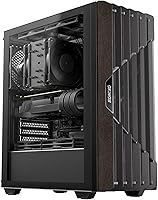
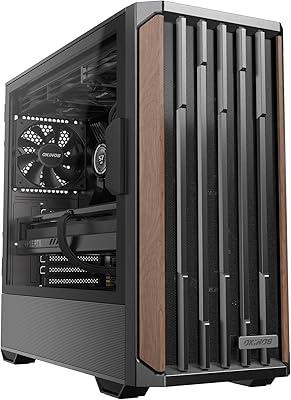
The Okinos Cypress 5 AIR Mid-Tower PC Case is one of the more unusual options at its price point — not because of raw specs, but because it actually looks like something you would be comfortable displaying in a living room. The oak wood accent on the front is a genuine veneer, not a wood-grain print, and that distinction matters when you are staring at it every day. Okinos is a smaller brand without the recognition of Fractal or Lian Li, so setting measured expectations on fit and finish is fair. That said, the tempered glass side panel and Type-C 3.2 Gen 2 port are solid inclusions at this tier. This is an aesthetics-first case that also covers the airflow basics without asking you to spend more on additional fans.

Features & Benefits

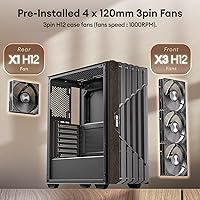
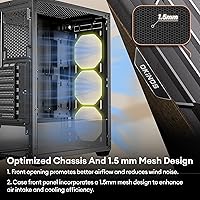
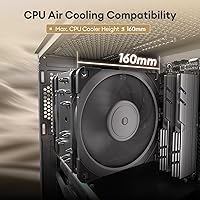
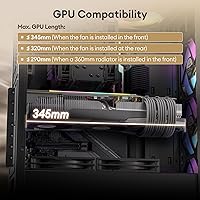
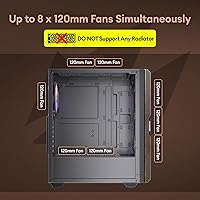
The oak wood front panel is the first thing you notice, and it holds up better than expected — the texture is warm and tactile in a way that printed plastic never quite replicates. Behind it sits a 1.5mm mesh layer that balances dust filtration against intake volume, though it does create a mild restriction compared to fully open designs. Four 120mm H12 fans come pre-installed — three pulling air in from the front and one exhausting from the rear at 1000 RPM. They are non-PWM, which limits motherboard-based speed tuning, but for a typical mid-range build the out-of-box airflow is genuinely workable. GPU clearance stretches to 345mm with front fans installed, covering most mainstream cards comfortably, and CPU cooler height tops out at a generous 160mm.

Best For

This oak wood PC case makes the most sense for builders who are tired of the standard all-black plastic box but do not want to spend significantly more chasing a premium branded name. It suits first-time or mid-range builders running an ATX or Micro-ATX board with a modern GPU under 345mm — think an RTX 4060 or RX 7600 paired with a tower air cooler, not a 360mm radiator. If you are building for a home office or shared living space where aggressive RGB and angular styling would feel out of place, the wood-accented front does real work here. Hardcore overclockers or anyone planning a high-end liquid cooling setup should look elsewhere, but for casual and mid-range builds the Cypress 5 AIR is a genuinely strong match.

User Feedback

Early buyers of this mid-tower build are largely positive, with a 4.6 out of 5 aggregate rating across roughly 87 reviews — though that is a fairly small sample, so treat it as an encouraging early signal rather than a settled verdict. The wood panel draws consistent praise; most reviewers note it photographs well and stands out on a desk in the best way. Fan noise gets a favorable mention too, since 1000 RPM fixed-speed fans run quietly under light loads. On the downside, a handful of builders flag tight cable management clearance behind the motherboard tray, and the lack of a fan controller means you are stuck with fixed speeds regardless of load. Panel fit and screws draw occasional criticism, though minor imperfections like these are expected at this price tier.

Pros

  • The oak wood front panel veneer is a genuine visual standout — it looks and feels nothing like the printed plastic used by most competitors.
  • Four 120mm fans come pre-installed and ready to move air on day one, saving you an immediate extra purchase.
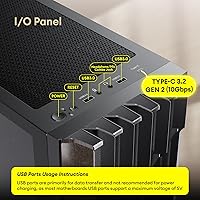
  • The front Type-C 3.2 Gen 2 port delivers real 10Gbps transfer speeds, which is uncommon at this price tier.
  • At 1000 RPM, the included non-PWM fans run quietly under typical loads — good news for shared or quiet spaces.
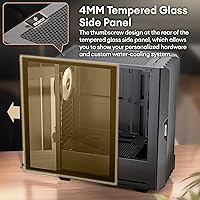
  • The 4mm tempered glass side panel removes with thumbscrews, making it genuinely tool-free to access the interior.
  • GPU clearance up to 345mm accommodates the vast majority of mainstream and upper-mid-range graphics cards without issue.
  • A 160mm CPU cooler height limit means most popular tower air coolers, including larger dual-tower designs, fit without trouble.
  • Supporting ATX, Micro-ATX, and Mini-ITX motherboards gives the Cypress 5 AIR solid flexibility for a range of build configurations.
  • The mesh front panel helps filter dust intake without fully sacrificing airflow, reducing maintenance frequency over time.
  • Bottom-mounted PSU placement keeps heat from the power supply away from other components and allows for cleaner cable routing.

Cons

  • Non-PWM fans cannot be speed-controlled through the motherboard, removing a key tool for balancing noise and thermals.
  • No fan controller is included, so you are locked into a fixed 1000 RPM regardless of system load or ambient temperature.
  • Cable management clearance behind the motherboard tray is reportedly tight, which can make neat builds frustrating to execute.
  • Radiator support is absent, ruling out all-in-one liquid coolers for builders who want quieter or more aggressive cooling.
  • The oak wood element is a surface veneer, not solid wood — it may age unevenly or show wear at the edges over time.
  • With roughly 87 ratings at time of writing, the review pool is small enough that long-term durability data is still limited.
  • Panel fit and screw quality have drawn occasional criticism, suggesting quality control is not perfectly consistent unit to unit.
  • GPU clearance drops to 320mm if fans are mounted at the rear instead of the front, which could catch some builders off guard.
  • Okinos lacks the established warranty reputation and customer support track record of larger, more recognized case brands.
  • The all-black exterior with wood accent is distinctive but narrow in appeal — builders wanting RGB or a bolder look will find limited options here.

Ratings

The scores below were generated by our AI after analyzing verified global buyer reviews for the Okinos Cypress 5 AIR Mid-Tower PC Case, with spam, incentivized, and bot-generated feedback actively filtered before any scoring was applied. Each category reflects what real builders consistently praised and what genuinely frustrated them, giving a transparent picture of both the strengths and the trade-offs. No category has been softened — the pain points are scored exactly as buyers experienced them.

Aesthetic Design
91%
The oak wood veneer front panel is the primary reason most buyers choose this case, and it reliably delivers on that expectation. In person, the warm wood texture reads as genuinely premium against the sea of all-black plastic mid-towers at this price point. Builders displaying their rig on an open desk or shelf consistently note how naturally it fits into a normal living space.
A handful of early buyers note the veneer can show edge wear after several months, especially if the front panel is removed often for fan cleaning or maintenance. It is a surface layer bonded to the frame rather than solid wood, which matters if long-term material durability over several years is a concern.
Front I/O & Connectivity
88%
Having a Type-C 3.2 Gen 2 port on the front panel at this price tier is genuinely uncommon, and buyers who connect modern phones, high-speed drives, or USB-C peripherals daily appreciate not having to reach around to the back of the machine. The two USB 3.0 ports alongside it cover keyboard, mouse, and general peripheral needs without conflict.
There are no USB 2.0 ports on the front panel, which is a minor inconvenience for users with older wireless dongles or legacy accessories that do not need USB 3.0 throughput. A few builders also report that the audio jack depth can feel slightly recessed depending on headphone plug design.
Value for Money
86%
Four pre-installed fans, a 4mm tempered glass panel, a Type-C Gen 2 front port, and a wood-accented front in a single purchase represents compelling value for the price category. Most builders report feeling like they received noticeably more than expected, particularly compared to plain plastic alternatives at the same cost.
Enthusiasts who discover the fans are non-PWM and that liquid cooling is unsupported may feel the value proposition weakens for their specific build goals. Buyers who immediately replace all four fans to gain speed control effectively pay twice for that component, which erodes the overall value calculation.
Side Panel Design
84%
The 4mm tempered glass panel feels notably substantial when handling, and the thumbscrew mounting system lets builders remove and reinstall it without reaching for a screwdriver. For anyone who enjoys displaying their components and cable work, the visibility angle is wide and the glass clarity is clean straight out of the box.
A small number of buyers note the glass panel does not sit perfectly flush with the chassis on every unit, pointing to some variability in alignment between production batches. Fingerprints also show prominently on the surface, requiring regular wiping if the case sits in an open, visible location.
Hardware Compatibility
83%
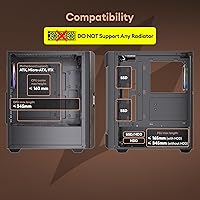
Supporting GPUs up to 345mm long and CPU coolers up to 160mm tall covers the vast majority of popular mid-range hardware without issue — cards like the RTX 4070 or RX 7800 XT fit comfortably in the standard front-fan configuration. Mini-ITX, Micro-ATX, and full ATX motherboards are all officially supported, giving builders flexibility across board sizes.
The 345mm GPU limit drops to 320mm if fans are moved to the rear, which can catch builders off guard when reconfiguring fan layout after purchasing a longer card. Liquid cooling is entirely unsupported, which rules out an increasingly popular cooling strategy for anyone planning higher-performance upgrades down the road.
Ease of Assembly
81%
19%
The thumbscrew glass panel, pre-installed fan array, and clearly marked standoff positions make the initial build process approachable for first-time builders. Most buyers report being able to seat all components and manage cables in a single sitting without needing to consult third-party guides or fight unusually tight angles inside the chassis.
Cable management behind the motherboard tray is where the assembly experience gets frustrating, as the clearance is tight for builders using thick modular PSU cables. A few users also flag that standoffs should be carefully verified before seating the motherboard, as misaligned threading on arrival has been reported occasionally.
Airflow Performance
78%
22%
Running three intake fans and one exhaust fan out of the box creates a positive-pressure-leaning airflow path that serves typical mid-range builds well, keeping CPU and GPU temperatures within expected ranges for air-cooled configurations. Buyers pairing the Cypress 5 AIR with mainstream components report satisfactory thermals without adding any additional fans on day one.
The 1.5mm front mesh creates a moderate intake restriction compared to fully open-grill designs, limiting maximum airflow capacity under sustained heavy workloads. Builders running thermally demanding hardware or pushing overclocks may find the baseline cooling insufficient and look to supplement with higher-airflow fan replacements relatively quickly.
Thermal Performance
74%
26%
For mid-range components handling typical gaming, productivity, or light creative workloads, the out-of-box thermal setup maintains stable and comfortable temperatures without intervention. Buyers pairing this case with CPUs in the 65W to 125W range and mainstream GPUs report no thermal throttling under normal sustained use.
Under prolonged heavy loads or in warmer ambient environments, the mesh-restricted front intake and fixed-speed fans limit the case's ability to ramp up cooling accordingly. Builders running hardware with high sustained TDP, or those in warm climates without air conditioning, may see temperatures trend higher than they would prefer.
Build Quality
72%
28%
The steel chassis does not flex noticeably when carrying or during installation, and most buyers report that the overall construction holds up well in day-to-day desktop use without developing rattles or creaks. The tempered glass panel in particular adds a sense of solidity to the left side of the chassis.
Panel alignment and screw quality are the most frequently mentioned complaints in early buyer feedback, with some units showing minor gaps at front panel joins or screws that strip more easily than expected. These issues are consistent with what smaller brands at this price tier typically deliver, but precision-focused builders may find them irritating.
Fan Quality & Control
67%
33%
At 1000 RPM, the included H12 fans run quietly enough to be essentially inaudible from a normal desk distance during light workloads, which is a genuine comfort for builders in shared spaces or home offices where fan noise is a daily consideration. Early buyers consistently highlight low noise as a positive standout.
The non-PWM design is the most significant technical limitation — these fans run at a fixed speed regardless of system load, removing the ability to ramp up under stress or whisper-quiet during idle. There is no bundled fan controller, and replacing all four fans to gain PWM speed control adds a meaningful extra cost to the build.
Dust Filtration
69%
31%
The integrated 1.5mm front mesh provides a meaningful first layer of filtration, slowing dust accumulation on fans and heatsinks compared to fully open-grill designs. Buyers in moderately dusty environments note that interior buildup is slower than what they experienced with previous cases lacking any front filtration layer.
There is no dedicated removable dust filter on the front, meaning proper cleaning requires detaching the entire front panel rather than sliding out a quick-release tray. The PSU intake area at the bottom also lacks a confirmed filter, leaving that component exposed to floor-level dust over time.
Cable Management
61%
39%
Dedicated cable routing holes and tie-down anchor points are distributed throughout the interior, giving builders the core tools needed to route cables along the edges and hide them behind the motherboard tray. Builders using slim modular cables report being able to achieve a reasonably tidy finished look with some patience and planning.
The clearance behind the motherboard tray is consistently flagged as tight in buyer feedback, making it difficult to tuck thick cable bundles cleanly out of sight. Builders using non-modular power supplies or factory-braided cables should expect a genuinely challenging management experience that may result in a noticeably cluttered finished interior.

Suitable for:

The Okinos Cypress 5 AIR Mid-Tower PC Case is a well-matched choice for builders who prioritize how their rig looks in a living room, bedroom, or home office over chasing maximum thermal headroom. If you are putting together a first or second build around an ATX or Micro-ATX motherboard, a mid-range GPU like an RTX 4060 or RX 7600, and a standard tower air cooler, this case covers all the practical bases without forcing you to buy extra fans on day one. The oak wood front panel veneer genuinely sets it apart from the sea of all-black plastic boxes at this price, making it a natural fit for anyone who wants their PC to blend into a home environment rather than announce itself with aggressive angles and RGB. Home office workers who need a capable daily driver that does not look like it belongs in a LAN party will find the understated styling refreshing. The front I/O is also worth noting for everyday usability — a Type-C 3.2 Gen 2 port and two USB 3.0 ports cover most peripheral and fast-transfer needs without reaching around to the back of the machine.

Not suitable for:

The Okinos Cypress 5 AIR Mid-Tower PC Case has real limitations that will frustrate certain builders, and it is worth being direct about them before you commit. If you are planning a high-performance build with a 360mm or 240mm all-in-one liquid cooler, stop here — radiator support is not listed, and the chassis is not designed with that use case in mind. Enthusiasts who rely on PWM fan headers to fine-tune noise and cooling curves will also find the included non-PWM fans limiting, since you cannot ramp them down through the motherboard when the system is idle or throttle them up under sustained load. Owners of high-end flagship GPUs should double-check physical clearance carefully, as the 345mm maximum length assumes the front fans remain installed — swap them to the rear and that ceiling drops to 320mm. Cable management space behind the motherboard tray has drawn some complaints from early buyers, so if you are building with thick modular cables and a lot of peripherals, the tidiness of the final result may disappoint. Finally, buyers expecting the build precision of established brands in higher price tiers should calibrate accordingly — panel alignment and screw quality are areas where smaller brands at this price point sometimes cut corners.

Specifications

  • Form Factor: Mid-Tower ATX chassis compatible with standard ATX, Micro-ATX, and Mini-ITX motherboards.
  • Dimensions: The case measures 405mm x 195mm x 449mm (15.94 x 7.68 x 17.68 inches) assembled.
  • Weight: Unit weight is 10.76 pounds, which is typical for a steel mid-tower of this size.
  • Front Panel: The front panel combines an oak wood veneer accent with a 1.5mm integrated mesh grill for filtered air intake.
  • Side Panel: A 4mm tempered glass panel is mounted on the left side and secured with thumbscrews for tool-free removal.
  • Included Fans: Four 120mm H12 non-PWM fans are pre-installed from the factory, running at a fixed 1000 RPM.
  • Fan Layout: Three fans are positioned as front intake and one as rear exhaust in the default configuration.
  • Fan Support: The chassis supports up to three 120mm fans at the front, two at the top, two at the bottom, and one at the rear.
  • Front I/O: The front panel includes one Type-C 3.2 Gen 2 (10Gbps) port, two USB 3.0 ports, a headphone jack, a microphone jack, a power button, and a reset button.
  • Max GPU Length: Graphics cards up to 345mm fit with front fans installed; this drops to 320mm when fans are mounted at the rear instead.
  • Max CPU Cooler: Tower air coolers up to 160mm tall are supported, which covers most large dual-tower and single-tower designs.
  • PSU Mount: The power supply mounts at the bottom of the chassis, which helps lower the center of gravity and keeps PSU heat away from other components.
  • Expansion Slots: Seven expansion slots are available, accommodating standard GPU configurations and optional riser or add-in cards.
  • Radiator Support: No liquid cooling radiator support is listed or confirmed for this chassis.
  • Color: Available in black with a natural oak wood tone accent panel on the front.
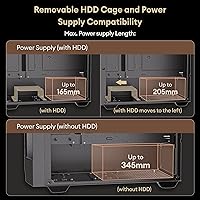
  • Max PSU Length: Power supply units up to approximately 165mm to 205mm in length are supported depending on configuration.

Related Reviews
Okinos Cypress 7 Walnut Wood ATX Mid-Tower Case

83%
94%
Aesthetic Design
88%
Build Quality
79%
Cooling Performance
76%
GPU Compatibility
86%
Front I/O
More
SAMA V60 Mid Tower PC Case
80%
93%
Out-of-Box Cooling Value
78%
Airflow Performance
91%
AIO & Radiator Flexibility
88%
Tempered Glass & Aesthetics
71%
Build Quality & Materials
More
KEDIERS K4 ATX Mid Tower PC Case
80%
91%
Value for Money
93%
Aesthetic Design
74%
Build Quality
72%
Cooling Performance
84%
Ease of Assembly
More
SAMA S40 Mid Tower ATX PC Case
79%
88%
Airflow Performance
83%
Included Fan Quality
79%
Build Quality & Finish
92%
GPU Compatibility
61%
Cable Management
More
darkFlash DS900 ATX Mid-Tower PC Case
75%
76%
Build Quality
83%
Cooling Potential
91%
Aesthetics & Visibility
88%
Value for Money
74%
Cable Management
More
SZSKYING CMSVB-1 Mid-Tower PC Gaming Case
74%
91%
Value for Money
88%
Included Fans
86%
Aesthetics & RGB
61%
Build Quality
74%
Airflow Performance
More
Zalman S2 ATX Mid-Tower PC Case
76%
88%
Airflow Performance
63%
Build Quality
91%
Value for Money
86%
Ease of Assembly
84%
Cooling Expandability
More
Zalman S4 Mid-Tower ATX PC Case
75%
72%
Build Quality
88%
Value for Money
91%
Ease of Assembly
67%
Airflow Performance
63%
Cable Management
More
Vetroo AL800 Mid Tower ATX PC Case
76%
78%
Build Quality
84%
Tempered Glass Panel
76%
Airflow Performance
61%
Fan Included & Expandability
69%
Cable Management
More
Corsair FRAME 4000D RS Mid-Tower Case
82%
91%
Airflow Performance
88%
Build Quality
86%
Modularity & Upgradability
83%
Fan Mounting System
78%
GPU Compatibility
More

FAQ

Most likely yes. The Okinos Cypress 5 AIR Mid-Tower PC Case supports GPUs up to 345mm long when the front fans are installed, which covers the RTX 4070 and RX 7800 XT comfortably. Just double-check the exact length of your specific card model before buying, since some factory-overclocked variants with extended coolers run slightly longer than the reference spec.

For a typical mid-range build they are good enough to start. The four included 120mm H12 fans move a reasonable amount of air at 1000 RPM, and the front mesh panel helps direct that airflow into the case. If you are running a high-TDP CPU or a hot-running GPU under sustained load, you may eventually want to upgrade, but most builders will not feel the need immediately.

No. The included fans are non-PWM, which means they run at a fixed 1000 RPM and cannot be speed-controlled through your motherboard headers. There is also no hardware fan controller included. If precise noise and thermal tuning matters to you, you would need to replace the fans with PWM variants or add a third-party controller.

It is a genuine oak wood veneer, not a printed plastic imitation, which is a meaningful distinction. That said, it is not solid hardwood — it is a thin wood layer applied over the front panel structure. It has real texture and warmth to it, but like any wood veneer, it can show edge wear over time if handled roughly.

No confirmed radiator mount positions are listed for this chassis, so it is not a reliable choice if liquid cooling is part of your plan. Stick with a quality tower air cooler up to 160mm tall — that covers options like the Deepcool AK620, be quiet! Dark Rock 4, and similar high-performing air coolers.

It is genuinely easy. The panel is held in place by thumbscrews at the rear, so you do not need any tools to pop it off. It is a practical feature that makes cable management and component installation much less frustrating compared to panels that require a screwdriver every time.

It is workable but not spacious. The case has the expected routing holes and tie-down points, but the clearance behind the motherboard tray is on the tighter side. With thin modular cables and some patience you can get a clean result, but if you are using thick braided cables or a large modular PSU harness, expect to spend extra time managing the routing.

Yes, Mini-ITX is officially listed as a supported motherboard format alongside ATX and Micro-ATX. Keep in mind that the case is still a full mid-tower in size, so a Mini-ITX board will have quite a bit of unused interior space around it.

Early buyer feedback is mostly positive, though the review count is still relatively low at around 87 ratings, so long-term durability data is limited. A small number of buyers have noted minor panel fit inconsistencies and variable screw quality, which are common trade-offs at this price tier. The oak wood veneer should hold up well in normal indoor use, but it is worth handling the front panel carefully during assembly to avoid chipping the edges.

That is actually one of its stronger points. The oak wood front panel and understated black chassis give it a much more furniture-friendly appearance than the aggressive angular designs common at this price range. There is no RGB lighting included, no loud branding, and no sharp edges that scream gaming rig — it sits comfortably on a desk or shelf alongside regular home furnishings.