Overview

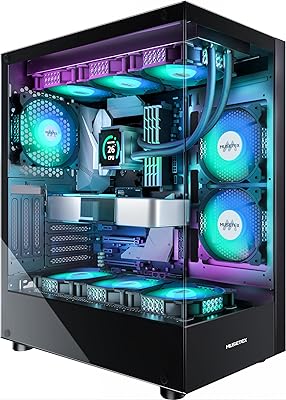
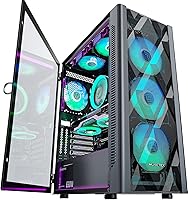
The MUSETEX NN8 Mid-Tower ATX PC Case is a well-rounded option for builders who want ARGB aesthetics and solid airflow without pushing into premium pricing territory. What separates this mesh tower from most similarly priced rivals is its swing-open glass panel — a design choice that actually changes how you interact with the case daily. Six ARGB fans come already installed, which is a meaningful head start for anyone piecing together their first rig. Build quality is honest for the price tier; some minor flex is expected. For budget-conscious builders and gaming rig upgrades alike, it presents a genuinely compelling package.
Features & Benefits

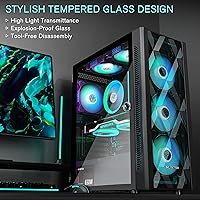
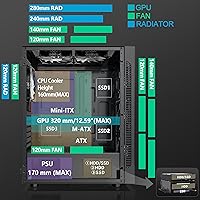
The NN8 case opens with a pull of the metal ring — the tempered glass door swings out magnetically, no screws involved. That alone speeds up any maintenance session considerably. Six 120mm PWM fans are pre-fitted across the front, middle, and rear positions, each capable of full ARGB sync through your motherboard software via a 3-pin ARGB header. No compatible header on your board? You will need a standalone controller. The diamond-mesh front panel moves air well, and the interior handles ATX boards alongside top-mounted radiators up to 280mm. Storage capacity is flexible, and front I/O covers the essentials, though no USB-C is present on this model.

Best For

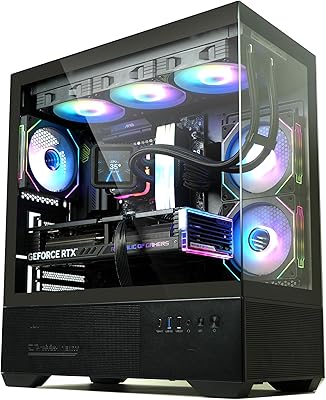
This ARGB mid-tower suits first-time builders particularly well — arriving with six fans pre-installed removes one of the most common early sourcing headaches. Gamers who care about the visual side of their setup will also find value here, especially with vertical GPU mounting available to show off the graphics card through the glass door. The case handles both air-cooled and moderate liquid-cooled builds, supporting AIOs up to 280mm at the top. Anyone who accesses their system regularly for swaps or cleaning will genuinely appreciate the tool-free panel. It is a less natural fit for enthusiast-level liquid cooling configurations that demand more radiator flexibility.

User Feedback

The swing-open glass door is consistently the most praised feature across verified reviews — builders coming from traditional screw-mount panels notice the difference quickly. ARGB lighting performance and fan reliability also draw frequent positive comments. On the constructive side, several buyers flagged that cable management space behind the motherboard tray is tighter than the roomy interior might suggest, which can add friction during assembly. A smaller number of reviewers noted minor fit-and-finish issues like slightly sharp interior edges or subtle panel flex. The ARGB header requirement catches some buyers off guard post-purchase. Overall, the rating stays strong, with most criticism pointing to the build process rather than the finished result.

Pros

  • Six ARGB fans come pre-installed, removing one of the most common sourcing headaches for new builders.
  • The swing-open tempered glass panel with magnetic latch makes accessing internals genuinely faster and easier.
  • Roomy ATX interior handles large air coolers and top-mounted 280mm AIOs without clearance fights.
  • The diamond-mesh front panel provides solid intake airflow for a mid-tier air-cooled or moderate liquid-cooled rig.
  • Vertical GPU mounting lets you show off your graphics card through the glass door with no extra bracket purchase.
  • Storage flexibility covers up to five SSDs and two HDDs, accommodating a wide range of build configurations.
  • PWM speed control keeps fan noise reasonable during light workloads and idle use.
  • The geometric mesh front panel gives this case a distinctive look that reads as more expensive than it is.
  • Supports ATX, Micro-ATX, and Mini-ITX boards across seven expansion slots without any unusual compatibility constraints.

Cons

  • Cable management space behind the motherboard tray is noticeably tighter than the generous main chamber suggests.
  • Stock fan bearings show wear faster than premium alternatives, with noise increasing after extended continuous use.
  • Interior edges are sharper than expected — gloves during assembly are a practical necessity, not optional.
  • No USB-C on the front I/O panel is an increasingly felt omission as modern peripherals default to that connector.
  • ARGB sync requires a 3-pin motherboard header; buyers without one need a separate controller that adds cost.
  • Minor panel flex and slight fit-and-finish inconsistencies reflect the budget tier more clearly on close inspection.
  • The manual lacks sufficient detail on fan wiring and configuration options, leaving some trial-and-error for new builders.
  • All-black is the only available colorway, limiting options for builders working toward a specific themed aesthetic.

Ratings

The MUSETEX NN8 Mid-Tower ATX PC Case scores below are generated by AI after analyzing thousands of verified global buyer reviews, with spam, bot-submitted, and incentivized feedback actively filtered out. This mesh tower drew strong opinions on both sides, and the ratings reflect that honestly — the standout strengths and the real friction points are weighted equally. Whether you are sizing it up for a first build or a mid-tier gaming upgrade, the breakdown below gives you a transparent picture of where this ARGB mid-tower earns its praise and where it falls short.
Value for Money
88%
For builders who would otherwise spend separately on fans, lighting controllers, and a case, the NN8 case bundles all three at a price that undercuts most rivals. Verified buyers consistently noted the out-of-box completeness as a genuine financial advantage over piecing together a comparable setup independently.
A small number of reviewers felt that the per-unit fan quality did not match what you would get buying individual fans at a similar cumulative cost. If you already own quality fans or plan to replace them, some of that bundled value evaporates quickly.
Airflow Performance
79%
21%
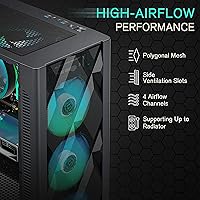
The diamond-mesh front panel allows meaningful air intake, and six pre-installed fans covering front, middle, and rear positions create a reasonable positive pressure environment right out of the box. Builders running mid-tier air-cooled rigs reported stable thermals without any additional fan purchases.
Fan quality at this price tier has real limits — the included 120mm units move adequate air but are not high-static-pressure performers. Enthusiast builders running hot GPUs or overclocked CPUs found themselves swapping at least some fans for better results after initial testing.
Side Panel Design
93%
The magnetic swing-open tempered glass door is the feature that genuinely differentiates this ARGB mid-tower from the crowded budget segment. Builders who frequently swap components, clean radiators, or just enjoy showing off their build praised how effortlessly the panel opens — no screwdriver required, no panel sliding off unexpectedly.
The magnetic hold is secure for everyday use but a few users noted the panel felt slightly loose when the system was moved or transported. The glass itself is clear and attractive, though minor panel flex under pressure was flagged by a subset of reviewers.
ARGB Lighting Quality
84%
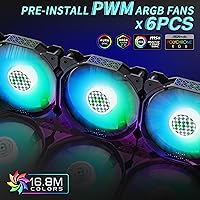
With six addressable ARGB fans capable of pulling from a 16.8 million color palette, the lighting display is genuinely impressive for this price range. Buyers who paired this mesh tower with an ARGB-compatible motherboard reported smooth color transitions and reliable sync through standard motherboard software.
The catch that trips up many buyers is the 3-pin ARGB motherboard header requirement — those without a compatible header cannot use software sync and need a standalone controller purchased separately. A few reviewers also noted minor color inconsistency between individual fans after extended use.
Build Quality & Finish
71%
29%
The overall chassis feels solid enough for stationary desktop use, and the steel construction holds its shape well once components are installed. Most buyers assembling their first or second rig found the structural integrity more than acceptable for the price point.
Fit and finish is where this case shows its budget origins most clearly. Several reviewers noted interior edges that were sharper than expected — worth wearing gloves during assembly. Slight panel flex on the glass door and minor alignment inconsistencies in the mesh front panel were also recurring observations.
Cable Management
63%
37%
The interior offers dedicated routing cutouts and Velcro tie points that make a reasonably tidy build achievable for patient builders. Those who took their time reported clean results with most cables hidden effectively behind the motherboard tray.
The space behind the motherboard tray is noticeably tighter than the generous main chamber would lead you to expect. Builders working with thick modular PSU cables or multiple storage drives found routing became frustrating, and some reported the rear panel sitting slightly proud after stuffing cables behind it.
Interior Space & Layout
82%
18%
ATX boards, large air coolers, and top-mounted 280mm AIOs all fit without the clearance fights common in tighter mid-towers. The multiple GPU mounting options give builders extra flexibility, and the storage bay configuration accommodates most typical home or gaming setups comfortably.
While the main chamber is roomy, the layout priorities favor width over depth in some areas. Builders installing both a top-mounted radiator and tall RAM sticks should verify clearance in advance, as the margin is tighter than the case dimensions alone suggest.
Fan Noise Levels
74%
26%
PWM speed control means the fans ramp down during light workloads, and several buyers noted that at idle or low load the system was quieter than expected for a six-fan configuration. The auto-adjusting behavior genuinely helps in mixed-use scenarios like office tasks paired with occasional gaming.
Under sustained load, all six fans spinning together produce an audible hum that some users found distracting in quieter rooms. The stock fan bearings are adequate but not whisper-quiet — builders targeting a near-silent setup will likely want aftermarket replacements on at least the front intake fans.
Ease of Assembly
76%
24%
The tool-free glass panel and straightforward interior layout mean most builders can get components installed without consulting the manual repeatedly. First-time builders in particular appreciated that the case did not throw unexpected obstacles at them during their initial build session.
The ARGB fan wiring is the most common assembly headache — six fans with individual headers create a bundle of cables that needs careful management before motherboard installation. A handful of reviewers also noted that the manual lacks detail on fan configuration options, leaving some guesswork involved.
Radiator & Cooling Compatibility
77%
23%
Top support for 280mm and 240mm radiators covers the most popular AIO sizes on the market, making this mesh tower a viable option for builders stepping up from air cooling. The rear 120mm fan slot adds further flexibility for exhaust-focused cooling setups.
There is no front radiator mounting, which limits options for builders who prefer front-intake liquid cooling configurations. Those planning high-end custom loops or large 360mm radiators will find this case restrictive and should look at a larger or more cooling-focused chassis.
Front I/O Usability
68%
32%
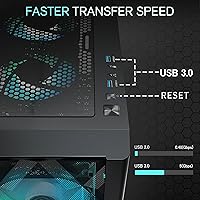
Dual USB 3.0 ports handle the everyday connection needs of most users — charging peripherals, transferring files from USB drives, and connecting headsets all work without reaching around to the back of the case. The HD audio ports are conveniently placed and function reliably.
The absence of a USB-C port on the front I/O is a straightforward omission that grows more noticeable as newer peripherals and storage devices default to USB-C. It is not a build-stopper, but buyers who rely on USB-C daily will feel it as a daily inconvenience.
Storage Configuration
78%
22%
Accommodating up to five SSDs and two HDDs in mixed configurations means this case handles both lean SSD-only builds and storage-heavy setups without requiring additional drive cages. That kind of flexibility is uncommon at this price point and was noted positively by users managing large media libraries.
The drive bay mounting system is functional but not tool-free for all configurations, and a few buyers found the SSD tray alignment fiddly during initial installation. Users targeting maximum HDD capacity may find the two-drive limit constraining if they are migrating from a storage-heavy older system.
Aesthetics & Visual Impact
87%
The polygonal mesh front panel gives this ARGB mid-tower a distinctive look that stands out on a desk. With the glass door open or closed, the combination of the illuminated fans and the geometric front creates a cohesive, intentional appearance that buyers consistently described as looking more expensive than it is.
The all-black exterior is the only colorway available, which limits options for builders pursuing a specific themed aesthetic. The mesh pattern, while visually distinctive, can accumulate dust visibly along the front panel ridges and benefits from more frequent cleaning than a flat-front case.
Motherboard Compatibility
86%
Supporting ATX, Micro-ATX, and Mini-ITX boards across seven expansion slots covers the vast majority of consumer build configurations without compromise. Builders upgrading from smaller form factor systems found the transition straightforward without the case imposing any unusual mounting quirks.
Mini-ITX builds in particular will find the interior feels cavernous and requires extra planning to manage airflow effectively with a smaller board footprint. The case is clearly optimized around ATX builds, and smaller board users may need to add intake fans or adjust the pre-installed fan layout.
Long-Term Durability
69%
31%
For stationary desktop use, the steel chassis holds up well over extended periods, and buyers who had owned the case for over a year reported no structural issues with the main body. The magnetic glass door mechanism remained functional and secure in the majority of long-term owner reviews.
The stock fan bearings show wear more quickly than premium alternatives, with a few long-term owners reporting increased noise after 12 to 18 months of continuous use. Minor surface scratches on the glass panel from repeated opening also accumulated over time according to some reviewers.

Suitable for:

The MUSETEX NN8 Mid-Tower ATX PC Case is a strong pick for first-time and intermediate builders who want a visually complete setup without sourcing fans, controllers, and a case separately. If your budget is firm but you still want ARGB lighting that syncs through your motherboard software, this mesh tower delivers that out of the box in a way that genuinely saves both money and setup time. Gamers who enjoy showing off their hardware will appreciate the swing-open glass panel paired with vertical GPU mounting — it turns the interior into a proper display. The spacious main chamber comfortably accommodates ATX boards, large air coolers, and top-mounted AIOs up to 280mm, making it a practical fit for the most common consumer cooling configurations. Anyone who regularly opens their case for cleaning, upgrades, or component swaps will also find the magnetic tool-free glass door to be a practical daily convenience rather than a novelty.
Not suitable for:

The MUSETEX NN8 Mid-Tower ATX PC Case is not the right choice for builders pushing high-end or enthusiast-level cooling setups. There is no front radiator mounting, which rules out front-intake liquid cooling configurations, and the 280mm top limit means 360mm AIO users need to look elsewhere. The stock fans perform adequately for mid-tier builds but are not up to the demands of heavily overclocked CPUs or power-hungry flagship GPUs running sustained workloads — expect to swap some fans if thermals are a priority. Builders who rely on USB-C daily will find the front I/O panel limiting, as this ARGB mid-tower ships with only USB 3.0 ports and no USB-C option. Those planning a near-silent build should also factor in that six fans under sustained load produce a noticeable combined hum that passive or semi-passive cooling setups would avoid. Finally, buyers without a 3-pin ARGB header on their motherboard will need a standalone ARGB controller to use the lighting features, which adds cost and complexity that is easy to overlook at purchase.
Specifications

  • Form Factor: Mid-Tower ATX enclosure compatible with ATX, Micro-ATX, and Mini-ITX motherboards across seven expansion slots.
  • Dimensions: The case measures 18.43″ x 15.28″ x 8.86″ (468 x 388 x 225mm) making it a standard mid-tower footprint suitable for most desks.
  • Weight: The unit weighs 12.54 lbs bare and ships at approximately 17.89 lbs including packaging and accessories.
  • Case Material: Primary construction uses steel for the chassis frame and tempered glass for the swing-open side panel.
  • Front Panel: The front face uses a polygonal diamond-pattern mesh metal design intended to maximize air intake while providing a three-dimensional visual texture.
  • Pre-Installed Fans: Six 120mm PWM ARGB fans come pre-installed covering front (3x), middle (2x), and rear (1x) positions.
  • Fan Positions: Total fan support spans front 3x120mm, top 2x120mm or 2x140mm, middle 2x120mm, and rear 1x120mm slots.
  • Radiator Support: The top panel supports up to a 280mm or 240mm radiator, while the rear accommodates a single 120mm radiator.
  • ARGB Control: Fan lighting is addressable via a 3-pin ARGB motherboard header; a compatible header is required for software-based lighting sync.
  • Side Panel: The tempered glass side panel opens on a magnetic swing-hinge mechanism with a metal pull ring, requiring no tools or screws to access the interior.
  • Front I/O: The I/O panel includes two USB 3.0 ports, two HD audio jacks (headphone and microphone), one power button, and one reset button; no USB-C is included.
  • GPU Support: Graphics cards can be installed in both standard horizontal orientation and vertical orientation for display through the glass panel.
  • Storage Bays: Drive bay configurations support up to 5x 2.5″ SSD combined with 1x 3.5″ HDD, or 4x 2.5″ SSD combined with 2x 3.5″ HDD.
  • Expansion Slots: Seven expansion slots are available, covering full-length GPU and multi-card or multi-port PCIe add-in card configurations.
  • PSU Mount: The power supply mounts at the rear base of the chassis using a standard rear-mount configuration compatible with ATX power supplies.
  • Dust Filtration: Removable dust filters are positioned at the top and bottom of the case to reduce particulate buildup on internal components.
  • Fan Speed: PWM control allows fan RPM to adjust automatically based on system thermal load, reducing noise during lighter workloads.
  • Color Option: The NN8 case is available in black only, with no alternative colorways currently offered by the manufacturer.

Related Reviews

MUSETEX K2
MUSETEX K2
80%
93%
Aesthetic Design
74%
Build Quality & Materials
78%
Cooling Performance
61%
Fan Noise Levels
91%
Hardware Compatibility & Clearance
More
Zalman S2 ATX Mid-Tower PC Case
83%
88%
Cooling Performance
80%
Build Quality
85%
Ease of Setup
70%
Cable Management
92%
Value for Money
More
SZSKYING ATX Mid-Tower PC Gaming Case
85%
92%
Cooling Performance
85%
Build Quality
88%
Aesthetic Design
74%
Cable Management
78%
Ease of Setup
More
Vetroo AL800 Mid Tower ATX PC Case
76%
78%
Build Quality
84%
Tempered Glass Panel
76%
Airflow Performance
61%
Fan Included & Expandability
69%
Cable Management
More
SAMA S40 Mid Tower ATX PC Case
79%
88%
Airflow Performance
83%
Included Fan Quality
79%
Build Quality & Finish
92%
GPU Compatibility
61%
Cable Management
More
KEDIERS K4 ATX Mid Tower PC Case
80%
91%
Value for Money
93%
Aesthetic Design
74%
Build Quality
72%
Cooling Performance
84%
Ease of Assembly
More
Zalman S3 ATX Mid-Tower PC Case
74%
83%
Value for Money
71%
Build Quality
58%
Airflow & Cooling Performance
86%
Ease of Assembly
67%
Acrylic Side Panel
More
Zalman S4 Mid-Tower ATX PC Case
81%
88%
Airflow and Cooling
80%
Build Quality and Materials
92%
Ease of Installation
60%
Acrylic Panel Durability
70%
Cable Management
More
darkFlash DS900 ATX Mid-Tower PC Case
84%
89%
Cooling Performance
88%
Build Quality
91%
Ease of Installation
85%
Design & Aesthetics
92%
Value for Money
More
FOIFKIN F1 ATX Mid-Tower Gaming PC Case
84%
92%
Cooling Performance
88%
Ease of Assembly
90%
Aesthetics/Design
85%
Internal Space and Compatibility
89%
Airflow Efficiency
More

FAQ

No, six 120mm ARGB fans come already installed covering the front, middle, and rear positions. For most mid-tier air-cooled or moderate liquid-cooled builds that is sufficient coverage straight out of the box. If you are running a very hot configuration or heavily overclocked system, you might eventually want to supplement or replace a few with higher-static-pressure units, but the majority of builders will not need to.

If your board is ATX, Micro-ATX, or Mini-ITX it will fit. Those three form factors cover the vast majority of consumer desktop motherboards sold today, so compatibility is unlikely to be an issue unless you are working with a non-standard extended ATX or server-grade board.

The fans connect to your motherboard via a 3-pin ARGB header, and from there you control colors and effects through your motherboard's own lighting software — ASUS Aura Sync, MSI Mystic Light, Gigabyte RGB Fusion, and similar platforms all work. The key thing to check before buying is whether your motherboard actually has a 3-pin ARGB header. If it does not, the fans will still run but you will need a standalone ARGB controller to manage the lighting, which is an extra purchase to factor in.

Unfortunately no. The top radiator mounting maxes out at 280mm, and there is no front radiator support. If you are planning a 360mm AIO, this mesh tower is not the right fit and you should look at a larger chassis with front-mount radiator support.

Yes, and that is genuinely one of the better aspects of this case. The tempered glass side panel swings open on a magnetic hinge — you pull the metal ring and it opens like a door. No screwdriver, no sliding the panel off carefully. If you clean your system regularly or swap components often, you will notice the difference immediately compared to traditional panel designs.

Tighter than you might expect given how roomy the main chamber is. There is enough space for a reasonably tidy build if you are patient and plan your routing before installing the motherboard, but thick modular PSU cables or a lot of storage drive connections can make it a genuine squeeze. Sleeved or flat cables will make your life noticeably easier in this particular case.

Under light use or at idle, PWM control ramps the fans down and the system is fairly quiet. When all six fans spin up under a sustained gaming load, the combined noise is audible — it is not obnoxiously loud, but it is present. Builders who prioritize near-silent operation will likely want to replace at least the front intake fans with quieter aftermarket options over time.

Yes, vertical GPU installation is supported. Paired with the swing-open glass door, it is actually one of the more visually effective ways to use this case if you have a GPU worth displaying. Keep in mind that a vertical GPU riser cable is typically required for vertical mounting and is usually sold separately — it does not come included in the box.

The MUSETEX NN8 Mid-Tower ATX PC Case supports up to five 2.5-inch SSDs alongside one 3.5-inch HDD, or you can shift to four SSDs and two HDDs depending on your configuration preference. For most gaming or home office builds that covers everything comfortably, though heavy-storage users migrating from a multi-drive NAS-style setup may find the two-HDD ceiling limiting.
Wear gloves. A number of builders have noted that some interior edges are sharper than expected, particularly around the drive bay area and panel cutouts. It is not unusual for budget-tier steel cases to have this characteristic, but it catches people off guard when they are reaching in bare-handed. The assembly process itself is straightforward — just be deliberate about where you rest your hands and you will avoid any issues.