Overview
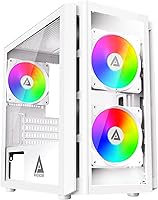
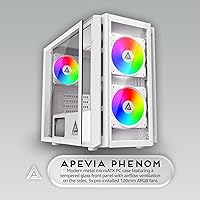
The Apevia Phenom Micro ATX Mid Tower Case is a budget-conscious enclosure that punches above its weight on visual appeal, making it a natural pick for first-time builders and RGB enthusiasts who want their setup to look sharp without spending a fortune. What sets it apart at this price tier is the dual tempered glass treatment — both the left side panel and the front panel are glazed, which is genuinely uncommon here. Physically, it sits comfortably on a desk without dominating the space, measuring roughly 15 x 8 x 15 inches. Just set expectations accordingly: this is an aesthetics-first build with entry-level construction quality.
Features & Benefits
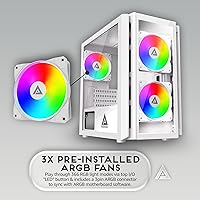
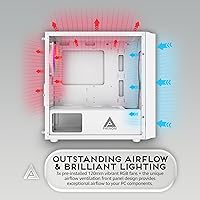
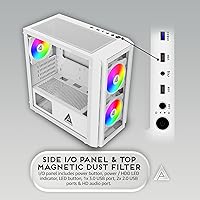
Three pre-installed 120mm ARGB fans come ready to go straight out of the box — two at the front, one at the rear — and cycling through the 366 lighting modes is handled by a hardware button on the top panel, no software or app required. The front panel combines tempered glass with built-in airflow vents, so you get the visual showcase without completely choking intake. This mATX case accommodates GPUs up to 340mm long and CPU coolers up to 155mm tall, which covers the vast majority of mid-range components. Magnetic dust filters on the top and bottom panels are a genuine convenience — pull them off, rinse them, done. Cable routing space behind the motherboard tray is present but notably tight.
Best For
This Apevia build is a strong match for anyone putting together their first PC on a tight budget who still wants the desk to look the part. If you are pairing a mid-range GPU under 340mm with a standard air cooler, you will not run into clearance problems. It is particularly well-suited for bedroom or home office setups where the RGB glow is part of the atmosphere, not just an afterthought. Micro ATX and ITX motherboard owners get full compatibility, keeping the internal layout manageable for a newcomer. It is less ideal for high-TDP systems that need serious sustained airflow beyond what three 120mm fans can reliably deliver.
User Feedback
Buyers consistently praise the out-of-box RGB impact — most report the lighting looks far more impressive in person than in product photos, and the glass panels are clear enough to show off any build properly. Assembly tends to go smoothly for most builders, which is a genuine confidence booster for newcomers. On the flip side, the ARGB motherboard sync function trips people up: activating it requires holding the LED button for five full seconds, and that detail is easy to miss. A number of reviewers also note the front panel restricts airflow more than expected, and a few mention minor edge sharpness during handling. Overall value sentiment is positive, though build consistency is not perfect across every unit.
Pros
- Dual tempered glass panels on both the front and side give this mATX case a premium visual presence well above its price point.
- Three ARGB fans come pre-installed and ready to light up the moment you power on, with zero software setup required.
- 366 lighting modes are cycled through a simple top-panel button, making RGB customization genuinely accessible for beginners.
- Magnetic dust filters on the top and bottom panels snap off easily for cleaning, which is a feature many pricier cases skip.
- GPU clearance up to 340mm and CPU cooler support up to 155mm means most mainstream mid-range components fit without issue.
- Front I/O includes two USB 3.0 ports and an HD audio jack, covering everyday connectivity needs without adapters.
- The Phenom enclosure supports both Micro ATX and ITX motherboards, giving builders some flexibility in platform choice.
- Non-punch-out PCIe slots make GPU installation cleaner and less stressful for first-time builders.
- Overall assembly experience is widely reported as straightforward, with most builders completing their first build without major frustrations.
- Value for money sentiment among buyers is consistently strong, with most agreeing the visual payoff exceeds what the price suggests.
Cons
- The front tempered glass panel limits air intake noticeably, which can push temperatures higher than a mesh-front alternative would allow.
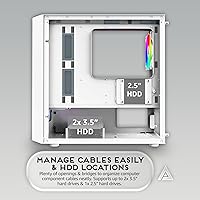
- Cable management space behind the motherboard tray is tight enough to make a tidy build genuinely challenging for less experienced builders.
- Fan noise becomes audible at higher speeds, which may be distracting in quiet environments or during light workloads.
- Switching to ARGB motherboard sync mode requires holding the LED button for five seconds — this is poorly documented and confuses many buyers.
- ARGB sync is only compatible with motherboards that have a 3-pin ARGB header, leaving older boards without native sync support.
- Some units have been reported to have sharp metal edges along internal panels, posing a minor but real risk during component installation.
- Panel fitment consistency is not perfect across all units, with occasional reports of slight misalignment on the front or side glass.
- Only one 2.5-inch SSD bay is included, which may feel limiting for builders who plan to run multiple storage drives.
- The top fan mounts are optional expansion slots only — no fans are pre-installed there, so additional cooling requires a separate purchase.
Ratings
The Apevia Phenom Micro ATX Mid Tower Case earns a well-rounded but nuanced set of scores based on AI-assisted analysis of verified global buyer reviews, with spam, bot activity, and incentivized feedback actively filtered out before scoring. Across thousands of real builder experiences, this enclosure consistently impresses on visual impact and out-of-box usability while revealing genuine trade-offs in airflow, cable management, and build consistency that any honest assessment must reflect.
Visual Design
RGB Lighting
Value for Money
Airflow & Cooling
Cable Management
Build Quality
Ease of Assembly
Fan Quality
Dust Filtration
Front I/O
Component Compatibility
Storage Options
Lighting Modes Variety
Motherboard ARGB Sync
Suitable for:
The Apevia Phenom Micro ATX Mid Tower Case is built squarely for first-time PC builders who want their rig to look genuinely impressive without committing to a high-end budget. If your priority is a visually striking desk setup — think bedroom gaming station or a home office build where aesthetics matter as much as performance — this enclosure delivers dual tempered glass panels and pre-installed ARGB lighting that most cases at this price tier simply do not offer. Builders working with Micro ATX or ITX motherboards will find the internal layout accommodating enough for standard component configurations, including GPUs up to 340mm and most popular air coolers. It is also a solid pick for anyone who finds RGB software finicky, since all 366 lighting modes are toggled directly from a hardware button on the top panel with no drivers or apps involved. If you are pairing this with a mid-range processor and a mainstream graphics card for everyday gaming and general use, the thermal headroom is more than adequate for the task.
Not suitable for:
Builders with demanding thermal requirements should approach the Apevia Phenom Micro ATX Mid Tower Case with realistic expectations, because the front glass panel does restrict intake airflow in ways that a mesh-front case would not. If you are planning to run a high-TDP CPU alongside a power-hungry GPU and expect the system to stay cool under sustained loads, the three included 120mm fans may not be enough without supplemental cooling, and the design does not prioritize maximum air throughput. Enthusiasts who care deeply about tidy cable management will also find the workspace behind the motherboard tray frustratingly shallow, making a clean build more difficult than it needs to be. Anyone expecting ARGB motherboard sync to work intuitively should know upfront that switching to sync mode requires holding the LED button for a full five seconds — it is not obvious, and it trips up a meaningful number of buyers. Finally, note that Amazon listing data sometimes shows this case as black, but the WH model suffix specifically denotes the white colorway, so double-check the variant before ordering if color accuracy matters to your build aesthetic.
Specifications
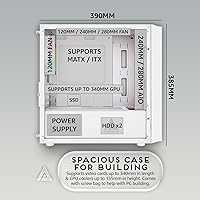
- Form Factor: Micro ATX Mid Tower configuration supports standard Micro ATX and Mini-ITX motherboards up to 9.6″ x 9.6″.
- Dimensions: The chassis measures 15.35″ (L) x 7.87″ (W) x 15.16″ (H), making it compact enough for most desk setups.
- Weight: Fully assembled chassis weight is approximately 11.79 lbs before components are installed.
- Material: The main structure is constructed from a steel metal chassis with tempered glass used for both the left side panel and the front panel.
- Included Fans: Three 120mm ARGB fans come pre-installed: two mounted at the front intake position and one at the rear exhaust position.
- Fan Capacity: The case supports up to five 120mm fans in total, with two additional optional slots available on the top panel.
- GPU Clearance: Graphics cards up to 340mm in length can be installed without modification or panel interference.
- CPU Cooler Height: Air CPU coolers up to 155mm (approximately 6.10″) in height are supported within the side panel clearance.
- Drive Bays: Storage capacity includes two 3.5″ hard drive bays and one dedicated 2.5″ SSD mounting position.
- Expansion Slots: Four PCIe expansion slots are provided, using a non-punch-out design for cleaner and more straightforward GPU installation.
- Front I/O Ports: The top panel houses two USB 3.0 ports and one HD audio combo jack for headset and microphone connectivity.
- RGB Lighting: 366 hardware-selectable ARGB lighting modes are accessible via a dedicated LED button on the top panel, requiring no software.
- ARGB Sync: A 3-pin ARGB connector is included for motherboard sync, compatible exclusively with motherboards that feature a 3-pin ARGB header.
- Dust Filters: Magnetic dust filters are fitted on both the top panel and the bottom panel for straightforward removal and cleaning.
- PSU Mounting: The power supply is rear-bottom mounted, keeping it isolated from the main motherboard area for cleaner internal layouts.
- Motherboard Support: Compatible with standard Micro ATX and Mini-ITX form factor motherboards; full ATX boards are not supported in this enclosure.
- Color Variant: The WH suffix in the model name denotes the white colorway; some retail listings may incorrectly display the color as black.
- Glass Panels: Both the front-facing panel and the left side panel use tempered glass, providing visibility into the build from two angles simultaneously.
Related Reviews
SilverStone FARA H1M Mid-Tower Micro-ATX Case
Thermaltake Tower 600 Mid-Tower ATX Case
KEDIERS P6 Mid Tower ATX PC Case
HYTE Y40 Mid-Tower ATX Gaming Case
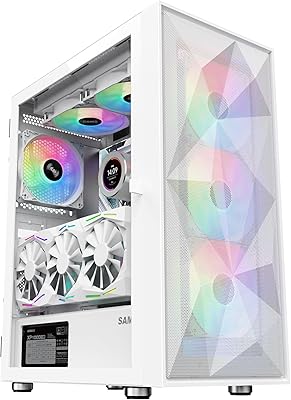
SAMA 3509 ATX Mid Tower PC Case
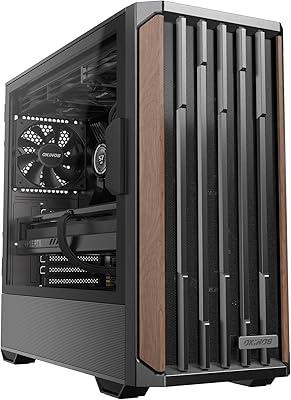
Okinos Cypress 7 Walnut Wood ATX Mid-Tower Case
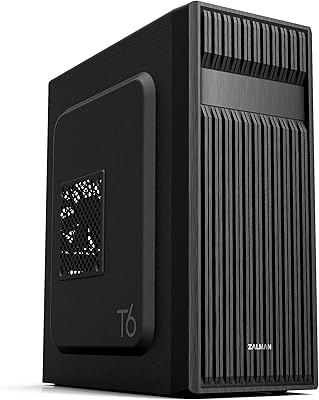
Zalman T6 ATX Mid Tower PC Case
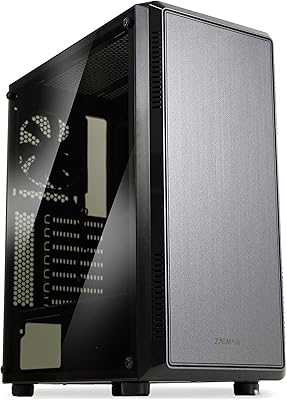
Zalman S4 Mid-Tower ATX PC Case
darkFlash DS900 ATX Mid-Tower PC Case