Overview

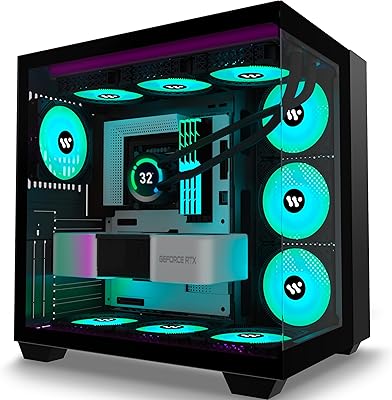
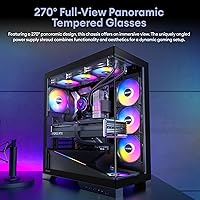
The Okinos Aqua 9 Mid Tower PC Case enters a competitive mid-tower market with one unmistakable statement: 270° panoramic glass covering three sides of the chassis. That kind of exposure is genuinely rare at this price tier, where a single side panel is still the norm. Okinos is not an established name — the brand is relatively new, and buyers should calibrate expectations for build quality accordingly — but the Aqua 9 stacks up a surprisingly dense feature set for its cost. Back-connect motherboard compatibility is a notable inclusion, signaling that Okinos is tracking current enthusiast trends rather than shipping another recycled design.

Features & Benefits

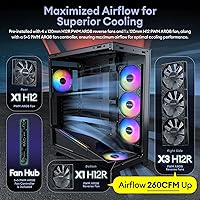
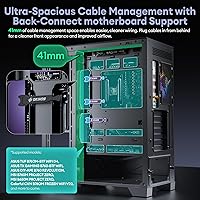
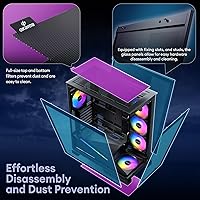
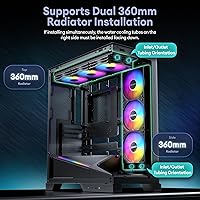
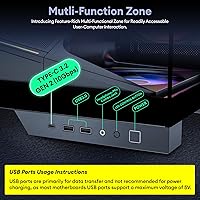
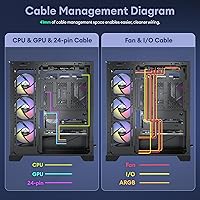
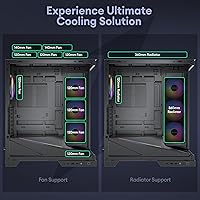
Five pre-installed H12 120mm fans collectively push 260 CFM of airflow — enough to keep a mid-to-high-end gaming build comfortable without needing immediate upgrades. They tie into a dedicated 5+5 port PWM and ARGB controller, handling speed and lighting sync in one hub. This Okinos case also fits dual 360mm radiators simultaneously — top and right side — though side-mounting carries one non-obvious rule: coolant tubes must run downward, not upward. Overlook that detail and you will have clearance problems. Cable management benefits from 41mm of rear space, front I/O includes a Type-C 3.2 Gen 2 port alongside two USB 3.0 headers, and magnetic dust filters at both the top and bottom make routine cleaning straightforward.

Best For

The Aqua 9 is a strong pick for builders who want a bold, glass-heavy aesthetic without paying flagship prices for it. Anyone planning a custom water-cooling loop with two full 360mm radiators will find few options at this tier that can actually deliver — this mid-tower build is one of them. It suits back-connect board owners well too, since ASUS BTF or MSI Project Zero users gain directly from the generous rear cable clearance. Beginners appreciate arriving five fans and a controller deep from day one. The caveat worth stating plainly: this is not a compact chassis. At nearly 18 inches wide and over 20 tall, desk footprint deserves a measurement before committing.

User Feedback

Sitting at 4.6 stars across roughly 100 ratings, the Aqua 9 is generating solid early sentiment for a newcomer brand. Buyers praise the glass presentation heavily — the three-sided exposure photographs well and holds up in person. The included fan bundle earns consistent approval, particularly from builders who wanted a fully functional system without sourcing fans separately. Where feedback gets uneven: the 220mm PSU cap is a real limitation, since many premium full-modular units run longer and simply will not fit. Side radiator installation also catches users off guard — the tube-down orientation requirement is not clearly explained in the manual, leading to frustration mid-build. Panel fitment is mostly praised, with occasional notes of slight alignment variance on individual units.

Pros

  • Three-sided 270° panoramic tempered glass creates a genuinely striking interior showcase rare at this price tier.
  • Five pre-installed PWM ARGB fans mean you can complete a fully functional build without buying additional cooling.
  • Dual 360mm radiator support — top and side simultaneously — is exceptional capacity for a mid-range case.
  • The 5+5 port fan and ARGB controller consolidates speed and lighting management without needing extra hubs.
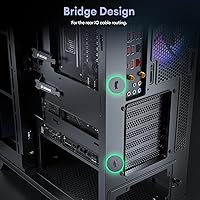
  • A 41mm rear cable management channel keeps builds clean, with extra benefit for back-connect motherboard setups.
  • Type-C 3.2 Gen 2 front I/O at 10Gbps is a modern, future-friendly port that many similarly priced cases still omit.
  • Full-size magnetic dust filters on the top and bottom are easy to remove, clean, and reattach without tools.
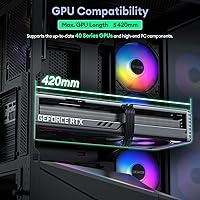
  • 420mm maximum GPU clearance accommodates even the longest current-generation graphics cards without compromise.
  • Back-connect motherboard compatibility is built-in by design, not an afterthought, which simplifies planning for BTF and Project Zero builds.
  • Early user ratings are strong for a new brand, with consistent praise for panel clarity and overall visual finish.

Cons

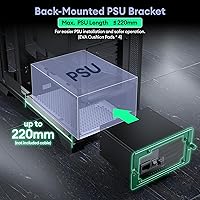
  • The 220mm PSU length limit rules out many popular full-modular power supplies from major brands.
  • Side radiator installation requires tubes to face downward — the manual does not explain this clearly enough, and it catches builders off guard.
  • Okinos has a limited track record, leaving long-term durability and warranty support less proven than established competitors.
  • The chassis is physically large for a mid-tower, which can be a real issue on smaller desks or in tighter spaces.
  • ARGB lighting cannot be fully disabled on the included fans without the controller, which may not suit minimalist builds.
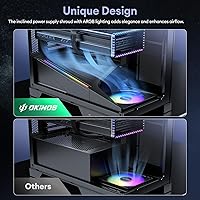
  • The inclined PSU shroud, while visually distinctive, adds installation complexity compared to a standard horizontal shroud.
  • With only 99 reviews at launch, the sample size for assessing long-term reliability is still relatively thin.
  • Occasional reports of minor panel alignment variance suggest quality control is not perfectly consistent unit to unit.

Ratings

The scores below for the Okinos Aqua 9 Mid Tower PC Case were generated by our AI review engine after analyzing verified buyer feedback from multiple global markets, with spam, incentivized, and bot-flagged submissions actively filtered out before any scoring was applied. This Okinos case earns strong marks for visual design, cooling capacity, and overall feature density, but the data also surfaces real friction points — particularly around PSU compatibility and side radiator installation — that are weighted transparently into each category score.

Aesthetic Design
94%
Buyers consistently describe the three-sided panoramic glass as one of the most visually striking chassis designs they have owned at this price level. The ARGB fans and lit PSU shroud create a cohesive interior display that photographs exceptionally well, and several reviewers noted the angled shroud lends a premium feel uncommon in this segment.
Buyers who prefer understated, RGB-free builds found the lighting difficult to fully suppress, and the illuminated PSU shroud has no clean off state without active controller intervention. For anyone planning a monochrome or stealth-aesthetic build, the visual identity of the Aqua 9 is almost too committed to a single look.
Build Quality
78%
22%
For a newer brand at this price tier, most buyers report that the metal feels adequately rigid and the tempered glass arrives without defects. Panel fitment earns generally positive feedback, with reviewers comparing it favorably to cases from mid-tier established brands they had used previously.
Occasional units arrive with minor panel alignment issues, and the metal gauge is noticeably thinner than what you get from premium-bracket competitors like Fractal Design or Lian Li. Okinos simply lacks the long track record needed to assess how these tolerances hold up over multiple years of use.
Airflow Performance
83%
Five pre-installed 120mm fans generating 260 CFM combined means most gaming builds run cooler than expected right out of the box without any upgrades. Builders using air-cooled setups with mid-range CPUs and GPUs report healthy thermal headroom, with the PWM controller keeping fan noise proportional to actual system load.
At full load, 260 CFM spread across five smaller fans can generate noticeable noise in a quiet room, and the controller PWM curve is not granular enough for users who want fine-tuned silent operation. Builds with very high-TDP processors may still want to supplement the included fans for sustained heavy workloads.
Cooling Capacity
91%
The ability to mount dual 360mm radiators simultaneously — one on top, one on the side — is exceptional for a case at this price, opening the door to full custom loop configurations that usually require spending significantly more. Reviewers planning serious water-cooling builds specifically cited this as the deciding reason they chose the Aqua 9 over alternatives.
Side radiator installation carries a non-obvious constraint: coolant tubes must face downward, and several buyers discovered this mid-build after routing them incorrectly. The manual coverage of this requirement is inadequate, causing real frustration even for experienced builders who simply did not anticipate the orientation rule before starting.
Value for Money
88%
Five fans, a controller, dual 360mm radiator support, back-connect compatibility, and panoramic glass in a single package at this price is a genuinely competitive offer that is hard to match from established brands. Buyers repeatedly note that sourcing these features individually would cost considerably more than the all-in price here.
Buyers who already own quality fans or a custom lighting ecosystem may feel they are paying for bundled hardware they cannot remove from the price equation. The 220mm PSU cap also means some buyers face an unplanned additional cost to replace an incompatible power supply, which chips into the perceived savings.
Fan & Lighting Bundle
84%
The 5+5 port controller managing both PWM speed and ARGB lighting in a single unit is a thoughtful inclusion that simplifies the build process, especially for first-time builders who would otherwise need to research hubs separately. Lighting sync with popular motherboard software works reliably for the majority of users.
The ARGB implementation is not the most sophisticated available, and enthusiasts with existing high-end lighting ecosystems sometimes report minor sync inconsistencies with certain motherboard ARGB headers. A small number of buyers also noted that one or more fans arrived with an LED strip that was visibly dimmer than the others in the set.
Installation Experience
67%
33%
The glass panel removal system using fixing slots and studs works well for routine hardware access, and magnetic dust filter removal is genuinely tool-free and quick. First-time builders generally found standard component installation — CPU coolers, RAM, and GPU — straightforward and logically laid out inside this mid-tower build.
Side radiator installation trips up builders of all experience levels because the tube-down orientation requirement is not intuitive and the manual does not explain it with sufficient clarity. Several reviewers spent significant time troubleshooting clearance conflicts mid-build, a preventable friction point that better documentation would resolve entirely.
PSU Compatibility
52%
48%
For builders using standard or semi-modular PSUs up to 220mm — which covers a broad entry-to-mid-range selection from brands like Corsair CX, EVGA BR, and be quiet! System Power — the bay fits cleanly without any clearance issues. Buyers within that range reported no fitment problems whatsoever.
The 220mm length cap is a frequently cited problem among buyers who own or plan to purchase premium full-modular PSUs, many of which run 230mm or longer. This affects a wide and popular category of high-end units, has directly caused returns, and deserves far more prominent disclosure before purchase rather than buried in the spec sheet.
Cable Management
86%
A 41mm rear cable channel is genuinely roomy by mid-tower standards, and builders using back-connect motherboards found it particularly valuable for keeping the visible interior completely wire-free. Multiple reviewers noted this helped them achieve their cleanest build yet without needing aftermarket cable extensions or additional management accessories.
The PSU shroud's angled design, while visually appealing, creates slightly awkward routing paths for certain modular cable configurations, and a few users wished for more velcro tie-down anchor points along the rear tray. It is manageable but requires more deliberate planning than a conventional flat-shroud layout typically demands.
Front I/O Quality
81%
19%
A Type-C 3.2 Gen 2 port at 10Gbps on the front panel is a genuinely useful inclusion that many competing cases at this tier still omit or downgrade to slower Gen 1 speeds. Paired with two USB 3.0 ports and audio jacks, daily-use connectivity needs are covered without reaching around to the rear of the system.
There is no high-speed USB-A port on the front for users who need fast transfers via Type-A devices, and the power and reset switch assembly received minor criticism for feeling slightly plasticky relative to the overall build aesthetic. Neither issue is a dealbreaker, but the button quality reads as a clear cost-saving measure.
Noise Level
74%
26%
At idle and light loads, the PWM controller keeps fan speeds low enough that the case is reasonably quiet in typical home desktop environments. Most buyers running gaming sessions at moderate GPU loads describe the audible output as acceptable and non-intrusive at normal listening distances from the desk.
Under sustained high load — extended gaming sessions, video rendering, or heavy CPU stress — all five fans ramp up noticeably and the combined output becomes harder to ignore in a quiet room or late-night setup. The fans prioritize airflow over acoustics, which is a fair trade-off at this price but worth factoring into a noise-sensitive build.
Dust Management
82%
18%
Full-size magnetic dust filters on both the top and bottom intakes are practical and well-executed, pulling away cleanly by hand for a quick rinse without tools. Buyers who maintain their builds regularly praised the filter coverage as more thorough than cases that only protect a single intake surface.
The panoramic glass front panels do not include a dedicated fine-mesh filter layer, meaning some particulate can enter through the front over time in dusty environments. Buyers in high-dust settings such as workshops or carpeted rooms may want to add supplemental filter material, though this trade-off is common in glass-forward case designs.
Expansion Flexibility
79%
21%
Seven expansion slots and 420mm GPU clearance make this mid-tower build genuinely accommodating for most consumer hardware configurations, including high-end triple-fan graphics cards and multi-slot add-in cards. Builders who plan to upgrade components over several years will not feel constrained by the chassis layout.
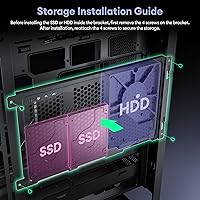
The internal drive bay configuration is limited, and users with larger storage arrays relying on multiple 3.5-inch HDDs may find the available mounting options more restrictive than expected. This is a common concession in glass-heavy cases that sacrifice internal storage real estate for visual openness, but it is still worth verifying before committing.
Back-Connect Support
87%
The 41mm rear channel and recessed motherboard tray cutouts are well-positioned for back-connect board installations, and buyers using ASUS BTF or MSI Project Zero platforms specifically praised how much cleaner their completed builds looked compared to previous enclosures they had used. It is one of the few cases at this price that treats back-connect as a genuine first-class use case.
Back-connect-specific documentation in the included manual is minimal, and first-time back-connect builders found some cable routing paths ambiguous without additional reference materials. A dedicated diagram or short setup guide for this configuration would meaningfully reduce build time and frustration for this growing segment of buyers.

Suitable for:

The Okinos Aqua 9 Mid Tower PC Case is built for builders who want maximum visual impact without crossing into premium pricing territory — if a three-sided panoramic glass interior is high on your priority list, this case delivers that at a price where most competitors still offer a single side window. Enthusiasts planning a serious water-cooling setup will find genuine value here, since supporting dual 360mm radiators simultaneously is a capability that typically costs significantly more elsewhere. Back-connect motherboard users — particularly those on ASUS BTF or MSI Project Zero platforms — benefit from the 41mm rear cable channel, which gives those tidy, wire-free builds the clearance they actually need. First-time and intermediate builders also land well here, since five pre-installed fans and a dedicated controller remove one of the more tedious early planning steps. If your priority is a clean, visible, well-cooled build at a reasonable spend, the Aqua 9 is a genuinely competitive option.

Not suitable for:

The Okinos Aqua 9 Mid Tower PC Case will frustrate anyone pairing it with a high-end, full-modular power supply — the 220mm PSU length cap excludes a wide range of popular units from Seasonic, EVGA, and Corsair that run 230mm or longer, and discovering that incompatibility after buying is an avoidable headache. Builders working with a tight desk footprint or a small workspace should also look elsewhere, since this chassis measures over 20 inches tall and nearly 18 inches wide, which is on the larger end for a mid-tower. If you are brand-sensitive and want the reassurance of a long-established manufacturer behind your case, Okinos does not yet have that track record, and some buyers will reasonably prefer proven names for a component this central to their build. Anyone planning to mount a side radiator without reading the manual thoroughly first should be aware that the coolant tubes must face downward — it is not intuitive, and skipping that detail causes real installation problems. Finally, builders who prefer a minimalist, RGB-free aesthetic will find the ARGB fan bundle and lit PSU shroud hard to fully suppress.

Specifications

  • Form Factor: Mid Tower ATX enclosure measuring 453mm x 232mm x 518mm (17.83″ x 9.13″ x 20.39″).
  • Weight: The case ships at 20.1 lbs, typical for a steel-and-glass mid-tower of this size.
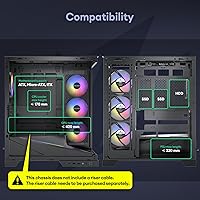
  • Motherboard Support: Compatible with ATX, Micro-ATX, and Mini-ITX form factor motherboards, including back-connect variants.
  • Panel Material: 270° panoramic tempered glass panels cover the front, left side, and right side of the chassis.
  • Included Fans: Five 120mm H12 PWM ARGB fans come pre-installed, delivering a combined airflow rating of 260 CFM.
  • Fan Controller: A 5+5 port hub manages both PWM speed control and ARGB lighting sync from a single unit.
  • Radiator Support: Supports up to a 360mm radiator on the top, a 360mm on the right side, and a 120mm at the rear simultaneously.
  • Fan Mounts: Top accepts up to 3x 120mm or 2x 140mm fans; right side accepts up to 3x 120mm; bottom accepts 1x 120mm; rear accepts 1x 120mm.
  • GPU Clearance: Maximum supported GPU length is 420mm, accommodating virtually all current full-length graphics cards.
  • PSU Clearance: The bottom-mounted PSU bay supports power supply units up to a maximum length of 220mm.
  • Cable Management: A 41mm rear cable management channel provides ample clearance for routing and concealing cables behind the motherboard tray.
  • Front I/O: Front panel includes one Type-C 3.2 Gen 2 port (10Gbps), two USB 3.0 ports, HD audio jacks, and a power and reset switch.
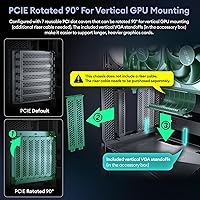
  • Expansion Slots: Seven rear expansion slots accommodate multi-GPU configurations and full-size add-in cards.
  • Dust Filters: Full-size magnetic dust filters are fitted at both the top and bottom intake positions for tool-free removal and cleaning.
  • PSU Shroud: An angled PSU shroud with integrated ARGB accent lighting conceals the power supply and lower cable run from view.
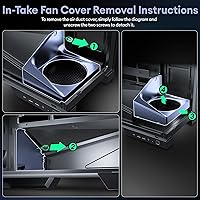
  • Glass Removal: Tempered glass panels are secured via fixing slots and studs, allowing tool-friendly removal without screwdrivers for most panels.

Related Reviews

SAMA V60 Mid Tower PC Case
80%
93%
Out-of-Box Cooling Value
78%
Airflow Performance
91%
AIO & Radiator Flexibility
88%
Tempered Glass & Aesthetics
71%
Build Quality & Materials
More
darkFlash DS900 ATX Mid-Tower PC Case
75%
76%
Build Quality
83%
Cooling Potential
91%
Aesthetics & Visibility
88%
Value for Money
74%
Cable Management
More
Zalman S2 ATX Mid-Tower PC Case
76%
88%
Airflow Performance
63%
Build Quality
91%
Value for Money
86%
Ease of Assembly
84%
Cooling Expandability
More
Corsair FRAME 4000D RS Mid-Tower Case
82%
91%
Airflow Performance
88%
Build Quality
86%
Modularity & Upgradability
83%
Fan Mounting System
78%
GPU Compatibility
More
Corsair 3000D Airflow Mid-Tower PC Case
81%
93%
Airflow Performance
88%
Build Quality & Materials
91%
Thermal Management Design
84%
Cable Management
61%
Included Fans Quality
More
ANSAITE W9 Mid-Tower ATX PC Case
77%
88%
Value for Money
91%
RGB & Lighting Performance
74%
Airflow & Cooling Capacity
63%
Build Quality & Materials
84%
Cable Management
More
SAMA V Mesh Mid Tower PC Case

79%
91%
Airflow Performance
88%
Included Fans
86%
Value for Money
67%
Build Quality
83%
Ease of Assembly
More
SZSKYING CMSVB-1 Mid-Tower PC Gaming Case
74%
91%
Value for Money
88%
Included Fans
86%
Aesthetics & RGB
61%
Build Quality
74%
Airflow Performance
More
Zalman S3 ATX Mid-Tower PC Case

74%
83%
Value for Money
71%
Build Quality
58%
Airflow & Cooling Performance
86%
Ease of Assembly
67%
Acrylic Side Panel
More
Vetroo AL800 Mid Tower ATX PC Case

76%
78%
Build Quality
84%
Tempered Glass Panel
76%
Airflow Performance
61%
Fan Included & Expandability
69%
Cable Management
More

FAQ

The Okinos Aqua 9 Mid Tower PC Case caps PSU length at 220mm, which covers many standard and semi-modular units but excludes a number of popular full-modular PSUs from brands like Seasonic, Corsair, and be quiet! that measure 230mm or more. Before ordering, check the exact length spec on your PSU model — it is listed in the product datasheet, not just the box.

Yes, the Aqua 9 supports a 360mm radiator on top and a second 360mm on the right side simultaneously. There is one critical installation detail though: when mounting the side radiator, the coolant tubes must exit facing downward. If you run them upward, the tubes will conflict with the top radiator. The manual covers this, but it is easy to miss on a first build.

Yes, the Aqua 9 was designed with back-connect motherboard support in mind. The 41mm rear cable channel gives you the depth needed to route power and data cables cleanly behind the tray, which is exactly what back-connect builds require for a tidy front-facing interior.

For most gaming and productivity builds, the five pre-installed H12 fans pushing 260 CFM combined are more than sufficient out of the box. They are PWM-controlled, so speeds scale with load, and the bundled controller handles lighting sync too. Builders running very high thermal loads — like overclocked flagship CPUs paired with top-tier GPUs — might eventually upgrade, but for the vast majority of builds these fans hold up well.

The panels use a fixing slot and stud system that lets you lift and detach them without a screwdriver in most cases. Magnetic dust filters at the top and bottom pull away by hand. It is a notably user-friendly setup compared to screw-retained panels, though you should handle the glass with care given its size.

The fan controller includes dedicated ARGB control buttons so you can cycle through lighting modes, including off. However, full lighting suppression may depend on whether your motherboard software or the controller button sequence supports a true off state — some ARGB implementations default back to a color mode on power cycle. If a permanently dark build is important to you, verify this with Okinos support before purchasing.

This mid-tower build supports graphics cards up to 420mm in length, which covers essentially every current-generation consumer GPU including triple-slot, triple-fan models from NVIDIA and AMD. If your card is longer than 420mm you are likely in workstation or extreme enthusiast territory, which is beyond what this chassis is designed for.

Okinos is a relatively new brand without the long track record of established names like Fractal Design, Lian Li, or NZXT. That said, the Aqua 9 has accumulated a strong early rating across its initial reviews, and buyers generally report solid build quality for the price. The honest answer is that long-term durability data is still limited, so if brand reputation and warranty history matter a lot to you, that is a fair reason to consider more established alternatives.

A standard ATX motherboard works perfectly fine in the Aqua 9 — back-connect compatibility is an added feature, not a requirement. The case also supports Micro-ATX and Mini-ITX boards if you want a smaller platform inside a larger, more feature-rich enclosure.

It is a reasonable choice for a first build, mainly because the five pre-installed fans and integrated controller remove a common planning headache. The panoramic glass also makes it easy to verify cable routing and component seating visually as you build. The one area where beginners should be careful is the side radiator installation if they plan on water cooling — read that section of the manual carefully before starting.