
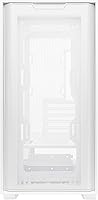
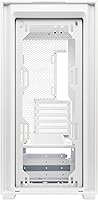
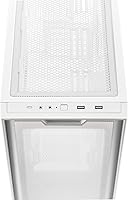
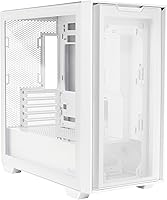
Overview

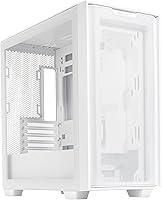
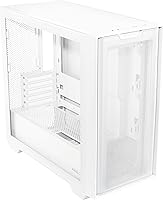
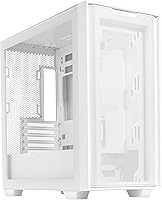
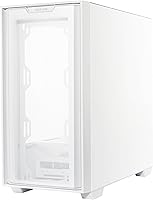
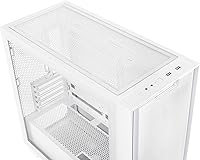
The ASUS A21 Micro ATX Mid Tower Case arrived in late 2023 as a compact option for builders who care as much about looks as they do about budget. What sets the A21 apart from similarly priced competition is its support for BTF hidden connector motherboards — a feature you rarely find at this price point. The white colorway, in particular, draws builders chasing a clean, minimal aesthetic. With over 1,000 ratings and a 4.7-star average, this ASUS enclosure has clearly found its audience. It is not trying to be everything; it is a focused, style-conscious case for mATX builds that do not need to break the bank.

Features & Benefits

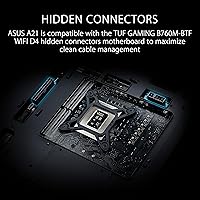
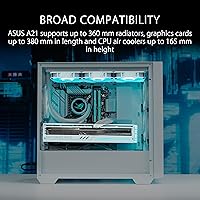
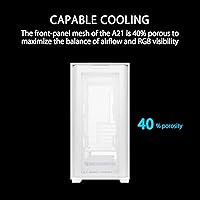
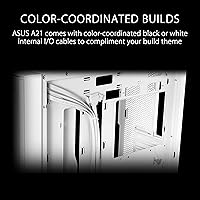
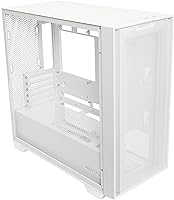
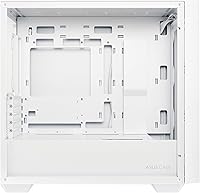
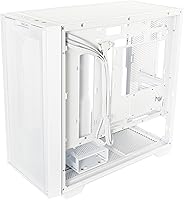
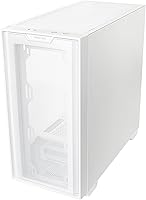
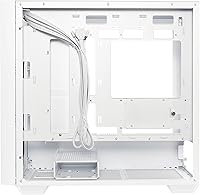
The A21's most talked-about feature is its compatibility with ASUS BTF motherboards, which route power connectors through the back of the board to hide cables entirely — though this only works if your motherboard supports BTF. For everyone else, the 33mm cable management compartment behind the motherboard still does a solid job tucking wires out of sight. The front panel uses a 40% porous mesh that lets air in, filters dust reasonably well, and allows RGB light through without turning the panel into a solid barrier. GPU clearance sits at 380mm, radiator support reaches 360mm, and CPU coolers up to 165mm tall fit without issue. Color-matched internal cables are a thoughtful finishing touch.

Best For

This Micro ATX case hits a sweet spot for a few specific builder types. If you are already invested in the ASUS BTF ecosystem, pairing the A21 with a BTF-compatible board makes the most sense — the cable-hiding results are genuinely impressive when the full system works together. New builders will appreciate how forgiving the layout is; you do not need to be a cable management veteran to get a tidy result. It also suits anyone building in a compact space who still wants headroom for a high-end GPU or a 360mm liquid cooler. White-themed build enthusiasts get a rare bonus: matching internal cables straight out of the box.

User Feedback

Most buyers come away satisfied with the A21, praising how straightforward the build process is and how polished the finished result looks — especially in the white version. BTF connector support earns specific praise from those pairing it with a compatible board. The most common complaint is that no fans are included, something that catches first-time buyers off guard and adds unexpected cost. Some users also mention that the side panel material feels thinner than expected at this price tier. Airflow under a heavy GPU load draws mixed feedback, though the 40% porous mesh is generally seen as an improvement over solid-front alternatives at a similar price.

Pros

  • BTF hidden connector support offers a genuinely clean interior when paired with a compatible motherboard.
  • Fits GPUs up to 380mm and 360mm radiators, giving serious component headroom for a compact case.
  • The 40% porous front mesh lets air in and filters dust without blocking RGB lighting.
  • Color-matched internal I/O cables are included, saving time and money on aesthetic finishing.
  • The 33mm rear cable management compartment keeps wiring tidy even without a BTF motherboard.
  • Supports CPU air coolers up to 165mm tall, covering the vast majority of popular tower coolers.
  • Assembly is beginner-friendly, with a layout that does not require advanced building skills.
  • The white colorway offers a cohesive look inside and out that is rare at this price tier.
  • ATX PSU support gives flexibility to reuse or upgrade power supplies without size restrictions.
  • Over 1,000 verified ratings at 4.7 stars reflects a consistently positive real-world ownership experience.

Cons

  • No fans are included in the box, which adds unexpected extra cost for new builders.
  • BTF connector compatibility is useless unless you also own a BTF-supported motherboard.
  • The side panel feels thinner than some competing cases at a similar price point.
  • Only Micro ATX motherboards are supported, ruling out standard ATX builds entirely.
  • A single front intake point can limit sustained airflow in thermally demanding gaming setups.
  • Front panel I/O offers only USB 2.0 and USB 3.0 ports — no USB-C connectivity is available.
  • The case weighs 18.5 pounds, which is on the heavier side for a compact mATX enclosure.
  • Limited to 120mm fan mounting, which may frustrate builders preferring larger, quieter fan configurations.

Ratings

The ASUS A21 Micro ATX Mid Tower Case scores below were generated by our AI review engine after analyzing thousands of verified global buyer experiences, actively filtering out incentivized, bot-generated, and spam submissions to surface what real builders actually think. Ratings reflect a transparent picture of both where this enclosure genuinely shines and where it falls short — no inflated averages, no buried criticism.

Value for Money
91%
Buyers consistently describe the A21 as punching above its weight for the price, especially given the BTF compatibility and color-matched internal cables — features that typically cost more elsewhere. For budget-aware builders putting together their first clean aesthetic build, the overall package feels like a genuine deal.
The omission of even a single included fan does sting at this price point, since it adds an immediate extra cost that buyers are not expecting. A few users also feel the side panel material quality does not quite match the perceived value of the rest of the chassis.
Cable Management
88%
The 33mm compartment behind the motherboard tray gives builders real room to bundle and route cables without cramming or forcing anything, and most users report a noticeably tidy result even without BTF hardware. For first-timers, the layout is forgiving enough that getting a clean interior does not require hours of planning.
Without a BTF-compatible motherboard, the full cable-hiding potential goes unrealized, and some builders find the standard routing channels slightly limited for very thick or high-count cable sets. A couple of tie-down anchor points in the rear compartment would improve things further.
BTF Compatibility
86%
For builders already in the ASUS BTF ecosystem, the results are striking — power connectors disappear entirely behind the board, and the interior looks closer to a render than a real build. Verified BTF users consistently call this the case's single most impressive real-world payoff.
The feature is entirely dependent on owning a BTF-supported motherboard, which limits its relevance to a specific subset of buyers. For anyone outside that ecosystem, it contributes nothing to the build experience, which is a meaningful asterisk given how prominently it is marketed.
Component Clearance
93%
Supporting GPUs up to 380mm, 360mm radiators, and CPU coolers up to 165mm tall is genuinely impressive headroom for a Micro ATX enclosure, and builders pairing it with high-end components report no fitment surprises. Most mainstream air coolers and even full-size triple-fan GPUs drop in without drama.
There is no official PSU length limit published, which creates minor uncertainty when selecting a longer modular unit. A small number of users with particularly thick 360mm radiators also noted tighter-than-expected clearance near front fan mounting positions.
Ease of Assembly
89%
First-time builders repeatedly highlight how intuitive the interior layout is, with well-placed cutouts, accessible standoffs, and enough room to work without contorting your hands. The included color-matched cables also reduce the mental overhead of figuring out which wire goes where for a cohesive look.
A handful of more experienced builders note that the toolless panel mechanisms feel slightly loose on repeated removal, which can be mildly frustrating during iterative builds or upgrades. Instructions are minimal, which is rarely a problem for veterans but can slow down absolute beginners.
Airflow Performance
71%
29%
The 40% porous front mesh does allow a meaningful volume of air to pass through compared to fully solid front panels, and casual gaming loads are handled adequately when paired with a couple of 120mm intake fans. RGB enthusiasts also appreciate that the mesh diffuses lighting rather than blocking it.
Under sustained high-TDP workloads — think long gaming sessions with a power-hungry GPU and a hot CPU — the single front intake mesh can become a thermal ceiling that more open-faced cases avoid. Builders running demanding rigs are advised to use high-static-pressure fans and consider removing the dust filter temporarily for stress testing.
Build Quality
74%
26%
The overall chassis feels solid and well-aligned out of the box, with no reported issues around warping, misaligned drive bays, or poorly finished edges. The exterior presentation — particularly in white — holds up well to close inspection and matches the product photography accurately.
The side panel is the most commonly cited weak point, with a noticeable number of users describing it as thinner-gauge steel than competing cases in the same price range. It does not rattle or flex under normal use, but tapping it side-by-side with pricier alternatives makes the difference perceptible.
Aesthetic Design
92%
The white colorway is genuinely clean and consistent across the interior and exterior, and the inclusion of white internal I/O cables is a detail that builders clearly appreciate — it removes one of the most common compromises in themed builds. The minimal front panel design photographs exceptionally well and draws frequent compliments.
The design language is deliberately restrained, which will not satisfy builders who want bold or aggressive styling cues on the exterior. There is also no integrated RGB lighting on the case itself, so the visual impact is entirely dependent on the components and fans installed inside.
Cooling Potential
69%
31%
The radiator support up to 360mm means serious liquid cooling options are on the table, which is a meaningful capability for a compact mATX case. Builders running AIO coolers in the 240mm to 360mm range report clean fitment and good thermal results in real-world use.
No fans included means the out-of-the-box cooling capability is literally zero — buyers must purchase fans separately before the case moves any air at all. The 120mm fan-only mounting also means you cannot use larger, quieter 140mm fans that many experienced builders prefer for noise-to-performance trade-offs.
Front I/O Ports
58%
42%
The four-port front panel — two USB 2.0 and two USB 3.0 — is functional and sufficient for basic peripherals like mice, keyboards, and flash drives during a build or routine use. Port placement is accessible and logically positioned for desktop use.
The complete absence of a USB-C port is a real limitation by current standards, especially for builders who frequently connect modern smartphones, portable SSDs, or USB-C peripherals. This is arguably the most outdated spec on an otherwise competitive case, and it is the kind of omission that may age poorly over the typical lifespan of a build.
Dust Filtration
77%
23%
The front mesh provides a first line of passive dust defense, and builders in moderately dusty environments report that visible dust buildup inside the case is manageable with routine cleaning every few weeks. The mesh panel is removable enough for periodic cleaning without needing to disassemble the case.
There is no dedicated removable dust filter tray on the bottom for PSU intake, which is a gap that leads to more frequent cleaning cycles in homes with pets or carpet flooring. The mesh alone is not a substitute for purpose-built magnetic dust filters found in cases at slightly higher price points.
Storage Options
66%
34%
The A21 accommodates the essential storage configurations most modern builders need, including SSD mounts in the cable management zone that keep drives hidden and the main chamber uncluttered. For builders going all-NVMe on the motherboard, the drive bay layout is essentially a non-issue.
Builders with large collections of 3.5-inch mechanical hard drives will find the bay count limiting, as the case prioritizes clean aesthetics over legacy storage density. The exact number of drive bays is not prominently specified, which itself creates uncertainty during the planning phase.
Brand Credibility
84%
ASUS carries strong recognition in the PC hardware community, and buyers cite this brand trust as a meaningful factor in their purchasing confidence — especially for a first case purchase. The BTF ecosystem integration also signals that ASUS is investing in this product line rather than releasing a one-off budget chassis.
ASUS is primarily known for motherboards, GPUs, and monitors rather than cases, and some enthusiasts feel the case division has less heritage and refinement than dedicated case manufacturers. Support and warranty experiences are mixed in niche reports, though no widespread service complaints were identified.

Suitable for:

The ASUS A21 Micro ATX Mid Tower Case is a strong pick for budget-conscious builders who want their finished PC to look like it cost significantly more than it did. It is especially well-suited for anyone already building within the ASUS BTF ecosystem, where pairing this enclosure with a BTF-compatible motherboard genuinely delivers a near-cableless interior without any extra effort. First-time builders will also find the layout forgiving — the 33mm cable management compartment handles most wiring neatly even without BTF, and the assembly process is straightforward enough that you do not need prior experience to get a clean result. Those building compact gaming rigs that still need room for a serious GPU or a 360mm liquid cooler will appreciate that the A21 does not sacrifice clearance to achieve its smaller footprint. White-themed build enthusiasts get a rare, cohesive touch with color-matched internal cables included straight from the box.

Not suitable for:

Builders expecting a ready-to-run cooling setup out of the box will be disappointed — the ASUS A21 Micro ATX Mid Tower Case ships without any included fans, meaning you need to budget separately for at least one or two 120mm units before your system can move any air. Those pushing high-TDP components under sustained load may also find the airflow ceiling limiting, as the front mesh, while 40% porous, is still a single front intake point that can become a bottleneck in thermally demanding builds. Full ATX motherboard users are out entirely, since the case only supports Micro ATX form factors. Builders who prioritize a premium, tank-like build quality may find the panel thickness a touch thin for the price point when compared to some competing enclosures. Finally, anyone not using a BTF-compatible motherboard should temper expectations around the hidden connector feature — without that pairing, the BTF compatibility is simply unused potential.

Specifications

  • Form Factor: Supports Micro ATX motherboards only; mid-tower chassis layout with internal ATX power supply mounting.
  • Dimensions: The case measures 19.49 x 11.42 x 20.35 inches (L x W x H) for a compact but capable mid-tower footprint.
  • Weight: Shipping weight is 18.5 pounds, reflecting a steel-dominant construction typical of cases in this category.
  • GPU Clearance: Accommodates graphics cards up to 380mm in length, covering most current high-end consumer GPUs.
  • Radiator Support: Supports liquid cooling radiators up to 360mm, enabling full custom or AIO loop configurations.
  • CPU Cooler Height: CPU air coolers up to 165mm tall are supported, fitting the majority of popular tower cooler models.
  • PSU Compatibility: Accepts standard ATX power supply units mounted internally, with no length restriction specified for the PSU bay.
  • Fan Size: The case is designed around 120mm fan mounting positions; no fans are included in the box.
  • Front Mesh Porosity: The front panel mesh is 40% porous, providing a measured balance between intake airflow, dust filtering, and RGB light diffusion.
  • Cable Management: A dedicated compartment behind the motherboard tray is 33mm deep, giving ample room to route and conceal wiring.
  • BTF Compatibility: Fully compatible with ASUS BTF hidden connector motherboards, which route power cables behind the board to eliminate visible wiring.
  • USB Ports: The front I/O panel includes two USB 2.0 ports and two USB 3.0 ports; no USB-C port is present.
  • Color Variants: Available in two colorways — black and white — each shipping with color-matched internal I/O cables to suit the build theme.
  • Internal Cables: Color-coordinated internal I/O cables are included in the box, pre-matched to either the white or black chassis variant.
  • Model Number: The official ASUS model number is 90DC00H3-B08000, used for warranty registration and parts identification.
  • Brand & Series: Manufactured by ASUS under the A21 series, released to market in December 2023.
  • Cooling Method: Primary cooling relies on air circulation; liquid cooling is supported via the 360mm radiator mounting compatibility.
  • Side Panel: The case features a side panel designed for component visibility, though the specific panel material is not officially disclosed by ASUS.

Related Reviews
SilverStone FARA H1M Mid-Tower Micro-ATX Case
82%
91%
Airflow Performance
88%
Build Quality
85%
Cooling Options
65%
Cable Management
82%
Aesthetics
More
ASUS TUF GT502 Horizon Mid-Tower Case
80%
91%
Build Quality
83%
Thermal Performance
79%
Airflow Design
94%
Aesthetic Design
81%
Cable Management
More
Thermaltake Tower 600 Mid-Tower ATX Case
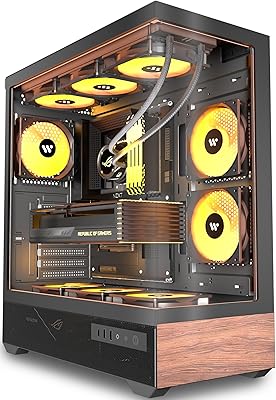
79%
91%
Build Quality
93%
Aesthetic Design
88%
Cable Management
94%
Cooling Capacity
71%
Installation Experience
More
KEDIERS P6 Mid Tower ATX PC Case
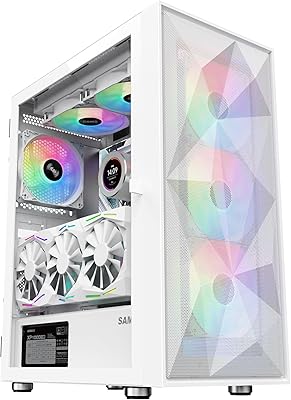
75%
88%
Aesthetic Design
71%
Build Quality
84%
Included Fans & Lighting
78%
Airflow & Thermal Performance
81%
Radiator & Cooling Support
More
ASUS Prime AP201 Micro ATX PC Case
80%
93%
Airflow Performance
91%
Cooling Compatibility
84%
Build Quality
92%
GPU Compatibility
89%
Tool-Free Panel Access
More
SAMA 3509 ATX Mid Tower PC Case
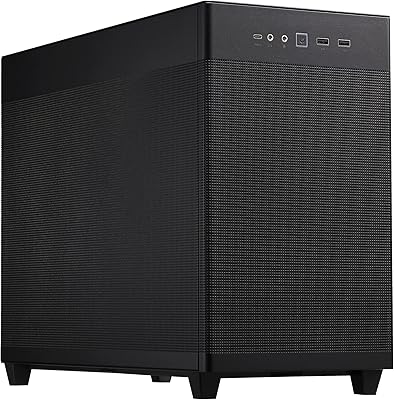
74%
88%
Value for Money
74%
Build Quality
81%
Airflow & Cooling Performance
67%
Pre-installed Fan Quality
86%
Tempered Glass Panel
More
HYTE Y40 Mid-Tower ATX Gaming Case
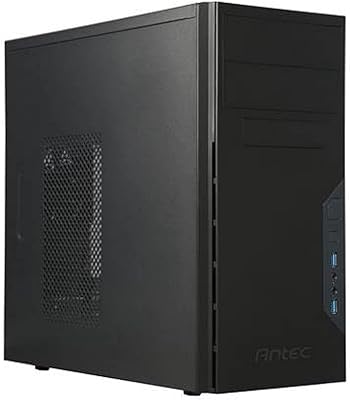
76%
94%
Aesthetics & Design
88%
Build Quality
62%
Cooling Performance
83%
Value for Money
81%
Cable Management
More
Zalman S2 ATX Mid-Tower PC Case
76%
88%
Airflow Performance
63%
Build Quality
91%
Value for Money
86%
Ease of Assembly
84%
Cooling Expandability
More
Vetroo AL800 Mid Tower ATX PC Case
76%
78%
Build Quality
84%
Tempered Glass Panel
76%
Airflow Performance
61%
Fan Included & Expandability
69%
Cable Management
More
Thermaltake Tower 300 Black Micro-ATX Case
84%
88%
Cooling Performance
90%
Build Quality
85%
Design and Aesthetics
82%
Size and Compatibility
80%
Ease of Setup
More

FAQ

No, the case ships without any fans in the box. This catches quite a few buyers off guard, so make sure to budget for at least one or two 120mm fans before you power on. You will need them to get any airflow through the chassis.

Yes, the BTF cable-hiding feature only works if your motherboard supports ASUS BTF technology, which routes power connectors through cutouts in the board itself. If you are using a standard motherboard, the BTF compatibility is simply irrelevant — the case still works perfectly fine, but you will not get that fully hidden cable look.

Unfortunately, no. The A21 is designed exclusively for Micro ATX boards. If you are building on a standard ATX or E-ATX platform, you will need to look at a larger enclosure.

Yes, the A21 supports radiators up to 360mm, so a 360mm AIO should fit without issue. Just double-check the specific mounting positions and fan clearance against your AIO model before purchasing, as radiator thickness can occasionally affect compatibility.

You should be fine. This ASUS enclosure supports graphics cards up to 380mm in length, so a 330mm card has comfortable room to spare. Just verify your GPU does not have unusually wide power connectors that could interfere with nearby cables.

The front panel is 40% porous, which is a reasonable spec for a case in this price range. It is not as open as a fully perforated front, but it does allow a decent amount of air through while still filtering dust. Builders running very hot systems under sustained load have noted it can feel limiting, so adding a high-static-pressure 120mm fan up front helps considerably.

Based on buyer feedback, the white colorway is consistently described as a clean, true white on both the interior and exterior. The included color-matched I/O cables reinforce that look nicely. It tends to photograph well and holds up against most white component combinations.

Perfectly manageable. The 33mm compartment behind the motherboard tray gives you enough space to bundle and tuck standard ATX cables without forcing them in. Several buyers without BTF boards have reported clean-looking builds using just the standard routing options the case provides.

No, it does not. The front panel offers two USB 2.0 and two USB 3.0 Type-A ports only. If USB-C front I/O is important to your workflow, this is a genuine limitation worth factoring into your decision.

Most users describe the A21 as solid overall, but a handful note that the side panel feels thinner than expected — lighter-gauge steel than some competitors at a comparable price. It is not flimsy, but if you knock heavily built cases when shopping, it is worth being aware of. For the price, the fit and finish of the white exterior and the overall assembly experience are generally well-regarded.

Where to Buy