Overview

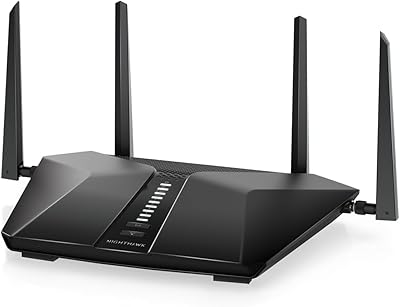
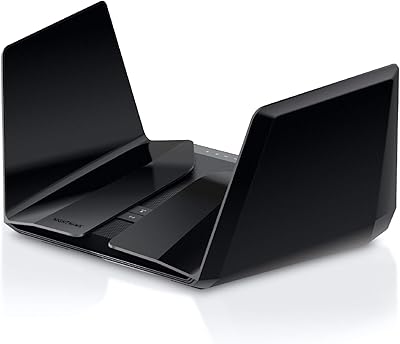
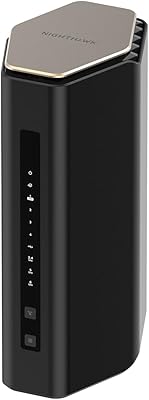
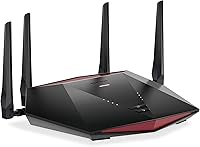
The NETGEAR XR1000 Nighthawk WiFi 6 Gaming Router is a certified refurbished dual-band AX5400 router built around one clear idea: bring gaming-grade network control to players who don't want to pay full retail price for it. It runs DumaOS 3.0, NETGEAR's own gaming-focused operating system, which sets it apart from standard home routers immediately. The chassis is large, angular, and purely black — very much the aesthetic of gaming hardware. Being certified refurbished matters here; NETGEAR puts these units through inspection before resale, but buyers should confirm warranty terms before purchasing. Think of it as a capable mid-range entry into WiFi 6, not a compromise.
Features & Benefits

The standout tool in this gaming router is the Geo-Filter — a feature that restricts which matchmaking servers your console or PC connects to based on geographic distance. In plain terms, you draw a circle on a map and the router tries to keep you out of distant, high-ping lobbies. Alongside that, the bandwidth allocation engine lets you push gaming traffic to the front of the line, so a household member streaming video won't spike your latency mid-match. WiFi 6's OFDMA technology helps manage multiple devices connecting simultaneously without the usual congestion. Four Gigabit LAN ports mean wired setups work well too. No tri-band, so very device-heavy homes may feel the absence.

Best For

This Nighthawk is a particularly good fit for console gamers on PS5 or Xbox Series X who want actual ping management tools built into the router — without digging into third-party firmware. It also suits PC gamers in apartments or mid-sized homes; range is solid in those environments, though it's not the right pick for large multi-floor houses where coverage distance becomes the priority. Households upgrading from WiFi 5 with a moderate number of connected devices will notice real improvements in network efficiency. Buyers comfortable with certified refurbished electronics and realistic about cosmetic condition will find the value proposition here genuinely strong.

User Feedback

Across roughly 245 ratings, the XR1000 sits at 3.8 stars — a score that tells a nuanced story. Buyers who received units in good working condition consistently praised the DumaOS interface and found the Geo-Filter genuinely effective at cutting down lobby ping. Complaints tend to cluster around two areas: cosmetic condition on arrival — scratches, non-original packaging — and setup complexity for less experienced users who find the dashboard intimidating at first. Range in larger homes draws criticism, which aligns with what the hardware is actually designed for. When the refurbished unit lands in solid shape, most buyers feel they got real value. When it doesn't, frustration follows quickly.

Pros

  • Geo-Filter actively limits high-ping game servers by geography, giving console and PC gamers real control over matchmaking quality.
  • DumaOS 3.0 interface is well-regarded for usability once initial setup is complete.
  • Built-in QoS lets you push gaming traffic ahead of streaming or downloads without any third-party firmware.
  • WiFi 6 (802.11ax) handles multiple simultaneously connected devices more efficiently than older standards.
  • Four Gigabit LAN ports make this gaming router a solid choice for wired gaming setups.
  • Certified refurbished status offers meaningful savings compared to buying new, with NETGEAR's inspection process behind it.
  • AX5400 speed class delivers strong throughput performance for its market tier.
  • WPS support simplifies connecting new devices quickly without manual password entry.
  • Fanless design means the router runs silently — no distracting noise near a gaming setup.

Cons

  • WiFi range disappoints in larger or multi-floor homes; coverage is best suited to apartments and mid-sized spaces.
  • Some refurbished units arrive with cosmetic damage or non-original packaging, which frustrates buyers expecting near-new condition.
  • Dual-band only architecture limits headroom for very device-heavy households compared to tri-band alternatives.
  • DumaOS 3.0 has a noticeable learning curve; less experienced users often struggle to get full value from its features.
  • Warranty terms on certified refurbished units can differ significantly from new-product coverage — always verify before purchasing.
  • No multi-gig WAN or LAN ports, which may become a bottleneck for users on faster ISP plans.
  • At roughly 12 x 8 x 3 inches, the physical footprint is large and may not fit neatly in tight spaces.

Ratings

Our AI rating system analyzed verified global user reviews for the NETGEAR XR1000 Nighthawk WiFi 6 Gaming Router, actively filtering out incentivized, bot-generated, and low-signal feedback to surface what real buyers consistently experienced. Scores reflect the full picture — where this gaming router genuinely delivers and where it falls short — so you can make a confident, eyes-open purchase decision.

Gaming Performance
83%
The Geo-Filter is the standout feature here — console gamers using PS5 and Xbox Series X regularly report noticeable reductions in matchmaking ping when the radius is configured properly. Competitive players in apartments and mid-sized homes describe noticeably more stable lobbies compared to standard ISP-supplied routers.
The gains are most measurable for players who were previously on poor or unmanaged hardware; buyers upgrading from a mid-range gaming router may not notice a dramatic difference. Performance consistency also depends on your ISP quality upstream, which the router cannot control.
DumaOS 3.0 Software
78%
22%
Users who invest time in the dashboard frequently praise its layout and the depth of control it offers — Geo-Filter, bandwidth sliders, and device-level monitoring in one place is genuinely useful for serious gamers. The interface is considered one of the more capable gaming router OSes available without needing third-party firmware.
The learning curve is a recurring sticking point in user reviews, particularly for buyers who expected plug-and-play simplicity. Some features feel buried, and getting the QoS allocation tuned correctly can take trial and error over several sessions before it feels optimized.
WiFi Range & Coverage
61%
39%
In apartments and single-floor homes under roughly 1,500 square feet, the XR1000 delivers consistent dual-band coverage with good signal strength near walls and around standard household obstacles. Users in these environments rarely flag coverage as a concern.
In larger homes, multi-floor layouts, or spaces with thick concrete walls, range limitations are a common complaint. Several buyers report dead zones or weak signal on upper floors, and the fixed internal antennas leave no hardware workaround for extending reach.
Refurbished Condition
58%
42%
When units arrive in solid cosmetic and functional condition — which a meaningful portion of buyers report — the certified refurbished status makes the value proposition genuinely compelling for getting gaming-grade WiFi 6 hardware at reduced cost. Functionally, most units perform identically to new.
Cosmetic inconsistency is the most divisive issue in user feedback: scratches, non-original packaging, and occasionally missing accessories create a frustrating unboxing experience for buyers expecting near-new condition. The variance between units is wide enough that condition at arrival feels like a lottery.
Latency & Ping Stability
81%
19%
Wired connections through the Gigabit LAN ports deliver rock-solid, low-latency performance that competitive gamers consistently highlight as a strength. Even on WiFi 6, the OFDMA efficiency improvements help stabilize latency when multiple devices are active simultaneously.
Wireless latency can fluctuate when the router is pushed near its device capacity limit, especially during peak household usage periods. Users in dense apartment buildings with heavy neighboring WiFi interference occasionally report instability that the dual-band architecture cannot fully offset.
Setup & Installation
63%
37%
The physical setup is straightforward — cable connections are clearly labeled and the router powers up quickly. For users with some networking familiarity, getting a basic working connection takes only a few minutes before diving into DumaOS configuration.
Getting meaningful value from the advanced features requires considerably more effort than most mainstream routers. Multiple reviewers describe spending hours configuring the Geo-Filter and QoS correctly, and the documentation provided in-box is considered insufficient for the software's depth.
Build Quality
74%
26%
The chassis feels solid and purposeful — the angular black casing is sturdy plastic that doesn't flex or creak, and the fanless design means there are no moving parts to wear out over time. For a refurbished unit, the structural integrity holds up well according to most buyers.
The large footprint (12 x 8 x 3 inches) makes placement awkward in tighter spaces or entertainment centers. Some refurbished units show cosmetic wear on the casing that, while not affecting function, undercuts the premium gaming aesthetic the design is aiming for.
Value for Money
79%
21%
For buyers who receive a fully functional unit in decent cosmetic condition, the price-to-feature ratio is hard to argue with — Geo-Filter and DumaOS 3.0 capabilities at this price point represent real value for console and PC gamers. It undercuts the cost of new gaming routers with comparable feature sets significantly.
The value calculation shifts unfavorably if your unit arrives in poor cosmetic condition or with functional quirks, since warranty support on refurbished units is more limited. Buyers who end up needing returns or replacements often feel the savings weren't worth the hassle.
QoS & Traffic Management
77%
23%
The bandwidth allocation system in DumaOS gives users granular control over which devices get priority, which is particularly effective for households where gaming competes with streaming or video calls for bandwidth. Gamers report fewer mid-match lag spikes when QoS is properly configured.
Initial QoS configuration is not intuitive, and default settings are not optimized out of the box — users need to actively set priorities rather than relying on automatic detection. Without proper tuning, the QoS provides little advantage over a standard router's default behavior.
Multi-Device Performance
69%
31%
WiFi 6's OFDMA technology gives the XR1000 a genuine edge over older-standard routers when managing five to ten simultaneously connected devices, keeping throughput reasonably distributed without severe degradation. Smart TVs, phones, and consoles running concurrently are handled without major complaints from most users.
The dual-band limitation becomes apparent in larger households with fifteen or more active wireless devices — throughput per device drops more noticeably than it would on a tri-band router. Power users with dense smart home ecosystems may hit the ceiling faster than expected.
Wired Connectivity
86%
Four Gigabit Ethernet LAN ports give wired gaming setups solid flexibility — two consoles, a PC, and a network switch can all connect simultaneously without compromise. Wired latency through these ports is consistently low and stable across user reports.
The absence of multi-gigabit (2.5G or higher) LAN or WAN ports is a limitation for users on fiber plans exceeding 1Gbps, where the Gigabit ceiling becomes a real bottleneck. Future-proofing on the wired side is limited as ISP speeds continue to climb.
Router OS Updates
66%
34%
NETGEAR has pushed DumaOS updates to the XR1000 post-launch, adding feature refinements and stability improvements that active users benefit from. Buyers who keep firmware current generally report a more polished experience than early adopters did at launch.
Update frequency has slowed compared to initial launch cadence, and some users report features they rely on remaining buggy across multiple firmware versions without resolution. Refurbished unit owners occasionally encounter firmware versions that need manual updating before the router performs optimally.
Compatibility
84%
The XR1000 works with any standard ISP modem or gateway and is fully compatible with PS5, Xbox Series X, and mainstream PC setups without any special configuration requirements. WPS support makes connecting secondary wireless devices quick and painless.
A small number of users report compatibility quirks with specific modem-router combo units in bridge mode, requiring extra troubleshooting steps. ISPs that restrict third-party router usage (uncommon but not rare) can also limit the router's deployability in some markets.

Suitable for:

The NETGEAR XR1000 Nighthawk WiFi 6 Gaming Router is a strong fit for console and PC gamers who want purpose-built network controls — specifically ping management and traffic prioritization — without needing to install custom firmware or build a complex setup. PS5 and Xbox Series X owners in particular will appreciate the Geo-Filter tool, which actively limits which game servers you connect to based on distance, helping keep matchmaking latency in check. It works well in apartments and mid-sized homes where WiFi 6 efficiency gains are noticeable without pushing the router beyond its comfortable range. Households with a moderate number of wireless devices — smart TVs, phones, laptops alongside gaming hardware — will benefit from the improved OFDMA handling that WiFi 6 brings. Buyers who are comfortable purchasing certified refurbished electronics from an established brand like NETGEAR, and who prioritize gaming-grade features over paying full retail price, will find this Nighthawk a genuinely practical choice.
Not suitable for:

The NETGEAR XR1000 Nighthawk WiFi 6 Gaming Router is not the right call for buyers with large, multi-floor homes where wireless range and wall penetration are the top priorities — real-world feedback consistently points to coverage limitations in bigger spaces. Tri-band households with a very high density of simultaneously active wireless devices may also run into congestion, since this router operates on dual-band only and lacks the dedicated third band that eases heavy concurrent loads. If cosmetic perfection or retail-fresh packaging matters to you, the certified refurbished condition is a genuine risk; some buyers have received units with scratches or non-original packaging. Less tech-savvy users who want a simple plug-and-play experience may find DumaOS 3.0 overwhelming at first, as the dashboard requires a learning curve to get meaningful value from its tools. Anyone expecting the performance ceiling of a flagship tri-band or multi-gig router at this price point will be setting themselves up for disappointment.

Specifications

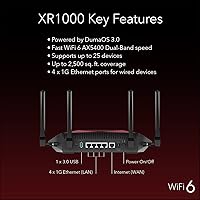
  • WiFi Standard: This router uses the 802.11ax standard, commonly known as WiFi 6, which improves throughput efficiency and reduces congestion compared to WiFi 5.
  • Speed Class: Rated at AX5400, with a combined theoretical maximum of 5.4Gbps across both frequency bands.
  • Frequency Bands: Dual-band operation covers both the 2.4GHz and 5GHz bands simultaneously.
  • Stream Count: Supports 6-stream (6x6) configuration, distributing wireless capacity across multiple connected devices.
  • LAN Ports: Equipped with four Gigabit Ethernet LAN ports for wired device connections.
  • WAN Port: Includes one Gigabit Ethernet WAN port for connecting to your modem or ISP gateway.
  • Operating System: Runs DumaOS 3.0, NETGEAR's proprietary gaming-focused router OS with traffic management and network monitoring tools.
  • Geo-Filter: Built-in Geo-Filter tool allows users to restrict game server connections by geographic radius to reduce matchmaking latency.
  • QoS Engine: Bandwidth Allocation QoS lets users manually prioritize traffic from specific devices or applications, such as gaming consoles.
  • Antenna Type: Uses fixed internal antennas; no external or adjustable antenna array is present on this model.
  • Special Features: WPS (Wi-Fi Protected Setup) is supported for simplified, button-press device onboarding.
  • Dimensions: The unit measures 12 x 8 x 3 inches, making it one of the larger footprint routers in its class.
  • Weight: Weighs 1.32 pounds, which is relatively light given the physical size of the chassis.
  • Color & Design: Finished in solid black with an angular gaming-aesthetic chassis; the design is fanless for silent operation.
  • Condition: Sold as Certified Refurbished, meaning units have been inspected and tested by NETGEAR before resale.
  • Compatible Devices: Designed for use with gaming consoles including PS5 and Xbox Series X, as well as Windows and Mac PCs.
  • Model Number: Official NETGEAR model designation is XR1000; the Amazon-listed refurbished variant carries ASIN B08T978XLF.
  • Manufacturer: Designed and sold by NETGEAR, a US-based networking hardware company with broad router and switch product lines.

Related Reviews

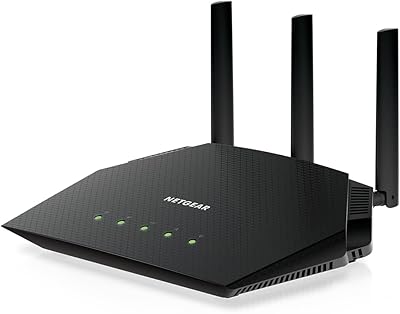
NETGEAR Nighthawk RAX120 AX6000 WiFi 6 Router
77%
88%
Wireless Performance
83%
Coverage & Range
86%
Multi-Device Handling
91%
Wired Connectivity
84%
Setup & Initial Configuration
More
NETGEAR Nighthawk RAX36 WiFi 6 Router
80%
86%
Wireless Performance
78%
Coverage & Range
91%
Setup & Ease of Use
83%
Device Load Handling
88%
Wired Connectivity
More
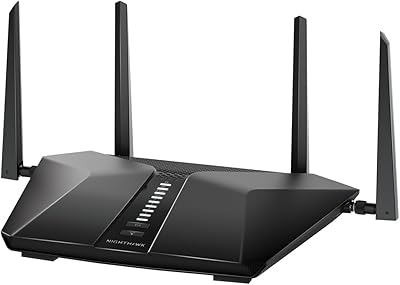
NETGEAR Nighthawk RAX54S
77%
83%
Wireless Performance
79%
Coverage & Range
88%
Setup & Ease of Use
76%
Gaming Performance (DumaOS 3.0)
81%
Security Features
More
Netgear Nighthawk RAX41 WiFi 6 Router
80%
83%
Wireless Performance
76%
Coverage & Range
89%
Setup & Installation
61%
App & Software Experience
81%
Multi-Device Handling
More
NETGEAR Nighthawk RAX43 WiFi 6 Router
80%
83%
WiFi Performance
81%
Multi-Device Handling
88%
Setup & Ease of Use
71%
Signal Range & Coverage
74%
Security Features
More
NETGEAR Nighthawk RAX70 WiFi 6 Router
87%
91%
WiFi Performance
88%
Security Features (NETGEAR Armor)
85%
Setup & Installation
89%
Coverage Area
92%
Speed (AX6600 Support)
More
Netgear Nighthawk RAX45 WiFi 6 Router
78%
88%
WiFi Speed & Throughput
86%
Multi-Device Performance
71%
WiFi Range & Coverage
84%
Setup & Ease of Use
83%
Gaming & Streaming
More
NETGEAR Nighthawk RAX29 WiFi 6 Router
77%
83%
WiFi Speed & Throughput
68%
Range & Coverage
89%
Setup & Ease of Use
81%
Multi-Device Performance
74%
Build Quality & Design
More
NETGEAR R6700AXS AX1800 WiFi 6 Router
76%
78%
Wireless Performance
91%
Setup Experience
83%
Multi-Device Handling
86%
Network Security
67%
Coverage Range
More
NETGEAR Nighthawk MK63S Mesh WiFi 6 System
74%
91%
Setup & Installation
78%
WiFi Coverage
76%
Connection Stability
67%
Throughput & Speed Performance
82%
Multi-Device Handling
More

FAQ

It means the unit was previously returned or used, then inspected, tested, and restored to working condition by NETGEAR before being resold. Cosmetically, you may see minor scratches or non-original packaging, but the hardware should function like new. Always check the specific warranty terms included with your unit, as refurbished coverage can differ from a brand-new purchase.

For many players, yes — particularly if you're connecting to distant servers with high ping. The Geo-Filter works by letting you draw a geographic radius on a map, and the router tries to keep your matchmaking within that zone. It's not a magic fix, but it gives you a real layer of control that standard routers simply don't offer.

DumaOS 3.0 is the custom software interface built into the XR1000 that puts gaming-focused tools front and center — things like the Geo-Filter, traffic prioritization, and network monitoring. It's more involved than a basic router dashboard, and less experienced users do report a learning curve. That said, NETGEAR provides setup guides, and the core features are reachable without deep networking knowledge once you spend a little time with the interface.

Honestly, not ideal. Real-world buyer feedback points to solid performance in apartments and mid-sized single-floor homes, but the coverage starts to feel limited in larger or multi-floor layouts. If range is your top priority, you'd be better served by a mesh system or a router specifically marketed for extended coverage.

Yes — with four Gigabit LAN ports, you can wire both consoles directly to the router simultaneously, which is the best way to get low-latency connections for both. Wireless connections for both consoles are also supported, though wired will always give you more consistent results for competitive play.

The NETGEAR XR1000 Nighthawk WiFi 6 Gaming Router is ISP-agnostic — it connects via its WAN port to any standard modem or gateway, regardless of provider. Whether you're on cable, fiber, or DSL, it should work as long as your modem is compatible and your ISP allows third-party routers, which most do.

That depends on the warranty terms included with your specific purchase, so reading those before buying is important. NETGEAR's certified refurbished products typically carry a shorter warranty window than new units. If the unit arrives non-functional, most sellers also have a return or replacement process — confirm this with the seller at checkout.

It can be. Dual-band means all your devices share just two wireless channels — 2.4GHz and 5GHz. In a home with a moderate number of devices (phones, laptops, a couple of consoles), it handles things well. If you have dozens of smart home gadgets running constantly alongside heavy gaming traffic, you may notice congestion during peak usage that a tri-band router would handle more gracefully.

Yes, in most cases. This gaming router is a router only — it does not include a built-in modem. You'll need a separate modem (or a modem-router combo in bridge mode) connected to the WAN port. If your ISP provides a gateway device, you can typically connect the XR1000 to it and disable the gateway's WiFi.

QoS, or Quality of Service, lets you tell the router which device or type of traffic should get priority access to your available bandwidth. In practical terms, you can set your gaming console to always get first priority, so even if someone else in the house is streaming 4K video, your game traffic jumps the queue. It's configured through the DumaOS dashboard and doesn't require any changes on your devices themselves.

Where to Buy