Overview

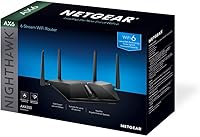
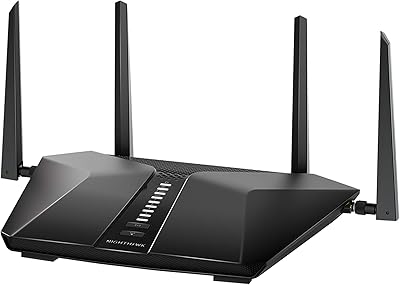
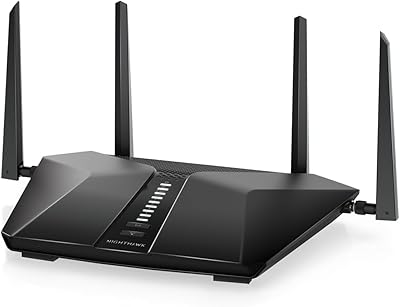
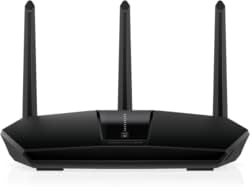
The Netgear Nighthawk RAX45 WiFi 6 Router sits squarely in the mid-range sweet spot—a compelling step up for households still running older AC-class gear that is starting to buckle under the weight of a dozen or more connected devices. WiFi 6 is not just a marketing number; it brings real improvements in how a router handles congestion when multiple devices are pulling bandwidth simultaneously. This Nighthawk router achieves that through smarter scheduling and more efficient channel use, which translates to noticeably smoother performance in busy homes. That said, it is a single-router solution, not a mesh system, so keep your expectations grounded.
Features & Benefits

What separates the RAX45 from older WiFi 5 routers is the combination of a triple-core 1.5GHz processor and a 6-stream design. In practice, that extra processing muscle means the router can juggle multiple demanding tasks—a 4K stream in the living room, a video call in the home office, and a console download running in the background—without any single device feeling the squeeze. Throughput exceeds 1Gbps over WiFi, which is genuinely useful as more ISPs push gigabit plans. Setup via the Nighthawk app is refreshingly quick, and the onboard USB and Ethernet ports open the door for wired connections or basic network-attached storage. Coverage is solid for medium to large single-floor homes.

Best For

This WiFi 6 router makes the most sense for households running 10 or more devices—smart TVs, phones, tablets, laptops, and a gaming console or two—where older routers start showing their age with buffering and slowdowns. It is a strong pick for anyone streaming 4K content across multiple rooms or playing online games where consistent low latency matters more than peak speed numbers. If you work from home and need reliable simultaneous upload and download, the RAX45 delivers without requiring a much larger investment. For a single-router deployment across a medium or large one- to two-story home, it hits a practical sweet spot. Sprawling or irregularly shaped homes may still benefit from a dedicated mesh system.

User Feedback

With a 4.3-star average across more than a thousand ratings, this Nighthawk router earns its score honestly. The most consistent praise centers on a noticeable jump in speed and reliability after switching from AC-class hardware, and many buyers note that setup was far less painful than expected. Long-term owners generally report stable, consistent performance over one to two years without significant issues. The criticism worth heeding: range does not always live up to the marketing in homes with thick walls or multiple floors, and a handful of users have flagged occasional app glitches during firmware updates. Nothing deal-breaking, but if your home has complex layout challenges, budget for a mesh upgrade down the road.

Pros

  • WiFi 6 handles congestion far better than older routers when many devices are active at once.
  • The triple-core processor keeps performance steady even during heavy multitasking across the network.
  • Setup via the Nighthawk app is quick and approachable, even for non-technical users.
  • Throughput exceeds 1Gbps over WiFi, making it a solid match for gigabit internet plans.
  • The 6-stream design gives the RAX45 more bandwidth headroom than typical 4-stream WiFi 5 routers.
  • Long-term owners report consistent, reliable performance well beyond the first year of use.
  • USB and Ethernet ports add flexibility for wired devices or basic file sharing setups.
  • Strong upgrade value for anyone coming from an AC1900 or similar older router class.
  • The 4.3-star rating across a large number of verified buyers signals dependable real-world satisfaction.

Cons

  • Range falls short in multi-floor homes or spaces with thick walls between rooms.
  • Dual-band only—no tri-band option means bandwidth cannot be split across three separate channels.
  • No 6GHz band support, so it will not keep pace as WiFi 6E devices become mainstream.
  • The Nighthawk app has drawn occasional complaints around firmware update glitches and UI inconsistencies.
  • Advanced features like built-in VPN server or granular QoS controls are limited compared to pricier competitors.
  • Not a substitute for a mesh system in large or irregularly shaped homes with dead zones.
  • Homes with very modest internet plans and few devices may not notice a meaningful improvement.
  • Physical footprint is fairly large for a single router, which may be a constraint for tight spaces.

Ratings

The scores below for the Netgear Nighthawk RAX45 WiFi 6 Router were produced by our AI system after analyzing thousands of verified global buyer reviews, with spam, bot-generated, and incentivized feedback actively filtered out before any scoring was applied. The result is an honest picture of where this router genuinely excels and where real owners have run into friction. Both strengths and recurring pain points are reflected transparently across every category.
WiFi Speed & Throughput
88%
Owners upgrading from older AC routers consistently report a meaningful jump in real-world speeds, particularly on the 5GHz band during large file downloads and 4K streaming. The router handles gigabit-class internet plans without becoming the bottleneck, which is exactly what most buyers in this category are after.
Peak speeds are impressive under ideal conditions, but performance does taper off at greater distances or through walls, as is common with dual-band routers at this tier. A handful of users on multi-gigabit plans note the router cannot fully saturate those connections over WiFi.
Multi-Device Performance
86%
The 6-stream WiFi 6 design genuinely reduces the pile-up effect that older routers struggle with when 10 or more devices are active simultaneously. Households with a mix of streaming TVs, phones, laptops, and a gaming console active at the same time report noticeably fewer buffering interruptions compared to their previous routers.
In households pushing past 20 concurrently active devices—especially in apartments with interference from neighboring networks—some users notice occasional slowdowns during peak evening hours. The dual-band architecture means there is no dedicated third band to offload traffic in the most congested environments.
WiFi Range & Coverage
71%
29%
For a standard two-story home with a reasonably central router placement, the RAX45 covers most of the floor plan without serious dead zones. Single-floor homes under 2,500 square feet tend to get strong, consistent signal throughout, which satisfies the majority of buyers in suburban and urban settings.
Coverage is the most polarizing aspect of this router in user feedback. Homes with concrete walls, split-level layouts, or footprints above 3,000 square feet frequently report weak signal in far rooms or upper floors, and several long-term owners ultimately paired the RAX45 with a wired access point or switched to a mesh system.
Setup & Ease of Use
84%
The Nighthawk app-guided setup is one of the most consistently praised aspects of ownership, with most users getting their network running in under 15 minutes regardless of technical background. WPS support makes adding smart home devices and older peripherals particularly painless.
A recurring minority complaint involves the app occasionally stalling or losing connection to the router partway through firmware updates, requiring a manual reboot to resolve. The web-based admin interface, while functional, feels dated compared to newer router software from competing brands.
Gaming & Streaming
83%
Console gamers and 4K streamers represent a vocal portion of satisfied buyers, with many noting that latency feels tighter and streams run more stably than on their previous routers. The processor headroom means the router does not stutter when gaming and streaming are happening in parallel across the household.
The RAX45 lacks dedicated gaming features found on more specialized routers, such as per-device QoS prioritization or a purpose-built gaming dashboard. Competitive online gamers who want fine-grained traffic control may find the feature set a bit basic for their needs.
Build Quality & Design
74%
26%
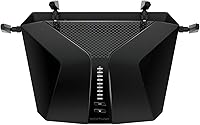
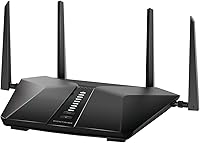
The router feels solid and well-assembled, with a low-profile flat design that sits unobtrusively on a shelf or entertainment unit. At just over three pounds, it has enough heft to feel premium without being cumbersome to reposition.
The antenna-free flat design, while aesthetically cleaner, leaves some buyers skeptical about long-range signal strength compared to routers with external antennas. The matte black finish also attracts visible dust fairly quickly in living room placements.
Long-Term Reliability
81%
19%
Owners who have used this WiFi 6 router for 18 months or more overwhelmingly report that it holds up without significant performance degradation or unexplained dropouts. Netgear has continued pushing firmware updates across the product's lifespan, which has improved stability for most users over time.
A small but persistent segment of owners report intermittent disconnects appearing after the one-year mark, sometimes resolved by a factory reset. Netgear support responsiveness receives mixed reviews, which compounds frustration when hardware issues do arise.
Firmware & Software
67%
33%
Firmware updates have addressed several early stability issues, and the router now runs considerably more smoothly than it did at launch. Automatic update support means most users are running current firmware without needing to manage it manually.
The firmware update process itself has caused temporary outages for a notable number of users, with the router occasionally needing a hard reboot to reconnect after an update. The Nighthawk app UI has improved but still lags behind competitors in terms of polish and responsiveness on older smartphones.
Port Selection & Connectivity
76%
24%
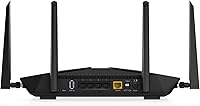
The inclusion of Gigabit Ethernet LAN ports satisfies the needs of most buyers who want to hardwire a desktop, smart TV, or gaming console for maximum stability. The USB port adds a layer of utility that budget routers skip, enabling basic drive sharing without extra hardware.
The single USB port limits the router for anyone hoping to simultaneously share a printer and a storage drive. There is no USB 3.0 port on this model, which means file transfer speeds over the USB share are noticeably slower than what a true NAS device would offer.
Security Features
72%
28%
WPA3 support is included, which is an important baseline for protecting a modern home network, and the router ships with automatic firmware update checking enabled by default. Guest network support allows visitors to access the internet without touching the main network.
Advanced security features like deep packet inspection, built-in ad blocking, or real-time threat intelligence are absent unless you subscribe to Netgear Armor, which carries an additional annual cost on top of the hardware. Buyers expecting a comprehensive security suite out of the box may feel the default offering is thin.
Value for Money
79%
21%
At its price point, the RAX45 delivers a genuinely capable WiFi 6 experience without demanding a premium-tier budget. For households upgrading from aging AC routers, the performance improvement relative to the cost is a realistic and satisfying trade-off.
As WiFi 6 routers have become more common, some competing models at similar or lower prices now offer tri-band configurations or more polished software. Buyers who research the market carefully may find the value equation tighter than it was at launch.
ISP & Modem Compatibility
82%
18%
The router works reliably across major ISPs without any carrier-specific configuration headaches, which is a genuine convenience for buyers who switch providers or move to a new address. The app walks through modem connection automatically, including for popular modem-router combo units in bridge mode.
A small number of users on certain cable providers report needing to call their ISP to update the MAC address registration before the router connects properly, which adds an unexpected setup step. Compatibility with some older or less common gateway models has also generated isolated complaints.
App Experience
68%
32%
The Nighthawk app handles the essentials well—network monitoring, device management, speed tests, and parental controls are all accessible without digging through confusing menus. For the majority of home users, it provides enough visibility and control for day-to-day management.
Power users find the app frustratingly limited once the initial setup is done, with advanced controls still requiring the browser-based admin panel. Crash reports and slow loading times within the app appear with enough frequency in user feedback to suggest it has not received the same investment as the router hardware itself.

Suitable for:

The Netgear Nighthawk RAX45 WiFi 6 Router is a strong match for households that have quietly accumulated a small army of connected devices—smart TVs, phones, tablets, laptops, and gaming consoles—and are starting to notice that their older router simply cannot keep up. Families who stream 4K content in multiple rooms simultaneously, or anyone who games online while others are on video calls, will appreciate how much more headroom WiFi 6 provides compared to older AC hardware. It is also a practical fit for home office setups where upload and download reliability both matter, not just raw download speed. If you are on a gigabit internet plan and frustrated that your current router is the bottleneck, the RAX45 is built to stop being that bottleneck. Medium to large single-floor homes, or two-story homes with a reasonably central router placement, tend to get the most out of its coverage.
Not suitable for:

The Netgear Nighthawk RAX45 WiFi 6 Router is not the right tool if your home has a challenging layout—think three or more floors, thick concrete or brick walls, or a sprawling footprint where dead zones already exist with your current router. A single router, however capable, cannot physically replace what a well-placed mesh system does in those environments. Power users who need tri-band connectivity, advanced QoS controls, or VPN server functionality built in may find the RAX45 a little lean on those fronts compared to pricier alternatives. It is also not the most future-proof choice for anyone already eyeing WiFi 6E devices, since it does not support the 6GHz band. And if your household runs fewer than five or six devices on a modest internet plan, the step up to this router may simply not produce a noticeable difference in daily use.
Specifications

  • WiFi Standard: This router uses the 802.11ax standard, commonly known as WiFi 6, which improves efficiency and reduces congestion compared to the previous 802.11ac generation.
  • Frequency Bands: Dual-band operation covers both the 2.4GHz band for range and the 5GHz band for higher-speed, shorter-range connections.
  • Max Speed: Combined aggregate WiFi throughput is rated at AX4300, with real-world speeds exceeding 1Gbps on the 5GHz band under favorable conditions.
  • Stream Count: The 6-stream configuration allows more simultaneous data paths than typical 4-stream routers, reducing bottlenecks in multi-device environments.
  • Processor: A triple-core 1.5GHz processor manages network traffic, enabling the router to handle multiple high-bandwidth tasks concurrently without significant performance degradation.
  • LAN Ports: The router includes multiple Gigabit Ethernet LAN ports for wired device connections, delivering full-speed wired throughput to desktops, consoles, or switches.
  • WAN Port: A single Gigabit Ethernet WAN port connects the router to your modem or gateway for internet access.
  • USB Port: One USB port supports basic network-attached storage or printer sharing when a compatible drive or device is connected.
  • Special Features: WPS (Wi-Fi Protected Setup) is supported, allowing compatible devices to join the network quickly without manually entering a password.
  • Dimensions: The unit measures 11.65 x 8.11 x 2.25 inches, designed to sit flat on a surface or be positioned vertically with the included stand.
  • Weight: At 3.04 pounds, the router is solidly built without being unwieldy for repositioning or installation.
  • Compatible Devices: Officially compatible with gaming consoles, smart televisions, and mobile devices, and it works with any WiFi-enabled device regardless of WiFi generation.
  • In-Box Contents: The package includes the router, a power adapter, one Ethernet cable, and a quick start guide to get the network running immediately.
  • Setup Method: Initial configuration is handled through the Nighthawk mobile app, which guides users through ISP connection, network naming, and password setup step by step.
  • Security: The router supports WPA3 and WPA2 encryption standards to protect the network against unauthorized access.
  • Backward Compat.: Full backward compatibility with 802.11a, b, g, n, and ac devices ensures that older hardware on the network continues to function without any configuration changes.
  • Model Number: The official model designation is RAX45-100NAS, which corresponds to the North American retail version of this product.
  • Manufacturer: Designed and sold by Netgear, a networking hardware company with an established presence in both consumer and business router markets.
  • User Rating: The product holds a 4.3 out of 5 star average rating based on over 1,172 verified customer ratings on Amazon.
  • Release Date: This router was first made available to consumers in April 2020, making it an established product with a multi-year track record in real-world home deployments.

Related Reviews

NETGEAR Nighthawk RAX43 WiFi 6 Router
80%
83%
WiFi Performance
81%
Multi-Device Handling
88%
Setup & Ease of Use
71%
Signal Range & Coverage
74%
Security Features
More
NETGEAR Nighthawk RAX36 WiFi 6 Router
80%
86%
Wireless Performance
78%
Coverage & Range
91%
Setup & Ease of Use
83%
Device Load Handling
88%
Wired Connectivity
More
NETGEAR Nighthawk RAX54S
77%
83%
Wireless Performance
79%
Coverage & Range
88%
Setup & Ease of Use
76%
Gaming Performance (DumaOS 3.0)
81%
Security Features
More
NETGEAR Nighthawk RAX120 AX6000 WiFi 6 Router
77%
88%
Wireless Performance
83%
Coverage & Range
86%
Multi-Device Handling
91%
Wired Connectivity
84%
Setup & Initial Configuration
More
NETGEAR Nighthawk RAX70 WiFi 6 Router
87%
91%
WiFi Performance
88%
Security Features (NETGEAR Armor)
85%
Setup & Installation
89%
Coverage Area
92%
Speed (AX6600 Support)
More
Netgear Nighthawk RAX41 WiFi 6 Router
80%
83%
Wireless Performance
76%
Coverage & Range
89%
Setup & Installation
61%
App & Software Experience
81%
Multi-Device Handling
More
NETGEAR XR1000 Nighthawk WiFi 6 Gaming Router
74%
83%
Gaming Performance
78%
DumaOS 3.0 Software
61%
WiFi Range & Coverage
58%
Refurbished Condition
81%
Latency & Ping Stability
More
NETGEAR Nighthawk RAX29 WiFi 6 Router
77%
83%
WiFi Speed & Throughput
68%
Range & Coverage
89%
Setup & Ease of Use
81%
Multi-Device Performance
74%
Build Quality & Design
More
NETGEAR R6700AXS AX1800 WiFi 6 Router
76%
78%
Wireless Performance
91%
Setup Experience
83%
Multi-Device Handling
86%
Network Security
67%
Coverage Range
More
NETGEAR Nighthawk RS90 WiFi 7 Router
79%
84%
Wireless Performance
67%
Coverage & Range
91%
Setup & Ease of Use
83%
Value for Money
78%
Build Quality & Design
More

FAQ

Your older devices will work just fine. The RAX45 is fully backward compatible with WiFi 5, WiFi 4, and even older standards. That said, only WiFi 6 capable devices will take full advantage of the efficiency improvements WiFi 6 brings. For everyone else, the faster processor and 6-stream design still help reduce congestion when many devices are active at the same time.

Setup is genuinely straightforward. The Nighthawk app walks you through the process step by step—connecting to your modem, naming your network, and setting a password takes most people under 15 minutes. You do not need to touch any advanced settings to get a working network up and running.

It depends a lot on your home's layout and construction materials. In an open-plan or wood-framed two-story home, the RAX45 handles that range reasonably well when placed centrally. If your home has thick walls, multiple floors, or an irregular shape, you may notice weaker signal in far corners. A mesh system would be a more reliable solution in those cases.

This WiFi 6 router is ISP-agnostic. It works with any broadband provider—cable, fiber, or DSL—as long as you connect it to a compatible modem or gateway. There are no carrier restrictions.

Yes, the Netgear Nighthawk RAX45 WiFi 6 Router is one of the reasons people on gigabit plans upgrade their routers. Older AC-class routers often become the bottleneck before the ISP does. The RAX45 is capable of exceeding 1Gbps on the 5GHz band under good conditions, so it will not be the weakest link for most gigabit subscribers.
Practically speaking, 15 to 20 actively connected devices is a comfortable range for this router. WiFi 6 technology, specifically OFDMA and MU-MIMO, makes it much better at managing simultaneous connections than older routers. You are unlikely to run into problems unless a large number of those devices are all streaming high-bandwidth content at exactly the same time.

The RAX45 is a standalone router, not a mesh unit. It does not natively pair with Netgear Orbi mesh satellites as a node. If you need to extend coverage, your best path is to either add a wired access point or switch to a dedicated mesh system. Some users daisy-chain a second router in access point mode, but that requires a wired connection between the two.

Yes, you can plug in a USB storage drive and access files on your local network through the Nighthawk app or a browser interface. It works reasonably well for basic file sharing. It is not a replacement for a proper NAS device, but for sharing a backup drive or media folder across a household, it does the job.

For the most part, the firmware has been stable over the router's lifespan. A portion of users have reported occasional hiccups during firmware updates through the app—sometimes requiring a manual reboot to recover. Netgear does push updates periodically, and the router supports automatic update checks, which is good for long-term security. Manually checking for updates via the web interface is also an option if the app gives you trouble.

If your household has fewer than 20 devices and you are not running anything unusually demanding, the performance difference in day-to-day use is modest for most people. Tri-band routers add a third radio, which helps in very device-dense environments or when one band is dedicated to a backhaul connection. WiFi 6E adds the 6GHz band for cutting-edge devices, but very few consumer devices currently support it. For the majority of homes today, the extra cost of those upgrades is harder to justify unless you have a specific reason to need them.