Overview

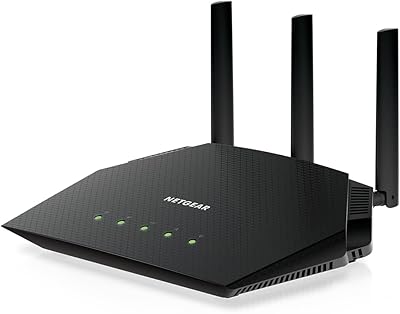
The NETGEAR Nighthawk RAX29 WiFi 6 Router enters a crowded mid-range market where buyers are finally making the jump from aging AC routers, and honestly, the upgrade often speaks for itself. WiFi 6 isn't just a marketing badge — it genuinely improves how your network handles a house full of phones, laptops, smart TVs, and IoT gadgets all competing for bandwidth. This Nighthawk router sits at a price point where you're not getting flagship-level specs, but you're getting something more valuable at this tier: reliable everyday performance from a brand that has spent decades in the networking space. NETGEAR's reputation carries real weight here, especially for buyers who want a known quantity rather than a gamble on a lesser-known label.
Features & Benefits

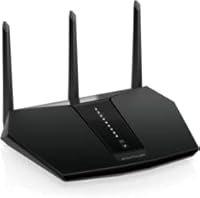
The RAX29 runs on the 802.11ax standard, combining both bands for up to 2.4 Gbps of total throughput — which in practice means noticeably smoother video calls, 4K streams, and online gaming when several devices are active at once. The triple-core 1.5GHz processor is what keeps things from slowing down when your household is pulling in multiple directions simultaneously. Three external antennas push coverage reasonably well through walls in a typical apartment or single-story home, though larger houses may feel the limits. Four Gigabit Ethernet ports handle wired connections cleanly, and the USB 3.0 port is handy for a shared drive. Setup runs through the Nighthawk mobile app, which makes initial configuration straightforward even if networking isn't your thing.

Best For

This WiFi 6 router is a strong fit for households running 10 to 20 connected devices — think streaming sticks, game consoles, smart speakers, and several phones all active at once. If you're still on an older WiFi 5 or WiFi 4 router in an apartment or medium-sized home, the performance difference will be noticeable and worth the investment. Casual gamers and 4K streamers will appreciate the consistency without needing to spend significantly more on a higher-end model. It also integrates well with Alexa and Google Assistant for voice-controlled network management. That said, if you live in a larger, multi-story home, you may want to consider whether a single router — even one this capable — will cover every corner adequately.

User Feedback

With a 4.4-star average across 62 ratings, the RAX29 has an encouraging early track record, though the relatively small sample size means it's worth reading individual reviews carefully rather than leaning entirely on the aggregate. Easy setup and a clear speed improvement over older routers are the most common praise points, with buyers often noting how quickly they were up and running. On the downside, a recurring frustration is the NETGEAR Armor subscription — it comes free initially, but the ongoing renewal fee catches some buyers off guard. A handful of users also mention coverage thinning out in larger homes or on upper floors. A few reviews flag inconsistent firmware updates and mixed customer support experiences, which are worth factoring in if responsive after-sale help matters to you.

Pros

  • WiFi 6 technology handles 10 to 20 simultaneous devices with noticeably less congestion than older AC routers.
  • The Nighthawk app makes setup fast and approachable, even for buyers with no networking experience.
  • Four Gigabit Ethernet ports give you plenty of wired options for TVs, consoles, and desktops.
  • The triple-core processor keeps the network responsive during busy evening hours when multiple streams are running.
  • Backward compatibility means older WiFi 5 and WiFi 4 devices connect without any reconfiguration.
  • NETGEAR is a well-established brand, which counts for something when firmware support and reliability matter.
  • The included Ethernet cable is a small but practical touch that many competing routers skip.
  • Voice assistant integration with Alexa and Google Assistant works reliably for basic hands-free network control.
  • Remote management via the app lets you pause connections or run speed tests from anywhere.
  • For apartment dwellers and smaller homes, the coverage footprint is solid without needing a mesh add-on.

Cons

  • NETGEAR Armor security shifts to a paid subscription after the trial, which surprises many buyers post-purchase.
  • Coverage weakens noticeably in multi-story homes or larger floor plans — this is a single-router limit.
  • Firmware updates have been inconsistent for some users, occasionally causing temporary performance regressions.
  • Customer support responsiveness has drawn mixed reviews, which is a real concern if something goes wrong.
  • The router runs warm under sustained heavy load, with no active cooling to manage thermals.
  • The Nighthawk app lacks granular controls for advanced users who want detailed traffic or QoS management.
  • With only 62 ratings at time of review, long-term reliability data is still relatively limited.
  • The USB 3.0 port is useful for basic storage sharing but falls short for users expecting NAS-level performance.
  • Real-world speeds fall well below the 2.4 Gbps combined ceiling, especially under heavy multi-device load.
  • The app occasionally loses its connection to the router, requiring a manual refresh to restore remote management.

Ratings

The NETGEAR Nighthawk RAX29 WiFi 6 Router has been scored by our AI system after analyzing verified buyer reviews from multiple global markets, with spam, bot-submitted, and incentivized feedback actively filtered out before any score was calculated. The ratings below reflect the honest spread of real user experiences — where this router genuinely impresses and where it falls short. Both sides of the picture are represented here so you can make an informed call before buying.
WiFi Speed & Throughput
83%
Most users upgrading from older AC routers report a clear and immediate improvement in download speeds and stream stability. Households with multiple devices pulling bandwidth simultaneously — a 4K TV, a few phones, a laptop — generally find the AX2400 rating translates into noticeably less buffering and lag.
The 2.4 Gbps figure is a combined ceiling across both bands, not a per-device guarantee, and real-world speeds rarely approach that number. Power users running heavy workloads or large file transfers between devices may find the throughput less impressive compared to higher-tier WiFi 6 routers in the same category.
Range & Coverage
68%
32%
In single-story apartments and smaller homes, the three external antennas do a decent job pushing signal into most rooms without dead zones. Users in compact living spaces consistently report solid coverage without needing a mesh add-on or range extender.
Multi-story homes and larger floor plans regularly expose the RAX29's coverage limits, with signal noticeably weakening past a certain distance or through multiple walls. Several reviewers specifically mention that upper floors or far corners of medium-to-large homes experience drops in connection quality.
Setup & Ease of Use
89%
The Nighthawk app-guided setup is one of the most consistently praised aspects of owning this router. Even buyers with no networking background report being fully online within minutes of opening the box, with the app walking through each step clearly and without technical jargon.
A small number of users run into hiccups where the app fails to detect the router during initial setup, requiring a restart of the process. Advanced configuration options, while available, are buried in menus that less experienced users can find unintuitive once they move beyond the basic setup flow.
Multi-Device Performance
81%
19%
WiFi 6's OFDMA technology genuinely helps when 10 or more devices are active simultaneously, and buyers with smart homes full of voice assistants, streaming sticks, and phones notice less congestion during peak evening hours. The triple-core processor keeps things moving without obvious slowdowns when the network is under moderate load.
When device counts push past 15 or 20 active connections simultaneously, some users report inconsistent speeds on lower-priority devices. It handles a busy household well at moderate loads, but heavy simultaneous demands from multiple high-bandwidth devices can stress it more than expected for its tier.
Build Quality & Design
74%
26%
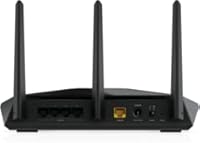
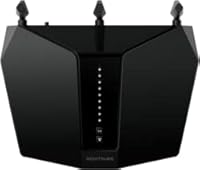
The router has a solid, no-frills physical build that feels durable without being unnecessarily bulky. The three antennas are sturdy and adjustable, and the overall footprint is manageable for a shelf or desk placement without dominating the space around it.
The all-black plastic housing, while functional, feels unremarkable compared to some competitors at this price point. A few buyers mention that the unit runs noticeably warm during extended use, which raises minor long-term durability questions even if it hasn't caused operational issues in practice.
Wired Connectivity
87%
Four Gigabit Ethernet LAN ports is a generous count at this price tier, making it straightforward to hard-wire a desktop, a smart TV, a gaming console, and a network switch all at once. Wired connection speeds are consistent and reliable, with no meaningful latency complaints from users relying on Ethernet for gaming or work.
There is only a single WAN port, which limits advanced networking configurations like link aggregation for those who need it. The USB 3.0 port works for basic network storage sharing, but users expecting NAS-level performance or media server capabilities may find the feature underwhelming in practice.
Security Features
61%
39%
NETGEAR Armor provides genuinely useful real-time threat protection and device vulnerability scanning during the included trial period. For users who activate it, the security layer adds meaningful peace of mind, especially in households where non-technical family members are regularly connecting new devices.
The catch is that Armor shifts to a paid subscription after the trial ends, and the renewal cost catches a meaningful number of buyers off guard at purchase. Without an active subscription, the router falls back to basic security features, which feels like a limitation given what competitors bundle at a similar price.
App & Remote Management
78%
22%
The Nighthawk app allows remote network management from anywhere, which is genuinely useful for parents monitoring device usage or travelers who want to check on their home network. Basic controls like pausing device access, running speed tests, and checking connected devices are intuitive and responsive.
Some users report occasional disconnects between the app and the router, requiring a manual refresh or app restart to re-establish the management connection. The app's feature depth is solid for casual use but lacks the granular controls that enthusiast users often want for traffic prioritization or advanced QoS settings.
Firmware & Software Updates
63%
37%
Firmware updates are pushed through the Nighthawk app, which at least makes the process accessible without logging into a web admin panel. When updates apply cleanly, they occasionally bring meaningful performance and stability improvements that users notice in day-to-day use.
A recurring complaint in reviews is inconsistency in how updates roll out, with some users reporting failed updates or performance regressions after applying new firmware. Customer support responsiveness around firmware-related issues has drawn mixed feedback, which is worth keeping in mind if you rely on timely software support.
Voice Assistant Integration
77%
23%
Compatibility with both Amazon Alexa and Google Assistant works reliably for basic voice commands like checking network status or pausing connections. Users with established smart home ecosystems find the integration adds a convenient layer of hands-free control without extra configuration complexity.
Voice control functionality is limited to a narrow set of commands and does not extend to more detailed network management tasks. Users hoping to deeply integrate the router into complex smart home automations will quickly find the voice features more superficial than the marketing framing suggests.
Value for Money
82%
18%
At its price point, the RAX29 delivers a genuine WiFi 6 upgrade with a reputable brand name, a capable app, and solid hardware — a combination that is harder to find consistently from lesser-known alternatives in the same range. For buyers replacing a several-year-old router, the performance jump alone justifies the outlay.
The value calculation shifts once you factor in the NETGEAR Armor subscription cost on top of the purchase price. Buyers who skip the security subscription may feel they are leaving a key marketed feature unused, while those who renew it effectively raise the total cost of ownership beyond the initial sticker price.
Backward Compatibility
91%
The router handles older WiFi 5 and WiFi 4 devices without issue, which matters a lot in real households where not every gadget has been upgraded to the latest standard. Printers, older laptops, and legacy smart home devices all connect and function normally without any special configuration.
There are no meaningful cons to report here — backward compatibility works as expected and no significant user complaints surfaced in this area. The only minor note is that older devices naturally cannot take advantage of WiFi 6 improvements, which is a hardware limitation, not a router shortcoming.
Heat Management
66%
34%
Under normal household loads, the router stays within reasonable operating temperatures and does not produce the kind of persistent heat that causes concern during everyday use. Casual users running standard streaming and browsing loads report no heat-related issues over extended periods.
Under sustained heavy loads — extended gaming sessions, large file transfers, or periods of very high concurrent connections — several users note the unit gets warm enough to be noticeable to the touch. There is no active cooling, and while no widespread overheating failures have been reported, the passive thermal management is a consideration for demanding environments.
Packaging & In-Box Contents
79%
21%
The box includes everything needed to get started: the router itself, an Ethernet cable, a power adapter, and a quick start guide. The included Ethernet cable is a practical touch that many comparable routers omit, saving buyers the immediate need to source one separately.
The quick start guide covers only the most basic setup steps and is not particularly helpful for buyers who run into any configuration issues. There is no printed documentation for advanced features, pushing users toward online resources or the app for anything beyond a straightforward plug-in-and-connect installation.

Suitable for:

The NETGEAR Nighthawk RAX29 WiFi 6 Router is a well-matched choice for renters and homeowners in apartments or single-story homes who are finally moving on from an older AC router and want a meaningful, reliable upgrade without spending heavily. If your household regularly has 10 to 20 devices connected at once — phones, tablets, a smart TV, a gaming console, a few smart speakers — this router handles that kind of congestion noticeably better than older WiFi 5 hardware. Casual gamers and 4K streamers will find the performance consistent enough during peak hours without needing to spend significantly more on a premium tier model. It also suits buyers who are not particularly technical: the Nighthawk app makes setup and ongoing management approachable, and Alexa or Google Assistant integration is a practical bonus for households already invested in a smart home ecosystem. Anyone who values buying from an established networking brand with a track record, rather than rolling the dice on an unknown label, will also find the RAX29 a comfortable and sensible choice.
Not suitable for:

The NETGEAR Nighthawk RAX29 WiFi 6 Router is not the right call for anyone living in a larger, multi-story home where wireless coverage needs to reach across significant distances or through multiple floors — the three antennas do solid work in compact spaces, but they have real limits, and frustrated users in bigger homes are a consistent theme in the reviews. Power users who need top-tier throughput, tri-band performance, or advanced QoS controls for demanding work-from-home setups or heavy-duty file transfers will likely outgrow what the RAX29 offers fairly quickly. Buyers who are counting on NETGEAR Armor as an ongoing security layer should also be aware upfront that it shifts to a paid subscription after the initial trial period, which changes the true cost of ownership. If long-term firmware support and highly responsive customer service are priorities for you, the mixed feedback on both fronts is worth taking seriously before committing. And if you are already running a capable mid-range WiFi 6 router, the performance delta here probably does not justify a lateral upgrade.
Specifications

  • WiFi Standard: Operates on the 802.11ax (WiFi 6) standard, offering improved efficiency and capacity over previous WiFi generations.
  • Max Speed: Delivers a combined maximum throughput of up to 2.4 Gbps across both frequency bands under ideal conditions.
  • Frequency Bands: Dual-band design broadcasts simultaneously on both 2.4 GHz and 5 GHz, balancing range and speed across connected devices.
  • Processor: Powered by a triple-core 1.5 GHz processor that manages multiple simultaneous connections without significant performance degradation.
  • Antennas: Equipped with three external high-power antennas that are manually adjustable to optimize signal direction and coverage.
  • LAN Ports: Features four Gigabit Ethernet LAN ports for wired device connections, supporting full gigabit speeds on each port.
  • WAN Port: Includes one Gigabit Ethernet WAN port for connecting directly to a modem or ISP gateway device.
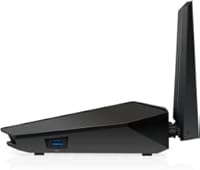
  • USB Port: One USB 3.0 port is included for connecting external storage devices to share files across the local network.
  • Security: NETGEAR Armor powered by Bitdefender is included for an initial trial period, after which a paid subscription is required to maintain active protection.
  • Companion App: The NETGEAR Nighthawk mobile app (iOS and Android) handles initial setup, network monitoring, and remote management from any location.
  • Voice Control: Compatible with Amazon Alexa and Google Assistant for hands-free control of basic network functions via voice commands.
  • Backward Compatibility: Fully backward compatible with WiFi 5 (802.11ac), WiFi 4 (802.11n), and earlier wireless standards, so older devices connect without issue.
  • Dimensions: The unit measures 7.97 x 9.32 x 6.23 inches, making it a mid-sized desktop router suitable for shelf or desk placement.
  • Weight: Weighs 1.03 pounds without cables, keeping the unit light and easy to reposition during setup.
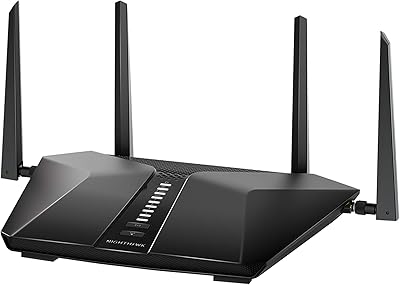
  • Color & Finish: Ships in a matte black finish with no RGB lighting, maintaining a low-profile appearance in most home environments.
  • In-Box Contents: Package includes the router, one Ethernet cable, a power adapter, and a printed quick start guide.
  • Model Number: The official model designation is RAX29-100NAS, which is useful for identifying firmware updates and compatible accessories.
  • Manufacturer: Designed and sold by NETGEAR, a US-based networking company with over two decades of consumer and enterprise router experience.

Related Reviews
NETGEAR Nighthawk RAX70 WiFi 6 Router
87%
91%
WiFi Performance
88%
Security Features (NETGEAR Armor)
85%
Setup & Installation
89%
Coverage Area
92%
Speed (AX6600 Support)
More
NETGEAR Nighthawk RAX120 AX6000 WiFi 6 Router
77%
88%
Wireless Performance
83%
Coverage & Range
86%
Multi-Device Handling
91%
Wired Connectivity
84%
Setup & Initial Configuration
More
NETGEAR Nighthawk RAX54S
77%
83%
Wireless Performance
79%
Coverage & Range
88%
Setup & Ease of Use
76%
Gaming Performance (DumaOS 3.0)
81%
Security Features
More
Netgear Nighthawk RAX41 WiFi 6 Router
80%
83%
Wireless Performance
76%
Coverage & Range
89%
Setup & Installation
61%
App & Software Experience
81%
Multi-Device Handling
More
NETGEAR Nighthawk RAX36 WiFi 6 Router
80%
86%
Wireless Performance
78%
Coverage & Range
91%
Setup & Ease of Use
83%
Device Load Handling
88%
Wired Connectivity
More
NETGEAR Nighthawk RAX43 WiFi 6 Router
80%
83%
WiFi Performance
81%
Multi-Device Handling
88%
Setup & Ease of Use
71%
Signal Range & Coverage
74%
Security Features
More
Netgear Nighthawk RAX45 WiFi 6 Router
78%
88%
WiFi Speed & Throughput
86%
Multi-Device Performance
71%
WiFi Range & Coverage
84%
Setup & Ease of Use
83%
Gaming & Streaming
More
NETGEAR XR1000 Nighthawk WiFi 6 Gaming Router

74%
83%
Gaming Performance
78%
DumaOS 3.0 Software
61%
WiFi Range & Coverage
58%
Refurbished Condition
81%
Latency & Ping Stability
More
NETGEAR R6700AXS AX1800 WiFi 6 Router
76%
78%
Wireless Performance
91%
Setup Experience
83%
Multi-Device Handling
86%
Network Security
67%
Coverage Range
More
NETGEAR Nighthawk RS600 WiFi 7 Tri-Band Router
81%
91%
Wireless Performance
76%
Coverage & Range
88%
Setup & Onboarding
67%
Value for Money
83%
Build Quality & Design
More

FAQ

It is genuinely one of the easier routers to get running. You download the Nighthawk app, plug everything in, and the app walks you through each step clearly. Most buyers report being fully online within 10 to 15 minutes, no web browser or command line required.

Yes, as long as your modem has a standard Ethernet output, the RAX29 connects to it without any compatibility issues. It works with cable, DSL, and fiber gateways from all major ISPs. If your ISP provides a modem-router combo unit, you can either replace it or put it in bridge mode and use the RAX29 on top.

NETGEAR Armor is a security layer powered by Bitdefender that scans your network and connected devices for threats in real time. It comes included for a trial period after purchase, but once that trial ends, you will need a paid subscription to keep it active. If you choose not to subscribe, the router still functions normally — you just lose the Armor protection layer.

Yes, this is actually one of its stronger suits. WiFi 6 handles the kind of low-bandwidth, high-device-count traffic that smart home gadgets generate more efficiently than older routers. Thermostats, smart bulbs, security cameras, voice assistants, and phones can all coexist without crowding each other off the network.

It depends on the size and layout. In a compact two-story home or townhouse, the signal often reaches well enough with good antenna positioning. In a larger two-story house, particularly one with thick walls or an irregular floor plan, you may notice weaker signal on the far side of the upper floor. If coverage is a concern, placing the router centrally and at an elevated position helps, but a larger home might ultimately benefit from a mesh system.

Absolutely. The four Gigabit Ethernet ports handle wired connections cleanly, and a hard-wired connection will always give you lower latency and more consistent speeds than wireless for gaming or large file transfers. You can wire in a console, a desktop, a smart TV, and still have a port free.

Yes, the RAX29 is backward compatible with WiFi 5, WiFi 4, and older wireless standards. Your older laptops, printers, and gadgets will connect just like they did before. They just will not benefit from WiFi 6 improvements until you upgrade those devices themselves, which is perfectly fine.

Yes, the Nighthawk app supports remote management so you can check which devices are connected, pause internet access for specific devices, or run a speed test from anywhere with a phone signal. It is handy for parents who want to manage screen time for kids while they are out, for example.

It works for basic file sharing — plug in a USB drive and other devices on the network can access it. That said, do not expect NAS-level performance. Transfer speeds are adequate for casual document or media access, but moving large files frequently will feel slow compared to a dedicated network storage device.

Updates are pushed through the Nighthawk app and can also be applied manually through the web admin interface. Most of the time this process works without incident, but a minority of users have reported occasional hiccups where updates either stalled or briefly degraded performance afterward. Keeping the router connected to power during an update and not interrupting the process reduces the chance of issues.

Where to Buy