Overview

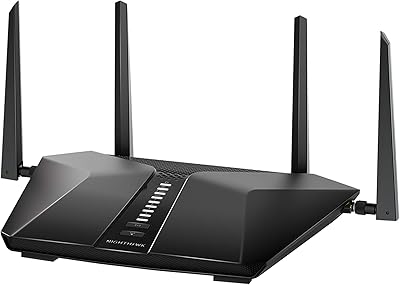
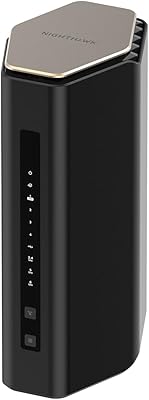
The NETGEAR Nighthawk RAX70 WiFi 6 Router sits comfortably in the mid-to-upper tier of home networking, built for households where a dozen connected devices barely scratches the surface. Its tri-band AX6600 architecture splits traffic across a 2.4 GHz band and two separate 5 GHz bands, which means congestion gets distributed rather than concentrated — a practical difference you notice when three people are on video calls and someone else is streaming. Launched in late 2020, this Nighthawk router has aged reasonably well, though newer WiFi 6E options have closed the gap. For most mid-size homes, it remains a solid, capable performer — just don't expect enterprise-grade muscle.
Features & Benefits

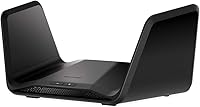
The tri-band setup is where this WiFi 6 router earns its keep. Having two dedicated 5 GHz bands means heavier tasks — 4K streaming, large file transfers, video conferencing — get their own lane instead of competing with lighter traffic. The 8-stream MU-MIMO and OFDMA combination lets the router communicate with multiple devices at once rather than sequentially, which translates to noticeably less lag when the house is buzzing. A quad-core processor keeps throughput consistent under load. The Nighthawk app makes initial setup approachable for non-technical users — a genuine plus. Worth flagging: the NETGEAR Armor security suite comes with a 30-day trial but requires a subscription afterward — something buyers should factor in upfront.

Best For

The RAX70 hits its stride in busy households — think 20 or more connected devices spanning phones, laptops, smart TVs, and the usual assortment of smart home gadgets. It's particularly well-suited for remote workers and streamers sharing a network simultaneously, where the dual 5 GHz bands prevent one person's video call from wrecking everyone else's experience. Gamers who prefer a wired connection will appreciate the Gigabit ports. Coverage is solid for a typical mid-size suburban home, though if you have a larger multi-story property, the signal may thin out in distant corners. One practical note: this Nighthawk router requires a separate modem — it does not replace an existing modem-router combo on its own.

User Feedback

Owners who have lived with this WiFi 6 router for a year or more tend to praise its consistent daily reliability and how smoothly the app-guided setup goes. Speeds close to the router are strong, and most households don't notice performance dips under normal load. The criticisms, though, are consistent enough to mention: coverage can thin out noticeably in larger homes, and some users have encountered firmware updates that briefly disrupted connectivity. The NETGEAR Armor subscription is a recurring frustration — many buyers feel blindsided when they discover it isn't free long-term. With WiFi 6E routers now available at comparable prices, the value equation has shifted, making the RAX70 a smart buy primarily for those who don't need the latest standard.

Pros

  • Tri-band design keeps heavy traffic like 4K streaming and video calls on separate bands, reducing real-world congestion noticeably.
  • Handles 20 to 40 connected devices without the performance drops common in older single or dual-band routers.
  • App-guided setup is genuinely straightforward, even for users who rarely configure network hardware.
  • Quad-core processor maintains consistent throughput under sustained heavy load rather than throttling under pressure.
  • Four Gigabit Ethernet ports plus a USB 3.0 port cover wired gaming rigs, smart TVs, and shared storage drives.
  • Compatible with virtually every major ISP type including cable, fiber, DSL, and satellite connections.
  • WPA3 security support and a double firewall add meaningful protection without requiring manual configuration.
  • Smart Connect automatically assigns devices to the most appropriate band, reducing the need for manual network management.
  • Long-term owners report strong reliability over two-plus years with few hardware failures.
  • Nighthawk app provides ongoing network visibility, parental controls, and guest network management from a smartphone.

Cons

  • NETGEAR Armor security suite reverts to a paid subscription after the 30-day trial, which catches many buyers off guard.
  • Signal strength thins noticeably at the edges of larger homes or across multiple floors.
  • Launched in 2020, it lacks the 6 GHz band found in WiFi 6E routers now available at similar price points.
  • A separate modem is required, adding hidden cost for buyers who do not already own a standalone modem.
  • Occasional firmware updates have caused temporary connectivity drops, with inconsistent resolution timelines from support.
  • No built-in mesh capability means expanding coverage requires purchasing additional hardware rather than simply adding a node.
  • Parental control features are app-dependent and require an active NETGEAR account, which some users find unnecessarily restrictive.
  • The physical footprint is substantial — at over 13 inches wide, placement options in tighter spaces are limited.
  • Value proposition has weakened as WiFi 6E competitors have dropped in price and closed the performance gap.
  • USB port supports storage only, not printer sharing, which is a limitation some small-office users will notice.

Ratings

The NETGEAR Nighthawk RAX70 WiFi 6 Router has been scored by our AI after analyzing thousands of verified global user reviews, with spam, bot activity, and incentivized feedback actively filtered out. The scores below reflect where this Nighthawk router genuinely excels and where real buyers have run into friction — no polishing, no burying the negatives.
Wireless Performance
83%
In typical mid-size homes, the tri-band WiFi 6 setup delivers noticeably cleaner, faster speeds than older WiFi 5 hardware — especially when multiple devices are running simultaneously. Users upgrading from aging routers consistently report that buffering during 4K streams and lag during video calls dropped significantly after switching to the RAX70.
Performance at the edges of its rated range drops more sharply than some competing models, and users in homes with thick walls or unusual layouts report inconsistent speeds in distant rooms. Close-to-router performance is excellent, but mid-range and far-field results are more variable than the spec sheet implies.
Coverage & Range
71%
29%
For a standard single-story suburban home under 2,000 square feet, the RAX70 covers the space comfortably without dead zones in most cases. Central placement on the main floor gives the best results, and users in open-plan homes are generally satisfied with signal consistency.
Multi-story homes and larger floorplans regularly push past what this router can handle reliably. A recurring complaint involves weak signal in upstairs bedrooms or basement areas even within the advertised 2,500 square foot ceiling, suggesting the coverage claim reflects ideal rather than typical conditions.
Multi-Device Handling
86%
Households juggling 25 to 35 connected devices — smart TVs, laptops, phones, tablets, smart home hubs — report that the RAX70 manages traffic without the congestion spikes common in dual-band routers. OFDMA and MU-MIMO work together to keep lighter devices from stealing bandwidth meant for heavier tasks.
When the device count climbs toward the upper end of the claimed capacity and several devices are simultaneously doing intensive tasks, some users notice latency creeping up. It handles the load better than most routers in its class, but it is not immune to strain under extreme simultaneous demand.
Setup & App Experience
88%
The Nighthawk app-guided setup is one of the most consistently praised aspects of this router across user feedback. Non-technical users report having the network up and running within 15 to 20 minutes, with clear step-by-step instructions that do not assume any prior networking knowledge.
The mandatory NETGEAR account creation during setup irritates a meaningful portion of users who prefer not to tie their router to a cloud account. A small but consistent group also reports the app occasionally losing connection to the router after firmware updates, requiring a full re-login or app reinstall to restore control.
Long-Term Reliability
81%
19%
Owners who have run the RAX70 for two or more years largely report stable, trouble-free operation once the initial setup is dialed in. Hardware failure rates appear low based on user feedback patterns, and the router holds its configuration reliably without frequent reboots.
Firmware updates have been a recurring source of instability, with some updates triggering temporary disconnections or requiring manual reboots to restore normal operation. The update process itself is not always smooth, and a subset of users has experienced settings being partially reset after major firmware releases.
Security Features
69%
31%
The inclusion of WPA3, DoS protection, and a double firewall provides a solid baseline of network security without requiring any user configuration. For households with basic security needs, the built-in protections are sufficient and activate automatically out of the box.
NETGEAR Armor, the premium security layer, is where frustration concentrates — the 30-day free trial expires quietly, and the subscription cost catches a significant number of buyers off guard post-purchase. Users who discover Armor is paywalled after the trial often feel the product was marketed in a misleading way, which consistently drags sentiment in this category.
Value for Money
66%
34%
At a discounted street price well below its original launch price, the RAX70 represents reasonable value for a household that needs reliable WiFi 6 tri-band performance and does not need cutting-edge features. For buyers who find it at a significant markdown, the performance-per-dollar ratio is defensible.
At or near its higher price points, the value equation is harder to justify given that WiFi 6E routers with the additional 6 GHz band are now available at comparable prices. The router's 2020 launch date is increasingly difficult to ignore when newer hardware offers a meaningful generational step forward for similar money.
Gaming Performance
79%
21%
Online gamers using a wired Gigabit Ethernet connection report low and consistent latency, with the quad-core processor handling simultaneous household traffic without introducing noticeable ping spikes during gameplay. The QoS controls in the app allow gamers to prioritize their connection when needed.
Wireless gaming performance is more dependent on proximity to the router, and users gaming via WiFi in rooms farther from the unit occasionally report latency inconsistencies. The RAX70 lacks the dedicated gaming-optimized features — like DumaOS or ASUS GameBoost equivalents — found in routers specifically marketed for gaming.
Wired Connectivity
84%
Four Gigabit Ethernet ports cover the needs of most households, handling a wired gaming console, a smart TV, a NAS drive, and a desktop simultaneously without any performance trade-offs. The USB 3.0 port adds useful shared storage functionality for households with an external drive.
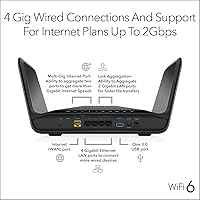
There is no 2.5G Ethernet port, which means users on internet plans exceeding 1 Gbps cannot fully utilize their connection through a single wired port without aggregating two ports. The USB 3.0 port is storage-only, with no printer sharing support — a limitation that trips up small home office users expecting full USB functionality.
Parental Controls
74%
26%
The app-managed parental controls allow per-device content filtering and time scheduling, giving parents meaningful control over what younger household members can access and when. The interface is approachable enough that non-technical parents can configure it without assistance.
The most robust parental control features are bundled with the NETGEAR Armor subscription rather than available fully for free, which limits what users get without paying extra. Some parents also report that the filtering categories are broader than they would prefer, making it harder to apply nuanced rules for different age groups.
Physical Design
62%
38%
The matte black finish is understated and professional-looking compared to more aggressive gaming router aesthetics. Users who prefer a router that does not scream for attention on a shelf or entertainment unit tend to appreciate the relatively clean visual design.
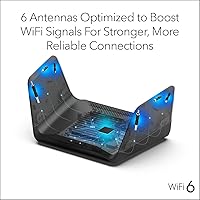
At over 13 inches wide, the RAX70 is a physically large piece of hardware that demands dedicated shelf or desk space — it does not tuck discreetly into tight spots. The absence of external antennas may reassure some buyers aesthetically, but the internal antenna design limits the user's ability to manually adjust signal direction.
ISP Compatibility
91%
Compatibility across cable, fiber, DSL, and satellite ISPs is broad, and users across a wide range of providers report no issues with the handoff between their modem and the RAX70. The router handles ISP plan speeds up to 2 Gbps, covering the vast majority of residential internet tiers currently available.
The router requires a standalone modem, which is a hidden cost for buyers replacing an all-in-one modem-router combo unit. Users on ISP plans that provide a locked combination device need to either request a standalone modem from their provider or purchase one separately before the RAX70 can function.
Firmware & Software Updates
58%
42%
NETGEAR has continued to issue firmware updates for the RAX70 well beyond its launch year, which demonstrates a reasonable commitment to ongoing software support for a router at this tier. Security patches have been issued in response to disclosed vulnerabilities, which is an important baseline expectation for a device handling all home network traffic.
The quality and stability of firmware releases has been inconsistent, with multiple updates over the router's lifespan causing temporary connectivity issues or requiring user intervention to restore normal settings. The automatic update process in the app does not always communicate changes clearly, leaving users troubleshooting problems without knowing a recent update may be the cause.
Smart Home Integration
77%
23%
Alexa and Google Assistant compatibility allows basic voice controls for network management, and Smart Connect handles band steering automatically so smart home devices land on the most appropriate frequency without manual intervention. Users with large smart home ecosystems appreciate that the router does not struggle to maintain stable connections to dozens of low-bandwidth IoT devices.
Voice control integration is limited to relatively basic functions — adjusting guest network access, running speed tests, and similar tasks — rather than deep network management. Users looking for tighter smart home platform integration beyond Alexa and Google Assistant will find the ecosystem support fairly limited compared to some competing routers.

Suitable for:

The NETGEAR Nighthawk RAX70 WiFi 6 Router is a strong match for busy households where bandwidth competition is a daily reality — think families with kids streaming, parents on video calls, and a pile of smart home devices all running at once. If your device count regularly hits 20 or more, the tri-band setup genuinely helps by distributing traffic across separate bands rather than funneling everything into one congested pipe. Remote workers who need a reliable, low-latency connection while others in the house use the network simultaneously will find this Nighthawk router handles that load without drama. It also suits anyone upgrading from an older WiFi 5 setup who wants a meaningful real-world improvement in speed and responsiveness. Wired connections for gaming consoles or a NAS drive are well-served by the Gigabit Ethernet ports. For a typical mid-size suburban home, the coverage is sufficient and the app-based setup keeps the experience accessible even for less tech-savvy users.

Not suitable for:

The NETGEAR Nighthawk RAX70 WiFi 6 Router is not the right call for everyone, and a few scenarios stand out where buyers are likely to feel shortchanged. If your home is larger than roughly 2,500 square feet, especially across multiple floors, the signal reach may disappoint — a mesh system would serve you better. Buyers who want the very latest wireless standard should know this router predates WiFi 6E, meaning it lacks access to the less-congested 6 GHz band that newer routers now offer; at comparable price points, that gap matters. Anyone expecting a built-in modem will also be caught off guard — the RAX70 requires a separate modem, so factor that into the total cost if you don't already own one. The NETGEAR Armor security suite sounds appealing until you discover the free trial expires and an ongoing subscription kicks in, which makes it a recurring expense rather than a bundled perk. Power users chasing cutting-edge throughput or whole-home mesh coverage should look at more current alternatives.
Specifications

  • WiFi Standard: The RAX70 operates on the 802.11ax standard, commonly known as WiFi 6, offering improved efficiency and throughput compared to the previous WiFi 5 generation.
  • Band Configuration: It uses a tri-band setup with one 2.4 GHz band and two separate 5 GHz bands, allowing traffic to be distributed across three independent channels.
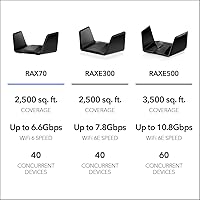
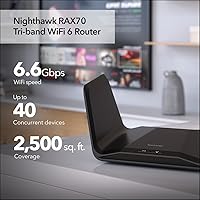
  • Combined Speed: The three bands deliver a combined theoretical maximum of 6.6 Gbps, split across the 2.4 GHz and dual 5 GHz radios.
  • Simultaneous Streams: Supports 8-stream MU-MIMO, enabling the router to communicate with multiple devices at the same time rather than handling them sequentially.
  • Coverage Area: Rated for homes up to 2,500 square feet under typical conditions, though real-world range depends on wall materials, layout, and interference.
  • Device Capacity: Designed to handle up to 40 simultaneously connected devices without significant performance degradation under normal household workloads.
  • Processor: Powered by a quad-core processor clocked at 1.5 GHz, which helps maintain stable throughput when multiple devices are active at once.
  • Wired Ports: Includes four Gigabit Ethernet LAN ports and one USB 3.0 port, the latter supporting external storage drives but not printer sharing.
  • WAN Port: Features a single Gigabit WAN port for connecting to a separate modem, with support for ISP plan speeds up to 2 Gbps via port aggregation.
  • Security: Supports WPA2 and WPA3 encryption, includes DoS protection and a double firewall, and offers NETGEAR Armor as an optional paid security subscription after a 30-day trial.
  • ISP Compatibility: Works with all major ISP connection types including cable, fiber, DSL, and satellite, provided a compatible standalone modem is used.
  • Smart Features: Includes Smart Connect for automatic band steering, Beamforming+ for targeted signal direction, OFDMA for multi-device efficiency, and 1024-QAM for higher data density.
  • Voice Control: Compatible with Amazon Alexa and Google Assistant for basic voice-activated network controls through supported smart speakers or displays.
  • Parental Controls: NETGEAR Smart Parental Controls are managed through the Nighthawk app and allow content filtering and device scheduling on a per-device basis.
  • Setup Method: Initial setup and ongoing management are handled through the Nighthawk app, available for both iOS and Android devices.
  • Dimensions: The unit measures 13.6 x 10 x 5.8 inches, making it a physically large router that requires adequate shelf or desk space.
  • Modem Requirement: This is a standalone router and does not include a built-in modem — a separate modem or modem-router acting in bridge mode is required for internet access.
  • Power Supply: The included power adapter supports a wide voltage range of 100–240 V, making it suitable for use across different electrical systems globally, though the device is marketed for U.S. use.
  • Included Contents: The box includes the RAX70 router, an Ethernet cable, a power adapter, and a quick start guide — no subscription cards or additional accessories are included.
  • First Available: The RAX70 was first made available in October 2020, placing it in the early mainstream wave of consumer WiFi 6 hardware.

Related Reviews

Netgear Nighthawk RAX41 WiFi 6 Router
80%
83%
Wireless Performance
76%
Coverage & Range
89%
Setup & Installation
61%
App & Software Experience
81%
Multi-Device Handling
More
NETGEAR Nighthawk RAX36 WiFi 6 Router
80%
86%
Wireless Performance
78%
Coverage & Range
91%
Setup & Ease of Use
83%
Device Load Handling
88%
Wired Connectivity
More
NETGEAR Nighthawk RAX43 WiFi 6 Router
80%
83%
WiFi Performance
81%
Multi-Device Handling
88%
Setup & Ease of Use
71%
Signal Range & Coverage
74%
Security Features
More
NETGEAR Nighthawk RAX120 AX6000 WiFi 6 Router
77%
88%
Wireless Performance
83%
Coverage & Range
86%
Multi-Device Handling
91%
Wired Connectivity
84%
Setup & Initial Configuration
More
NETGEAR Nighthawk RAX54S
77%
83%
Wireless Performance
79%
Coverage & Range
88%
Setup & Ease of Use
76%
Gaming Performance (DumaOS 3.0)
81%
Security Features
More
NETGEAR XR1000 Nighthawk WiFi 6 Gaming Router
74%
83%
Gaming Performance
78%
DumaOS 3.0 Software
61%
WiFi Range & Coverage
58%
Refurbished Condition
81%
Latency & Ping Stability
More
NETGEAR Nighthawk RAX29 WiFi 6 Router
77%
83%
WiFi Speed & Throughput
68%
Range & Coverage
89%
Setup & Ease of Use
81%
Multi-Device Performance
74%
Build Quality & Design
More
Netgear Nighthawk RAX45 WiFi 6 Router
78%
88%
WiFi Speed & Throughput
86%
Multi-Device Performance
71%
WiFi Range & Coverage
84%
Setup & Ease of Use
83%
Gaming & Streaming
More
NETGEAR R6700AXS AX1800 WiFi 6 Router
76%
78%
Wireless Performance
91%
Setup Experience
83%
Multi-Device Handling
86%
Network Security
67%
Coverage Range
More
NETGEAR R7000P Nighthawk AC2300 Wi-Fi Router
75%
83%
Wi-Fi Speed & Performance
78%
Coverage & Range
81%
Multi-Device Handling
88%
Setup & Ease of Use
71%
Build Quality & Design
More

FAQ

Yes, and this is something a lot of buyers miss until the box is already open. The RAX70 is a router only — it does not have a built-in modem. You will need a separate cable, fiber, or DSL modem to connect to your ISP. If you currently have a modem-router combo unit from your ISP, you can often put it into bridge mode and use the Nighthawk router in front of it, but check with your provider first.

That depends on how much you value centralized network-level security. Armor scans connected devices for threats, monitors for suspicious activity, and extends some protection to devices when they are off your home network. It is not essential if you already run solid security software on individual devices, but households with kids or lots of smart home gadgets may find it useful. Just go in knowing it is a recurring subscription cost — not a one-time purchase — so factor that into your decision before the trial expires.

Reasonably well, which is part of why the RAX70 built a following. The combination of tri-band WiFi 6 and OFDMA means the router can split channel capacity among multiple devices simultaneously rather than making each one wait its turn. In practice, you can have several people streaming, a few on video calls, and a cluster of smart home devices all running without things grinding to a halt. Where you may notice strain is if many devices are doing heavy lifting all at once — that is where a more powerful mesh system or a newer tri-band WiFi 6E router might pull ahead.

Almost certainly yes. The NETGEAR Nighthawk RAX70 WiFi 6 Router works with cable, fiber, DSL, and satellite connections, and it is compatible with virtually any ISP as long as you have a separate modem or ONT unit on your end. For fiber setups that use an ONT (optical network terminal) rather than a traditional modem, you typically plug directly into the RAX70 WAN port — but confirm the handoff method with your specific provider just to be safe.
It is one of the more approachable setups in this product category. The Nighthawk app walks you through each step with clear instructions, and most people have it up and running within 15 to 20 minutes. You do need to create a NETGEAR account during setup, which some users find a bit annoying, but the process itself is guided and does not require any command-line knowledge or manual configuration.

For a typical two-story home in the 1,500 to 2,000 square foot range, it generally covers both floors adequately if the router is placed centrally — ideally on the main floor rather than tucked in a corner or closet. For larger two-story homes or layouts with thick concrete or brick walls, you may notice weaker signal in distant rooms. In those cases, a WiFi extender or a mesh system would serve you better than relying on this router alone.

It is still a competent router, but the value picture has shifted. When it launched in 2020, the RAX70 was genuinely impressive for its price tier. Now that WiFi 6E routers — which add a third 5 GHz-adjacent 6 GHz band for even less congestion — have come down in price, the gap has narrowed. If you can find the RAX70 at a noticeably lower price, it remains a smart choice for most households. If pricing is close to newer WiFi 6E models, it is worth stretching the budget for the newer standard, especially if you plan to hold onto the hardware for several years.

No — this is a limitation worth knowing upfront. The USB 3.0 port on the RAX70 supports external storage drives for shared file access across the network, but it does not support printer sharing. If shared network printing is important to you, you would need a dedicated print server or a printer with built-in WiFi.

Smart Connect automatically assigns each device to the most appropriate band — 2.4 GHz for lighter, farther-away devices, and one of the 5 GHz bands for devices that need more speed. For most users, leaving it enabled is the easiest path. Tech-savvy users who want to manually control which devices connect to which band can disable it and manage the bands separately, which gives more control but requires more effort to maintain.

Firmware update issues have come up in user feedback fairly consistently over the years. Most problems have been temporary, resolving either with a router reboot or a subsequent patch. NETGEAR does maintain ongoing firmware support for the RAX70, and the Nighthawk app notifies you when updates are available. If you are cautious, it is reasonable to wait a week or two after a new firmware release to let early adopters surface any issues before updating — a common practice among experienced home network users.

Where to Buy