Overview

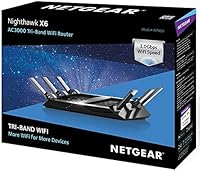
The NETGEAR Nighthawk X6 R7900P AC3000 WiFi Router sits firmly in the high-end tier of home networking gear, built for larger houses and households packed with connected devices. It's part of Netgear's Nighthawk performance lineup, which has always leaned toward power users rather than casual browsers. Rather than chasing one headline spec, this tri-band router tries to balance raw speed, physical range, and smart-home compatibility all at once. That combination matters more than it might seem, since most homes today juggle phones, laptops, smart speakers, and streaming devices simultaneously. This isn't a brand-new release either; it has been around long enough to build a real track record, for better or worse, rather than relying on hype alone.
Features & Benefits

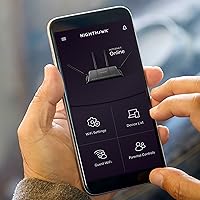
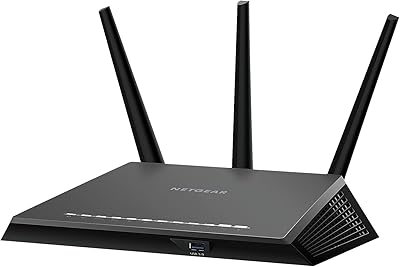
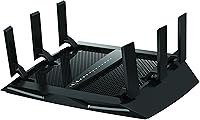
Where this AC3000 router earns its premium positioning is in how it spreads WiFi traffic. Instead of cramming every device onto one band, it splits things across a 2.4GHz band and two separate 5GHz bands, which cuts down on the kind of congestion that slows things down when a household is busy. Six antennas with their own amplifiers help push that signal into corners of the house a typical router would never reach. Inside, a 1.8GHz dual-core processor keeps gaming and streaming responsive even when several devices are pulling bandwidth at once. A USB 3.0 port lets you plug in a drive for quick file sharing, while the Nighthawk app handles setup, pausing internet access, and running speed tests, and Alexa compatibility means voice commands work too.

Best For

This tri-band router makes the most sense for households juggling a lot of connected gear at once, think smart speakers, multiple laptops, tablets, and a streaming box or two all pulling data simultaneously. It's also a strong fit for bigger homes, especially multi-floor layouts, where a basic router from an internet provider tends to leave dead zones in back bedrooms or basements. Gamers and heavy streamers benefit from having a dedicated band largely free from everyday household traffic, which helps avoid the kind of lag that ruins a match or buffers a show. People who prefer managing their network from a phone app rather than a clunky browser interface will appreciate that convenience. Just know you're paying a premium for that range and flexibility, so budget shoppers might want to look elsewhere.

User Feedback

Buyer sentiment lands at a solid 4.2 out of 5 across more than a thousand ratings, which says a lot about how this router performs once it's actually set up in someone's home. The people rating it highest tend to focus on range and how well the tri-band setup handles a packed household without things slowing to a crawl. Long-term owners frequently mention stability, saying it just stays connected without random drops, which matters more day-to-day than any spec sheet number. On the flip side, some reviewers question whether the price still makes sense now that WiFi 6 routers exist at similar cost points. A few also mention setup taking longer than expected for less tech-savvy users. Overall, satisfaction seems tied closely to whether buyers prioritize range over chasing the newest WiFi standard.

Pros

  • Splits devices across three bands, which noticeably cuts down on congestion in busy households.
  • Six antennas genuinely extend coverage into rooms a typical router can't reach.
  • The dual-core processor keeps gaming and streaming smooth even with multiple devices active at once.
  • USB 3.0 port makes it easy to share files from an external drive across the network.
  • Nighthawk app turns setup and internet pausing into a quick phone task instead of a chore.
  • Alexa compatibility adds convenient voice control for managing WiFi without opening an app.
  • Holds a strong 4.2 out of 5 average across more than a thousand buyer ratings.
  • Long-term owners frequently praise its stability and consistent uptime over months of daily use.

Cons

  • Price sits well above budget routers, which can feel steep for casual home users.
  • Still built on the older WiFi 5 standard rather than newer WiFi 6 or 6E technology.
  • Initial setup can take longer than expected for buyers who aren't especially tech-savvy.
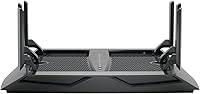
  • Bulky six-antenna design takes up more shelf or desk space than compact routers.
  • Only a single USB 3.0 port limits options for attaching multiple storage devices at once.
  • Some buyers question whether the asking price still makes sense given its release date.
  • Smaller homes may never benefit enough from the extended range to justify the upgrade.
  • Lacks the multi-gig WAN port found on some newer premium routers in this price range.

Ratings

These scores for the NETGEAR Nighthawk X6 R7900P AC3000 WiFi Router are generated by AI after analyzing verified user reviews from buyers around the world, filtering out spam, bots, and incentivized feedback along the way. Each category below reflects what real owners consistently praised and what they consistently struggled with, so you're seeing the full picture rather than just the highlight reel. Use these breakdowns to figure out exactly which strengths matter for your home and which trade-offs you can live with.
WiFi Range & Coverage
88%
Six antennas and tri-band design genuinely stretch coverage into back bedrooms, garages, and upper floors that smaller routers leave dead. Many owners in larger homes report finally getting a usable signal in spaces where their old router barely reached. That extended reach is consistently the most praised aspect across reviews.
Coverage gains taper off in homes with thick concrete walls or unusual layouts, where even six antennas can't fully compensate. A few owners in sprawling multi-story houses still needed a mesh extender for far corners. Results clearly vary by home construction.
Speed & Throughput
84%
Splitting traffic across two 5GHz bands keeps speeds high even when several devices stream 4K video or download large files simultaneously. Households juggling work-from-home video calls alongside kids' gaming sessions notice less slowdown during peak evening hours.
Real-world speeds rarely match the advertised AC3000 combined number, which is typical for routers but still catches some buyers off guard. Distance from the router and wall interference noticeably reduce throughput on the 5GHz bands.
Multi-Device Performance
86%
Owners running fifteen-plus devices, from smart speakers to security cameras, say the tri-band split keeps everything responsive instead of competing for one crowded channel. This is repeatedly cited as the standout reason buyers upgraded from a basic router.
Extremely device-dense smart homes with dozens of IoT gadgets can still strain the network occasionally, especially during simultaneous firmware updates. A few users recommend periodic reboots to keep performance consistent under heavy load.
Gaming & Streaming Latency
81%
19%
The dedicated band setup noticeably reduces lag spikes during online matches, which gamers specifically call out as a reason this held up better than their previous router. Streamers also report fewer buffering interruptions during live broadcasts.
Latency improvements are most noticeable when other household traffic is heavy; on quieter networks the difference feels less dramatic. Wired connections still outperform WiFi for competitive gaming, as expected with any wireless router.
Setup & Ease of Use
73%
27%
The Nighthawk app walks first-time users through setup with clear steps, which many less technical buyers appreciate compared to fumbling through a browser admin page. Most reviewers got online within twenty to thirty minutes.
Some owners describe the initial configuration as more involved than a basic ISP router, particularly when setting up advanced features like band steering. A handful mention needing to consult Netgear's support documentation to finish setup.
Mobile App Experience
79%
21%
Pausing internet access, running speed tests, and checking connected devices from a phone feels genuinely convenient for parents and busy households. Reviewers frequently mention using the app weekly rather than just during setup.
Occasional reviewers report the app losing connection to the router or needing a reinstall after updates. It also lacks some of the deeper customization options available through the full web interface.
Build Quality & Design
77%
23%
The six-antenna build feels sturdy and substantial rather than flimsy, which matches its premium positioning. Owners generally describe it as solidly constructed hardware meant to sit out in the open rather than hide in a closet.
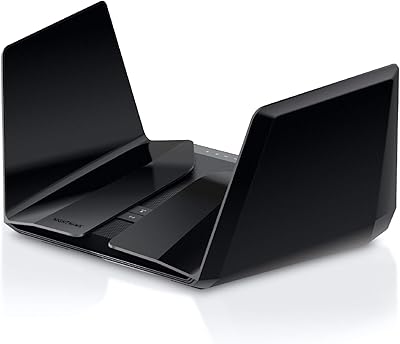
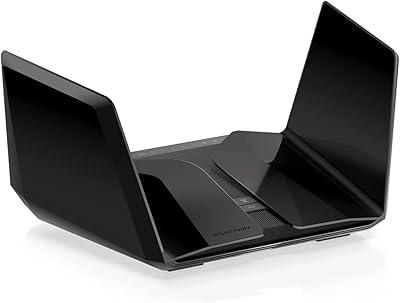
Its large footprint with six external antennas takes up noticeably more shelf space than compact routers, which some apartment dwellers find awkward to position. It is not a discreet, low-profile design.
USB Storage Sharing
68%
32%
Having a USB 3.0 port for attaching a drive is genuinely useful for households wanting quick local file sharing without setting up a separate NAS device. Reviewers who use it for backups call it a handy extra.
A single USB port limits multitasking if you want to connect more than one device at a time. Transfer speeds over WiFi to the attached drive also fall short of a direct wired connection.
Smart Home & Voice Control
71%
29%
Alexa compatibility lets owners check or adjust WiFi settings with voice commands, which feels like a nice convenience for smart speaker households already used to voice control. It integrates smoothly into an existing Alexa routine.
Voice control is limited to basic functions rather than full network management, so it's more of a nice-to-have than a core feature. Buyers without existing Alexa devices won't find much use for it.
Long-Term Reliability
83%
Long-term owners frequently mention the router staying connected for weeks without needing a manual reboot, which matters more day to day than any spec sheet number. That consistency is a major driver behind its solid overall rating.
A smaller group of long-term owners report occasional firmware-related hiccups or the need to reboot during extended heavy use, though this seems to affect a minority of households. Reliability appears strong on average but isn't universally flawless.
Value for Money
66%
34%
Buyers who actually need the range and tri-band performance feel they got real value, especially compared to replacing multiple cheap range extenders. For larger households, the upfront cost often works out cheaper than buying a mesh system.
Smaller households or those in modest apartments often feel they overpaid for capabilities they'll never fully use. Several reviewers note the price feels harder to justify now that competitively priced WiFi 6 routers exist.
Future-Proofing (WiFi Standard)
52%
48%
Despite being built on the older WiFi 5 standard, it still comfortably handles current household bandwidth needs for streaming, browsing, and smart home devices. Most buyers report no noticeable shortfall in daily real-world performance.
Its WiFi 5 foundation means it lacks the efficiency and capacity improvements found in newer WiFi 6 and WiFi 6E routers, which matters more as homes add devices. Buyers prioritizing long-term futureproofing may find this a real limitation.
Customer Support & Documentation
61%
39%
Netgear's support resources and community forums help most owners troubleshoot common issues without needing to contact support directly. Reviewers who did reach out describe response times as reasonable for a product in this price range.
A handful of owners mention longer wait times when dealing with more technical firmware issues, which can be frustrating for less patient users. Documentation also leans technical in places, assuming more networking knowledge than casual buyers may have.

Suitable for:

The NETGEAR Nighthawk X6 R7900P AC3000 WiFi Router is a strong fit for larger households where a single router from the internet provider just can't reach every corner of the house. Families with a growing pile of smart speakers, laptops, tablets, and streaming boxes will appreciate how the tri-band setup spreads that load instead of bottlenecking everything on one channel. It also makes sense for gamers and serious streamers who want a band mostly free of everyday household traffic so a match or a show doesn't stutter at the worst moment. Anyone who wants to manage their network from a phone instead of fumbling through a browser-based admin panel will likely enjoy the Nighthawk app. Buyers who already understand they're paying for performance and range, rather than hunting for the cheapest option on the shelf, are the ones who tend to walk away happiest.

Not suitable for:

Anyone shopping purely on budget should look elsewhere, since the NETGEAR Nighthawk X6 R7900P AC3000 WiFi Router sits well above entry-level routers in price. People living in smaller apartments or single-floor homes probably won't notice much benefit from six antennas built for reaching distant rooms. Buyers specifically chasing the newest WiFi 6 or WiFi 6E standards may feel this router is starting to show its age compared to newer releases. Those who want a true plug-and-play experience with zero setup time might find the initial configuration more involved than a basic ISP-issued router. If voice control, USB storage sharing, or app-based management aren't features you'll actually use, you may be paying for capabilities that go unused.

Specifications

  • WiFi Standard: This router uses the 802.11ac wireless standard across all three of its bands.
  • Combined WiFi Speed: Combined WiFi speed reaches AC3000, made up of 450 Mbps on the 2.4GHz band and 1300 Mbps on each of the two 5GHz bands.
  • Band Configuration: It runs tri-band WiFi with one 2.4GHz channel and two separate 5GHz channels operating at the same time.
  • Antennas: Six external antennas paired with high-power amplifiers are built in to extend signal range.
  • Processor: A 1.8GHz dual-core processor manages network traffic and keeps multiple connections responsive.
  • USB Port: One USB 3.0 port is included for connecting external storage drives to the network.
  • Ethernet Ports: Gigabit Ethernet ports are built in for wired connections to computers or other network hardware.
  • Mobile App: The Nighthawk app handles setup, internet pausing, and speed testing directly from a smartphone.
  • Smart Home Compatibility: Built-in Alexa compatibility allows voice control of certain WiFi management tasks.
  • Weight: The router weighs 2.43 pounds.
  • Dimensions: Physical dimensions measure 11.63 x 8.92 x 2.14 inches.
  • Color: The unit is finished in black.
  • Model Number: The official model number for this unit is R7900P-100NAS.
  • Customer Rating: It holds an average rating of 4.2 out of 5 stars based on 1,081 customer ratings.
  • Battery Requirement: The product listing specifies that one lithium-ion battery is required as part of the unit.
  • OS Compatibility: It is compatible with Windows 7, 8, Vista, XP, and 2000, along with Mac OS, UNIX, and Linux.

Related Reviews
NETGEAR Nighthawk AC2600 WiFi Router
75%
83%
Wireless Speed & Throughput
81%
Wi-Fi Range & Coverage
89%
Setup & Ease of Use
58%
Admin Interface & Management
79%
Gaming Performance & QoS
More
NETGEAR Nighthawk RAX36 WiFi 6 Router
80%
86%
Wireless Performance
78%
Coverage & Range
91%
Setup & Ease of Use
83%
Device Load Handling
88%
Wired Connectivity
More
NETGEAR R7000P Nighthawk AC2300 Wi-Fi Router
75%
83%
Wi-Fi Speed & Performance
78%
Coverage & Range
81%
Multi-Device Handling
88%
Setup & Ease of Use
71%
Build Quality & Design
More
NETGEAR Nighthawk RS180 WiFi 7 Dual-Band Router
77%
86%
Wireless Performance
71%
Coverage & Range
83%
Value for Money
88%
Setup & Ease of Use
79%
Build Quality & Design
More
NETGEAR Nighthawk RAX70 WiFi 6 Router
76%
83%
Wireless Performance
71%
Coverage & Range
86%
Multi-Device Handling
88%
Setup & App Experience
81%
Long-Term Reliability
More
NETGEAR Nighthawk RS140 WiFi 7 Router
76%
91%
Setup & Ease of Use
83%
Wireless Performance
72%
Coverage & Range
54%
Wired Connectivity
84%
Value for Money
More
NETGEAR Nighthawk RS700S WiFi 7 Tri-Band Router
81%
93%
Wireless Speed & Throughput
88%
Multi-Device Performance
81%
Coverage & Range
91%
Wired Connectivity
82%
Setup & App Experience
More
NETGEAR Nighthawk RS500 WiFi 7 Tri-Band Router
77%
88%
Wireless Performance
74%
Coverage & Range
83%
Setup & Ease of Use
67%
Value for Money
86%
Device Handling
More
NETGEAR Nighthawk RAX54S
77%
83%
Wireless Performance
79%
Coverage & Range
88%
Setup & Ease of Use
76%
Gaming Performance (DumaOS 3.0)
81%
Security Features
More
Netgear Nighthawk R6700 AC1750 WiFi Router
72%
88%
Setup & Ease of Use
62%
Wi-Fi Range & Coverage
83%
Connection Stability
74%
Wireless Speed Performance
71%
Value for Money
More

FAQ

Yes, that's actually the scenario this tri-band router was built for. The six antennas and tri-band setup push signal into rooms and floors that a basic router usually struggles to reach. For extremely large or oddly shaped homes, you might still want to pair it with a mesh extender.

Not really, but it does take a bit more effort than plugging in a basic ISP router. The Nighthawk app walks you through setup step by step, which helps a lot if you're not comfortable digging through a browser-based admin page.

Yes, there's a single USB 3.0 port for exactly that. You can connect a drive and share files across your home network at decent transfer speeds.

Yes, it has built-in Alexa compatibility, so you can use voice commands to manage certain WiFi functions without opening the app.

That's a fair question and it really depends on your priorities. This AC3000 router still delivers strong range and tri-band performance, but if futureproofing and the newest wireless standard matter most to you, a WiFi 6 model might be the better long-term pick.

It's built specifically for device-heavy households, splitting traffic across three bands so smart speakers, laptops, and streaming boxes aren't all fighting for the same channel. Most users with a dozen or more connected devices report it handling the load comfortably.

The dual-core processor and dedicated band help keep gaming responsive even with other devices active on the network. Many gamers choose this kind of tri-band router specifically to avoid sharing bandwidth with everyday household traffic.

It works with Windows 7 through more recent versions, along with Mac OS, UNIX, and Linux, so compatibility shouldn't be an issue for most households.

Long-term owners frequently mention solid stability and uptime, which is usually one of the better real-world indicators of reliability beyond the spec sheet.

It still performs well for what it's designed to do, which is covering large homes with strong tri-band WiFi. The main trade-off is that it's built on an older wireless standard, so it's worth comparing against newer WiFi 6 options before deciding if the price still makes sense for your situation.