


Overview

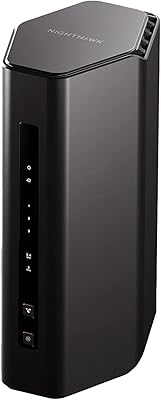
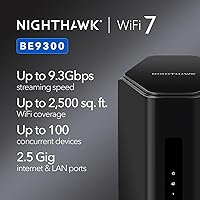
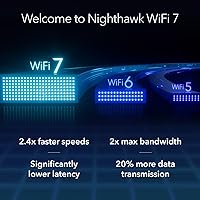
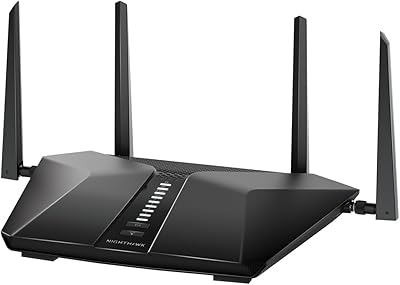
The NETGEAR Nighthawk BE9300 WiFi 7 Router is NETGEAR's serious mid-to-upper-tier push into the 802.11be generation, arriving in early 2025 with a noticeably slimmer profile than older Nighthawk towers. One thing to get straight before anything else: this is router only — there is no built-in modem, so you will need a separate cable modem to get online. The tri-band design spans 2.4GHz, 5GHz, and 6GHz simultaneously, which in practical terms means less congestion and more headroom for demanding devices. That advertised 9.3Gbps figure is an aggregate theoretical ceiling; real-world speeds depend heavily on your ISP plan and whether your devices actually support WiFi 7.

Features & Benefits

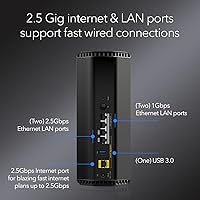
The headline spec is a tri-band 9.3Gbps ceiling split across three frequencies, but what matters more day-to-day is how the Nighthawk BE9300 manages traffic through MLO and OFDMA — technologies that reduce latency and keep things moving when 20-plus devices are active at once. The 2.5 Gigabit WAN port is a standout practical feature, ensuring the router can handle multi-gig ISP plans without becoming a bottleneck. Four wired LAN ports, two of which run at 2.5G, are handy for gaming consoles, NAS drives, or desktop PCs. Coverage reaches up to 2,500 sq. ft., and the included 30-day NETGEAR Armor trial adds network-level security — though that subscription cost kicks in afterward.

Best For

This WiFi 7 router makes the most sense for households upgrading from WiFi 5 or WiFi 6 who want a tangible improvement without jumping to a much pricier flagship. It is a natural fit for gamers and remote workers who need reliable, low-latency connections even when the house is running multiple streams and smart devices simultaneously. If your ISP just rolled out a multi-gig fiber or cable plan, this Nighthawk model's 2.5G WAN port means you can actually use those speeds without swapping the router again in two years. That said, it covers roughly 2,500 sq. ft. — renters or homeowners in mid-size spaces will be well served, but larger homes would need a mesh system instead.

User Feedback

Across nearly 1,650 ratings and a 4.4-out-of-5 average, the Nighthawk BE9300 earns generally strong marks, particularly from buyers who notice real speed gains on the 6GHz band and appreciate how painless the Nighthawk app makes initial setup. The criticisms, though, are worth paying attention to. Several reviewers point out that the coverage claims are optimistic in homes with concrete walls or split-level layouts. Others raise a fair concern about NETGEAR Armor: after the 30-day trial, it shifts to a paid subscription, which some buyers did not anticipate. A handful of longer-term owners also mention inconsistency in firmware updates — worth knowing before you buy rather than discovering after.

Pros

  • The 2.5G WAN port handles multi-gig ISP plans without bottlenecking — a genuinely future-proof hardware choice.
  • Tri-band WiFi 7 noticeably reduces congestion when many devices are active simultaneously.
  • The 6GHz band delivers a real, measurable speed improvement for compatible devices near the router.
  • Setup via the Nighthawk app is straightforward and well-suited even for less tech-savvy users.
  • Four wired LAN ports, including two 2.5G ports, offer flexible high-speed connections for desktops, consoles, and NAS drives.
  • The redesigned body has a smaller footprint than older Nighthawk models, making it easier to place discreetly.
  • MLO and OFDMA help manage traffic intelligently, keeping latency low under heavy household loads.
  • Rated 4.4 out of 5 across nearly 1,650 buyers — a reliable signal of broad real-world satisfaction.
  • The 30-day NETGEAR Armor trial gives new users a meaningful window to evaluate network-level security features.

Cons

  • No built-in modem — buyers must own or purchase a separate cable modem, adding cost and setup complexity.
  • NETGEAR Armor shifts to a recurring paid subscription after the 30-day trial ends, which surprises many users.
  • Real-world coverage in homes with thick walls or multiple floors often falls short of the advertised 2,500 sq. ft. claim.
  • Most current client devices do not yet support WiFi 7, limiting the practical benefit for many households right now.
  • Firmware update frequency has drawn mixed long-term feedback from owners who rely on consistent security patches.
  • The theoretical 9.3Gbps speed figure has little relevance for the vast majority of home internet plans available today.
  • Not a viable solution for large homes or open floor plans exceeding roughly 2,500 sq. ft. without additional hardware.

Ratings

The scores below reflect an AI-driven analysis of verified global buyer reviews for the NETGEAR Nighthawk BE9300 WiFi 7 Router, with spam, incentivized submissions, and bot patterns actively filtered out to surface genuine user sentiment. Each category is scored to reflect the real distribution of praise and frustration found across nearly 1,650 ratings — not a sanitized highlight reel. Both where this router genuinely delivers and where it falls short are reflected transparently in the numbers.

Wireless Performance
88%
Buyers upgrading from WiFi 6 routers consistently report a noticeable jump in throughput, particularly on the 6GHz band where interference is minimal. Gamers and streamers note lower latency and fewer mid-session drops compared to their previous routers, especially in homes with 10 or more active devices.
The 9.3Gbps aggregate figure has little practical relevance for most households on sub-1Gbps ISP plans, and users with only WiFi 6 or older client devices see a much more modest real-world gain than the spec sheet implies.
Setup Experience
91%
The Nighthawk app-guided setup is one of the most consistently praised aspects across reviews — even self-described non-technical users describe getting online in under 15 minutes. The interface is clean, the steps are logical, and the app does a good job of detecting common configuration issues automatically.
A recurring friction point is the modem confusion: buyers who did not realize a separate modem was required hit a wall during setup that no amount of app polish can fix. A clearer warning in the packaging itself would prevent a lot of frustrated returns.
Coverage & Range
71%
29%
In open-plan apartments and single-floor homes under 2,000 sq. ft., most users report solid, consistent coverage with few dead zones. The 6GHz band in particular performs well at moderate distances when walls are not a significant obstacle.
The 2,500 sq. ft. claim proves optimistic in a meaningful share of real-world homes — multi-story layouts and rooms with dense wall construction consistently show weaker signal at range. Buyers in larger or compartmentalized homes report needing a second access point or a mesh node to achieve full coverage.
Multi-Device Handling
86%
MLO and OFDMA make a genuine difference in busy households — users with 20 to 30 simultaneously connected devices describe noticeably more stable performance compared to their previous routers during peak evening usage. Video calls running alongside 4K streams and gaming sessions hold up well.
While the 100-device capacity rating sounds impressive, users in very dense environments such as small offices or large family homes with dozens of smart devices note that overall throughput does start to degrade meaningfully once the active device count climbs past 30 to 40.
Wired Connectivity
89%
The combination of two 2.5G and two 1G LAN ports is a practical differentiator for buyers who run a NAS drive, a wired gaming console, and a desktop PC simultaneously. Having two 2.5G ports means high-bandwidth wired connections are not a compromise.
Four LAN ports total will feel limiting for more complex home network setups that include a switch, a NAS, multiple gaming rigs, and a smart TV all wanting wired connections — a dedicated switch becomes a necessary additional purchase in those cases.
WAN Port Capability
93%
The 2.5 Gigabit WAN port is consistently flagged by technically informed buyers as the feature that justifies the purchase, particularly for those on multi-gig fiber plans who were previously bottlenecked by a 1G WAN port on their old router. It is a hardware specification that meaningfully extends the useful life of the device.
The benefit is entirely conditional on your ISP offering a plan above 1Gbps, which remains unavailable or prohibitively priced in many US markets as of 2025 — buyers on standard 300 to 500Mbps plans will not see any practical gain from this port over a standard 1G alternative.
Security Features
67%
33%
NETGEAR Armor provides genuine network-level protection during the 30-day trial — device vulnerability scanning, malware blocking, and basic parental controls all function as advertised and are accessible through a reasonably intuitive interface within the app.
The shift to a paid annual subscription after the trial ends is a recurring source of buyer frustration and feels like a bait-and-switch to users who were not clearly informed upfront. Without the subscription, the security layer disappears entirely, leaving only basic router-level protections.
Firmware & Updates
62%
38%
Initial firmware is stable for the majority of users, and the router ships in a fully functional state without requiring an immediate update to work correctly. Early adopters report no critical bugs in day-to-day operation during the first few months of use.
Long-term update cadence is where buyer confidence starts to erode — a portion of reviewers who have owned the unit beyond six months note slower-than-expected firmware releases and limited communication from NETGEAR about security patches, which is a legitimate concern for buyers planning a four to five year ownership cycle.
Build Quality & Design
84%
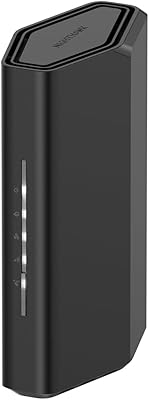
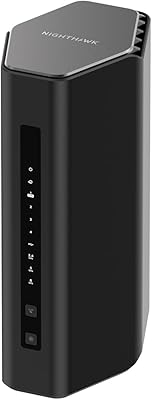
The redesigned chassis is noticeably more compact than older Nighthawk tower models, making it easier to place on a shelf or router shelf without dominating the space. The matte black finish looks appropriately premium and does not attract fingerprints the way glossy alternatives do.
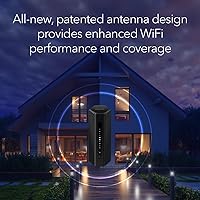
The antennas are internal rather than external on this model, which some technically minded buyers associate with reduced flexibility for signal tuning — though most everyday users report no practical difference in their setup.
Value for Money
78%
22%
At its price point, this WiFi 7 router sits in a reasonable position for buyers who specifically need the 2.5G WAN port and WiFi 7 future-proofing without stepping up to a significantly pricier flagship. For multi-gig ISP subscribers, the hardware justification is clear.
For buyers on standard sub-1Gbps internet plans who do not own WiFi 7 client devices yet, the real-world performance gap over a well-priced WiFi 6E router is narrow enough to make the price premium feel hard to justify today rather than as a forward-looking investment.
App & Management
82%
18%
The Nighthawk mobile app handles initial setup well and provides accessible controls for network management, guest network configuration, device prioritization, and basic parental controls — all from a reasonably clean interface that does not assume technical expertise.
Power users wanting granular controls — custom DNS, detailed traffic analytics, advanced QoS rules — will find the app interface limiting and may need to access the web-based admin panel for deeper configuration, which is less polished than the app experience.
WiFi 7 Ecosystem Readiness
69%
31%
For buyers who are actively building a WiFi 7 device ecosystem — pairing the router with a new WiFi 7 laptop or smartphone — the 6GHz band performance and MLO benefits are tangible and measurable in real throughput tests.
The WiFi 7 client device market is still maturing in 2025, meaning most households will not fully utilize the router's headline capabilities for another one to two years as device refresh cycles catch up — a fact that softens the urgency of upgrading now for average consumers.
Heat & Stability
81%
19%
The router runs warm but not hot under sustained load, and the majority of buyers report stable 24/7 uptime without needing to manually reboot the unit during normal household use. Thermal management appears competent for a router in this class.
A minority of users report occasional slowdowns or connectivity drops after extended periods of heavy sustained throughput, suggesting some edge cases around thermal throttling under extreme load — though this appears to be uncommon in typical home environments.

Suitable for:

The NETGEAR Nighthawk BE9300 WiFi 7 Router is a strong pick for households that are serious about squeezing performance out of a modern internet plan without jumping to an enterprise-grade setup. If you are on a multi-gig fiber or cable plan, the 2.5G WAN port means the router can actually keep pace with what your ISP is delivering — a detail that catches a lot of buyers off guard when they realize their old router was the bottleneck all along. Gamers running consoles and PCs alongside a household full of streaming devices will appreciate the MLO and OFDMA traffic management, which keeps latency low even when 20-plus devices are active. Home office users who depend on rock-solid video calls while family members are streaming or gaming in the background will find this Nighthawk model handles that kind of mixed load well. It is also a sensible long-term investment for tech-forward renters or homeowners in spaces up to around 2,000 to 2,500 sq. ft. who want WiFi 7 compatibility as more devices adopt the standard over the next few years.

Not suitable for:

The NETGEAR Nighthawk BE9300 WiFi 7 Router will frustrate buyers who do not already own a standalone cable modem — this router has no modem built in, and overlooking that detail is the single most common reason for returns. If your home stretches well beyond 2,500 sq. ft., or has multiple floors with concrete or brick construction, a single-unit router is likely to leave dead zones that only a mesh system would reliably address. Buyers hoping to get full value from WiFi 7 speeds right now may also be disappointed — the device ecosystem in 2025 is still catching up, and most laptops, phones, and smart home gadgets currently in circulation are WiFi 6 or older, meaning the 6GHz band benefits will not be fully realized until you upgrade client devices too. Anyone who wants bundled, ongoing network security without extra costs should also factor in that NETGEAR Armor shifts to a paid subscription after the initial 30-day trial. Finally, buyers who hold onto routers for four or five years and expect consistent firmware support may want to research NETGEAR's update track record before committing.

Specifications

  • WiFi Standard: This router uses the 802.11be standard, commonly marketed as WiFi 7, which is the latest generation of wireless networking technology available as of early 2025.
  • Frequency Bands: Tri-band operation covers three simultaneous frequency bands: 2.4GHz for range and legacy devices, 5GHz for mid-range performance, and 6GHz for maximum throughput on compatible devices.
  • Max Speed: The aggregate theoretical maximum across all three bands is 9.3Gbps; actual throughput on any single device will be substantially lower and depends on client hardware and ISP plan.
  • WAN Port: A single 2.5 Gigabit Ethernet WAN port connects the router to your modem, supporting multi-gig internet plans from compatible ISPs without creating a hardware bottleneck.
  • LAN Ports: Four wired LAN ports are included: two running at 2.5 Gigabit and two at 1 Gigabit, providing fast, stable wired connections for PCs, consoles, NAS drives, or switches.
  • Coverage Area: NETGEAR rates wireless coverage at up to 2,500 sq. ft., though real-world range will vary based on wall materials, home layout, and interference sources.
  • Device Capacity: The router is rated to support up to 100 simultaneously connected wireless devices, aided by MLO and OFDMA technology to reduce per-device congestion.
  • Dimensions: The unit measures 17.13 x 7.13 x 7.05 inches, reflecting a slimmer, more compact footprint compared to previous Nighthawk tower designs.
  • Weight: The router weighs 4 pounds, making it manageable to reposition during setup but substantial enough to sit stably on a shelf or desk without a mount.
  • Power Supply: A 12V / 3.5A power adapter is included in the box and is required for operation; the router does not support PoE or USB-C power input.
  • Security Suite: NETGEAR Armor is included with a 30-day free trial, providing network-level malware protection, device vulnerability scanning, and parental controls; a paid subscription is required to continue after the trial period.
  • Modem Required: This is a router only and does not include a built-in cable modem; a separate modem with a coaxial input is required to connect to a cable or fiber internet service.
  • Included Items: The box contains one WiFi 7 tri-band router (BE9300), one 2-meter Ethernet cable, one 12V/3.5A power adapter, and a printed quick start guide.
  • Color: The router is finished in black with a matte surface texture consistent with the broader Nighthawk product family aesthetic.
  • Model Number: The official model designation is BE9300-1AZPAS, which can be used to verify compatibility with NETGEAR firmware updates and support documentation.
  • Release Date: The BE9300 was first made available for purchase in January 2025, positioning it among the early consumer-accessible WiFi 7 routers on the market.
  • User Rating: Based on nearly 1,650 ratings on Amazon, this router holds a 4.4 out of 5 average score as of the time of this review.
  • Manufacturer: The router is designed and sold by NETGEAR, Inc., a US-based networking hardware company with an established consumer and business product line.

Related Reviews
NETGEAR Nighthawk RS140 WiFi 7 Router
76%
91%
Setup & Ease of Use
83%
Wireless Performance
72%
Coverage & Range
54%
Wired Connectivity
84%
Value for Money
More
NETGEAR Nighthawk BE17000 WiFi 7 Router
79%
91%
Wireless Performance
88%
Setup Experience
74%
Coverage & Range
72%
Value for Money
86%
Device Handling
More
NETGEAR Nighthawk RS600 WiFi 7 Tri-Band Router
81%
91%
Wireless Performance
76%
Coverage & Range
88%
Setup & Onboarding
67%
Value for Money
83%
Build Quality & Design
More
NETGEAR Nighthawk RS200
81%
88%
Wireless Speed & Performance
71%
Coverage & Range
91%
Setup & Installation
63%
App & Firmware Experience
82%
Value for Money
More
NETGEAR Nighthawk RS700S WiFi 7 Tri-Band Router
81%
93%
Wireless Speed & Throughput
88%
Multi-Device Performance
81%
Coverage & Range
91%
Wired Connectivity
82%
Setup & App Experience
More
NETGEAR Nighthawk RS90 WiFi 7 Router
79%
84%
Wireless Performance
67%
Coverage & Range
91%
Setup & Ease of Use
83%
Value for Money
78%
Build Quality & Design
More
NETGEAR Nighthawk RS500 WiFi 7 Tri-Band Router
77%
88%
Wireless Performance
74%
Coverage & Range
83%
Setup & Ease of Use
67%
Value for Money
86%
Device Handling
More
NETGEAR Nighthawk RS180 WiFi 7 Dual-Band Router

77%
86%
Wireless Performance
71%
Coverage & Range
83%
Value for Money
88%
Setup & Ease of Use
79%
Build Quality & Design
More
NETGEAR Nighthawk RS280S WiFi 7 Tri-Band Router
80%
88%
Wireless Speed & Performance
71%
Wi-Fi Coverage & Range
83%
Setup & Ease of Use
62%
Modem Compatibility
86%
Wired Port Performance
More
NETGEAR Nighthawk RAX120 AX6000 WiFi 6 Router
77%
88%
Wireless Performance
83%
Coverage & Range
86%
Multi-Device Handling
91%
Wired Connectivity
84%
Setup & Initial Configuration
More

FAQ

Yes, absolutely — this is one of the most important things to understand before ordering. The Nighthawk BE9300 is a router only, with no built-in modem, so you will need a standalone cable or fiber modem to connect it to your ISP. If you currently rent a modem-router combo unit from your cable company, you would need to keep or replace the modem portion separately.

That depends on two things: your ISP plan and the devices you are using. The router itself will not increase the speed your ISP delivers to your home, but it will stop being the bottleneck if you have a multi-gig plan and an older router that was capping out at 1Gbps. For most people on standard 300–500Mbps plans, the practical speed difference versus a good WiFi 6 router will be modest unless you are also upgrading client devices.

It is backward compatible with WiFi 6, WiFi 5, and older standards, so all your current devices will connect without any issues. However, to take full advantage of the 6GHz band and WiFi 7-specific features like MLO, your devices would need to support WiFi 7, which most phones, laptops, and smart home gadgets released before 2024 do not.

NETGEAR Armor is a security subscription that runs at the network level, scanning for malware, blocking suspicious traffic, and flagging vulnerable devices on your network. You get a 30-day free trial automatically when you set up the router, but after that it requires a paid annual subscription to stay active. You can still use the router normally without it — you just lose the Armor-specific protection layer.

Better than most older routers, thanks to technologies called MLO and OFDMA that allow the router to communicate with multiple devices simultaneously rather than sequentially. In practice this means reduced lag and more consistent speeds even when 15 to 20 devices are active. That said, 100 simultaneous devices is a rated ceiling under ideal conditions — real-world dense environments will still see some performance trade-offs.

Possibly, but with some caveats. The rated 2,500 sq. ft. coverage assumes reasonably open spaces without significant interference. Homes with multiple floors, thick walls, or large square footage often see noticeably reduced range from a single router. If your home is on the larger or more compartmentalized side, you may want to consider a mesh system instead.

Setup is genuinely approachable for most people. The Nighthawk app walks you through the process step by step on your phone, and the majority of buyers in user reviews describe it as one of the smoother router setups they have done. The main stumbling block tends to be the modem connection — just make sure your modem is already working before you start configuring the router.

Yes, it has four wired LAN ports in total — two that run at 2.5 Gigabit and two at 1 Gigabit. That makes it a solid option for desktop PCs, gaming consoles, or a NAS drive that you want to connect with a cable for maximum reliability and speed rather than relying on wireless.

It will work perfectly fine, but you likely will not notice a dramatic real-world difference compared to a well-configured WiFi 6 router for day-to-day use. Where you would start to feel the benefit is in local network tasks, reduced congestion with many devices, and future-proofing if your ISP rolls out faster plans in your area over the next few years. If budget is a concern, a current-generation WiFi 6E router might offer better immediate value.

This is one area where buyer feedback is a bit mixed. Many users report stable day-to-day operation with no major issues, but a portion of longer-term reviewers have noted that NETGEAR's firmware update cadence can be inconsistent compared to some competitors. If ongoing security patches and feature updates are important to you — particularly if you plan to use this router for four or five years — it is worth checking NETGEAR's support page for the BE9300 model to gauge recent activity before purchasing.

Where to Buy