Overview

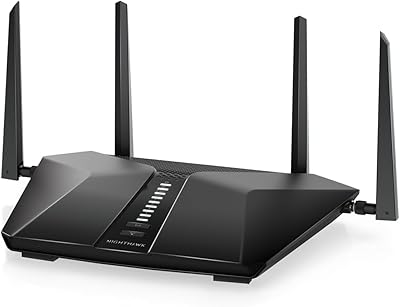
The NETGEAR Nighthawk RAXE500 WiFi 6E Tri-Band Router arrived as one of the first consumer routers to unlock the 6GHz wireless band, a frequency range previously off-limits for home networking. That alone makes it notable. Across three bands — 2.4GHz, 5GHz, and the new 6GHz — it advertises a combined 10.8Gbps, though real-world throughput will land considerably lower than that figure. It is a large, angular device that demands counter or shelf space, and it requires a separate modem to function. Less technical buyers should factor both of those points into their purchase decision before committing at this flagship price tier.
Features & Benefits

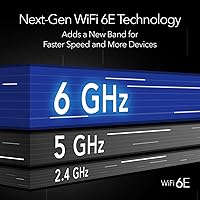
The 6GHz band is what separates this WiFi 6E router from every previous generation. It is far less congested than 2.4GHz or 5GHz, which translates to noticeably lower latency and faster sustained speeds — but only for devices that actually support WiFi 6E. The 1.8GHz quad-core processor keeps traffic moving without bogging down when multiple heavy users are online simultaneously. Twelve-stream MU-MIMO with beamforming means the router actively directs signal toward devices rather than broadcasting indiscriminately. The 2.5G WAN port is a smart inclusion for anyone on or planning to upgrade to a multi-gig internet plan. Setup through the Nighthawk app is straightforward, though the built-in security suite shifts to a paid subscription after the trial ends.

Best For

This tri-band flagship makes the most sense for households that already own — or are about to buy — WiFi 6E client devices. Think recent high-end Android phones, newer laptops, or next-generation gaming peripherals. If your entire device lineup is older hardware, the 6GHz band sits unused and the value proposition shrinks considerably. It is well-suited to power users juggling 4K or 8K video streams, cloud gaming sessions, and video calls running simultaneously. Homes with 30 to 60 connected devices will appreciate the breathing room this router provides. Those on multi-gig fiber plans have the most to gain from the 2.5G WAN port pairing.

User Feedback

Among verified buyers, the Nighthawk RAXE500 earns consistent praise for real-world speed gains on 6GHz-capable devices — the difference is tangible for those with compatible hardware. The setup process draws positive marks for being approachable. On the critical side, the physical size surprises some users; it runs warm and needs open clearance to ventilate properly. More than a few reviewers push back on the NETGEAR Armor subscription, describing it as an unexpected recurring cost once the trial expires. The app also lacks depth for advanced users who prefer granular manual controls. Long-term reliability is generally solid, though firmware update cadence has not always satisfied everyone.

Pros

  • The 6GHz band delivers noticeably lower latency and faster sustained speeds on compatible devices.
  • A 1.8GHz quad-core processor keeps performance consistent even when many devices are active at once.
  • Twelve-stream MU-MIMO with beamforming provides real multi-device throughput, not just spec-sheet claims.
  • The 2.5G WAN port is a practical future-proofing feature for anyone on or upgrading to a multi-gig plan.
  • Coverage reaches up to 3,500 sq. ft., making it a strong fit for larger homes without needing a mesh add-on.
  • Initial setup through the Nighthawk app is straightforward and approachable, even for less technical users.
  • Supports up to 60 simultaneous devices without the network degradation common in mid-range alternatives.
  • WPA3 security and a double firewall provide solid baseline protection out of the box.
  • Compatible with virtually every major ISP type, including cable, fiber, DSL, and satellite up to 2Gbps.
  • Long-term reliability reports from owners are generally positive, with stable connections over extended periods.

Cons

  • The 6GHz band benefit is entirely dependent on owning compatible client devices — most existing hardware will not use it.
  • Subscription cost for NETGEAR Armor security kicks in after the trial, adding an ongoing expense many buyers did not anticipate.
  • The physical size is substantial; at over 13 inches wide, it demands dedicated, open shelf or desk space.
  • The router runs warm under load and needs adequate clearance for ventilation — a real concern in enclosed spaces.
  • Advanced network users will find the Nighthawk app lacks the granular manual controls they expect at this price level.
  • A separate modem is required, which adds hidden cost and complexity buyers should budget for upfront.
  • Firmware updates have not always rolled out at a pace that satisfies users tracking security patches closely.
  • The price-to-benefit ratio weakens considerably for anyone whose devices cannot connect on the 6GHz band.

Ratings

The scores below reflect an AI-driven analysis of verified global buyer reviews for the NETGEAR Nighthawk RAXE500 WiFi 6E Tri-Band Router, with spam, bot-generated, and incentivized submissions actively filtered out before any scoring was applied. Ratings are drawn from thousands of real ownership experiences across a wide range of home environments, device setups, and internet plans. Both the genuine strengths and the recurring frustrations are weighted transparently — no category has been softened to protect the product's reputation.

Wireless Speed Performance
88%
Users with WiFi 6E-capable devices report throughput gains that are tangible in daily use — faster large file transfers, smoother 4K streams, and noticeably lower latency during cloud gaming sessions. The 6GHz band, when actually in use, delivers a cleaner connection than anything most buyers have experienced from a home router.
Real-world speeds fall well short of the 10.8Gbps marketing figure, as expected, but some buyers express surprise at how much distance and building materials shrink that number. Those testing on non-6E devices see improvements that are solid but not dramatic enough to justify the price alone.
6GHz Band Utility
71%
29%
For buyers who already own WiFi 6E smartphones, newer laptops, or recent gaming peripherals, the 6GHz band delivers a noticeably less congested connection — particularly valuable in apartment buildings or dense neighborhoods where the 5GHz spectrum is crowded with competing networks.
The honest limitation here is adoption: most households do not yet have enough 6E-compatible devices to feel this feature's full impact. A significant portion of buyers report that only one or two of their devices can actually connect on 6GHz, making the premium feel speculative for average households.
Multi-Device Handling
86%
Households running 30 or more simultaneous connections — smart home devices, laptops, phones, streaming sticks, and game consoles all fighting for bandwidth — report noticeably fewer bottlenecks compared to their previous mid-range routers. The 12-stream MU-MIMO architecture earns consistent credit for keeping things stable during peak household hours.
A small number of users with exceptionally device-heavy setups, approaching or exceeding the 60-device ceiling, report occasional instability that requires a router restart to resolve. This appears infrequent but is worth noting for commercial-adjacent home environments.
Setup & App Experience
73%
27%
The Nighthawk app draws genuine praise for making initial setup approachable — even buyers with limited networking experience describe getting online within 20 minutes. The built-in speed test and per-device visibility are features that less technical users find genuinely useful in everyday management.
Power users run into the app's ceiling fairly quickly. Granular controls — custom DNS, advanced QoS tuning, detailed traffic analysis — are either buried or absent entirely, which frustrates the technically inclined buyers who make up a meaningful portion of this router's audience.
Coverage & Range
82%
18%
In open-plan homes and single-floor layouts, the router delivers strong, consistent signal across the full advertised 3,500 square foot range. Buyers in large houses report being able to drop a secondary access point or extender they had previously relied on, consolidating to this single unit.
Multi-story homes with concrete floors or homes featuring older construction with thick interior walls see more significant signal drop-off than the coverage rating implies. A handful of buyers in these environments report needing a mesh addition sooner than they anticipated.
Build & Hardware Quality
84%
The angular, matte-black chassis feels solid and premium — this does not feel like a router that will need replacing due to hardware failure within a couple of years. The weight and construction convey a level of build quality that matches the price point, at least in terms of physical durability.
The unit runs noticeably warm under sustained load, and in enclosed or poorly ventilated spaces this is a legitimate concern over time. Several users in smaller apartments or media cabinet setups mention the heat output as a surprise they wish product listings had flagged more clearly.
Value for Money
61%
39%
For the specific buyer who has a multi-gig fiber plan, multiple WiFi 6E devices, and a large home to cover, the investment makes logical sense as a long-term infrastructure upgrade. Those users report feeling the price is justified once their setup is fully utilizing what the hardware offers.
For anyone without WiFi 6E client devices — which is most buyers at the time this router launched — the premium feels difficult to rationalize against capable WiFi 6 routers available at a fraction of the cost. The value case is heavily future-dependent, which is a real risk for buyers on a budget.
Security Features
77%
23%
Out of the box, WPA3 encryption, DoS protection, and a double firewall provide solid baseline security without requiring any subscription. Buyers who activate NETGEAR Armor during the trial period report appreciating the network-wide threat monitoring and vulnerability scanning it adds.
The transition from trial to paid subscription catches a meaningful number of buyers off guard. Once the trial ends, the advanced Armor features go dark unless users commit to an annual fee — a recurring expense that was not always clearly communicated at the point of purchase.
Firmware & Software Updates
66%
34%
NETGEAR does release firmware updates for this model, and several updates have addressed real-world stability issues and security vulnerabilities. Users who keep automatic updates enabled tend to report fewer long-term complaints about software behavior.
The cadence of updates draws criticism from buyers who track router firmware closely. Some security-conscious users feel the gap between identified issues and released patches is longer than it should be for a flagship product, and the update notification system in the app is not always reliable.
Wired Port Configuration
79%
21%
The inclusion of a 2.5G WAN port is a forward-thinking hardware decision that users on faster internet plans genuinely benefit from. The four 1G LAN ports cover most wired setups comfortably, and the port layout on the back panel is accessible without needing to move the unit.
The absence of a multi-gig LAN port limits wired throughput for users with 2.5G or 10G network-attached storage or workstations. At this price tier, at least one faster LAN port would have aligned better with the overall positioning of the product.
ISP Compatibility
91%
Buyers across a wide range of ISPs — fiber, cable, DSL, and fixed wireless — report clean, trouble-free compatibility. There are no ISP-specific pairing issues flagged in the feedback pool, and the router works with virtually any modem users pair it with.
The router does not include a modem, and a small but consistent group of buyers — particularly those upgrading from ISP-provided gateways — express frustration at discovering this requires a separate purchase and setup step before the router is even usable.
Long-Term Reliability
83%
The majority of long-term owners — those reporting 12 months or more of use — describe consistent uptime with minimal unplanned reboots. For a router handling heavy daily network traffic across dozens of devices, that is a meaningful endorsement of the underlying hardware stability.
A smaller segment of users, typically those pushing the device hardest with maximum device counts and sustained bandwidth, report occasional firmware-related slowdowns that require a manual reboot to resolve. These incidents are infrequent but not rare enough to dismiss.
Physical Design & Placement
68%
32%
The aggressive Nighthawk aesthetic is genuinely distinctive, and buyers who display the router openly on a shelf or desk appreciate that it does not look like generic networking hardware. The antennas are fixed, which simplifies placement without requiring manual adjustment.
At over 13 inches wide, this is a large device that needs open surface space and adequate airflow — it does not tuck away neatly. Buyers in smaller living spaces, or those hoping to store it inside a media cabinet, frequently report placement as a more frustrating constraint than they expected.

Suitable for:

The NETGEAR Nighthawk RAXE500 WiFi 6E Tri-Band Router is built for households where network congestion is a genuine daily problem, not a hypothetical one. If you have multiple people simultaneously streaming in 4K, joining video calls, and gaming online, the dedicated 6GHz band offers a largely interference-free lane that older routers simply cannot replicate. Content creators who upload large files regularly, remote workers who cannot afford a dropped connection mid-call, and early adopters who have already invested in WiFi 6E client devices — recent flagship smartphones, newer laptops, or next-gen peripherals — will get the clearest return on this investment. Homes with 30 or more connected devices that regularly overwhelm a mid-range router will also notice a meaningful improvement in overall network stability. If you are on a multi-gig fiber plan, the 2.5G WAN port means you can actually push that bandwidth to compatible wired devices without an upgrade bottleneck sitting in the middle of your setup.

Not suitable for:

If your device lineup is made up of hardware purchased more than two or three years ago, the headline feature of this tri-band flagship — the 6GHz band — will go completely unused, and you would be paying a significant premium for a benefit you cannot access yet. Apartment dwellers or anyone in a smaller living space will likely find the coverage range excessive for their needs and may struggle to find a suitable spot for a router that measures over 13 inches wide and runs noticeably warm. Buyers who prefer an all-in-one solution should know the NETGEAR Nighthawk RAXE500 WiFi 6E Tri-Band Router requires a separate modem, which adds both cost and complexity to the setup. Those who want deep manual network controls through an app will find the Nighthawk interface functional but limited. Finally, buyers sensitive to recurring software costs should factor in that the bundled security suite transitions to a paid subscription after the initial trial period expires.

Specifications

  • WiFi Standard: This router uses the 802.11ax standard, commonly marketed as WiFi 6E, which extends WiFi 6 capabilities into the 6GHz frequency band.
  • Frequency Bands: Three simultaneous bands are available: 2.4GHz, 5GHz, and 6GHz, allowing devices to connect on whichever band best suits their capabilities.
  • Max Throughput: Combined theoretical throughput is rated at 10.8Gbps (AXE11000), though real-world speeds will be substantially lower depending on environment and client hardware.
  • Processor: A 1.8GHz quad-core processor manages network traffic across all bands, helping maintain stable performance under heavy simultaneous loads.
  • MU-MIMO Streams: Twelve-stream MU-MIMO allows the router to communicate with multiple devices at the same time rather than cycling through them sequentially.
  • Beamforming: Active beamforming focuses the wireless signal toward connected devices rather than broadcasting omnidirectionally, improving per-device signal quality.
  • Coverage Area: NETGEAR rates coverage at up to 3,500 square feet, making this router suitable for large single-family homes under typical conditions.
  • Device Capacity: The router is designed to handle up to 60 simultaneously connected devices without significant degradation in network performance.
  • WAN Port: One 2.5G Ethernet WAN port supports internet connections from ISPs delivering up to 2Gbps, including cable, fiber, DSL, and satellite services.
  • LAN Ports: Four 1G Ethernet LAN ports are included for wired connections to computers, gaming consoles, smart TVs, and other stationary devices.
  • Security: Network protection includes NETGEAR Armor (subscription required after trial), WPA3 and WPA2 encryption, DoS attack mitigation, and a double firewall.
  • Setup Method: Initial configuration and ongoing network management are handled through the Nighthawk mobile app, available for both iOS and Android devices.
  • Dimensions: The router measures 13 x 9.81 x 5.52 inches, a substantial footprint that requires dedicated open shelf or surface space for proper placement and ventilation.
  • Weight: At 3.19 pounds, the unit is dense for a home router and should be placed on a stable, flat surface rather than mounted without proper support.
  • Power Input: The router accepts 100–240V AC input, making it compatible with standard outlets in both North America and international markets with an appropriate plug adapter.
  • ISP Compatibility: This WiFi 6E router works with any internet service provider delivering speeds up to 2Gbps, regardless of connection type.
  • USB Ports: No USB ports are included on the RAXE500, which limits options for attaching network-attached storage directly to the router.
  • Color: The unit is finished in matte black with angular styling consistent with NETGEAR's Nighthawk product family aesthetic.

Related Reviews
NETGEAR Nighthawk RS280S WiFi 7 Tri-Band Router
80%
88%
Wireless Speed & Performance
71%
Wi-Fi Coverage & Range
83%
Setup & Ease of Use
62%
Modem Compatibility
86%
Wired Port Performance
More
NETGEAR Nighthawk X6 AC3000 Tri-Band WiFi Router
84%
88%
Performance
76%
Setup and Installation
91%
Signal Strength and Range
79%
Usability (App & Interface)
85%
Compatibility with Devices
More
Netgear Nighthawk X6S AC4000 Tri-Band Router
70%
83%
Wireless Performance
81%
Signal Range & Coverage
86%
Multi-Device Handling
78%
Gaming & Low Latency
61%
Setup & Installation
More
NETGEAR Nighthawk X8 AC5300 Tri-Band WiFi Router R8500
84%
89%
WiFi Performance
87%
Range and Coverage
93%
Ease of Setup
90%
Compatibility with Alexa
80%
Overall Build Quality
More
NETGEAR Nighthawk MK83 Mesh WiFi 6 System
74%
88%
Coverage & Range
83%
WiFi Speed Performance
91%
Setup & Installation
62%
Value for Money
71%
App Experience
More
MSI Radix AXE6600 WiFi 6E Gaming Router
75%
88%
Gaming Performance
84%
Setup & Installation
58%
App & Software Experience
76%
WiFi Range & Coverage
83%
Multi-Device Handling
More
Netgear Nighthawk R6700 AC1750 WiFi Router
86%
88%
Performance & Speed
91%
Security Features
85%
Ease of Setup
80%
Wi-Fi Range & Coverage
83%
Build Quality
More
NETGEAR Nighthawk RAX120 AX6000 WiFi 6 Router
77%
88%
Wireless Performance
83%
Coverage & Range
86%
Multi-Device Handling
91%
Wired Connectivity
84%
Setup & Initial Configuration
More
NETGEAR Nighthawk RAX36 WiFi 6 Router
80%
86%
Wireless Performance
78%
Coverage & Range
91%
Setup & Ease of Use
83%
Device Load Handling
88%
Wired Connectivity
More
NETGEAR Nighthawk RS180 WiFi 7 Router
86%
92%
WiFi Performance
90%
Gaming Performance
88%
Streaming Quality
89%
Coverage Area
85%
Ease of Setup
More

FAQ

Yes, the Nighthawk RAXE500 is a standalone router and requires a separate modem or modem-router combo to connect to your ISP. It does not have a built-in modem. If your current setup is an all-in-one gateway from your ISP, you would typically put that in bridge mode or replace it with a dedicated modem.

Not from the 6GHz band specifically. Devices that do not support WiFi 6E will still connect on the 2.4GHz or 5GHz bands, which is perfectly functional. The 6GHz advantage only kicks in for devices — like certain newer laptops and flagship smartphones — that are explicitly WiFi 6E certified.

It is fairly straightforward. The Nighthawk app walks you through the process step by step, and most users report being up and running within 15 to 20 minutes. You do need your modem connected and active before starting, and a smartphone to run the app during initial configuration.

NETGEAR Armor is a cybersecurity layer that provides real-time threat protection for all devices on your network. It comes with a free trial, but after that it requires a paid annual subscription. You can use the router without it — standard WPA3 and firewall protections remain active — but the advanced Armor features will stop working once the trial ends.

The 2.5G WAN port means it can support ISP plans delivering up to 2.5Gbps on the wired side, which covers virtually every residential multi-gig plan currently available. Keep in mind that wireless speeds to individual devices will still vary based on distance, interference, and client hardware capabilities.

Yes, it works with any major ISP — cable, fiber, DSL, or satellite — as long as you have a compatible modem. There are no ISP-specific restrictions, and it supports connections up to 2Gbps, which covers all but the most extreme residential plans currently on the market.

It is worth taking seriously. The unit runs noticeably warm under sustained load, and placing it in an enclosed cabinet or tight space can cause heat buildup over time. Leaving a few inches of clearance on all sides and keeping it off carpeted floors will help maintain stable long-term performance.

A single router like this one covers up to 3,500 square feet under ideal conditions, but walls, floors, and interference can reduce that meaningfully. If your home has dead zones, a mesh system might distribute coverage more evenly. That said, for open-plan homes or layouts where the router can be centrally placed, this tri-band flagship often outperforms entry-level mesh systems in raw speed.

The Nighthawk app offers basic device-level management and some parental control features, but they are relatively limited compared to dedicated parental control routers. More granular filtering and scheduling typically require a NETGEAR Smart Parental Controls subscription, which is a separate optional add-on.

NETGEAR does issue firmware updates for the RAXE500, but some users feel the release cadence could be more consistent. Security patches and bug fixes do arrive, but if staying on the absolute latest firmware is a priority for you, it is worth checking NETGEAR's support page periodically rather than relying solely on automatic notifications.

Where to Buy