Overview

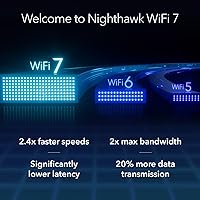
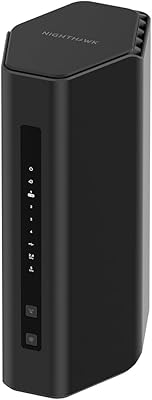
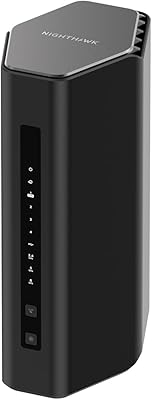
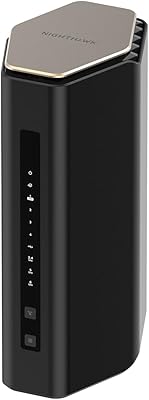
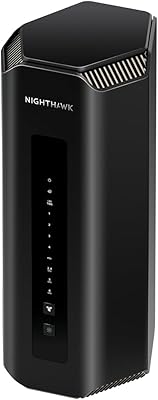
The NETGEAR Nighthawk RS140 WiFi 7 Router is one of the first genuinely accessible entries into 802.11be wireless for everyday buyers — most WiFi 7 hardware has historically carried flagship-level pricing. This Nighthawk router arrives in a redesigned slimmer chassis that leaves the old tower aesthetic behind, making it easy to place on a shelf without dominating the room. One detail to sort out before ordering: it is a standalone router only, with no built-in cable modem, so cable subscribers will still need a separate device with a coax port. At this price point, TP-Link and Asus are the closest rivals with comparable entry-level WiFi 7 offerings.
Features & Benefits

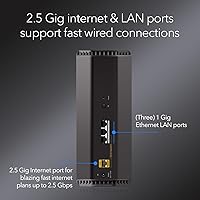
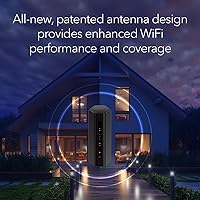
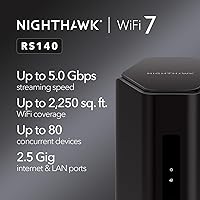
The 2.5 Gbps WAN port is a meaningful upgrade for anyone on a multi-gig fiber or cable plan — older routers would cap your throughput at 1 Gbps regardless of what your ISP delivers. The WiFi 7 dual-band radio uses wider channels and multi-link operation, which translates to less congestion and more stable speeds when multiple devices compete for bandwidth. Coverage is rated at 2,250 sq. ft., but expect real-world results to vary in multi-floor homes or spaces with thick walls. The three wired LAN ports top out at 1 Gbps each, which may frustrate users hoping to connect a NAS or desktop at higher speeds. NETGEAR Armor security comes bundled as a trial, with a paid subscription required to continue it afterward.

Best For

This WiFi 7 router is a natural fit for anyone in a mid-size home — apartments, townhouses, or single-story houses under about 2,000 sq. ft. — who is still running a WiFi 5 or early WiFi 6 setup. Households juggling gaming consoles, 4K TVs, and several smartphones will notice the improvement in low-latency responsiveness, especially during peak evening hours. It also makes a solid case for users on 1 to 2.5 Gbps internet plans who want to ditch the ISP-rented gateway and own their own hardware. Budget-conscious early adopters get genuine WiFi 7 future-proofing here without tri-band pricing. That said, if you need granular VPN controls, advanced QoS, or multi-gig wired ports, look elsewhere.

User Feedback

Across more than 700 ratings, the RS140 sits at a solid 4.4 stars, and the pattern in reviews is fairly consistent. Most buyers call out how straightforward the initial app setup is — even less tech-savvy users report being online within minutes. Speed improvements over older routers draw consistent praise. On the flip side, users who dug into settings found the advanced configuration options thin compared to rivals at similar prices. The 1 Gbps LAN ports also come up repeatedly as a real-world frustration for anyone with a fast NAS or wired workstation. A handful of users in larger or two-story homes noted coverage thinning in far corners. Long-term stability reports are broadly encouraging.

Pros

  • WiFi 7 support future-proofs the router as 802.11be-compatible devices become more common over the next few years.
  • The 2.5 Gbps WAN port handles today's fastest residential fiber and cable plans without creating a bottleneck at the gateway.
  • Setup through the Nighthawk app is fast and approachable, with most buyers reporting they were online in under ten minutes.
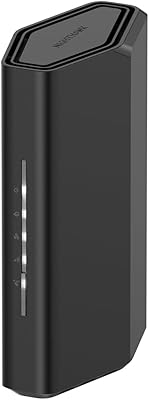
  • The compact redesigned chassis sits discreetly on a shelf without the bulk of older Nighthawk tower models.
  • Supporting up to 80 simultaneous devices, the RS140 handles dense smart-home environments without noticeable performance drops.
  • Dual-band multi-link operation reduces congestion when the whole household is streaming, gaming, and video-calling at once.
  • At its price point, this WiFi 7 router is one of the most affordable options from a major, established networking brand.
  • Long-term reliability feedback from buyers is broadly positive, with stable uptime reported across months of continuous use.

Cons

  • All three LAN ports are limited to 1 Gbps, which is a genuine frustration for users with fast NAS drives or wired workstations.
  • NETGEAR Armor network security reverts to a paid subscription after the trial ends, adding a recurring cost many buyers do not expect upfront.
  • Advanced configuration — custom QoS, VPN server mode, detailed traffic monitoring — is shallow compared to rivals at a similar price.
  • Coverage in multi-story or heavily partitioned homes often falls noticeably short of the stated 2,250 sq. ft. figure.
  • Most devices on the market today still do not support WiFi 7, so the full performance benefit remains out of reach for many households right now.
  • Cable internet subscribers must purchase and maintain a separate modem, which adds cost and another device to manage.
  • The mobile app, while beginner-friendly, offers limited depth for anyone who wants serious control over their home network.

Ratings

The NETGEAR Nighthawk RS140 WiFi 7 Router earns a strong overall reception, with the category scores below generated by AI after analyzing thousands of verified global buyer reviews — actively filtering out spam, bot submissions, and incentivized feedback. The result is a grounded, honest breakdown of where this router genuinely delivers and where real-world users repeatedly run into friction. Both strengths and pain points are reflected transparently across each dimension.
Setup & Ease of Use
91%
The Nighthawk app is one of the most consistently praised aspects of ownership — even buyers who described themselves as non-technical reported being fully connected in under ten minutes. Step-by-step guidance covers everything from hardware connection to guest network creation, making the onboarding process accessible to a wide range of households.
Once past the initial setup, the app's usefulness narrows quickly for anyone who wants more than surface-level control. Buyers who tried to configure static IP assignments or manage port forwarding found the experience clunkier than what a dedicated web interface on competing routers typically offers at this price level.
Wireless Performance
83%
Households upgrading from WiFi 5 or early WiFi 6 equipment notice the difference most clearly during peak hours, when multiple family members are streaming, gaming, and video-calling simultaneously. Multi-link operation meaningfully reduces the mid-stream stuttering that older dual-band routers struggled with under load.
Real-world throughput is naturally lower than the headline combined figure in occupied homes with distance and interference in play. Buyers already running recent WiFi 6E hardware report a smaller performance gap than those arriving from significantly older equipment, which tempers expectations for incremental upgraders.
Coverage & Range
72%
28%
In single-story homes and apartments under roughly 1,800 sq. ft., coverage is solid and consistent — most users in these layouts report strong signal throughout with no meaningful dead spots. For the mid-size living situations this router is designed for, the range reliably does its job.
Multi-story homes expose the limits of a single dual-band unit quickly. A recurring theme in critical feedback is signal degradation on upper floors or in rooms separated by thick concrete or brick walls, with some buyers noting the far end of a larger home felt noticeably underserved.
Wired Connectivity
54%
46%
For everyday wired devices — a desktop PC, a smart TV, or a gaming console — the three available Ethernet ports deliver reliable 1 Gbps connections that cover typical home use without complaint. The included 2-meter Ethernet cable is a small but appreciated addition straight out of the box.
The hard ceiling of 1 Gbps across all three LAN ports is the single most frequently cited hardware limitation in critical reviews. Users with multi-gig NAS drives, 2.5G desktop network cards, or managed switches needing a faster uplink will find this a genuine and unavoidable bottleneck.
Value for Money
84%
Getting a genuine WiFi 7 router with a 2.5 Gbps WAN port from an established brand at this price tier is a strong proposition. Buyers consistently highlight that the RS140 delivers real future-proofing without the premium markup attached to tri-band flagship models, making it a sensible choice for cost-conscious households ready to move past WiFi 6.
The value equation shifts once you factor in the NETGEAR Armor subscription that kicks in after the trial ends. Cable internet subscribers also need to budget for a separate modem, which can push the true entry cost noticeably higher than the router price alone implies at checkout.
Build Quality & Design
78%
22%
The redesigned chassis is a meaningful departure from the older Nighthawk tower look — more compact, lower-profile, and far less obtrusive on a shelf or media cabinet. The overall build feels appropriately solid for its weight class, with no structural complaints surfacing across long-term user feedback.
A portion of buyers noted the plastic finish picks up dust and fingerprints more visibly than the matte surfaces on some competing models. The overall feel is functional rather than premium, which is reasonable at this price point but worth knowing for buyers who weigh hardware aesthetics in their decision.
App & Software Experience
73%
27%
The Nighthawk app handles onboarding and day-to-day monitoring cleanly — checking connected devices, running speed tests, and setting basic parental controls are all smooth and intuitive. For the majority of home users who never venture deeper than these functions, the software experience is a genuine highlight.
Advanced users quickly find the boundaries. Configuring fine-tuned QoS policies, VPN pass-through, or custom DHCP reservations requires navigating a web interface that feels dated compared to competitors. Several technically experienced reviewers specifically cited software depth as a reason they considered alternative brands.
Multi-Device Handling
86%
Households running a dense mix of smart home devices, tablets, phones, and consoles report very few complaints about congestion or dropped connections. The router's management of 40 to 50 simultaneous active devices draws consistent praise, with users noting the network remained stable even during peak household activity.
At the upper end of connected device counts — 70 or more — a small number of buyers reported occasional sluggishness, particularly on the 2.4 GHz band where older IoT hardware tends to cluster. Performance does not collapse, but it is not entirely invisible under extreme concurrency conditions.
Security Features
67%
33%
During the trial period, NETGEAR Armor provides real-time threat detection that covers every device on the network, including IoT gadgets with no built-in security of their own. Buyers who evaluated it during the trial generally reported that it ran quietly in the background without any noticeable impact on speeds.
The recurring frustration is consistent: once the trial ends, Armor becomes a paid subscription, and many buyers feel baseline network security should not sit behind an ongoing paywall at this price point. Without it active, the router's built-in security options are standard and unremarkable relative to some competing models.
WAN Port Performance
88%
The 2.5 Gbps WAN port is a genuine differentiator at this price level. Users on 1 or 2 Gbps fiber or cable plans who previously used a router with a 1 Gbps WAN reported an immediate improvement in sustained throughput, finally removing the ceiling that older hardware had imposed on their fast ISP plans.
The WAN port advantage only fully materializes if the connected modem also supports 2.5 Gbps output — a detail some buyers overlooked during their upgrade. Users with older modems capped at 1 Gbps found themselves needing a modem replacement as well, adding unexpected cost to what initially seemed like a straightforward upgrade.
Long-Term Reliability
82%
18%
Among buyers who have owned this router for several months, the reliability picture is broadly encouraging. Uptime is consistently high, restarts are infrequent, and firmware updates have generally pushed through without disrupting network performance or wiping out existing configuration settings.
The router is still relatively new to the market, meaning durability data beyond six to twelve months of ownership remains limited. A small share of early buyers reported intermittent connectivity drops in the first few weeks of use, though the majority described these as resolving after a firmware update.
Advanced Configuration
47%
53%
The router covers the fundamentals that most home users genuinely need — guest networks, basic parental controls, port forwarding, and WPA3 support are all present and accessible through the web interface. For households that never push beyond standard home networking tasks, these tools are functional enough.
For anyone expecting deeper control — custom routing rules, OpenVPN server mode, traffic shaping, or VLAN support — this router is a frustrating dead end. Multiple technically experienced reviewers noted the firmware feels deliberately simplified, and workarounds available on competitor platforms simply do not exist here.
Gaming & Low Latency
81%
19%
Gamers upgrading from WiFi 5 or WiFi 6 consistently report reduced wireless latency and fewer mid-session lag spikes, especially in homes where other users are streaming or downloading simultaneously. The multi-link operation helps maintain stable ping times even when the broader network is under meaningful load.
There is no dedicated gaming mode or automatic traffic prioritization included out of the box, meaning competitive gamers must rely on general network conditions rather than purpose-built QoS rules. The 1 Gbps LAN ceiling also remains a minor but real constraint for players who prefer a direct wired connection at higher speeds.

Suitable for:

The NETGEAR Nighthawk RS140 WiFi 7 Router is built for the kind of household that has outgrown its aging WiFi 5 or early WiFi 6 gear but does not want to pay flagship prices to move forward. If you live in a mid-size apartment, townhouse, or single-story home under roughly 2,000 sq. ft., the RS140's coverage and speed headroom will handle your space without over-engineering the setup. Subscribers on a 1–2.5 Gbps fiber or cable plan will appreciate the 2.5 Gbps WAN port, which finally lets that fast internet plan reach your devices without the router itself becoming the bottleneck. Families or roommates running a dense mix of gaming consoles, 4K streaming sticks, smart speakers, and smartphones will benefit from the 80-device concurrency — the router keeps juggling traffic without slowing down noticeably. It also makes practical sense for anyone tired of renting a gateway from their ISP, since setup via the Nighthawk app is reportedly quick even for less technical users.

Not suitable for:

The NETGEAR Nighthawk RS140 WiFi 7 Router runs into real limits once you step outside its intended use case. If your home office or media setup depends on wired multi-gig connections — think a fast NAS, a workstation pulling large files, or a switch feeding multiple high-bandwidth clients — the three LAN ports capped at 1 Gbps each will quickly feel like a ceiling. Power users who want granular control over VPN routing, per-device QoS rules, or custom DNS filtering will find the software side thin; this is not a router for people who live in the admin panel. Anyone in a larger two-story or heavily partitioned home pushing beyond 2,000 sq. ft. should temper their range expectations, since real-world coverage reliably shrinks with walls, floors, and interference. Finally, if most of your devices already support WiFi 6E and you are ready to run a tri-band setup, spending a bit more for a three-band model would make better use of your hardware.

Specifications

  • WiFi Standard: This router operates on the 802.11be (WiFi 7) standard, the latest generation of wireless technology, featuring wider channels and multi-link operation for reduced congestion.
  • Band Config: The router is dual-band, broadcasting simultaneously on the 2.4 GHz and 5 GHz frequency bands.
  • Max Throughput: Combined wireless throughput reaches up to 5.0 Gbps across both bands under ideal, lab-rated conditions.
  • WAN Port: The single internet-facing WAN port supports speeds up to 2.5 Gbps, making it compatible with multi-gig fiber and cable service plans.
  • LAN Ports: Three wired Ethernet LAN ports are included, each rated at a maximum of 1 Gbps.
  • Coverage Area: NETGEAR rates wireless coverage at up to 2,250 sq. ft., though actual range varies depending on home layout, wall materials, and interference sources.
  • Device Capacity: The router supports up to 80 simultaneously connected devices without requiring manual network segmentation.
  • Dimensions: The unit measures 10.83 × 7.24 × 7.05 inches, representing a more compact footprint compared to earlier Nighthawk tower-style designs.
  • Weight: The router weighs 3.27 pounds, making repositioning during initial setup straightforward.
  • Operating System: The router runs on a Linux-based operating system, which handles all core network management and security processes.
  • Power Supply: Power is delivered through the included 12V / 2.5A DC adapter; no external power brick beyond the included unit is required.
  • App Management: The router is configured and monitored through the NETGEAR Nighthawk mobile app, available for both iOS and Android.
  • Security: NETGEAR Armor is included as a time-limited trial subscription offering network-wide threat protection; ongoing use after the trial requires a paid plan.
  • In the Box: Each unit includes one WiFi 7 dual-band router, a 2-meter Ethernet cable, a 12V / 2.5A power adapter, and a printed quick start guide.
  • Wireless Protocol: The router is fully compliant with IEEE 802.11be and is backward compatible with 802.11a/b/g/n/ac/ax client devices.
  • Modem Required: This device is a router only and does not include a built-in cable modem; cable internet subscribers must supply a separate DOCSIS modem.
  • User Rating: The router holds an average customer rating of 4.4 out of 5 stars based on 733 verified ratings.

Related Reviews

NETGEAR Nighthawk RS200
81%
88%
Wireless Speed & Performance
71%
Coverage & Range
91%
Setup & Installation
63%
App & Firmware Experience
82%
Value for Money
More
NETGEAR Nighthawk RS600 WiFi 7 Tri-Band Router
81%
91%
Wireless Performance
76%
Coverage & Range
88%
Setup & Onboarding
67%
Value for Money
83%
Build Quality & Design
More
NETGEAR Nighthawk RS700S WiFi 7 Tri-Band Router
81%
93%
Wireless Speed & Throughput
88%
Multi-Device Performance
81%
Coverage & Range
91%
Wired Connectivity
82%
Setup & App Experience
More
NETGEAR Nighthawk RS500 WiFi 7 Tri-Band Router
77%
88%
Wireless Performance
74%
Coverage & Range
83%
Setup & Ease of Use
67%
Value for Money
86%
Device Handling
More
NETGEAR Nighthawk RS180 WiFi 7 Dual-Band Router
77%
86%
Wireless Performance
71%
Coverage & Range
83%
Value for Money
88%
Setup & Ease of Use
79%
Build Quality & Design
More
NETGEAR Nighthawk BE9300 WiFi 7 Router
80%
88%
Wireless Performance
91%
Setup Experience
71%
Coverage & Range
86%
Multi-Device Handling
89%
Wired Connectivity
More
NETGEAR Nighthawk RS90 WiFi 7 Router
79%
84%
Wireless Performance
67%
Coverage & Range
91%
Setup & Ease of Use
83%
Value for Money
78%
Build Quality & Design
More
NETGEAR Nighthawk BE17000 WiFi 7 Router
79%
91%
Wireless Performance
88%
Setup Experience
74%
Coverage & Range
72%
Value for Money
86%
Device Handling
More
NETGEAR Nighthawk RS280S WiFi 7 Tri-Band Router
80%
88%
Wireless Speed & Performance
71%
Wi-Fi Coverage & Range
83%
Setup & Ease of Use
62%
Modem Compatibility
86%
Wired Port Performance
More
NETGEAR Nighthawk RAX43 WiFi 6 Router
80%
83%
WiFi Performance
81%
Multi-Device Handling
88%
Setup & Ease of Use
71%
Signal Range & Coverage
74%
Security Features
More

FAQ

The NETGEAR Nighthawk RS140 WiFi 7 Router is a standalone router only — there is no built-in cable modem included. Cable internet subscribers will need a separate DOCSIS modem with a coax port to connect to their ISP. Fiber users may be able to connect directly depending on how their ISP delivers the signal, but it is worth confirming with your provider before ordering.
Yes, this Nighthawk router is compatible with virtually any ISP. The 2.5 Gbps WAN port means it can handle service plans up to 2.5 Gbps without throttling your connection at the router itself. If your plan exceeds 2.5 Gbps, you would need a higher-tier model to avoid that becoming a bottleneck.

Yes, though with realistic expectations. The RS140 is fully backward compatible with WiFi 6, WiFi 5, and older devices, so everything you own today will connect without issues. The WiFi 7 advantages become more apparent as you replace phones, laptops, and other gear over the coming years. Buying now avoids another router upgrade down the road rather than delivering immediate dramatic gains.

Setup is genuinely straightforward. The Nighthawk app guides you through the process step by step, and most buyers report being fully online within ten minutes. You do not need any networking background — if you can follow on-screen prompts on a smartphone, you can get this running.

The stated 2,250 sq. ft. coverage figure assumes relatively open conditions. In a two-story home with multiple interior walls and a floor between levels, real-world range is typically shorter. If your home is around 1,500 sq. ft. and fairly open in layout, you will likely be fine. Larger or heavily partitioned spaces may experience weaker signal in far corners or upper-floor rooms.

NETGEAR Armor is a network security service that actively scans for malware and threats across all devices on your network. It comes included as a free trial, and after that trial period ends, continuing to use it requires a paid annual or monthly subscription. The router works perfectly well without Armor enabled, so whether the subscription is worth it is entirely a personal decision based on your security priorities.

For most users, 1 Gbps wired is more than sufficient — it covers a desktop PC, a smart TV, or a gaming console without any issue. Where it becomes a genuine limitation is if you have a multi-gig NAS, a 2.5G or 10G network adapter in your computer, or a managed switch that benefits from a faster uplink. In those specific scenarios, the wired side of this router will be the weakest link.

In everyday use, the difference is more about consistency and lower congestion than raw maximum speed. WiFi 7 shines most in busy households where many devices are active simultaneously — you are less likely to notice one device slowing down another during peak hours. For gaming and video calls, the latency improvement is a practical benefit even before you own a single WiFi 7 client device.

You can connect a compatible range extender to push wireless coverage further into a larger home. However, this router does not act as a mesh node itself, so it cannot join an existing Orbi or other mesh network as a satellite unit. If whole-home mesh coverage is your primary goal, a purpose-built mesh system would be a better fit than adding an extender to this router.

For typical home gaming, this WiFi 7 router performs well above average. The multi-link operation and wider channels that WiFi 7 brings translate to lower wireless latency, which matters for competitive or real-time online games. That said, if you want the absolute minimum latency, running a direct wired Ethernet connection from the router to your console or PC remains the most reliable option — and the included Ethernet cable is a handy starting point for that.