Overview

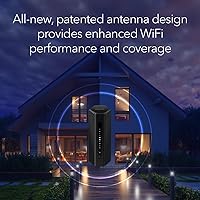
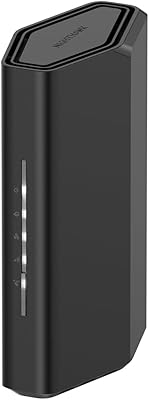
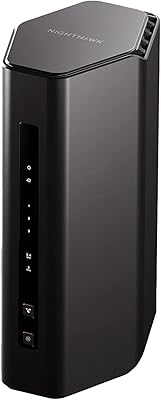
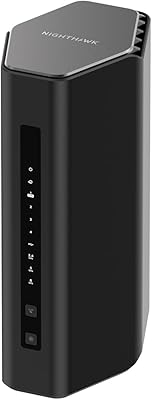
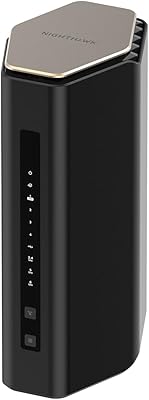
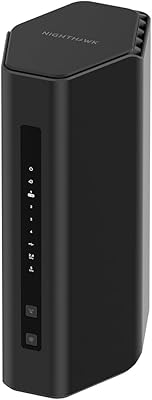
The NETGEAR Nighthawk RS280S WiFi 7 Tri-Band Router sits at a sweet spot for households ready to move past WiFi 5 or 6 without splurging on enterprise-grade hardware. One thing to know upfront: this is a router only — no modem included, and you will need a separate one to get online. Compared to older Nighthawk towers, the redesigned body is noticeably more compact, which actually matters when you're tucking it onto a shelf or entertainment cabinet. Coverage tops out at 2,500 sq. ft. under ideal conditions — think open-plan, single-floor layouts. The included one-year Armor subscription adds real security value that competing routers at this tier rarely bundle in.
Features & Benefits

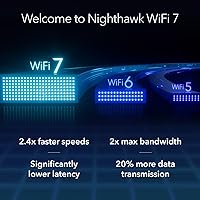
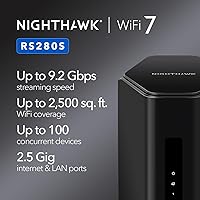
Running on the 802.11be WiFi 7 standard, this Nighthawk WiFi 7 router spreads its 9.2 Gbps across three bands — 2.4 GHz, 5 GHz, and 6 GHz. That figure is an aggregate across all bands, not what any single device will see, so keep expectations grounded. The 2.5 Gig WAN port is genuinely useful if your ISP offers multi-gig plans, but your modem needs to support 2.5G speeds too — older DOCSIS 3.0 units will quietly cap you out. On the wired side, two 2.5G LAN ports alongside two 1G ports serve NAS drives, gaming rigs, or TVs well. Setup through the Nighthawk App is straightforward for most users, though complete networking newcomers may need a few extra minutes to get comfortable.

Best For

The RS280S punches hardest for households that have already upgraded to a multi-gig fiber or cable plan and are tired of the router being the weak link. If you're running several 4K streams, a few gaming sessions, and video calls simultaneously, the tri-band architecture keeps traffic sorted without obvious slowdowns. Home office setups with a mix of wired and wireless demands will appreciate both the fast LAN ports and the cleaner 6 GHz band. It's also a solid pick for buyers who want WiFi 7 performance without committing to a full mesh system. Just don't expect it to blanket a large multi-story house — that's a job for a mesh kit, not a single-unit router.

User Feedback

Across more than 1,400 ratings, this tri-band router holds a 4.3-star average — respectable, and the review volume gives the score real credibility. Most buyers highlight a genuine speed boost over their previous WiFi 6 setups, and the app-based setup gets consistent praise for being clean and approachable. On the critical side, two complaints surface regularly: the cost of renewing the Armor subscription after year one, and limited granular controls for advanced users who prefer manual configuration. A handful of reviewers also noted weaker-than-expected coverage in multi-story homes with thick walls, and a few ran into modem compatibility issues when pairing with older hardware. Balanced overall, but worth sorting out your modem situation before purchasing.

Pros

  • Real-world speeds on the 6 GHz band are a clear step up from WiFi 6 for compatible devices.
  • The 2.5G WAN port is ready for next-gen ISP plans the moment your modem can support them.
  • Dual 2.5G LAN ports give wired devices — NAS drives, gaming PCs — far more throughput than standard gigabit.
  • Handles up to 100 connected devices without the slowdowns common on mid-range WiFi 6 hardware.
  • The Nighthawk App makes initial setup genuinely manageable for non-technical households.
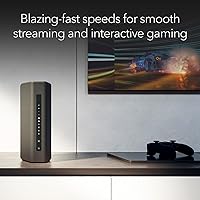
  • Compact redesign fits cleanly on a shelf or media cabinet without dominating the space.
  • NETGEAR Armor covers every device on the network from a single router-level subscription.
  • Tri-band architecture keeps gaming, streaming, and smart home traffic on separate lanes automatically.
  • Strong 4.3-star average across 1,400-plus verified ratings signals reliable real-world performance.
  • The RS280S positions buyers well ahead of the WiFi 7 client device adoption curve without overpaying for enterprise gear.

Cons

  • No modem included — buyers with older hardware may face an unplanned additional purchase to unlock full speeds.
  • The 9.2 Gbps speed figure is an aggregate across all bands, not a single-device throughput number.
  • NETGEAR Armor renews at an extra annual cost after the included first year — easy to overlook at purchase.
  • Coverage in multi-story homes or thick-walled spaces regularly falls short of the advertised 2,500 sq. ft. claim.
  • Only four LAN ports total — households with multiple wired devices will likely need an external switch.
  • Advanced router settings are limited; power users accustomed to OpenWrt-style controls will find it frustrating.
  • The Nighthawk App pushes Armor renewal notifications persistently, which several long-term users found irritating.
  • Some users reported intermittent 6 GHz band drops following certain firmware updates since launch.
  • WiFi 7 client devices remain uncommon in most homes, so near-term speed gains depend heavily on your existing hardware.
  • Remote app management can lose cloud sync reliability, making off-network router management occasionally inconsistent.

Ratings

The NETGEAR Nighthawk RS280S WiFi 7 Tri-Band Router scores below are generated by AI after analyzing thousands of verified global user reviews, with spam, bot activity, and incentivized feedback actively filtered out. Across more than 1,400 ratings, real buyers shared consistent patterns — both where this router genuinely delivers and where it falls short — and those signal transparently in every score you see here.
Wireless Speed & Performance
88%
Users upgrading from WiFi 6 routers consistently reported faster real-world throughput, especially on the 6 GHz band during peak household usage. Heavy tasks like 4K streaming across multiple TVs and simultaneous video calls ran noticeably smoother without the congestion drops they experienced before.
A portion of buyers were surprised that the 9.2 Gbps figure is an aggregate across all three bands combined, not what a single device receives. Managing expectations around per-device speeds remains a recurring source of mild disappointment in reviews.
Wi-Fi Coverage & Range
71%
29%
For open-plan homes and single-story apartments under 2,000 sq. ft., the RS280S covers well with strong signal in most corners. Users in such layouts rarely reported dead zones under normal furniture and appliance conditions.
Multi-story homes and spaces with dense concrete or brick walls exposed the limits of the 2,500 sq. ft. claim fairly quickly. Several reviewers noted that signal degraded meaningfully between floors, and a handful felt a mesh system would have been the smarter choice for their layout.
Setup & Ease of Use
83%
The Nighthawk App-guided setup is genuinely approachable for most users — plug in the hardware, follow the on-screen steps, and the majority of households were online within ten minutes. The interface is clean and avoids overwhelming non-technical buyers with jargon upfront.
Users who wanted to dig deeper — custom DNS, advanced QoS rules, or VLAN configuration — found the app limiting compared to router interfaces from competitors at the same price point. A web-based admin panel exists but feels less polished than the app.
Modem Compatibility
62%
38%
Buyers already running a DOCSIS 3.1 modem with 2.5G capability found the pairing worked exactly as expected, letting them actually take advantage of the multi-gig WAN port without any extra configuration headaches.
This was one of the most common friction points across reviews. Users with older DOCSIS 3.0 modems or budget ISP-supplied gateways found the 2.5G WAN port effectively wasted on their setup, and some had to buy a new modem just to unlock the router's full potential — an added cost that caught many off guard.
Wired Port Performance
86%
The dual 2.5G LAN ports were a genuine highlight for home lab users and those running a NAS or wired gaming PC. File transfers between a NAS and a desktop PC over the 2.5G connection showed real-world speeds that traditional gigabit simply cannot match.
Four total LAN ports is on the lean side for households with several wired devices. Users with smart TVs, a desktop, a NAS, and a gaming console found themselves reaching for an unmanaged switch to expand the port count, which adds minor clutter to the setup.
Build Quality & Design
81%
19%
The redesigned chassis is a genuine improvement over the bulky older Nighthawk towers — it sits flat on a shelf without dominating the space, and the matte black finish looks clean next to AV equipment. The build feels solid and premium without being heavy.
Some buyers noted the antennas are internal, which limits any physical adjustability if signal direction becomes a concern. A small number of reviews mentioned the unit runs warm during extended use, though no widespread overheating issues were flagged.
NETGEAR Armor Security Suite
74%
26%
The Bitdefender-backed Armor suite covers all connected devices — phones, laptops, smart home gear — without needing individual installs on each one. Users appreciated having malware blocking and intrusion detection running passively in the background, especially in households with kids online.
The one-year inclusion is genuinely useful, but the renewal cost after that first year surprised a number of buyers who had not factored it into their total cost of ownership. For those who decided not to renew, some felt the router lost a meaningful part of its value proposition.
Value for Money
77%
23%
When you factor in WiFi 7 hardware, the 2.5G wired infrastructure, and a full year of Armor security coverage, the overall package holds up well compared to similarly priced competitors that bundle less. Buyers who were already planning a network upgrade found it a reasonable single purchase.
Users who realized post-purchase that they also needed a new 2.5G-capable modem felt the true cost was higher than the sticker suggested. The Armor renewal pricing also shifts the long-term value calculation depending on whether you keep subscribing.
Multi-Device Handling
84%
Households with 30 to 60 connected devices — a realistic count for a modern smart home — reported stable performance without obvious prioritization problems. Smart TVs, phones, laptops, and IoT devices coexisted without the bandwidth fights common on older single-band or entry WiFi 6 routers.
At the upper end of the claimed 100-device ceiling, a small number of users noticed latency creeping up during simultaneous high-bandwidth activity. It handles a busy household well, but it is not engineered for small office or high-density environments.
Gaming & Low-Latency Use
82%
18%
Gamers connecting via the 2.5G wired LAN ports saw consistent, low-latency connections that held steady even with other household members streaming concurrently. The dedicated 6 GHz band also gave wireless gaming devices a cleaner channel away from the usual 2.4 GHz and 5 GHz congestion.
The router lacks the dedicated gaming QoS features found in purpose-built gaming routers at similar prices. Advanced users looking for per-device prioritization or gaming traffic dashboards will find the options here fairly basic.
App & Remote Management
76%
24%
The Nighthawk App handles day-to-day tasks well — rebooting the router remotely, checking which devices are connected, and running speed tests are all intuitive from a phone. Parents found the basic parental controls accessible without needing any technical background.
Remote management can be unreliable when the app loses its cloud sync, an issue flagged periodically in reviews. The app also pushes Armor renewal notifications somewhat aggressively, which a number of users found annoying over time.
Future-Proofing & WiFi 7 Readiness
89%
As one of the more accessible WiFi 7 routers currently available, the RS280S positions buyers well ahead of the client device curve. Those who already have WiFi 7 laptops or phones reported taking full advantage of the 6 GHz band improvements in throughput and reduced latency.
WiFi 7 client devices are still not widespread in most households, meaning a portion of buyers are paying for a standard their current devices cannot yet use. The investment makes sense long-term, but near-term gains depend entirely on the devices you already own.
Installation & Documentation
79%
21%
The quick start guide and app-based onboarding cover the essentials clearly enough that most users did not need to visit a support forum. The included Ethernet cable and power adapter are adequate quality for immediate use right out of the box.
Advanced configuration documentation is thin in the physical guide and the app, pushing users toward NETGEAR's online knowledge base, which can be slow to navigate. Users who ran into modem pairing issues found the troubleshooting resources less helpful than expected.
Reliability & Connection Stability
83%
The majority of long-term owners reported no need to reboot the router more than once every few weeks, which is a positive sign for a relatively new product in the market. Uptime was consistently praised in reviews from buyers several months into ownership.
A smaller subset of reviewers reported occasional drops on the 6 GHz band, particularly after firmware updates. NETGEAR has pushed patches addressing some of these issues, but the pattern suggests that firmware quality control has not been entirely consistent since launch.

Suitable for:

The NETGEAR Nighthawk RS280S WiFi 7 Tri-Band Router is a strong match for households that have already subscribed to a multi-gig fiber or cable internet plan and are tired of the router being the weakest link in their setup. If your home is a single story or an open-plan layout under roughly 2,000 to 2,500 sq. ft., this router's coverage holds up reliably without needing extenders. Gamers and streamers will particularly benefit from the dedicated 6 GHz band, which keeps high-bandwidth devices on a cleaner channel away from the congestion that plagues crowded 2.4 GHz and 5 GHz networks. Home office users with a desktop, NAS, or wired workstation will find real utility in the dual 2.5G LAN ports, which push well beyond the ceiling of standard gigabit Ethernet. Tech-savvy buyers who want WiFi 7 future-proofing without the complexity and cost of a full mesh system will also find this tri-band router hits a practical sweet spot — capable hardware, approachable setup, and a useful security suite bundled in for the first year.

Not suitable for:

The NETGEAR Nighthawk RS280S WiFi 7 Tri-Band Router is not the right pick for buyers living in multi-story homes or properties with thick concrete, brick, or plaster walls — the 2,500 sq. ft. claim assumes near-ideal conditions, and real-world performance in complex floor plans often falls noticeably short. It is also a poor fit for anyone still running an older DOCSIS 3.0 modem or an ISP-supplied gateway that lacks 2.5G capability, since the hardware ceiling of that modem will quietly cap your speeds regardless of what this router can theoretically handle. Buyers on a tight all-in budget should factor in the potential modem upgrade cost before committing, because the true expense can be higher than the router price alone suggests. This is also not the right choice for advanced networking enthusiasts who want granular controls — detailed QoS configuration, VLAN management, or deep traffic analysis — as the app and web interface are oriented toward general consumers rather than power users. Finally, anyone hoping to avoid ongoing subscription costs should know that the Armor security suite carries a recurring renewal fee after the included first year, and without it, a portion of this router's value proposition disappears.
Specifications

  • WiFi Standard: Operates on the 802.11be (WiFi 7) standard, the latest generation of wireless networking technology available for home use.
  • Max Speed: Delivers an aggregate wireless throughput of up to 9.2 Gbps spread across all three bands combined, not per individual device.
  • Band Configuration: Tri-band design covers the 2.4 GHz, 5 GHz, and 6 GHz frequency bands simultaneously for traffic separation across device types.
  • Coverage Area: Rated for up to 2,500 sq. ft. of WiFi coverage under open, single-floor conditions without significant physical obstructions.
  • Concurrent Devices: Supports up to 100 connected devices at the same time without severe performance degradation under typical household loads.
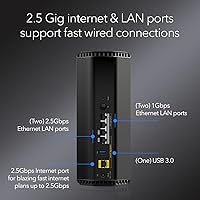
  • WAN Port: Equipped with a single 2.5 Gigabit Ethernet WAN port for connecting a compatible modem running a multi-gig internet service plan.
  • LAN Ports: Provides four total wired LAN ports — two at 2.5 Gigabit speed and two at 1 Gigabit speed — for direct device connections.
  • Dimensions: The unit measures 5.9 x 4 x 9.8 inches, reflecting the redesigned compact footprint compared to older tower-style Nighthawk models.
  • Weight: Weighs 3.96 pounds, making it light enough for shelf or cabinet placement without requiring dedicated mounting hardware.
  • Power Supply: Includes a 12V / 3.5A power adapter in the box, providing stable power delivery for continuous 24/7 router operation.
  • Security Suite: Comes with NETGEAR Armor powered by Bitdefender, offering network-level malware blocking, intrusion prevention, and identity protection for all connected devices.
  • Armor Subscription: A one-year NETGEAR Armor subscription is included at no extra charge, after which renewal is required at an additional annual cost to maintain coverage.
  • Setup Method: Initial configuration is handled through the NETGEAR Nighthawk mobile app, available for both iOS and Android devices.
  • Modem Required: This is a router only — it does not include a built-in cable modem, so a separate compatible modem is required for internet service.
  • Model Number: The official model designation is RS280S-1CCNAS, used for warranty registration, firmware downloads, and NETGEAR support inquiries.
  • Color & Finish: Ships in a matte black finish that blends with most home entertainment and office setups without drawing visual attention.
  • In-Box Contents: Package includes the WiFi 7 tri-band router, a 12V/3.5A power adapter, a 2-meter Ethernet cable, and a printed quick start guide.
  • Wireless Protocol: Supports backward compatibility with older WiFi standards including 802.11a/b/g/n/ac/ax, ensuring all legacy devices can connect without issue.

Related Reviews

NETGEAR Nighthawk X6 AC3000 Tri-Band WiFi Router
84%
88%
Performance
76%
Setup and Installation
91%
Signal Strength and Range
79%
Usability (App & Interface)
85%
Compatibility with Devices
More
NETGEAR Nighthawk X8 AC5300 Tri-Band WiFi Router R8500
84%
89%
WiFi Performance
87%
Range and Coverage
93%
Ease of Setup
90%
Compatibility with Alexa
80%
Overall Build Quality
More
Netgear Nighthawk X6S AC4000 Tri-Band Router
70%
83%
Wireless Performance
81%
Signal Range & Coverage
86%
Multi-Device Handling
78%
Gaming & Low Latency
61%
Setup & Installation
More
NETGEAR Nighthawk BE17000 WiFi 7 Router
79%
91%
Wireless Performance
88%
Setup Experience
74%
Coverage & Range
72%
Value for Money
86%
Device Handling
More
NETGEAR Nighthawk RS200
81%
88%
Wireless Speed & Performance
71%
Coverage & Range
91%
Setup & Installation
63%
App & Firmware Experience
82%
Value for Money
More
NETGEAR Nighthawk RS90 WiFi 7 Router
79%
84%
Wireless Performance
67%
Coverage & Range
91%
Setup & Ease of Use
83%
Value for Money
78%
Build Quality & Design
More
NETGEAR Nighthawk RS180 WiFi 7 Router
86%
92%
WiFi Performance
90%
Gaming Performance
88%
Streaming Quality
89%
Coverage Area
85%
Ease of Setup
More
NETGEAR Nighthawk RS600 WiFi 7 Tri-Band Router
81%
91%
Wireless Performance
76%
Coverage & Range
88%
Setup & Onboarding
67%
Value for Money
83%
Build Quality & Design
More
NETGEAR Nighthawk RS500 WiFi 7 Tri-Band Router
77%
88%
Wireless Performance
74%
Coverage & Range
83%
Setup & Ease of Use
67%
Value for Money
86%
Device Handling
More
NETGEAR Nighthawk BE9300 WiFi 7 Router
88%
94%
Wireless Performance
91%
Coverage Area
88%
Device Capacity
85%
Setup & Installation
90%
Security Features
More

FAQ

Yes, absolutely — the NETGEAR Nighthawk RS280S WiFi 7 Tri-Band Router is a standalone router with no built-in modem. You will need a separate cable or fiber modem to connect to your ISP. If your current modem is an older DOCSIS 3.0 unit, it will also cap your speeds well below what the 2.5G WAN port is capable of, so it is worth checking modem compatibility before you buy.
No single device will see 9.2 Gbps on its own. That number is the total aggregate bandwidth spread across all three bands simultaneously. In practice, your individual devices will each get a portion of that depending on which band they connect to and what else is running on the network at the same time.

It depends heavily on your layout. The 2,500 sq. ft. coverage figure assumes an open, single-floor environment with minimal walls and obstructions. In a multi-story home — especially one with thick concrete or brick walls — you will likely notice weaker signal on upper or lower floors. If your home fits that description, a mesh system would probably serve you better than a single-unit router.

It genuinely depends on your household. Armor covers every device on your network at the router level — no per-device installs needed — and the Bitdefender engine behind it is well-regarded. For families with kids online, or anyone who wants passive protection without managing antivirus software on every phone and laptop, the subscription has real value. If you are already running security software on all your devices individually, the overlap may make it feel redundant.

Not necessarily. Even on a 1 Gbps plan, the tri-band WiFi 7 design helps distribute traffic more efficiently across your devices, and the 2.5G LAN ports benefit wired connections like NAS drives or gaming PCs regardless of your internet speed. That said, you will not unlock the full potential of the 2.5G WAN port until your ISP plan and modem both support speeds above 1 Gbps.

Most non-technical users manage it without any real difficulty. The Nighthawk App walks you through each step — plug in the hardware, connect your modem, follow the on-screen prompts, and most people are online within 10 to 15 minutes. Where things can get slightly confusing is if your modem needs to be reconfigured or put into bridge mode first, but that is a modem issue rather than anything specific to this router.

Yes, the RS280S is fully backward compatible with older WiFi standards going back to 802.11a/b/g/n. Your existing WiFi 5 and WiFi 6 devices will connect and work just as they always have — they simply will not benefit from the WiFi 7 improvements, which require a WiFi 7 capable client device to take advantage of.

The four LAN ports — two at 2.5G and two at 1G — cover most households comfortably. If you have a gaming PC, a NAS, a smart TV, and a work laptop all needing wired connections simultaneously, you will hit the limit quickly. In that case, adding an inexpensive unmanaged network switch to one of the 1G ports is a straightforward fix.

The Nighthawk App handles the basics well — guest networks, parental controls, device prioritization — but deeper configuration options are limited compared to what power users might expect. There is a web-based admin interface that offers somewhat more control, but if you are looking for full VLAN management or OpenWrt-style granular settings, this router is not really built for that use case.

This tri-band router is a strong single-unit solution for homes under 2,500 sq. ft. with straightforward layouts. A mesh system wins when you need consistent coverage across multiple floors, large square footage, or complex building structures, because it places wireless nodes throughout the space instead of relying on a single broadcast point. If your home fits within this router's comfort zone, you get comparable performance without the added cost and configuration of a mesh kit.