Overview

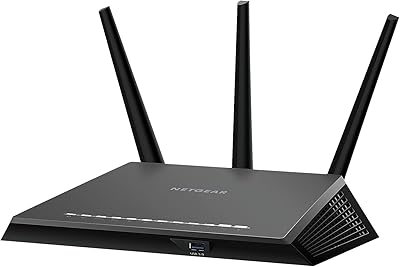
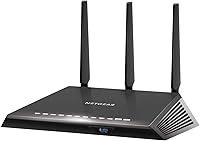
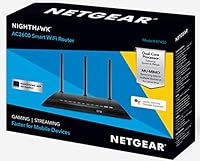
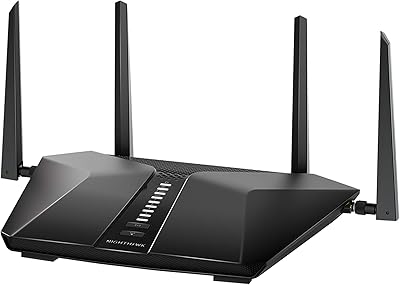
The NETGEAR Nighthawk AC2600 WiFi Router launched in late 2018 and has held its ground as a reliable mid-range option for households that need dependable performance without paying for enterprise-grade hardware. This Nighthawk router sits in an interesting spot — comfortably above the budget AC1200 and AC1750 class, but short of newer tri-band and Wi-Fi 6 territory. It runs on a dual-core processor, which genuinely helps when multiple tasks hit the router simultaneously, unlike single-core alternatives that can buckle under load. The external antennas give it a purposeful physical profile and contribute meaningfully to better floor-to-floor coverage in homes of moderate size.
Features & Benefits

The AC2600 rating breaks down to 800Mbps on the 2.4GHz band and 1733Mbps on the 5GHz band, meaning the router can handle simultaneous heavy traffic without funneling everything through a single lane. MU-MIMO is what makes this practical — instead of serving devices one at a time, it streams data to several at once, so your laptop video call does not pause while someone else loads a game. The built-in QoS controls let you push gaming and streaming traffic ahead of routine browsing, cutting down on the lag spikes that frustrate players during busy household hours. WPS is a small but welcome convenience for quickly adding new devices without typing passwords.

Best For

This dual-band router makes the most sense for households running 10 to 20 connected devices — phones, smart TVs, laptops, and the occasional gaming console all active at once. Gamers benefit from QoS prioritization without needing to spend up to a Wi-Fi 6 model. It is also a strong upgrade pick for anyone still using the router their ISP handed them; the range and speed jump tends to register immediately. Renters in medium-sized apartments or small home offices where video calls and file syncing compete for bandwidth will find the AC2600 handles that balancing act comfortably without overcomplicating the setup process.

User Feedback

Across nearly 500 ratings, this Nighthawk router holds a 4.2 out of 5, which reflects real satisfaction with some honest reservations. The Nighthawk mobile app draws consistent praise for making initial setup straightforward — most buyers report getting online without consulting a manual. Better range compared to ISP-provided equipment comes up repeatedly as a standout benefit. On the downside, the browser-based admin panel feels dated; it functions, but anyone used to a modern dashboard may find it clunky. A handful of long-term owners have flagged firmware update gaps. Value perception depends heavily on purchase price — at a discount it is hard to argue with, but against similarly priced Wi-Fi 6 competition, the decision gets noticeably tighter.

Pros

  • Quick, app-guided setup gets most users online in under ten minutes without technical knowledge.
  • MU-MIMO support means multiple family members can stream and browse at the same time without noticeably competing for bandwidth.
  • The QoS engine lets gamers prioritize their traffic over background device activity, reducing in-game lag spikes.
  • External antennas with three amplifiers provide noticeably better coverage than typical ISP-supplied routers.
  • The dual-core processor handles simultaneous wired and wireless traffic without the slowdowns common in entry-level hardware.
  • Range improvements are frequently the first thing upgrading users notice, especially on the second floor.
  • WPS pairing makes adding smart home devices and new phones quick and hassle-free.
  • Holds a 4.2 out of 5 rating across nearly 500 real buyer reviews — a reliable signal of consistent satisfaction.
  • The AC2600 performs well as a long-term daily driver for moderate household workloads without requiring frequent reboots.

Cons

  • The web-based admin panel looks and feels dated compared to modern router dashboards from competing brands.
  • Firmware updates have become infrequent, raising legitimate concerns for users who care about ongoing security patches.
  • NETGEAR Armor security features require a paid subscription — baseline threat protection is not included for free.
  • Placement flexibility is limited; the large footprint and lack of wall-mount support restrict where it fits comfortably.
  • Value proposition weakens considerably when purchased at full retail against similarly priced Wi-Fi 6 alternatives.
  • The 2.4GHz band can experience intermittent drops in dense urban environments with heavy wireless interference nearby.
  • Households exceeding 20 simultaneously active devices may encounter bandwidth inconsistency and occasional congestion.
  • The Nighthawk mobile app has reported reliability issues on certain iOS and Android versions, affecting remote management.
  • No tri-band backhaul means high-congestion environments lack the dedicated channel that newer multi-band routers provide.

Ratings

The NETGEAR Nighthawk AC2600 WiFi Router has been evaluated by our AI rating system after processing hundreds of verified global buyer reviews, with spam, bot-submitted, and incentivized feedback actively filtered out. The scores below reflect what real users consistently experienced — both the aspects that impressed them and the friction points that gave some pause. Strengths and shortcomings are weighted equally so you get an honest picture before deciding.
Wireless Speed & Throughput
83%
Most users upgrading from ISP-supplied or older AC1200 routers noticed an immediate and meaningful speed improvement, particularly on the 5GHz band during streaming and large file transfers. The combined AC2600 rating holds up well in real households with moderate device loads.
Heavy-traffic households with 20-plus simultaneous devices can push the router closer to its ceiling, especially on the 2.4GHz band. Buyers coming from newer Wi-Fi 6 hardware will find the throughput underwhelming by comparison.
Wi-Fi Range & Coverage
81%
19%
The three amplifiers and external antenna configuration make a tangible difference in medium-sized homes and apartments across two floors. Users in 1,500 to 2,500 square foot spaces consistently reported fewer dead zones than with their previous routers.
Larger homes over 2,500 square feet or layouts with thick concrete walls revealed the router's coverage limits, with some buyers reporting weak signal in far rooms. A mesh system or range extender would be needed in those scenarios.
Setup & Ease of Use
89%
The Nighthawk mobile app stands out as one of the most praised aspects across buyer reviews — first-time router buyers and tech-averse users alike completed setup in under ten minutes without touching a manual. WPS pairing for additional devices adds further convenience.
A small number of users encountered initial connectivity hiccups that required a router restart or ISP modem reboot to resolve. These were not widespread but appear often enough to be worth noting for buyers with complex modem setups.
Admin Interface & Management
58%
42%
The browser-based dashboard provides full access to QoS controls, port forwarding, guest network setup, and firmware management. For users who only need to configure basic settings once, it gets the job done reliably.
The web UI has not kept pace with cleaner, more modern dashboards found in competing routers at similar price points. Users who regularly log in to adjust settings found it cluttered and slower to navigate than expected in 2024.
Gaming Performance & QoS
79%
21%
The advanced QoS engine allows users to prioritize gaming and video traffic over background downloads and smart home device chatter, which translated to noticeably reduced lag spikes during online gaming sessions in busy households. Console and PC gamers both reported positive results.
QoS configuration requires some manual attention to get the most out of it — default settings do not automatically optimize for all game types. Users expecting plug-and-play lag elimination without any setup may be disappointed.
Multi-Device Handling
77%
23%
MU-MIMO support means the router can serve several devices simultaneously rather than cycling through them sequentially, which matters when a family has phones, laptops, smart TVs, and gaming systems all active at once. Most users in this scenario reported stable concurrent performance.
Beyond roughly 15 to 18 heavily active devices, some users noticed bandwidth inconsistency and occasional packet loss. The dual-band architecture, while solid, lacks the dedicated backhaul channel that tri-band routers provide for congested environments.
Build Quality & Design
74%
26%
The physical construction feels solid and purposeful — the external antennas are firmly attached and adjustable, and the chassis has enough ventilation to prevent noticeable heat buildup during extended use. The router does not feel cheap given its price tier.
The footprint is fairly large at over 13 inches wide, and the angular Nighthawk aesthetic will not suit minimalist setups or small entertainment centers. There is no wall-mount option, limiting placement flexibility.
Firmware Reliability
62%
38%
The router ships with stable base firmware and functions reliably for months at a stretch for users who do not manually update. Core routing functions remain dependable for the majority of the ownership period.
A meaningful subset of long-term owners flagged that firmware updates arrived inconsistently or introduced minor bugs that required factory resets. NETGEAR's update cadence for this model has slowed considerably, which is a real concern for security-conscious buyers.
Value for Money
71%
29%
At a discounted or sale price, the AC2600 delivers a strong bundle of features — MU-MIMO, QoS, dual-core processing, and solid range — that genuinely competes with routers priced noticeably higher just a few years ago.
At full retail, the value case weakens when Wi-Fi 6 routers offering future-proof speeds and better device efficiency can be found at comparable prices. For buyers who shop at full price, this is a real trade-off worth weighing carefully.
Signal Stability
78%
22%
Under typical household conditions, the connection remains stable for days and weeks without requiring reboots. Users running smart home devices, security cameras, and streaming sticks simultaneously reported a consistent, drop-free experience in most cases.
A subset of users reported intermittent drops specifically on the 2.4GHz band after extended uptime, usually resolved by a reboot. This appears more common in environments with heavy interference from neighboring networks in dense urban settings.
Processor Performance
82%
18%
The dual-core processor is a genuine differentiator at this tier, handling the simultaneous demands of wireless traffic management, wired LAN routing, and QoS processing without the slowdowns that plague entry-level single-core routers under load.
While the dual-core design holds up well for current tasks, it shows its age when paired with gigabit-plus ISP connections, where the WAN-to-LAN throughput headroom becomes a limiting factor for power users.
App & Remote Management
76%
24%
The Nighthawk app provides remote access, basic parental controls, speed testing, and device management from a smartphone, which casual users found genuinely useful for quick check-ins without sitting down at a computer.
The app has received mixed reviews for reliability on iOS and Android across different OS versions, with some users reporting login errors or delayed status updates. It works, but it is not polished enough to be a primary management tool for advanced users.
Security Features
67%
33%
The router includes standard WPA2 encryption, a guest network option, and basic access controls that cover the needs of most home users who want a layer of protection without managing complex firewall rules.
There is no built-in malware protection or automatic threat detection without a paid NETGEAR Armor subscription, which feels like a gap at this price point when some competitors include baseline security scanning at no extra cost.
Heat Management
73%
27%
During normal operation, the chassis stays warm but not hot to the touch, and no users reported thermal throttling or heat-related connection instability under typical 24-hour household workloads.
In enclosed spaces like media cabinets or shelves with limited airflow, heat accumulation is noticeable and could affect long-term component longevity. The router really does need open-air placement to perform consistently over time.

Suitable for:

The NETGEAR Nighthawk AC2600 WiFi Router is a practical fit for households that have outgrown their ISP-provided equipment and need a reliable step up without overcomplicating their setup. If your home has 10 to 20 connected devices — phones, smart TVs, laptops, a gaming console or two — this dual-band router handles that kind of concurrent load without constant rebooting or frustrating slowdowns. Renters and homeowners in medium-sized spaces, roughly 1,500 to 2,500 square feet across one or two floors, will notice a meaningful improvement in both range and signal consistency compared to budget alternatives. Gamers who want traffic prioritization through QoS controls but are not ready to spend up to a Wi-Fi 6 model will find the performance-to-cost trade-off reasonable, especially at a sale price. Small home office setups where video calls, cloud backups, and general browsing need to share bandwidth without stepping on each other are another strong match for what this router does well.

Not suitable for:

Buyers with genuinely large homes — think over 2,500 square feet, thick walls, or sprawling multi-story layouts — will likely find the coverage of the NETGEAR Nighthawk AC2600 WiFi Router falls short of what they actually need, and a mesh system would serve them better. Anyone whose ISP delivers gigabit-plus speeds and expects to actually use that headroom across many devices simultaneously should know this router will become a bottleneck rather than an asset over time. Tech-forward buyers who have already experienced the cleaner dashboards and future-proof speeds of Wi-Fi 6 routers will find this dual-band router feels behind the times, particularly in its browser-based admin interface. Security-conscious users who want built-in threat detection or automatic malware scanning without paying for an add-on subscription should look elsewhere, as those protections are not included out of the box. And if you are buying at full retail rather than a discount, the honest advice is to compare directly against entry-level Wi-Fi 6 options first — the gap has narrowed enough to make that comparison worthwhile.

Specifications

  • Brand & Model: Manufactured by NETGEAR under the Nighthawk line, with the specific model designation R7450.
  • Wi-Fi Standard: Operates on 802.11ac (Wi-Fi 5), supporting both 2.4GHz and 5GHz frequency bands simultaneously.
  • Max Speed: Delivers a combined theoretical maximum of 2.6Gbps — 800Mbps on 2.4GHz and 1733Mbps on 5GHz.
  • Frequency Bands: Dual-band architecture provides two separate wireless networks for distributing device load across different use cases.
  • Processor: Equipped with a dual-core processor to manage concurrent wireless throughput, wired routing, and QoS processing without performance degradation.
  • MU-MIMO: Supports MU-MIMO technology, enabling simultaneous data streaming to multiple devices rather than sequential delivery.
  • QoS: Includes an advanced Quality of Service engine designed to prioritize gaming and video streaming traffic during peak household usage.
  • Antennas: Features multiple external antennas backed by three internal amplifiers to extend wireless signal reach across medium to large spaces.
  • WPS Support: WPS (Wi-Fi Protected Setup) is included for quick, password-free pairing of compatible devices to the network.
  • LAN Ports: Provides four Gigabit Ethernet LAN ports for wired connections to desktops, smart TVs, and gaming consoles.
  • WAN Port: Includes one Gigabit Ethernet WAN port for connecting to a cable or DSL modem from any ISP.
  • USB Ports: Equipped with one USB 3.0 port and one USB 2.0 port for attaching storage devices or printers to the network.
  • Dimensions: Physical footprint measures 13.07 x 9.76 x 3.98 inches, requiring open-air placement for adequate ventilation.
  • Weight: Weighs 2.94 pounds, making it a stationary desktop unit not intended for portable or travel use.
  • Color: Available in black with the angular industrial aesthetic characteristic of the Nighthawk product family.
  • Security Protocols: Supports WPA2 wireless encryption and includes a guest network feature for isolating visitor devices from the primary network.
  • Management App: Compatible with the NETGEAR Nighthawk mobile app on iOS and Android for setup, remote management, and basic parental controls.
  • Availability: Currently active and not discontinued by the manufacturer as of the date this information was compiled.
  • Release Date: First made available for purchase on October 18, 2018, placing it in the Wi-Fi 5 generation of home routers.
  • Power Input: Requires an AC power adapter for operation; no battery backup is included or supported in the base unit.

Related Reviews
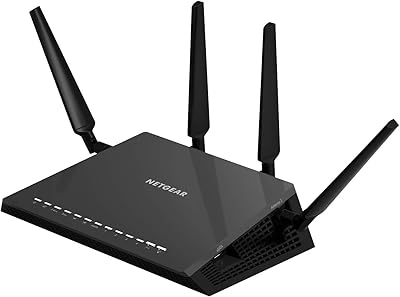
NETGEAR Nighthawk X4S R7800 AC2600 Smart WiFi Router
86%
91%
Performance & Speed
88%
Ease of Setup
90%
Coverage Area
85%
Device Handling (Up to 45 Devices)
93%
Gaming & Streaming Performance
More
NETGEAR Nighthawk BE9300 WiFi 7 Router
88%
94%
Wireless Performance
91%
Coverage Area
88%
Device Capacity
85%
Setup & Installation
90%
Security Features
More
NETGEAR Nighthawk RAX43 WiFi 6 Router
80%
83%
WiFi Performance
81%
Multi-Device Handling
88%
Setup & Ease of Use
71%
Signal Range & Coverage
74%
Security Features
More
NETGEAR Nighthawk RS200
81%
88%
Wireless Speed & Performance
71%
Coverage & Range
91%
Setup & Installation
63%
App & Firmware Experience
82%
Value for Money
More
NETGEAR Nighthawk RS140 WiFi 7 Router
85%
92%
Performance
88%
Ease of Setup
91%
WiFi Speed & Range
89%
Device Connectivity
80%
Software & Firmware
More
NETGEAR Nighthawk RAXE500 WiFi 6E Tri-Band Router
78%
88%
Wireless Speed Performance
71%
6GHz Band Utility
86%
Multi-Device Handling
73%
Setup & App Experience
82%
Coverage & Range
More
NETGEAR Nighthawk RS700S WiFi 7 Tri-Band Router
81%
93%
Wireless Speed & Throughput
88%
Multi-Device Performance
81%
Coverage & Range
91%
Wired Connectivity
82%
Setup & App Experience
More
NETGEAR Nighthawk RS500 WiFi 7 Tri-Band Router
77%
88%
Wireless Performance
74%
Coverage & Range
83%
Setup & Ease of Use
67%
Value for Money
86%
Device Handling
More
NETGEAR Nighthawk BE17000 WiFi 7 Router
79%
91%
Wireless Performance
88%
Setup Experience
74%
Coverage & Range
72%
Value for Money
86%
Device Handling
More
Netgear Nighthawk RAX41 WiFi 6 Router
80%
83%
Wireless Performance
76%
Coverage & Range
89%
Setup & Installation
61%
App & Software Experience
81%
Multi-Device Handling
More

FAQ

Yes, setup is one of the most consistently praised aspects of this router. The Nighthawk mobile app walks you through the entire process step by step, and most users report being online within ten minutes without needing to read a manual. WPS also lets you connect compatible devices with a button press rather than entering a password.

Yes, it is compatible with virtually any cable, DSL, or fiber gateway from any ISP — including Comcast, AT&T, Spectrum, and others. You simply connect your modem to the WAN port and run the app setup. Just confirm your modem is in bridge mode if you are replacing an all-in-one modem-router combo unit from your provider.

It handles 10 to 20 simultaneously active devices comfortably in most household scenarios. MU-MIMO helps by serving several devices at once rather than one at a time. If your household consistently has more than 20 heavily active devices, you may occasionally notice congestion, particularly on the 2.4GHz band.

It performs well for gaming thanks to the built-in QoS engine, which lets you push gaming traffic ahead of background activity like app updates or cloud syncing. This helps reduce the lag spikes that happen when other household members are streaming at the same time. It is not a Wi-Fi 6 router, but for most online gaming at current internet speeds it holds up well.

In most medium-sized homes between 1,500 and 2,500 square feet, coverage is solid with few dead zones. The external antennas and three amplifiers make a noticeable difference over standard ISP equipment. Larger homes with thick concrete or brick walls may still have weak spots in far rooms, so placement near the center of the home helps considerably.

The basics — setting up a guest network, changing your password, or adjusting QoS settings — are straightforward enough once you find them. That said, the browser-based dashboard does look dated compared to what newer routers offer, and navigating more advanced settings can feel clunky. If you only configure it once and leave it, this will not bother you much.

No, this is a Wi-Fi 5 (802.11ac) router, so it does not support the Wi-Fi 6 (802.11ax) standard. For households where all devices are Wi-Fi 5 compatible — which covers the vast majority of devices made before 2020 — this is not a practical limitation. If you have recently purchased Wi-Fi 6 devices and want to take full advantage of their capabilities, a Wi-Fi 6 router would be the better long-term investment.

Yes. The router includes both a USB 3.0 and a USB 2.0 port, which you can use to attach an external hard drive or flash drive and make it accessible across your network. This is useful for basic file sharing or as a rudimentary NAS setup, though it is not designed to replace a dedicated network-attached storage device for heavy workloads.

This is one area worth being aware of before buying. While the base firmware is stable, a number of long-term owners have noted that update releases have become infrequent as the router ages. This is common for routers of this generation, but if staying current with security patches is a priority for you, it is worth factoring into your decision.

Honestly, yes — it is one of the more satisfying upgrade paths in this category. The speed headroom, better multi-device handling, and improved range are all noticeable coming from an AC1200 or AC1750 unit. If you are already on an AC2300 or above, the jump will feel less dramatic, and in that case comparing against Wi-Fi 6 options first makes sense.

Where to Buy