Overview

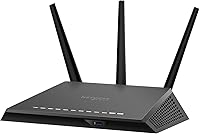
The NETGEAR Nighthawk RS400 AC2300 WiFi Router is built for households that have outgrown whatever router their internet provider handed them. It sits in a strange middle ground, more capable than the basic models but not quite flagship territory, which honestly makes sense for most homes. Under the hood is a dual-core processor running on a Linux-based system, which sounds technical but really just means it handles a busy network without choking. What stands out early on is that this router doesn't just hand you WiFi and call it done; it bundles in security software too, something you don't see bundled this generously at this tier. For a mid-size to larger home, that combination of coverage and protection is the real pitch here.
Features & Benefits

Once you start using this Nighthawk model day to day, the practical touches show up fast. Four gigabit Ethernet ports mean you can hardwire a gaming console, a desktop, and a streaming box without needing a separate switch, which matters more than people expect once lag becomes an issue. The two USB ports let you plug in a shared drive or a printer, turning the router into a makeshift home server of sorts. Beamforming and MU-MIMO work quietly in the background, focusing signal toward devices instead of broadcasting it evenly everywhere, which helps when several people are streaming at once. Smart Connect handles band-switching automatically, and the bundled protection adds a layer of network-wide security that most routers simply skip.

Best For

This home networking setup makes the most sense for families with a fairly typical mix of devices, think a couple of smart TVs, several phones, a laptop or two, and maybe a smart speaker. It's not really built for power users chasing every last megabit, but for everyday browsing, streaming, and gaming, it holds up well. Parents will likely appreciate the Circle App, since scheduling and filtering come included rather than locked behind another subscription. Anyone who also wants wired ports for a console or a network drive gets that flexibility too. If your priority list includes solid coverage, decent device handling, and security software, this router checks those boxes without asking you to overthink it.

User Feedback

Real-world reactions to this router tend to land in a fairly predictable pattern. Plenty of owners report dependable coverage stretching across mid-to-large homes, which lines up with what you'd expect from its spec sheet. The more common complaint involves the setup app and admin dashboard, which several reviewers describe as feeling a step behind newer mesh systems in terms of polish. On the upside, a noticeable group of buyers specifically call out how long the included security software stays free, calling it a nice bonus rather than a gimmick. A smaller number mention that firmware updates sometimes need manual attention instead of installing themselves, which is a minor annoyance but worth knowing about going in.

Pros

  • Reliable coverage for mid-to-large homes based on consistent owner feedback
  • Four gigabit Ethernet ports make wiring consoles or PCs simple
  • Built-in cyber-threat protection adds real security value over basic routers
  • Circle App parental controls come included without extra subscription costs
  • USB ports allow easy shared storage or printer access across the network
  • Beamforming and MU-MIMO help keep signal steady with multiple devices active
  • Smart Connect removes the hassle of manually picking a WiFi band
  • The NETGEAR Nighthawk RS400 AC2300 WiFi Router bundles security software many competitors charge for separately
Cons

  • Admin interface and setup app feel dated next to newer mesh systems
  • Firmware occasionally requires manual updates instead of installing automatically
  • Single-unit design may struggle in unusually large or oddly shaped homes
  • Not aimed at users chasing the absolute fastest available WiFi speeds
  • Limited to one USB 3.0 port, which may feel restrictive for heavy storage use
  • Setup process can take longer than expected for less tech-comfortable users
  • Free security software eventually requires a paid renewal after the included period
  • Lacks the expandability of true multi-node mesh networking systems

Ratings

These scores for the NETGEAR Nighthawk RS400 AC2300 WiFi Router come from an AI analysis of verified buyer reviews collected worldwide, with spam, bot activity, and incentivized feedback filtered out before scoring. The goal is a balanced picture, so both the genuine strengths and the recurring complaints from real owners are reflected here rather than smoothed over.

WiFi Coverage & Range
84%
Owners in mid-to-large homes consistently mention reaching rooms that previous routers struggled with, including upstairs bedrooms and garages. For typical layouts under 2000 square feet, signal strength stays usable even with several walls in the way.
A handful of reviewers with unusually long or split-level homes still report weak spots far from the router. Since it's a single unit rather than a mesh system, dead zones can persist in oddly shaped properties.
Device Capacity & Multi-Device Handling
78%
22%
Households running a dozen-plus devices, smart TVs, phones, laptops, and smart speakers, report stable performance during everyday use like streaming and browsing at the same time. MU-MIMO genuinely helps when multiple people are online simultaneously.
Once usage climbs toward the upper end of the recommended device range, some users notice slower response during simultaneous heavy streaming or large downloads. It handles typical loads well but isn't built for extreme multi-device households.
Wired Connectivity (Ethernet Ports)
89%
Gamers and home office users appreciate having four gigabit ports available for hardwiring consoles, desktops, or streaming boxes without needing a separate switch. This setup noticeably reduces lag compared to relying on WiFi alone.
A few buyers wished for more than four ports given how many wired devices modern homes accumulate. It's a minor gripe, but expandability beyond four becomes a real consideration in tech-heavy households.
Built-in Security (NETGEAR Armor)
91%
Many reviewers specifically call out the three years of included anti-malware protection as a standout value, especially compared to routers that charge immediately or skip security entirely. It runs quietly in the background without constant prompts.
Some users note confusion over what happens once the free period ends, expecting clearer messaging about renewal pricing. A smaller group also mentions initial setup of the security features takes a few extra steps.
Parental Controls (Circle App)
82%
18%
Parents managing kids' screen time appreciate scheduling and filtering being included without an extra subscription, which several reviewers single out as a meaningful cost saver over time. Setting time limits per device is described as straightforward.
A portion of users find the app's interface less intuitive than dedicated parental control apps on the market. Occasional sync delays between the app and router are mentioned, though not consistently across reviews.
Setup & App Experience
68%
32%
Most users get online within thirty minutes following the guided setup process, even without prior networking knowledge. The basic configuration steps are described as clear enough for non-technical buyers.
This is the most frequently criticized area, with several reviewers describing the admin interface and app as feeling dated compared to newer mesh systems. Navigating advanced settings reportedly takes more effort than it should.
Firmware & Maintenance
71%
29%
Updates, when applied, are reported to improve stability and patch security gaps effectively, and the process itself is quick once initiated. Owners who stay on top of it report few lingering issues.
A recurring complaint is that firmware updates don't always install automatically, requiring users to check manually. This adds a small maintenance task that more modern systems tend to handle without intervention.
USB & Storage Sharing
75%
25%
Users connecting external drives or printers via the USB ports describe it as a convenient way to create basic shared network storage without buying a separate NAS device. Printer sharing across devices works as expected for most.
A few reviewers note transfer speeds for shared storage feel modest, particularly through the USB 2.0 port. It's functional for casual use but not a substitute for a dedicated storage solution.
Build Quality & Design
80%
20%
The antennas and overall build feel sturdy enough for long-term placement on a shelf or desk, and the compact footprint fits into most home setups without standing out awkwardly. Ventilation seems adequate for typical use.
Some buyers mention the antennas can feel slightly loose over time with repositioning. It's a minor cosmetic and durability concern rather than a functional dealbreaker for most owners.
Value for Money
86%
Reviewers frequently point out that the bundled security software and Circle App controls add real value that competitors often charge separately for, making the overall package feel reasonably priced for what's included. Many describe it as a solid mid-tier investment.
Buyers expecting top-tier mesh performance at this price point may feel the value proposition softens slightly once the free security period eventually requires renewal. It's a fair deal, but not without future costs to weigh.
Gaming & Streaming Performance
83%
Wired gaming setups benefit noticeably from the gigabit ports, with reviewers reporting stable connections during online play. Streaming across multiple devices simultaneously is generally smooth for typical household usage.
During peak simultaneous use, like several 4K streams alongside online gaming, a portion of users report occasional slowdown. It performs well under normal conditions but shows limits under heavier concurrent demand.

Suitable for:

The NETGEAR Nighthawk RS400 AC2300 WiFi Router fits well in mid-size to larger homes where a single bedroom router just doesn't reach anymore. Families with kids will likely lean on the Circle App, since it covers scheduling and content filtering without requiring another monthly fee. It's also a solid match for households juggling a typical mix of devices, smart TVs, a few phones, a laptop, maybe a smart speaker or two, without needing anything more industrial. Gamers and streamers who want a few devices hardwired will appreciate having four gigabit Ethernet ports instead of fighting for bandwidth over WiFi alone. And anyone who wants built-in network security without paying for a separate antivirus subscription gets real value here, at least for the first few years.

Not suitable for:

Anyone leaning toward a full mesh system for a sprawling house or multiple floors should look elsewhere, since the NETGEAR Nighthawk RS400 AC2300 WiFi Router is a single-unit router rather than a true mesh kit. Tech-savvy users who want a slick, modern app experience may find the admin interface feels a bit behind what newer routers offer. It's also not the best pick for anyone chasing the absolute fastest WiFi speeds on the market, since this sits in the mid-tier rather than flagship territory. People who dislike doing occasional manual firmware updates might find that small task mildly annoying over time. If your home is unusually large or oddly shaped with lots of dead zones, a single router here may still leave gaps.

Specifications

  • Wireless Speed: This router delivers combined dual-band speeds up to 2300 Mbps, split across a 600 Mbps 2.4GHz band and a 1625 Mbps 5GHz band.
  • Coverage Area: It is rated to cover up to 2000 square feet of living space under typical home conditions.
  • Device Capacity: NETGEAR recommends this router for networks with up to 35 connected devices.
  • Ethernet Ports: It includes four 1 Gigabit Ethernet ports for wired connections to consoles, computers, or streaming devices.
  • USB Ports: It has one USB 3.0 port and one USB 2.0 port for connecting shared storage drives or a printer.
  • Processor: The router runs on a dual-core 1GHz processor to handle multiple simultaneous network tasks.
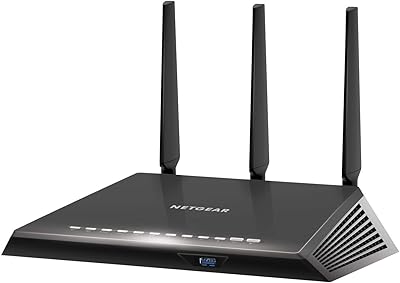
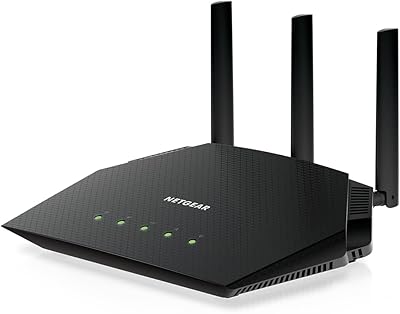
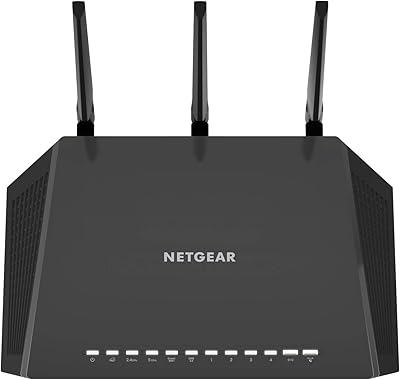
  • Antennas: It uses three amplified external antennas to help extend and direct wireless signal.
  • Signal Technology: Beamforming+ and MU-MIMO are included to improve signal focus and handle multiple devices at once.
  • Operating System: The router operates on a Linux-based firmware system.
  • Flash Memory: It includes 128 MB of flash memory for storing firmware and settings.
  • Weight: The router weighs 1.7 pounds.
  • Dimensions: Its physical dimensions are 11.22 x 7.26 x 1.97 inches.
  • Parental Controls: The Circle App is built in, offering scheduling and content filtering for connected devices.
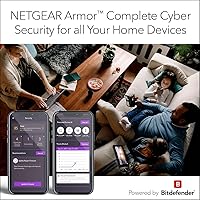
  • Security Software: NETGEAR Armor, powered by BitDefender, provides network-wide anti-malware and anti-phishing protection for three years at no extra cost.
  • Band Management: Smart Connect automatically assigns devices to the 2.4GHz or 5GHz band based on performance needs.
  • Voice Control: The router supports Amazon Alexa voice commands for basic network functions.
  • Included Accessories: The box includes three detachable antennas, an Ethernet cable, a power adapter, and a quick install guide.

Related Reviews
NETGEAR R7000P Nighthawk AC2300 Wi-Fi Router
75%
83%
Wi-Fi Speed & Performance
78%
Coverage & Range
81%
Multi-Device Handling
88%
Setup & Ease of Use
71%
Build Quality & Design
More
NETGEAR Nighthawk RS600 WiFi 7 Tri-Band Router
81%
91%
Wireless Performance
76%
Coverage & Range
88%
Setup & Onboarding
67%
Value for Money
83%
Build Quality & Design
More
NETGEAR Nighthawk RAX120 AX6000 WiFi 6 Router
77%
88%
Wireless Performance
83%
Coverage & Range
86%
Multi-Device Handling
91%
Wired Connectivity
84%
Setup & Initial Configuration
More
NETGEAR Nighthawk RAXE500 WiFi 6E Tri-Band Router
78%
88%
Wireless Speed Performance
71%
6GHz Band Utility
86%
Multi-Device Handling
73%
Setup & App Experience
82%
Coverage & Range
More
Netgear Nighthawk RAX41 WiFi 6 Router
80%
83%
Wireless Performance
76%
Coverage & Range
89%
Setup & Installation
61%
App & Software Experience
81%
Multi-Device Handling
More
NETGEAR Nighthawk RS200
81%
88%
Wireless Speed & Performance
71%
Coverage & Range
91%
Setup & Installation
63%
App & Firmware Experience
82%
Value for Money
More
NETGEAR Nighthawk RAX43 WiFi 6 Router
80%
83%
WiFi Performance
81%
Multi-Device Handling
88%
Setup & Ease of Use
71%
Signal Range & Coverage
74%
Security Features
More
NETGEAR Nighthawk BE17000 WiFi 7 Router
79%
91%
Wireless Performance
88%
Setup Experience
74%
Coverage & Range
72%
Value for Money
86%
Device Handling
More
NETGEAR Nighthawk RS90 WiFi 7 Router
79%
84%
Wireless Performance
67%
Coverage & Range
91%
Setup & Ease of Use
83%
Value for Money
78%
Build Quality & Design
More
NETGEAR Nighthawk BE9300 WiFi 7 Router
80%
88%
Wireless Performance
91%
Setup Experience
71%
Coverage & Range
86%
Multi-Device Handling
89%
Wired Connectivity
More

FAQ

For most homes up to around 2000 square feet, this router should reach pretty evenly, especially if it's placed centrally rather than tucked in a corner. If your home has multiple floors or unusual layouts with lots of walls, you may still run into a weak spot or two. It's not a mesh system, so it's working from a single point rather than spreading nodes around.

NETGEAR lists up to 35 devices as a general guideline, and that holds up fine for typical households with phones, smart TVs, and a few smart home gadgets running together. Performance will naturally dip if a large chunk of those devices are streaming or gaming simultaneously, since that's just how shared bandwidth works. Think of 35 as a comfortable ceiling, not a guaranteed number under heavy load.

NETGEAR Armor comes included free for three years on this Nighthawk model, which is a genuinely longer trial than most competitors offer. After that period, you'd need to pay a subscription fee to keep using it, similar to renewing antivirus software. It's worth using during the free window even if you decide not to continue afterward.

Not really, the basic setup through the Nighthawk app or web interface walks you through connecting to your modem and naming your network. Some users have mentioned the interface feels a little less polished than newer apps on the market, so expect functional rather than flashy. Plugging in cables and following on-screen prompts gets most people online within twenty or thirty minutes.

Yes, plugging your console directly into one of the four gigabit Ethernet ports is generally your best bet for stable, low-latency gaming. Wired connections avoid the inconsistency that can come with WiFi interference, especially in busier households. If wired isn't an option, the 5GHz band with MU-MIMO support still performs reasonably well for gaming.

The Circle App lets you pause internet access for specific devices, set time limits, and filter certain types of content, all without paying extra on top of the router itself. It's built into the router's ecosystem rather than being a separate add-on you have to install elsewhere. Setup takes a few minutes per device the first time around.

It handles typical home office needs fine, video calls, file uploads, and general browsing shouldn't be an issue under normal conditions. The wired Ethernet ports are actually a nice touch here, letting you hardwire a work computer for a more stable connection than WiFi alone. Just keep expectations realistic if you're running multiple heavy work tasks simultaneously across many devices.

Yes, like most routers, it benefits from occasional firmware updates to patch security issues and improve stability. Some owners have noted these don't always install automatically, so checking the admin panel every so often is a good habit. It only takes a few minutes when needed and isn't a frequent chore.

Yes, the NETGEAR Nighthawk RS400 AC2300 WiFi Router includes one USB 3.0 and one USB 2.0 port specifically for this purpose. You can set up a connected drive as shared network storage or link a printer for access from multiple devices. It's a handy feature if you don't want to invest in a separate NAS device.

It depends on your home and priorities. If you want strong single-unit performance, wired ports, and bundled security software at a reasonable price point, this router still holds up well. If your space is large or irregularly shaped and you're willing to spend more, a mesh system might handle dead zones more gracefully than a single router can.