Overview

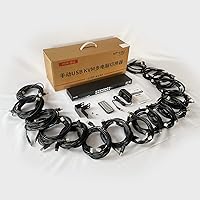
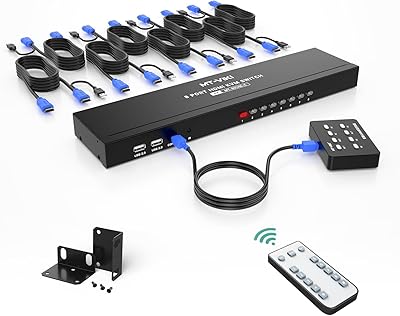
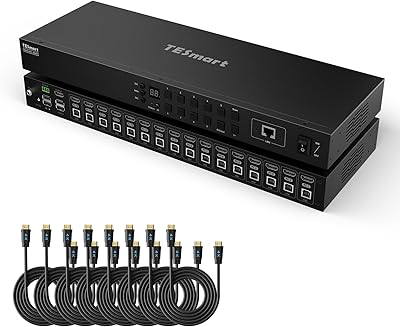
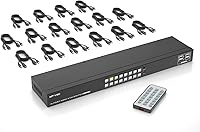
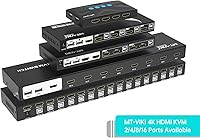
The MT-VIKI MT-1601HK-C 16-Port HDMI KVM Switch sits squarely between hobbyist gear and full enterprise hardware — capable enough for real server room work, without the steep pricing that typically comes with it. Designed to slot into a standard 1U 19-inch rack, it lets you control up to sixteen machines from a single monitor, keyboard, and mouse. Output tops out at 4K resolution at 30Hz, which is plenty for server console work and monitoring tasks where raw refresh rate matters less than clarity. Every HDMI and USB cable needed for all sixteen ports ships in the box, so you can have everything cabled and running on day one.
Features & Benefits

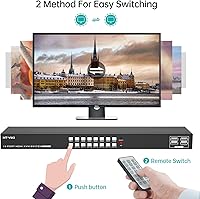
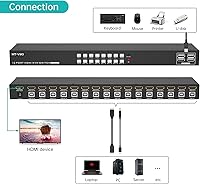
Two things stand out right away with this rack-mount KVM console: you can switch between connected machines using either the front-panel buttons or an included IR remote, which is genuinely useful when the rack is not right in front of you. The built-in EDID storage is a quiet but important feature — it tells each connected computer what display is attached, preventing the blank-screen handshake failures that plague cheaper switches. Four USB 2.0 hub ports let you share additional peripherals beyond the standard keyboard and mouse pair. No driver installation is required, and it works with wireless peripheral combos from major brands straight out of the box.

Best For

This 16-port KVM switch makes the most sense for sysadmins and IT teams running a rack of servers who need centralized console access without paying enterprise licensing fees. Home lab builders will find the 1U form factor particularly practical — it slides neatly into a standard rack cabinet without wasting valuable space. Studios or small offices juggling nine to sixteen workstations can consolidate their setup without installing any software or dealing with proprietary drivers. If your infrastructure is already HDMI-based, the MT-VIKI switch fits right in without adapter headaches. The IR remote is a genuine perk for anyone whose rack is not at arm's reach during daily operations.

User Feedback

Buyers consistently highlight reliable port switching and the inclusion of all cables as standout positives — not having to source sixteen sets of HDMI and USB cables separately saves real time. Setup is generally described as straightforward. That said, some users note the IR remote's effective range is shorter than expected in larger or cluttered rack environments. A handful report occasional delays during display re-negotiation when switching between machines running different resolutions. The USB hub ports handle basic peripherals without issue, though high-bandwidth USB devices may hit throughput limits. Long-term durability feedback is mostly positive, with cable connectors holding up well through regular use.

Pros

  • All 16 HDMI and USB cables are included in the box, so there is nothing extra to source before getting started.
  • EDID storage prevents the blank-screen handshakes that commonly frustrate users of cheaper KVM switches.
  • Front-panel buttons and an IR remote give you two practical ways to switch between machines.
  • Plug-and-play operation means no driver installation on Windows, macOS, or Linux.
  • Four USB 2.0 hub ports let you share additional peripherals beyond just a keyboard and mouse.
  • The 1U rack form factor fits cleanly into any standard 19-inch rack cabinet without wasted space.
  • Wireless keyboard and mouse combos from major brands work without additional configuration.
  • Buyers consistently report reliable, stable switching behavior even after extended daily use.
  • Cable connector quality holds up well over time according to long-term user feedback.
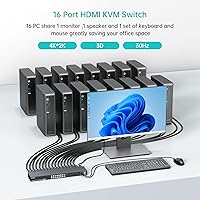
  • Manages up to sixteen machines from one monitor and one input set, dramatically simplifying multi-server console access.

Cons

  • The 4K output is limited to 30Hz, which rules out this rack-mount KVM console for any motion-sensitive or high-refresh workflow.
  • The IR remote range has been reported as shorter than expected, particularly in larger or cluttered rack environments.
  • USB 2.0 hub throughput is insufficient for high-bandwidth peripherals like fast external storage devices.
  • Occasional delays during display resolution re-negotiation when switching between machines running different resolutions have been noted by multiple buyers.
  • Strictly HDMI-only connectivity means no support for DisplayPort or VGA sources without an external adapter.
  • The industrial 1U rack design is a poor aesthetic and ergonomic fit for open desktop or home office use.
  • No software control or hotkey switching is supported, limiting automation options for power users.
  • Compatibility edge cases have surfaced with certain non-standard USB hubs and ultra-high-refresh-rate monitors.

Ratings

The scores below reflect an AI-driven analysis of verified global user reviews for the MT-VIKI MT-1601HK-C 16-Port HDMI KVM Switch, with spam, bot-generated, and incentivized submissions actively filtered out to surface what real buyers actually experienced. Ratings are calibrated to reflect both the consistent strengths users praised and the recurring pain points that genuinely affected their workflows. Nothing has been smoothed over — if a category underperformed in the field, the score reflects it.

Switching Reliability
88%
Users across home labs and small server rooms consistently report that port switching is stable and responsive, with machines coming up on screen quickly after each selection. Even after months of daily use, most buyers note no degradation in switching performance or dropped connections between sessions.
A small number of users report that switching occasionally requires a second button press to register, particularly when toggling between ports that were idle for extended periods. This is infrequent but worth noting for anyone relying on rapid sequential switching.
EDID Storage Performance
81%
19%
For sysadmins tired of blank screens and resolution resets every time they switch sources, the onboard EDID storage is a meaningful improvement over basic KVM switches at this port count. Most users find their monitor holds the correct resolution reliably across all connected machines.
Some buyers report noticeable delays during resolution re-negotiation when switching between computers running significantly different display configurations. In mixed-resolution server environments, occasional handshake hiccups still occur, which can be disruptive during time-sensitive tasks.
Build Quality
79%
21%
The metal enclosure feels appropriately solid for a rack-mounted device, and users who have had this unit installed for over a year generally report no structural issues or loose ports. The front-panel buttons have a satisfying tactile response that feels more durable than competing units at this port count.
A few buyers note that the chassis finish shows scuffs and scratches more readily than expected during installation, particularly around the rack-mount ear attachment points. The overall construction quality is acceptable but does not match the feel of higher-tier enterprise hardware.
IR Remote Usability
62%
38%
Having an IR remote at all is a genuine convenience in rack environments where the unit is not within arm's reach, and users in compact setups — such as home labs with the rack a few feet away — find it works reliably for everyday switching without getting up.
The remote's effective range is shorter than most buyers expect, and performance degrades noticeably in larger rooms or when there are obstructions between the remote and the unit. Several users in dedicated server closets have essentially abandoned the remote and rely on front-panel buttons instead.
Value for Money
86%
Bundling sixteen sets of HDMI and USB cables with the switch removes a cost and logistics headache that most competing products ignore entirely. For the port density and included accessories, most buyers feel the price sits in a reasonable range compared to enterprise-grade alternatives that offer less flexibility.
Users who experienced EDID delays or IR remote disappointments do express some frustration that these rough edges exist at this price tier. A handful of buyers feel that spending slightly more on a competing unit might have addressed the remote range and hub throughput issues more effectively.
USB Hub Functionality
66%
34%
The four integrated USB 2.0 hub ports handle standard peripherals like webcams, card readers, and input devices without any issues, and users appreciate not needing a separate powered hub for basic shared accessories in their rack setup.
USB 2.0 throughput is a real constraint for anyone trying to use fast external storage or high-bandwidth capture devices through the hub. Several buyers specifically flagged this as a limitation they wish they had researched before purchasing, as it forced them to add a separate USB 3.0 hub to their rack.
Setup & Installation
91%
The plug-and-play experience is one of the most consistently praised aspects across user reviews — no driver installation, no configuration software, and the included cable set means most buyers are fully operational within thirty minutes of opening the box. Rack-mount hardware and instructions are included and functional.
A small number of users report minor confusion around optimal cable routing with sixteen connections in a 1U form factor, particularly when the rack has limited depth clearance behind the unit. First-time KVM installers may need extra time to manage cable bulk neatly.
OS Compatibility
89%
Support across Windows, macOS, and Linux without any driver installation is something users across mixed-OS environments specifically praise, as it removes the compatibility anxiety that comes with multi-OS server racks. Wireless keyboard and mouse combos from Logitech and Microsoft work reliably on first connection.
A few edge cases with less common Linux distributions and older macOS versions have been noted, where the switch required a full power cycle to properly register input devices after an OS update. These are uncommon but not isolated reports.
4K Output Quality
74%
26%
For server monitoring, terminal access, and general IT console work, 4K at 30Hz delivers a sharp and readable display that makes this rack-mount KVM console genuinely practical for extended work sessions. Text clarity on modern 4K displays is noticeably better than lower-resolution alternatives.
The 30Hz refresh ceiling is a real limitation if anyone in your environment expects to use this for anything beyond static or slowly-updating content. Users who initially hoped to run light workstation tasks through the switch quickly found the motion handling unsatisfying compared to 60Hz alternatives.
Cable Quality
77%
23%
The bundled HDMI and USB cables are consistently described as functional and reliable, with connector housings that sit securely in ports without wobbling — a concern with included cables at this price tier that MT-VIKI largely avoids.
Cable length is fixed and may be too short for racks with significant depth or unconventional layouts. A handful of buyers also note that the cable jackets feel slightly thin and could be more resistant to kinking over time with repeated routing adjustments.
Thermal & Acoustic Performance
84%
The switch runs passively cooled without a fan, which means server room noise levels are unaffected by adding this unit to the rack. Users who are sensitive to acoustic environments specifically mention appreciating the silent operation during long monitoring sessions.
Under sustained heavy use in warm rack environments, a few users note the chassis becomes noticeably warm to the touch, though no thermal shutdowns or performance issues attributable to heat have been widely reported. Adequate rack ventilation around the unit is advisable.
Remote Control Inclusion
71%
29%
The fact that an IR remote is included at all distinguishes this 16-port KVM switch from many competitors at comparable price points, and buyers who use it within a practical range find the port-selection experience genuinely more convenient than walking to the rack.
The remote itself feels lightweight and plasticky relative to the rest of the package, and battery compartment feedback is underwhelming. Given that range limitations push many users back to front-panel buttons anyway, some buyers feel the remote is more of a checkbox feature than a fully realized one.
Port Density
93%
Sixteen HDMI ports in a 1U rack enclosure is a strong achievement for this product class, and users transitioning from multiple smaller KVM units specifically value the consolidation it enables. Managing a full sixteen-node rack from a single console is handled without any perceptible compromise in port spacing or accessibility.
The front-panel port labeling is functional but small, and users with aging eyesight or dimly lit server rooms occasionally struggle to confirm which port number they are interacting with at a glance. A slightly larger or backlit label scheme would improve usability meaningfully.
Wireless Peripheral Support
83%
Logitech and Microsoft wireless combos connect without any additional configuration, which is a practical benefit for users who prefer uncluttered console areas without wired input devices draped across equipment. Most users report instant recognition across all connected systems.
Compatibility with less mainstream wireless keyboard and mouse brands is inconsistent, and a few users report that non-standard wireless receivers required switching to a wired alternative to resolve input registration issues. Sticking to major supported brands is advisable for a friction-free experience.

Suitable for:

The MT-VIKI MT-1601HK-C 16-Port HDMI KVM Switch is purpose-built for IT administrators and sysadmins who need to manage a dense rack of servers or workstations from a single console without juggling multiple monitors and input devices. Home lab enthusiasts who have outgrown smaller 4-port or 8-port switches will find the 1U rack form factor a natural fit, cleanly consolidating up to sixteen machines into an organized, space-efficient setup. Small businesses, recording studios, or trading desks running eight or more HDMI-connected workstations can reduce desk clutter significantly without committing to expensive enterprise KVM infrastructure. The included IR remote is a practical bonus for anyone whose rack sits across the room or in a dedicated server closet, eliminating the need to physically walk up to the unit just to switch ports. Organizations already standardized on HDMI cabling will appreciate that no adapters or converters are needed, and the bundled cable set means the whole system is ready to deploy on day one.
Not suitable for:

The MT-VIKI MT-1601HK-C 16-Port HDMI KVM Switch is not the right tool for users who need high-refresh-rate output, as its 4K ceiling is capped at 30Hz — a real limitation for anyone doing video editing, gaming, or any workflow where smooth motion at higher resolutions matters. Buyers who need DisplayPort or VGA connectivity will need to look elsewhere entirely, since this switch is strictly HDMI throughout. If your setup involves demanding USB peripherals like fast external drives or high-resolution capture devices, the built-in USB 2.0 hub ports will create a throughput bottleneck. The IR remote, while convenient in theory, has drawn complaints about limited effective range, so users in larger or obstructed server rooms should not rely on it as a primary switching method. Finally, this console is designed for rack mounting — anyone looking for a clean desktop KVM experience may find the industrial form factor and relative lack of desktop-friendly design choices a poor fit for their space.
Specifications

  • Model Number: This unit is manufactured by MT-VIKI under the model designation MT-1601HK-C.
  • Input Ports: The switch accepts sixteen HDMI source inputs, allowing simultaneous connection of up to sixteen computers or servers.
  • Output Port: A single HDMI output connects to your monitor, keyboard, and mouse console.
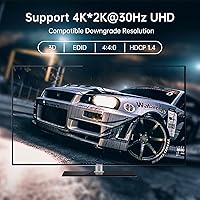
  • Max Resolution: Output resolution reaches up to 3840x2160 pixels at 30Hz, suitable for 4K monitoring and console tasks.
  • HDMI Standard: The switch operates on HDMI 1.4, with a signal bandwidth of approximately 2.55 Gbps.
  • HDCP Support: HDCP 1.4 compliance is built in, covering content protection requirements for most modern displays and sources.
  • USB Hub: Four USB 2.0 hub ports are integrated into the unit for sharing additional peripheral devices across connected machines.
  • Switching Methods: Users can switch between ports using front-panel push buttons or the included IR remote control.
  • EDID Storage: Onboard EDID storage retains display configuration data, helping prevent resolution handshake failures when switching between sources.
  • Wireless Support: The switch is compatible with wireless keyboard and mouse combos from major brands including Logitech and Microsoft.
  • OS Compatibility: Supported operating systems include Windows XP through Windows 10, macOS, and Linux distributions, with no driver installation required.
  • Form Factor: The enclosure is designed as a 1U rack-mount unit fitting standard 19-inch rack cabinets.
  • Dimensions: Physical dimensions measure 15.28 inches long, 3.26 inches wide, and 1.26 inches tall.
  • Weight: The unit weighs approximately 1 pound without cables, making it easy to position and mount.
  • Power Input: The switch is powered via a 5V DC connection rated at 2 amps.
  • Included Cables: The package includes sixteen HDMI cables and sixteen USB cables, one set per source port.
  • IR Remote: One IR remote control is included in the box for distance-based port switching.
  • Rack Hardware: A set of rack-mount ears and the necessary screws for 19-inch rack installation are included in the package.

Related Reviews

MT-VIKI MT-801HK-C 8-Port HDMI KVM Switch
78%
83%
Value for Money
88%
Ease of Setup
76%
Build Quality
69%
Switching Performance
71%
Display Quality
More
MT-VIKI 460KL 4-Port VGA KVM Switch
80%
91%
Value for Money
93%
Ease of Setup
84%
Switching Reliability
78%
Build Quality
76%
Video Output Quality
More
TESmart 16 Ports HDMI KVM Switch 4K@30Hz
85%
87%
Performance
91%
Setup & Installation
75%
Switching Speed
88%
Video Quality
89%
Build Quality
More
TCNEWCL KS-801 8-Port HDMI KVM Switch
78%
88%
Ease of Setup
91%
Port Capacity & Scalability
74%
Video Quality & Resolution
69%
Switching Speed & Reliability
83%
IR Remote Control
More
MT-VIKI 4x4 HDMI Matrix Switch
86%
88%
Performance
91%
Build Quality
85%
Ease of Setup
72%
Remote Control Responsiveness
90%
Audio Extraction Quality
More
DGODRT KS604H 4-Port HDMI KVM Switch
80%
91%
Ease of Setup
74%
Switching Reliability
78%
Video Quality
79%
USB Peripheral Sharing
84%
Wired Remote Control
More
IOGEAR GCS32HU 2-Port HDMI KVM Switch
72%
93%
Ease of Setup
88%
Switching Reliability
91%
Value for Money
74%
Build Quality
67%
Cable Length & Reach
More
ANXQQ ANQ-8401B 4-Port HDMI KVM Switch
77%
91%
Ease of Setup
88%
Display Switching Reliability
86%
EDID Performance
67%
USB Device Recognition
61%
8K Resolution Capability
More
StarTech SV431HDU3A2 4-Port HDMI KVM Switch
73%
74%
Switching Reliability
69%
Video Quality
66%
USB 3.0 Hub Performance
71%
Audio Switching
83%
Setup & Installation
More
Seiryruc 2-in-3-Out 4K HDMI KVM Switch
71%
88%
Setup & Installation
83%
Video Signal Quality
57%
Switching Method & Speed
81%
USB Peripheral Sharing
76%
Display Mode Flexibility
More

FAQ

No, the MT-VIKI MT-1601HK-C 16-Port HDMI KVM Switch is fully plug-and-play. It works with Windows, macOS, and Linux without any driver installation — just connect your cables and it is ready to go.
Yes, wireless combos from major brands like Logitech and Microsoft are supported. The switch recognizes the USB receiver as a standard input device, so you do not need a wired keyboard or mouse to operate it.

In most cases, yes. The built-in EDID storage tells each connected computer what your display supports, which prevents the blank-screen or resolution-reset issues that are common with cheaper KVM switches. Occasional re-negotiation delays can occur if connected machines use significantly different output settings.

The included IR remote lets you switch ports without walking up to the unit. Keep in mind that several users have noted the remote's effective range is shorter than expected, so it works best in smaller or unobstructed spaces rather than large server rooms.

Yes, macOS is fully supported alongside Windows and Linux. The switch recognizes standard HID-compliant keyboards and mice, so most Mac-compatible input devices will work without any additional setup.

The unit is not officially designed for daisy-chaining, and this configuration is not supported in the product documentation. If you need more than sixteen ports, you would need to look at a higher-capacity KVM solution rather than linking two units together.

For server monitoring, console access, and general IT tasks, 4K at 30Hz is perfectly adequate — most people do not notice the difference in those workflows. However, if you are doing video editing, motion graphics, or anything where smooth movement on screen matters, the 30Hz cap will be noticeable compared to a 60Hz-capable alternative.

Everything needed to connect all sixteen sources is included — sixteen HDMI cables and sixteen USB cables, plus the rack-mount hardware. For most straightforward setups you will not need to buy anything additional before getting started.

The four USB 2.0 hub ports are designed for standard peripherals like webcams, card readers, or input devices. High-bandwidth USB devices such as fast external hard drives or solid-state drives may underperform due to USB 2.0 throughput limits, so this rack-mount KVM console is not ideal for heavy USB storage use.

General long-term feedback from users suggests the unit holds up reasonably well in daily rack environments. Cable connectors specifically tend to stay secure through regular switching cycles. The enclosure feels solid for the form factor, though it is worth being deliberate with cable connections rather than forcing them repeatedly at awkward angles.