Overview

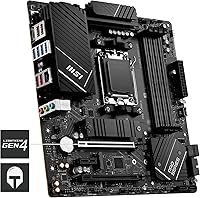
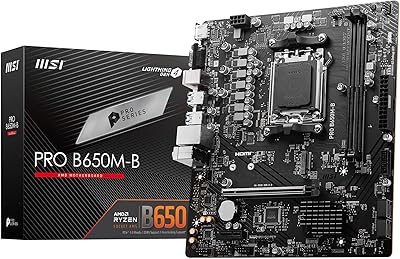
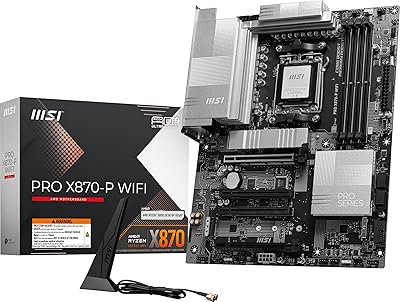
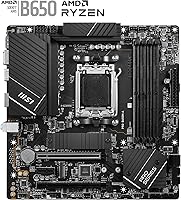
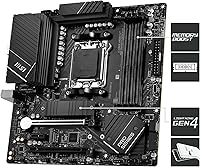
The MSI PRO B650M-A WiFi V1 Motherboard sits squarely in the sweet spot of the AM5 market — a Micro-ATX board built on AMD's B650 chipset that supports Ryzen 7000, 8000, and 9000 processor families without any compatibility headaches on current retail stock. MSI's PRO series has earned a quiet reputation in prosumer and light workstation circles for being solid and unfussy, and this compact AM5 motherboard carries that same ethos into a smaller chassis footprint. The core argument for going Micro-ATX here is practical: you keep dual PCIe x16 slots and a full DIMM count while fitting the board into mid-tower or compact cases that a full ATX board simply couldn't occupy.
Features & Benefits

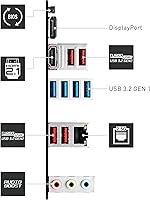
Four DDR5 DIMM slots with 6000+ MHz support give builders real headroom — both for today's kits and for capacity upgrades down the road. The two M.2 Gen4 x4 slots run at 64 Gbps each, and the primary slot gets a Shield Frozr heatsink that keeps NVMe drives from throttling during prolonged write tasks. Networking is a real strength on this MSI B650 board: 2.5G wired LAN pairs with built-in WiFi, so you are not choosing between connection types or hunting for an add-in card. The rear I/O covers HDMI 2.1 and DisplayPort 1.4 outputs, USB 3.2 Gen 2 Type-A, and 7.1 HD Audio. Frozr AI Cooling rounds things out by reading CPU and GPU temperatures in real time to adjust fan speeds automatically.

Best For

This compact AM5 motherboard makes the most sense for builders who have outgrown their AM4 platform and want a clean DDR5 upgrade path without overspending on a flagship chipset. If your case is already a mid-tower or smaller, the Micro-ATX footprint is a natural fit — you still get dual storage slots and a second PCIe lane for future expansion. Home office builders and prosumer workstation users will appreciate the stable VRM design and passive heatsinks, which keep noise levels down without sacrificing thermal performance. The onboard WiFi and 2.5G LAN also make this board work well in setups where running a long Ethernet cable simply isn't practical, making it a flexible pick across a range of build scenarios.

User Feedback

Buyers who have put the PRO B650M-A through real builds tend to highlight two things first: the BIOS is straightforward to navigate, and memory kits at 6000 MHz post without much fuss. The M.2 heatsink also gets regular mentions for keeping primary SSDs cool during sustained workloads. That said, the criticism is consistent too. Fan header count is the most common frustration — builders with multiple case fans often find themselves reaching for a splitter or hub right away. A handful of early adopters reported minor BIOS compatibility hiccups with specific Ryzen 9000 CPUs at launch, though updates appear to have addressed most of those. WiFi range lands in average-to-good territory; nothing remarkable, but reliable enough for most home setups.

Pros

  • BIOS setup is approachable even for first-time AM5 builders, with most DDR5 kits posting at 6000 MHz without manual tuning.
  • Dual M.2 Gen4 slots with Shield Frozr cooling prevent SSD throttling during sustained read and write workloads.
  • Onboard WiFi and 2.5G LAN are included out of the box, eliminating the cost and clutter of separate networking cards.
  • Frozr AI Cooling adjusts fan curves automatically based on real thermal data, reducing the need for manual fan tuning in the BIOS.
  • Four DDR5 DIMM slots give builders room to start with two sticks and expand capacity later without replacing the board.
  • The compact AM5 motherboard fits mid-tower and smaller cases while still offering two PCIe x16 slots for flexible expansion.
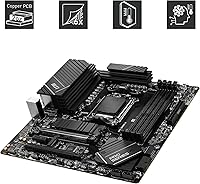
  • The 6-layer PCB with thickened copper helps maintain VRM stability under sustained CPU loads, which matters for productivity workloads.
  • HDMI 2.1 and DisplayPort 1.4 rear outputs allow direct display connections without a discrete GPU, useful during initial system builds.
  • At its price tier, the feature-to-cost ratio is genuinely hard to fault for a clean Ryzen 9000 platform build.

Cons

  • Fan header count is low enough that builders with three or more case fans will likely need a splitter or dedicated hub immediately.
  • Rear USB port selection is modest; users with multiple peripherals may find themselves relying heavily on a front-panel hub or USB switch.
  • No PCIe 5.0 M.2 slot means NVMe storage is capped at Gen4 speeds, which will feel limiting as Gen5 SSDs become mainstream.
  • Early firmware revisions had compatibility hiccups with certain Ryzen 9000 CPUs, requiring a BIOS update before the system would post cleanly.
  • WiFi antenna performance is average rather than exceptional; users in larger homes or with signal obstructions may find range underwhelming.
  • The B650 chipset imposes overclocking headroom limits compared to X670 boards, which matters for builders pushing CPU frequencies hard.
  • Only one M.2 slot includes the Shield Frozr heatsink; the secondary slot is left exposed, which can be a concern in thermally dense builds.

Ratings

The MSI PRO B650M-A WiFi V1 Motherboard earns a solid overall reception across verified buyer reviews worldwide, with our AI-assisted scoring system filtering out incentivized and bot-generated feedback to surface what real builders actually experience. Scores reflect both the genuine strengths that make this compact AM5 board a popular mid-range pick and the recurring pain points that prevent it from being a universal recommendation. The result is a transparent, balanced snapshot of where this board excels and where it asks for compromise.
Value for Money
88%
Most builders feel they are getting more than their money's worth given that WiFi, 2.5G LAN, dual M.2 Gen4 slots, and a capable VRM are all included at a mid-range price point. Compared to similarly priced B650 competitors that strip out networking features, this MSI B650 board stands out as a genuinely complete package for the cost.
A small contingent of buyers feel the value proposition weakens slightly when they factor in the cost of a fan hub — an accessory that becomes almost mandatory given the limited header count. If you need to spend extra to make the build functional, that nibbles at the perceived savings.
BIOS & Setup Experience
91%
First-time AM5 builders consistently praise how approachable the BIOS interface is, with clear labeling and memory profiles that enable 6000 MHz DDR5 in just a few clicks. Experienced builders appreciate that the firmware does not bury useful settings under confusing sub-menus, making the initial setup genuinely fast.
A meaningful subset of early adopters ran into compatibility issues with specific Ryzen 9000 CPUs on older pre-flashed firmware, requiring either a BIOS update or a fallback CPU to complete the flash. This is not unusual for a newer platform, but it is worth flagging for buyers who do not have a spare chip on hand.
Memory Compatibility & OC
86%
Running DDR5 at 6000 MHz via EXPO or XMP profiles is reliable on the PRO B650M-A, which is exactly the sweet spot AMD recommends for AM5 performance. Users report that most reputable DDR5 kits from major brands post cleanly on the first boot without manual intervention.
Kits rated above 6400 MHz can be hit or miss without manual sub-timing adjustments, and a small number of users report instability with four-stick configurations at higher speeds. This is partly a platform limitation rather than a board-specific flaw, but it is a real ceiling for memory enthusiasts.
Thermal Management
84%
The Shield Frozr heatsink on the primary M.2 slot does a convincing job keeping NVMe temperatures in check during sustained sequential writes, which matters for video editors and anyone moving large files regularly. The passive VRM heatsink also keeps things stable under prolonged CPU loads without requiring dedicated airflow pointed at it.
The secondary M.2 slot lacks any heatsink coverage, which is a noticeable oversight for a board that otherwise takes thermal design seriously. Builders planning to run a demanding Gen4 drive in that slot should budget for a third-party M.2 cooler to avoid throttling during heavy workloads.
Connectivity & I/O
72%
28%
Having both 2.5G wired LAN and built-in WiFi on the same board at this price tier is a genuine convenience, particularly for home office setups where routing a cable is impractical. The rear panel also covers HDMI 2.1 and DisplayPort 1.4 for integrated graphics output, which is useful during builds before a GPU arrives.
The rear USB port count is where this compact AM5 motherboard draws the most complaints — users with multiple peripherals, external drives, and a keyboard and mouse quickly run out of ports without a hub. The absence of USB 3.2 Gen 2x2 or USB4 ports also means the rear I/O feels slightly behind more premium boards in this generation.
Fan Header Count
58%
42%
The fan headers that are present support PWM control and integrate with the Frozr AI Cooling system, which does a reasonable job of automatic fan curve management for simple builds with two or three fans. Casual builders who run a single tower cooler and one or two case fans will likely not notice the limitation at all.
Anyone building a system with four or more fans — a common scenario in mid-tower cases with front intake, rear exhaust, and top exhaust configurations — will need a splitter or fan hub immediately. This is one of the most consistently mentioned frustrations across verified reviews, and it is a real gap for builders who prefer clean cable management without adapters.
PCIe & Expansion
79%
21%
Dual PCIe 4.0 x16 slots give this board more expansion flexibility than many competing Micro-ATX options that drop to a single full-bandwidth slot. For builders who want to run a GPU alongside a high-speed PCIe NVMe adapter or capture card, the second slot adds genuine utility.
Neither PCIe slot nor either M.2 slot runs at the PCIe 5.0 standard, which is becoming available on higher-tier AM5 boards and Gen5 SSDs are now commercially viable. For builders planning ahead over a three-to-five year ownership cycle, the Gen4 ceiling may feel limiting sooner than expected.
Build Quality & PCB
83%
The six-layer PCB with thickened copper traces gives the board a reassuringly solid feel during installation, and the overall component layout is clean enough that cable routing around the board is straightforward. The heatsink mounting feels secure and does not wobble after repeated handling during test fits.
A few users noted that the board's aesthetic is utilitarian rather than visually distinctive, which matters in open-frame or glass-panel builds where the motherboard is on display. The component quality is functionally sound, but it is clearly optimized for reliability over visual appeal.
Audio Performance
76%
24%
The 7.1 HD Audio with Audio Boost satisfies the majority of desktop users who rely on the onboard solution for headsets, speakers, or monitor audio. Casual gamers and home office users consistently report clean audio output with no noticeable hiss or interference from nearby components.
Dedicated audio enthusiasts and musicians who monitor through the 3.5mm jacks will find the onboard codec underwhelming compared to a dedicated sound card or external DAC. Crosstalk and dynamic range are acceptable but not exceptional, and the gap becomes audible at higher volumes with quality headphones.
WiFi Performance
67%
33%
Built-in WiFi covers everyday browsing, video calls, and 4K streaming reliably in typical home setups where the router is one or two rooms away. For a board where wireless is essentially a bonus feature rather than the headline specification, it performs adequately for most non-competitive use cases.
Users in larger homes or environments with significant wall interference report that the signal strength drops off more noticeably than expected, and the antenna design is functional rather than high-gain. Competitive gamers or users transferring large files over WiFi will likely prefer the 2.5G wired connection for consistency.
CPU Power Delivery
81%
19%
The VRM design with MSI Core Boost technology handles mid-range Ryzen processors — including the Ryzen 7 9700X and equivalents — with stable delivery under sustained all-core workloads like rendering or compilation tasks. Thermal output from the VRM area stays manageable even in cases with moderate airflow.
Pushing a high-TDP Ryzen 9 processor under extended full-load scenarios in a poorly ventilated case does push the VRM heatsink toward its comfort limit. The board is not designed for extreme overclocking or flagships running well above their base TDP, so pairing it with a power-hungry CPU in a tight build requires some airflow consideration.
Installation & Documentation
82%
18%
The physical installation experience is clean — standoff alignment, cooler bracket compatibility, and DIMM slot placement are all standard and well-labeled. The included documentation covers the basics clearly enough that even builders assembling their first DDR5 system can follow along without hunting for online guides.
The printed manual covers setup steps adequately but is sparse on advanced BIOS tuning guidance, which means users who want to push memory past 6000 MHz or configure PBO settings are largely on their own or relying on community resources. A more thorough digital manual would help fill this gap.
Long-Term Reliability
78%
22%
MSI PRO series boards have a track record of lasting through multiple OS installs, driver updates, and hardware swaps without instability creeping in over time. Users who have run earlier PRO series AM4 boards for three or more years frequently cite this as a reason they trusted the brand again for their AM5 upgrade.
The platform is still relatively young, and long-term reliability data beyond two years of real-world use is limited for AM5 boards broadly. A small number of users have reported early component issues, though it is difficult to separate genuine product defects from isolated units or installation errors at this sample size.

Suitable for:

The MSI PRO B650M-A WiFi V1 Motherboard is a strong match for PC builders who want a capable AM5 platform without committing to a full-ATX chassis or a high-end X670 chipset price tag. It fits naturally into mid-tower and compact cases where board real estate is limited but feature requirements are not, making it especially practical for home office workstations, content creation rigs, and general productivity builds running a Ryzen 7000, 8000, or 9000 series processor. Builders upgrading from AM4 platforms will appreciate the straightforward DDR5 compatibility and the fact that WiFi and 2.5G LAN are already included, removing the need for separate networking add-ins. The dual M.2 Gen4 slots also make it a comfortable choice for anyone running an OS drive alongside a secondary high-speed storage volume, which covers most modern workflow setups without compromise.
Not suitable for:

The MSI PRO B650M-A WiFi V1 Motherboard is not the right call for builders who run complex cooling setups with four or more case fans, since the limited fan header count will require additional hardware like a fan hub just to manage airflow properly. Enthusiasts chasing the absolute ceiling of PCIe storage performance should also look elsewhere, as neither M.2 slot runs the PCIe 5.0 standard available on higher-tier boards. If you are building a content production or rendering station that demands a large number of rear USB ports, the I/O panel may feel restrictive compared to X670E alternatives at a higher price point. Power users planning to run dual high-wattage GPUs or heavy PCIe expansion cards simultaneously may also find the B650 chipset a limiting factor versus a flagship platform. Mini-ITX enthusiasts with very specific small-form-factor cases will need to verify physical fitment carefully, as Micro-ATX still occupies meaningfully more space than ITX layouts.
Specifications

  • Form Factor: Micro-ATX layout fits standard mid-tower and compact cases that support boards up to 244mm x 244mm.
  • Chipset: AMD B650 chipset provides a solid mid-range AM5 foundation with support for PCIe 4.0 across CPU and chipset lanes.
  • CPU Socket: AM5 (LGA1718) socket is compatible with AMD Ryzen 7000, 8000, and 9000 series processors.
  • Memory: Four DDR5 DIMM slots support dual-channel configurations with rated speeds of 6000+ MHz and overclocking headroom up to 7200 MHz.
  • PCIe Slots: Two PCIe 4.0 x16 slots deliver up to 64 GB/s combined bandwidth for discrete graphics cards and high-speed expansion cards.
  • M.2 Storage: Two M.2 Gen4 x4 slots each support drives up to 64 Gbps, with a Shield Frozr heatsink fitted on the primary slot.
  • Wired Network: Onboard 2.5 Gbps LAN port provides faster-than-gigabit wired connectivity without requiring an add-in card.
  • Wireless: Built-in WiFi module supports wireless connectivity directly from the rear I/O, with antenna connectors included.
  • Rear USB: Rear panel includes at least one USB 3.2 Gen 2 Type-A port running at 10 Gbps for fast peripheral and storage connections.
  • Video Output: Rear I/O provides both HDMI 2.1 and DisplayPort 1.4 outputs for direct monitor connections using the CPU integrated graphics.
  • Audio: 7.1 HD Audio with MSI Audio Boost delivers multi-channel output through dedicated rear audio jacks with improved signal isolation.
  • PCB Construction: Six-layer PCB with 2 oz thickened copper traces improves current delivery stability and heat dissipation under sustained load.
  • Fan Control: Frozr AI Cooling technology reads real-time CPU and GPU temperatures to automatically adjust system fan speeds without manual tuning.
  • M.2 Cooling: The primary M.2 slot features a Shield Frozr heatsink that contacts the SSD surface directly to reduce thermal throttling during sustained writes.
  • Weight: The board weighs 3.21 pounds, which is typical for a fully featured Micro-ATX motherboard with integrated heatsinks.
  • Package Size: Retail packaging measures approximately 12.13 x 10.91 x 2.28 inches, accommodating the board and included accessories.
  • Platform: Officially validated for Windows 11, consistent with AMD AM5 platform requirements for modern operating system support.
  • VRM Design: MSI Core Boost VRM technology is designed to improve power delivery stability, particularly relevant for higher TDP Ryzen processors.

Related Reviews
MSI PRO B650M-P V1 Micro-ATX Motherboard
82%
89%
Value for Money
91%
BIOS & Software
84%
Build Quality
67%
VRM & Power Delivery
92%
Storage Performance
More
MSI B550-A PRO V1 Motherboard
84%
88%
Performance
91%
Value for Money
85%
Ease of Setup
89%
Compatibility with Ryzen 5000 Series
72%
Connectivity (I/O Ports)
More
MSI PRO B650-S WIFI Motherboard
84%
94%
Performance with Ryzen 7000 Processors
89%
Wi-Fi 6E Connectivity
88%
Cooling Efficiency
72%
Setup and Installation Ease
91%
PCIe 4.0 Expansion Support
More
MSI PRO Z790-A MAX WiFi
83%
88%
Build Quality
91%
VRM & Power Delivery
86%
Memory Overclocking
77%
BIOS Experience
93%
Wireless Connectivity
More
MSI A520M-A PRO V1 AM4 Motherboard
74%
91%
Value for Money
88%
Ease of Installation
74%
CPU Compatibility
78%
Build Quality
81%
BIOS Experience
More
MSI PRO B550M-VC WiFi
83%
91%
Value for Money
86%
Build Quality
89%
Wireless Connectivity
74%
CPU Power Delivery
88%
BIOS Experience
More
MSI B550M PRO-VDH WiFi
80%
91%
Value for Money
88%
BIOS Experience
78%
Wireless Connectivity
72%
CPU Power Delivery
69%
RAM Compatibility & Stability
More
MSI MAG B650M Mortar WiFi Gaming Motherboard
86%
91%
Overall Performance
88%
Ease of Installation
93%
Networking Capabilities (Wi-Fi 6E & LAN)
87%
Build Quality
90%
Compatibility with AMD Ryzen 7000 Series
More
MSI PRO B760-P WiFi DDR4
82%
91%
Value for Money
87%
Build Quality
89%
BIOS Experience
84%
CPU Power Delivery
88%
Wireless Connectivity
More
MSI PRO B650M-B Micro ATX Motherboard
83%
88%
Value for Money
91%
Ease of Setup
85%
Performance with DDR5
82%
Network Connectivity (2.5Gbps LAN)
87%
Expansion Options (PCIe/M.2)
More

FAQ

In most cases, yes, but it depends on which BIOS version is pre-installed on the specific unit you receive. Some early stock shipped with firmware that needed an update before Ryzen 9000 series CPUs would post correctly. If you are buying new, it is worth checking the box for a sticker indicating an updated BIOS version, or have a Ryzen 7000 chip on hand as a fallback to perform the update if needed.

There are two PCIe 4.0 x16 slots physically present, but AMD B650 does not natively support multi-GPU configurations in the traditional sense. The second slot shares bandwidth and is better suited for a high-speed NVMe adapter, capture card, or other expansion device rather than a second gaming GPU. If dual-GPU workloads are a hard requirement, you would need to look at a higher-tier platform.

This is one of the more common frustrations users mention. The fan header count is on the lower end for a board in this category, so if you are building with three or more case fans, plan to pick up a PWM fan hub or splitter cables. It is a minor but real inconvenience worth budgeting for upfront.

Yes, antenna connectors are present on the rear I/O panel and the necessary antennas are included in the box. Real-world range is rated as average to good by most users — perfectly fine for a typical home office or bedroom build, though those in larger homes or with walls between the PC and router may find a wired 2.5G connection delivers more consistent throughput.

Generally yes, and this is actually a strong point of this compact AM5 motherboard. Most DDR5 kits rated at 6000 MHz have been reported to enable and post cleanly via EXPO or XMP profiles without manual tuning. Kits at 6400 MHz and above may need a bit of manual adjustment, but 6000 MHz is considered the sweet spot for AM5 and this board handles it well.

Only the primary M.2 slot (M2_1) includes the Shield Frozr heatsink. The secondary slot is uncovered, so if you plan to run a high-performance Gen4 drive in that position under sustained workloads, you may want to add a third-party M.2 heatsink to avoid performance dips from thermal throttling.

The rear panel includes both HDMI 2.1 and DisplayPort 1.4 outputs, which connect directly to AMD Ryzen CPUs with integrated graphics. This is particularly handy during initial builds before a GPU is installed, or for lightweight productivity setups using a Ryzen processor with a built-in graphics engine.

Yes, Micro-ATX is one of the most widely supported form factors, and virtually all mid-tower and many compact ATX cases include Micro-ATX mounting standoffs. Just double-check your specific case specifications, as a small number of budget cases are sized only for full ATX boards with fewer standoff positions for smaller layouts.

The B650 chipset does support memory overclocking, and pushing DDR5 kits to 6000 MHz or beyond via EXPO profiles works reliably on the PRO B650M-A. CPU core overclocking is more limited compared to X670 boards — AMD restricts some finer overclocking controls to higher chipset tiers. You can still apply PBO (Precision Boost Overdrive) adjustments, but hardcore CPU overclockers will want an X670E platform instead.

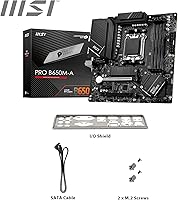
Typical included accessories for this board are SATA cables, the WiFi antenna, an I/O shield, a driver and utility disc or card, and documentation. The exact count of SATA cables can vary, so if you are planning to run multiple traditional hard drives or SATA SSDs, verify the contents when the box arrives and grab extras if needed.