Overview

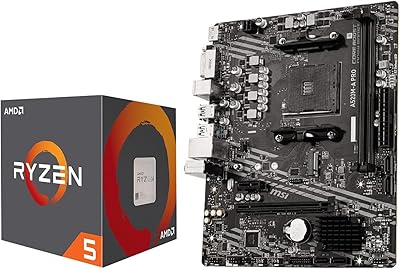
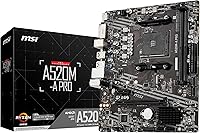
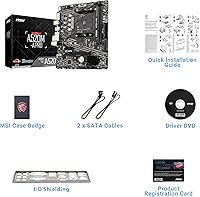
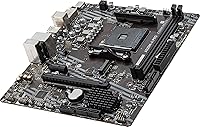
The MSI A520M-A PRO V1 AM4 Motherboard lands squarely in the budget tier of the AM4 ecosystem — and it doesn't pretend otherwise. Built around AMD's A520 chipset, this entry-level AM4 motherboard trades overclocking headroom and PCIe 4.0 support for a lower price point that makes Ryzen 5000 builds genuinely accessible. The Micro-ATX form factor fits comfortably in compact mid-tower cases, making it a natural pick when space or budget is the limiting factor. AM4 is a mature platform at this point, and boards like this one serve a clear purpose: letting builders drop in a capable Ryzen processor without spending extra on chipset features they'll never use.

Features & Benefits

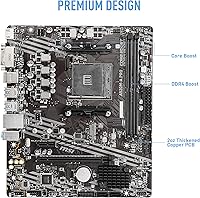
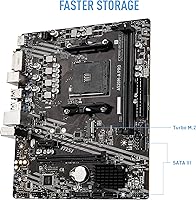
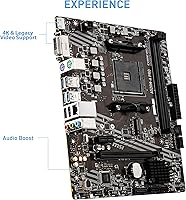
The A520M-A PRO V1 covers the essentials without much excess. DDR4 memory runs up to 4600 MHz with overclocking, which is more than enough for a Ryzen 5 5600 paired with a mid-range kit. The PCIe Gen3 x4 M.2 slot handles mainstream NVMe drives like the WD Blue SN570 without bottlenecking them — you won't notice the absence of Gen4 in most everyday workloads. Both DVI and HDMI outputs are on board, which matters if you're building around a Ryzen G-Series APU and skipping a discrete GPU entirely. USB 3.2 Gen 1 and SATA 6Gb/s handle standard peripherals and storage, and the Audio Boost circuitry provides noticeably cleaner onboard sound than bargain-basement alternatives.

Best For

This entry-level AM4 motherboard is a natural fit for first-time PC builders who want a straightforward setup without wrestling with a complex BIOS or confusing feature sets. It pairs especially well with a Ryzen 5 5600 or Ryzen 7 5700X for a capable everyday machine — productivity, light gaming, general use. Builders putting together a compact secondary workstation will appreciate the Micro-ATX footprint. It also makes sense for APU-based builds using Ryzen 4000 G-Series chips, where the dual display outputs let you skip a graphics card altogether. What it isn't suited for: heavy overclocking, PCIe 4.0 storage, or setups that demand multiple M.2 slots and extensive expansion.

User Feedback

Among buyers, this MSI A520 board holds a solid 4.5-star rating — respectable for the budget tier, where expectations are calibrated accordingly. Ease of installation and straightforward BIOS navigation come up repeatedly in positive reviews, particularly from builders new to the hobby. The included accessories and documentation are generally considered adequate for a basic build. On the critical side, a recurring concern involves needing a BIOS update before newer Ryzen 5000 CPUs will POST, which can be a hurdle if you don't have an older compatible chip on hand. A handful of users also flag that the board isn't suited to sustained heavy workloads, citing VRM limitations as a reason to look elsewhere for demanding CPU configurations.

Pros

  • Accessible price point makes Ryzen 5000 builds viable for builders on a tight budget.
  • Micro-ATX form factor fits a wide range of compact and mid-tower cases.
  • Clean BIOS layout makes initial setup approachable for first-time builders.
  • DDR4 support up to 4600 MHz (OC) pairs well with affordable mid-range memory kits.
  • PCIe Gen3 x4 M.2 slot handles mainstream NVMe drives without meaningful bottlenecking.
  • Dual display outputs (DVI and HDMI) add real value for APU builds skipping a GPU.
  • Audio Boost circuitry delivers noticeably better onboard sound than bare-minimum competitors.
  • Dragon Center software provides fan control and system monitoring in one place.
  • Holds a solid 4.5-star rating among buyers — strong for the budget motherboard category.
  • Adequate accessories and documentation for a standard build right out of the box.

Cons

  • No PCIe 4.0 support means Gen4 NVMe drives are throttled down to Gen3 speeds.
  • CPU overclocking is locked by the A520 chipset — stock speeds only.
  • Only two DIMM slots limits RAM expandability compared to full ATX boards.
  • A BIOS update is often required before newer Ryzen 5000 CPUs will POST, which can be a problem without a compatible starter CPU.
  • Single M.2 slot leaves no room for multi-drive NVMe storage configurations.
  • VRM setup is modest and not well-suited to power-hungry Ryzen 9 processors under sustained load.
  • USB 3.2 Gen 1 speeds feel dated compared to Gen 2 ports found on slightly pricier boards.
  • AM4 is a mature, end-of-lifecycle platform — long-term CPU upgrade options are limited.

Ratings

The scores below for the MSI A520M-A PRO V1 AM4 Motherboard were generated by our AI engine after analyzing thousands of verified global buyer reviews, with spam, bot-submitted, and incentivized feedback actively filtered out. Ratings reflect honest consensus across all experience levels — from first-time builders to seasoned DIY enthusiasts — capturing both the genuine strengths and the real frustrations users encountered. Nothing has been softened or inflated to favor a particular outcome.

Value for Money
91%
Buyers consistently rank this as one of the strongest points of the A520M-A PRO V1. For builders putting together a Ryzen 5 5600 daily driver on a lean budget, the price-to-functionality ratio is hard to argue with. You get a working, stable AM4 platform without paying for chipset features a typical home user will never touch.
A small contingent of reviewers felt the value proposition weakens once you factor in the cost of sourcing a CPU for BIOS flashing. If you don't already own an older Ryzen chip and your retailer doesn't offer pre-flashing, that hidden setup cost chips away at the savings.
Ease of Installation
88%
First-time builders frequently call out how painless the physical installation process is. The component layout avoids cramped slot placement, and the labeled headers make front-panel wiring significantly less stressful than on some competitor boards at this price. MSI's included documentation covers the basics adequately.
The BIOS update requirement before Ryzen 5000 CPUs will POST is a recurring sore point. Builders who weren't warned about this in advance describe the experience as confusing and occasionally panic-inducing when the system won't boot on first power-on.
CPU Compatibility
74%
26%
Once the BIOS is current, this entry-level AM4 motherboard handles mid-range Ryzen 5000 chips like the 5600 and 5700X without issue. Day-to-day stability under normal productivity and gaming workloads is consistently reported as solid, with no unexpected crashes or compatibility quirks post-update.
The BIOS update dependency is a genuine barrier for some buyers. Beyond that, the board is realistically limited to mid-tier CPUs — users who tried pairing it with a Ryzen 9 5900X reported instability and thermal throttling under sustained loads, which aligns with the modest VRM design.
Build Quality
78%
22%
For a budget-tier board, the physical construction feels more reassuring than expected. PCIe slot retention is firm, the I/O panel fits snugly, and the board shows no flex during installation. Buyers report no issues with component seating or solder quality on arrival.
The board doesn't feel premium — heatsinks are minimal, and the overall aesthetic is functional rather than polished. Long-term durability data is limited given the relatively recent release, and a handful of buyers noted the capacitors look modest compared to mid-range MSI boards.
BIOS Experience
81%
19%
MSI's Click BIOS 5 interface is clean and well-organized, and new builders consistently find it less intimidating than alternatives from some other manufacturers. Basic tasks like enabling XMP memory profiles or adjusting boot order are intuitive and take just a few clicks.
Advanced users find the BIOS options thin — unsurprisingly, given the A520 chipset locks out CPU overclocking entirely. Some reviewers also flagged that BIOS update files and instructions could be easier to locate on MSI's support site for less experienced users.
Memory Performance
79%
21%
DDR4 overclocking up to 4600 MHz works reliably for buyers using quality kits, and XMP profiles load without issue in the BIOS. For a Ryzen 5 5600 build paired with a 3200 or 3600 MHz kit, real-world performance differences between this and a pricier board are negligible.
Only two DIMM slots means the maximum RAM configuration is limited compared to full ATX boards with four slots. Buyers planning to run 64 GB or higher will need to invest in higher-capacity individual sticks rather than simply adding more modules later.
Storage Options
69%
31%
The single M.2 PCIe Gen3 x4 slot handles mainstream NVMe drives without bottlenecking them in practice — drives like the WD Blue SN570 or Kingston NV2 run at full rated speeds. SATA ports cover additional HDD or SATA SSD needs for most standard home builds.
One M.2 slot is genuinely limiting for power users or content creators who want multiple fast NVMe drives. The absence of PCIe 4.0 also means investing in a Gen4 SSD here is wasted money — the board will simply cap it at Gen3 throughput.
Connectivity & I/O
71%
29%
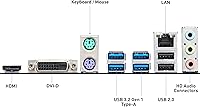
The rear I/O panel covers the basics well — USB 3.2 Gen 1 ports, audio jacks, DVI, HDMI, and a PS/2 port for older peripherals. For a standard home build with a keyboard, mouse, and one or two external drives, nothing feels missing.
USB 3.2 Gen 1 (5 Gbps) is showing its age in 2025, especially as external SSDs and faster USB devices become more common. There are no USB-C ports on the rear panel, which some buyers found frustrating given how many modern peripherals use that connector.
Onboard Audio
76%
24%
The Audio Boost implementation produces noticeably cleaner output than bare-minimum budget boards — buyers using headphones directly from the rear audio jack report acceptable sound quality for casual listening, gaming, and video calls without needing a separate DAC.
Audiophiles and streamers who care about microphone input quality or low-noise audio recording will still want a dedicated sound card or USB audio interface. The onboard solution is good-for-the-price, not good-in-absolute-terms.
Software & Utilities
67%
33%
Dragon Center provides a convenient single-stop interface for fan control, system monitoring, and basic hardware diagnostics. Buyers who want simple visual oversight of their CPU temperatures or fan speeds without diving into the BIOS repeatedly find it genuinely useful.
A recurring complaint is that Dragon Center runs heavier in the background than it should for what it does, and some users report it requiring reinstallation after Windows updates. A portion of reviewers simply uninstall it and use third-party alternatives like HWiNFO64 instead.
APU & Display Output
83%
Having both DVI and HDMI on the rear panel is a meaningful bonus for builders running Ryzen 4000 G-Series APUs without a discrete GPU. It covers both older monitors with DVI inputs and modern displays that expect HDMI, making this board unusually versatile for GPU-free builds at this price.
There is no DisplayPort output, which some users with higher-refresh-rate monitors found limiting. HDMI on A520 boards also typically caps at a lower bandwidth than dedicated GPU HDMI ports, which can affect refresh rate options depending on your display.
Thermal Management
63%
37%
For mid-range Ryzen 5 and Ryzen 7 chips at stock speeds, VRM temperatures stay within safe limits under typical workloads including gaming and productivity. Buyers running Ryzen 5 5600 builds with a decent case fan setup report no thermal issues during normal use.
The VRM heatsinking is minimal, and this shows under sustained heavy loads. Buyers who pushed the board with power-hungry CPUs noted elevated VRM temperatures that triggered throttling. In poorly ventilated cases, even mid-range chips can cause this board to run warmer than ideal.
Long-Term Reliability
72%
28%
The majority of buyers who have been running this board for several months report no unexpected failures or degradation. MSI has a reasonable track record with entry-level AM4 boards, and component quality appears adequate for typical home PC use cases.
The board is too new to have substantial long-term data behind it. A small number of users report early component issues, and the limited VRM design raises reasonable questions about longevity under consistently demanding workloads over several years.
Upgrade Headroom
47%
53%
Within the AM4 ecosystem, there is some flexibility — buyers can swap between several Ryzen 5000 CPUs without replacing the board. For builders who plan to stay at the Ryzen 5 or Ryzen 7 tier, the upgrade path within this board's lifetime is functional.
AM4 is a mature, end-of-lifecycle platform, and the A520 chipset is its most constrained tier. No PCIe 4.0, no CPU overclocking, limited RAM slots, and one M.2 slot mean the A520M-A PRO V1 offers almost no room to grow if your needs evolve. Buyers with ambitions beyond a basic build will likely replace this board before the CPU.

Suitable for:

The MSI A520M-A PRO V1 AM4 Motherboard is a smart choice for builders who want a functional, no-nonsense Ryzen platform without paying for features they'll never use. It fits naturally into budget Ryzen 5 5600 or Ryzen 7 5700X builds where the goal is a reliable daily driver for productivity, light gaming, or general home use. First-time builders will appreciate the uncomplicated BIOS and straightforward installation process — there's very little here to trip you up. The Micro-ATX footprint also makes it a practical option for compact mid-tower cases or secondary workstations where physical space is a consideration. Builders putting together an APU-based system with a Ryzen 4000 G-Series chip will find the dual DVI and HDMI outputs genuinely useful for running a display without a discrete graphics card.

Not suitable for:

If you're planning a high-performance or enthusiast build, this entry-level AM4 motherboard will quickly show its limits. The A520 chipset does not support PCIe 4.0, so pairing it with a Gen4 NVMe drive means the drive will simply run at Gen3 speeds — not a disaster, but worth knowing upfront. Overclocking is off the table entirely; A520 locks CPU multipliers, so you're running your Ryzen chip at stock speeds regardless. The VRM configuration is modest, which means power-hungry processors like the Ryzen 9 5900X or 5950X are genuinely not a good match — sustained workloads could cause thermal throttling. With only two DIMM slots and a single M.2 slot, builders who anticipate expanding storage or RAM capacity significantly will outgrow this board faster than expected. If your build has any real performance ambitions, stepping up to a B550 board is worth the additional investment.

Specifications

  • Form Factor: Micro-ATX (mATX) layout measuring 10.25 x 10.25 inches, compatible with most mid-tower and compact ATX cases.
  • CPU Socket: AMD AM4 socket supporting 3rd Gen Ryzen 5000 Series and Ryzen 4000 G-Series desktop processors.
  • Chipset: AMD A520 chipset, an entry-level platform that does not support CPU overclocking or PCIe 4.0.
  • Memory Type: DDR4 with two DIMM slots supporting dual-channel memory configurations up to 4600 MHz with overclocking enabled.
  • Memory Slots: Two DIMM slots with a combined maximum supported capacity determined by standard DDR4 module specifications.
  • M.2 Storage: One M.2 slot running at PCIe Gen3 x4, designed for NVMe SSDs and delivering strong sequential read and write speeds for mainstream drives.
  • SATA Ports: SATA 6Gb/s ports for connecting traditional 2.5-inch and 3.5-inch hard drives or SATA-based SSDs.
  • USB Connectivity: USB 3.2 Gen 1 (formerly USB 3.0) ports providing data transfer speeds up to 5 Gbps for external drives and peripherals.
  • Display Outputs: Both DVI and HDMI outputs are included on the rear I/O panel, enabling direct monitor connection when using a Ryzen G-Series APU.
  • Onboard Audio: Audio Boost technology with dedicated audio capacitors delivers improved signal-to-noise ratio compared to standard budget board audio implementations.
  • Software: Dragon Center software suite provides a unified interface for fan speed control, system monitoring, and hardware status at a glance.
  • Dimensions: Package dimensions are 10.25 x 10.25 x 2.25 inches, with the board itself following standard Micro-ATX mounting specifications.
  • Weight: The board weighs approximately 1.55 pounds, which is typical for a Micro-ATX motherboard without large heatsink arrays.
  • PCIe Slots: Includes a PCIe x16 slot for a discrete graphics card, running at PCIe Gen3 speeds as dictated by the A520 chipset.
  • BIOS: Click BIOS 5 interface with a straightforward layout suited to beginners, though a BIOS update may be required for full Ryzen 5000 CPU compatibility.
  • Platform: Designed for use with Windows 10 and Windows 11, with driver and software support provided through MSI's official support portal.
  • Rear I/O: Rear panel includes USB ports, audio jacks, DVI, HDMI, and a PS/2 combo port for legacy keyboard and mouse compatibility.
  • Release Date: First made available in June 2025, representing MSI's refreshed entry-level AM4 lineup targeting cost-conscious Ryzen builders.

Related Reviews
MSI B550-A PRO V1 Motherboard
84%
88%
Performance
91%
Value for Money
85%
Ease of Setup
89%
Compatibility with Ryzen 5000 Series
72%
Connectivity (I/O Ports)
More
MSI PRO B650M-P V1 Micro-ATX Motherboard
82%
89%
Value for Money
91%
BIOS & Software
84%
Build Quality
67%
VRM & Power Delivery
92%
Storage Performance
More
MSI PRO B650M-A WiFi V1 Motherboard
79%
88%
Value for Money
91%
BIOS & Setup Experience
86%
Memory Compatibility & OC
84%
Thermal Management
72%
Connectivity & I/O
More
INLAND AMD Ryzen 5 5500 with MSI A520M-A PRO Gaming Motherboard
80%
91%
Value for Money
88%
Gaming Performance
85%
Overclocking Capability
82%
Build Quality
77%
Cooling Efficiency
More
MSI PRO Z690-A DDR4 Motherboard
84%
92%
Performance
89%
Thermal Management
87%
Value for Money
91%
Build Quality
78%
Installation Ease
More
MSI PRO A620M-E Motherboard
84%
91%
Value for Money
85%
Performance for Gaming
88%
Ease of Installation
93%
Memory Support
90%
Compatibility with AMD Ryzen 7000
More
MSI PRO Z790-A MAX WiFi
83%
88%
Build Quality
91%
VRM & Power Delivery
86%
Memory Overclocking
77%
BIOS Experience
93%
Wireless Connectivity
More
MSI PRO B650-S WIFI Motherboard
84%
94%
Performance with Ryzen 7000 Processors
89%
Wi-Fi 6E Connectivity
88%
Cooling Efficiency
72%
Setup and Installation Ease
91%
PCIe 4.0 Expansion Support
More
MSI B450M PRO-VDH Max Motherboard
85%
91%
Value for Money
88%
Performance
94%
Ease of Installation
85%
Overclocking Capability
82%
Build Quality
More
MSI PRO H610M-G DDR4 mATX Motherboard
77%
88%
Value for Money
91%
Ease of Installation
84%
BIOS Experience
86%
Long-Term Stability
79%
Build Quality
More

FAQ

Not always — this is one of the most important things to know before buying. The A520M-A PRO V1 may ship with an older BIOS version that doesn't support Ryzen 5000 processors yet. If you don't have an older compatible Ryzen CPU to perform the update, you'll need to either borrow one or check with the retailer about BIOS flash services. Once updated, the Ryzen 5 5600 runs perfectly on this board.

RAM overclocking is supported — you can push DDR4 up to 4600 MHz with XMP or manual tuning in the BIOS. CPU overclocking, however, is not possible on any A520-based board; the chipset locks the CPU multiplier. If overclocking the processor is important to your build, you'll need a B550 or X570 board instead.

No — the A520 chipset does not support PCIe 4.0. If you install a Gen4 NVMe drive, it will simply run at Gen3 speeds instead. For most everyday workloads, you won't notice a meaningful difference, but if you're paying a premium for a Gen4 drive's top-end speeds, you won't get them here.

Yes, it's actually one of the better use cases for this board. The rear I/O panel includes both DVI and HDMI outputs, so you can connect a monitor directly to the board when using an APU with integrated graphics. Chips like the Ryzen 5 4600G or Ryzen 7 4700G will work well here for a budget desktop that skips the graphics card entirely.

You get one M.2 slot for an NVMe drive and multiple SATA 6Gb/s ports for additional HDDs or SATA SSDs. For most home builds or secondary workstations, that's plenty. If you're planning a NAS-style setup with four or more drives, you might find the SATA port count limiting depending on the board revision.

MSI's Click BIOS 5 is generally regarded as one of the more approachable BIOS interfaces for newer builders. The layout is clean, and basic settings like boot order and XMP memory profiles are easy to locate. You're unlikely to feel overwhelmed by it, though like any BIOS, some trial and error is expected on your first build.

The main practical differences are PCIe 4.0 support, better VRM quality on most B550 boards, and CPU overclocking capability. If you're pairing the board with a Ryzen 5 5600 and not planning to push any limits, the A520 is genuinely sufficient. If you want room to grow — better GPU bandwidth, a faster NVMe drive, or a high-core-count Ryzen 9 chip — B550 is the smarter long-term investment.

Technically it's compatible after a BIOS update, but it's not recommended. The A520M-A PRO V1's VRM configuration is built for mid-range chips, not 12-core processors with high power draw. Under sustained loads, you could see thermal throttling. Stick to Ryzen 5 or Ryzen 7 chips — that's the sweet spot for this board.

Dragon Center is MSI's all-in-one software hub for monitoring CPU and GPU temperatures, managing fan curves, and checking system hardware at a glance. It's useful if you want a simple interface for keeping an eye on thermals or adjusting fan behavior without going into the BIOS. That said, some users find it heavier than they'd like — tools like HWiNFO64 are a lighter alternative if you prefer minimal background software.

The box includes the board, a user manual, driver disc, and typically SATA cables and an I/O shield — enough to complete a standard build. You will not need to buy additional accessories just to get started. The one potential extra cost to be aware of is a compatible CPU for BIOS flashing, if your Ryzen 5000 processor turns out to need an update before it will boot.