Overview

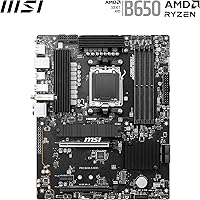
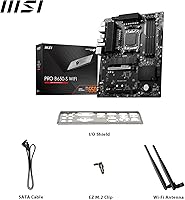
The MSI PRO B650-S WIFI ATX Motherboard lands squarely in the mid-range AM5 sweet spot — enough board for most Ryzen 7000 and 9000 builds without the premium you'd pay stepping up to X670. The full ATX form factor means standard case compatibility and room for proper expansion, whether that's a discrete GPU, sound card, or extra storage. MSI's PRO series carries a business-oriented reliability philosophy, which in practice means conservative defaults and stable behavior rather than flashy aesthetics. One honest caveat: B650 lacks PCIe 5.0 support on storage slots, so if that's a priority, you'll need a pricier platform. That said, Wi-Fi 6E inclusion at this price point is genuinely uncommon and a real differentiator.

Features & Benefits

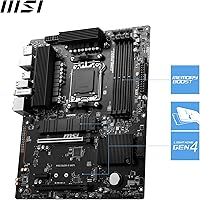
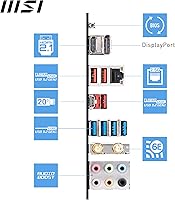
The 12-phase VRM is one of this board's stronger suits — it gives Ryzen processors clean, stable power delivery under sustained loads, which matters if you're running a Ryzen 7 or even a mid-tier Ryzen 9 without boutique cooling. DDR5 memory speeds up to 6000+ MHz work out of the box via EXPO profiles, though hitting the higher 7200 MHz ceiling requires single-rank kits configured one per channel — something worth knowing before you buy your RAM. Both M.2 slots run at Gen4 speeds, and the primary includes a Shield Frozr heatsink to keep NVMe temperatures in check during long file transfers or heavy reads. Rounding things out, the rear I/O includes a 20Gbps USB-C port, HDMI 2.1, DisplayPort 1.4, and 7.1 audio.

Best For

This mid-range AM5 motherboard is a strong pick for first-time AM5 builders who want a fully equipped platform without stretching the budget into X670 territory. It pairs particularly well with Ryzen 5 and Ryzen 7 processors — think the 7600X through the 7800X3D — where B650's power delivery is more than adequate. The built-in Wi-Fi 6E and 2.5G LAN combo makes it especially practical for home office setups where running Ethernet isn't an option. Anyone using Ryzen APUs with integrated graphics will also appreciate the HDMI 2.1 and DisplayPort 1.4 outputs on the rear panel. And with two Gen4 M.2 slots onboard, there's no need to spend extra on a PCIe NVMe adapter just to run a second fast drive.

User Feedback

Across nearly 4,000 ratings, the MSI PRO B650-S WIFI sits at a solid 4.4 stars — which for a motherboard, a category where setup frustrations often skew reviews negative, says quite a bit. Most buyers highlight straightforward installation, reliable first-boot behavior, and good out-of-box EXPO memory compatibility. The board holds the #40 spot in Computer Motherboards on Amazon, reflecting consistent buyer satisfaction over time. On the critical side, some users find that pushing memory beyond official EXPO profiles into manual OC territory involves a steeper BIOS learning curve than expected. There are also scattered mentions of needing a BIOS update before Ryzen 9000 CPUs are recognized — worth factoring in if you're buying a newer processor without a spare system to flash from.

Pros

  • Dual Gen4 M.2 slots cover most storage needs without any add-in cards or adapters.
  • Wi-Fi 6E inclusion at this price tier is uncommon and genuinely useful in congested wireless environments.
  • The 12-phase VRM delivers stable power for mid-range Ryzen CPUs across demanding, sustained workloads.
  • EXPO memory profiles work reliably out of the box, making DDR5 setup straightforward for most buyers.
  • Full ATX form factor means broad case compatibility and room for future expansion.
  • Rear I/O includes a 20Gbps USB-C port, HDMI 2.1, and DisplayPort 1.4 — strong for the chipset tier.
  • 2.5G LAN pairs well with modern routers and NAS devices without needing a separate network card.
  • Primary M.2 slot includes a heatsink that keeps NVMe drives from throttling under heavy read and write loads.
  • Nearly 4,000 buyer ratings at 4.4 stars reflects consistent real-world satisfaction over time.
  • Dedicated pump-fan header makes AIO liquid cooler installation cleaner without sacrificing a standard fan header.

Cons

  • No PCIe 5.0 storage support — buyers wanting next-gen NVMe speeds need to look at X670E boards.
  • New Ryzen 9000 CPUs may require a BIOS update before the board will POST, which needs a spare compatible CPU.
  • Pushing memory beyond EXPO profiles into manual overclocking involves a steeper BIOS learning curve than expected.
  • Only two M.2 slots total — builders planning multi-drive NVMe arrays will hit a ceiling quickly.
  • The PRO series aesthetic is plain and understated, which won't appeal to builders who care about RGB or visual flair.
  • B650 chipset limits total PCIe lane availability, which can become a constraint in heavily expanded workstation builds.
  • Hitting the top-rated memory speeds requires single-rank kits in a specific one-per-channel configuration, which trips up buyers with dual-rank RAM.
  • No PCIe 5.0 x16 slot means the board won't future-proof for next-generation GPU bandwidth requirements.

Ratings

The scores below were generated by our AI system after analyzing thousands of verified buyer reviews for the MSI PRO B650-S WIFI ATX Motherboard from global marketplaces, with spam, bot-submitted, and incentivized feedback actively filtered out. We looked at what real builders consistently praised and where frustrations surfaced repeatedly — both sides are reflected honestly in every category.

Value for Money
88%
Buyers consistently feel the feature set punches above its price bracket — Wi-Fi 6E, dual Gen4 M.2 slots, and a 20Gbps USB-C port are not standard at this tier. Reviewers building Ryzen 7000 systems frequently note they got X670-adjacent connectivity without the X670 price tag.
A handful of buyers who later discovered the B650 chipset's PCIe 5.0 limitations felt they had overpaid relative to what future-proofing they actually received. For builders who later needed more than two M.2 slots, the value calculus shifted noticeably.
Build Quality
84%
The 6-layer PCB with thickened copper and the Steel Armor-reinforced primary PCIe slot earn consistent praise from builders who handle and install the board frequently. The Shield Frozr heatsink on the primary M.2 slot feels solid and well-fitted rather than the flimsy plastic covers seen on cheaper boards.
A few users noted that the secondary PCIe slot lacks the same reinforcement as the primary, which matters for heavier GPU configurations. The overall aesthetic is plain, and some buyers expecting premium tactile quality for the price found the finish underwhelming compared to competing boards.
CPU Power Delivery
86%
The 12-phase Duet Rail VRM keeps Ryzen 7 and even entry-level Ryzen 9 CPUs running stable through sustained multi-threaded workloads like video rendering and extended gaming sessions. Thermal pads rated at 7W/mK keep VRM temperatures in a comfortable range without requiring aggressive fan curves.
The VRM is well-matched to mid-range Ryzen CPUs but is not built for prolonged all-core loads on the higher-TDP Ryzen 9 parts. Builders running a Ryzen 9 7950X at full bore for hours reported thermal headroom becoming a concern that a more premium board would handle more confidently.
Memory Compatibility
79%
21%
EXPO and EXPO II profiles activate reliably out of the box for most single-rank DDR5 kits, and users pairing popular 6000 MHz kits with this board rarely report POST failures or instability. First-time DDR5 builders appreciate that memory configuration is largely plug-and-play at the rated EXPO speed.
Buyers who purchased dual-rank kits or populated all four DIMM slots frequently found they could not hit advertised speeds, which caused confusion and frustration. The nuance around single-rank, one-per-channel requirements for peak memory speeds is not clearly communicated, leading to real compatibility disappointment.
Wireless Connectivity
91%
Wi-Fi 6E with Bluetooth 5.3 is the feature that consistently surprises buyers at this price point. Home office users in dense wireless environments report noticeably lower latency and stronger throughput compared to their previous Wi-Fi 5 boards, and the 2.5G LAN rounds out a networking package that rivals boards costing significantly more.
A small number of users reported needing to update drivers before Bluetooth and Wi-Fi performed at their rated capabilities on first boot. The antenna included in the box is functional but not exceptional — users in large homes or challenging RF environments may want a directional aftermarket antenna for the best results.
BIOS Experience
73%
27%
For everyday tasks — enabling EXPO profiles, setting a boot drive, and monitoring temperatures — most buyers describe the BIOS as straightforward and well-organized. The out-of-box defaults are conservative and stable, which reduces the likelihood of a frustrating first-boot experience for newcomers.
Once users venture beyond EXPO into manual overclocking territory, the BIOS becomes noticeably less guided than competitors like ASUS or Gigabyte at the same price tier. Several reviewers noted that BIOS updates for Ryzen 9000 support were necessary but not communicated clearly during setup, creating a confusing experience for buyers upgrading from a boxed board.
Storage Expandability
76%
24%
Two Gen4 x4 M.2 slots each running at 64 Gbps cover the storage needs of the vast majority of gaming and productivity builds without any additional hardware. The primary slot heatsink is genuinely effective at keeping NVMe temperatures below throttling thresholds during large file transfers and sustained sequential workloads.
Two M.2 slots is the ceiling — there is no third slot or workaround without adding a PCIe adapter card, which consumes one of only two PCIe x16 slots. The absence of PCIe 5.0 on the M.2 slots also means buyers planning to adopt next-generation NVMe drives will eventually be constrained by this board.
Rear I/O Quality
83%
A 20Gbps USB-C port, HDMI 2.1, DisplayPort 1.4, and both Wi-Fi and Ethernet ports make the rear panel genuinely comprehensive for a B650 board. APU users running integrated Ryzen graphics appreciate having both HDMI and DisplayPort available for multi-monitor setups without needing a GPU.
The total USB port count is adequate but not generous — power users running multiple external drives, peripherals, and storage devices simultaneously may find themselves reaching for a USB hub. There is no Thunderbolt port, which is an expected omission at this chipset level but still a gap for users coming from Intel-based builds.
Thermal Management
81%
19%
The combination of the VRM heatsink, Shield Frozr on the primary M.2 slot, and the dedicated pump-fan header gives this board a well-considered thermal design for its tier. AIO liquid cooler users specifically praise the dedicated pump header, which simplifies wiring and ensures the pump runs at the correct speed profile.
The secondary M.2 slot has no heatsink coverage, which can lead to temperature spikes on a second NVMe drive during sustained sequential writes. The chipset heatsink runs warm under full platform load, and a few users noted it gets noticeably hot to the touch in poorly ventilated cases.
Setup & Installation
85%
Reviewers frequently mention how smoothly initial installation goes — the board posts reliably on first boot in the majority of documented builds, and EXPO memory enablement is a single BIOS toggle. The included manual covers the basics competently, and MSI's online BIOS documentation is easy to find.
Buyers who received units requiring a BIOS update for Ryzen 9000 CPU support faced a setup blocker that required borrowing or purchasing a compatible older CPU. This is a platform-level issue, but the MSI PRO B650-S WIFI does not include a Flash BIOS button to work around it independently.
PCIe Expandability
69%
31%
Two PCIe 4.0 x16 slots handle the standard dual-slot GPU plus one additional card configuration that most gaming and prosumer builds require. The primary slot's Steel Armor reinforcement holds heavy modern GPUs securely without visible flex.
The B650 chipset's PCIe lane budget is genuinely limited — adding a second GPU, a high-bandwidth capture card, and an NVMe expansion card simultaneously will exhaust available bandwidth and require lane-sharing compromises. There is no PCIe 5.0 x16 support, which may become a meaningful gap as next-generation GPUs arrive.
Audio Performance
74%
26%
The 7.1 HD Audio implementation with Audio Boost is a step above the bare-minimum audio found on budget boards, and users running analog headphones or desktop speakers through the rear jacks report clean output with minimal background noise. It covers the needs of casual and mid-level audio users without requiring a dedicated sound card.
Audiophiles and content creators who need studio-quality output will quickly find the onboard audio insufficient compared to a dedicated DAC or PCIe sound card. A few reviewers noticed a faint electrical interference hum in high-gain headphone setups, which is a common limitation of integrated motherboard audio.
Long-term Reliability
82%
18%
The PRO series branding reflects MSI's business-oriented design philosophy, and buyers using this board in always-on workstation or home server environments report stable uptime over many months without unexpected crashes or component failures. The conservative VRM defaults contribute to a stable baseline that protects hardware longevity.
The long-term track record of AM5 boards broadly is still building, and the B650 platform is newer than some competing budget chipsets with longer documented histories. A small number of reviewers reported capacitor or trace issues after extended use, though these appear to be outlier cases rather than a systematic pattern.

Suitable for:

The MSI PRO B650-S WIFI ATX Motherboard is purpose-built for builders who want a capable, well-rounded AM5 platform without the cost overhead of a flagship chipset. It's an especially strong fit for anyone pairing it with a mid-range Ryzen 7000 or 9000 series processor — from the Ryzen 5 7600X up through the Ryzen 7 7800X3D — where the board's power delivery is more than sufficient for sustained workloads and everyday performance. Home office users and prosumers will appreciate the built-in Wi-Fi 6E and 2.5G LAN, which remove the need for add-in networking cards in setups where cabling isn't practical. First-time AM5 builders benefit from the reliable out-of-box EXPO memory compatibility and a BIOS that most users find approachable without a deep technical background. Anyone running a Ryzen APU with integrated graphics also gets a practical advantage from the HDMI 2.1 and DisplayPort 1.4 rear outputs, making a dedicated GPU optional for lighter workloads.

Not suitable for:

The MSI PRO B650-S WIFI ATX Motherboard is not the right choice for builders chasing cutting-edge storage performance, since the B650 chipset does not support PCIe 5.0 on M.2 slots — if next-generation NVMe speeds are a priority, an X670E board is the more appropriate path. Enthusiast overclockers looking to push memory well beyond official EXPO profiles or fine-tune CPU voltages at an advanced level may find the experience frustrating, as the BIOS options for manual overclocking carry a learning curve that goes beyond what casual users expect. Those buying a brand-new Ryzen 9000 series CPU should be aware that an out-of-box board may require a BIOS update before the processor is recognized, which can be a real obstacle without access to an older compatible CPU for flashing. Builders working with micro-ATX or mini-ITX cases will also find the full ATX footprint simply doesn't fit their chassis. And if you're building a workstation that needs more than two M.2 slots or extensive PCIe lane allocation, the B650's lane budget will become a limiting factor before long.

Specifications

  • Form Factor: Full ATX layout fits standard mid-tower and full-tower cases that accept ATX motherboards.
  • Chipset: Built on the AMD B650 chipset, which supports AM5 processors including Ryzen 7000, 8000, and 9000 series.
  • CPU Socket: Uses the AM5 (LGA1718) socket, compatible with all current AMD Ryzen 7000, 8000, and 9000 series desktop processors.
  • Memory Type: Supports DDR5 memory exclusively across 4 DIMM slots, with a maximum capacity of 64 GB.
  • Memory Speed: Rated for 6000+ MHz out of the box via EXPO profiles, and up to 7200 MHz with manual overclocking using single-rank kits in a one-per-channel configuration.
  • PCIe Slots: Includes two PCIe 4.0 x16 slots; the primary slot is reinforced with Steel Armor and delivers up to 64 GB/s bandwidth.
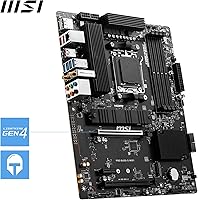
  • M.2 Storage: Provides two M.2 Gen4 x4 slots each rated at 64 Gbps, with a Shield Frozr heatsink covering the primary slot to reduce thermal throttling.
  • Wireless: Integrated Wi-Fi 6E with Bluetooth 5.3 handles wireless networking and peripheral connectivity without a separate add-in card.
  • Wired LAN: Onboard 2.5 Gbps Ethernet port provides a high-bandwidth wired connection compatible with modern routers and NAS devices.
  • Rear USB: Rear panel includes a USB 3.2 Gen 2x2 Type-C port delivering up to 20 Gbps transfer speeds, alongside additional USB Type-A ports.
  • Video Output: Rear I/O includes one HDMI 2.1 and one DisplayPort 1.4 output for use with integrated Ryzen APU graphics.
  • Audio: Onboard 7.1 HD Audio with Audio Boost technology supports multi-channel surround sound output through the rear panel jacks.
  • VRM Design: A 12-phase Duet Rail Power System using P-PAK components provides stable CPU power delivery for sustained workloads on mid-to-high-tier Ryzen processors.
  • VRM Cooling: MOSFET thermal pads rated at 7W/mK and a dedicated VRM heatsink help manage heat during extended CPU loads.
  • Fan Headers: Includes a dedicated pump-fan header for AIO liquid coolers in addition to standard PWM fan headers for chassis and CPU cooling.
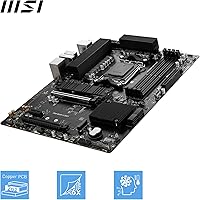
  • PCB Construction: Built on a 6-layer PCB with 2 oz. thickened copper to improve signal integrity and thermal dissipation.
  • Color: The board ships in an all-black color scheme with no integrated RGB lighting by default.
  • Amazon Ranking: Holds the number 40 position in the Computer Motherboards category on Amazon with a 4.4-star average across approximately 3,918 ratings.

Related Reviews
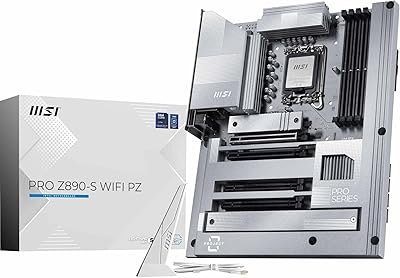
MSI PRO Z890-S WiFi PZ Motherboard
87%
92%
Performance with Intel Core Ultra Processors
89%
Connectivity & Network Speed
87%
Ease of Installation & Setup
85%
Cooling Efficiency
88%
Storage Options & Expansion
More
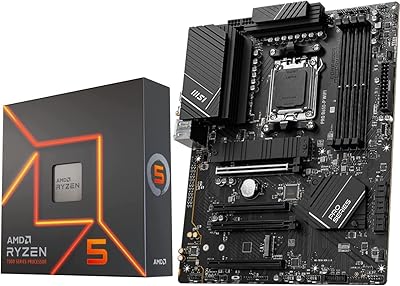
INLAND MSI B650-P Ryzen 5 7600X Bundle
75%
88%
Gaming Performance
83%
Value for Money
84%
Motherboard Build Quality
79%
Ease of Setup
62%
Thermal Management
More
MSI B550M PRO-VDH WiFi
80%
91%
Value for Money
88%
BIOS Experience
78%
Wireless Connectivity
72%
CPU Power Delivery
69%
RAM Compatibility & Stability
More
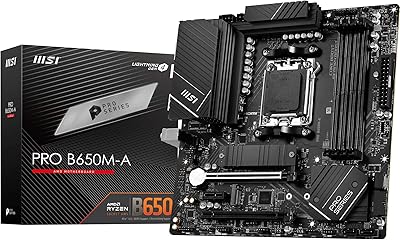
MSI PRO B650M-A WiFi V1 Motherboard
79%
88%
Value for Money
91%
BIOS & Setup Experience
86%
Memory Compatibility & OC
84%
Thermal Management
72%
Connectivity & I/O
More
MSI PRO Z790-A MAX WiFi
83%
88%
Build Quality
91%
VRM & Power Delivery
86%
Memory Overclocking
77%
BIOS Experience
93%
Wireless Connectivity
More
MSI PRO B550M-VC WiFi
83%
91%
Value for Money
86%
Build Quality
89%
Wireless Connectivity
74%
CPU Power Delivery
88%
BIOS Experience
More
MSI MAG B650 Tomahawk WiFi ATX Motherboard
81%
88%
VRM & Power Delivery
82%
Memory Compatibility
91%
Storage Versatility
86%
Wireless Performance
89%
Wired Networking
More
MSI PRO B760-P WiFi DDR4
82%
91%
Value for Money
87%
Build Quality
89%
BIOS Experience
84%
CPU Power Delivery
88%
Wireless Connectivity
More
MSI PRO Z790-P WiFi DDR4 Motherboard
83%
91%
Performance for Gaming
88%
Future-Proofing Features
85%
Thermal Management
80%
Ease of Installation
89%
Wi-Fi and Connectivity
More
MSI PRO X870-P WiFi AM5 ATX Motherboard
79%
83%
Value for Money
81%
Build Quality
88%
Installation Experience
77%
BIOS & Software
67%
Memory Compatibility
More

FAQ

Not always, unfortunately. Depending on when the board was manufactured, it may ship with an older BIOS that does not yet support Ryzen 9000 processors. If you are buying a Ryzen 9000 CPU as your first and only processor, you will need access to a compatible Ryzen 7000 CPU to perform the BIOS update first. MSI does offer a Flash BIOS button on some boards, but it is worth confirming whether this model supports that feature before you commit.

DDR5 only. The AM5 platform dropped DDR4 support entirely, so this board exclusively uses DDR5 DIMMs. If you have DDR4 kits from a previous build, they will not be compatible here.

The 6000+ MHz figure is what you can realistically expect using standard EXPO memory profiles, which are the DDR5 equivalent of XMP. The higher 7200 MHz ceiling requires manual overclocking and, critically, single-rank memory kits installed one stick per channel. If you buy a dual-rank kit or populate all four slots, you will likely max out at a lower stable speed. For most buyers, enabling EXPO at 6000 MHz is the practical sweet spot.

Yes, but only if your CPU includes integrated graphics — meaning you will need a Ryzen processor with a built-in GPU, such as a Ryzen 8000G series APU. Standard Ryzen 7000 non-G CPUs do not include integrated graphics, so a dedicated GPU is required in that case. The rear panel does include HDMI 2.1 and DisplayPort 1.4 outputs for APU users.

It is solid for enabling EXPO or EXPO II memory profiles, which is where most mainstream users stop anyway. The 12-phase VRM handles mid-range Ryzen CPUs without stress under typical use. That said, this is not a board designed for serious manual CPU or memory overclocking — if pushing voltages and fine-tuning infinity fabric ratios is your goal, a more premium X670E board with a heavier VRM is the better fit.

You get two M.2 slots, and yes, both run at Gen4 x4 speeds for up to 64 Gbps per slot. The primary slot includes the Shield Frozr heatsink to keep drive temperatures in check. If you need more than two M.2 drives, this board has no additional slots, and you would need a PCIe add-in card.

MSI includes an antenna in the box for the onboard Wi-Fi 6E module. You just attach it to the rear panel connectors during setup. No separate purchase is needed.

Any case that supports standard ATX motherboards will fit the MSI PRO B650-S WIFI ATX Motherboard. This includes the vast majority of mid-tower and full-tower cases on the market. Micro-ATX and mini-ITX cases will not fit this board due to its full-size footprint.

For basic setup — enabling EXPO memory profiles, configuring boot order, and checking temperatures — most users find the BIOS approachable even without prior experience. Where things get more involved is manual memory overclocking beyond EXPO profiles; that part of the BIOS is less guided and has a steeper curve. For a standard gaming or home office build, the out-of-box BIOS experience is generally praised in user reviews.

No. The B650 chipset does not offer PCIe 5.0 support on storage slots, and while the primary x16 slot supports PCIe 4.0, it does not run at PCIe 5.0 speeds either. If PCIe 5.0 compatibility for a next-generation GPU or ultra-fast NVMe drive is important to your build, you will need to look at an X670E platform instead.

Where to Buy