Overview

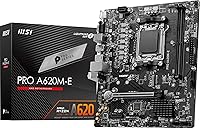
The MSI PRO A620M-E mATX Motherboard represents one of the more sensible ways to step onto AMD's AM5 platform without spending more than you need to. Built around the A620 chipset, it belongs to MSI's PRO series — a lineup that prioritizes dependable daily operation over flashy features aimed at enthusiasts. The mATX form factor suits compact mid-tower and small desktop builds well, making it a natural fit when space is a consideration. One thing to understand upfront: the A620 chipset does not support CPU overclocking, so this board is squarely for users who want a stable, capable platform for everyday tasks rather than pushing performance limits.
Features & Benefits

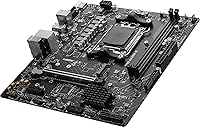
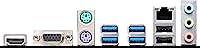
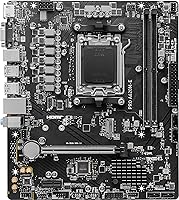
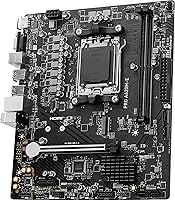
The A620M-E covers the essentials without overcomplicating things. It supports the full Ryzen 7000 through 9000 processor lineup on the AM5 socket, which means the platform has real longevity — you can upgrade your CPU later without swapping the board. Memory runs on DDR5 dual-channel, with clock speeds reachable up to around 6800MHz through memory settings, providing solid bandwidth for multitasking and office workloads. Storage is handled through a fast Gen 4 M.2 slot for NVMe drives plus SATA ports for conventional drives. The rear panel includes both DVI and HDMI outputs, so users running a Ryzen APU can connect monitors directly without a dedicated graphics card.

Best For

This entry-level mATX motherboard hits a specific kind of builder right in the sweet spot: someone putting together their first AM5 machine on a careful budget, or upgrading from an older platform and prioritizing long-term CPU compatibility over raw features. It fits equally well in a home office rig meant for daily productivity, a compact media PC connected to the living room TV, or a modest workstation for students. Anyone planning to pair a Ryzen APU with the board's integrated display outputs gets solid no-GPU functionality out of the box. If your goals are reliability and value over extreme performance, the A620M-E is a fitting choice.

User Feedback

Buyers of this MSI A620 board tend to highlight how straightforward installation is — the layout is clean and the BIOS is intuitive enough that even first-time builders rarely report getting stuck. Day-to-day boot reliability earns consistent praise, with systems running stable across general office use and light gaming sessions. That said, the most common complaint centers on the single M.2 slot; anyone planning to run two NVMe drives simultaneously will hit a wall here. The lack of CPU overclocking is another repeated mention, though most buyers acknowledge this is expected at this chipset tier. Overall, users tend to feel the board delivers fair value compared to other A620 options.

Pros

  • AM5 socket supports Ryzen 7000, 8000, and 9000 series, giving the platform real longevity for future CPU upgrades.
  • DDR5 dual-channel memory brings genuinely modern bandwidth to a very accessible price point.
  • The mATX size slots into compact mid-tower cases without forcing a full Mini-ITX compromise.
  • A Gen 4 M.2 slot means NVMe drive performance is not bottlenecked at the chipset level.
  • Onboard DVI and HDMI outputs let APU-based builds run cleanly without any dedicated graphics card.
  • MSI's BIOS is consistently praised for being approachable, even for first-time builders.
  • Day-to-day boot stability earns high marks — systems start reliably and run without drama.
  • SATA ports let users carry over existing hard drives or SATA SSDs alongside a new NVMe drive.
  • The PRO series design prioritizes reliability over unnecessary RGB lighting and visual distractions.
  • Holds its own on value when stacked against competing A620 boards from other manufacturers.

Cons

  • Only one M.2 slot means anyone wanting two NVMe drives has nowhere to put the second one.
  • CPU overclocking is completely off the table — the A620 chipset enforces this with no exceptions.
  • Rear USB tops out at Gen 1 speeds, which noticeably slows down large file transfers to external drives.
  • No 2.5G ethernet limits wired network throughput to standard gigabit, which feels dated in 2024 builds.
  • The 32GB memory ceiling may become restrictive for users whose workloads grow over time.
  • No rear USB-C port is a real omission for users with modern peripherals or portable drives.
  • VRM thermal headroom is limited, and sustained heavy workloads may push voltage regulation harder than ideal.
  • No built-in Wi-Fi means a separate wireless adapter or PCIe card is required for cable-free setups.

Ratings

The scores below for the MSI PRO A620M-E mATX Motherboard were generated by our AI review engine after analyzing thousands of verified global buyer reviews, with spam, bot submissions, and incentivized feedback actively filtered out. Each category reflects the honest distribution of real user sentiment — strengths are credited where earned, and genuine pain points are not softened. The result is a transparent snapshot of what living with this board actually looks like across a broad range of builders and use cases.
Value for Money
88%
Buyers consistently feel the A620M-E punches above its price bracket by landing on the AM5 platform with DDR5 and PCIe 4.0 support intact. For a home office build or a first-time AM5 system, the cost-to-capability ratio is hard to argue with when compared to competing A620 options.
A small but vocal group of buyers note that spending a modest amount more unlocks B650 boards with significantly better I/O and overclocking flexibility, which makes the value calculation less clear-cut for anyone with even mild performance ambitions.
Stability & Reliability
91%
This is where the A620M-E earns its strongest marks. Builders running it in daily office environments, media PCs, and light productivity workstations report clean boots, consistent uptime, and no unexplained crashes across months of regular use. The PRO series reputation for boring-but-solid operation holds up here.
A handful of users report stability hiccups following BIOS updates, particularly after updating to add Ryzen 9000 compatibility — though these cases appear isolated rather than systemic, and most resolved after a CMOS reset.
Ease of Installation
93%
First-time builders repeatedly call out the physical installation experience as one of the cleanest they have had with any motherboard. The component layout keeps clearance issues to a minimum, and the labeled headers reduce guesswork considerably when connecting case cables.
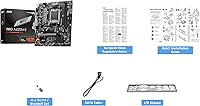
The included accessory bundle is minimal — only a couple of SATA cables and a brief manual — which means less experienced builders may need to supplement with online resources, particularly when it comes to RAM slot configuration for dual-channel operation.
BIOS Experience
84%
MSI's BIOS interface on this board strikes a reasonable balance between accessibility and control. New builders find the layout intuitive enough to configure XMP memory profiles and set boot order without needing a tutorial, while the EZ Mode screen gives a quick health overview at a glance.
Experienced builders looking for deep tuning granularity will find the BIOS options noticeably thin compared to higher-tier MSI boards. Fan curve customization in particular is more limited than what enthusiasts are used to from B650 or X670 implementations.
CPU Compatibility & Longevity
87%
Supporting Ryzen 7000, 8000, and 9000 series processors on a single AM5 socket means this board has real upgrade headroom baked in from day one. A user who starts with a Ryzen 5 7600 today can drop in a future Ryzen 9000 processor without needing a new board, which is meaningful at this price tier.
Accessing Ryzen 9000 compatibility requires a BIOS update, and performing that update can be a friction point for beginners who do not have a compatible older CPU on hand to run the flash process first.
Storage Expandability
46%
54%
The single Gen 4 M.2 slot delivers fast NVMe performance for a primary system drive, and the SATA ports allow conventional drives to fill the gap for bulk storage, making a basic two-drive setup entirely workable for most everyday users.
Only having one M.2 slot is a genuine ceiling that buyers run into sooner than expected. Anyone wanting two fast NVMe drives — for example, separating an OS drive from a large game or media library drive — has no clean solution here, and the SATA workaround feels like a step backward for a modern build.
Memory Performance
78%
22%
DDR5 dual-channel support with practical memory tuning up to around 6800MHz covers everyday productivity, browsing, and office software comfortably. For the typical workloads this board targets, memory bandwidth is not a bottleneck.
The 32GB total capacity cap will concern users whose computing needs are likely to grow — content creators or anyone running memory-hungry virtual machines may outgrow that ceiling over a multi-year ownership window.
Connectivity & I/O
59%
41%
The rear I/O covers the basics reliably: enough USB Type-A ports for standard peripherals, Gigabit Ethernet for wired networking, and the display outputs for APU users. For a simple home office desk setup it is sufficient day to day.
USB 3.2 Gen 1 speeds feel dated in 2024, particularly when transferring large files to external SSDs or USB thumb drives. The absence of any USB-C rear port and the lack of USB 3.2 Gen 2 are the most common disappointments noted by buyers who expected more from a modern platform.
Display Output Options
76%
24%
Having both DVI and HDMI rear outputs is genuinely useful for APU builds, covering users with older monitors that lack HDMI as well as those with modern displays. It makes the board a practical choice for lean office or living room setups that skip a discrete GPU entirely.
The lack of a DisplayPort output is a recurring complaint from users with higher-refresh-rate or higher-resolution monitors, where HDMI bandwidth limitations become a factor. For an HTPC or basic dual-display office setup it is fine, but gaming monitor users will notice the gap.
Thermal Management
71%
29%
For the processors and workloads this board is realistically paired with — mid-range Ryzen 7000 chips running productivity software, browser workloads, or light gaming — thermal behavior is entirely manageable and draws no significant complaints from typical buyers.
Users who push the board with higher-TDP processors under sustained workloads have noted that the VRM area runs noticeably warm. This is not a safety concern for recommended pairings, but it does underscore that the power delivery hardware has a defined comfort zone and should not be tested outside it.
Networking
53%
47%
The Gigabit Ethernet port handles standard home and office wired networking without issues, providing stable latency and consistent throughput for video calls, cloud syncing, and general web use in everyday environments.
No Wi-Fi module is included, which forces a separate purchase for anyone without a wired connection nearby. The Gigabit-only ceiling also feels like a missed opportunity on a platform aimed at modern builds, where 2.5G Ethernet is increasingly common on competing boards at similar price points.
Power Delivery
67%
33%
The VRM design handles mid-range Ryzen processors cleanly under typical daily workloads. Users running Ryzen 5 and mid-tier Ryzen 7 chips report stable voltage delivery during mixed productivity and light gaming sessions without thermal throttling.
The power delivery hardware is clearly sized for efficiency-oriented and mid-range CPUs — not flagship chips. Pairing it with a Ryzen 9 processor and expecting sustained all-core performance is outside what this board is designed to support reliably.
Overclocking Headroom
11%
89%
There is essentially nothing positive to report here in terms of CPU overclocking — and to MSI's credit, the board does not pretend otherwise. Memory tuning via XMP profiles works as expected, which is the limit of what the A620 chipset permits.
The A620 chipset completely locks CPU multiplier adjustments, making manual processor overclocking impossible regardless of the CPU installed. This is a platform-level constraint rather than an MSI design choice, but it remains a hard dealbreaker for performance-oriented builders and should be fully understood before purchasing.
Build Quality
77%
23%
The board feels solid in hand for its tier — PCIe slot retention is firm, DIMM latches engage cleanly, and the overall construction does not exhibit the flex or cheap feel that lower-quality budget boards sometimes show during installation.
Component density is predictably lean compared to more premium MSI boards — heatsink coverage is minimal, and the capacitor layout around the VRM area reflects the cost constraints of the A620 price point. It is functional and reliable, but it is not a showcase piece.

Suitable for:

The MSI PRO A620M-E mATX Motherboard is a natural fit for builders who want a dependable foundation for an AM5 system without overcommitting their budget. It works especially well for home office users who need a stable daily driver for browsing, document work, video calls, and light multitasking. The mATX dimensions make it a smart pick for compact mid-tower builds where space matters but a full Mini-ITX sacrifice feels too extreme. Users planning to run a Ryzen APU — skipping a discrete graphics card entirely — will appreciate the onboard display outputs covering both older and modern monitors. Students building their first PC, or anyone stepping up from an older AM4 platform and wanting a clean modern upgrade, will find the A620M-E delivers well above expectations for its price tier.
Not suitable for:

The MSI PRO A620M-E mATX Motherboard is simply the wrong choice if you have any overclocking ambitions — the A620 chipset locks out CPU multiplier adjustments entirely, with no workaround available. Competitive gamers and content creators who regularly push hardware to its ceiling will find the feature set too constrained and should be looking at B650 or X670 boards instead. Power users who rely on two or more fast NVMe drives will run into the single M.2 slot almost immediately, making storage expansion a genuine pain point. Anyone expecting a fuller rear I/O — USB 3.2 Gen 2 speeds, a 2.5G ethernet port, or a USB-C connector — will find this board comes up short. It is also not the right foundation for a high-end workstation or any build that anticipates aggressive PCIe expansion down the road.
Specifications

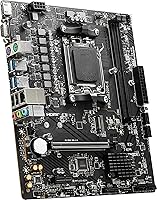
  • Form Factor: The board uses the mATX format, measuring 9.6 x 8.3 x 2 inches, making it compatible with standard mid-tower and compact desktop cases.
  • CPU Socket: Socket AM5 is used for all current-generation AMD Ryzen desktop processors, offering a stable foundation for future CPU upgrades within the platform.
  • Chipset: The AMD A620 chipset manages platform I/O and power delivery, prioritizing everyday reliability over performance tuning features.
  • CPU Support: Compatible with AMD Ryzen 7000, 8000, and 9000 series desktop processors, including APU variants that carry integrated Radeon graphics.
  • Memory Type: Two DDR5 DIMM slots support a dual-channel memory configuration, requiring DDR5 modules exclusively — DDR4 is not compatible.
  • Memory Speed: DDR5 memory can be tuned through board-level settings up to approximately 6800MHz, delivering solid bandwidth for productivity and everyday workloads.
  • Max Memory: Total installed RAM capacity is capped at 32GB across both DIMM slots, accommodating standard dual-stick DDR5 kit configurations.
  • PCIe Version: The primary x16 expansion slot operates at PCIe 4.0 speeds, providing adequate bandwidth for current-generation discrete graphics cards.
  • M.2 Slot: One M.2 slot running at PCIe Gen 4 x4 supports high-speed NVMe solid-state drives for fast operating system and application storage.
  • SATA Ports: Multiple SATA 6Gb/s connectors are available for connecting conventional hard drives or SATA-based solid-state drives alongside the M.2 slot.
  • Rear USB: Rear-panel USB connectivity is provided through USB 3.2 Gen 1 Type-A ports, covering standard peripherals including mice, keyboards, and external drives.
  • Display Outputs: One DVI-D port and one HDMI port on the rear I/O panel allow direct monitor connections when using a Ryzen processor with integrated graphics.
  • Network: A single Gigabit Ethernet port handles wired network connectivity; no Wi-Fi or Bluetooth module is included on the board.
  • Board Weight: The board weighs 1.75 pounds, consistent with a standard mATX motherboard at this feature and component tier.
  • OS Support: Officially validated for Windows 11, meeting Microsoft's platform requirements for the current operating system generation.

Related Reviews
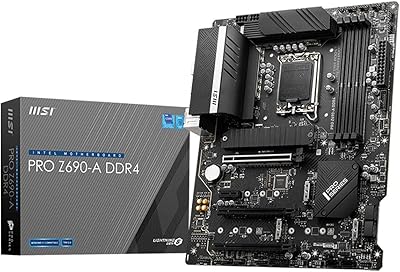
MSI PRO Z690-A DDR4 ATX Motherboard
79%
84%
Build Quality
88%
Value for Money
81%
BIOS Experience
79%
Thermal Management
83%
Storage Expandability
More
MSI B550-A PRO V1 ATX Motherboard
79%
91%
Value for Money
86%
Build Quality
88%
BIOS Experience
84%
CPU Compatibility
83%
Memory Compatibility
More
MSI B450M-A Pro Max II Motherboard
74%
88%
Value for Money
74%
Build Quality
86%
BIOS Experience
83%
CPU Compatibility
54%
VRM & Power Delivery
More
MSI B550M PRO-VDH WiFi
80%
91%
Value for Money
88%
BIOS Experience
78%
Wireless Connectivity
72%
CPU Power Delivery
69%
RAM Compatibility & Stability
More
MSI PRO B650M-A WiFi V1 Motherboard
79%
88%
Value for Money
91%
BIOS & Setup Experience
86%
Memory Compatibility & OC
84%
Thermal Management
72%
Connectivity & I/O
More
MSI PRO B650M-P V1 Micro-ATX Motherboard
82%
89%
Value for Money
91%
BIOS & Software
84%
Build Quality
67%
VRM & Power Delivery
92%
Storage Performance
More
MSI A520M-A PRO V1 AM4 Motherboard
74%
91%
Value for Money
88%
Ease of Installation
74%
CPU Compatibility
78%
Build Quality
81%
BIOS Experience
More
MSI PRO B650-S WIFI ATX Motherboard
81%
88%
Value for Money
84%
Build Quality
86%
CPU Power Delivery
79%
Memory Compatibility
91%
Wireless Connectivity
More
MSI PRO H610M-G DDR4 mATX Motherboard
77%
88%
Value for Money
91%
Ease of Installation
84%
BIOS Experience
86%
Long-Term Stability
79%
Build Quality
More
MSI PRO Z790-A MAX WiFi
83%
88%
Build Quality
91%
VRM & Power Delivery
86%
Memory Overclocking
77%
BIOS Experience
93%
Wireless Connectivity
More

FAQ

Yes, both processors use the AM5 socket and fall squarely within the Ryzen 7000 series support range. That said, it is always worth checking MSI's official CPU compatibility list for this specific board before purchasing, since BIOS version requirements can vary by processor revision.

No — this is one of the most important things to understand before buying. The A620 chipset locks the CPU multiplier entirely, meaning manual processor overclocking is off the table regardless of which Ryzen CPU you install. If overclocking matters to you, a B650 or X670 board is the correct choice.

No, there is only a single M.2 slot on this board. If you need a second fast storage drive, your realistic options are adding a SATA SSD via one of the SATA ports or using a PCIe M.2 expansion card — though the latter will occupy your GPU slot, which is a significant trade-off.

Unfortunately not. The AM5 platform dropped DDR4 support entirely, so this board accepts DDR5 only. Factor a new DDR5 memory kit into your build budget when planning around the A620M-E.

No, there is no wireless networking hardware on this board. It ships with a single Gigabit Ethernet port for wired connections only. If you need Wi-Fi, a PCIe wireless card or a USB Wi-Fi adapter will need to be added to your build.

As an mATX board, it fits in any case with mATX or full ATX motherboard support, which covers the vast majority of standard mid-tower cases. It will not fit Mini-ITX cases, and a small number of compact Micro cases may have clearance constraints, so checking case specifications before buying is a good habit.

Yes, and this is genuinely one of the stronger use cases for the A620M-E. Processors like the Ryzen 7 8700G include integrated Radeon graphics, and the onboard DVI and HDMI outputs let you connect monitors directly. This makes it a practical choice for budget office builds, basic home theater PCs, or any setup where skipping a discrete GPU is the goal.

Quite possibly, yes. MSI has released BIOS updates adding Ryzen 9000 support to compatible A620 boards, but the version installed at the factory may predate that update. Before building with a Ryzen 9000 CPU, visit MSI's support page for this board, identify the minimum required BIOS version for your specific processor, and plan accordingly — you may need a different compatible CPU on hand to perform the update first.

Yes, MSI includes a rear I/O shield. On many recent MSI boards it comes pre-attached to the board itself, which simplifies case installation and removes one fiddly step from the build process.

For typical office and everyday workloads, thermal behavior is a non-issue. Under more sustained loads the VRM area can warm up, but it stays within safe operating limits when paired with the mid-range processors this board is designed for. Where caution is warranted is pairing it with very high-TDP Ryzen 9 chips — the power delivery hardware is not sized for those processors, and sustained heavy loads in that scenario would stress it beyond its intended operating range.

Where to Buy